"WEB CAKE 3.0" infection - HELP

ship691

New member
Member
VIP
Local time
1:47 AM
Messages
136
Hi

HELP! I have been infected by "WEB CAKE 3.0".

BACKGROUND
I am running Windows7 x64 on 8GB of RAM, and 256GB of SSD.
I am using Microsoft Security Essentials for virus protection.
I am pretty much a newbie.

THE STORY SO FAR:
1. I found it in Control Panel > Programs and Features, and because I didn't recognize it I tried to uninstall it.
I have no idea how or when it got there.
2. But it wouldn't uninstall.
3. So then following a thead on WEB CAKE 3.0 - It crashes Internet Explorer regularly - Microsoft Community I used regedit to search for "WEB CAKE", "WEBCAKE" and just "CAKE" as well as "Tarma" and I deleted any line in my registry that had any such reference. There were about 30 of these
4. Then I used "Everything" (desktop search" to find and delete any file with "cake" in the name - there were about 5 of these.
5. I then following the advice on answers.microsoft.com installed "SpyHunter 4" and ran a fast scan.
This found about 66 items under the following headings:
- Babylon Search
- Hola Search
- Advert
- Adware Helpers
- Adware.WebCake
- Atlas DMT
- DoubleClick
- Media
However I then discovered that SpyHunter 4 is not free so I stopped.

What should I do next?
Many thanks

J
 

My Computer My Computer

Computer type
PC/Desktop
Computer Manufacturer/Model Number
custom
OS
Windows 7 x64 Professional (SP1)
CPU
Intel Core i5 CPU 750 @2.67GHz
Motherboard
Intel
Memory
8GB
Graphics Card(s)
ATI Radeon HD 5700 series
Hard Drives
INTEL SSD ATA 256GB
Spy Hunter 4 has a rouge background & is probably using scare tactics to get you to pony up $$$$$. I would uninstall it & go with something known to be legit, such as Malwarebytes. It is free, or you have the option to pay for it which enables other features. However the free version is more then adequate.

When you have done a full system scan with Malwarebytes, it will present a window of infections it found (if any). Make sure to check the boxes of all listed malware & quarantine it.

This link will show you various methods to remove the infection.

How to remove WebCake virus (Uninstall Guide)

In addition, you may want to run Adwcleaner.

AdwCleaner Download

You may or may not have these viruses, but I wouldn't trust Spy Hunter. Run a scan with the above listed tools & post back with the results.

Also, run a scan with TDSSKiller to confirm you do not have a rootkit. Malware is known to introduce other malware/viruses to a system.

After all this is done, run a full system scan with MSE to be sure nothing is leftover. Run Malwarebytes regularly. Unless you have the paid version, you will need to manually update the definitions.
 

My Computer My Computer

Computer type
PC/Desktop
Computer Manufacturer/Model Number
Dell Hell oh Well
OS
Win 7 32 Home Premium, Win 7 64 Pro, Win 8.1, Win 10
CPU
Intel Core 2 Duo 2.93GHz
Memory
Not much with my ADHD
Graphics Card(s)
ATI Radeon HD 4350
Monitor(s) Displays
24" HDTV/Monitor
Screen Resolution
Blurry after a Scotch or 2
Hard Drives
1 HDD 250 GB, 1 HDD 1 TB, 3 - 1 TB Externals
Case
Don't get on my case...man :D
Cooling
I have an Air Conditioner & Diet Pepsi
Keyboard
Saitek Cyborg
Mouse
10 yr old MS optical mouse that still works
Internet Speed
Never fast enough
Antivirus
Various
Browser
Various
Hi

Okay I just ran MalwareBytes here are the results:

>>>>>

Malwarebytes Anti-Malware 1.75.0.1300
Malwarebytes : Free anti-malware download

Database version: v2013.08.01.06

Windows 7 Service Pack 1 x64 NTFS
Internet Explorer 10.0.9200.16635
Alec :: ALEC09 [limited]

01/08/2013 17:44:09
mbam-log-2013-08-01 (17-44-09).txt

Scan type: Full scan (C:\|)
Scan options enabled: Memory | Startup | Registry | File System | Heuristics/Extra | Heuristics/Shuriken | PUP | PUM
Scan options disabled: P2P
Objects scanned: 501884
Time elapsed: 23 minute(s), 20 second(s)

Memory Processes Detected: 0
(No malicious items detected)

Memory Modules Detected: 0
(No malicious items detected)

Registry Keys Detected: 0
(No malicious items detected)

Registry Values Detected: 0
(No malicious items detected)

Registry Data Items Detected: 0
(No malicious items detected)

Folders Detected: 0
(No malicious items detected)

Files Detected: 0
(No malicious items detected)

(end)

>>>>>


OJK, I then ran AdwCleaner and here are its results:


>>>
# AdwCleaner v2.306 - Logfile created 08/01/2013 at 18:15:40
# Updated 19/07/2013 by Xplode
# Operating system : Microsoft Windows XP Service Pack 3 (64 bits)
# User : Alec - ALEC09
# Boot Mode : Normal
# Running from : C:\Users\Alec\Downloads\AdwCleaner (1).exe
# Option [Search]


***** [Services] *****


***** [Files / Folders] *****


***** [Registry] *****

Key Found : HKLM\SOFTWARE\Classes\Interface\{66EEF543-A9AC-4A9D-AA3C-1ED148AC8EEE}
Key Found : HKLM\SOFTWARE\Classes\Interface\{DF84E609-C3A4-49CB-A160-61767DAF8899}
Value Found : HKCU\Software\Policies\Microsoft\Internet Explorer\Control Panel [Homepage]

***** [Internet Browsers] *****

-\\ Internet Explorer v10.0.9200.16635

[OK] Registry is clean.

-\\ Mozilla Firefox v22.0 (en-US)

File : C:\Users\admin\AppData\Roaming\Mozilla\Firefox\Profiles\obg07pq8.default\prefs.js

[OK] File is clean.

File : C:\Users\Alec\AppData\Roaming\Mozilla\Firefox\Profiles\xy2jf0dy.default-1375366487036\prefs.js

[OK] File is clean.

-\\ Google Chrome v28.0.1500.95

File : C:\Users\admin\AppData\Local\Google\Chrome\User Data\Default\Preferences

[OK] File is clean.

File : C:\Users\Alec\AppData\Local\Google\Chrome\User Data\Default\Preferences

[OK] File is clean.

-\\ Opera v12.15.1748.0

File : C:\Users\Alec\AppData\Roaming\Opera\Opera\operaprefs.ini

[OK] File is clean.

*************************

AdwCleaner[R1].txt - [4278 octets] - [01/11/2012 22:32:42]
AdwCleaner[R2].txt - [1830 octets] - [01/08/2013 16:13:12]
AdwCleaner[R3].txt - [1890 octets] - [01/08/2013 16:15:41]
AdwCleaner[R4].txt - [1752 octets] - [01/08/2013 16:21:58]
AdwCleaner[R5].txt - [1662 octets] - [01/08/2013 18:15:40]
AdwCleaner[S2].txt - [4264 octets] - [01/11/2012 22:42:54]
AdwCleaner[S3].txt - [1960 octets] - [01/08/2013 16:16:31]
AdwCleaner[S4].txt - [1816 octets] - [01/08/2013 16:22:34]

########## EOF - C:\AdwCleaner[R5].txt - [1902 octets] ##########

>>>>>

Do you have any idea what these are?

> Key Found : HKLM\SOFTWARE\Classes\Interface\{66EEF543-A9AC-4A9D-AA3C-1ED148AC8EEE}
> Key Found : HKLM\SOFTWARE\Classes\Interface\{DF84E609-C3A4-49CB-A160-61767DAF8899}
> Value Found : HKCU\Software\Policies\Microsoft\Internet Explorer\Control Panel [Homepage]

Also, I just ran TDSSKiller which found nothing.
 

My Computer My Computer

Computer type
PC/Desktop
Computer Manufacturer/Model Number
custom
OS
Windows 7 x64 Professional (SP1)
CPU
Intel Core i5 CPU 750 @2.67GHz
Motherboard
Intel
Memory
8GB
Graphics Card(s)
ATI Radeon HD 5700 series
Hard Drives
INTEL SSD ATA 256GB
Welcome to sevenforums!

MSE is not a good enough anti-virus solution on it's own, I don't recommend it to anyone for that purpose.

avtest.org will enlighten you on the major products available, MSE is rated dead last overall.

I suggest exploring other browsers to use as well, all should import IE's bookmarks and all cost nothing.

Firefox, Opera, Maxthon, Chrome, Safari, and Pale Moon (Firefox based), to name a few.
 

My Computer My Computer

Computer type
PC/Desktop
Computer Manufacturer/Model Number
Self Built Custom
OS
Windows 7 Ultimate Retail Box (64-bit installed) + Service Pack 1
CPU
AMD FX-8350 CPU v1.15 (or 1.0F) BIOS was required!
Motherboard
MSI 890FXA-GD70
Memory
8G CAS-7 G-Skill DDR3 @1333 (2 fours) [mobo nonOC max rec'd]
Graphics Card(s)
Radeon HD 7950 [3 gigs of GDDR5] MSI Twin Frozr model
Sound Card
Realtek High Definition Audio (onboard mobo, ALC-889 chip)
Monitor(s) Displays
2 WS LED Monitors: One LG One Viewsonic
Screen Resolution
1920 by 1080
Hard Drives
SSD for OS: Samsung 840 Pro
SSD for VM and utilities: Adata SX900
7200 RPM SATA HDs for the rest: Hitachi and Seagate
PSU
Corsair TX850 - 850W max, in service since August 2010.
Case
Thermaltake Armor A90
Cooling
Thermaltake Spin Q CPU Cooler, in service since August 2010
Keyboard
Logitech G11
Mouse
Logitech M310 Wireless
Internet Speed
100 Megabit broadband supposedly upgraded from 50 (Cable)
Antivirus
Bitdefender Internet Security 2014 suite
Browser
Pale Moon 64-bit main, also IceDragon, Opera, and Maxthon.
Other Info
CompTIA A+ certified (220-800 series) in July 2013.
Download Junkware Removal Toolkit

Click here Junkware Removal Tool to download

Drag the JRT.exe from the Downloads folder to your Desktop

Right click JRT.exe and choose
mawket.jpg


Once done upload the JRT.txt file

Download
2jtn9k.png
HitManPro

64-Bit Version OS :ar: HitmanPro_x64

32-Bit Version OS :ar: HitmanPro

:ar: Save to the Desktop

:ar: Right click on HitmanPro.exe and choose
mawket.jpg


:ar: When HitmanPro opens up click on Settings uncheck Scan for tracking cookies . Click on OK . Then click on the Next button

:ar: Click on No, I only want to perform a one-time scan to check this computer on the Setup page . Click Next once done .

:ar: Let it scan the PC once its done Click Next

:ar: Click Activate free license to start the free 30 days trial and remove all the malicious files from your computer then click Next

Upload the log . Locate in C:\ ProgramData\Hitman Pro\Logs
 

My Computer My Computer

Computer Manufacturer/Model Number
Custom Built
OS
Windows 7 Ultimate 32-Bit & Windows 7 Ultimate 64-Bit
CPU
Intel Core i7 CPU 950 @ 3.07GHz
Motherboard
ASUS P6T DELUXE V2
Memory
OCZ 6GB (3 x 2GB) 240-Pin DDR3 SDRAM DDR3 1600 OCZ3X1600R2
Graphics Card(s)
ATI Radeon HD 5700 Series
Sound Card
OnBoard
Hard Drives
WD6400AACS-00M3B0 (640GB SATA )
PSU
CORSAIR 850w
Case
NZXT LEXA
Cooling
Intel Stock Heatsink Fan
Keyboard
Microsoft Wireless Laser Keyboard 7000
Mouse
Microsoft Wireless Laser Mouse 7000
> Welcome to sevenforums!
Thanks :)

> MSE is not a good enough anti-virus solution on it's own, I don't recommend it to anyone for that purpose.
Oh-oh. But I thought it was bad to run too AV solutions at once.
So should I uninstall MSE completely?

> avtest.org will enlighten you on the major products available, MSE is rated dead last overall.
BitDefender Internet Security gets good marks on avtest.org. Should I buy that?
At £44.95 (per year?) it's at the very top end of what I'd be prepared to spend.
What are your personal recommendations?

Comodo: Internet Security Premium scores even better but nothing of that name seems to exist on comodo.com. There is something called "Comodo Internet Security Complete 2013" for $39.99 which is certainly cheaper than BidDefender if it does the same thing.

In the past, my main issue with AV software is that they all seem to slow the computer up really badly.

> I suggest exploring other browsers to use as well, all should import IE's bookmarks and all cost nothing.
> Firefox, Opera, Maxthon, Chrome, Safari, and Pale Moon (Firefox based), to name a few.
Unfortunately I cant abandon the major browsers completely because I am a webmaster and necessarily HAVE to test sites using popular software including MSIE. I already use Chrome, Safair, Firefox and Opera.

Meanwhile how can I make sure I'm not still infected?
 

My Computer My Computer

Computer type
PC/Desktop
Computer Manufacturer/Model Number
custom
OS
Windows 7 x64 Professional (SP1)
CPU
Intel Core i5 CPU 750 @2.67GHz
Motherboard
Intel
Memory
8GB
Graphics Card(s)
ATI Radeon HD 5700 series
Hard Drives
INTEL SSD ATA 256GB
You don't want to run more than two real time protection antivirus . MSE is OK for a free antivirus .

If you want to purchase an Antivirus . BitDefender would be one of the choices .

I'd stay far from Norton products and McAfee products .
 

My Computer My Computer

Computer Manufacturer/Model Number
Custom Built
OS
Windows 7 Ultimate 32-Bit & Windows 7 Ultimate 64-Bit
CPU
Intel Core i7 CPU 950 @ 3.07GHz
Motherboard
ASUS P6T DELUXE V2
Memory
OCZ 6GB (3 x 2GB) 240-Pin DDR3 SDRAM DDR3 1600 OCZ3X1600R2
Graphics Card(s)
ATI Radeon HD 5700 Series
Sound Card
OnBoard
Hard Drives
WD6400AACS-00M3B0 (640GB SATA )
PSU
CORSAIR 850w
Case
NZXT LEXA
Cooling
Intel Stock Heatsink Fan
Keyboard
Microsoft Wireless Laser Keyboard 7000
Mouse
Microsoft Wireless Laser Mouse 7000
I have recently run JRT and HitmanPr but I'll do so again now.

OK here is my JRT.txt file:

>>>

~~~~~~~~~~~~~~~~~~~~~~~~~~~~~~~~~~~~~~~~~~~~~~~~~~~~~~~~~~~~~
Junkware Removal Tool (JRT) by Thisisu
Version: 5.2.9 (07.30.2013:1)
OS: Windows 7 Professional x64
Ran by Alec on 01/08/2013 at 20:11:21.81
~~~~~~~~~~~~~~~~~~~~~~~~~~~~~~~~~~~~~~~~~~~~~~~~~~~~~~~~~~~~~


~~~ Services


~~~ Registry Values


~~~ Registry Keys


~~~ Files


~~~ Folders


~~~ Event Viewer Logs were cleared


~~~~~~~~~~~~~~~~~~~~~~~~~~~~~~~~~~~~~~~~~~~~~~~~~~~~~~~~~~~~~
Scan was completed on 01/08/2013 at 20:15:15.77
End of JRT log
~~~~~~~~~~~~~~~~~~~~~~~~~~~~~~~~~~~~~~~~~~~~~~~~~~~~~~~~~~~~~

>>>

Here is "HitmanPro_20130801_2042.log":


>>>

Code:
HitmanPro 3.7.7.202
www.hitmanpro.com

   Computer name . . . . : XXXX09
   Windows . . . . . . . : 6.1.1.7601.X64/4
   User name . . . . . . : xxxx09\Xxxx
   UAC . . . . . . . . . : Disabled
   License . . . . . . . : Trial (30 days left)

   Scan date . . . . . . : 2013-08-01 20:35:01
   Scan mode . . . . . . : Normal
   Scan duration . . . . : 1m 18s
   Disk access mode  . . : Direct disk access (SRB)
   Cloud . . . . . . . . : Internet
   Reboot  . . . . . . . : No

   Threats . . . . . . . : 0
   Traces  . . . . . . . : 0

   Objects scanned . . . : 1,659,792
   Files scanned . . . . : 46,281
   Remnants scanned  . . : 467,751 files / 1,145,760 keys
 

My Computer My Computer

Computer type
PC/Desktop
Computer Manufacturer/Model Number
custom
OS
Windows 7 x64 Professional (SP1)
CPU
Intel Core i5 CPU 750 @2.67GHz
Motherboard
Intel
Memory
8GB
Graphics Card(s)
ATI Radeon HD 5700 series
Hard Drives
INTEL SSD ATA 256GB
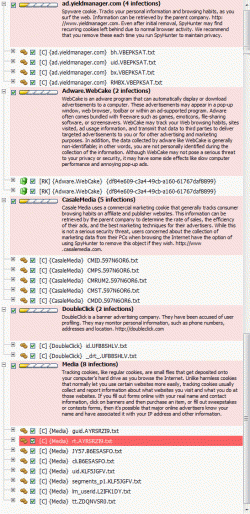
I profoundly disapprove of SpyHunter because it is not building trust before demanding money. Nonetheless it is worrying that when I run it, it is still finding various problems. Fewer problems than before, including fewer Web Cake problems, but still various problems... (!)

delme_spy_hunter.gif

Now what?
 

My Computer My Computer

Computer type
PC/Desktop
Computer Manufacturer/Model Number
custom
OS
Windows 7 x64 Professional (SP1)
CPU
Intel Core i5 CPU 750 @2.67GHz
Motherboard
Intel
Memory
8GB
Graphics Card(s)
ATI Radeon HD 5700 series
Hard Drives
INTEL SSD ATA 256GB
<==== Download Link


<==== Download Link

:ar: Click on one of the links above that goes with your Windows 7 bit versions

:ar: Save to the Desktop.

:ar: Close all windows and browsers

:ar: Right click on
2lneiqv.png
and choose
mawket.jpg


:ar: Press: SCAN

:ar: provide the RKreport.txt (Mode: Scan) in your reply.
 

My Computer My Computer

Computer Manufacturer/Model Number
Custom Built
OS
Windows 7 Ultimate 32-Bit & Windows 7 Ultimate 64-Bit
CPU
Intel Core i7 CPU 950 @ 3.07GHz
Motherboard
ASUS P6T DELUXE V2
Memory
OCZ 6GB (3 x 2GB) 240-Pin DDR3 SDRAM DDR3 1600 OCZ3X1600R2
Graphics Card(s)
ATI Radeon HD 5700 Series
Sound Card
OnBoard
Hard Drives
WD6400AACS-00M3B0 (640GB SATA )
PSU
CORSAIR 850w
Case
NZXT LEXA
Cooling
Intel Stock Heatsink Fan
Keyboard
Microsoft Wireless Laser Keyboard 7000
Mouse
Microsoft Wireless Laser Mouse 7000
OK I tried a scan with RogueKiller. Although it didnt produce a file called RKreport.txt, after the scan ran, under the registry tab it seemed to find a few things, which were by default ticked. So I clicked "Delete", and then "Report" which produced this text:

RogueKiller V8.6.4 _x64_ [Jul 29 2013] by Tigzy
mail : tigzyRK<at>gmail<dot>com
Feedback : Forum
Website : RogueKiller download
Blog : tigzy-RK

Operating System : Windows 7 (6.1.7601 Service Pack 1) 64 bits version
Started in : Normal mode
User : Xxxx [Admin rights]
Mode : Remove -- Date : 08/01/2013 21:34:39
| ARK || FAK || MBR |

¤¤¤ Bad processes : 0 ¤¤¤

¤¤¤ Registry Entries : 11 ¤¤¤
[HJ POL] HKCU\[...]\System : DisableTaskMgr (0) -> DELETED
[HJ POL] HKCU\[...]\System : DisableRegistryTools (0) -> DELETED
[HJ POL] HKLM\[...]\System : DisableTaskMgr (0) -> DELETED
[HJ POL] HKLM\[...]\System : DisableRegistryTools (0) -> DELETED
[HJ POL] HKLM\[...]\System : EnableLUA (0) -> REPLACED (1)
[HJ POL] HKLM\[...]\Wow6432Node\[...]\System : DisableTaskMgr (0) -> [0x2] The system cannot find the file specified.
[HJ POL] HKLM\[...]\Wow6432Node\[...]\System : DisableRegistryTools (0) -> [0x2] The system cannot find the file specified.
[HJ POL] HKLM\[...]\Wow6432Node\[...]\System : EnableLUA (0) -> REPLACED (1)
[HJ SMENU] HKCU\[...]\Advanced : Start_ShowMyGames (0) -> REPLACED (1)
[HJ DESK] HKLM\[...]\NewStartPanel : {59031a47-3f72-44a7-89c5-5595fe6b30ee} (1) -> REPLACED (0)
[HJ DESK] HKLM\[...]\NewStartPanel : {20D04FE0-3AEA-1069-A2D8-08002B30309D} (1) -> REPLACED (0)

¤¤¤ Scheduled tasks : 0 ¤¤¤

¤¤¤ Startup Entries : 0 ¤¤¤

¤¤¤ Web browsers : 0 ¤¤¤

¤¤¤ Particular Files / Folders: ¤¤¤

¤¤¤ Driver : [NOT LOADED 0x0] ¤¤¤

¤¤¤ External Hives: ¤¤¤

¤¤¤ Infection : ¤¤¤

¤¤¤ HOSTS File: ¤¤¤
--> %SystemRoot%\System32\drivers\etc\hosts


127.0.0.1 localhost
192.168.111.249 auctionairsvr


¤¤¤ MBR Check: ¤¤¤

+++++ PhysicalDrive0: INTEL SSDSA2CW300G3 ATA Device +++++
--- User ---
[MBR] 6a915b1c608c67ddad89ce3b86333bff
[BSP] 7fe233195ddbffa0f47d27f8b707cb38 : Windows 7/8 MBR Code
Partition table:
0 - [ACTIVE] NTFS (0x07) [VISIBLE] Offset (sectors): 2048 | Size: 100 Mo
1 - [XXXXXX] NTFS (0x07) [VISIBLE] Offset (sectors): 206848 | Size: 286066 Mo
User = LL1 ... OK!
User = LL2 ... OK!

Finished : << RKreport[0]_D_08012013_213439.txt >>
RKreport[0]_S_08012013_212857.txt


So I then ran a SECOND scan, and this time the report didnt find much:

¤¤¤ MBR Check: ¤¤¤

+++++ PhysicalDrive0: INTEL SSDSA2CW300G3 ATA Device +++++
--- User ---
[MBR] 6a915b1c608c67ddad89ce3b86333bff
[BSP] 7fe233195ddbffa0f47d27f8b707cb38 : Windows 7/8 MBR Code
Partition table:
0 - [ACTIVE] NTFS (0x07) [VISIBLE] Offset (sectors): 2048 | Size: 100 Mo
1 - [XXXXXX] NTFS (0x07) [VISIBLE] Offset (sectors): 206848 | Size: 286066 Mo
User = LL1 ... OK!
User = LL2 ... OK!

>>>

Meanwhile SpyHunter 4 is still finding 21 Threats (and counting) including Web Cake... This may of course be a false alarm but it is worrying.

Now what?
 

My Computer My Computer

Computer type
PC/Desktop
Computer Manufacturer/Model Number
custom
OS
Windows 7 x64 Professional (SP1)
CPU
Intel Core i5 CPU 750 @2.67GHz
Motherboard
Intel
Memory
8GB
Graphics Card(s)
ATI Radeon HD 5700 series
Hard Drives
INTEL SSD ATA 256GB
Run Farbar Recovery Scan Tool


2j4a9si.png
64-Bit Version OS Farbar Recovery Scan Tool x64 <===== Download Link

Drag the FRST64.exe from the Downloads folder to your Desktop

Right click on FRST64.exe and choose
mawket.jpg


When the tool opens click Yes on the disclaimer window .

Press Scan button.

FRST will let you know when the scan is complete and has written the FRST.txt to file

   Note
The first time Farbar Recovery Scan Tool is run, it makes also another log Addition.txt


Please upload both logs in your reply.(FRST.txt and Addition.txt)

:note: FRST.txt and Addition.txt will be on the Desktop :note:

How To Upload a File
Click on the Go Advanced button under the Message box . Scroll down to Additional Options then click on Manage Attachments in the Attach Files sections . Click the Browse button locate the file then click on the Open button . In the Upload File from your Computer section click on the Upload button . Wait until it finishes uploading then close the window . Then click Submit Reply .
 

My Computer My Computer

Computer Manufacturer/Model Number
Custom Built
OS
Windows 7 Ultimate 32-Bit & Windows 7 Ultimate 64-Bit
CPU
Intel Core i7 CPU 950 @ 3.07GHz
Motherboard
ASUS P6T DELUXE V2
Memory
OCZ 6GB (3 x 2GB) 240-Pin DDR3 SDRAM DDR3 1600 OCZ3X1600R2
Graphics Card(s)
ATI Radeon HD 5700 Series
Sound Card
OnBoard
Hard Drives
WD6400AACS-00M3B0 (640GB SATA )
PSU
CORSAIR 850w
Case
NZXT LEXA
Cooling
Intel Stock Heatsink Fan
Keyboard
Microsoft Wireless Laser Keyboard 7000
Mouse
Microsoft Wireless Laser Mouse 7000

My Computer My Computer

Computer type
PC/Desktop
Computer Manufacturer/Model Number
custom
OS
Windows 7 x64 Professional (SP1)
CPU
Intel Core i5 CPU 750 @2.67GHz
Motherboard
Intel
Memory
8GB
Graphics Card(s)
ATI Radeon HD 5700 series
Hard Drives
INTEL SSD ATA 256GB
Run
2nk42kw.jpg
Malwarebytes

Download Link :ar: MalwareBytes

When the installation is done uncheck Enable free trial of Malwarebytes (see image below )

2013-03-09_224312_zps62dc7c23.jpg


Update the definitions and do a full scan

:ar: On the Scanner tab:
Make sure the "Perform Full Scan" option is selected.
Then click on the Scan button.
:ar: If asked to select the drives to scan, leave all the drives selected and click on the Start Scan button.
:ar: The scan will begin and "Scan in progress" will show at the top. It may take some time to complete so please be patient.
:ar: When the scan is finished, a message box will say "The scan completed successfully. Click 'Show Results' to display all objects found".
:ar: Click OK to close the message box and continue with the removal process.
:ar: Back at the main Scanner screen, click on the Show Results button to see a list of any malware that was found.
:ar: Make sure that everything is checked, and click Remove Selected.
:ar: When removal is completed, a log report will open in Notepad.
:ar: The log is automatically saved and can be viewed by clicking the Logs tab in MBAM.
:ar: Copy and paste the contents of that report in your next reply and exit MBAM.

On
3133y8w.png

Hold down Control and click on ESET Online Scanner to open ESET OnlineScan in a new window
Click the
30jij2b.png
button
Check YES, I accept the Terms of Use.
Click the Start button.
Accept any security warnings from your browser.
Under scan settings, check "Scan Archives" and "Remove found threats"
Click Advanced settings and select the following:
° Scan potentially unwanted applications
° Scan for potentially unsafe applications
° Enable Anti-Stealth technology
ESET will then download updates for itself, install itself, and begin scanning your computer. Please be patient as this can take some time.
When the scan completes, click List Threats
Click Export, and save the file to your desktop using a unique name, such as ESETScan. Include the contents of this report in your next reply.
Click the Back button.
Click the Finish button.


On
5b5jza.png
or
4l6ro8.png

Click on esetsmartinstaller_enu.exe to download the ESET Smart Installer. Save it to your desktop.
Right click on
2wohcn4.png
choose
mawket.jpg
on your desktop
Check YES, I accept the Terms of Use.
Click the Start button.
Accept any security warnings from your browser.
Under scan settings, check "Scan Archives" and "Remove found threats"
Click Advanced settings and select the following:
° Scan potentially unwanted applications
° Scan for potentially unsafe applications
° Enable Anti-Stealth technology
ESET will then download updates for itself, install itself, and begin scanning your computer. Please be patient as this can take some time.
When the scan completes, click List Threats
Click Export, and save the file to your desktop using a unique name, such as ESETScan. Include the contents of this report in your next reply.
Click the Back button.
Click the Finish button.
 

My Computer My Computer

Computer Manufacturer/Model Number
Custom Built
OS
Windows 7 Ultimate 32-Bit & Windows 7 Ultimate 64-Bit
CPU
Intel Core i7 CPU 950 @ 3.07GHz
Motherboard
ASUS P6T DELUXE V2
Memory
OCZ 6GB (3 x 2GB) 240-Pin DDR3 SDRAM DDR3 1600 OCZ3X1600R2
Graphics Card(s)
ATI Radeon HD 5700 Series
Sound Card
OnBoard
Hard Drives
WD6400AACS-00M3B0 (640GB SATA )
PSU
CORSAIR 850w
Case
NZXT LEXA
Cooling
Intel Stock Heatsink Fan
Keyboard
Microsoft Wireless Laser Keyboard 7000
Mouse
Microsoft Wireless Laser Mouse 7000
I have already run all these in the last couple of days but here goes, I shall run them again...


1. Malwarebytes Anti-Malware 1.75.0.1300
www.malwarebytes.org

Database version: v2013.08.02.03

Windows 7 Service Pack 1 x64 NTFS
Internet Explorer 10.0.9200.16635
Xxxx :: XXXX09 [administrator]

02/08/2013 08:35:49
mbam-log-2013-08-02 (08-35-49).txt

Scan type: Full scan (C:\|)
Scan options enabled: Memory | Startup | Registry | File System | Heuristics/Extra | Heuristics/Shuriken | PUP | PUM
Scan options disabled: P2P
Objects scanned: 504004
Time elapsed: 24 minute(s), 33 second(s)

Memory Processes Detected: 0
(No malicious items detected)

Memory Modules Detected: 0
(No malicious items detected)

Registry Keys Detected: 0
(No malicious items detected)

Registry Values Detected: 0
(No malicious items detected)

Registry Data Items Detected: 0
(No malicious items detected)

Folders Detected: 0
(No malicious items detected)

Files Detected: 0
(No malicious items detected)

(end)


2. ESET online scanner - on MSIE
4 threats found and deleted.

View attachment ESETscan.txt


3. ESET on Chrome found nothing. There was no option to export anything when the scan finished.delme_ESET.gif

Now what?
 
Last edited:

My Computer My Computer

Computer type
PC/Desktop
Computer Manufacturer/Model Number
custom
OS
Windows 7 x64 Professional (SP1)
CPU
Intel Core i5 CPU 750 @2.67GHz
Motherboard
Intel
Memory
8GB
Graphics Card(s)
ATI Radeon HD 5700 series
Hard Drives
INTEL SSD ATA 256GB
If nothing is showing up, you may have successfully removed the virus. It looks like some changes were made to your files, such as task manager disabled (virus/malware behavior). Run a SFC to see if any files need repairing. Be sure to run it 3X as SFC doesn't always catch everything the 1st or 2nd time around. The tutorial for this procedure is here:

http://www.sevenforums.com/tutorials/1538-sfc-scannow-command-system-file-checker.html

Also, d/l & run TFC to make sure everything is cleaned out.

http://www.bleepingcomputer.com/download/tfc/

TFC. or Temp File Cleaner, is a small utility that will clean out all the folders on your computer that house temporary files. The temp folders that TFC will clean are the Java, Windows Temp Folder, and the Internet Explorer, Opera, Chrome, and Safari caches. This tool will clean the folders for all accounts on the computer including the Administrator, NetworkService, and LocalService accounts.
I profoundly disapprove of SpyHunter because it is not building trust before demanding money.

ANY program that finds a bunch of viruses/malware on your PC & then wants payment before cleaning it should be deleted immediately. There are plenty of free, legitimate programs that will do the job & do not demand money to clean your PC.
 
Last edited:

My Computer My Computer

Computer type
PC/Desktop
Computer Manufacturer/Model Number
Dell Hell oh Well
OS
Win 7 32 Home Premium, Win 7 64 Pro, Win 8.1, Win 10
CPU
Intel Core 2 Duo 2.93GHz
Memory
Not much with my ADHD
Graphics Card(s)
ATI Radeon HD 4350
Monitor(s) Displays
24" HDTV/Monitor
Screen Resolution
Blurry after a Scotch or 2
Hard Drives
1 HDD 250 GB, 1 HDD 1 TB, 3 - 1 TB Externals
Case
Don't get on my case...man :D
Cooling
I have an Air Conditioner & Diet Pepsi
Keyboard
Saitek Cyborg
Mouse
10 yr old MS optical mouse that still works
Internet Speed
Never fast enough
Antivirus
Various
Browser
Various
I rand SFC /SCANNOW three times but it said it found nothing each time.
I also ran TFC

Getting user folders.

Stopping running processes.

Emptying Temp folders.

>>>
User: admin
->Temp folder emptied: 943695 bytes
->Temporary Internet Files folder emptied: 88618 bytes
->FireFox cache emptied: 0 bytes
->Google Chrome cache emptied: 0 bytes

User: Xxxx
->Temp folder emptied: 145488167 bytes
->Temporary Internet Files folder emptied: 33052103 bytes
->Java cache emptied: 900939 bytes
->FireFox cache emptied: 22796966 bytes
->Google Chrome cache emptied: 124978374 bytes
->Apple Safari cache emptied: 0 bytes
->Opera cache emptied: 0 bytes
->Flash cache emptied: 58233 bytes

User: All Users

User: Default
->Temp folder emptied: 0 bytes
->Temporary Internet Files folder emptied: 0 bytes
->Flash cache emptied: 57472 bytes

User: Default User
->Temp folder emptied: 0 bytes
->Temporary Internet Files folder emptied: 0 bytes
->Flash cache emptied: 0 bytes

User: fbwuser
->Temp folder emptied: 0 bytes
->Temporary Internet Files folder emptied: 128 bytes
->Flash cache emptied: 2840 bytes

User: Guest
->Temp folder emptied: 50175 bytes
->Temporary Internet Files folder emptied: 32768 bytes

User: Public
->Temp folder emptied: 0 bytes

%systemdrive% .tmp files removed: 0 bytes
%systemroot% .tmp files removed: 190411 bytes
%systemroot%\System32 .tmp files removed: 9267880 bytes
%systemroot%\System32 (64bit) .tmp files removed: 11056128 bytes
%systemroot%\System32\drivers .tmp files removed: 0 bytes
Windows Temp folder emptied: 25852 bytes
%systemroot%\system32\config\systemprofile\AppData\Local\Microsoft\Windows\Temporary Internet Files folder emptied: 33298 bytes
%systemroot%\sysnative\config\systemprofile\AppData\Local\Microsoft\Windows\Temporary Internet Files folder emptied: 111519 bytes

Emptying RecycleBin. Do not interrupt.

RecycleBin emptied: 9819944 bytes
Process complete!

Total Files Cleaned = 342.00 mb
>>>

Now what?
 

My Computer My Computer

Computer type
PC/Desktop
Computer Manufacturer/Model Number
custom
OS
Windows 7 x64 Professional (SP1)
CPU
Intel Core i5 CPU 750 @2.67GHz
Motherboard
Intel
Memory
8GB
Graphics Card(s)
ATI Radeon HD 5700 series
Hard Drives
INTEL SSD ATA 256GB
Lets see something

In :ar:
3133y8w.png


Click arrow on the right of search box;
Do the following: on IE8-9 choose Manage Search providers, on ie7 click change search defaults;
Remove WebCake from the list.

In :ar:
5b5jza.png


Enter “about:config” in url bar. This will open settings page;
Type “Keyword.url” in the search box. Right click it & reset it; ( also search WebCake )
Type “browser.search.defaultengine” in the search box. Right click it & reset it;
Type “browser.search.selectedengine” in the search box. Right click it & reset it;
Search for ‘browser.newtab.url’. Right-click and reset. This will make sure that the search page won’t launch on each new tab.

In :ar:
4l6ro8.png


Click 3 horizontal lines icon on browser toolbar;
Select Settings;
Select Basics ->Manage Search engines;
Remove unnecessary search engines from list;
Go back to settings. On Startup choose open blank page ( you can remove undesired pages from the set pages link too).
 

My Computer My Computer

Computer Manufacturer/Model Number
Custom Built
OS
Windows 7 Ultimate 32-Bit & Windows 7 Ultimate 64-Bit
CPU
Intel Core i7 CPU 950 @ 3.07GHz
Motherboard
ASUS P6T DELUXE V2
Memory
OCZ 6GB (3 x 2GB) 240-Pin DDR3 SDRAM DDR3 1600 OCZ3X1600R2
Graphics Card(s)
ATI Radeon HD 5700 Series
Sound Card
OnBoard
Hard Drives
WD6400AACS-00M3B0 (640GB SATA )
PSU
CORSAIR 850w
Case
NZXT LEXA
Cooling
Intel Stock Heatsink Fan
Keyboard
Microsoft Wireless Laser Keyboard 7000
Mouse
Microsoft Wireless Laser Mouse 7000
Do I need to be in Safe Mode for all this stuff?

Fwiw, my screen just went black - but it's a hot day an my PC may have over heated, I'm not sure. So I'm writing this on my laptop (XP) and letting the Win7 PC cool down for a few minutes.

Update:
Okay I've done all that. None of them were still talking about Web Cake (probably because I had already changed them back previously)

Now what?
 
Last edited:

My Computer My Computer

Computer type
PC/Desktop
Computer Manufacturer/Model Number
custom
OS
Windows 7 x64 Professional (SP1)
CPU
Intel Core i5 CPU 750 @2.67GHz
Motherboard
Intel
Memory
8GB
Graphics Card(s)
ATI Radeon HD 5700 series
Hard Drives
INTEL SSD ATA 256GB
No it doesn't have to be on Safe Mode . Might want to get a can of air spray and spray the vents on the laptop .
 

My Computer My Computer

Computer Manufacturer/Model Number
Custom Built
OS
Windows 7 Ultimate 32-Bit & Windows 7 Ultimate 64-Bit
CPU
Intel Core i7 CPU 950 @ 3.07GHz
Motherboard
ASUS P6T DELUXE V2
Memory
OCZ 6GB (3 x 2GB) 240-Pin DDR3 SDRAM DDR3 1600 OCZ3X1600R2
Graphics Card(s)
ATI Radeon HD 5700 Series
Sound Card
OnBoard
Hard Drives
WD6400AACS-00M3B0 (640GB SATA )
PSU
CORSAIR 850w
Case
NZXT LEXA
Cooling
Intel Stock Heatsink Fan
Keyboard
Microsoft Wireless Laser Keyboard 7000
Mouse
Microsoft Wireless Laser Mouse 7000
Back
Top