Webcam drivers for acer aspire 1410 notebook (11.6")

sbuxman

New member
Member
VIP
Local time
3:13 AM
Messages
194
I've downloaded the latest version of Skype and wish to use my built-in webcam. I'm being told when I attempt to use Skype that there is a problem with my video device. I thought I'd downloaded and installed the correct drivers after I recently reformatted my system's HDD, but still the message appears.

Going to the ACER website for driver support is inconclusive because there are several versions of different manufacturers' webcam drivers -- for both a Suyin model and a Chicony model. Results differ in two of the different utilities that I've run for detection of the correct manufacturer...one utility identified Chicony, one did not:sleepy:

Can someone please help me solve this mystery so I can finally get to camming again on Skype?

Thank you.

My notebook has the 11.6" display, and here are the overall specs:

Acer Aspire 1410 v0.3117
Windows 7 Home Premium Service Pack 1 (build 7601)
Install Language: English (United States)
System Locale: English (United States)
Installed: 7/28/2012 12:54:09 PM
Processor a Main Circuit Board b
1.40 gigahertz Intel Core2 Solo
64 kilobyte primary memory cache
3072 kilobyte secondary memory cache
64-bit ready
Not hyper-threaded Board: Acer Base Board Product Name Base Board Version
Bus Clock: 800 megahertz
BIOS: INSYDE v0.3117 09/08/2009
new USB Storage Use in past 30 Days (mouse over last used for details) new Hosted Virtual Machines (mouse over name for details)
Last Used
SanDisk Cruzer, s/n 2005173800077940ED35, rev 1.26 8/17/2012 3:31:12 PM*
* Possibly used again before the reboot following this time.
None discovered
Drives new – drive encryption Memory Modules c,d
237.17 Gigabytes Usable Hard Drive Capacity
178.61 Gigabytes Hard Drive Free Space

TOSHIBA MK2555GSX [Hard drive] (250.06 GB) -- drive 0, s/n 69FLS5R7S, rev FG001J, SMART Status: Healthy 2976 Megabytes Usable Installed Memory

Slot 'DIMM0' has 2048 MB (serial number 76A9F203)
Slot 'DIMM2' has 2048 MB (serial number 71CC48D8)
 

My Computer My Computer

At a glance

Microsoft Windows 7 Home Premium 64-bit 7601 ...Intel(R) Core(TM) i7-2600 CPU @ 3.40GHz8.00 GBAMD Radeon HD 6450
Computer type
PC/Desktop
Computer Manufacturer/Model Number
Dell Inc. XPS 8300
OS
Microsoft Windows 7 Home Premium 64-bit 7601 Multiprocessor Free Service Pack 1
CPU
Intel(R) Core(TM) i7-2600 CPU @ 3.40GHz
Motherboard
Dell Inc. 0Y2MRG
Memory
8.00 GB
Graphics Card(s)
AMD Radeon HD 6450
Sound Card
(1) Realtek High Definition Audio (2) Intel(R) Display Aud
Monitor(s) Displays
Samsung SA300/SA350 [Monitor] (21.7"vis)
Screen Resolution
1920 x 1080 x 32 bits (4294967296 colors) @ 60 Hz
Hard Drives
(1) ST31500341AS ATA Device (2) Generic- Compact Flash USB Device (3) Generic- MS/MS-Pro USB Device (4) Generic- SD/MMC USB Device (5) Generic- SM/xD-Picture USB Device
PSU
Dell 460W for i7 configuration
Case
mid-size tower
Keyboard
Dell Inc. standard keyboard
Mouse
Dell Inc. wired mouse
Internet Speed
Verizon FIOS
Antivirus
Microsoft Security Essentials
Browser
I.E. 11 default/Chrome
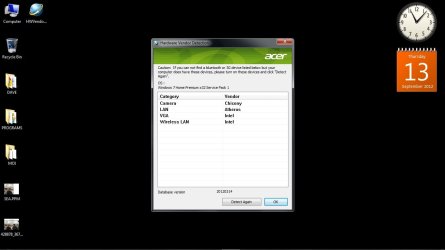
Attached is the result of the Vendor Detection Utility, if that's what you meant...and if this proves that the webcam is a Chicony, there is more than one upload for same to the drivers page -- which one do I choose?

Thank you!

sbuxman
 

Attachments

  • vend.detect.jpg
    vend.detect.jpg
    49 KB · Views: 52

My Computer My Computer

At a glance

Microsoft Windows 7 Home Premium 64-bit 7601 ...Intel(R) Core(TM) i7-2600 CPU @ 3.40GHz8.00 GBAMD Radeon HD 6450
Computer type
PC/Desktop
Computer Manufacturer/Model Number
Dell Inc. XPS 8300
OS
Microsoft Windows 7 Home Premium 64-bit 7601 Multiprocessor Free Service Pack 1
CPU
Intel(R) Core(TM) i7-2600 CPU @ 3.40GHz
Motherboard
Dell Inc. 0Y2MRG
Memory
8.00 GB
Graphics Card(s)
AMD Radeon HD 6450
Sound Card
(1) Realtek High Definition Audio (2) Intel(R) Display Aud
Monitor(s) Displays
Samsung SA300/SA350 [Monitor] (21.7"vis)
Screen Resolution
1920 x 1080 x 32 bits (4294967296 colors) @ 60 Hz
Hard Drives
(1) ST31500341AS ATA Device (2) Generic- Compact Flash USB Device (3) Generic- MS/MS-Pro USB Device (4) Generic- SD/MMC USB Device (5) Generic- SM/xD-Picture USB Device
PSU
Dell 460W for i7 configuration
Case
mid-size tower
Keyboard
Dell Inc. standard keyboard
Mouse
Dell Inc. wired mouse
Internet Speed
Verizon FIOS
Antivirus
Microsoft Security Essentials
Browser
I.E. 11 default/Chrome
Attached is the result of the Vendor Detection Utility, if that's what you meant...and if this proves that the webcam is a Chicony, there is more than one upload for same to the drivers page -- which one do I choose?

Thank you!

sbuxman

I've worked it out (: will upload a screenshot in a second to show you what I mean:


 

Attachments

  • Capture.JPG
    Capture.JPG
    20.9 KB · Views: 50

My Computer My Computer

Computer type
Laptop
Thanks to you both...I had mixed results:

extracted the .exe file form the zip and then double-clicked it to install the drivers, but after clicking Finish when complete, I got back a msg that the program may not have installed correctly...I clicked OK to proceed anyway. Reflecting on my decision, I chose to double-click the .exe file again and was presented with the option to Repair the first installation, which I chose. Did not get the error message the second time. What puzzles me is that the "USB cam" that appears in the Device Manager shows properties of a Microsoft camera...where is my Chicony!?

sbuxman

Thanks as usual for all...
 

My Computer My Computer

At a glance

Microsoft Windows 7 Home Premium 64-bit 7601 ...Intel(R) Core(TM) i7-2600 CPU @ 3.40GHz8.00 GBAMD Radeon HD 6450
Computer type
PC/Desktop
Computer Manufacturer/Model Number
Dell Inc. XPS 8300
OS
Microsoft Windows 7 Home Premium 64-bit 7601 Multiprocessor Free Service Pack 1
CPU
Intel(R) Core(TM) i7-2600 CPU @ 3.40GHz
Motherboard
Dell Inc. 0Y2MRG
Memory
8.00 GB
Graphics Card(s)
AMD Radeon HD 6450
Sound Card
(1) Realtek High Definition Audio (2) Intel(R) Display Aud
Monitor(s) Displays
Samsung SA300/SA350 [Monitor] (21.7"vis)
Screen Resolution
1920 x 1080 x 32 bits (4294967296 colors) @ 60 Hz
Hard Drives
(1) ST31500341AS ATA Device (2) Generic- Compact Flash USB Device (3) Generic- MS/MS-Pro USB Device (4) Generic- SD/MMC USB Device (5) Generic- SM/xD-Picture USB Device
PSU
Dell 460W for i7 configuration
Case
mid-size tower
Keyboard
Dell Inc. standard keyboard
Mouse
Dell Inc. wired mouse
Internet Speed
Verizon FIOS
Antivirus
Microsoft Security Essentials
Browser
I.E. 11 default/Chrome
Yes, the webcam is built into the laptop upper frame.

I've uploaded a jpeg screenshot of the device manager showing Imaging devices...USB Webcam.

HTH,

sbuxman
 

My Computer My Computer

At a glance

Microsoft Windows 7 Home Premium 64-bit 7601 ...Intel(R) Core(TM) i7-2600 CPU @ 3.40GHz8.00 GBAMD Radeon HD 6450
Computer type
PC/Desktop
Computer Manufacturer/Model Number
Dell Inc. XPS 8300
OS
Microsoft Windows 7 Home Premium 64-bit 7601 Multiprocessor Free Service Pack 1
CPU
Intel(R) Core(TM) i7-2600 CPU @ 3.40GHz
Motherboard
Dell Inc. 0Y2MRG
Memory
8.00 GB
Graphics Card(s)
AMD Radeon HD 6450
Sound Card
(1) Realtek High Definition Audio (2) Intel(R) Display Aud
Monitor(s) Displays
Samsung SA300/SA350 [Monitor] (21.7"vis)
Screen Resolution
1920 x 1080 x 32 bits (4294967296 colors) @ 60 Hz
Hard Drives
(1) ST31500341AS ATA Device (2) Generic- Compact Flash USB Device (3) Generic- MS/MS-Pro USB Device (4) Generic- SD/MMC USB Device (5) Generic- SM/xD-Picture USB Device
PSU
Dell 460W for i7 configuration
Case
mid-size tower
Keyboard
Dell Inc. standard keyboard
Mouse
Dell Inc. wired mouse
Internet Speed
Verizon FIOS
Antivirus
Microsoft Security Essentials
Browser
I.E. 11 default/Chrome
oops...
 

Attachments

  • 7forums.jpg
    7forums.jpg
    34.2 KB · Views: 47

My Computer My Computer

At a glance

Microsoft Windows 7 Home Premium 64-bit 7601 ...Intel(R) Core(TM) i7-2600 CPU @ 3.40GHz8.00 GBAMD Radeon HD 6450
Computer type
PC/Desktop
Computer Manufacturer/Model Number
Dell Inc. XPS 8300
OS
Microsoft Windows 7 Home Premium 64-bit 7601 Multiprocessor Free Service Pack 1
CPU
Intel(R) Core(TM) i7-2600 CPU @ 3.40GHz
Motherboard
Dell Inc. 0Y2MRG
Memory
8.00 GB
Graphics Card(s)
AMD Radeon HD 6450
Sound Card
(1) Realtek High Definition Audio (2) Intel(R) Display Aud
Monitor(s) Displays
Samsung SA300/SA350 [Monitor] (21.7"vis)
Screen Resolution
1920 x 1080 x 32 bits (4294967296 colors) @ 60 Hz
Hard Drives
(1) ST31500341AS ATA Device (2) Generic- Compact Flash USB Device (3) Generic- MS/MS-Pro USB Device (4) Generic- SD/MMC USB Device (5) Generic- SM/xD-Picture USB Device
PSU
Dell 460W for i7 configuration
Case
mid-size tower
Keyboard
Dell Inc. standard keyboard
Mouse
Dell Inc. wired mouse
Internet Speed
Verizon FIOS
Antivirus
Microsoft Security Essentials
Browser
I.E. 11 default/Chrome
I feel it's strange, you didn't have a driver for the webcam in the first place, my laptop came with the drivers pre-installed.

Did you purchase the laptop from a retailer with Windows 7 pre-installed, or did you install Windows 7 after purchasing the laptop?
 

My Computer My Computer

Computer type
Laptop
The laptop was sold in-store with XP installed, but there was a one-time free upgrade to Windows 7, which I almost immediately performed. The webcam worked like a charm. When corruption appeared to be setting in 2-3 years, max, into the life of my laptop, I reformatted the hard drive and reloaded everything per ACER instructions, which yielded, if I remember correctly, a very sluggish version of Vista. I figured I'd go for broke and try the Win7 Home Premium disks again, and voila, was booting back into 7. The webcam has not worked since, and it may not have been available as well when I first reformatted, but I never tried it because I was anxious to get rid of Vista asap.

I like the idea of EasyDriverPro, but the gimmick, of course, is the $30 I have to pay to have all the drivers identified in the free run, 32 in my case, upgraded to the latest versions :mad:

Now what?

Thanks...

sbuxman
 

My Computer My Computer

At a glance

Microsoft Windows 7 Home Premium 64-bit 7601 ...Intel(R) Core(TM) i7-2600 CPU @ 3.40GHz8.00 GBAMD Radeon HD 6450
Computer type
PC/Desktop
Computer Manufacturer/Model Number
Dell Inc. XPS 8300
OS
Microsoft Windows 7 Home Premium 64-bit 7601 Multiprocessor Free Service Pack 1
CPU
Intel(R) Core(TM) i7-2600 CPU @ 3.40GHz
Motherboard
Dell Inc. 0Y2MRG
Memory
8.00 GB
Graphics Card(s)
AMD Radeon HD 6450
Sound Card
(1) Realtek High Definition Audio (2) Intel(R) Display Aud
Monitor(s) Displays
Samsung SA300/SA350 [Monitor] (21.7"vis)
Screen Resolution
1920 x 1080 x 32 bits (4294967296 colors) @ 60 Hz
Hard Drives
(1) ST31500341AS ATA Device (2) Generic- Compact Flash USB Device (3) Generic- MS/MS-Pro USB Device (4) Generic- SD/MMC USB Device (5) Generic- SM/xD-Picture USB Device
PSU
Dell 460W for i7 configuration
Case
mid-size tower
Keyboard
Dell Inc. standard keyboard
Mouse
Dell Inc. wired mouse
Internet Speed
Verizon FIOS
Antivirus
Microsoft Security Essentials
Browser
I.E. 11 default/Chrome
Have you tried changing the view within the Device Manager to show hidden devices?

The device could have been hidden by Windows due to a missing driver, and then replaced with a generic device instead.

Device Manager > View > Show Hidden Devices

Also, have you tried installing the driver in compatibility mode?

Try this link - How To Install A Driver In Compatibility Mode (Windows 7)
 

My Computer My Computer

Computer type
Laptop
already tried both
 

My Computer My Computer

At a glance

Microsoft Windows 7 Home Premium 64-bit 7601 ...Intel(R) Core(TM) i7-2600 CPU @ 3.40GHz8.00 GBAMD Radeon HD 6450
Computer type
PC/Desktop
Computer Manufacturer/Model Number
Dell Inc. XPS 8300
OS
Microsoft Windows 7 Home Premium 64-bit 7601 Multiprocessor Free Service Pack 1
CPU
Intel(R) Core(TM) i7-2600 CPU @ 3.40GHz
Motherboard
Dell Inc. 0Y2MRG
Memory
8.00 GB
Graphics Card(s)
AMD Radeon HD 6450
Sound Card
(1) Realtek High Definition Audio (2) Intel(R) Display Aud
Monitor(s) Displays
Samsung SA300/SA350 [Monitor] (21.7"vis)
Screen Resolution
1920 x 1080 x 32 bits (4294967296 colors) @ 60 Hz
Hard Drives
(1) ST31500341AS ATA Device (2) Generic- Compact Flash USB Device (3) Generic- MS/MS-Pro USB Device (4) Generic- SD/MMC USB Device (5) Generic- SM/xD-Picture USB Device
PSU
Dell 460W for i7 configuration
Case
mid-size tower
Keyboard
Dell Inc. standard keyboard
Mouse
Dell Inc. wired mouse
Internet Speed
Verizon FIOS
Antivirus
Microsoft Security Essentials
Browser
I.E. 11 default/Chrome
IGNORE the last post, I have last suggestion for you to try before you attempt to re install the operating system, have you attempted to search for the webcam within the Device Manager, as in have you attempted to install the webcam as a new device which hasn't been previously installed before?

Also, you said you had a one time upgrade from Windows XP to Windows 7? I'm sure your not able to directly upgrade from XP to 7, but would need to upgrade from XP to Vista then to 7. How did you upgrade? Was it with a CD/DVD?
 

My Computer My Computer

Computer type
Laptop
Please attach a screenshot of the Device manager:

http://www.sevenforums.com/tutorials/9733-screenshots-files-upload-post-seven-forums.html

I guess the webcam is built by Acer, and is the webcam built into the laptop?
webcam is acer crystal eye webcam. they offer 3 software versions.
before downloading driver, make sure you choose what version of windows you have, some have diiferent software versions. but if your having problem with acer download, find what model of emachine is same as yours. acer emachine and gateway are the same company. i have the aspire 5515 which is same as the emachine e620. except the aspire doesnt have drivers for win7.
 

My Computer My Computer

At a glance

win7 home premium 32bit OEM System Builder PackAMD 2650e 1.6 ghz3gb upgradable to 4gbATI X1200
Computer Manufacturer/Model Number
Acer/ aspire 5515 notebook
OS
win7 home premium 32bit OEM System Builder Pack
CPU
AMD 2650e 1.6 ghz
Motherboard
nile
Memory
3gb upgradable to 4gb
Graphics Card(s)
ATI X1200
Sound Card
Realtech HD audio
Monitor(s) Displays
generic
Screen Resolution
1200x800
Hard Drives
factory 160gb Hitachi SCSI disk device 5400 rpm
PSU
Li-ion 11.1v 4400mAh/46Wh extenal A/C adapter 19v;3.43A 65w
Cooling
fan to heat pipe, run no higher than 54c
Keyboard
ps/2
Mouse
logitech M705 marathon, ps/2 pad
Internet Speed
ATT uverse 12mbps download
Other Info
searching for a faster duel core processor. AM2 socket.
I've just realised from the Acer driver checker screenshot, that the suggested driver was a 32-bit, whereas, you have stated within your system specifications a 64-bit OS :S

Although, the driver should have been appropriate to the operating system, as the driver was for 32-bit and 64-bit operating systems.
 

My Computer My Computer

Computer type
Laptop
response to post #15:

you ask, "have you attempted to search for the webcam within the Device Manager, as in have you attempted to install the webcam as a new device which hasn't been previously installed before?

Also, you said you had a one time upgrade from Windows XP to Windows 7? I'm sure your not able to directly upgrade from XP to 7, but would need to upgrade from XP to Vista then to 7. How did you upgrade? Was it with a CD/DVD?"

=====================

Other than finding "USB Camera" under "Imaging devices" in the Device Manager as mentioned previously, I'm not aware of any other method of searching for a webcam, if that's what you're asking? Have I "attempted to install the webcam as a new device which hasn't been previously installed before," again not sure what you're asking. As previously mentioned, the webcam came built in to the notebook's frame and worked just fine when it was first purchased. Is there a procedure to search for something in the DevMgr which is not already showing, since I had already toggled to the preference to "Show Hidden Devices?"

The one-time upgrade I mention came in the form of 2 DVDs provided with the system's original packaging: first DVD: Acer Upgrade DVD containing Acer Upgrade Wizard and Applications, drivers for Windows 7...second DVD: Microsoft Windows 7 Upgrade Media. When I reformatted the HDD using the procedure described on ACER's website for reformatting, the result I first booted into was Vista. I then used the two DVDs I describe above to convert to Windows 7. So the system I originally purchased came preloaded with XP, then I reformatted into Vista, and lastly used the 2 DVDs provided to gain Windows 7 Home Premium.

sbuxman
 

My Computer My Computer

At a glance

Microsoft Windows 7 Home Premium 64-bit 7601 ...Intel(R) Core(TM) i7-2600 CPU @ 3.40GHz8.00 GBAMD Radeon HD 6450
Computer type
PC/Desktop
Computer Manufacturer/Model Number
Dell Inc. XPS 8300
OS
Microsoft Windows 7 Home Premium 64-bit 7601 Multiprocessor Free Service Pack 1
CPU
Intel(R) Core(TM) i7-2600 CPU @ 3.40GHz
Motherboard
Dell Inc. 0Y2MRG
Memory
8.00 GB
Graphics Card(s)
AMD Radeon HD 6450
Sound Card
(1) Realtek High Definition Audio (2) Intel(R) Display Aud
Monitor(s) Displays
Samsung SA300/SA350 [Monitor] (21.7"vis)
Screen Resolution
1920 x 1080 x 32 bits (4294967296 colors) @ 60 Hz
Hard Drives
(1) ST31500341AS ATA Device (2) Generic- Compact Flash USB Device (3) Generic- MS/MS-Pro USB Device (4) Generic- SD/MMC USB Device (5) Generic- SM/xD-Picture USB Device
PSU
Dell 460W for i7 configuration
Case
mid-size tower
Keyboard
Dell Inc. standard keyboard
Mouse
Dell Inc. wired mouse
Internet Speed
Verizon FIOS
Antivirus
Microsoft Security Essentials
Browser
I.E. 11 default/Chrome
response to post #16:

"...but if your having problem with acer download,..."

Since the problem does indeed to be involved with the events I describe in post #15, how can I determine what model of emachine is the same as my Aspire 1410 (11.6")?

sbuxman
 

My Computer My Computer

At a glance

Microsoft Windows 7 Home Premium 64-bit 7601 ...Intel(R) Core(TM) i7-2600 CPU @ 3.40GHz8.00 GBAMD Radeon HD 6450
Computer type
PC/Desktop
Computer Manufacturer/Model Number
Dell Inc. XPS 8300
OS
Microsoft Windows 7 Home Premium 64-bit 7601 Multiprocessor Free Service Pack 1
CPU
Intel(R) Core(TM) i7-2600 CPU @ 3.40GHz
Motherboard
Dell Inc. 0Y2MRG
Memory
8.00 GB
Graphics Card(s)
AMD Radeon HD 6450
Sound Card
(1) Realtek High Definition Audio (2) Intel(R) Display Aud
Monitor(s) Displays
Samsung SA300/SA350 [Monitor] (21.7"vis)
Screen Resolution
1920 x 1080 x 32 bits (4294967296 colors) @ 60 Hz
Hard Drives
(1) ST31500341AS ATA Device (2) Generic- Compact Flash USB Device (3) Generic- MS/MS-Pro USB Device (4) Generic- SD/MMC USB Device (5) Generic- SM/xD-Picture USB Device
PSU
Dell 460W for i7 configuration
Case
mid-size tower
Keyboard
Dell Inc. standard keyboard
Mouse
Dell Inc. wired mouse
Internet Speed
Verizon FIOS
Antivirus
Microsoft Security Essentials
Browser
I.E. 11 default/Chrome
You mentioned the drivers for the web-cam were found on the first DVD provided by Acer, therefore the drivers should be on the DVD for the web-cam.

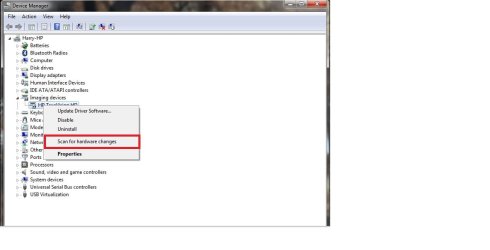
Below screenshot, illustrates how to scan for hardware changes with Device Manager:
 

Attachments

  • Device Manager - Hardware.jpg
    Device Manager - Hardware.jpg
    38.7 KB · Views: 21

My Computer My Computer

Computer type
Laptop
Back
Top