weird autoplay problem

dymmy

New member
Local time
6:47 AM
Messages
12
hi can someone help. I have been trying to solve this one for a while. Whenever i put my driver disk that came with my motherboard or indeed any other disk with software on it the autorun feature works but not the 'install software' box 'run.exe' option. In autoplay the option is to ask each time and there is nowhere i can reset or configure it to ask me if i want to install or run the auto setup file. If i open the disk and click on the setup.exe file myself it runs but wont let me see the window as it did it is there as an open folder on the bottom right of taskbar but only shows me the thumbnail of the folder and refuses to actually open it. I therefore cannot use the interface to choose which software or hardware to install. All other softwaree disks wont autorun only they will if i manually click on the setup.exe but something has interferd with the way it used to work fine.
 

My Computer

Computer Manufacturer/Model Number
home build
OS
windows 7 pro
CPU
i7 3770k
Motherboard
Asus sabertooth z77
Memory
gskill 32gb
Graphics Card(s)
onboard
Sound Card
onboard
Monitor(s) Displays
samsung
Hard Drives
OCZ Agility4 256gb
PSU
corsair 750w
Case
Corsair 600t
Cooling
coolermaster hyper 212 evo
hi can someone help. I have been trying to solve this one for a while. Whenever i put my driver disk that came with my motherboard or indeed any other disk with software on it the autorun feature works but not the 'install software' box 'run.exe' option. In autoplay the option is to ask each time and there is nowhere i can reset or configure it to ask me if i want to install or run the auto setup file. If i open the disk and click on the setup.exe file myself it runs but wont let me see the window as it did it is there as an open folder on the bottom right of taskbar but only shows me the thumbnail of the folder and refuses to actually open it. I therefore cannot use the interface to choose which software or hardware to install. All other softwaree disks wont autorun only they will if i manually click on the setup.exe but something has interferd with the way it used to work fine.

shellhwdetection is automatic and the DVD drive i use is external USB one ;)
 

My Computer

Computer Manufacturer/Model Number
home build
OS
windows 7 pro
CPU
i7 3770k
Motherboard
Asus sabertooth z77
Memory
gskill 32gb
Graphics Card(s)
onboard
Sound Card
onboard
Monitor(s) Displays
samsung
Hard Drives
OCZ Agility4 256gb
PSU
corsair 750w
Case
Corsair 600t
Cooling
coolermaster hyper 212 evo
Give your machine a through cleaning and then run a sfc /scannow. Do you have a VMware installed?
 

My Computer

Computer type
Laptop
Computer Manufacturer/Model Number
MSI GE72VR Apache Pro-416
OS
Windows 10x64 Build 1709
CPU
Intel i7 7700HQ Kaby Lake
Motherboard
Micro-Star Intl. MS-179B (U3C1)
Memory
16 GB DDR4 @2400
Graphics Card(s)
Nvidia Geforce GTX 1060
Screen Resolution
1920x1080 120Hz
Hard Drives
256 GB Nvme M.2 SSD

1TB HDD@7200
Cooling
Cooler Blast 4
Keyboard
Steel Series
Antivirus
Bit Defender Free
Browser
Edge
no vmware. sfc completes with no errors
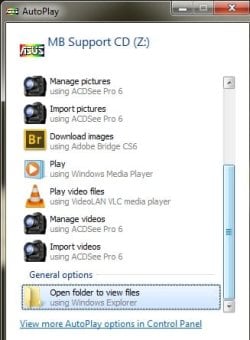
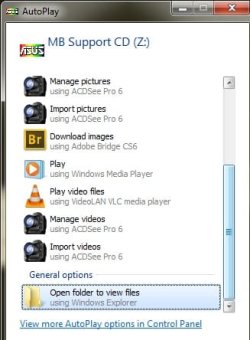
i get this :

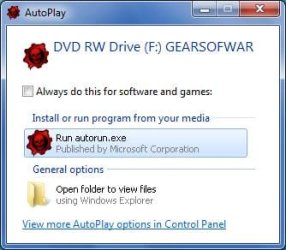
when i used to get this :
 

Attachments

  • autoplay.jpg
    autoplay.jpg
    23.5 KB · Views: 1
  • tagoreillycom20091001oreillyimages326561.png.jpg
    tagoreillycom20091001oreillyimages326561.png.jpg
    17.7 KB · Views: 0
Last edited:

My Computer

Computer Manufacturer/Model Number
home build
OS
windows 7 pro
CPU
i7 3770k
Motherboard
Asus sabertooth z77
Memory
gskill 32gb
Graphics Card(s)
onboard
Sound Card
onboard
Monitor(s) Displays
samsung
Hard Drives
OCZ Agility4 256gb
PSU
corsair 750w
Case
Corsair 600t
Cooling
coolermaster hyper 212 evo
Hmmmmmmm......... I'd still recommend a sfc /scannow, but then..... lol..... I recommend that alot. Its saved my bacon many times over then years. Have you tried a restore to before the time you forced it to install/recognise the rom drive?
 

My Computer

Computer type
Laptop
Computer Manufacturer/Model Number
MSI GE72VR Apache Pro-416
OS
Windows 10x64 Build 1709
CPU
Intel i7 7700HQ Kaby Lake
Motherboard
Micro-Star Intl. MS-179B (U3C1)
Memory
16 GB DDR4 @2400
Graphics Card(s)
Nvidia Geforce GTX 1060
Screen Resolution
1920x1080 120Hz
Hard Drives
256 GB Nvme M.2 SSD

1TB HDD@7200
Cooling
Cooler Blast 4
Keyboard
Steel Series
Antivirus
Bit Defender Free
Browser
Edge
there is no restore thats relevant seems to only go back one day. Its a new pc and have been installing allsorts over the past week.
 

My Computer

Computer Manufacturer/Model Number
home build
OS
windows 7 pro
CPU
i7 3770k
Motherboard
Asus sabertooth z77
Memory
gskill 32gb
Graphics Card(s)
onboard
Sound Card
onboard
Monitor(s) Displays
samsung
Hard Drives
OCZ Agility4 256gb
PSU
corsair 750w
Case
Corsair 600t
Cooling
coolermaster hyper 212 evo

My Computer

Computer type
Laptop
Computer Manufacturer/Model Number
MSI GE72VR Apache Pro-416
OS
Windows 10x64 Build 1709
CPU
Intel i7 7700HQ Kaby Lake
Motherboard
Micro-Star Intl. MS-179B (U3C1)
Memory
16 GB DDR4 @2400
Graphics Card(s)
Nvidia Geforce GTX 1060
Screen Resolution
1920x1080 120Hz
Hard Drives
256 GB Nvme M.2 SSD

1TB HDD@7200
Cooling
Cooler Blast 4
Keyboard
Steel Series
Antivirus
Bit Defender Free
Browser
Edge
I don't know if this is relevant or not but have you read this?

AutoRun changes in Windows 7 - Security Research & Defense - Site Home - TechNet Blogs

Try , if you haven't yet , running your A/V and malware programs
no malware at all I have Kaspersky running always. I did read this and as when i first used this disk via my usb/dvd reader it worked and gave me the run option which booted the desired UI that i need to run and choose the relevant drivers/software I am assuming it should work now. Maybe an update of windows 7 has changed this. Does the definition of a usb drive mean a 'stick' or indeed as i am using a dvd read/writer I am assuming they mean a usb stick. Basically any software disk I have bundled from manufacturers will not autorun and few will allow me to manually run setup the one from ASUS will not even do that now !

ie this will not happen on my machine:
http://blogs.technet.com/blogfiles/srd/WindowsLiveWriter/AutoRunchangesinWindows7_ECB1/image_8.png
 
Last edited:

My Computer

Computer Manufacturer/Model Number
home build
OS
windows 7 pro
CPU
i7 3770k
Motherboard
Asus sabertooth z77
Memory
gskill 32gb
Graphics Card(s)
onboard
Sound Card
onboard
Monitor(s) Displays
samsung
Hard Drives
OCZ Agility4 256gb
PSU
corsair 750w
Case
Corsair 600t
Cooling
coolermaster hyper 212 evo
I hesitate to to say this as you obviously have some experience here ..... but have you changed and/or looked at the settings for autoplay software and games? (Control panel > Hardware and Sound > Autoplay)
Theres an option to "Install or Run program from your media". Running out of suggestions here...... sorry

I must say the lack of restore points worries me as Windows will usually make a new restore point for each new program installation. And you say you've been installing a lot of software this past week.
 
Last edited:

My Computer

Computer type
Laptop
Computer Manufacturer/Model Number
MSI GE72VR Apache Pro-416
OS
Windows 10x64 Build 1709
CPU
Intel i7 7700HQ Kaby Lake
Motherboard
Micro-Star Intl. MS-179B (U3C1)
Memory
16 GB DDR4 @2400
Graphics Card(s)
Nvidia Geforce GTX 1060
Screen Resolution
1920x1080 120Hz
Hard Drives
256 GB Nvme M.2 SSD

1TB HDD@7200
Cooling
Cooler Blast 4
Keyboard
Steel Series
Antivirus
Bit Defender Free
Browser
Edge
I have and even when i change the setting to ask every time to 'install or run from media' it makes no difference at all and always brings up the generic :

thx for your help ;) I did a bit of deleting files to clean up and rediscover my lost 50gb that was being taken up by restore files and paging files etc. Thats when i lost my restore options. Too much knowledge is a hinderance ;)
 

Attachments

  • autoplay.jpg
    autoplay.jpg
    23.5 KB · Views: 0
Last edited:

My Computer

Computer Manufacturer/Model Number
home build
OS
windows 7 pro
CPU
i7 3770k
Motherboard
Asus sabertooth z77
Memory
gskill 32gb
Graphics Card(s)
onboard
Sound Card
onboard
Monitor(s) Displays
samsung
Hard Drives
OCZ Agility4 256gb
PSU
corsair 750w
Case
Corsair 600t
Cooling
coolermaster hyper 212 evo
Well....... sorry I couldn't be of more help to you but I'm out of suggestions for now. Let me mull this over for a bit, maybe something will pop up. Gregrocker and others should be online later and they are GOOD! Good luck and if you work this out beforehand please post the solution for the rest of us. Theres always the option to reinstall ......:cry:
 

My Computer

Computer type
Laptop
Computer Manufacturer/Model Number
MSI GE72VR Apache Pro-416
OS
Windows 10x64 Build 1709
CPU
Intel i7 7700HQ Kaby Lake
Motherboard
Micro-Star Intl. MS-179B (U3C1)
Memory
16 GB DDR4 @2400
Graphics Card(s)
Nvidia Geforce GTX 1060
Screen Resolution
1920x1080 120Hz
Hard Drives
256 GB Nvme M.2 SSD

1TB HDD@7200
Cooling
Cooler Blast 4
Keyboard
Steel Series
Antivirus
Bit Defender Free
Browser
Edge
Well....... sorry I couldn't be of more help to you but I'm out of suggestions for now. Let me mull this over for a bit, maybe something will pop up. Gregrocker and others should be online later and they are GOOD! Good luck and if you work this out beforehand please post the solution for the rest of us. Theres always the option to reinstall ......:cry:

here is a tiny video that shows the Asus setup running after a manual click on the setup.exe but it remains as a thumbnail on the taskbar and will not open into a window either i can see it is running but had to be forced and then remains unavailable to select installs this worked fine initially. I am lost...confused ! http://www.hdmediacreation.com/p362115969/h49d58440#h49d58440
 

My Computer

Computer Manufacturer/Model Number
home build
OS
windows 7 pro
CPU
i7 3770k
Motherboard
Asus sabertooth z77
Memory
gskill 32gb
Graphics Card(s)
onboard
Sound Card
onboard
Monitor(s) Displays
samsung
Hard Drives
OCZ Agility4 256gb
PSU
corsair 750w
Case
Corsair 600t
Cooling
coolermaster hyper 212 evo
Yeah.... me too. Maybe a repair installation? I'm thinking that maybe the "forced recognition" broke something? I had some minor problems with my Asus machine when I first got it. Between updating my bio's and a repair installation everything is fine now. Again, sorry I couldn't be of more help. There's some real Pro's here though (gregrocker, Britton30,Slartybart,Golden,Brink,jimbo45,Laybackbear,..... and many more),so I'm sure you'll find the help that I couldn't give you.
 

My Computer

Computer type
Laptop
Computer Manufacturer/Model Number
MSI GE72VR Apache Pro-416
OS
Windows 10x64 Build 1709
CPU
Intel i7 7700HQ Kaby Lake
Motherboard
Micro-Star Intl. MS-179B (U3C1)
Memory
16 GB DDR4 @2400
Graphics Card(s)
Nvidia Geforce GTX 1060
Screen Resolution
1920x1080 120Hz
Hard Drives
256 GB Nvme M.2 SSD

1TB HDD@7200
Cooling
Cooler Blast 4
Keyboard
Steel Series
Antivirus
Bit Defender Free
Browser
Edge
i look forward to their input, thx again :)
 

My Computer

Computer Manufacturer/Model Number
home build
OS
windows 7 pro
CPU
i7 3770k
Motherboard
Asus sabertooth z77
Memory
gskill 32gb
Graphics Card(s)
onboard
Sound Card
onboard
Monitor(s) Displays
samsung
Hard Drives
OCZ Agility4 256gb
PSU
corsair 750w
Case
Corsair 600t
Cooling
coolermaster hyper 212 evo
aww :( noone wants to help me ....
 

My Computer

Computer Manufacturer/Model Number
home build
OS
windows 7 pro
CPU
i7 3770k
Motherboard
Asus sabertooth z77
Memory
gskill 32gb
Graphics Card(s)
onboard
Sound Card
onboard
Monitor(s) Displays
samsung
Hard Drives
OCZ Agility4 256gb
PSU
corsair 750w
Case
Corsair 600t
Cooling
coolermaster hyper 212 evo
I couldn't come up with anything, thought about it all night. Maybe a repair installation or even a clean install might be your only shot. Again, sorry I couldn't be of more help.
 

My Computer

Computer type
Laptop
Computer Manufacturer/Model Number
MSI GE72VR Apache Pro-416
OS
Windows 10x64 Build 1709
CPU
Intel i7 7700HQ Kaby Lake
Motherboard
Micro-Star Intl. MS-179B (U3C1)
Memory
16 GB DDR4 @2400
Graphics Card(s)
Nvidia Geforce GTX 1060
Screen Resolution
1920x1080 120Hz
Hard Drives
256 GB Nvme M.2 SSD

1TB HDD@7200
Cooling
Cooler Blast 4
Keyboard
Steel Series
Antivirus
Bit Defender Free
Browser
Edge
Possibly, if you are the Administrator and can take 'ownership' of the file you need, it might work.
 

My Computer

Computer type
PC/Desktop
Computer Manufacturer/Model Number
Bruce ... somewhere in his 40's
OS
Windows 7 Ultimate 32bit SP1
CPU
Intel(R) Core(TM)2 Quad CPU @ 2.40GHz, 2400 MHz
Motherboard
INTEL/D975XBX2
Memory
4 GB
Graphics Card(s)
ATI Radeon HD 2600 Pro
Monitor(s) Displays
Samsung SyncMaster 914v
Screen Resolution
1280 x 1024
Hard Drives
2/500GB each ... ST3500630AS ATA Device.
One is not connected
PSU
Rocketfish 700 W
Case
G.Skill Gigabyte Chassis
Keyboard
Standard PS/2 Keyboard
Mouse
Microsoft PS/2 Mouse
Internet Speed
DSL
Antivirus
Avira Internet Security
Browser
IE 11
Other Info
ATI HDMI Audio
Possibly, if you are the Administrator and can take 'ownership' of the file you need, it might work.
I am trying to auto run setup.exe from dvd/cd's not possible to take ownership of these disks
 

My Computer

Computer Manufacturer/Model Number
home build
OS
windows 7 pro
CPU
i7 3770k
Motherboard
Asus sabertooth z77
Memory
gskill 32gb
Graphics Card(s)
onboard
Sound Card
onboard
Monitor(s) Displays
samsung
Hard Drives
OCZ Agility4 256gb
PSU
corsair 750w
Case
Corsair 600t
Cooling
coolermaster hyper 212 evo
is your antivirus blocking autorun feature? Quite a few do without even bother asking, so check its settings. (and for a good reason, autorun is an amazing way to infect or take control of your machine, I personally turned it off long ago)
 

My Computer

Computer type
PC/Desktop
Computer Manufacturer/Model Number
custom built
OS
Win 7 Pro 64-bit 7601
CPU
AMD Phenom 9650 QuadCore, revision DR-B3
Motherboard
ASUS M4A78
Memory
5 GB yes I run 2x 2GB and 1x 1GB, different brand, spank me.
Graphics Card(s)
NVIDIA GeForce 9800 GT 512 Mb, unknown manufacturer.
Sound Card
Crappy Realtek Integrated Audio
Monitor(s) Displays
Fujitsu Siemens P19-3P
Screen Resolution
1280 x 1024 x 32 bits @ 60 Hz Oh yeah, 4:3 rocks!
Hard Drives
(1) MAXTOR S TM3320613AS SATA Disk Device (2) STM35004 18AS SATA Disk Device (3) TOSHIBA USB 2.5"-HDD
PSU
whatever, around 450w
Case
Scavenged from old company PC, 10+ years old
Cooling
CPU fan, GPU fan, case fan, nothing fancy
Keyboard
Microsoft, PS/2, white.
Mouse
Optical, logitec.
Internet Speed
effective max speeds: 70-ish kB/s down 30-ish kB/s up
Antivirus
Avira, free edition.
Browser
Firefox with FXChrome to make it look like Google Chrome :P
Other Info
Was discarded by previous owner due to "horrible performance".
Was running Win Xp from a IDE drive. Yeah. Was a pain.
SATA II drive and Win7 and it zips away! Yay!
is your antivirus blocking autorun feature? Quite a few do without even bother asking, so check its settings. (and for a good reason, autorun is an amazing way to infect or take control of your machine, I personally turned it off long ago)
I will test that out thanks, the reason I want to autorun is that this machine has no DVD drive whatsoever and all my install disks are genuine and my external USB DVD reader/writer is only used for original disks. The weird bit is my ASUS mobo disk wont even run visibly when i manually click on the autorun.exe file it opens as a thumbnail only and therefore cannot be interacted with. It is a disk full of free software and all the drivers i need in a handy UI that i liked.

Ok I tried that and no change it still opens autorun but only the wrong one/as per image i posted isnt seeing it as a data/software/games disk
 
Last edited:

My Computer

Computer Manufacturer/Model Number
home build
OS
windows 7 pro
CPU
i7 3770k
Motherboard
Asus sabertooth z77
Memory
gskill 32gb
Graphics Card(s)
onboard
Sound Card
onboard
Monitor(s) Displays
samsung
Hard Drives
OCZ Agility4 256gb
PSU
corsair 750w
Case
Corsair 600t
Cooling
coolermaster hyper 212 evo
Back
Top