Weird freezing problem?

ShockSand

New member
Local time
10:39 PM
Messages
14
Okay, so for about a month now I've been having a weird problem. I'm 90% sure I need to replace something but I don't know what. Here's what happens: I turn on my computer, things are pretty slow. For the first 20-or-so minutes, programs freeze and hang a lot. This isn't such a big deal, but at random times, if I open a folder or open/close a tab in Chrome, the whole computer freezes for about 5-10 seconds. This problem will last for about 30 minutes then things will be fine, and it can just start happening again at random times throughout the day. For example, starting a recording in Fraps often restarts the problem. I've asked a lot of people about this and I've never gotten a definite answer, but someone suggested it might be the PSU. Also note I'm terrible with computers so if anyone decides to help me out, have fun.

Specs (since the first thing people do is ask for them when I tell them about this):
OS Name Microsoft Windows 7 Home Premium
Version 6.1.7601 Service Pack 1 Build 7601
OS Manufacturer Microsoft Corporation
System Model Lenovo H430
System Type x64-based PC
Processor Intel(R) Core(TM) i7-3770 CPU @ 3.40GHz, 3401 Mhz, 4 Core(s), 8 Logical Processor(s)
BIOS Version/Date LENOVO ECKT16A, 06/04/2012
SMBIOS Version 2.7
Memory: 8192MB RAM

Drive C:
Description Local Fixed Disk
Compressed No
File System NTFS
Size 1.79 TB (1,973,369,696,256 bytes)
Free Space 568.00 GB (609,888,559,104 bytes)
Volume Name
Volume Serial Number 4A427869

Drive D:
Description CD-ROM Disc

Drive F:
Description Local Fixed Disk
Compressed No
File System NTFS
Size 1.82 TB (2,000,396,742,656 bytes)
Free Space 1.52 TB (1,670,761,500,672 bytes)
Volume Name Secondary
Volume Serial Number 68FFCC70
 

My Computer

Computer type
PC/Desktop
Computer Manufacturer/Model Number
Lenovo
OS
Windows 7 Home Premium 64bit
CPU
Intel(R) Core(TM) i7-3770 CPU @ 3.40GHz
Memory
8 GB
Graphics Card(s)
MSI GeForce GTX 660
Hard Drives
2 TB
Browser
Chrome
Hmm...

I've had a problem like that before and it was the RAM that was the problem.

I would run Memtest86 +

If there are any errors then test every stick of ram separately.

Post back results.
 
Last edited:

My Computer

Computer type
Laptop
Computer Manufacturer/Model Number
eMachines
OS
Microsoft Windows 7 Home Premium 64-bit
CPU
AMD Athlon(tm) Processor TF-20
Motherboard
eMachines eMachines E627
Memory
2 1GB RAM Sticks
Graphics Card(s)
ATI Radeon HD 3200 Graphics
Sound Card
(Generic USB Audio)
Monitor(s) Displays
1
Screen Resolution
1366 x 768
Hard Drives
TOSHIBA MK2555GSX ATA Device
PSU
?????
Case
?????
Cooling
?????
Keyboard
Standerd USB Keyboard
Mouse
Standerd USB Mouse
Internet Speed
?????
Antivirus
Avast
Browser
Google Chrome
Sorry, I probably should've mentioned this first also, I'm not sure if it makes a difference but every hour or so I can hear my secondary hard drive shut down then hear the sound of it starting up again whenever I open a file on it. I'm not sure if this changes anything, so I'll still run Memtest just in case. This didn't start happening until I was having the freezing problem I mentioned but I'm not sure if they're related at all.
 

My Computer

Computer type
PC/Desktop
Computer Manufacturer/Model Number
Lenovo
OS
Windows 7 Home Premium 64bit
CPU
Intel(R) Core(TM) i7-3770 CPU @ 3.40GHz
Memory
8 GB
Graphics Card(s)
MSI GeForce GTX 660
Hard Drives
2 TB
Browser
Chrome
Wait, your second hard-drive shuts down?

Which hard-drive has your Windows Installation on it?
 

My Computer

Computer type
Laptop
Computer Manufacturer/Model Number
eMachines
OS
Microsoft Windows 7 Home Premium 64-bit
CPU
AMD Athlon(tm) Processor TF-20
Motherboard
eMachines eMachines E627
Memory
2 1GB RAM Sticks
Graphics Card(s)
ATI Radeon HD 3200 Graphics
Sound Card
(Generic USB Audio)
Monitor(s) Displays
1
Screen Resolution
1366 x 768
Hard Drives
TOSHIBA MK2555GSX ATA Device
PSU
?????
Case
?????
Cooling
?????
Keyboard
Standerd USB Keyboard
Mouse
Standerd USB Mouse
Internet Speed
?????
Antivirus
Avast
Browser
Google Chrome
Try replacing your sata cables and testing your hard drives out with the manufacturers tool
 

My Computer

Computer type
PC/Desktop
Computer Manufacturer/Model Number
Custom Built
OS
Windows 10 Pro
CPU
AMD Ryzen 5 2400G Processor with Radeon RX Vega 11 Graphics
Motherboard
ASRock X470 Master SLI/AC AM4 AMD Promontory X470 SATA 6Gb/s
Memory
G.SKILL Ripjaws V Series 16GB (2 x 8GB) 288-Pin DDR4 SDRAM D
Graphics Card(s)
2047MB NVIDIA GeForce GTX 1060 6GB (EVGA)
Sound Card
Motherboard Built in
Monitor(s) Displays
Acer R240HY bidx 23.8-Inch IPS HDMI DVI VGA (1920 x 1080) Wi
Screen Resolution
1920 x 1080
Hard Drives
1TB Sandisk SSD PLUS (Main drive)
500 GB Seagate 7200 RPM (Games)
500 GB Western Digital 7200 RPM (Virtual Machines)
PSU
CORSAIR TX Series TX650M 650W 80+ Gold Modular Power Supply
Case
CORSAIR CARBIDE SPEC-02 Mid-Tower Gaming Case, Red LED Fan
Cooling
220mm, two 120mm, and four 60mm fans
Keyboard
Wired Dell keyboard
Mouse
Wireless Logitech mouse
Internet Speed
250mb down, 30mb up
Antivirus
Panda Cloud Antivirus
Browser
Chrome-ish x64
Other Info
Your awesome for reading this.
Wait, your second hard-drive shuts down?

Which hard-drive has your Windows Installation on it?

The only files on my second hard drive are some recordings, that's all I use it for.

Doing Memtest86+ at the moment, will switch the sata cables afterwards if I get no errors. Also, about how many passes do you think is enough for each stick? The first stick has done 12 passes so far with no errors.
 

My Computer

Computer type
PC/Desktop
Computer Manufacturer/Model Number
Lenovo
OS
Windows 7 Home Premium 64bit
CPU
Intel(R) Core(TM) i7-3770 CPU @ 3.40GHz
Memory
8 GB
Graphics Card(s)
MSI GeForce GTX 660
Hard Drives
2 TB
Browser
Chrome
Most people say run memtest overnight, best way to be sure
 

My Computer

Computer type
PC/Desktop
Computer Manufacturer/Model Number
Custom Built
OS
Windows 10 Pro
CPU
AMD Ryzen 5 2400G Processor with Radeon RX Vega 11 Graphics
Motherboard
ASRock X470 Master SLI/AC AM4 AMD Promontory X470 SATA 6Gb/s
Memory
G.SKILL Ripjaws V Series 16GB (2 x 8GB) 288-Pin DDR4 SDRAM D
Graphics Card(s)
2047MB NVIDIA GeForce GTX 1060 6GB (EVGA)
Sound Card
Motherboard Built in
Monitor(s) Displays
Acer R240HY bidx 23.8-Inch IPS HDMI DVI VGA (1920 x 1080) Wi
Screen Resolution
1920 x 1080
Hard Drives
1TB Sandisk SSD PLUS (Main drive)
500 GB Seagate 7200 RPM (Games)
500 GB Western Digital 7200 RPM (Virtual Machines)
PSU
CORSAIR TX Series TX650M 650W 80+ Gold Modular Power Supply
Case
CORSAIR CARBIDE SPEC-02 Mid-Tower Gaming Case, Red LED Fan
Cooling
220mm, two 120mm, and four 60mm fans
Keyboard
Wired Dell keyboard
Mouse
Wireless Logitech mouse
Internet Speed
250mb down, 30mb up
Antivirus
Panda Cloud Antivirus
Browser
Chrome-ish x64
Other Info
Your awesome for reading this.
Ran a 24+ hour test on each stick, no errors found. Bleh.
 

My Computer

Computer type
PC/Desktop
Computer Manufacturer/Model Number
Lenovo
OS
Windows 7 Home Premium 64bit
CPU
Intel(R) Core(TM) i7-3770 CPU @ 3.40GHz
Memory
8 GB
Graphics Card(s)
MSI GeForce GTX 660
Hard Drives
2 TB
Browser
Chrome

My Computer

Computer type
PC/Desktop
Computer Manufacturer/Model Number
Custom Build
OS
Windows 7 Ultimate x64 SP1
CPU
Intel Q6600 @ 2.6Ghz
Motherboard
Evga NF78-CK-132-A 3-Way SLI
Memory
4Gb DDR2 Corsair Dominator @ 800Mhz 5-5-5-15
Graphics Card(s)
EVGA 560 GTX SC FTW 1GB
Sound Card
Realtek HD 7.1 Audio, Plantronics GameCom780 7.1 Headset
Monitor(s) Displays
Dell S2409W
Screen Resolution
1920 x 1080
Hard Drives
SanDisk SDSSDHII-120G-G25 120GB SSD
Samsung 7200RPM 750Gb SATA
Samsung 850 EVO 120GB SSD
Western Digital Green 1TB 7200RPM
PSU
Xigmatek 750W Quad sli quad core 80% eff
Case
Antec 900 Gaming Case
Cooling
Zalman CNPS9700-NT NVIDIA Tritium
Keyboard
Logitech generic keyboard, MS wireless keyboard
Mouse
Razor Lachesis Banshee V2 Blue, 4000DPI, MS wireless mouse
Internet Speed
152Mb Virgin Media Fibre Optic
Antivirus
Microsoft Security Essentials
Browser
Google Chrome
Other Info
Wireless Gaming Receiver for Windows, Wireless Xbox 360 Pad
Tested with Parkdale, these were my results

Primary: ST2000DM - 001-9YN164 - CC62
Seq. Write Speed: 171.5 MByte/sec
Random QD32: 1289.3 kByte/sec, 322.3 OPS, 3.10 ms

Seq. Read Speed: 168.5 MByte/sec
Random QD32: 598.6 kByte/sec, 149.6 IOPS, 6.68 ms

Secondary: ST2000DM - 001-1CH164 - CC24
Seq. Write Speed: 171.4 MByte/sec
Random QD32: 1552.0 kByte/sec, 388.0 IOPS, 2.58 ms

Seq. Read Speed: 185.9 MByte/sec
Random QD32: 633.2 kByte/sec, 158.3 IOPS, 6.32 ms
 

My Computer

Computer type
PC/Desktop
Computer Manufacturer/Model Number
Lenovo
OS
Windows 7 Home Premium 64bit
CPU
Intel(R) Core(TM) i7-3770 CPU @ 3.40GHz
Memory
8 GB
Graphics Card(s)
MSI GeForce GTX 660
Hard Drives
2 TB
Browser
Chrome
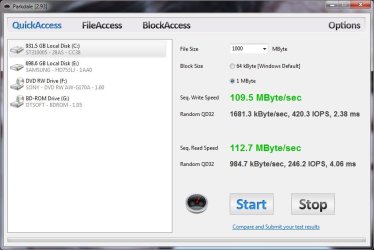
The Sequential reads and writes are pretty good for a mechanical hard drive but the randoms are pretty bad, here's an example with my hard drive, wouldn't hurt to do a defrag.
seagate parkdale.jpg
 

My Computer

Computer type
PC/Desktop
Computer Manufacturer/Model Number
Custom Build
OS
Windows 7 Ultimate x64 SP1
CPU
Intel Q6600 @ 2.6Ghz
Motherboard
Evga NF78-CK-132-A 3-Way SLI
Memory
4Gb DDR2 Corsair Dominator @ 800Mhz 5-5-5-15
Graphics Card(s)
EVGA 560 GTX SC FTW 1GB
Sound Card
Realtek HD 7.1 Audio, Plantronics GameCom780 7.1 Headset
Monitor(s) Displays
Dell S2409W
Screen Resolution
1920 x 1080
Hard Drives
SanDisk SDSSDHII-120G-G25 120GB SSD
Samsung 7200RPM 750Gb SATA
Samsung 850 EVO 120GB SSD
Western Digital Green 1TB 7200RPM
PSU
Xigmatek 750W Quad sli quad core 80% eff
Case
Antec 900 Gaming Case
Cooling
Zalman CNPS9700-NT NVIDIA Tritium
Keyboard
Logitech generic keyboard, MS wireless keyboard
Mouse
Razor Lachesis Banshee V2 Blue, 4000DPI, MS wireless mouse
Internet Speed
152Mb Virgin Media Fibre Optic
Antivirus
Microsoft Security Essentials
Browser
Google Chrome
Other Info
Wireless Gaming Receiver for Windows, Wireless Xbox 360 Pad
I've done one, a problem I was having with my primary was the freezing whenever it was reading or writing something, which also showed up in other programs' benchmarking, which is why I bought the secondary for recording.
 

My Computer

Computer type
PC/Desktop
Computer Manufacturer/Model Number
Lenovo
OS
Windows 7 Home Premium 64bit
CPU
Intel(R) Core(TM) i7-3770 CPU @ 3.40GHz
Memory
8 GB
Graphics Card(s)
MSI GeForce GTX 660
Hard Drives
2 TB
Browser
Chrome
I think it might be time for an SSD upgrade, scan.co.uk are selling them for £50(128GB) which is surprisingly cheap considering.
 

My Computer

Computer type
PC/Desktop
Computer Manufacturer/Model Number
Custom Build
OS
Windows 7 Ultimate x64 SP1
CPU
Intel Q6600 @ 2.6Ghz
Motherboard
Evga NF78-CK-132-A 3-Way SLI
Memory
4Gb DDR2 Corsair Dominator @ 800Mhz 5-5-5-15
Graphics Card(s)
EVGA 560 GTX SC FTW 1GB
Sound Card
Realtek HD 7.1 Audio, Plantronics GameCom780 7.1 Headset
Monitor(s) Displays
Dell S2409W
Screen Resolution
1920 x 1080
Hard Drives
SanDisk SDSSDHII-120G-G25 120GB SSD
Samsung 7200RPM 750Gb SATA
Samsung 850 EVO 120GB SSD
Western Digital Green 1TB 7200RPM
PSU
Xigmatek 750W Quad sli quad core 80% eff
Case
Antec 900 Gaming Case
Cooling
Zalman CNPS9700-NT NVIDIA Tritium
Keyboard
Logitech generic keyboard, MS wireless keyboard
Mouse
Razor Lachesis Banshee V2 Blue, 4000DPI, MS wireless mouse
Internet Speed
152Mb Virgin Media Fibre Optic
Antivirus
Microsoft Security Essentials
Browser
Google Chrome
Other Info
Wireless Gaming Receiver for Windows, Wireless Xbox 360 Pad
I think it might be time for an SSD upgrade, scan.co.uk are selling them for £50(128GB) which is surprisingly cheap considering.

Are you sure that's the problem? I just need to be completely sure because I don't exactly have the money to start buying stuff out of trial-and-error, also considering I don't have £50 yet in the first place.
 

My Computer

Computer type
PC/Desktop
Computer Manufacturer/Model Number
Lenovo
OS
Windows 7 Home Premium 64bit
CPU
Intel(R) Core(TM) i7-3770 CPU @ 3.40GHz
Memory
8 GB
Graphics Card(s)
MSI GeForce GTX 660
Hard Drives
2 TB
Browser
Chrome
So I performed another test on my primary drive while the freezing problem was happening and the speeds were significantly lower while the secondary speeds were still the same. Like, write was <100 with read hardly getting past 20. It looks like it might be the problem. I'll try installing Windows on my secondary and taking out the primary.
 

My Computer

Computer type
PC/Desktop
Computer Manufacturer/Model Number
Lenovo
OS
Windows 7 Home Premium 64bit
CPU
Intel(R) Core(TM) i7-3770 CPU @ 3.40GHz
Memory
8 GB
Graphics Card(s)
MSI GeForce GTX 660
Hard Drives
2 TB
Browser
Chrome
I think it might be time for an SSD upgrade, scan.co.uk are selling them for £50(128GB) which is surprisingly cheap considering.

Are you sure that's the problem? I just need to be completely sure because I don't exactly have the money to start buying stuff out of trial-and-error, also considering I don't have £50 yet in the first place.

You could try and see if your other hard drive suffers with the same problem, but I feel it maybe your hard drive failing.

Edit: Seems you've come to the same conclusion :)
 

My Computer

Computer type
PC/Desktop
Computer Manufacturer/Model Number
Custom Build
OS
Windows 7 Ultimate x64 SP1
CPU
Intel Q6600 @ 2.6Ghz
Motherboard
Evga NF78-CK-132-A 3-Way SLI
Memory
4Gb DDR2 Corsair Dominator @ 800Mhz 5-5-5-15
Graphics Card(s)
EVGA 560 GTX SC FTW 1GB
Sound Card
Realtek HD 7.1 Audio, Plantronics GameCom780 7.1 Headset
Monitor(s) Displays
Dell S2409W
Screen Resolution
1920 x 1080
Hard Drives
SanDisk SDSSDHII-120G-G25 120GB SSD
Samsung 7200RPM 750Gb SATA
Samsung 850 EVO 120GB SSD
Western Digital Green 1TB 7200RPM
PSU
Xigmatek 750W Quad sli quad core 80% eff
Case
Antec 900 Gaming Case
Cooling
Zalman CNPS9700-NT NVIDIA Tritium
Keyboard
Logitech generic keyboard, MS wireless keyboard
Mouse
Razor Lachesis Banshee V2 Blue, 4000DPI, MS wireless mouse
Internet Speed
152Mb Virgin Media Fibre Optic
Antivirus
Microsoft Security Essentials
Browser
Google Chrome
Other Info
Wireless Gaming Receiver for Windows, Wireless Xbox 360 Pad
If that is the problem I'm not sure why it would cause the secondary drive to seemingly shut down on occasion. In My Computer it still shows it but if I open it it freezes for a few seconds while I can hear it starting up. Hm.
 

My Computer

Computer type
PC/Desktop
Computer Manufacturer/Model Number
Lenovo
OS
Windows 7 Home Premium 64bit
CPU
Intel(R) Core(TM) i7-3770 CPU @ 3.40GHz
Memory
8 GB
Graphics Card(s)
MSI GeForce GTX 660
Hard Drives
2 TB
Browser
Chrome
If that is the problem I'm not sure why it would cause the secondary drive to seemingly shut down on occasion. In My Computer it still shows it but if I open it it freezes for a few seconds while I can hear it starting up. Hm.

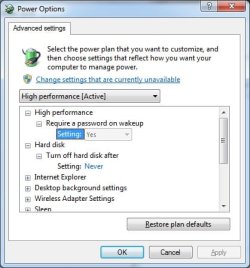
What about power options within windows?, have you set everything to high performance?
power hard disk.jpg
 

My Computer

Computer type
PC/Desktop
Computer Manufacturer/Model Number
Custom Build
OS
Windows 7 Ultimate x64 SP1
CPU
Intel Q6600 @ 2.6Ghz
Motherboard
Evga NF78-CK-132-A 3-Way SLI
Memory
4Gb DDR2 Corsair Dominator @ 800Mhz 5-5-5-15
Graphics Card(s)
EVGA 560 GTX SC FTW 1GB
Sound Card
Realtek HD 7.1 Audio, Plantronics GameCom780 7.1 Headset
Monitor(s) Displays
Dell S2409W
Screen Resolution
1920 x 1080
Hard Drives
SanDisk SDSSDHII-120G-G25 120GB SSD
Samsung 7200RPM 750Gb SATA
Samsung 850 EVO 120GB SSD
Western Digital Green 1TB 7200RPM
PSU
Xigmatek 750W Quad sli quad core 80% eff
Case
Antec 900 Gaming Case
Cooling
Zalman CNPS9700-NT NVIDIA Tritium
Keyboard
Logitech generic keyboard, MS wireless keyboard
Mouse
Razor Lachesis Banshee V2 Blue, 4000DPI, MS wireless mouse
Internet Speed
152Mb Virgin Media Fibre Optic
Antivirus
Microsoft Security Essentials
Browser
Google Chrome
Other Info
Wireless Gaming Receiver for Windows, Wireless Xbox 360 Pad
If that is the problem I'm not sure why it would cause the secondary drive to seemingly shut down on occasion. In My Computer it still shows it but if I open it it freezes for a few seconds while I can hear it starting up. Hm.

What about power options within windows?, have you set everything to high performance?
View attachment 334300

Yeah, it was high performance, I turned it back down to Balanced and restarted and the problem still occurred.
 

My Computer

Computer type
PC/Desktop
Computer Manufacturer/Model Number
Lenovo
OS
Windows 7 Home Premium 64bit
CPU
Intel(R) Core(TM) i7-3770 CPU @ 3.40GHz
Memory
8 GB
Graphics Card(s)
MSI GeForce GTX 660
Hard Drives
2 TB
Browser
Chrome
Is there a good way to transfer all my files from one hard drive to the other?
 

My Computer

Computer type
PC/Desktop
Computer Manufacturer/Model Number
Lenovo
OS
Windows 7 Home Premium 64bit
CPU
Intel(R) Core(TM) i7-3770 CPU @ 3.40GHz
Memory
8 GB
Graphics Card(s)
MSI GeForce GTX 660
Hard Drives
2 TB
Browser
Chrome
Back
Top