Weird problem, can't access certain websites.

kLN93

New member
Member
VIP
Local time
2:19 PM
Messages
116
Location
U.K
Well this problem came up a few weeks ago, at first I thought it was just Google search, but it turns out I can't access multiple websites, eg. Twitter, Facebook and YouTube. I've tried resetting my router but no luck, does anyone know what could cause this? I really don't want to format my hard drive, again.


Thanks,

kLN
 

My Computer

Computer type
PC/Desktop
Computer Manufacturer/Model Number
Custom Build
OS
Windows 7 Home Premium 64bit
CPU
Intel Core i5 3570k OC'd to 4.3Ghz with Hyper 212 evo.
Motherboard
Asus p8z77 V-LX
Memory
Crucial Ballistix Sport RAM 8GB DDR3 1333mhz
Graphics Card(s)
Sapphire AMD R9 290 Tri-X OC edition
Sound Card
Intergrated
Screen Resolution
1920x1080p
Hard Drives
1TB WD Caviar blue
PSU
Coolermaster VS-Series 650W Semi Modular Gold Power Supply
Case
Fractal Define R5
Cooling
4 Arctic Cooling F12 120mm Case Fans, stock intake case fan.
Mouse
Logitech MX518 & Logitech G400
Antivirus
Avast and Malwarebytes
Browser
Chrome
Do you see the sites in other browsers?
If you do, its something with chrome.

I suggest you delete chache
 

My Computer

Computer type
PC/Desktop
Computer Manufacturer/Model Number
Ordi
OS
Windows 7 Home Premium SP1, 64 bit
CPU
Athlon 2 x2 250
Motherboard
ECS A740GM-M
Memory
4GB DDR2
Graphics Card(s)
nVida Geforce GT-440
Sound Card
onboard
Monitor(s) Displays
21'' Philips @ 1080p, 19,5''' Samsung @ 1440x900
Hard Drives
500GB SAMSUNG HD502HJ (SATA)
PSU
400w thermaltake
Cooling
Stock CPU fan, one fan on the back
Keyboard
A keyboard
Mouse
A mouse
Internet Speed
7 down 1 up
Antivirus
KIS 2014
Browser
Chrome
Do you see the sites in other browsers?
If you do, its something with chrome.

I suggest you delete chache


I've tried Firefox and IE but they don't work on them either, and i've already tried but it doesn't help.
 

My Computer

Computer type
PC/Desktop
Computer Manufacturer/Model Number
Custom Build
OS
Windows 7 Home Premium 64bit
CPU
Intel Core i5 3570k OC'd to 4.3Ghz with Hyper 212 evo.
Motherboard
Asus p8z77 V-LX
Memory
Crucial Ballistix Sport RAM 8GB DDR3 1333mhz
Graphics Card(s)
Sapphire AMD R9 290 Tri-X OC edition
Sound Card
Intergrated
Screen Resolution
1920x1080p
Hard Drives
1TB WD Caviar blue
PSU
Coolermaster VS-Series 650W Semi Modular Gold Power Supply
Case
Fractal Define R5
Cooling
4 Arctic Cooling F12 120mm Case Fans, stock intake case fan.
Mouse
Logitech MX518 & Logitech G400
Antivirus
Avast and Malwarebytes
Browser
Chrome
If multiple browsers are causing issues, signs point to a connectivity problem. Have you restarted? Are you on wireless? If not, can you verify that you are properly plugged into the router? Do other computers on your network have internet access? We need to rule out some things to help you out :)
 
Last edited:

My Computer

Computer type
PC/Desktop
Computer Manufacturer/Model Number
Build
OS
Windows 7 Profession x64
CPU
Intel Core i5
Motherboard
Intel DB75EN
Memory
16 GB DDR3
Graphics Card(s)
Intel HD Graphics
Sound Card
Realtek High Definition Audio
Monitor(s) Displays
Dual Viewsonic TD2220 touchscreen displays
Hard Drives
Seagate 500GB 7200 RPM
Case
Slimline
Cooling
Standard Intel heat sink / fan.
Keyboard
Microsoft boring keyboard - it works!
If multiple browsers are causing issues, signs point to a connectivity problem. Have you restarted? Are you on wireless? If not, can you verify that you are properly plugged into the router? Do other computers on your network have internet access? We need to rule out some things to help you out :)

Yes i've restarted, i've got a wired connection. It's properly plugged in, I have a laptop which is connected to it but I can access all sites, the same with my phone
 

My Computer

Computer type
PC/Desktop
Computer Manufacturer/Model Number
Custom Build
OS
Windows 7 Home Premium 64bit
CPU
Intel Core i5 3570k OC'd to 4.3Ghz with Hyper 212 evo.
Motherboard
Asus p8z77 V-LX
Memory
Crucial Ballistix Sport RAM 8GB DDR3 1333mhz
Graphics Card(s)
Sapphire AMD R9 290 Tri-X OC edition
Sound Card
Intergrated
Screen Resolution
1920x1080p
Hard Drives
1TB WD Caviar blue
PSU
Coolermaster VS-Series 650W Semi Modular Gold Power Supply
Case
Fractal Define R5
Cooling
4 Arctic Cooling F12 120mm Case Fans, stock intake case fan.
Mouse
Logitech MX518 & Logitech G400
Antivirus
Avast and Malwarebytes
Browser
Chrome
For internet explorer only,
Clean boot,
http://support.microsoft.com/kb/929135
Safe mode and other advanced methods,
http://windows.microsoft.com/en-US/windows7/Advanced-startup-options-including-safe-mode
Shut down your machine, Unplug-Hold the power button down for 30/45 seconds (Power Drain)
Power up and Tap the F8 key continuously until you see a black page with white text,
Use the down arrow key to toggle to safe mode with networking/ hit the enter key.
Login as usual
Test the issue,
Can’t access secure sites,
http://support.microsoft.com/kb/967897
http://windows.microsoft.com/en-us/windows7/Why-cant-I-view-some-websites
http://support.microsoft.com/kb/972034
 

My Computer

Computer type
PC/Desktop
Computer Manufacturer/Model Number
Custom assembled by me :}
OS
Win-7-Pro64bit 7-H-Prem-64bit
CPU
i7-5930K 2nd i9-9940x both water blocked VRM's too
Motherboard
ASUS SABERTOOTH X99 2nd ASUS x299 Apex
Memory
Trident-z 3200C14 2nd Trident-z 3600C16
Graphics Card(s)
EVGA 1080ti ftw3 2nd Titan Xp both water blocked
Sound Card
Built-in Realtek
Monitor(s) Displays
1-AOC G2460PG 24"G-Sync 144Hz/ 2nd 1-ASUS VG248QE 24" 144Hz
Screen Resolution
1920 x 1080 144Hz
Hard Drives
2-Samsung M.2 Evo & Evo Plus
2-Samsung 850 EVO 500GB SSD's/ 3-2.5 W.D. Black 1tb-&3-1tb/3-3.5 WD Black 1tb hdd's
PSU
EVGA SuperNOVA 1000-P2 2nd 1200-P2
Case
2-Corsair Obsidian Series 450D Black ATX Mid Tower
Cooling
Custom water loops
Keyboard
Logitech G710+/ 2nd Logitech G910
Mouse
2-RedDragon M901 Perdition 16400 dpi Gaming mouse = wired
Internet Speed
Comcast Ping 19ms 89.31mbps download speed 6.12mbps upload
Antivirus
Malwarebytes Pro/ Superantispyware Pro
Browser
FireFox & Pale moon
Other Info
2nd ASUS X299 Apex/Intel i9-9940x with Custom water loop/7H-Prem-x64/Corsair 450D case/Ram Trident-z 3600C16 4x8gb / Samsung970Evo plus 500gb SSD/Dual ssd EZ swap evo/PSU EVGA SuperNova 1200w-P2 80+Platinum/GPU Titan Xp /8-ML-140 on push-pull on 2-280GTX rads
For internet explorer only,
Clean boot,
http://support.microsoft.com/kb/929135
Safe mode and other advanced methods,
http://windows.microsoft.com/en-US/windows7/Advanced-startup-options-including-safe-mode
Shut down your machine, Unplug-Hold the power button down for 30/45 seconds (Power Drain)
Power up and Tap the F8 key continuously until you see a black page with white text,
Use the down arrow key to toggle to safe mode with networking/ hit the enter key.
Login as usual
Test the issue,
Can’t access secure sites,
http://support.microsoft.com/kb/967897
http://windows.microsoft.com/en-us/windows7/Why-cant-I-view-some-websites
http://support.microsoft.com/kb/972034


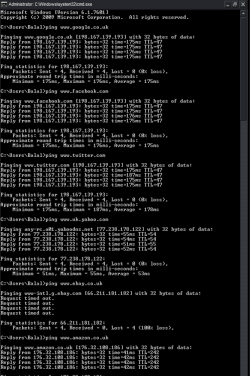
I've tried booting in safe mode with networking but I still can't access certain websites. I've used cmd to ping some websites that I can access and some websites which I cannot access. As you can see in the attachment, I ping around 35ms to websites which I can access, and around 175ms to websites which I cannot access.
 

Attachments

  • Picture1.png
    Picture1.png
    84.2 KB · Views: 4

My Computer

Computer type
PC/Desktop
Computer Manufacturer/Model Number
Custom Build
OS
Windows 7 Home Premium 64bit
CPU
Intel Core i5 3570k OC'd to 4.3Ghz with Hyper 212 evo.
Motherboard
Asus p8z77 V-LX
Memory
Crucial Ballistix Sport RAM 8GB DDR3 1333mhz
Graphics Card(s)
Sapphire AMD R9 290 Tri-X OC edition
Sound Card
Intergrated
Screen Resolution
1920x1080p
Hard Drives
1TB WD Caviar blue
PSU
Coolermaster VS-Series 650W Semi Modular Gold Power Supply
Case
Fractal Define R5
Cooling
4 Arctic Cooling F12 120mm Case Fans, stock intake case fan.
Mouse
Logitech MX518 & Logitech G400
Antivirus
Avast and Malwarebytes
Browser
Chrome

My Computer

Computer type
PC/Desktop
Computer Manufacturer/Model Number
Custom assembled by me :}
OS
Win-7-Pro64bit 7-H-Prem-64bit
CPU
i7-5930K 2nd i9-9940x both water blocked VRM's too
Motherboard
ASUS SABERTOOTH X99 2nd ASUS x299 Apex
Memory
Trident-z 3200C14 2nd Trident-z 3600C16
Graphics Card(s)
EVGA 1080ti ftw3 2nd Titan Xp both water blocked
Sound Card
Built-in Realtek
Monitor(s) Displays
1-AOC G2460PG 24"G-Sync 144Hz/ 2nd 1-ASUS VG248QE 24" 144Hz
Screen Resolution
1920 x 1080 144Hz
Hard Drives
2-Samsung M.2 Evo & Evo Plus
2-Samsung 850 EVO 500GB SSD's/ 3-2.5 W.D. Black 1tb-&3-1tb/3-3.5 WD Black 1tb hdd's
PSU
EVGA SuperNOVA 1000-P2 2nd 1200-P2
Case
2-Corsair Obsidian Series 450D Black ATX Mid Tower
Cooling
Custom water loops
Keyboard
Logitech G710+/ 2nd Logitech G910
Mouse
2-RedDragon M901 Perdition 16400 dpi Gaming mouse = wired
Internet Speed
Comcast Ping 19ms 89.31mbps download speed 6.12mbps upload
Antivirus
Malwarebytes Pro/ Superantispyware Pro
Browser
FireFox & Pale moon
Other Info
2nd ASUS X299 Apex/Intel i9-9940x with Custom water loop/7H-Prem-x64/Corsair 450D case/Ram Trident-z 3600C16 4x8gb / Samsung970Evo plus 500gb SSD/Dual ssd EZ swap evo/PSU EVGA SuperNova 1200w-P2 80+Platinum/GPU Titan Xp /8-ML-140 on push-pull on 2-280GTX rads
You can use these free tools to see if they find anything,
Manually Update them before running full scans,
Try not to use your computer while the scans are running, (one at a time of course).
http://www.malwarebytes.org/products/malwarebytes_free
http://www.superantispyware.com/?tag=SUPERANTISPYWARE

This one is the longest up to 4 hours, the others are only about 45 minutes,
http://www.microsoft.com/security/scanner/en-us/default.aspx


Runned all of them, couldn't find anything.
 

My Computer

Computer type
PC/Desktop
Computer Manufacturer/Model Number
Custom Build
OS
Windows 7 Home Premium 64bit
CPU
Intel Core i5 3570k OC'd to 4.3Ghz with Hyper 212 evo.
Motherboard
Asus p8z77 V-LX
Memory
Crucial Ballistix Sport RAM 8GB DDR3 1333mhz
Graphics Card(s)
Sapphire AMD R9 290 Tri-X OC edition
Sound Card
Intergrated
Screen Resolution
1920x1080p
Hard Drives
1TB WD Caviar blue
PSU
Coolermaster VS-Series 650W Semi Modular Gold Power Supply
Case
Fractal Define R5
Cooling
4 Arctic Cooling F12 120mm Case Fans, stock intake case fan.
Mouse
Logitech MX518 & Logitech G400
Antivirus
Avast and Malwarebytes
Browser
Chrome
bump~
 

My Computer

Computer type
PC/Desktop
Computer Manufacturer/Model Number
Custom Build
OS
Windows 7 Home Premium 64bit
CPU
Intel Core i5 3570k OC'd to 4.3Ghz with Hyper 212 evo.
Motherboard
Asus p8z77 V-LX
Memory
Crucial Ballistix Sport RAM 8GB DDR3 1333mhz
Graphics Card(s)
Sapphire AMD R9 290 Tri-X OC edition
Sound Card
Intergrated
Screen Resolution
1920x1080p
Hard Drives
1TB WD Caviar blue
PSU
Coolermaster VS-Series 650W Semi Modular Gold Power Supply
Case
Fractal Define R5
Cooling
4 Arctic Cooling F12 120mm Case Fans, stock intake case fan.
Mouse
Logitech MX518 & Logitech G400
Antivirus
Avast and Malwarebytes
Browser
Chrome
Reset ie9 or ie10 manually,
Click the Start button on the Taskbar,
Click on Control panel,
Click on Internet options, Change (View by on the top right to Small Icons)
Go to the Advanced section,
Click on Reset button on the bottom,
Check the box to Delete personal settings,
See a tutorial here,
http://www.sevenforums.com/tutorials/1222-internet-explorer-reset.html
After Resetting ie9 or 10,
Open Internet explorer,
Use the recommended setup and install options when prompted,
When prompted that there are Add-ons ready to be Enabled click on No,
Test with the site your having issues with first before enabling any add-ons.
http://windows.microsoft.com/en-us/internet-explorer/manage-add-ons#ie=ie-10-win-7
Also Use No Add-ons mode/ Click Start and type in the search box,
Internet explorer/ click on the suggestion or it’s located at,
Start/ All programs/ Accessories folder/ System tools folder.
 

My Computer

Computer type
PC/Desktop
Computer Manufacturer/Model Number
Custom assembled by me :}
OS
Win-7-Pro64bit 7-H-Prem-64bit
CPU
i7-5930K 2nd i9-9940x both water blocked VRM's too
Motherboard
ASUS SABERTOOTH X99 2nd ASUS x299 Apex
Memory
Trident-z 3200C14 2nd Trident-z 3600C16
Graphics Card(s)
EVGA 1080ti ftw3 2nd Titan Xp both water blocked
Sound Card
Built-in Realtek
Monitor(s) Displays
1-AOC G2460PG 24"G-Sync 144Hz/ 2nd 1-ASUS VG248QE 24" 144Hz
Screen Resolution
1920 x 1080 144Hz
Hard Drives
2-Samsung M.2 Evo & Evo Plus
2-Samsung 850 EVO 500GB SSD's/ 3-2.5 W.D. Black 1tb-&3-1tb/3-3.5 WD Black 1tb hdd's
PSU
EVGA SuperNOVA 1000-P2 2nd 1200-P2
Case
2-Corsair Obsidian Series 450D Black ATX Mid Tower
Cooling
Custom water loops
Keyboard
Logitech G710+/ 2nd Logitech G910
Mouse
2-RedDragon M901 Perdition 16400 dpi Gaming mouse = wired
Internet Speed
Comcast Ping 19ms 89.31mbps download speed 6.12mbps upload
Antivirus
Malwarebytes Pro/ Superantispyware Pro
Browser
FireFox & Pale moon
Other Info
2nd ASUS X299 Apex/Intel i9-9940x with Custom water loop/7H-Prem-x64/Corsair 450D case/Ram Trident-z 3600C16 4x8gb / Samsung970Evo plus 500gb SSD/Dual ssd EZ swap evo/PSU EVGA SuperNova 1200w-P2 80+Platinum/GPU Titan Xp /8-ML-140 on push-pull on 2-280GTX rads

My Computer

Computer type
PC/Desktop
OS
Windows 10 Home x64
CPU
INTEL Core i5-750 Quad-Core 3.37GHz
Motherboard
ASUS P7P55D
Memory
HyperX Fury Black Series 8GB (2 x 4GB) 1866Mhz
Graphics Card(s)
EVGA GeForce GTX 750 Superclocked 1GB 128-Bit GDDR5
Monitor(s) Displays
LG 32MA68HY 32" IPS
Screen Resolution
1920 x 1080
Hard Drives
Samsung 840 Evo 120GB, SEAGATE 500GB Barracuda® 7200.12, SATA 3 Gb/s, 7200 RPM, 16MB cache
PSU
ANTEC TruePower New TP-550, 80 PLUS, 550W
Case
ANTEC Three Hundred Illusion
Cooling
COOLER MASTER Hyper 212 Plus, 4 x 120mm 1 x 140mm Noctua's
Internet Speed
85 + Mbps
Antivirus
Avast
Browser
Vivaldi

My Computer

Computer type
PC/Desktop
Computer Manufacturer/Model Number
Custom Build
OS
Windows 7 Home Premium 64bit
CPU
Intel Core i5 3570k OC'd to 4.3Ghz with Hyper 212 evo.
Motherboard
Asus p8z77 V-LX
Memory
Crucial Ballistix Sport RAM 8GB DDR3 1333mhz
Graphics Card(s)
Sapphire AMD R9 290 Tri-X OC edition
Sound Card
Intergrated
Screen Resolution
1920x1080p
Hard Drives
1TB WD Caviar blue
PSU
Coolermaster VS-Series 650W Semi Modular Gold Power Supply
Case
Fractal Define R5
Cooling
4 Arctic Cooling F12 120mm Case Fans, stock intake case fan.
Mouse
Logitech MX518 & Logitech G400
Antivirus
Avast and Malwarebytes
Browser
Chrome
Problem solved, my AVG was about to expire so I removed it and installed Security Essentials, and now the problem seems to have gone
 

My Computer

Computer type
PC/Desktop
Computer Manufacturer/Model Number
Custom Build
OS
Windows 7 Home Premium 64bit
CPU
Intel Core i5 3570k OC'd to 4.3Ghz with Hyper 212 evo.
Motherboard
Asus p8z77 V-LX
Memory
Crucial Ballistix Sport RAM 8GB DDR3 1333mhz
Graphics Card(s)
Sapphire AMD R9 290 Tri-X OC edition
Sound Card
Intergrated
Screen Resolution
1920x1080p
Hard Drives
1TB WD Caviar blue
PSU
Coolermaster VS-Series 650W Semi Modular Gold Power Supply
Case
Fractal Define R5
Cooling
4 Arctic Cooling F12 120mm Case Fans, stock intake case fan.
Mouse
Logitech MX518 & Logitech G400
Antivirus
Avast and Malwarebytes
Browser
Chrome

My Computer

Computer type
PC/Desktop
Computer Manufacturer/Model Number
Custom assembled by me :}
OS
Win-7-Pro64bit 7-H-Prem-64bit
CPU
i7-5930K 2nd i9-9940x both water blocked VRM's too
Motherboard
ASUS SABERTOOTH X99 2nd ASUS x299 Apex
Memory
Trident-z 3200C14 2nd Trident-z 3600C16
Graphics Card(s)
EVGA 1080ti ftw3 2nd Titan Xp both water blocked
Sound Card
Built-in Realtek
Monitor(s) Displays
1-AOC G2460PG 24"G-Sync 144Hz/ 2nd 1-ASUS VG248QE 24" 144Hz
Screen Resolution
1920 x 1080 144Hz
Hard Drives
2-Samsung M.2 Evo & Evo Plus
2-Samsung 850 EVO 500GB SSD's/ 3-2.5 W.D. Black 1tb-&3-1tb/3-3.5 WD Black 1tb hdd's
PSU
EVGA SuperNOVA 1000-P2 2nd 1200-P2
Case
2-Corsair Obsidian Series 450D Black ATX Mid Tower
Cooling
Custom water loops
Keyboard
Logitech G710+/ 2nd Logitech G910
Mouse
2-RedDragon M901 Perdition 16400 dpi Gaming mouse = wired
Internet Speed
Comcast Ping 19ms 89.31mbps download speed 6.12mbps upload
Antivirus
Malwarebytes Pro/ Superantispyware Pro
Browser
FireFox & Pale moon
Other Info
2nd ASUS X299 Apex/Intel i9-9940x with Custom water loop/7H-Prem-x64/Corsair 450D case/Ram Trident-z 3600C16 4x8gb / Samsung970Evo plus 500gb SSD/Dual ssd EZ swap evo/PSU EVGA SuperNova 1200w-P2 80+Platinum/GPU Titan Xp /8-ML-140 on push-pull on 2-280GTX rads
Glad you got it sorted ;)

A Guy
 

My Computer

Computer type
PC/Desktop
OS
Windows 10 Home x64
CPU
INTEL Core i5-750 Quad-Core 3.37GHz
Motherboard
ASUS P7P55D
Memory
HyperX Fury Black Series 8GB (2 x 4GB) 1866Mhz
Graphics Card(s)
EVGA GeForce GTX 750 Superclocked 1GB 128-Bit GDDR5
Monitor(s) Displays
LG 32MA68HY 32" IPS
Screen Resolution
1920 x 1080
Hard Drives
Samsung 840 Evo 120GB, SEAGATE 500GB Barracuda® 7200.12, SATA 3 Gb/s, 7200 RPM, 16MB cache
PSU
ANTEC TruePower New TP-550, 80 PLUS, 550W
Case
ANTEC Three Hundred Illusion
Cooling
COOLER MASTER Hyper 212 Plus, 4 x 120mm 1 x 140mm Noctua's
Internet Speed
85 + Mbps
Antivirus
Avast
Browser
Vivaldi
Notice the IP addresses that resolve when you ping twitter, facebook, etc. Several of them have the same IP. It sounds to me like malware that has either planted a hosts file with this IP or tampered with your DNS settings.

That's just the first two things that come to mind. Check your network configuration. See if your DNS settings match the ones from the computers on your network that are indeed working.

Run (as administrator) ipconfig /flushdns

I don't think that will change anything, but it might. The entries may have a ridiculously long TTL.

Nothing else is jumping into my brain right now, so try that and keep us composted.

Joe

edit:
Missed page two, but maybe the information will be useful to someone else in the future.
 

My Computer

Computer Manufacturer/Model Number
Dell Optiplex
OS
Windows 7 Professional 64 bit
Memory
4096
Back
Top