

- Local time
- 8:02 PM
- Messages
- 93
I have a WD Elements 1TB external hard drive attached to my computer via USB. This drive has been giving me some weird problems.
I first noticed the problem when I was downloading torrents to this drive. The download after a short while would slow to a crawl and then stop. At first I thought it was a problem with my Bittorrent, but when I tried downloading to an internal drive everything was hunky dory again with no slowdown.
I've recently been trying to transfer some movies over to this drive to clear up space on my internal drive and the problem has reappeared. The transfer would proceed fine until it was almost finished and then it would hang (see picture below). Sometimes after a few minutes the transfer would complete but the file would remain in both locations, even though I used the 'move' command. Other times the transfer would fail and I'd end up with an empty folder on the receiving drive.

Another symptom of the problem is sometimes when trying to read from the drive my computer just freezes and hangs and I am unable to do anything - not even access task manager to close explorer. If I unplug the hard drive the freeze up ends and everything is back to normal.
Also, when booting up the bootup process stops for about 30 seconds when trying to read this drive. Again if I unplug the drive the bootup continues normally.
I have included a couple of screenshots of the setup of this drive below in case that helps in diagnosing the problem. For example could it be because caching is disabled that I have this problem (although wouldn't that just affect writing and not reading also?). Also I don't understand why this particular drive is setup as an MBR drive.
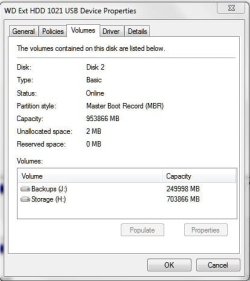
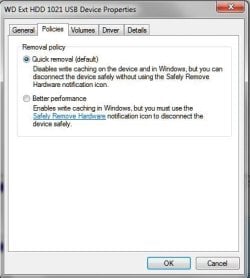
Any help is appreciated as this drive has had hardly any use because of this problem, and I don't really want to bin it.
I first noticed the problem when I was downloading torrents to this drive. The download after a short while would slow to a crawl and then stop. At first I thought it was a problem with my Bittorrent, but when I tried downloading to an internal drive everything was hunky dory again with no slowdown.
I've recently been trying to transfer some movies over to this drive to clear up space on my internal drive and the problem has reappeared. The transfer would proceed fine until it was almost finished and then it would hang (see picture below). Sometimes after a few minutes the transfer would complete but the file would remain in both locations, even though I used the 'move' command. Other times the transfer would fail and I'd end up with an empty folder on the receiving drive.
Another symptom of the problem is sometimes when trying to read from the drive my computer just freezes and hangs and I am unable to do anything - not even access task manager to close explorer. If I unplug the hard drive the freeze up ends and everything is back to normal.
Also, when booting up the bootup process stops for about 30 seconds when trying to read this drive. Again if I unplug the drive the bootup continues normally.
I have included a couple of screenshots of the setup of this drive below in case that helps in diagnosing the problem. For example could it be because caching is disabled that I have this problem (although wouldn't that just affect writing and not reading also?). Also I don't understand why this particular drive is setup as an MBR drive.
Any help is appreciated as this drive has had hardly any use because of this problem, and I don't really want to bin it.
My Computer
- Computer type
- PC/Desktop
- Computer Manufacturer/Model Number
- Self build
- OS
- Windows 7 professional X 64
- CPU
- Phenom 11 X 6 1090t 3.2 GHz
- Motherboard
- Asus Crosshair III Formula 790FX
- Memory
- 8 gb Corsair 1600MHz C9 DDR3
- Graphics Card(s)
- 2 X Saphire HD5770 Vapour X in crossfire
- Sound Card
- SupremeFX X-Fi
- Monitor(s) Displays
- Samsung 24" full HD
- Screen Resolution
- 1920 X 1080
- Hard Drives
- 1 X 1Tb Sata HHD
- PSU
- Corsair TX 650 watt
- Case
- Antec 902 ultimate gamer case
- Cooling
- Zalman CNPS 9900


