
Weird Problem

GokAy

New member
Guru
Gold Member
VIP
Local time
7:17 AM
Messages
5,653
Location
Maltepe - Istanbul
Hey all, we have a saying here along the lines of "A tailor can't fix his own holes" :) so I am here asking for any advice.

I have been getting a strange glitch where windows stop refreshing and menus and informational pop-ups (like when you hover mouse on title of a webpage) turn black. The context menu for example when right clicked show correct for a split second and covered by a black overlay.

This started after I installed a program called QTTabBar (but not sure if they are related). Today it happened twice in 20 minute interval, but possible it won't happen for 3 days. Remedy has been to log off and log back in.

I have already restored to an image from before the install. And also cleaned the startup a bit. But still happening.

Attaching the DM log collector from a few days earlier (had a random BSOD) results in case you want to check the state of the system.
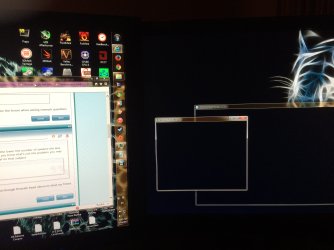
20150619_185811401_iOS.jpg
 

Attachments

My Computer

Computer type
PC/Desktop
Computer Manufacturer/Model Number
Custom Build
OS
Windows 7 Ultimate x64 SP1
CPU
AMD Phenom 2 1090T
Motherboard
Gigabyte GA-890FXA-UD5
Memory
2x8GB Kingston HyperX Fury Black 1600Mhz Unganged
Graphics Card(s)
MSI GTX 970 Gaming 4G
Sound Card
Realtek On-Board HD 7.1 Audio / Logitech G35
Monitor(s) Displays
3xAcer GD245HQ
Screen Resolution
1920x1080
Hard Drives
Samsung 850 Pro 512GB SSD - OS /
WD Caviar Black SATA 3 - 1 TBx2 - Dynamic RAID 0 /
WD Caviar Green SATA 2 - 640GBx2 - Dynamic RAID 0 /
WD Caviar Green SATA 2 - 640GB - Internal Backup /
Seagate Barracude SATA 3 - 3TB - External Backup/ Sync
PSU
HighPower 1000W
Case
Cooler Master HAF 932
Cooling
Noctua NH-D14
Keyboard
Logitech G19
Mouse
Logitech G500
Internet Speed
100/4 Mbit Cable (100GB quota)
Antivirus
ZoneAlarm Extreme Security / MBAM Pro / MBAE Free / SAS Free
Browser
IE 11 - Firefox - Chrome
Other Info
Logitech F710/ G27/ G940/ Z5500 // TrackIR 5 // Nvidia 3D Surround Vision
There are a couple of drivers showing up in your dump file.

Kaspersky:
Code:
fffff880`02db6068  fffff880`038e7558Unable to load image klif.sys, Win32 error 0n2
[COLOR=Red]*** WARNING: Unable to verify timestamp for klif.sys
*** ERROR: Module load completed but symbols could not be loaded for klif.sys[/COLOR]
 klif+0x21558

Code:
KLIF         Kaspersky Lab Driver   Kaspersky Lab Driver   File System   System     Running    OK         TRUE        FALSE        147,456    241,664    0      3/11/2014 1:13:11 PM   C:\Windows\system32\DRIVERS\klif.sys
Zone Alarm Firewall:
Code:
BugCheck 7E, {ffffffffc0000005, fffff88007f4ecd8, fffff88002db6978, fffff88002db61d0}

[COLOR=Red]*** WARNING: Unable to verify timestamp for vsdatant.sys
*** ERROR: Module load completed but symbols could not be loaded for vsdatant.sys[/COLOR]
Probably caused by : vsdatant.sys ( vsdatant+ecd8 )

Code:
Vsdatant     Zone Alarm Firewall Dr Zone Alarm Firewall Dr Kernel        System     Running    OK         TRUE        FALSE        12,288     380,928    0      6/4/2014 3:03:11 AM    C:\Windows\system32\DRIVERS\vsdatant.sys
I don't see any trace of Kaspersky on your system, have you had it installed and then uninstalled it?
 

My Computer

Computer type
PC/Desktop
Computer Manufacturer/Model Number
Custom Build
OS
W7 Pro x64 SP1 | W10 Pro IP x64 | W8.1 Pro x64 VM | Linux Mint VM
CPU
i7-4790k @ 4GHz (4.4GHz Boost)
Motherboard
ASUS Sabertooth Z87 (BIOS Rev 2004)
Memory
16GB DDR3 Kingston HyperX Fury @ 1600MHz CL 9-9-9-27
Graphics Card(s)
EVGA GTX 980 Classified
Sound Card
Realtek Onboard
Monitor(s) Displays
Samsung S27D390
Screen Resolution
1920 x 1080
Hard Drives
240GB Intel 520 Series SSD |
Samsung 850 EVO 120GB SSD |
2TB WD Caviar Black |
2TB WD Caviar Green
PSU
Corsair HX850-80 Gold Modular
Case
Cooler Master Silencio 650
Cooling
Corsair H80i w/2 x Corsair SP120 | 2 x 120mm Noctua NF-S12B
Keyboard
Microsoft Sidewinder X4
Mouse
Gigabyte M6900 optical
Internet Speed
152mb
Antivirus
F-Secure
Browser
Firefox 38.0
Other Info
Backup Rig: Win 7 Pro 64-bit | AMD A10-5800k | ASUS F2A85-V Pro | 8GB Samsung DDR3 @1600MHz | 120GB Toshiba SDD | 2TB Seagate HDD | Cooler Master Silencio 550
Nope, never had it installed. Been using ZA for 5+ years.

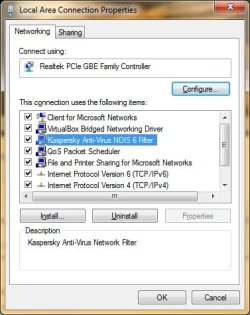
It is this:
LAN properties - Kaspersky.jpg

I have it on my laptop too, which is unrelated. They both have ZA Extreme Security, maybe it is installing it.

Arc has already checked the dmp for me and we are aware of ZA causing the BSOD, I have my eyes watching it. :)

Thanks for your input, much appreciated! ;)

Edit: Just checked ZA forums
NDIS is part of Kaspersky and as ZA uses Kaspersky engine it is also included in ZA (antivirus versions).
 

My Computer

Computer type
PC/Desktop
Computer Manufacturer/Model Number
Custom Build
OS
Windows 7 Ultimate x64 SP1
CPU
AMD Phenom 2 1090T
Motherboard
Gigabyte GA-890FXA-UD5
Memory
2x8GB Kingston HyperX Fury Black 1600Mhz Unganged
Graphics Card(s)
MSI GTX 970 Gaming 4G
Sound Card
Realtek On-Board HD 7.1 Audio / Logitech G35
Monitor(s) Displays
3xAcer GD245HQ
Screen Resolution
1920x1080
Hard Drives
Samsung 850 Pro 512GB SSD - OS /
WD Caviar Black SATA 3 - 1 TBx2 - Dynamic RAID 0 /
WD Caviar Green SATA 2 - 640GBx2 - Dynamic RAID 0 /
WD Caviar Green SATA 2 - 640GB - Internal Backup /
Seagate Barracude SATA 3 - 3TB - External Backup/ Sync
PSU
HighPower 1000W
Case
Cooler Master HAF 932
Cooling
Noctua NH-D14
Keyboard
Logitech G19
Mouse
Logitech G500
Internet Speed
100/4 Mbit Cable (100GB quota)
Antivirus
ZoneAlarm Extreme Security / MBAM Pro / MBAE Free / SAS Free
Browser
IE 11 - Firefox - Chrome
Other Info
Logitech F710/ G27/ G940/ Z5500 // TrackIR 5 // Nvidia 3D Surround Vision
Back
Top