Western digital passport 500gb errors

jordanC

New member
Local time
10:52 AM
Messages
10
Hey guys, i just bought myself western didgital external harddrive for all my music, the only problem is i cant acess it. It shows up in my computer as a HDD but when i double click it i get an error reading "Q: is not acessable, acsess denied." Can anyone help me out here, cheers.
 

My Computer My Computer

At a glance

windows 7 professional 32 bit
Computer Manufacturer/Model Number
Sony vaio VGN-N38Z
OS
windows 7 professional 32 bit
Hi,
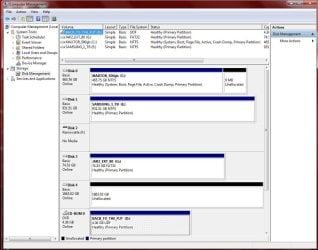
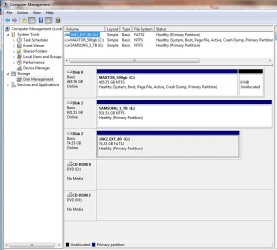
Can you give us a full screen snip of your Disk Management

Start :ar: Computer Management :ar: Disk Management
 

Attachments

  • Disk_Management_New_2tbHD.JPG
    Disk_Management_New_2tbHD.JPG
    108.7 KB · Views: 262
  • Disk_Management_oct_2009.JPG
    Disk_Management_oct_2009.JPG
    88.7 KB · Views: 195

My Computer My Computer

At a glance

Win7 Enterprise, Win7 x86 (Ult 7600), Win7 x6...AMD fx8350 4ghz, AMD-32 2400mhz, AMD-64 3200m...2gb, 4gb on the Ult 7600, 4gb on Technet RTM,...Draw my own Graphics, several nVidia cards
Computer type
PC/Desktop
Computer Manufacturer/Model Number
Built them myself, Science Experiments !
OS
Win7 Enterprise, Win7 x86 (Ult 7600), Win7 x64 Ult 7600, TechNet RTM on AMD x64 (2.8Ghz)
CPU
AMD fx8350 4ghz, AMD-32 2400mhz, AMD-64 3200mhz, AMDx64 2.8G
Motherboard
SIS 755, ECS-K8M890M-M (Ult 7600), GigaByte & others
Memory
2gb, 4gb on the Ult 7600, 4gb on Technet RTM, 32gb on FX8350
Graphics Card(s)
Draw my own Graphics, several nVidia cards
Sound Card
on motherboard
Monitor(s) Displays
19" flat scr, 28" I-Inc widescr,22" Emprex Widescr, 23" Acer
Screen Resolution
1280 x 1024, 1440 x 900, 1920 x 1080
Hard Drives
6 pata Ide HD's & 2 Sata HD's
added 80gb external on Ult 7600 computer,
numerous extra 1tb, 2TB, 3Tb SATA HD's
A collection of ext HD Docks w/ HDs
PSU
430w, 550w, 600w, 700, 800, etc
Case
All Generic Full Towers
Cooling
Open Air & a few fans, some w/ colored LEDs
Keyboard
Compaq & Dell recycled from GoodWill
Mouse
Made in China Optical Wired Mouse
Internet Speed
Fast Cable InterNet
Antivirus
AVG Free on 24 different Desktops, NO Problems!
Browser
IE 8 is preferred, but use FireFox sometimes
Other Info
Linksys Routers, switches, & Hubs
Too Many USB Flash Drives to count, Biggest is 64GB !
Eight computers in my home network.
Sixteen computers at my business network.
Linked via TeamViewer !
Lots of old used spare computer parts everywhere!
there you go :)
 

Attachments

  • Untitled jew.png
    Untitled jew.png
    51.8 KB · Views: 345

My Computer My Computer

At a glance

windows 7 professional 32 bit
Computer Manufacturer/Model Number
Sony vaio VGN-N38Z
OS
windows 7 professional 32 bit
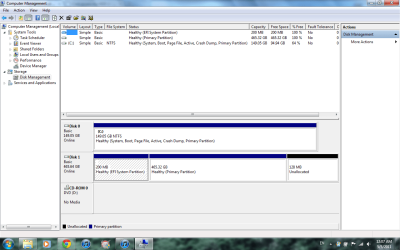
Try right clicking on the 200mb & then the 465gb partitions & see if you get a menu that will let you asign a drive letter to them.
 

My Computer My Computer

At a glance

Win7 Enterprise, Win7 x86 (Ult 7600), Win7 x6...AMD fx8350 4ghz, AMD-32 2400mhz, AMD-64 3200m...2gb, 4gb on the Ult 7600, 4gb on Technet RTM,...Draw my own Graphics, several nVidia cards
Computer type
PC/Desktop
Computer Manufacturer/Model Number
Built them myself, Science Experiments !
OS
Win7 Enterprise, Win7 x86 (Ult 7600), Win7 x64 Ult 7600, TechNet RTM on AMD x64 (2.8Ghz)
CPU
AMD fx8350 4ghz, AMD-32 2400mhz, AMD-64 3200mhz, AMDx64 2.8G
Motherboard
SIS 755, ECS-K8M890M-M (Ult 7600), GigaByte & others
Memory
2gb, 4gb on the Ult 7600, 4gb on Technet RTM, 32gb on FX8350
Graphics Card(s)
Draw my own Graphics, several nVidia cards
Sound Card
on motherboard
Monitor(s) Displays
19" flat scr, 28" I-Inc widescr,22" Emprex Widescr, 23" Acer
Screen Resolution
1280 x 1024, 1440 x 900, 1920 x 1080
Hard Drives
6 pata Ide HD's & 2 Sata HD's
added 80gb external on Ult 7600 computer,
numerous extra 1tb, 2TB, 3Tb SATA HD's
A collection of ext HD Docks w/ HDs
PSU
430w, 550w, 600w, 700, 800, etc
Case
All Generic Full Towers
Cooling
Open Air & a few fans, some w/ colored LEDs
Keyboard
Compaq & Dell recycled from GoodWill
Mouse
Made in China Optical Wired Mouse
Internet Speed
Fast Cable InterNet
Antivirus
AVG Free on 24 different Desktops, NO Problems!
Browser
IE 8 is preferred, but use FireFox sometimes
Other Info
Linksys Routers, switches, & Hubs
Too Many USB Flash Drives to count, Biggest is 64GB !
Eight computers in my home network.
Sixteen computers at my business network.
Linked via TeamViewer !
Lots of old used spare computer parts everywhere!
Also, have you done anything to the passport apart from plug it in?
 

My Computer My Computer

At a glance

Windows 7x64 Home Premium SP1Intel i7 2600kG.Skill Ripjaws (DDR3-1600) 2x4GBNvidia GeForce GTS 450; Intel HD Graphics 300...
Computer type
PC/Desktop
Computer Manufacturer/Model Number
Own build
OS
Windows 7x64 Home Premium SP1
CPU
Intel i7 2600k
Motherboard
ASUS P8Z68 Deluxe
Memory
G.Skill Ripjaws (DDR3-1600) 2x4GB
Graphics Card(s)
Nvidia GeForce GTS 450; Intel HD Graphics 3000(GT2+)
Monitor(s) Displays
Dell Ultrasharp IPS panel U2311H, Samsung SyncMaster P2350
Screen Resolution
1920x1080
Hard Drives
Samsung 850 Pro SSD 256GB, Samsung SSD 840 120GB, Seagates 1TB Barracuda ST31000528AS x2
PSU
Seasonic M12II 520W
Case
Lian Li Lancool PC-K60
Cooling
Case: 1x120mm, 3x140mm CPU: Hyper 212+
Keyboard
Logitech MK520 (wireless)
Mouse
Logitech MK520
Internet Speed
6-7 Mbps
Antivirus
Norton Security Premium, Malwarebytes on 2 (MSE on 3rd PC)
Browser
FireFox
Other Info
Audio: Logitech Z523 2.1
All ive done is plug it in and install the drivers for it from thier website. When i right click on the partitions of my laptop hdd i can change the letter, but i cant with my external HDD, just has all the options grey and cant click them. :/
 

My Computer My Computer

At a glance

windows 7 professional 32 bit
Computer Manufacturer/Model Number
Sony vaio VGN-N38Z
OS
windows 7 professional 32 bit
Your 465GB partition on the external drive has no file system yet. So you can't assign a drive letter, until it is formatted.

Select that 465GB partition (it will become cross-hatched). Then right-click on it, and select FORMAT from the popup menu. Follow the wizard to format it as NTFS.

Then it should either automatically be assigned a drive letter by Windows, or you can manually assign a drive letter (still while in DISKMGMT).


I don't think you need to format that 200MB system partition as NTFS, but in worst case you could do that as well. If you have some Windows problem because this partition has no file system, then you should definitely format it as NTFS as well. Presumably there's nothing on it you need to preserve... since you can't read it anyway.

Actually I don't think you really need that little partition on a second drive, so you could even delete it and just resize the 465GB partition to include this 200MB space. Not a big deal, but it's an option.
 

My Computer My Computer

At a glance

Windows 7 Pro x64 (1), Win7 Pro X64 (2)i5-3350p 3.1Ghz/6MB-cache (1); E8400 3.0Ghz/6...8GB PC3-12800 DDR3 (1); 4GB PC3-10600 DDR3 (2)ATI HD7750 (1), (see TV cards); ATI R7 250 (2)
Computer type
PC/Desktop
Computer Manufacturer/Model Number
Home-built, two systems (1) and (2)
OS
Windows 7 Pro x64 (1), Win7 Pro X64 (2)
CPU
i5-3350p 3.1Ghz/6MB-cache (1); E8400 3.0Ghz/6MB-cache (2)
Motherboard
ASUS P8Z77-V Pro (1); ASUS P5Q3 (2)
Memory
8GB PC3-12800 DDR3 (1); 4GB PC3-10600 DDR3 (2)
Graphics Card(s)
ATI HD7750 (1), (see TV cards); ATI R7 250 (2)
Sound Card
Realtek ALC892 HD Audio (1); Realtek ALC1200 HD Audio (2)
Monitor(s) Displays
Eizo HD2441W LCD, Eizo S2433W (1); Eizo 24" S2433W (2)
Screen Resolution
1920x1200, 1920x1200 (1); 1920x1200 (2)
Hard Drives
(1) 1TB SATA-II (7200RPM), 2x2TB SATA-III (7200RPM), 250GB SATA-III (10000RPM) for OS; 2x2TB external USB 3.0

(2) 320GB SATA-II (7200RPM), 750GB SATA-II (7200RPM), 150GB SATA-II (10000RPM) for OS; 2TB external USB 3.0
PSU
Nesteq ECS-6001 600W (1); Nesteq ECS-5001 500W (2)
Case
Acousti-Case 360 (1) and (2)
Cooling
Noctua NH-U12P SE2 for CPU, 2x120mm case fans (1) and (2)
Keyboard
IBM PS/2 (1) and (2)
Mouse
Logitech MX Revolution wireless (1); Microsoft wired (2)
Internet Speed
100mbps down / 10mbps up
Antivirus
Microsoft Security Essentials; Malwarebyte Anti-Malware Pro
Browser
Firefox
Other Info
Ceton InfiniTV 4-tuner cablecard-enabled TV card as well as Hauppauge HVR-2250 OTA/ATSC 2-tuner TV card in (1), running under Win7 WMC
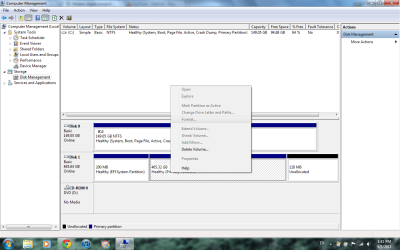
This is what happens when i try to formatt it :(
 

Attachments

  • Untitled judas.png
    Untitled judas.png
    55.2 KB · Views: 175

My Computer My Computer

At a glance

windows 7 professional 32 bit
Computer Manufacturer/Model Number
Sony vaio VGN-N38Z
OS
windows 7 professional 32 bit
Well... drat.

I'm beginning to think this is now typical of all USB drives, which come pre-formatted for Mac's (with HFS) instead of Windows (with NTFS).

Anyway, since "delete volume" is the only thing you can do, I suppose you could select that. I have never done that before, but I suspect that 485GB partition will be deleted, and become "unallocated".

Given what this probably implies, I'd imagine the other two partitions on the drive should also be disappeared the same way, making the entire drive "unallocated".

Then, you should be able to create new partition(s) from this 100% unallocated space. Personally I'd recommend "logical" partitions rather than "primary", but it's not critical as long as you only want 1-4 partitions on the drive.

You perhaps will need to FORMAT to NTFS after allocating the partition, given what you've run into so far.


Alternatively...

(1) Download and install [free] Partition Wizard Home Edition v5.2.

(2) Also download the ISO image and burn the standalone boot CD version of Partition Wizard, which can be used conveniently when the functions you're performing cannot be completed while booted to the OS, but must be run outside of the OS.

(3) Run Partition Wizard while under Win7 because work on this external drive (Disk1 for DISKMGMT, Disk 2 for Partition Wizard) can be run this way without any limitations.

Maximize the window to fill the screen, and spread the columns where information is shown, so that you can see all text in all columns. It's just much more readable that way.

(4) Select that external drive which will be titled "Disk 2" in the presentation, by clicking on the "Disk 2" title itself, not on any of the detail lines underneath it.

(5) When you select the drive itself (i.e. "Disk 2") on the left side of the screen you will see an available item under "Operations" named "delete all partitions". Select that "delete all partitions" and reply "yes" to the confirmation asking you if you want to delete all partitions.

This will add the "delete all partitions" operation to the queued list of operations now shown at the bottom-left corner of the screen. And the presentation for the contents of Disk 2" will now be modified to appear as if the entire 500GB (i.e. maybe 486GB after formatting) space is now unallocated and fully available for partitioning.

(6) Push the APPLY button at the bottom left of the screen, to perform this one pending operation to "delete all partitions" on the external drive "Disk 2". This will perform and complete it, and the list of queued operations will be emptied.

(7) Select the "unallocated" space now appearing under the "Disk 2" title. Now, on the left side of the screen in the "Operations" section you will see the "create partition" item.

Select this "create partition" item, to bring up the "Create New Partition" window. The options on the window should be completely intuitive, and you can either allocate it completely as one partition or you can create two or more smaller partitions in the 486GB available space. BE SURE TO SPECIFY NTFS FILE TYPE.

You use sliders and/or entered values to specify the size and location of the partition you're creating, and you can also install a label for the partition.

My suggestion is that you create the one or more partitions on this second drive as "logical" partitions instead of "primary partitions. Functionally, they're essentially identical, but with "logical" partitions you don't have the "maximum of four primary partitions on a basic hard drive" to contend with. You have no limit on the number of "logical" partitions. Obviously if you only want to have one partition on this drive it doesn't really matter whether you use "logical" or "primary".

(8) When you push the OK button, the "create partition" operation will be queued in the list at the bottom-left corner of the screen.

You can now repeat the "create partition" process a second time if you want to build more than one partition into that 500GB drive. Pushing OK will add this second partition's create to the queued pending operation list.

Repeat again as required.

(9) When you're done, push the APPLY button in the lower-left, and the one or more partitions you want to create on the external hard drive will be created.

(10) If for some reason the file system NTFS doesn't appear on the partitions, you should select the partitions and then choose the "FORMAT PARTITION" on the left side (or, right-click on the partition and select "format partition" from the popup menu).

Again, we want to get these partitions formatted as NTFS.

(11) You will get default drive letters assigned by this process. You can use Partition Wizard or Win7's DISKMGMT.MSC to change the drive letters to be whatever you want.

Again, if you use Partition Wizard to change the drive letters, you just select the partition from the list in the upper part of the screen or the graphic presentation in the lower part of the screen, and then select the "change drive letter" operation in the "Operations" group shown on the left side of the screen.

As before, push OK after you're finished setting things up, and you can repeat if you want to change another drive letter. All of these operations will again be queued into the pending operations list at the bottom-left corner.

Again, push APPLY, and the drive letter changes will occur.


Partition Wizard. Download it, install it, use it. You won't be sorry.

 

My Computer My Computer

At a glance

Windows 7 Pro x64 (1), Win7 Pro X64 (2)i5-3350p 3.1Ghz/6MB-cache (1); E8400 3.0Ghz/6...8GB PC3-12800 DDR3 (1); 4GB PC3-10600 DDR3 (2)ATI HD7750 (1), (see TV cards); ATI R7 250 (2)
Computer type
PC/Desktop
Computer Manufacturer/Model Number
Home-built, two systems (1) and (2)
OS
Windows 7 Pro x64 (1), Win7 Pro X64 (2)
CPU
i5-3350p 3.1Ghz/6MB-cache (1); E8400 3.0Ghz/6MB-cache (2)
Motherboard
ASUS P8Z77-V Pro (1); ASUS P5Q3 (2)
Memory
8GB PC3-12800 DDR3 (1); 4GB PC3-10600 DDR3 (2)
Graphics Card(s)
ATI HD7750 (1), (see TV cards); ATI R7 250 (2)
Sound Card
Realtek ALC892 HD Audio (1); Realtek ALC1200 HD Audio (2)
Monitor(s) Displays
Eizo HD2441W LCD, Eizo S2433W (1); Eizo 24" S2433W (2)
Screen Resolution
1920x1200, 1920x1200 (1); 1920x1200 (2)
Hard Drives
(1) 1TB SATA-II (7200RPM), 2x2TB SATA-III (7200RPM), 250GB SATA-III (10000RPM) for OS; 2x2TB external USB 3.0

(2) 320GB SATA-II (7200RPM), 750GB SATA-II (7200RPM), 150GB SATA-II (10000RPM) for OS; 2TB external USB 3.0
PSU
Nesteq ECS-6001 600W (1); Nesteq ECS-5001 500W (2)
Case
Acousti-Case 360 (1) and (2)
Cooling
Noctua NH-U12P SE2 for CPU, 2x120mm case fans (1) and (2)
Keyboard
IBM PS/2 (1) and (2)
Mouse
Logitech MX Revolution wireless (1); Microsoft wired (2)
Internet Speed
100mbps down / 10mbps up
Antivirus
Microsoft Security Essentials; Malwarebyte Anti-Malware Pro
Browser
Firefox
Other Info
Ceton InfiniTV 4-tuner cablecard-enabled TV card as well as Hauppauge HVR-2250 OTA/ATSC 2-tuner TV card in (1), running under Win7 WMC
Almost the same problem

Hi all,
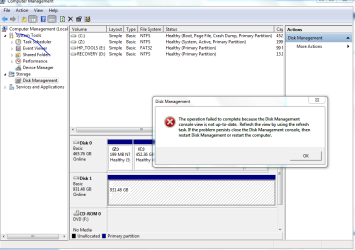
I think we almost have the same problem. Although when I right click on my disk I have the option to change drive letter, format, delete volume, properties and help. But the moment that I clicked on change drive letter I will get the error "The operation failed to complete because the disk management console view is not up-to-date. Refresh the view by using the refresh task. If the problem persist close the disk management console, then restart disk management or restart the computer". I have attached the screentshot below. Please help.
 

Attachments

  • Capture.PNG
    Capture.PNG
    33.4 KB · Views: 97

My Computer My Computer

At a glance

Windows 7 Home Premium 64 bit
OS
Windows 7 Home Premium 64 bit
Hi all,
I think we almost have the same problem. Although when I right click on my disk I have the option to change drive letter, format, delete volume, properties and help. But the moment that I clicked on change drive letter I will get the error "The operation failed to complete because the disk management console view is not up-to-date.
You can't change drive letters unless there is a file system on the partition. It's not possible to be a real Windows "drive letter" unless there is a file system.

Note that there is no "NTFS" in the cross-hatched partition on Disk1, whereas there IS an NTFS shown for your other partitions on Disk0.

Instead of trying to change the drive letter from the popup menu for the cross-hatched partition on Disk1, how about trying to FORMAT it first (since you say that option is not grayed out when you right-click). If that works, you should get a Windows drive letter assigned (or be able to assign it yourself... once the file system is installed on the partition).

Worst case, try my suggested Partition Wizard recipe in the post above yours. This will "delete all partitions" on Disk1, and then create new partition, and then FORMAT, and then drive letter. Hopefully.

Safest bet, with highest likelihood of success: boot using the standalone Partition Wizard CD.


I still think the reason everybody is seemingly having these problems is that these USB drives are coming pre-formatted not for Windows but for Mac's (and HFS). They can't be used in Windows unless they're formatted properly... either by the factory, or by manual steps you must take first in order to prepare the drive for Windows and NTFS.

I did a little research on this same type of problem on another thread (where an Iomega USB drive was involved. Here are my findings:

========================================

Doing a bit of research, it almost looks like Iomega USB drives ship formatted for Mac's, not for Windows:

"Some Iomega Hard Drives ship formatted Mac OS Extended (HFS+) for use with Mac OS and will not be recognized by Windows until they are reformatted NTFS or FAT32/exFAT. This includes most Iomega FireWire®/USB 2.0 Desktop Hard Drives, the MiniMax Hard Drive, the Iomega UltraMax Hard Drive, and some models of the Portable Hard Drive. If you are connecting one of these drives to a Windows PC, and you do not see the drive in 'My Computer' or Windows Explorer, follow the instructions below to format the drive to NTFS or FAT32. This will allow your computer to recognize the drive."

The procedure described on this Iomega support page describes the usual standard initialization for an MBR disk (under 2TB), as to how to re-prepare the drive for use with Windows. In particular this is the recommended solution if Windows does not assign a drive letter (sound familiar guys?).

NOTE: the DISKMGMT screenshots on that Iomega page look EXACTLY like the one we're puzzled about here, where there is a partition but no file system on it.

Again, strong evidence for why it looks like FORMAT to NTFS could solve the problem... if this is what's been the root problem all along.

I would think Partition Wizard's "initialize to MBR disk" function might accomplish the same result, although FORMAT to NTFS may also be needed afterwards.

Anyway, this is certainly an interesting new piece of information to consider.
 

My Computer My Computer

At a glance

Windows 7 Pro x64 (1), Win7 Pro X64 (2)i5-3350p 3.1Ghz/6MB-cache (1); E8400 3.0Ghz/6...8GB PC3-12800 DDR3 (1); 4GB PC3-10600 DDR3 (2)ATI HD7750 (1), (see TV cards); ATI R7 250 (2)
Computer type
PC/Desktop
Computer Manufacturer/Model Number
Home-built, two systems (1) and (2)
OS
Windows 7 Pro x64 (1), Win7 Pro X64 (2)
CPU
i5-3350p 3.1Ghz/6MB-cache (1); E8400 3.0Ghz/6MB-cache (2)
Motherboard
ASUS P8Z77-V Pro (1); ASUS P5Q3 (2)
Memory
8GB PC3-12800 DDR3 (1); 4GB PC3-10600 DDR3 (2)
Graphics Card(s)
ATI HD7750 (1), (see TV cards); ATI R7 250 (2)
Sound Card
Realtek ALC892 HD Audio (1); Realtek ALC1200 HD Audio (2)
Monitor(s) Displays
Eizo HD2441W LCD, Eizo S2433W (1); Eizo 24" S2433W (2)
Screen Resolution
1920x1200, 1920x1200 (1); 1920x1200 (2)
Hard Drives
(1) 1TB SATA-II (7200RPM), 2x2TB SATA-III (7200RPM), 250GB SATA-III (10000RPM) for OS; 2x2TB external USB 3.0

(2) 320GB SATA-II (7200RPM), 750GB SATA-II (7200RPM), 150GB SATA-II (10000RPM) for OS; 2TB external USB 3.0
PSU
Nesteq ECS-6001 600W (1); Nesteq ECS-5001 500W (2)
Case
Acousti-Case 360 (1) and (2)
Cooling
Noctua NH-U12P SE2 for CPU, 2x120mm case fans (1) and (2)
Keyboard
IBM PS/2 (1) and (2)
Mouse
Logitech MX Revolution wireless (1); Microsoft wired (2)
Internet Speed
100mbps down / 10mbps up
Antivirus
Microsoft Security Essentials; Malwarebyte Anti-Malware Pro
Browser
Firefox
Other Info
Ceton InfiniTV 4-tuner cablecard-enabled TV card as well as Hauppauge HVR-2250 OTA/ATSC 2-tuner TV card in (1), running under Win7 WMC
Hey thanks man, i deleted the partition made and you were right, it had been setup for mac! was simple to sort out after that, took about 30 seconds :L thanks
 

My Computer My Computer

At a glance

windows 7 professional 32 bit
Computer Manufacturer/Model Number
Sony vaio VGN-N38Z
OS
windows 7 professional 32 bit
Hey thanks man, i deleted the partition made and you were right, it had been setup for mac! was simple to sort out after that, took about 30 seconds :L thanks
Excellent! Glad I could help out.

Could you please post one final screenshot from Diskmgmt (maximized, columns spread so that we can see all text), so that we can see what you ended up with.

Did you delete the other two small partitions on either side of the 485GB partition as well? Did you end up with one large partition using all the available space? Of course, we'll have these answers from the screenshot.

Did you actually have to FORMAT after deleting and then creating? This is the one thing that's not going to be implied by the screenshot from Diskmgmt.

Did you use Partition Wizard, or just Diskmgmt?
 

My Computer My Computer

At a glance

Windows 7 Pro x64 (1), Win7 Pro X64 (2)i5-3350p 3.1Ghz/6MB-cache (1); E8400 3.0Ghz/6...8GB PC3-12800 DDR3 (1); 4GB PC3-10600 DDR3 (2)ATI HD7750 (1), (see TV cards); ATI R7 250 (2)
Computer type
PC/Desktop
Computer Manufacturer/Model Number
Home-built, two systems (1) and (2)
OS
Windows 7 Pro x64 (1), Win7 Pro X64 (2)
CPU
i5-3350p 3.1Ghz/6MB-cache (1); E8400 3.0Ghz/6MB-cache (2)
Motherboard
ASUS P8Z77-V Pro (1); ASUS P5Q3 (2)
Memory
8GB PC3-12800 DDR3 (1); 4GB PC3-10600 DDR3 (2)
Graphics Card(s)
ATI HD7750 (1), (see TV cards); ATI R7 250 (2)
Sound Card
Realtek ALC892 HD Audio (1); Realtek ALC1200 HD Audio (2)
Monitor(s) Displays
Eizo HD2441W LCD, Eizo S2433W (1); Eizo 24" S2433W (2)
Screen Resolution
1920x1200, 1920x1200 (1); 1920x1200 (2)
Hard Drives
(1) 1TB SATA-II (7200RPM), 2x2TB SATA-III (7200RPM), 250GB SATA-III (10000RPM) for OS; 2x2TB external USB 3.0

(2) 320GB SATA-II (7200RPM), 750GB SATA-II (7200RPM), 150GB SATA-II (10000RPM) for OS; 2TB external USB 3.0
PSU
Nesteq ECS-6001 600W (1); Nesteq ECS-5001 500W (2)
Case
Acousti-Case 360 (1) and (2)
Cooling
Noctua NH-U12P SE2 for CPU, 2x120mm case fans (1) and (2)
Keyboard
IBM PS/2 (1) and (2)
Mouse
Logitech MX Revolution wireless (1); Microsoft wired (2)
Internet Speed
100mbps down / 10mbps up
Antivirus
Microsoft Security Essentials; Malwarebyte Anti-Malware Pro
Browser
Firefox
Other Info
Ceton InfiniTV 4-tuner cablecard-enabled TV card as well as Hauppauge HVR-2250 OTA/ATSC 2-tuner TV card in (1), running under Win7 WMC
There you go :) I did have to format it after by right clicking it and allocating it. (after unallocating it which is what got me confused) It came up with a formatting wizard and took about 30 seconds :)
And i just left the 2 smaller partitions on it.
 

Attachments

  • Untitled.png
    Untitled.png
    54.7 KB · Views: 56

My Computer My Computer

At a glance

windows 7 professional 32 bit
Computer Manufacturer/Model Number
Sony vaio VGN-N38Z
OS
windows 7 professional 32 bit
And i just left the 2 smaller partitions on it.
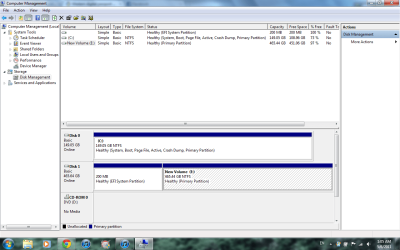
From the screenshot it looks like you "absorbed" that original 128MB unallocated space which was to the right of the big 465.32GB partition which was causing you the problem.

When you deleted the 465.32 partition (making it unallocated) that other 128MB unallocated space to its right simply got combined into one contiguous unallocated space, now available for partitioning.

And then when you created the new partition (apparently specifying "use all available free space), that's how you ended up with 465.44GB (i.e. 465.32 + .128) in your new partition.

The key to success was, apparently, then FORMAT'ing it as NTFS, and you're now home. You've emerged victorious.


However you still left that small 200MB system partition to the left of the new 465GB partition. I don't know what that's for, nor how it got created if you didn't do it yourself.

Also, it's called "EFI System Partition", which I don't know what that means. Perhaps this has something to do with factory formatting for a MAC. It certainly means nothing for Windows, in my opinion. Your "active" partition is the C partition on Disk0. That's where your BIOS boots to.

You don't have the typical 100MB "system reserved" (and "active") partition generally seen on Win7 systems with only one OS, where the Win7 installer puts its boot manager files and which the BIOS boots to, along with the real Win7 system installed into a genuine C second partition.

Nevertheless, this odd 200MB "EFI System Partition" on Disk1 can't possibly be of any use in your environment, in my opinion. I'd like to know how it got created, but beyond that I would rate it of zero value.

Anyway, if you really wanted to do what I would do... I'd delete that 200MB partition, and then re-size the 465GB partition to include this final bit of 200MB on the drive. This would give you one big 465.64GB partition using all available space on the drive.

All very interesting.
 

My Computer My Computer

At a glance

Windows 7 Pro x64 (1), Win7 Pro X64 (2)i5-3350p 3.1Ghz/6MB-cache (1); E8400 3.0Ghz/6...8GB PC3-12800 DDR3 (1); 4GB PC3-10600 DDR3 (2)ATI HD7750 (1), (see TV cards); ATI R7 250 (2)
Computer type
PC/Desktop
Computer Manufacturer/Model Number
Home-built, two systems (1) and (2)
OS
Windows 7 Pro x64 (1), Win7 Pro X64 (2)
CPU
i5-3350p 3.1Ghz/6MB-cache (1); E8400 3.0Ghz/6MB-cache (2)
Motherboard
ASUS P8Z77-V Pro (1); ASUS P5Q3 (2)
Memory
8GB PC3-12800 DDR3 (1); 4GB PC3-10600 DDR3 (2)
Graphics Card(s)
ATI HD7750 (1), (see TV cards); ATI R7 250 (2)
Sound Card
Realtek ALC892 HD Audio (1); Realtek ALC1200 HD Audio (2)
Monitor(s) Displays
Eizo HD2441W LCD, Eizo S2433W (1); Eizo 24" S2433W (2)
Screen Resolution
1920x1200, 1920x1200 (1); 1920x1200 (2)
Hard Drives
(1) 1TB SATA-II (7200RPM), 2x2TB SATA-III (7200RPM), 250GB SATA-III (10000RPM) for OS; 2x2TB external USB 3.0

(2) 320GB SATA-II (7200RPM), 750GB SATA-II (7200RPM), 150GB SATA-II (10000RPM) for OS; 2TB external USB 3.0
PSU
Nesteq ECS-6001 600W (1); Nesteq ECS-5001 500W (2)
Case
Acousti-Case 360 (1) and (2)
Cooling
Noctua NH-U12P SE2 for CPU, 2x120mm case fans (1) and (2)
Keyboard
IBM PS/2 (1) and (2)
Mouse
Logitech MX Revolution wireless (1); Microsoft wired (2)
Internet Speed
100mbps down / 10mbps up
Antivirus
Microsoft Security Essentials; Malwarebyte Anti-Malware Pro
Browser
Firefox
Other Info
Ceton InfiniTV 4-tuner cablecard-enabled TV card as well as Hauppauge HVR-2250 OTA/ATSC 2-tuner TV card in (1), running under Win7 WMC
Back
Top