Solved What backup & relocation strategy for User profiles and Program Data

My Computer

Computer Manufacturer/Model Number
HP, Dell, Gateway, Toshiba - 4 laptops and 2 desktops
OS
Vista, Windows7, Mint Mate, Zorin, Windows 8
CPU
from 1.6GHz Duo to i7
Monitor(s) Displays
2x HP w2207
Hard Drives
5x HDD, 7x SSD, 12x Externals
Keyboard
with trackball - no mices
Mouse
Trackball mice
Internet Speed
DSL 6000
To all:

indeed I have a lot of questions and all are related to a single thing: which configuration will I use for my new installation, regarding OS+progs image backup, that will be practical to me and also a sure way not to mess up everything with the Users things when I recover. (which was my case yesterday and i now I unfortunately need to do all from scratch again).
So all views are welcome and please continue to asnwer me because your experience is most welcome.
Thus being said: I took time to write a first post that included many details.
For example that I didn't want to use Windows Backup and also that I didn't want to make an image of the whole data partition. (that's why I also proposed option 1 with three partitions.
  1. OS and Progs
  2. ProgramData + Users. With Users containing AppData, system folders, etc. but somehow linking to the actual data partition
  3. data

Thank you all again and I hope that with the continuing of these topic I'll at least have a clearer view on it. Which is already the case to a certain point, thanks to all of you.
 

My Computer

Computer type
Laptop
Computer Manufacturer/Model Number
Asus N55SF
OS
Windows 7 Home Premium 64 bit
CPU
Intel Core i5 2410M @ 2.30GHz Sandy Bridge 32nm Technology
Motherboard
ASUSTeK Computer Inc. N55SF
Memory
8,00 GB Dual-Channel DDR3 @ 1333 MHz (PC3-10600)
Graphics Card(s)
NVIDIA GeForce GT 555M, Intel HD Graphics 3000
Sound Card
Realtek High Definition Audio
Screen Resolution
1600x900@60Hz
Hard Drives
699GB Seagate ST9750423AS (SATA) 5400rpm
Other Info
Optical drive: Slimtype DVD A DS8A5SH
I would go with only 2 partitions

1. OS and programs
2. Data

There is nothing to be gained splitting out those OS files into a 3d partition. It just complicates your life.

For the data, you can always use a sync program to backup. That is faster than imaging (although I personally prefer imaging my data partition).
 

My Computer

Computer Manufacturer/Model Number
HP, Dell, Gateway, Toshiba - 4 laptops and 2 desktops
OS
Vista, Windows7, Mint Mate, Zorin, Windows 8
CPU
from 1.6GHz Duo to i7
Monitor(s) Displays
2x HP w2207
Hard Drives
5x HDD, 7x SSD, 12x Externals
Keyboard
with trackball - no mices
Mouse
Trackball mice
Internet Speed
DSL 6000
A 60 GB C: drive is totally normal. As I want to have all installed software being included in my system images thus installing all apps and programs on C:, mine is ATM almost 100 GB on this laptop's fairly new (about one month) installation.

About the size of the AppData, here's an interesting example:

First some background: As you might know, installing Windows on a virtual machine takes less space than the exactly same installation on a physical computer. This is due the file system and how Windows handles virtual hard disks.

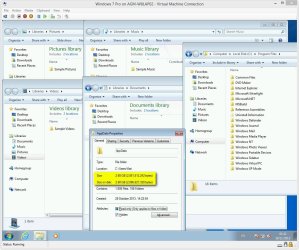
I have a Windows 7 Professional installed on a Windows 8.1 Hyper-V virtual machine, installed just a few weeks ago. It's almost virgin, "empty", I mean I have only installed Windows Virtual PC and XP Mode on this virtual machine, absolutely nothing else. I only used the virtual machine once, to create some screenshots for a post about installing and setting up XP Mode. The Windows 7 Pro vm contains nothing else, is never been used except that one time, contains no personal stuff. I launched it just now for the second time in its short life.

Yet, the AppData is 2.7 GB. I repeat: a completely "empty" new installation, nothing installed but AppData is already a bit under 3 GB:

2013-11-18_014320.jpg

The same folder would take about 3 to 3.1 GB on a physical installation.

When considering your options when reinstalling, remember this: Using sysprep in relocating Users and Programdata, it only needs to be done once, and it takes care of completely moving the entire Users and ProgramData folders including all their subfolders, for example AppData. It also does this at once for every existing user account on your computer, plus for every user account that will be created in the future, as the environment variable which is changed automatically takes care of that all future accounts and all their subfolders will be created on a new location.

Doing it manually means you have to do it manually folder by folder, for each existing user account plus for each user account you will create in the future, still leaving for instance AppData on C:. The more user accounts you are and will be using, the more work you have.

Kari

 

My Computer

Computer type
Laptop
Computer Manufacturer/Model Number
HP ENVY 17-1150eg
OS
Windows 10 Pro x64 EN-GB
CPU
1.6 GHz Intel Core i7-720QM Processor
Memory
6 GB
Graphics Card(s)
ATI Mobility Radeon HD 5850 Graphics
Sound Card
Beats sound system with integrated subwoofer
Monitor(s) Displays
17" laptop display, 22" LED and 32" Full HD TV through HDMI
Screen Resolution
1600*900 (1), 1920*1080 (2&3)
Hard Drives
Internal: 2 x 500 GB SATA Hard Disk Drive 7200 rpm
External: 2TB for backups, 3TB USB3 network drive for media
Cooling
As Envy runs a bit warm, I have it on a Cooler Master pad
Keyboard
Logitech diNovo Media Desktop Laser (bluetooth)
Mouse
Logitech Performance Mouse MX
Internet Speed
50/10 Mbps VDSL
Antivirus
Windows Defender 4.3.9431.0
Browser
Maxthon 3.5.2., IE11
You're correct 3GB is enough to worry about although even that seems a bit big.

What I'm wondering what is causing your C: drive to be taking up 60GB. That seems to be a bit on the big side, like by almost 100%

You meant 3GB is NOT enough to worry about, right?

I ahve no idea why C is 60GB. And also I don't know how much it's supposed to be as an average size.. ?
Here are some sizes, maybe one is extremely big and you will see it directly?

Windows: 24 GB
Program Files: 1,58 GB
Program Files (x86): 4 GB
pagefile.sys (hidden system file): 3,90 GB
hiberfil.sys (hidden system file): 2,90 GB

NVIDIA: 285MB

That makes around 37 GB..strange..i can't see where are the other 20 GB used.. i didnt mentions some other folders/files cause they are really small.. and I have all the hidden folder shown... any idea?

You're right, I meant 3 GB is NOT enough to worry about. I blame it on old age (that's my story and I'm sticking to it ;)).

I don't what to say about the size of what's on your C: partition. I would say just watch it and see if it grows any. However, if you decide to start over from scratch, it would be interesting to see how big it is after you do so.

I did some digging around and found a few cases where people had abnormally large AppData files. Almost all could be traced to old temp files and programs inappropriately using AppData. One example was iTunes uses AppData to backup files unless one directs it to put the files elsewhere. This is not to say that Kari has programs that inappropriately uses AppData or excessive temp files.

My anti-malware programs remove temp files as part of the weekly scan process so that may be one reason I've been able to keep the size of my AppData file size down.
 

My Computer

Computer type
PC/Desktop
Computer Manufacturer/Model Number
Custom Build
OS
Win 7 Ultimate 64 bit
CPU
Intel i7-3930K
Motherboard
ASUS P9X79 WS
Memory
Kingston HyperX Genesis 32GB Kit (8x4GB Modules) 1600MHz DDR
Graphics Card(s)
MSI R7850 Twin Frozr 2GD5/OC Radeon HD 7850 2GB 256-bit GDDR
Sound Card
Asus Xonar Essence STX
Monitor(s) Displays
3x Asus VG248QE 24", Vizio 32" TV
Screen Resolution
1920 x 1080, ?
Hard Drives
Samsung 128GB 840 Pro SSD (1),
Samsung 4TB 850 EVO SSDs (4)
Samsung 4TB 850 EVO SSDs (16) external backup drives used in 2.5" hot swap bays in the computer.
PSU
Corsair HX750w
Case
Antec Two Hundred v2 (modified)
Cooling
Cooler Master GeminII S524 120mm (fan replaced with a 140mm)
Keyboard
Logitech G510s
Mouse
Logitech M525 (two in use)
Internet Speed
=< 32Mbps down, 8Mbps up
Antivirus
AVAST!, MBAM, SAS, Spybot S&D (all but MBAM free) Glary Util
Browser
IE11
Other Info
LSI 9211-8i HBA card (8 SATA III ports), 2.5" & 3.5" Hot Swap Bays, HooToo HT-CR001 PCI-E to USB 3.0 Internal Hub + 6 Slot Card Reader, and LG Model CH12LS28 BD-ROM Optical Drive. Also, ScanSnap S1500 ADF duplexing scanner, Canon 9000F flat bed scanner, Corsair SP2500 2.1 speakers, Samsung CLP 415nw laser color printer, Cyberpower PP2200SW UPS
You're correct 3GB is enough to worry about although even that seems a bit big.

What I'm wondering what is causing your C: drive to be taking up 60GB. That seems to be a bit on the big side, like by almost 100%

Sorry, I gave the sizes the other way around.
Actually, for my C partition (which doesn't contain Users and ProgramData folders), the sizes are:

Used: 40GB
  • Windows: 24 GB
  • Program Files (x86): 4 GB
  • pagefile.sys (hidden system file): 3,90 GB
  • hiberfil.sys (hidden system file): 2,90 GB
  • Program Files: 1,58 GB
  • MSOCache: 690 MB
  • NVIDIA: 285MB
  • Others...

Free: 60GB

Does that seem normal to all of you?
 

My Computer

Computer type
Laptop
Computer Manufacturer/Model Number
Asus N55SF
OS
Windows 7 Home Premium 64 bit
CPU
Intel Core i5 2410M @ 2.30GHz Sandy Bridge 32nm Technology
Motherboard
ASUSTeK Computer Inc. N55SF
Memory
8,00 GB Dual-Channel DDR3 @ 1333 MHz (PC3-10600)
Graphics Card(s)
NVIDIA GeForce GT 555M, Intel HD Graphics 3000
Sound Card
Realtek High Definition Audio
Screen Resolution
1600x900@60Hz
Hard Drives
699GB Seagate ST9750423AS (SATA) 5400rpm
Other Info
Optical drive: Slimtype DVD A DS8A5SH
I would go with only 2 partitions

1. OS and programs
2. Data

There is nothing to be gained splitting out those OS files into a 3d partition. It just complicates your life.

For the data, you can always use a sync program to backup. That is faster than imaging (although I personally prefer imaging my data partition).

I agree unless a fresh windows reinstall creates a boot partition (then it would be three).

I haven't been able to find a sync program I like or trust. I find it easier to just use Reflect to clone my data drives. I load a HDD into the swap bay of my computer, set Reflect (takes just a few seconds), start it, and go to bed. When I get up later to skip to my loo, I remove the now completed clone and start a second one.
 

My Computer

Computer type
PC/Desktop
Computer Manufacturer/Model Number
Custom Build
OS
Win 7 Ultimate 64 bit
CPU
Intel i7-3930K
Motherboard
ASUS P9X79 WS
Memory
Kingston HyperX Genesis 32GB Kit (8x4GB Modules) 1600MHz DDR
Graphics Card(s)
MSI R7850 Twin Frozr 2GD5/OC Radeon HD 7850 2GB 256-bit GDDR
Sound Card
Asus Xonar Essence STX
Monitor(s) Displays
3x Asus VG248QE 24", Vizio 32" TV
Screen Resolution
1920 x 1080, ?
Hard Drives
Samsung 128GB 840 Pro SSD (1),
Samsung 4TB 850 EVO SSDs (4)
Samsung 4TB 850 EVO SSDs (16) external backup drives used in 2.5" hot swap bays in the computer.
PSU
Corsair HX750w
Case
Antec Two Hundred v2 (modified)
Cooling
Cooler Master GeminII S524 120mm (fan replaced with a 140mm)
Keyboard
Logitech G510s
Mouse
Logitech M525 (two in use)
Internet Speed
=< 32Mbps down, 8Mbps up
Antivirus
AVAST!, MBAM, SAS, Spybot S&D (all but MBAM free) Glary Util
Browser
IE11
Other Info
LSI 9211-8i HBA card (8 SATA III ports), 2.5" & 3.5" Hot Swap Bays, HooToo HT-CR001 PCI-E to USB 3.0 Internal Hub + 6 Slot Card Reader, and LG Model CH12LS28 BD-ROM Optical Drive. Also, ScanSnap S1500 ADF duplexing scanner, Canon 9000F flat bed scanner, Corsair SP2500 2.1 speakers, Samsung CLP 415nw laser color printer, Cyberpower PP2200SW UPS
A 60 GB C: drive is totally normal. As I want to have all installed software being included in my system images thus installing all apps and programs on C:, mine is ATM almost 100 GB on this laptop's fairly new (about one month) installation.

About the size of the AppData, here's an interesting example:

First some background: As you might know, installing Windows on a virtual machine takes less space than the exactly same installation on a physical computer. This is due the file system and how Windows handles virtual hard disks.

I have a Windows 7 Professional installed on a Windows 8.1 Hyper-V virtual machine, installed just a few weeks ago. It's almost virgin, "empty", I mean I have only installed Windows Virtual PC and XP Mode on this virtual machine, absolutely nothing else. I only used the virtual machine once, to create some screenshots for a post about installing and setting up XP Mode. The Windows 7 Pro vm contains nothing else, is never been used except that one time, contains no personal stuff. I launched it just now for the second time in its short life.

Yet, the AppData is 2.7 GB. I repeat: a completely "empty" new installation, nothing installed but AppData is already a bit under 3 GB:


The same folder would take about 3 to 3.1 GB on a physical installation.

When considering your options when reinstalling, remember this: Using sysprep in relocating Users and Programdata, it only needs to be done once, and it takes care of completely moving the entire Users and ProgramData folders including all their subfolders, for example AppData. It also does this at once for every existing user account on your computer, plus for every user account that will be created in the future, as the environment variable which is changed automatically takes care of that all future accounts and all their subfolders will be created on a new location.

Doing it manually means you have to do it manually folder by folder, for each existing user account plus for each user account you will create in the future, still leaving for instance AppData on C:. The more user accounts you are and will be using, the more work you have.

Kari

Thanks Kari,

I still have a question though about the recovery process, using the method you suggest.
Given the configuration you suggest: Say I make an image of C and of D at the beginning of the week. During the week I add some music. At the end of the week, OS crashes and I want to restore it. So I need to use my two images made at the beginning of the week (both, since the ProgramData and Users folders are on the data partition).

So it restores the C and the D. But, this means it will put my data files back to the previous state. So it will "erase" the new music I had added during the week.
That means, in parallel with the imaging thing, I should also have a parallel process for the data on D?
What are the options there?
Keep in mind that I'm a normal user and I don't want to image my D drive every day! Maybe once a week or month. Syncing every few days is OK though. So in case of syncing D, with your configuration, in case of restoring, I would need to put the D image back PLUS syncing back the new music. Is tha right?
 

My Computer

Computer type
Laptop
Computer Manufacturer/Model Number
Asus N55SF
OS
Windows 7 Home Premium 64 bit
CPU
Intel Core i5 2410M @ 2.30GHz Sandy Bridge 32nm Technology
Motherboard
ASUSTeK Computer Inc. N55SF
Memory
8,00 GB Dual-Channel DDR3 @ 1333 MHz (PC3-10600)
Graphics Card(s)
NVIDIA GeForce GT 555M, Intel HD Graphics 3000
Sound Card
Realtek High Definition Audio
Screen Resolution
1600x900@60Hz
Hard Drives
699GB Seagate ST9750423AS (SATA) 5400rpm
Other Info
Optical drive: Slimtype DVD A DS8A5SH

My Computer

Computer type
Laptop
Computer Manufacturer/Model Number
Asus N55SF
OS
Windows 7 Home Premium 64 bit
CPU
Intel Core i5 2410M @ 2.30GHz Sandy Bridge 32nm Technology
Motherboard
ASUSTeK Computer Inc. N55SF
Memory
8,00 GB Dual-Channel DDR3 @ 1333 MHz (PC3-10600)
Graphics Card(s)
NVIDIA GeForce GT 555M, Intel HD Graphics 3000
Sound Card
Realtek High Definition Audio
Screen Resolution
1600x900@60Hz
Hard Drives
699GB Seagate ST9750423AS (SATA) 5400rpm
Other Info
Optical drive: Slimtype DVD A DS8A5SH
In my opinion you are thinking too complicated. It's about 3 AM here, my painkiller & whisky coctail seems to be working so I have certain difficuties to find correct words, but I will try.

You always lose something if you need to restore a backup or an image due a system crash. Always. You cannot create a backup strategy that always keeps everything, which never causes any data loss in case of emergency recovery after a total crash. Before you voice any objections, I'll admit that in theory it would be possible if you imaged your system several times every hour, after every modification in any file, after every download, after every install, after any change in settings and so on. But that only works in theory.

That being said, external storage prices being so low as they today are, I see nothing wrong in including your so called data drive in your system image if it includes any system files or folders.

Here's how I do it on this PC:
  • Drive C: - 200 GB for Windows and Program Files
  • Drive D: - 250 GB for Virtual Machines
  • Drive E: - 470 GB for Users (all users (existing and future), all subfolders)
  • Drive H: - 1 TB for Audio (music and audio books)
  • Drive I: - 1 TB for Video (mostly recorded TV)
  • Drive J: - 1 TB for Backup images
  • Drives C, D, & E are internal
  • Drives H, I & J external on 3TB Western Digital USB3 HD which you can get with a bit under €80 or $105
  • System Image backups made with Macrium Reflect, including C: and E:
It is of course up to you to decide what and how you will set up your Windows PC. For me, this system works.

You might find this an interesting read: http://www.sevenforums.com/installa...pproach-installing-setting-up-windows-pc.html

Good night :).

Kari
 

My Computer

Computer type
Laptop
Computer Manufacturer/Model Number
HP ENVY 17-1150eg
OS
Windows 10 Pro x64 EN-GB
CPU
1.6 GHz Intel Core i7-720QM Processor
Memory
6 GB
Graphics Card(s)
ATI Mobility Radeon HD 5850 Graphics
Sound Card
Beats sound system with integrated subwoofer
Monitor(s) Displays
17" laptop display, 22" LED and 32" Full HD TV through HDMI
Screen Resolution
1600*900 (1), 1920*1080 (2&3)
Hard Drives
Internal: 2 x 500 GB SATA Hard Disk Drive 7200 rpm
External: 2TB for backups, 3TB USB3 network drive for media
Cooling
As Envy runs a bit warm, I have it on a Cooler Master pad
Keyboard
Logitech diNovo Media Desktop Laser (bluetooth)
Mouse
Logitech Performance Mouse MX
Internet Speed
50/10 Mbps VDSL
Antivirus
Windows Defender 4.3.9431.0
Browser
Maxthon 3.5.2., IE11
That being said, external storage prices being so low as they today are, I see nothing wrong in including your so called data drive in your system image if it includes any system files or folders.

It is of course up to you to decide what and how you will set up your Windows PC. For me, this system works.

Thanks Kari,

question 1. given your configuration (sysprep etc.), when restoring the image of the partition containing "data+users+programData", isn't there any ownership issues to fix? Or is it working flawlessly? just restoring the OS image and the data image and that's it ? nothing to rearrange?

question 2. i have a laptop with a single HDD. If I chose your configuration (sysprep etc), what would be the procedure in the future if i decide to buy an SSD for OS and keep the HDD for the dat. Will I be able to transfer or will I need to reinstall windows?
 

My Computer

Computer type
Laptop
Computer Manufacturer/Model Number
Asus N55SF
OS
Windows 7 Home Premium 64 bit
CPU
Intel Core i5 2410M @ 2.30GHz Sandy Bridge 32nm Technology
Motherboard
ASUSTeK Computer Inc. N55SF
Memory
8,00 GB Dual-Channel DDR3 @ 1333 MHz (PC3-10600)
Graphics Card(s)
NVIDIA GeForce GT 555M, Intel HD Graphics 3000
Sound Card
Realtek High Definition Audio
Screen Resolution
1600x900@60Hz
Hard Drives
699GB Seagate ST9750423AS (SATA) 5400rpm
Other Info
Optical drive: Slimtype DVD A DS8A5SH
1) No issues, no problems. Restoring the image does what the name says: it restores as it was before.

2) Searching our Installation and setup and Tutorials sections you'll find a lot of help in moving your OS from an HDD to an SSD. However, I recommend a clean install when upgrading to an SSD and going from there.
 

My Computer

Computer type
Laptop
Computer Manufacturer/Model Number
HP ENVY 17-1150eg
OS
Windows 10 Pro x64 EN-GB
CPU
1.6 GHz Intel Core i7-720QM Processor
Memory
6 GB
Graphics Card(s)
ATI Mobility Radeon HD 5850 Graphics
Sound Card
Beats sound system with integrated subwoofer
Monitor(s) Displays
17" laptop display, 22" LED and 32" Full HD TV through HDMI
Screen Resolution
1600*900 (1), 1920*1080 (2&3)
Hard Drives
Internal: 2 x 500 GB SATA Hard Disk Drive 7200 rpm
External: 2TB for backups, 3TB USB3 network drive for media
Cooling
As Envy runs a bit warm, I have it on a Cooler Master pad
Keyboard
Logitech diNovo Media Desktop Laser (bluetooth)
Mouse
Logitech Performance Mouse MX
Internet Speed
50/10 Mbps VDSL
Antivirus
Windows Defender 4.3.9431.0
Browser
Maxthon 3.5.2., IE11
I would go with only 2 partitions

1. OS and programs
2. Data

There is nothing to be gained splitting out those OS files into a 3d partition. It just complicates your life.

For the data, you can always use a sync program to backup. That is faster than imaging (although I personally prefer imaging my data partition).

Thank you,

I would indeed prefer just syncing partition 2, because it's big. That's an advantage of that configuration and a disadvantage of Kari's. From my personal point of view. For the moment I'm checking the pros and cons of both the configurations you all suggest.

Could you please give me your opinion on this:

If I go for the above configuration (1+2), how can I be sure that, after some time, years?, the partition 1 will never get full and make the system slow down?
I've heard that it's always good to leave a rather big empty space on the OS partition, in order to let the OS "breathe". In other words, that it shouldn't be full.
It's difficult for me for the moment to forsee how the size of the programs and AppData etc on the C partition will grow over time. So I'm afraid that at some point it will be full, with me not knowing what to do. That would be an advantage for the config of Kari. Where the AppData folder being on partition 2, which would be very big and no space problem would occur.

This is one point. Another one, is, if I ever move to a SSD+HDD configuration (for the moment I have only one HDD), in that case relocating the Users folders and AppData folders seem a thing many people do when they have an SSD since it's small and expensive. In the config of Kari, I guess it would be easy to move the C parition on the SSD and the data+users partition would stay on the HDD as it is.
While with the above config, if I ever buy an SSD, I would have to relocate the Users, etc. Meaning change the configuration.

Your thoughts on these?
 

My Computer

Computer type
Laptop
Computer Manufacturer/Model Number
Asus N55SF
OS
Windows 7 Home Premium 64 bit
CPU
Intel Core i5 2410M @ 2.30GHz Sandy Bridge 32nm Technology
Motherboard
ASUSTeK Computer Inc. N55SF
Memory
8,00 GB Dual-Channel DDR3 @ 1333 MHz (PC3-10600)
Graphics Card(s)
NVIDIA GeForce GT 555M, Intel HD Graphics 3000
Sound Card
Realtek High Definition Audio
Screen Resolution
1600x900@60Hz
Hard Drives
699GB Seagate ST9750423AS (SATA) 5400rpm
Other Info
Optical drive: Slimtype DVD A DS8A5SH
. However, I recommend a clean install when upgrading to an SSD and going from there.
Thank you Kari, what would be the reason for that?
 

My Computer

Computer type
Laptop
Computer Manufacturer/Model Number
Asus N55SF
OS
Windows 7 Home Premium 64 bit
CPU
Intel Core i5 2410M @ 2.30GHz Sandy Bridge 32nm Technology
Motherboard
ASUSTeK Computer Inc. N55SF
Memory
8,00 GB Dual-Channel DDR3 @ 1333 MHz (PC3-10600)
Graphics Card(s)
NVIDIA GeForce GT 555M, Intel HD Graphics 3000
Sound Card
Realtek High Definition Audio
Screen Resolution
1600x900@60Hz
Hard Drives
699GB Seagate ST9750423AS (SATA) 5400rpm
Other Info
Optical drive: Slimtype DVD A DS8A5SH
Call it old school wariness or even superstition, whatever you want to, but personally I do not like the idea of transferring an OS from one disk to another. Too many risk factors, in my opinion it's always better to start from scratch. I'd rather do a clean install. Might be hypocrisy on my part because I have written this tutorial, but for me a clean install is always safer.
 

My Computer

Computer type
Laptop
Computer Manufacturer/Model Number
HP ENVY 17-1150eg
OS
Windows 10 Pro x64 EN-GB
CPU
1.6 GHz Intel Core i7-720QM Processor
Memory
6 GB
Graphics Card(s)
ATI Mobility Radeon HD 5850 Graphics
Sound Card
Beats sound system with integrated subwoofer
Monitor(s) Displays
17" laptop display, 22" LED and 32" Full HD TV through HDMI
Screen Resolution
1600*900 (1), 1920*1080 (2&3)
Hard Drives
Internal: 2 x 500 GB SATA Hard Disk Drive 7200 rpm
External: 2TB for backups, 3TB USB3 network drive for media
Cooling
As Envy runs a bit warm, I have it on a Cooler Master pad
Keyboard
Logitech diNovo Media Desktop Laser (bluetooth)
Mouse
Logitech Performance Mouse MX
Internet Speed
50/10 Mbps VDSL
Antivirus
Windows Defender 4.3.9431.0
Browser
Maxthon 3.5.2., IE11
. However, I recommend a clean install when upgrading to an SSD and going from there.
Thank you Kari, what would be the reason for that?

Less chance for misconfiguration and alignment. Keep in mind this is only for the first installation on an SSD. After that, an image of that first installation after programs and updates are installed can save a lot of time for a later fresh reinstall.
 

My Computer

Computer type
PC/Desktop
Computer Manufacturer/Model Number
Custom Build
OS
Win 7 Ultimate 64 bit
CPU
Intel i7-3930K
Motherboard
ASUS P9X79 WS
Memory
Kingston HyperX Genesis 32GB Kit (8x4GB Modules) 1600MHz DDR
Graphics Card(s)
MSI R7850 Twin Frozr 2GD5/OC Radeon HD 7850 2GB 256-bit GDDR
Sound Card
Asus Xonar Essence STX
Monitor(s) Displays
3x Asus VG248QE 24", Vizio 32" TV
Screen Resolution
1920 x 1080, ?
Hard Drives
Samsung 128GB 840 Pro SSD (1),
Samsung 4TB 850 EVO SSDs (4)
Samsung 4TB 850 EVO SSDs (16) external backup drives used in 2.5" hot swap bays in the computer.
PSU
Corsair HX750w
Case
Antec Two Hundred v2 (modified)
Cooling
Cooler Master GeminII S524 120mm (fan replaced with a 140mm)
Keyboard
Logitech G510s
Mouse
Logitech M525 (two in use)
Internet Speed
=< 32Mbps down, 8Mbps up
Antivirus
AVAST!, MBAM, SAS, Spybot S&D (all but MBAM free) Glary Util
Browser
IE11
Other Info
LSI 9211-8i HBA card (8 SATA III ports), 2.5" & 3.5" Hot Swap Bays, HooToo HT-CR001 PCI-E to USB 3.0 Internal Hub + 6 Slot Card Reader, and LG Model CH12LS28 BD-ROM Optical Drive. Also, ScanSnap S1500 ADF duplexing scanner, Canon 9000F flat bed scanner, Corsair SP2500 2.1 speakers, Samsung CLP 415nw laser color printer, Cyberpower PP2200SW UPS
I would go with only 2 partitions

1. OS and programs
2. Data

There is nothing to be gained splitting out those OS files into a 3d partition. It just complicates your life.

For the data, you can always use a sync program to backup. That is faster than imaging (although I personally prefer imaging my data partition).

Thank you,

I would indeed prefer just syncing partition 2, because it's big. That's an advantage of that configuration and a disadvantage of Kari's. From my personal point of view. For the moment I'm checking the pros and cons of both the configurations you all suggest.

Could you please give me your opinion on this:

If I go for the above configuration (1+2), how can I be sure that, after some time, years?, the partition 1 will never get full and make the system slow down?
I've heard that it's always good to leave a rather big empty space on the OS partition, in order to let the OS "breathe". In other words, that it shouldn't be full.
It's difficult for me for the moment to forsee how the size of the programs and AppData etc on the C partition will grow over time. So I'm afraid that at some point it will be full, with me not knowing what to do. That would be an advantage for the config of Kari. Where the AppData folder being on partition 2, which would be very big and no space problem would occur.

This is one point. Another one, is, if I ever move to a SSD+HDD configuration (for the moment I have only one HDD), in that case relocating the Users folders and AppData folders seem a thing many people do when they have an SSD since it's small and expensive. In the config of Kari, I guess it would be easy to move the C parition on the SSD and the data+users partition would stay on the HDD as it is.
While with the above config, if I ever buy an SSD, I would have to relocate the Users, etc. Meaning change the configuration.

Your thoughts on these?

Apparently, whs has unsubscribed from this thread,

I've been using my present OS configuration for nine months now and it has gained only 2-3GB in size, mostly from added programs (most notably, my music notation program and its associated programs). Unless you have program that makes excessive writes in the AppData folder (cleaning out temp files periodically—I clean out mine weekly with Glary Utilities—should help to minimize that problem), a growing OS and Program partition is not going to be a huge concern and leaving the AppData folder with the OS is not going to be a concern. A HDD needs around 10-15% free space to avoid fragmentation problems. SSDs need 20-25% free space to avoid excessive rewrites (in addition to any provisioning: space reserved for replacing worn out cells). While one could fit their OS and programs on a 60-64GB SSD, I recommend a 120-128GB SSD to people to ensure they will always have plenty of overhead (free space). Even with my large OS and programs, I'm still using only half of my 128GB SSD.
 

My Computer

Computer type
PC/Desktop
Computer Manufacturer/Model Number
Custom Build
OS
Win 7 Ultimate 64 bit
CPU
Intel i7-3930K
Motherboard
ASUS P9X79 WS
Memory
Kingston HyperX Genesis 32GB Kit (8x4GB Modules) 1600MHz DDR
Graphics Card(s)
MSI R7850 Twin Frozr 2GD5/OC Radeon HD 7850 2GB 256-bit GDDR
Sound Card
Asus Xonar Essence STX
Monitor(s) Displays
3x Asus VG248QE 24", Vizio 32" TV
Screen Resolution
1920 x 1080, ?
Hard Drives
Samsung 128GB 840 Pro SSD (1),
Samsung 4TB 850 EVO SSDs (4)
Samsung 4TB 850 EVO SSDs (16) external backup drives used in 2.5" hot swap bays in the computer.
PSU
Corsair HX750w
Case
Antec Two Hundred v2 (modified)
Cooling
Cooler Master GeminII S524 120mm (fan replaced with a 140mm)
Keyboard
Logitech G510s
Mouse
Logitech M525 (two in use)
Internet Speed
=< 32Mbps down, 8Mbps up
Antivirus
AVAST!, MBAM, SAS, Spybot S&D (all but MBAM free) Glary Util
Browser
IE11
Other Info
LSI 9211-8i HBA card (8 SATA III ports), 2.5" & 3.5" Hot Swap Bays, HooToo HT-CR001 PCI-E to USB 3.0 Internal Hub + 6 Slot Card Reader, and LG Model CH12LS28 BD-ROM Optical Drive. Also, ScanSnap S1500 ADF duplexing scanner, Canon 9000F flat bed scanner, Corsair SP2500 2.1 speakers, Samsung CLP 415nw laser color printer, Cyberpower PP2200SW UPS
Ok, Thank you all for your super helpful advices and sharing of personal experience.

I will mark this thread as solved as its aim was to receive information and I got plenty of it.
I havn't decided yet what option I'll go for but anyway, i first have to send the laptop for some hardware repair. Also i'll use Macrium a bit. And then i'll make a choice.

Thanks all.

Adrien
 

My Computer

Computer type
Laptop
Computer Manufacturer/Model Number
Asus N55SF
OS
Windows 7 Home Premium 64 bit
CPU
Intel Core i5 2410M @ 2.30GHz Sandy Bridge 32nm Technology
Motherboard
ASUSTeK Computer Inc. N55SF
Memory
8,00 GB Dual-Channel DDR3 @ 1333 MHz (PC3-10600)
Graphics Card(s)
NVIDIA GeForce GT 555M, Intel HD Graphics 3000
Sound Card
Realtek High Definition Audio
Screen Resolution
1600x900@60Hz
Hard Drives
699GB Seagate ST9750423AS (SATA) 5400rpm
Other Info
Optical drive: Slimtype DVD A DS8A5SH
Back
Top