
BentFranklin
New member
- Local time
- 2:31 AM
- Messages
- 2
Windows 7 Home Premium SP1
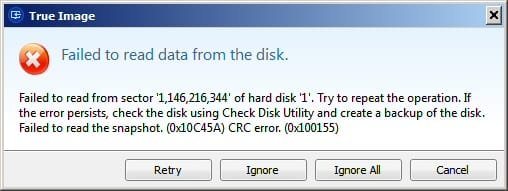
Trying to back up C:, D: & System drives using Windows Backup, Acronis, and Macrium all fail after about 65%. Acronis screenshot attached. The other programs don't even give that much info, or I couldn't find logs. How do I turn on deep logging for any of these programs? How can I find out what file occupies the sector identified in the Acronis error?
I ran CHKDSK C: /R /F on bootup and left for work. I come home and the computer's off. I ran it in the evening and it got into Stage 4 of 5 for a long time. It seemed to be stalled at 79% for a long time but then it finally went on to 80% so I figured it was just on some big file. I did something else for about 15 minutes and then looked back and my computer was off again! Backups continue to fail. What causes a CHKDSK to turn off the computer? I'm baffled! I hope I can solve this without staring at CHKDSK for 45 minutes only to find out the info I need just flashes by.
Thank you,
Bent Franklin
Trying to back up C:, D: & System drives using Windows Backup, Acronis, and Macrium all fail after about 65%. Acronis screenshot attached. The other programs don't even give that much info, or I couldn't find logs. How do I turn on deep logging for any of these programs? How can I find out what file occupies the sector identified in the Acronis error?
I ran CHKDSK C: /R /F on bootup and left for work. I come home and the computer's off. I ran it in the evening and it got into Stage 4 of 5 for a long time. It seemed to be stalled at 79% for a long time but then it finally went on to 80% so I figured it was just on some big file. I did something else for about 15 minutes and then looked back and my computer was off again! Backups continue to fail. What causes a CHKDSK to turn off the computer? I'm baffled! I hope I can solve this without staring at CHKDSK for 45 minutes only to find out the info I need just flashes by.
Thank you,
Bent Franklin
Attachments
My Computer
At a glance
Windows 7 Home Premium 64 bit SP1AMD Phenom 2 x4 2.8 GHz8 GB
- Computer type
- PC/Desktop
- Computer Manufacturer/Model Number
- HP
- OS
- Windows 7 Home Premium 64 bit SP1
- CPU
- AMD Phenom 2 x4 2.8 GHz
- Memory
- 8 GB
- Antivirus
- AVG
- Browser
- Chrome


