What causes BSOD

XxKOLOHExX

New member
Power User
Local time
1:07 AM
Messages
128
Location
Hawaii
BSOD = Blue Screen of Death
i got this BSOD 5 times from yesterday and today combine and i want to know what causes the BSOD and if its a virus or malware or something can you please give me a link to a site that has the bes program to get rid of it

thank you,
XxKOLOHExX:shock:
 
Last edited:

My Computer

Computer Manufacturer/Model Number
Hp
OS
Windows 7
CPU
AMD Turion(tm) 64 x2 Mobile Technology TL-60
Motherboard
Idk
Memory
3 GB DDR2 memory
Graphics Card(s)
Nvidia GeForce 7150M/nForce 630M
Sound Card
Conexant High-Definition Audio Driver
Monitor(s) Displays
1 external monitor DYNEX 32"
Screen Resolution
1280 x 768
Hard Drives
200 ATA Gb Hard Drive
Cooling
the fan built in ...
Keyboard
Microsoft wireless keyboard 1000
Mouse
Microsoft optical mouse 1000
Internet Speed
5 mb/s
BSOD = Blue Screen of Death
i got this BSOD 5 times from yesterday and today combine and i want to know what causes the BSOD and if its a virus or malware or something can you please give me a link to a site that has the bes program to get rid of it

thank you,
XxKOLOHExX:shock:


Hi XxKOLOHExX,

A BSOD is when a system failure happens. For different reasons, could be hardware failure, software compatibility, memory problems,etc.

Here is a little information about BSOD's.

Blue Screen of Death - Wikipedia, the free encyclopedia

Screens of death - Wikipedia, the free encyclopedia


Try to take a picture of your BSOD and post what it says.
 

My Computer

Computer type
PC/Desktop
Computer Manufacturer/Model Number
Airbot 2.0
OS
Windows 7 Ultimate x64 SP1
CPU
Core i7 920 (D0) @ 4Ghz, *26c idle *65c full load on air
Motherboard
Asus P6X58D Premium - Sata 6Gb/s - USB 3.0
Memory
12GB DDR3 Corsair Dominator -CMD12GX3M6A1600C8 at 1600MHz
Graphics Card(s)
Zotac Geforce GTX 770
Sound Card
ASUS Xonar D2X
Monitor(s) Displays
1 LG 24" Flatron W2453V-PF 1 Samsung 24" P2450H both 2ms RT
Screen Resolution
1920x1080@60hz
Hard Drives
1 Samsung 250GB 840 Evo SSD
1 OCZ Vertex2 180GB SSD
1 TB Samsung Spinpoint F1 7200RPM 32MB cache
2 500GB WD Caviar Blacks 7200RPM 32MB cache (WD5001AALS)

Pioneer DVD Burner DVR-S18M
PSU
Corsair HX1000W
Case
Cooler Master HAF 932
Cooling
Case Fans *3 230mm, *1 140mm/CPU - *Tuniq Tower 120 Extreme
Keyboard
Logitech Wireless MK700
Mouse
Logitech Wireless MK700
Internet Speed
DL 15 Mbps UL 0.98 Mbps
Antivirus
None
Browser
Firefox Nightly
Other Info
Processor-7.7 *RAM- 7.9 *Graphics-7.9 *Gaming Graphics- 7.9 *SSD- 7.8 W.E.I final score= 7.7
*Phone- LG Nexus 5
Your BSOD does provide some information to help, sometimes simply searching the error code in a search engine will provide an answer. These failures are common when you're trying something new, and its failing.

Have you recently installed new hardware? New software? What was the last thing you did before you noticed the multiple BSODs?

System restore or other repair utilities are out there, but they can messily fix your machine. If you're not an expert though- and you think it may be software related- try system restore, to a point when you remember it working fine.
 

My Computer

Computer Manufacturer/Model Number
Zanza Computer
OS
Windows 7 (7127)
CPU
i7 920 (4.1Ghz)
Motherboard
nForce X58
Memory
2x 2gb 1066 (4gb total)
Graphics Card(s)
GTX 295,
Sound Card
Creative X-Fi Platinum (Fata1ty)
Monitor(s) Displays
Viewsonic VX924 (2x - 19"), Viewsoic VX2835wm (1x - 28")
Screen Resolution
4480x1200 Total, 1920x1200 max single
Hard Drives
Raptor (main)
250 (local storage)
320 (Multi OS)
+Server Storage
PSU
1100W
Case
P182 Moded
Cooling
Air, mod cooling
Keyboard
Microsoft Desktop 8000
Mouse
Microsoft Desktop 8000
Internet Speed
Cable (24mbps)
Other Info
CPU OC'd to 3.2 stable (barely any temp change)
GPU (OC in progress) + additional GPU for side monitors
okie dokie ill try that i have to go back 3 days but its okay LOLthank you ecverybody
 

My Computer

Computer Manufacturer/Model Number
Hp
OS
Windows 7
CPU
AMD Turion(tm) 64 x2 Mobile Technology TL-60
Motherboard
Idk
Memory
3 GB DDR2 memory
Graphics Card(s)
Nvidia GeForce 7150M/nForce 630M
Sound Card
Conexant High-Definition Audio Driver
Monitor(s) Displays
1 external monitor DYNEX 32"
Screen Resolution
1280 x 768
Hard Drives
200 ATA Gb Hard Drive
Cooling
the fan built in ...
Keyboard
Microsoft wireless keyboard 1000
Mouse
Microsoft optical mouse 1000
Internet Speed
5 mb/s
You can't post the BSOD?
 

My Computer

Computer type
PC/Desktop
Computer Manufacturer/Model Number
Airbot 2.0
OS
Windows 7 Ultimate x64 SP1
CPU
Core i7 920 (D0) @ 4Ghz, *26c idle *65c full load on air
Motherboard
Asus P6X58D Premium - Sata 6Gb/s - USB 3.0
Memory
12GB DDR3 Corsair Dominator -CMD12GX3M6A1600C8 at 1600MHz
Graphics Card(s)
Zotac Geforce GTX 770
Sound Card
ASUS Xonar D2X
Monitor(s) Displays
1 LG 24" Flatron W2453V-PF 1 Samsung 24" P2450H both 2ms RT
Screen Resolution
1920x1080@60hz
Hard Drives
1 Samsung 250GB 840 Evo SSD
1 OCZ Vertex2 180GB SSD
1 TB Samsung Spinpoint F1 7200RPM 32MB cache
2 500GB WD Caviar Blacks 7200RPM 32MB cache (WD5001AALS)

Pioneer DVD Burner DVR-S18M
PSU
Corsair HX1000W
Case
Cooler Master HAF 932
Cooling
Case Fans *3 230mm, *1 140mm/CPU - *Tuniq Tower 120 Extreme
Keyboard
Logitech Wireless MK700
Mouse
Logitech Wireless MK700
Internet Speed
DL 15 Mbps UL 0.98 Mbps
Antivirus
None
Browser
Firefox Nightly
Other Info
Processor-7.7 *RAM- 7.9 *Graphics-7.9 *Gaming Graphics- 7.9 *SSD- 7.8 W.E.I final score= 7.7
*Phone- LG Nexus 5
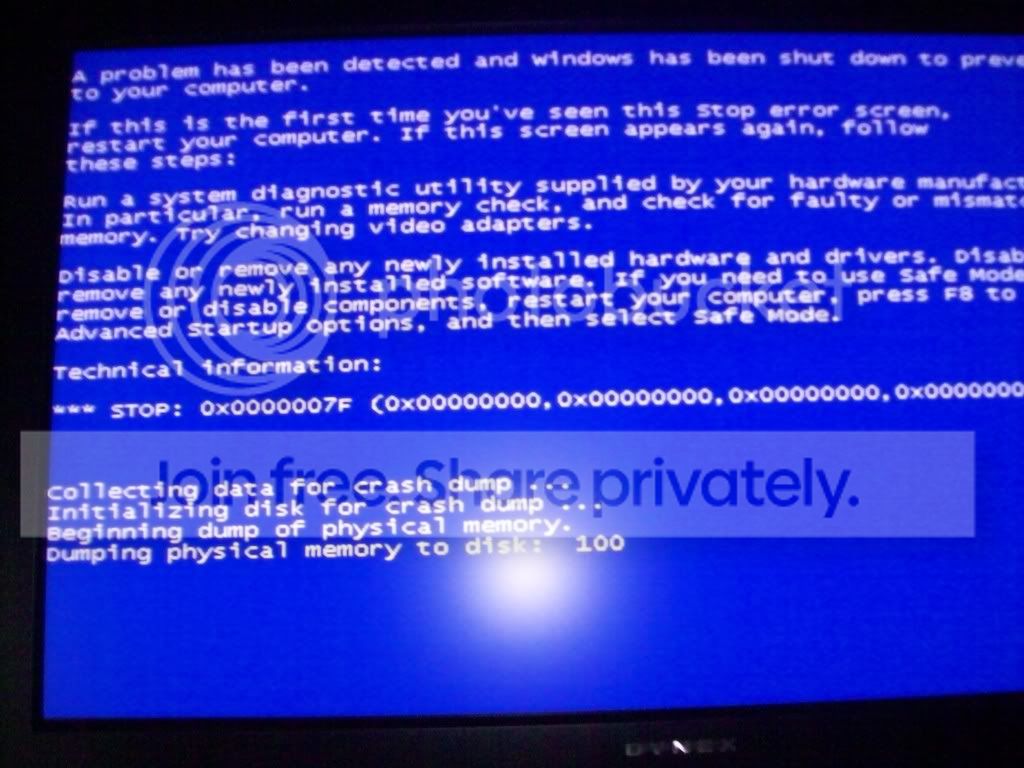
i took a picture but i can seem to get it to the point u guys can read it my camera only has flash on each setting so the closer i go the more glare u might get but here is the clearest picture i gots
116_0831.jpg
 
Last edited:

My Computer

Computer Manufacturer/Model Number
Hp
OS
Windows 7
CPU
AMD Turion(tm) 64 x2 Mobile Technology TL-60
Motherboard
Idk
Memory
3 GB DDR2 memory
Graphics Card(s)
Nvidia GeForce 7150M/nForce 630M
Sound Card
Conexant High-Definition Audio Driver
Monitor(s) Displays
1 external monitor DYNEX 32"
Screen Resolution
1280 x 768
Hard Drives
200 ATA Gb Hard Drive
Cooling
the fan built in ...
Keyboard
Microsoft wireless keyboard 1000
Mouse
Microsoft optical mouse 1000
Internet Speed
5 mb/s
here is a Microsoft Support article on your error.
General causes of "STOP 0x0000007F" errors


This error message can occur if either of the following conditions exists:
  • Your computer has hardware or software problems (hardware failure is the most common cause).
  • You try to over clock the speed of your computer's processor (for example, you set a 150 MhZ processor to run at 187 MhZ).

Seems to point towards hardware, do you overclock at all? Just curious- what is your experince would you say with computers? I dont know if you like to change a lot of settings or not. Have you installed any ram recently? Have you recently installed new hardware? New software? What was the last thing you did before you noticed the multiple BSODs? Are you getting this error when your are doing something speciffically. Sorry a lot of questions, but BSODs represent a lot of errors.
 

My Computer

Computer Manufacturer/Model Number
Zanza Computer
OS
Windows 7 (7127)
CPU
i7 920 (4.1Ghz)
Motherboard
nForce X58
Memory
2x 2gb 1066 (4gb total)
Graphics Card(s)
GTX 295,
Sound Card
Creative X-Fi Platinum (Fata1ty)
Monitor(s) Displays
Viewsonic VX924 (2x - 19"), Viewsoic VX2835wm (1x - 28")
Screen Resolution
4480x1200 Total, 1920x1200 max single
Hard Drives
Raptor (main)
250 (local storage)
320 (Multi OS)
+Server Storage
PSU
1100W
Case
P182 Moded
Cooling
Air, mod cooling
Keyboard
Microsoft Desktop 8000
Mouse
Microsoft Desktop 8000
Internet Speed
Cable (24mbps)
Other Info
CPU OC'd to 3.2 stable (barely any temp change)
GPU (OC in progress) + additional GPU for side monitors

My Computer

Computer type
PC/Desktop
Computer Manufacturer/Model Number
Airbot 2.0
OS
Windows 7 Ultimate x64 SP1
CPU
Core i7 920 (D0) @ 4Ghz, *26c idle *65c full load on air
Motherboard
Asus P6X58D Premium - Sata 6Gb/s - USB 3.0
Memory
12GB DDR3 Corsair Dominator -CMD12GX3M6A1600C8 at 1600MHz
Graphics Card(s)
Zotac Geforce GTX 770
Sound Card
ASUS Xonar D2X
Monitor(s) Displays
1 LG 24" Flatron W2453V-PF 1 Samsung 24" P2450H both 2ms RT
Screen Resolution
1920x1080@60hz
Hard Drives
1 Samsung 250GB 840 Evo SSD
1 OCZ Vertex2 180GB SSD
1 TB Samsung Spinpoint F1 7200RPM 32MB cache
2 500GB WD Caviar Blacks 7200RPM 32MB cache (WD5001AALS)

Pioneer DVD Burner DVR-S18M
PSU
Corsair HX1000W
Case
Cooler Master HAF 932
Cooling
Case Fans *3 230mm, *1 140mm/CPU - *Tuniq Tower 120 Extreme
Keyboard
Logitech Wireless MK700
Mouse
Logitech Wireless MK700
Internet Speed
DL 15 Mbps UL 0.98 Mbps
Antivirus
None
Browser
Firefox Nightly
Other Info
Processor-7.7 *RAM- 7.9 *Graphics-7.9 *Gaming Graphics- 7.9 *SSD- 7.8 W.E.I final score= 7.7
*Phone- LG Nexus 5
Thanks man if its hardware related can that also mean my nvidia drive because its been crashing alot latley
 

My Computer

Computer Manufacturer/Model Number
Hp
OS
Windows 7
CPU
AMD Turion(tm) 64 x2 Mobile Technology TL-60
Motherboard
Idk
Memory
3 GB DDR2 memory
Graphics Card(s)
Nvidia GeForce 7150M/nForce 630M
Sound Card
Conexant High-Definition Audio Driver
Monitor(s) Displays
1 external monitor DYNEX 32"
Screen Resolution
1280 x 768
Hard Drives
200 ATA Gb Hard Drive
Cooling
the fan built in ...
Keyboard
Microsoft wireless keyboard 1000
Mouse
Microsoft optical mouse 1000
Internet Speed
5 mb/s
Probably, or a memory problem or overclocking.
 

My Computer

Computer type
PC/Desktop
Computer Manufacturer/Model Number
Airbot 2.0
OS
Windows 7 Ultimate x64 SP1
CPU
Core i7 920 (D0) @ 4Ghz, *26c idle *65c full load on air
Motherboard
Asus P6X58D Premium - Sata 6Gb/s - USB 3.0
Memory
12GB DDR3 Corsair Dominator -CMD12GX3M6A1600C8 at 1600MHz
Graphics Card(s)
Zotac Geforce GTX 770
Sound Card
ASUS Xonar D2X
Monitor(s) Displays
1 LG 24" Flatron W2453V-PF 1 Samsung 24" P2450H both 2ms RT
Screen Resolution
1920x1080@60hz
Hard Drives
1 Samsung 250GB 840 Evo SSD
1 OCZ Vertex2 180GB SSD
1 TB Samsung Spinpoint F1 7200RPM 32MB cache
2 500GB WD Caviar Blacks 7200RPM 32MB cache (WD5001AALS)

Pioneer DVD Burner DVR-S18M
PSU
Corsair HX1000W
Case
Cooler Master HAF 932
Cooling
Case Fans *3 230mm, *1 140mm/CPU - *Tuniq Tower 120 Extreme
Keyboard
Logitech Wireless MK700
Mouse
Logitech Wireless MK700
Internet Speed
DL 15 Mbps UL 0.98 Mbps
Antivirus
None
Browser
Firefox Nightly
Other Info
Processor-7.7 *RAM- 7.9 *Graphics-7.9 *Gaming Graphics- 7.9 *SSD- 7.8 W.E.I final score= 7.7
*Phone- LG Nexus 5
overclocking is leaving my computer on all night all day everyday right LOL?
 

My Computer

Computer Manufacturer/Model Number
Hp
OS
Windows 7
CPU
AMD Turion(tm) 64 x2 Mobile Technology TL-60
Motherboard
Idk
Memory
3 GB DDR2 memory
Graphics Card(s)
Nvidia GeForce 7150M/nForce 630M
Sound Card
Conexant High-Definition Audio Driver
Monitor(s) Displays
1 external monitor DYNEX 32"
Screen Resolution
1280 x 768
Hard Drives
200 ATA Gb Hard Drive
Cooling
the fan built in ...
Keyboard
Microsoft wireless keyboard 1000
Mouse
Microsoft optical mouse 1000
Internet Speed
5 mb/s
No, it's setting the CPU or GPU to run at speeds above the rated specs. If you haven't done that, then rule that out.
 

My Computer

Computer type
PC/Desktop
Computer Manufacturer/Model Number
Airbot 2.0
OS
Windows 7 Ultimate x64 SP1
CPU
Core i7 920 (D0) @ 4Ghz, *26c idle *65c full load on air
Motherboard
Asus P6X58D Premium - Sata 6Gb/s - USB 3.0
Memory
12GB DDR3 Corsair Dominator -CMD12GX3M6A1600C8 at 1600MHz
Graphics Card(s)
Zotac Geforce GTX 770
Sound Card
ASUS Xonar D2X
Monitor(s) Displays
1 LG 24" Flatron W2453V-PF 1 Samsung 24" P2450H both 2ms RT
Screen Resolution
1920x1080@60hz
Hard Drives
1 Samsung 250GB 840 Evo SSD
1 OCZ Vertex2 180GB SSD
1 TB Samsung Spinpoint F1 7200RPM 32MB cache
2 500GB WD Caviar Blacks 7200RPM 32MB cache (WD5001AALS)

Pioneer DVD Burner DVR-S18M
PSU
Corsair HX1000W
Case
Cooler Master HAF 932
Cooling
Case Fans *3 230mm, *1 140mm/CPU - *Tuniq Tower 120 Extreme
Keyboard
Logitech Wireless MK700
Mouse
Logitech Wireless MK700
Internet Speed
DL 15 Mbps UL 0.98 Mbps
Antivirus
None
Browser
Firefox Nightly
Other Info
Processor-7.7 *RAM- 7.9 *Graphics-7.9 *Gaming Graphics- 7.9 *SSD- 7.8 W.E.I final score= 7.7
*Phone- LG Nexus 5
All night EVERY day!? that is some serious overclocking! personally i've only gotten bsods because of faulty ram... you could still check it out by running some type of memory test (onboard or os dependent)... benching or stress testing could help out too.
 

My Computer

Computer Manufacturer/Model Number
Zanza Computer
OS
Windows 7 (7127)
CPU
i7 920 (4.1Ghz)
Motherboard
nForce X58
Memory
2x 2gb 1066 (4gb total)
Graphics Card(s)
GTX 295,
Sound Card
Creative X-Fi Platinum (Fata1ty)
Monitor(s) Displays
Viewsonic VX924 (2x - 19"), Viewsoic VX2835wm (1x - 28")
Screen Resolution
4480x1200 Total, 1920x1200 max single
Hard Drives
Raptor (main)
250 (local storage)
320 (Multi OS)
+Server Storage
PSU
1100W
Case
P182 Moded
Cooling
Air, mod cooling
Keyboard
Microsoft Desktop 8000
Mouse
Microsoft Desktop 8000
Internet Speed
Cable (24mbps)
Other Info
CPU OC'd to 3.2 stable (barely any temp change)
GPU (OC in progress) + additional GPU for side monitors
okie dokes thanks man alot for ur helps
 

My Computer

Computer Manufacturer/Model Number
Hp
OS
Windows 7
CPU
AMD Turion(tm) 64 x2 Mobile Technology TL-60
Motherboard
Idk
Memory
3 GB DDR2 memory
Graphics Card(s)
Nvidia GeForce 7150M/nForce 630M
Sound Card
Conexant High-Definition Audio Driver
Monitor(s) Displays
1 external monitor DYNEX 32"
Screen Resolution
1280 x 768
Hard Drives
200 ATA Gb Hard Drive
Cooling
the fan built in ...
Keyboard
Microsoft wireless keyboard 1000
Mouse
Microsoft optical mouse 1000
Internet Speed
5 mb/s
No, it's setting the CPU or GPU to run at speeds above the rated specs. If you haven't done that, then rule that out.

I think he's joking.. hope he's joking.
 

My Computer

Computer Manufacturer/Model Number
Zanza Computer
OS
Windows 7 (7127)
CPU
i7 920 (4.1Ghz)
Motherboard
nForce X58
Memory
2x 2gb 1066 (4gb total)
Graphics Card(s)
GTX 295,
Sound Card
Creative X-Fi Platinum (Fata1ty)
Monitor(s) Displays
Viewsonic VX924 (2x - 19"), Viewsoic VX2835wm (1x - 28")
Screen Resolution
4480x1200 Total, 1920x1200 max single
Hard Drives
Raptor (main)
250 (local storage)
320 (Multi OS)
+Server Storage
PSU
1100W
Case
P182 Moded
Cooling
Air, mod cooling
Keyboard
Microsoft Desktop 8000
Mouse
Microsoft Desktop 8000
Internet Speed
Cable (24mbps)
Other Info
CPU OC'd to 3.2 stable (barely any temp change)
GPU (OC in progress) + additional GPU for side monitors
Who's joking, me?
 

My Computer

Computer type
PC/Desktop
Computer Manufacturer/Model Number
Airbot 2.0
OS
Windows 7 Ultimate x64 SP1
CPU
Core i7 920 (D0) @ 4Ghz, *26c idle *65c full load on air
Motherboard
Asus P6X58D Premium - Sata 6Gb/s - USB 3.0
Memory
12GB DDR3 Corsair Dominator -CMD12GX3M6A1600C8 at 1600MHz
Graphics Card(s)
Zotac Geforce GTX 770
Sound Card
ASUS Xonar D2X
Monitor(s) Displays
1 LG 24" Flatron W2453V-PF 1 Samsung 24" P2450H both 2ms RT
Screen Resolution
1920x1080@60hz
Hard Drives
1 Samsung 250GB 840 Evo SSD
1 OCZ Vertex2 180GB SSD
1 TB Samsung Spinpoint F1 7200RPM 32MB cache
2 500GB WD Caviar Blacks 7200RPM 32MB cache (WD5001AALS)

Pioneer DVD Burner DVR-S18M
PSU
Corsair HX1000W
Case
Cooler Master HAF 932
Cooling
Case Fans *3 230mm, *1 140mm/CPU - *Tuniq Tower 120 Extreme
Keyboard
Logitech Wireless MK700
Mouse
Logitech Wireless MK700
Internet Speed
DL 15 Mbps UL 0.98 Mbps
Antivirus
None
Browser
Firefox Nightly
Other Info
Processor-7.7 *RAM- 7.9 *Graphics-7.9 *Gaming Graphics- 7.9 *SSD- 7.8 W.E.I final score= 7.7
*Phone- LG Nexus 5
All night EVERY day!? that is some serious overclocking! personally i've only gotten bsods because of faulty ram... you could still check it out by running some type of memory test (onboard or os dependent)... benching or stress testing could help out too.

If you're saying that I'm joking as to overclocking, I 'd suggest you read up on what OC is. It has nothing to do with keeping your computer on all the time.

Overclocking - Wikipedia, the free encyclopedia
 

My Computer

Computer type
PC/Desktop
Computer Manufacturer/Model Number
Airbot 2.0
OS
Windows 7 Ultimate x64 SP1
CPU
Core i7 920 (D0) @ 4Ghz, *26c idle *65c full load on air
Motherboard
Asus P6X58D Premium - Sata 6Gb/s - USB 3.0
Memory
12GB DDR3 Corsair Dominator -CMD12GX3M6A1600C8 at 1600MHz
Graphics Card(s)
Zotac Geforce GTX 770
Sound Card
ASUS Xonar D2X
Monitor(s) Displays
1 LG 24" Flatron W2453V-PF 1 Samsung 24" P2450H both 2ms RT
Screen Resolution
1920x1080@60hz
Hard Drives
1 Samsung 250GB 840 Evo SSD
1 OCZ Vertex2 180GB SSD
1 TB Samsung Spinpoint F1 7200RPM 32MB cache
2 500GB WD Caviar Blacks 7200RPM 32MB cache (WD5001AALS)

Pioneer DVD Burner DVR-S18M
PSU
Corsair HX1000W
Case
Cooler Master HAF 932
Cooling
Case Fans *3 230mm, *1 140mm/CPU - *Tuniq Tower 120 Extreme
Keyboard
Logitech Wireless MK700
Mouse
Logitech Wireless MK700
Internet Speed
DL 15 Mbps UL 0.98 Mbps
Antivirus
None
Browser
Firefox Nightly
Other Info
Processor-7.7 *RAM- 7.9 *Graphics-7.9 *Gaming Graphics- 7.9 *SSD- 7.8 W.E.I final score= 7.7
*Phone- LG Nexus 5
well i can tell you that if your running 3/4gb of ram your get the blue screen of death, i was running 2gb ram and windows 7 run fine and today i put in another gig and blue screened every time, rebooted in to xp and everythink was fine so i know its not the new ram, took out a older ram stick 1gb and it booted win7 fine again....
 

My Computer

OS
windows xp
well i can tell you that if your running 3/4gb of ram your get the blue screen of death, i was running 2gb ram and windows 7 run fine and today i put in another gig and blue screened every time, rebooted in to xp and everythink was fine so i know its not the new ram, took out a older ram stick 1gb and it booted win7 fine again....

Was the RAM different to the old RAM, sometimes if you put different spec RAM in the same channels Windows will not like - it is not recommended to start with especially with Vista/Windows 7
 

My Computer

Computer Manufacturer/Model Number
Custom Built
OS
Windows Vista Ultimate x64 & Windows 7
CPU
Intel Core 2 Quad Q6600 @ 3.0Ghz
Motherboard
Gigabyte EP35-DS4
Memory
Kingston HyperX DDR2 4GB kit
Graphics Card(s)
NVIDIA 8800GTS
Sound Card
Creative SoundBlaster Xtreme
Monitor(s) Displays
Dual screen - LG and ASUS (17")
Screen Resolution
1280*1024
Hard Drives
Samsung F1 - 1TB
Seagate - 500GB
Western Digital - 500GB
PSU
Coolermaster 650W
Case
Lian-Li
Cooling
Tuniq Tower/Noctua 120mm + 80mm
Keyboard
Logitech DiNovo - Wireless
Mouse
Logitech LX7 - Wireless
Internet Speed
6MB
Back
Top