Solved What fixed my windows update problems

Viscon

New member
Member
Local time
1:32 AM
Messages
50
Like many users I suffered these issues: high CPU and RAM usage by svchost.exe, hours of checking windows updates and being stuck while downloading them.
After weeks of trying solutions I've found this one that worked.

Here's what I did:
- stopped WinUpdate service and installed KB3138612 OFFLINE
- rebooted
- stopped WinUpade again and installed KB3145739 and KB3153199, both OFFLINE
- rebooted

Then I checked for new updates and it took just about 10 mins.
Downloading new updates went right away and no more high CPU and RAM usage by svchost.
It's been 5 days now and so far problems are gone.

Hopefully this might help.
 

My Computer

Computer type
PC/Desktop
Computer Manufacturer/Model Number
built by myself
OS
Windows 7 Ultimate x64 SP1
CPU
Intel Core i5-3570K @ 4GHz
Motherboard
Asus P8Z77-V Deluxe
Memory
Corsair Vengeance DDR3 8 GB Dual Channel
Graphics Card(s)
Asus Radeon RX 570 Strix OC 4GB
Monitor(s) Displays
LG 24BK550Y-B IPS
Screen Resolution
1920x1080
Hard Drives
SSD SAMSUNG 860 EVO SATA III 2.5'' 500GB
SSD CRUCIAL MX500 SATA III 2.5'' 250GB
Seagate ST1000DM003 SATA III
TOSHIBA HDWD110 SATA III
PSU
Corsair HX750i
Case
Corsair Carbide 400R
Cooling
CPU Cooler Master Hyper 412 Slim
Keyboard
Logitech K200
Mouse
Logitech G400
Antivirus
Norton Security
Browser
Firefox
Thanks :), have made note of that !

Cheers,
Thelma
 

My Computer

Computer type
Laptop
Computer Manufacturer/Model Number
HP Presario CQ70
OS
windows 7 professional 64 bit
CPU
CPU Genuine Intel (R) CPU [email protected]
Motherboard
APCI x 64 - based PC
Memory
RAM 3 GB
Graphics Card(s)
Toshiba MK2555 GSX ATA
Sound Card
Conexant High Def Smart Audio 221,
Monitor(s) Displays
monitor Generic PnP.
Screen Resolution
?
Hard Drives
HDAUDIO Soft Data Fax Modern with smart CP
PSU
?
Keyboard
Standard PS/2 keyboard
Mouse
PS/2 Compatible mouse
Antivirus
Hyjackthis and Superanti spyware, Mamb Ccleaner
Browser
Google Chrome
I was having this problem. Your fix seems to work. Thanks.
 

My Computer

Computer type
PC/Desktop
Computer Manufacturer/Model Number
Lenov0 G550
OS
Windows 7 Home Premium 64 bit
Antivirus
Avast 2015 free
All 3 D-Loads said "not applicable to this computer". Disappointing, but many thanks for quick tips. Don't know what "installed OFFLINE" means though. Maybe makes a big difference, e.g. suddenly IS suitable for this computer?!

I'll keep looking for Forum replies, thank you.
 

My Computer

Computer type
PC/Desktop
Computer Manufacturer/Model Number
ThinkPad
OS
W7 Prof 64 bit
CPU
Intel Core i5
Memory
4GB
Hard Drives
Solid State
Antivirus
MS Essentials, Emsisoft Antimalware
Browser
Chrome, sometimes IE
Like many users I suffered these issues: high CPU and RAM usage by svchost.exe, hours of checking windows updates and being stuck while downloading them.
After weeks of trying solutions I've found this one that worked.

Here's what I did:
- stopped WinUpdate service and installed KB3138612 OFFLINE
- rebooted
- stopped WinUpade again and installed KB3145739 and KB3153199, both OFFLINE
- rebooted

Then I checked for new updates and it took just about 10 mins.
Downloading new updates went right away and no more high CPU and RAM usage by svchost.
It's been 5 days now and so far problems are gone.

Hopefully this might help.

I have KB3138612 hidden and on my Specialized High Intensity Training List. The other two I installed the Saturday after they came out since I could find no harm in them. Even without the hidden, uninstalled one, I haven't been having any problems with with Windows updates.
 

My Computer

Computer type
PC/Desktop
Computer Manufacturer/Model Number
Custom Build
OS
Win 7 Ultimate 64 bit
CPU
Intel i7-3930K
Motherboard
ASUS P9X79 WS
Memory
Kingston HyperX Genesis 32GB Kit (8x4GB Modules) 1600MHz DDR
Graphics Card(s)
MSI R7850 Twin Frozr 2GD5/OC Radeon HD 7850 2GB 256-bit GDDR
Sound Card
Asus Xonar Essence STX
Monitor(s) Displays
3x Asus VG248QE 24", Vizio 32" TV
Screen Resolution
1920 x 1080, ?
Hard Drives
Samsung 128GB 840 Pro SSD (1),
Samsung 4TB 850 EVO SSDs (4)
Samsung 4TB 850 EVO SSDs (16) external backup drives used in 2.5" hot swap bays in the computer.
PSU
Corsair HX750w
Case
Antec Two Hundred v2 (modified)
Cooling
Cooler Master GeminII S524 120mm (fan replaced with a 140mm)
Keyboard
Logitech G510s
Mouse
Logitech M525 (two in use)
Internet Speed
=< 32Mbps down, 8Mbps up
Antivirus
AVAST!, MBAM, SAS, Spybot S&D (all but MBAM free) Glary Util
Browser
IE11
Other Info
LSI 9211-8i HBA card (8 SATA III ports), 2.5" & 3.5" Hot Swap Bays, HooToo HT-CR001 PCI-E to USB 3.0 Internal Hub + 6 Slot Card Reader, and LG Model CH12LS28 BD-ROM Optical Drive. Also, ScanSnap S1500 ADF duplexing scanner, Canon 9000F flat bed scanner, Corsair SP2500 2.1 speakers, Samsung CLP 415nw laser color printer, Cyberpower PP2200SW UPS
All 3 D-Loads said "not applicable to this computer". Disappointing, but many thanks for quick tips. Don't know what "installed OFFLINE" means though. Maybe makes a big difference, e.g. suddenly IS suitable for this computer?!

I'll keep looking for Forum replies, thank you.

"Offline" means updates installed from hard drive (first downloaded and saved) with WinUpdate service temporarily stopped.

As for "not applicable to this computer" updates, did you install win 7 Service Pack 1?
 

My Computer

Computer type
PC/Desktop
Computer Manufacturer/Model Number
built by myself
OS
Windows 7 Ultimate x64 SP1
CPU
Intel Core i5-3570K @ 4GHz
Motherboard
Asus P8Z77-V Deluxe
Memory
Corsair Vengeance DDR3 8 GB Dual Channel
Graphics Card(s)
Asus Radeon RX 570 Strix OC 4GB
Monitor(s) Displays
LG 24BK550Y-B IPS
Screen Resolution
1920x1080
Hard Drives
SSD SAMSUNG 860 EVO SATA III 2.5'' 500GB
SSD CRUCIAL MX500 SATA III 2.5'' 250GB
Seagate ST1000DM003 SATA III
TOSHIBA HDWD110 SATA III
PSU
Corsair HX750i
Case
Corsair Carbide 400R
Cooling
CPU Cooler Master Hyper 412 Slim
Keyboard
Logitech K200
Mouse
Logitech G400
Antivirus
Norton Security
Browser
Firefox
I got the "not applicable" message for KB3138612. The other two updates downloaded to my machine and installed. Did you try all 3 updates or quit after the first came up as not applicable?
 

My Computer

Computer type
PC/Desktop
Computer Manufacturer/Model Number
Lenov0 G550
OS
Windows 7 Home Premium 64 bit
Antivirus
Avast 2015 free
All 3 D-Loads said "not applicable to this computer". Disappointing, but many thanks for quick tips. Don't know what "installed OFFLINE" means though. Maybe makes a big difference, e.g. suddenly IS suitable for this computer?!

I'll keep looking for Forum replies, thank you.

"Offline" means updates installed from hard drive (first downloaded and saved) with WinUpdate service temporarily stopped...

On that note, now that I know how to disable the telemetry updates embedded in the convenience rollup (thank you, Callender and ThrashZone), how does one download updates for later installation offline, then install them? Can they be installed directly to and/or from a USB thumb drive?
 

My Computer

Computer type
PC/Desktop
Computer Manufacturer/Model Number
Custom Build
OS
Win 7 Ultimate 64 bit
CPU
Intel i7-3930K
Motherboard
ASUS P9X79 WS
Memory
Kingston HyperX Genesis 32GB Kit (8x4GB Modules) 1600MHz DDR
Graphics Card(s)
MSI R7850 Twin Frozr 2GD5/OC Radeon HD 7850 2GB 256-bit GDDR
Sound Card
Asus Xonar Essence STX
Monitor(s) Displays
3x Asus VG248QE 24", Vizio 32" TV
Screen Resolution
1920 x 1080, ?
Hard Drives
Samsung 128GB 840 Pro SSD (1),
Samsung 4TB 850 EVO SSDs (4)
Samsung 4TB 850 EVO SSDs (16) external backup drives used in 2.5" hot swap bays in the computer.
PSU
Corsair HX750w
Case
Antec Two Hundred v2 (modified)
Cooling
Cooler Master GeminII S524 120mm (fan replaced with a 140mm)
Keyboard
Logitech G510s
Mouse
Logitech M525 (two in use)
Internet Speed
=< 32Mbps down, 8Mbps up
Antivirus
AVAST!, MBAM, SAS, Spybot S&D (all but MBAM free) Glary Util
Browser
IE11
Other Info
LSI 9211-8i HBA card (8 SATA III ports), 2.5" & 3.5" Hot Swap Bays, HooToo HT-CR001 PCI-E to USB 3.0 Internal Hub + 6 Slot Card Reader, and LG Model CH12LS28 BD-ROM Optical Drive. Also, ScanSnap S1500 ADF duplexing scanner, Canon 9000F flat bed scanner, Corsair SP2500 2.1 speakers, Samsung CLP 415nw laser color printer, Cyberpower PP2200SW UPS
All 3 D-Loads said "not applicable to this computer". Disappointing, but many thanks for quick tips. Don't know what "installed OFFLINE" means though. Maybe makes a big difference, e.g. suddenly IS suitable for this computer?!

I'll keep looking for Forum replies, thank you.

"Offline" means updates installed from hard drive (first downloaded and saved) with WinUpdate service temporarily stopped...

On that note, now that I know how to disable the telemetry updates embedded in the convenience rollup (thank you, Callender and ThrashZone), how does one download updates for later installation offline, then install them? Can they be installed directly to and/or from a USB thumb drive?

Hi Lady F, are you able to access the Windows update catalog site? That seems to be the only way for some updates now. I know some people are having issues with the ActiveX on that site. The sooner MS removes it, the better.
I just download any update packages I need and stick them on a flash drive. You can install them from that or just copy them over on to the new system.
 

My Computer

Computer type
PC/Desktop
Computer Manufacturer/Model Number
Custom Build
OS
Win 7 Ultimate, Win 8.1 Pro, Linux Mint 19 Cinnamon (All 64-Bit)
CPU
Intel i5 4690K
Motherboard
Gigabyte Z97X-UD3H
Memory
Corsair Vengeance LP 32GB DDR3
Graphics Card(s)
MSI GTX 1060 GAMING X 6GB
Sound Card
Onboard
Hard Drives
Samsung 850 EVO 250GB SSD (x2)
Samsung 860 EVO 1TB SSD (x2)
Crucial MX300 525GB SSD
WD Blue 2TB 5400rpm Intellipark Disabled (x2)
PSU
Corsair HX750i
Case
Phanteks Enthoo Pro
Cooling
CM Hyper 212 EVO on CPU, Noctua Redux NF-P14S 1500rpm (x6)
Keyboard
Corsair K70 RGB LUX
Mouse
Corsair Sabre RGB
Antivirus
Avast Free, MalwareBytes, SAS & CryptoPrevent
Browser
Chrome
Other Info
StarTech PEXESAT322I 2 Port PCI-E SATA Card
ASUS PCE-AC56 Dual-band AC1300 Wireless Card
Akasa FC.Six Manual Fan Controller
And a Partridge in a Pear Tree!
To access Windows update catalog site I use IE11.
Using Firefox gives me an error "something went wrong....." or just a blank site.
 

My Computer

Computer type
PC/Desktop
Computer Manufacturer/Model Number
built by myself
OS
Windows 7 Ultimate x64 SP1
CPU
Intel Core i5-3570K @ 4GHz
Motherboard
Asus P8Z77-V Deluxe
Memory
Corsair Vengeance DDR3 8 GB Dual Channel
Graphics Card(s)
Asus Radeon RX 570 Strix OC 4GB
Monitor(s) Displays
LG 24BK550Y-B IPS
Screen Resolution
1920x1080
Hard Drives
SSD SAMSUNG 860 EVO SATA III 2.5'' 500GB
SSD CRUCIAL MX500 SATA III 2.5'' 250GB
Seagate ST1000DM003 SATA III
TOSHIBA HDWD110 SATA III
PSU
Corsair HX750i
Case
Corsair Carbide 400R
Cooling
CPU Cooler Master Hyper 412 Slim
Keyboard
Logitech K200
Mouse
Logitech G400
Antivirus
Norton Security
Browser
Firefox
I use IE11 too (for that site only) and have no issues accessing it. I don't think it's accessible with another browser as it requires the ActiveX plugin. It doesn't work when I try with Chrome.
Apparently MS is said to be removing that requirement in the next few months so it will be accessible with any browser eventually.
Even some users using IE11 have said they're unable to access it though.

Hopefully they'll remove that quickly now that they're supposedly phasing out the Download Center. Otherwise some people are going to have less options to download some updates offline. :(
 

My Computer

Computer type
PC/Desktop
Computer Manufacturer/Model Number
Custom Build
OS
Win 7 Ultimate, Win 8.1 Pro, Linux Mint 19 Cinnamon (All 64-Bit)
CPU
Intel i5 4690K
Motherboard
Gigabyte Z97X-UD3H
Memory
Corsair Vengeance LP 32GB DDR3
Graphics Card(s)
MSI GTX 1060 GAMING X 6GB
Sound Card
Onboard
Hard Drives
Samsung 850 EVO 250GB SSD (x2)
Samsung 860 EVO 1TB SSD (x2)
Crucial MX300 525GB SSD
WD Blue 2TB 5400rpm Intellipark Disabled (x2)
PSU
Corsair HX750i
Case
Phanteks Enthoo Pro
Cooling
CM Hyper 212 EVO on CPU, Noctua Redux NF-P14S 1500rpm (x6)
Keyboard
Corsair K70 RGB LUX
Mouse
Corsair Sabre RGB
Antivirus
Avast Free, MalwareBytes, SAS & CryptoPrevent
Browser
Chrome
Other Info
StarTech PEXESAT322I 2 Port PCI-E SATA Card
ASUS PCE-AC56 Dual-band AC1300 Wireless Card
Akasa FC.Six Manual Fan Controller
And a Partridge in a Pear Tree!
"Offline" means updates installed from hard drive (first downloaded and saved) with WinUpdate service temporarily stopped...

On that note, now that I know how to disable the telemetry updates embedded in the convenience rollup (thank you, Callender and ThrashZone), how does one download updates for later installation offline, then install them? Can they be installed directly to and/or from a USB thumb drive?

Hi Lady F, are you able to access the Windows update catalog site? That seems to be the only way for some updates now. I know some people are having issues with the ActiveX on that site. The sooner MS removes it, the better.
I just download any update packages I need and stick them on a flash drive. You can install them from that or just copy them over on to the new system.

I'll answer that once I someone gives me a URL to it (I'm feeling especially stupid today; rough night).
 

My Computer

Computer type
PC/Desktop
Computer Manufacturer/Model Number
Custom Build
OS
Win 7 Ultimate 64 bit
CPU
Intel i7-3930K
Motherboard
ASUS P9X79 WS
Memory
Kingston HyperX Genesis 32GB Kit (8x4GB Modules) 1600MHz DDR
Graphics Card(s)
MSI R7850 Twin Frozr 2GD5/OC Radeon HD 7850 2GB 256-bit GDDR
Sound Card
Asus Xonar Essence STX
Monitor(s) Displays
3x Asus VG248QE 24", Vizio 32" TV
Screen Resolution
1920 x 1080, ?
Hard Drives
Samsung 128GB 840 Pro SSD (1),
Samsung 4TB 850 EVO SSDs (4)
Samsung 4TB 850 EVO SSDs (16) external backup drives used in 2.5" hot swap bays in the computer.
PSU
Corsair HX750w
Case
Antec Two Hundred v2 (modified)
Cooling
Cooler Master GeminII S524 120mm (fan replaced with a 140mm)
Keyboard
Logitech G510s
Mouse
Logitech M525 (two in use)
Internet Speed
=< 32Mbps down, 8Mbps up
Antivirus
AVAST!, MBAM, SAS, Spybot S&D (all but MBAM free) Glary Util
Browser
IE11
Other Info
LSI 9211-8i HBA card (8 SATA III ports), 2.5" & 3.5" Hot Swap Bays, HooToo HT-CR001 PCI-E to USB 3.0 Internal Hub + 6 Slot Card Reader, and LG Model CH12LS28 BD-ROM Optical Drive. Also, ScanSnap S1500 ADF duplexing scanner, Canon 9000F flat bed scanner, Corsair SP2500 2.1 speakers, Samsung CLP 415nw laser color printer, Cyberpower PP2200SW UPS

My Computer

Computer type
PC/Desktop
Computer Manufacturer/Model Number
Custom Build
OS
Win 7 Ultimate, Win 8.1 Pro, Linux Mint 19 Cinnamon (All 64-Bit)
CPU
Intel i5 4690K
Motherboard
Gigabyte Z97X-UD3H
Memory
Corsair Vengeance LP 32GB DDR3
Graphics Card(s)
MSI GTX 1060 GAMING X 6GB
Sound Card
Onboard
Hard Drives
Samsung 850 EVO 250GB SSD (x2)
Samsung 860 EVO 1TB SSD (x2)
Crucial MX300 525GB SSD
WD Blue 2TB 5400rpm Intellipark Disabled (x2)
PSU
Corsair HX750i
Case
Phanteks Enthoo Pro
Cooling
CM Hyper 212 EVO on CPU, Noctua Redux NF-P14S 1500rpm (x6)
Keyboard
Corsair K70 RGB LUX
Mouse
Corsair Sabre RGB
Antivirus
Avast Free, MalwareBytes, SAS & CryptoPrevent
Browser
Chrome
Other Info
StarTech PEXESAT322I 2 Port PCI-E SATA Card
ASUS PCE-AC56 Dual-band AC1300 Wireless Card
Akasa FC.Six Manual Fan Controller
And a Partridge in a Pear Tree!

My Computer

Computer type
PC/Desktop
Computer Manufacturer/Model Number
Custom Build
OS
Win 7 Ultimate 64 bit
CPU
Intel i7-3930K
Motherboard
ASUS P9X79 WS
Memory
Kingston HyperX Genesis 32GB Kit (8x4GB Modules) 1600MHz DDR
Graphics Card(s)
MSI R7850 Twin Frozr 2GD5/OC Radeon HD 7850 2GB 256-bit GDDR
Sound Card
Asus Xonar Essence STX
Monitor(s) Displays
3x Asus VG248QE 24", Vizio 32" TV
Screen Resolution
1920 x 1080, ?
Hard Drives
Samsung 128GB 840 Pro SSD (1),
Samsung 4TB 850 EVO SSDs (4)
Samsung 4TB 850 EVO SSDs (16) external backup drives used in 2.5" hot swap bays in the computer.
PSU
Corsair HX750w
Case
Antec Two Hundred v2 (modified)
Cooling
Cooler Master GeminII S524 120mm (fan replaced with a 140mm)
Keyboard
Logitech G510s
Mouse
Logitech M525 (two in use)
Internet Speed
=< 32Mbps down, 8Mbps up
Antivirus
AVAST!, MBAM, SAS, Spybot S&D (all but MBAM free) Glary Util
Browser
IE11
Other Info
LSI 9211-8i HBA card (8 SATA III ports), 2.5" & 3.5" Hot Swap Bays, HooToo HT-CR001 PCI-E to USB 3.0 Internal Hub + 6 Slot Card Reader, and LG Model CH12LS28 BD-ROM Optical Drive. Also, ScanSnap S1500 ADF duplexing scanner, Canon 9000F flat bed scanner, Corsair SP2500 2.1 speakers, Samsung CLP 415nw laser color printer, Cyberpower PP2200SW UPS
Thank you for this thread, Viscon. I had pretty much given up on updating my computer. Decided to try your method. It worked! I already had the first one installed, so I downloaded the other two. I followed your instructions. It did take an hour or so, but I'm not complaining. Great tip!
 

My Computer

Computer type
PC/Desktop
Computer Manufacturer/Model Number
Gateway GT5656
OS
Windows 7 x64 SP1
CPU
AMD Athlon 64 X2 6000+ / 3.0 GHz
Motherboard
NVIDIA GeForce 6150 SE
Memory
6 GB
Monitor(s) Displays
Lenovo LED
Screen Resolution
1920 X 1080
Hard Drives
Windows on 500 GB spinner; Ubuntu 16 on Sandisk 250GB SSD; Bodhi5 on Samsung 250GB SSD; another old spinner for fooling around.
PSU
Original that came with computer
Keyboard
Logitech wireless
Mouse
Logitech wireless
Antivirus
Microsoft Sec Essentials
Browser
Vivaldi

My Computer

Computer type
PC/Desktop
Computer Manufacturer/Model Number
Custom Build
OS
Win 7 Ultimate 64 bit
CPU
Intel i7-3930K
Motherboard
ASUS P9X79 WS
Memory
Kingston HyperX Genesis 32GB Kit (8x4GB Modules) 1600MHz DDR
Graphics Card(s)
MSI R7850 Twin Frozr 2GD5/OC Radeon HD 7850 2GB 256-bit GDDR
Sound Card
Asus Xonar Essence STX
Monitor(s) Displays
3x Asus VG248QE 24", Vizio 32" TV
Screen Resolution
1920 x 1080, ?
Hard Drives
Samsung 128GB 840 Pro SSD (1),
Samsung 4TB 850 EVO SSDs (4)
Samsung 4TB 850 EVO SSDs (16) external backup drives used in 2.5" hot swap bays in the computer.
PSU
Corsair HX750w
Case
Antec Two Hundred v2 (modified)
Cooling
Cooler Master GeminII S524 120mm (fan replaced with a 140mm)
Keyboard
Logitech G510s
Mouse
Logitech M525 (two in use)
Internet Speed
=< 32Mbps down, 8Mbps up
Antivirus
AVAST!, MBAM, SAS, Spybot S&D (all but MBAM free) Glary Util
Browser
IE11
Other Info
LSI 9211-8i HBA card (8 SATA III ports), 2.5" & 3.5" Hot Swap Bays, HooToo HT-CR001 PCI-E to USB 3.0 Internal Hub + 6 Slot Card Reader, and LG Model CH12LS28 BD-ROM Optical Drive. Also, ScanSnap S1500 ADF duplexing scanner, Canon 9000F flat bed scanner, Corsair SP2500 2.1 speakers, Samsung CLP 415nw laser color printer, Cyberpower PP2200SW UPS
I use IE11 too (for that site only) and have no issues accessing it. I don't think it's accessible with another browser as it requires the ActiveX plugin. It doesn't work when I try with Chrome.
Apparently MS is said to be removing that requirement in the next few months so it will be accessible with any browser eventually.
Even some users using IE11 have said they're unable to access it though.

Hopefully they'll remove that quickly now that they're supposedly phasing out the Download Center. Otherwise some people are going to have less options to download some updates offline. :(

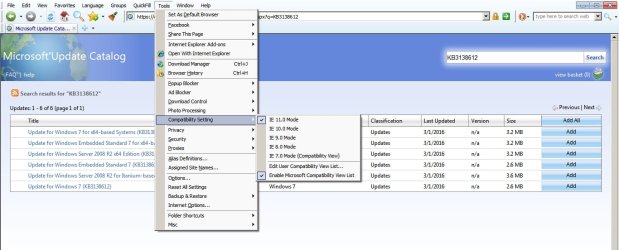
I can use a couple of other browsers to access MS Update Catalog but they "pretend to be IE11"

Microsoft Update Catalog Other Browser.jpg
 
Last edited:

My Computer

Computer type
Laptop
Computer Manufacturer/Model Number
ASUS
OS
Microsoft Windows 7 Home Premium 64-bit 7601 Multiprocessor Free Service Pack 1
CPU
AMD C-60 APU with Radeon(tm) HD Graphics
Motherboard
ASUSTeK COMPUTER INC. X501U
Memory
4.00 GB
Graphics Card(s)
AMD Radeon HD 6290 Graphics
Sound Card
(1) AMD High Definition Audio Device (2) Realtek High Defi
Screen Resolution
1366 x 768 x 32 bits (4294967296 colors) @ 60 Hz
Hard Drives
Hitachi HTS545050A7E380 SATA Disk Device
Antivirus
Comodo CIS & FW, SecureAplus App Whitelisting, Threatfire
Browser
Cyberfox 64bit, Opera 64bit, Airfox
Other Info
Spy-The-Spy, HitmanPro.Alert, Norton Connect Safe, MJRegWatcher, BitDefender TrafficLight, Voodoo Shield, Zemana AntiMalware
I use IE11 too (for that site only) and have no issues accessing it. I don't think it's accessible with another browser as it requires the ActiveX plugin. It doesn't work when I try with Chrome.
Apparently MS is said to be removing that requirement in the next few months so it will be accessible with any browser eventually.
Even some users using IE11 have said they're unable to access it though.

Hopefully they'll remove that quickly now that they're supposedly phasing out the Download Center. Otherwise some people are going to have less options to download some updates offline. :(

I can use a couple of other browsers to access MS Update Catalog but they "pretend to be IE11"


That's interesting Callender, what browser is that you're using? I've tried to use IETab extension in Chrome as that has different IE compatibility modes. It does open up the site with no problems, but when you click to download it won't go any further, there's no popup to download the files to Desktop.
 

My Computer

Computer type
PC/Desktop
Computer Manufacturer/Model Number
Custom Build
OS
Win 7 Ultimate, Win 8.1 Pro, Linux Mint 19 Cinnamon (All 64-Bit)
CPU
Intel i5 4690K
Motherboard
Gigabyte Z97X-UD3H
Memory
Corsair Vengeance LP 32GB DDR3
Graphics Card(s)
MSI GTX 1060 GAMING X 6GB
Sound Card
Onboard
Hard Drives
Samsung 850 EVO 250GB SSD (x2)
Samsung 860 EVO 1TB SSD (x2)
Crucial MX300 525GB SSD
WD Blue 2TB 5400rpm Intellipark Disabled (x2)
PSU
Corsair HX750i
Case
Phanteks Enthoo Pro
Cooling
CM Hyper 212 EVO on CPU, Noctua Redux NF-P14S 1500rpm (x6)
Keyboard
Corsair K70 RGB LUX
Mouse
Corsair Sabre RGB
Antivirus
Avast Free, MalwareBytes, SAS & CryptoPrevent
Browser
Chrome
Other Info
StarTech PEXESAT322I 2 Port PCI-E SATA Card
ASUS PCE-AC56 Dual-band AC1300 Wireless Card
Akasa FC.Six Manual Fan Controller
And a Partridge in a Pear Tree!
Should be this one LF: https://catalog.update.microsoft.com
I can't actually access it right now though as it doesn't work on a tablet.

Aparently I can but, first, I'm making an image before I install it on my computer. Be back in a few.

I had updated this post but, for some weird reason, it didn't go through.

Ok, it's supposedly installed. Where is it? How do I use it? I'm so confused. :confused:

You have to know the KB number of any update you want to download. Just type it in the search bar. You'll then have the option to "Add to basket" (Download queue/list). You can then go to your basket and download any updates you need in one go.
 

My Computer

Computer type
PC/Desktop
Computer Manufacturer/Model Number
Custom Build
OS
Win 7 Ultimate, Win 8.1 Pro, Linux Mint 19 Cinnamon (All 64-Bit)
CPU
Intel i5 4690K
Motherboard
Gigabyte Z97X-UD3H
Memory
Corsair Vengeance LP 32GB DDR3
Graphics Card(s)
MSI GTX 1060 GAMING X 6GB
Sound Card
Onboard
Hard Drives
Samsung 850 EVO 250GB SSD (x2)
Samsung 860 EVO 1TB SSD (x2)
Crucial MX300 525GB SSD
WD Blue 2TB 5400rpm Intellipark Disabled (x2)
PSU
Corsair HX750i
Case
Phanteks Enthoo Pro
Cooling
CM Hyper 212 EVO on CPU, Noctua Redux NF-P14S 1500rpm (x6)
Keyboard
Corsair K70 RGB LUX
Mouse
Corsair Sabre RGB
Antivirus
Avast Free, MalwareBytes, SAS & CryptoPrevent
Browser
Chrome
Other Info
StarTech PEXESAT322I 2 Port PCI-E SATA Card
ASUS PCE-AC56 Dual-band AC1300 Wireless Card
Akasa FC.Six Manual Fan Controller
And a Partridge in a Pear Tree!
That's interesting Callender, what browser is that you're using? I've tried to use IETab extension in Chrome as that has different IE compatibility modes. It does open up the site with no problems, but when you click to download it won't go any further, there's no popup to download the files to Desktop.

I'll PM you with the info on the browser. RE: IETab extensions. I tried using FF IE Tab extension and ActiveX plugin (allows ActiveX controls) and switched user agent. It wouldn't work in Cyberfox (the Active X plugin) and I didn't actually test with FF.
 

My Computer

Computer type
Laptop
Computer Manufacturer/Model Number
ASUS
OS
Microsoft Windows 7 Home Premium 64-bit 7601 Multiprocessor Free Service Pack 1
CPU
AMD C-60 APU with Radeon(tm) HD Graphics
Motherboard
ASUSTeK COMPUTER INC. X501U
Memory
4.00 GB
Graphics Card(s)
AMD Radeon HD 6290 Graphics
Sound Card
(1) AMD High Definition Audio Device (2) Realtek High Defi
Screen Resolution
1366 x 768 x 32 bits (4294967296 colors) @ 60 Hz
Hard Drives
Hitachi HTS545050A7E380 SATA Disk Device
Antivirus
Comodo CIS & FW, SecureAplus App Whitelisting, Threatfire
Browser
Cyberfox 64bit, Opera 64bit, Airfox
Other Info
Spy-The-Spy, HitmanPro.Alert, Norton Connect Safe, MJRegWatcher, BitDefender TrafficLight, Voodoo Shield, Zemana AntiMalware
Back
Top