What is a "0-0" partition??

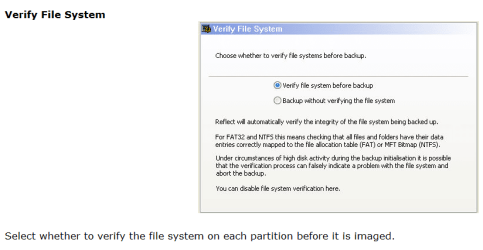
I have found out that much. Under Advanced (see picture 1) you seem to be getting to the option whether to verify or not (see picture 2). But that is not available in the free version.

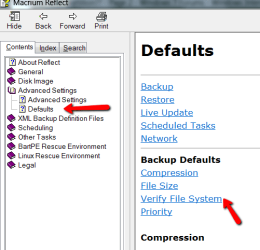
Your settings must be reminents of the Pro Version that were still floating around the system. If you want to see for yourself: Go to Help. There in Advanced Settings > Defaults they show the settings page (see Picture 3). But I actually could not find it in my Macrium. -- What a mess.
 

Attachments

  • 2011-03-12_2122.png
    2011-03-12_2122.png
    17.6 KB · Views: 1
  • 2011-03-12_2140.png
    2011-03-12_2140.png
    33.8 KB · Views: 0
  • 2011-03-12_2149.png
    2011-03-12_2149.png
    13.2 KB · Views: 0

My Computer My Computer

At a glance

Vista, Windows7, Mint Mate, Zorin, Windows 8from 1.6GHz Duo to i7
Computer Manufacturer/Model Number
HP, Dell, Gateway, Toshiba - 4 laptops and 2 desktops
OS
Vista, Windows7, Mint Mate, Zorin, Windows 8
CPU
from 1.6GHz Duo to i7
Monitor(s) Displays
2x HP w2207
Hard Drives
5x HDD, 7x SSD, 12x Externals
Keyboard
with trackball - no mices
Mouse
Trackball mice
Internet Speed
DSL 6000
I still don't understand your Macrium pe (pre installation environment) issue. I thought either it or the linux option would be boot CD/DVDs.

Your questions:
My Macrium free has a license number. (I don't know why).

As I see it there are 2 types of "verify". One the verify of the file system before imaging which defaults to "yes". Two the image verify after making an image. Talking about number 2, yours is set to "Y". Like whs mine is set to "N".
I can't find where to adjust the setting!!!!

It would be a worry anyway if it failed. Why keep an image that can't be verified.

I'd be making a small dummy partition somewhere and doing a test on that. WHS has a guide somewhere.

ADD: You apparently can't have this auto verify set (Y) with the free version. Here's some reasons Macrium give for the error
http://www.macrium.com/KB/KnowledgebaseArticle50048.aspx
This suggests you may have broader computer issues.
 
Last edited:

My Computer My Computer

At a glance

Windows 7x64 Home Premium SP1Intel i7 2600kG.Skill Ripjaws (DDR3-1600) 2x4GBNvidia GeForce GTS 450; Intel HD Graphics 300...
Computer type
PC/Desktop
Computer Manufacturer/Model Number
Own build
OS
Windows 7x64 Home Premium SP1
CPU
Intel i7 2600k
Motherboard
ASUS P8Z68 Deluxe
Memory
G.Skill Ripjaws (DDR3-1600) 2x4GB
Graphics Card(s)
Nvidia GeForce GTS 450; Intel HD Graphics 3000(GT2+)
Monitor(s) Displays
Dell Ultrasharp IPS panel U2311H, Samsung SyncMaster P2350
Screen Resolution
1920x1080
Hard Drives
Samsung 850 Pro SSD 256GB, Samsung SSD 840 120GB, Seagates 1TB Barracuda ST31000528AS x2
PSU
Seasonic M12II 520W
Case
Lian Li Lancool PC-K60
Cooling
Case: 1x120mm, 3x140mm CPU: Hyper 212+
Keyboard
Logitech MK520 (wireless)
Mouse
Logitech MK520
Internet Speed
6-7 Mbps
Antivirus
Norton Security Premium, Malwarebytes on 2 (MSE on 3rd PC)
Browser
FireFox
Other Info
Audio: Logitech Z523 2.1
I'm probably the only guy in the world who could have his much trouble for so long and still not be able to fix it.

I'll try downloading it again, while I'm at it I'll download Revo, maybe iObit missed something that is screwing it up. It almost acts like part of it is running on the paid version even though it's supposed to be uninstalled.:banghead:


I ran Memtest last night, left it run all night. It made 7 passes and no errors on the two sticks I'm using right now.

I still having gotten any response on my question as to why the backup for Windows doesn't work. Maybe someone will look at it soon.
 

My Computer My Computer

At a glance

Windows 7 ProIntel 2 quad Q66004 GBNvidia GeForce GTS 450 1TB
Computer type
PC/Desktop
Computer Manufacturer/Model Number
Acer Aspire E700 dsktop
OS
Windows 7 Pro
CPU
Intel 2 quad Q6600
Motherboard
Acer fg965M
Memory
4 GB
Graphics Card(s)
Nvidia GeForce GTS 450 1TB
Sound Card
RealTek
Monitor(s) Displays
Acer 22" X223w
Hard Drives
1TB WD Caviar Black (internal)
1TB WD My Book Essential
PSU
500W coolmaster Extreme Power Plus
Case
Acer
Cooling
case fan
Keyboard
acer
Mouse
acer
Internet Speed
56k
Antivirus
Microsoft Security Essentials
Browser
IE 8
Other Info
I hate IE 9 10 & 11
I still having gotten any response on my question as to why the backup for Windows doesn't work. Maybe someone will look at it soon.

Look in Disk Management to see if you have the System Reserved boot partition and whether it has 50mb of free space in the disk listings.

If not, post back a screenshot of your full Disk Mgmt drive map and listings as well as the contents of the SysReserved partition after unhiding System and hidden files in Control Panel>Folder Options>View tab. Use Snipping Tool in Start menu to save a rectangular screenshot of the maximized windows' content.
 
I don't think system reserved will have much of an effect on Macrium like it does with the native Windows imaging.
RE:
1) Running free Macrium. There may be a registry entry that say you are a licensed user and any install will be a licensed install. (Trial software keeps a record that you've used it somewhere normally so you can't install it again).
There must be a way to disable this verify option with the paid version. Why use a free version when you have a paid version - just for finding this setting.

2) Issue 1) is a secondary issue. You checked memory. The Macrium link I gave you suggested other tests like doing large file transfers. I'd be looking at this and scanning the HDD for bad sectors.
 

My Computer My Computer

At a glance

Windows 7x64 Home Premium SP1Intel i7 2600kG.Skill Ripjaws (DDR3-1600) 2x4GBNvidia GeForce GTS 450; Intel HD Graphics 300...
Computer type
PC/Desktop
Computer Manufacturer/Model Number
Own build
OS
Windows 7x64 Home Premium SP1
CPU
Intel i7 2600k
Motherboard
ASUS P8Z68 Deluxe
Memory
G.Skill Ripjaws (DDR3-1600) 2x4GB
Graphics Card(s)
Nvidia GeForce GTS 450; Intel HD Graphics 3000(GT2+)
Monitor(s) Displays
Dell Ultrasharp IPS panel U2311H, Samsung SyncMaster P2350
Screen Resolution
1920x1080
Hard Drives
Samsung 850 Pro SSD 256GB, Samsung SSD 840 120GB, Seagates 1TB Barracuda ST31000528AS x2
PSU
Seasonic M12II 520W
Case
Lian Li Lancool PC-K60
Cooling
Case: 1x120mm, 3x140mm CPU: Hyper 212+
Keyboard
Logitech MK520 (wireless)
Mouse
Logitech MK520
Internet Speed
6-7 Mbps
Antivirus
Norton Security Premium, Malwarebytes on 2 (MSE on 3rd PC)
Browser
FireFox
Other Info
Audio: Logitech Z523 2.1
Hi Greg
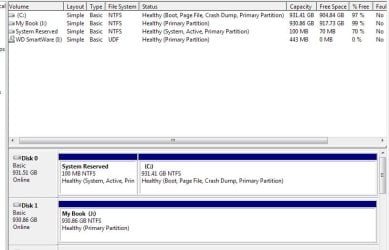
I checked the reserve has 100MB see attachment, it says there is 70% free space. I'm running 1TB on both internal and external HD's. I did cut the RAM back to 2BG, only because I wanted to run Memtest on it.

mjf
I ran a search for anything Macrium then deleted it. I also used RegCure and checked the registry for anything stray, only 2 files unrelated.
The reason I tried the free version is because I can't get my paid version to give me a verifiable image to store in case of disaster. I also used Revo to uninstall the free version, did a reboot and tried again with it. It still shows a Y (for yes) in the auto verify. Where are licenses stored?
 

Attachments

  • reserve.jpg
    reserve.jpg
    46.1 KB · Views: 4

My Computer My Computer

At a glance

Windows 7 ProIntel 2 quad Q66004 GBNvidia GeForce GTS 450 1TB
Computer type
PC/Desktop
Computer Manufacturer/Model Number
Acer Aspire E700 dsktop
OS
Windows 7 Pro
CPU
Intel 2 quad Q6600
Motherboard
Acer fg965M
Memory
4 GB
Graphics Card(s)
Nvidia GeForce GTS 450 1TB
Sound Card
RealTek
Monitor(s) Displays
Acer 22" X223w
Hard Drives
1TB WD Caviar Black (internal)
1TB WD My Book Essential
PSU
500W coolmaster Extreme Power Plus
Case
Acer
Cooling
case fan
Keyboard
acer
Mouse
acer
Internet Speed
56k
Antivirus
Microsoft Security Essentials
Browser
IE 8
Other Info
I hate IE 9 10 & 11
When you mention RegCure it gives me the creepy feeling like you might be tweaking Win7 beyond its tolerances, which are almost zero for tweaking beyond normal system settings. This is not XP or Vista - Win7 is a perfectly balanced lightweight OS that needs no tweaking. Registry cleaners and tweaking suites are a prime cause of problems we see here.

If you have tweaked Win7, I would strongly consider wiping the HD to clean reinstall following these tips to get a purrfect install, then avoid tweaking or messing with the registry which will always come back to bite you in Win7: http://www.sevenforums.com/installation-setup/125874-re-install-windows-7-a.html#post1086729
 
Last edited:
I don't know enough about license security to answer your question.
Once you have confidence in Macrium and your own computer system you may want this verify feature "off". You shouldn't have confidence in either at this stage.

In the properly installed paid version the option is accessed by
other tasks>defaults>backup>autoverify image
In the free version the autoverify image is missing (always set to "N")

Again, you need to check your HDDs. I would start with your C: partition and it will take around 3 hours.
Computer>right click C: (right pane)>properties>Tools>Check now>
you will get check disk options:
1) Automatically fix file system errors
2) Scan for and attempt recovery of bad sectors

Initially tick 1) and agree to schedule a check. Reboot your computer and wait for test results (~5minutes?).
Note results
then
tick 1) and 2) schedule the check, reboot and leave it for ~3 hours?
you will see progress as it works it's way through the HDD.
 
Last edited:

My Computer My Computer

At a glance

Windows 7x64 Home Premium SP1Intel i7 2600kG.Skill Ripjaws (DDR3-1600) 2x4GBNvidia GeForce GTS 450; Intel HD Graphics 300...
Computer type
PC/Desktop
Computer Manufacturer/Model Number
Own build
OS
Windows 7x64 Home Premium SP1
CPU
Intel i7 2600k
Motherboard
ASUS P8Z68 Deluxe
Memory
G.Skill Ripjaws (DDR3-1600) 2x4GB
Graphics Card(s)
Nvidia GeForce GTS 450; Intel HD Graphics 3000(GT2+)
Monitor(s) Displays
Dell Ultrasharp IPS panel U2311H, Samsung SyncMaster P2350
Screen Resolution
1920x1080
Hard Drives
Samsung 850 Pro SSD 256GB, Samsung SSD 840 120GB, Seagates 1TB Barracuda ST31000528AS x2
PSU
Seasonic M12II 520W
Case
Lian Li Lancool PC-K60
Cooling
Case: 1x120mm, 3x140mm CPU: Hyper 212+
Keyboard
Logitech MK520 (wireless)
Mouse
Logitech MK520
Internet Speed
6-7 Mbps
Antivirus
Norton Security Premium, Malwarebytes on 2 (MSE on 3rd PC)
Browser
FireFox
Other Info
Audio: Logitech Z523 2.1
Hi Greg
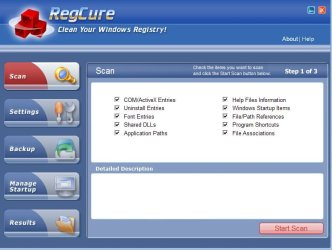
RegCure is a seriously light weight program (see photo) The only thing I've ever had it pull up were Active X; file/path references; program shortcuts; and file associations. It keeps the registry from filling up on file associations that have been deleted. Say the pic below; even when I delete it, there will be an association to it left behind. I also like to keep track of Active x files that get loaded so troubleshooting stuff will download.
I haven't "tweaked" anything. I learned from my mistakes with Vista.

mjf;

In the free version the autoverify image is missing (always set to "N")

The problem is that the free version is not getting set to no. I know that sounds impossible.
I ran a stress test this weekend on the hardware. Everything was well within parameters. I definitely don't want to have to wipe the hard drive unless it can't be avoided. That would take hours and hours of backing crap up. 5 minutes if I could get one of these stupid programs to work so I could just create an image for backup. I can run another checkdisk, but I don't think it's going to show anything different than a couple weeks ago. I'll run a sfc while I'm at it.
I'll get back to you and let you know what if anything I find.

Add: Macrium would like for you to believe they have created the "perfect program" and that any verification issues have to be with your machine, not their program. Take a look at their forum and see how many have verification issues.
This was a brand new installation on a brand new hard drive being backed up to a brand new hard drive.
 

Attachments

  • RegCure.jpg
    RegCure.jpg
    49.2 KB · Views: 0
Last edited:

My Computer My Computer

At a glance

Windows 7 ProIntel 2 quad Q66004 GBNvidia GeForce GTS 450 1TB
Computer type
PC/Desktop
Computer Manufacturer/Model Number
Acer Aspire E700 dsktop
OS
Windows 7 Pro
CPU
Intel 2 quad Q6600
Motherboard
Acer fg965M
Memory
4 GB
Graphics Card(s)
Nvidia GeForce GTS 450 1TB
Sound Card
RealTek
Monitor(s) Displays
Acer 22" X223w
Hard Drives
1TB WD Caviar Black (internal)
1TB WD My Book Essential
PSU
500W coolmaster Extreme Power Plus
Case
Acer
Cooling
case fan
Keyboard
acer
Mouse
acer
Internet Speed
56k
Antivirus
Microsoft Security Essentials
Browser
IE 8
Other Info
I hate IE 9 10 & 11
Hi
I ran a sfc and it says file integrity is fine. Ran dskck on both hard drives and they both checked out fine too.

Putting all of the Macrium problems on hold, what gives with the Windows 7 Pro backup??? Why am I getting "it can't start because of internal error"?? What internal error? In the services, the backup and restore is set to manual, but is on started and it still doesn't work. I even tried a system restore.
 

My Computer My Computer

At a glance

Windows 7 ProIntel 2 quad Q66004 GBNvidia GeForce GTS 450 1TB
Computer type
PC/Desktop
Computer Manufacturer/Model Number
Acer Aspire E700 dsktop
OS
Windows 7 Pro
CPU
Intel 2 quad Q6600
Motherboard
Acer fg965M
Memory
4 GB
Graphics Card(s)
Nvidia GeForce GTS 450 1TB
Sound Card
RealTek
Monitor(s) Displays
Acer 22" X223w
Hard Drives
1TB WD Caviar Black (internal)
1TB WD My Book Essential
PSU
500W coolmaster Extreme Power Plus
Case
Acer
Cooling
case fan
Keyboard
acer
Mouse
acer
Internet Speed
56k
Antivirus
Microsoft Security Essentials
Browser
IE 8
Other Info
I hate IE 9 10 & 11
What I would do is wipe the HD and clean reinstall using the known-good steps to get a purrfect reinstall: http://www.sevenforums.com/installation-setup/125874-re-install-windows-7-a.html#post1086729

Then don't do any tweaking whatsoever other than normal system settings for Win7, and limit 3rd party cleaner to CCleaner which all experts can agree upon - although some don't trust it's Registry cleaner, I've not had any issues with it during ten years use in hundreds of installs.

Save a Win7 backup and one other image after it's set up and running good, then you have a fallback if anything gets tweaky again.
 
I used CCleaner when I had Vista installed. It is partially the reason my Vista hit the skids. I unknowingly (and that's my fault) had it clean out the "junk files". It said there were over 200. I started looking at some of them and they did look like junk, I hit the clean button. Unfortunately not all of them were junk, some were ones the system needed to function right. I then installed Spotmau to try to repair that. Again it wanted to run a scan. No where did I read that at the end of the scan it would remove what it didn't like. I ended up doing a clean install on that. A clean install when you have a lot of extra programing is a real PITA.
I thought I would be good to go by installing Windows 7 on a new hard drive. I usually use the Acer Empowering programing. It only removes real crap. It leaves the system alone. RegCure is the only other "cleaning" program I use, which as I showed you is pretty benign.
I'm not sure what I'm going to gain by doing a clean install if both sfc and dskck show no problem. Also in the disk management it shows the system as healthy. Why isn't this "internal error" showing up any place? I don't see anything connected to it in the event viewer either. Remember Windows 7 was installed on a new hard drive, can't get any cleaner than that.
 

My Computer My Computer

At a glance

Windows 7 ProIntel 2 quad Q66004 GBNvidia GeForce GTS 450 1TB
Computer type
PC/Desktop
Computer Manufacturer/Model Number
Acer Aspire E700 dsktop
OS
Windows 7 Pro
CPU
Intel 2 quad Q6600
Motherboard
Acer fg965M
Memory
4 GB
Graphics Card(s)
Nvidia GeForce GTS 450 1TB
Sound Card
RealTek
Monitor(s) Displays
Acer 22" X223w
Hard Drives
1TB WD Caviar Black (internal)
1TB WD My Book Essential
PSU
500W coolmaster Extreme Power Plus
Case
Acer
Cooling
case fan
Keyboard
acer
Mouse
acer
Internet Speed
56k
Antivirus
Microsoft Security Essentials
Browser
IE 8
Other Info
I hate IE 9 10 & 11
It's just what I would do. Take it or leave it. I don't leave wounded OS's on the field.

Try this Win7 backup imaging method to see if anything changes: http://www.sevenforums.com/457081-post21.html

I haven't seen a verifiable issue with CCleaner in more years than I can remember. I think the last one I recall was hibernate file. It is a genius app closely maintained by geniuses, maybe the most highly regarded app in the tech world.
 
Greg
Hope I didn't offend you with my comments on CCleaner. I'm a little more tech savvy than when I was, so no harm, no foul to give it another try. Definitely ain't playing with the "registry cleaner".:zip:
I want to hold off on any clean installs, kind of keep it as a last resort. I'm also going to switch out another 2 sticks of RAM I have and see if that makes any difference. I know that Memtest doesn't always catch a problem.
 

My Computer My Computer

At a glance

Windows 7 ProIntel 2 quad Q66004 GBNvidia GeForce GTS 450 1TB
Computer type
PC/Desktop
Computer Manufacturer/Model Number
Acer Aspire E700 dsktop
OS
Windows 7 Pro
CPU
Intel 2 quad Q6600
Motherboard
Acer fg965M
Memory
4 GB
Graphics Card(s)
Nvidia GeForce GTS 450 1TB
Sound Card
RealTek
Monitor(s) Displays
Acer 22" X223w
Hard Drives
1TB WD Caviar Black (internal)
1TB WD My Book Essential
PSU
500W coolmaster Extreme Power Plus
Case
Acer
Cooling
case fan
Keyboard
acer
Mouse
acer
Internet Speed
56k
Antivirus
Microsoft Security Essentials
Browser
IE 8
Other Info
I hate IE 9 10 & 11
Back
Top