What is my computer (hard drive) doing now?- I can hear it working

pintree3

Mich
Member
VIP
Local time
8:30 AM
Messages
394
Location
Canada
When you defrag your computer you can hear the hard drive running as it changes files back and forth. At times I can hear the same sound (or similar) but have no clue what it can possibly be doing. My 1st instinct is to unplug my internet connection should someone be hacking in my PC and using my resources. But after doing so I can still hear it working hard, on and on, and on at times. So I do a Ctrl+Alt+Del to see what is using most of my memory. Often its Firefox and Skype but even after closing both and doing nothing (hand away from keyboard and mouse) I can still hear it at work. I do not have any automatic updates for any of my software so it can't be that. I was wonderig if there is some way, software perhaps, to find out exactly what it is that is making my computer do such a thing?
 

My Computer My Computer

At a glance

Windows 7 Home Premium 64Intel Core i5 760 @ 2800MHz12288MBAMD Radeon HD 7800 Series
Computer type
PC/Desktop
Computer Manufacturer/Model Number
OEM Designed by me :-)
OS
Windows 7 Home Premium 64
CPU
Intel Core i5 760 @ 2800MHz
Motherboard
Asus P7P55D-E LX
Memory
12288MB
Graphics Card(s)
AMD Radeon HD 7800 Series
Sound Card
ASUS Xonar DG
Monitor(s) Displays
ViewSonic VX2453 Series, HDMI 1080p Full HD
Screen Resolution
1920X1080
Hard Drives
Samsung SSD 840 EVO 250GB& two others
PSU
Tagan BZ Series, TG800-BZ 800W
Keyboard
Logitech MK250
Mouse
Logitech M310
Internet Speed
toppest, mostest :-) <-- bad, but fun English
Browser
Firefox, Crrome, IE
Hi there,

Some info. here on how to distinguish the type of hard drive noise you are hearing. Here's an Article on how to troubleshoot noisy hard drive.

Hope that this is helpful.
 

My Computer My Computer

At a glance

Win7 & Win8 64bitIntel i5
Computer Manufacturer/Model Number
Lenovo Desktop/Samsung Laptop
OS
Win7 & Win8 64bit
CPU
Intel i5
Internet Speed
Charter-20 Mbps
Antivirus
Avast
Browser
FF, IE9 and Chrome
Windows hits the drive about once per second as part of normal "keep-alive" activities. There's also indexing and logging going on in the back ground so there's never a time that the drive is really idle even when nothing else is running. One acquires an appreciation of a quiet system after installing a SSD. :)

Some HDDs are just plain noisy. The method of mounting makes a difference too. Clips and trays just can't beat plain ole' screws and solid racks. It's impossible to know if the sounds you hear are abnormal. (We're not there.) Follow the links given by Ray and let us know what you find out.

Added:
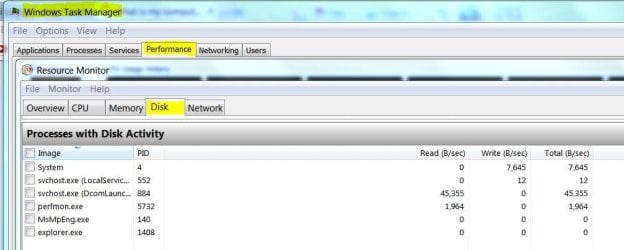
You can see what processes are using disk. Start Task Manager, then click on the Performance tab. At the bottom of that window is a button called Resource Monitor. Click that button. On the Resource Monitor window, click on the Disk tab. This shows all the processes using disk. If you expand the area below it, every disk file in use is shown.
 

Attachments

  • Disk Activity.JPG
    Disk Activity.JPG
    52.7 KB · Views: 0
Last edited:

My Computer My Computer

At a glance

Windows 7 Pro-x64i7-2600 3.4GHz - 3.8GHz Turbo8Gb - 2x4GB, Muskin 991770 PC3-1333Integrated Intel HD 2000
Computer type
PC/Desktop
Computer Manufacturer/Model Number
Built 2/11/2011
OS
Windows 7 Pro-x64
CPU
i7-2600 3.4GHz - 3.8GHz Turbo
Motherboard
Intel DH67BL-B3
Memory
8Gb - 2x4GB, Muskin 991770 PC3-1333
Graphics Card(s)
Integrated Intel HD 2000
Sound Card
Integrated Intel 10.1 HD, RealTek ALC892
Monitor(s) Displays
Asus LCD VH222H, Haier HL24XSL2a
Screen Resolution
1920x1080, 1920x1080
Hard Drives
Crucial SSD C300-128Gb,
Western Digital WD5002AALX - 500Gb,
Western Digital WD7501AALS - 750Gb
PSU
Seasonic 650W 80+ Gold Modular
Case
Rosewill Defender
Cooling
Stock CPU, Four 120mm case fans, PCH fan added
Keyboard
Logitech EX100 Y-RBH94 Wireless
Mouse
Logitech EX100 M-RCE95 Wireless
Internet Speed
3.0/1.5 Mbs
Antivirus
Microsoft Security Essentials
Browser
Microsoft Internet Explorer 11
Other Info
Antec Veris Premier-Multimedia IR Station,
Cyber Accoustics-3602 Speakers,
AFT XM-5U Card Reader,
Hauppauge TV-HVR-2250,
Sony LX300 USB Turntable
Next time have a look into Resource Monitor > Disk tab. That will tell you which processes read or write on the disk. Very often it is the system updating some log files or other activities.
 
Last edited:

My Computer My Computer

At a glance

Vista, Windows7, Mint Mate, Zorin, Windows 8from 1.6GHz Duo to i7
Computer Manufacturer/Model Number
HP, Dell, Gateway, Toshiba - 4 laptops and 2 desktops
OS
Vista, Windows7, Mint Mate, Zorin, Windows 8
CPU
from 1.6GHz Duo to i7
Monitor(s) Displays
2x HP w2207
Hard Drives
5x HDD, 7x SSD, 12x Externals
Keyboard
with trackball - no mices
Mouse
Trackball mice
Internet Speed
DSL 6000
Ops! Sorry Wolf. I didn't see your post before adding the picture to mine. Good idea though. :)
 

My Computer My Computer

At a glance

Windows 7 Pro-x64i7-2600 3.4GHz - 3.8GHz Turbo8Gb - 2x4GB, Muskin 991770 PC3-1333Integrated Intel HD 2000
Computer type
PC/Desktop
Computer Manufacturer/Model Number
Built 2/11/2011
OS
Windows 7 Pro-x64
CPU
i7-2600 3.4GHz - 3.8GHz Turbo
Motherboard
Intel DH67BL-B3
Memory
8Gb - 2x4GB, Muskin 991770 PC3-1333
Graphics Card(s)
Integrated Intel HD 2000
Sound Card
Integrated Intel 10.1 HD, RealTek ALC892
Monitor(s) Displays
Asus LCD VH222H, Haier HL24XSL2a
Screen Resolution
1920x1080, 1920x1080
Hard Drives
Crucial SSD C300-128Gb,
Western Digital WD5002AALX - 500Gb,
Western Digital WD7501AALS - 750Gb
PSU
Seasonic 650W 80+ Gold Modular
Case
Rosewill Defender
Cooling
Stock CPU, Four 120mm case fans, PCH fan added
Keyboard
Logitech EX100 Y-RBH94 Wireless
Mouse
Logitech EX100 M-RCE95 Wireless
Internet Speed
3.0/1.5 Mbs
Antivirus
Microsoft Security Essentials
Browser
Microsoft Internet Explorer 11
Other Info
Antec Veris Premier-Multimedia IR Station,
Cyber Accoustics-3602 Speakers,
AFT XM-5U Card Reader,
Hauppauge TV-HVR-2250,
Sony LX300 USB Turntable
Ops! Sorry Wolf. I didn't see your post before adding the picture to mine. Good idea though. :)
No problem. The more info, the better.
 

My Computer My Computer

At a glance

Vista, Windows7, Mint Mate, Zorin, Windows 8from 1.6GHz Duo to i7
Computer Manufacturer/Model Number
HP, Dell, Gateway, Toshiba - 4 laptops and 2 desktops
OS
Vista, Windows7, Mint Mate, Zorin, Windows 8
CPU
from 1.6GHz Duo to i7
Monitor(s) Displays
2x HP w2207
Hard Drives
5x HDD, 7x SSD, 12x Externals
Keyboard
with trackball - no mices
Mouse
Trackball mice
Internet Speed
DSL 6000
Ear buds!
 

My Computer My Computer

At a glance

Win8/8.1,Win7-U64, Vista U64, uncounted Linux...AMD and Intell, 9590, 8350, i5 3570kCorsair G SkillCrossfired Sapphire HD 7950 Vapor-X, ASUS R9 ...
Computer type
PC/Desktop
Computer Manufacturer/Model Number
Custom, Dell and Lenono LT's
OS
Win8/8.1,Win7-U64, Vista U64, uncounted Linux distor's
CPU
AMD and Intell, 9590, 8350, i5 3570k
Motherboard
CFVFZ, GA990FXA, Z77e-itx
Memory
Corsair G Skill
Graphics Card(s)
Crossfired Sapphire HD 7950 Vapor-X, ASUS R9 280X TOP
Sound Card
Realtek ALC889
Monitor(s) Displays
ViewSonic VX2770SMH 27" / ViewSonic VX2433 LCD 24"
Screen Resolution
1080i HD
Hard Drives
Samsung SSD 840 Pro
OCZ Agility 3's
OCZ Vector's
WD's Blue, red, green, Velociraptors
Seagate USB3 & Hybrid's
ASUS Blu-Ray
ASUS DVD
PSU
Corsair AX1200i, Seasonice 850 Gold
Case
Cooler Master HAF 922 & HAF 932, Lian Li Train case.
Cooling
Air, Glacer 240L expanded, custom EK loop with duel D5's
Keyboard
Microsoft SideWinder X4 USB Keyboard / Logitech 250 PS2
Mouse
Logitech G500 / MS wireless 5000
Internet Speed
Best of 5ms / 75+ dn / 12+ up More or less.
Antivirus
MS esentials-MalwareBytes
Browser
Firefox Chromebook
Back
Top