freewheeling
New member
- Local time
- 7:26 PM
- Messages
- 92
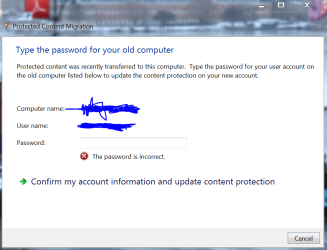
After using Easy Transfer and rebooting I got a window with a key icon on it that said that to complete protected content migration I had to enter the password for my account on my old computer. Well, it's exactly the same as on my new computer, but when I entered that password it said it was incorrect. I tried about every password I know and kept getting the incorrect message so in frustration I closed the window. Now I don't know what it was or how to open it again. I tried doing a search in the help section on "protected content migration" and nothing comes up, and when I do a Google search I just get a bunch of problem descriptions similar to mine, but no solution. Where did this window come from and how do I bring it up again, and how do I type in the *correct* password? Do I have to translate it into Gaelic or something?
My Computer
- Computer Manufacturer/Model Number
- Gateway DX4720-03
- OS
- Windows Vista HP 64-bit, Windows 7 P 64-bit, Leopard 10.5.8, Windows 7 P 32-bit
- CPU
- Pentium(R) Dual-Core E5200 @ 2.50GHz
- Motherboard
- ACPI x64
- Memory
- 4.00GB
- Graphics Card(s)
- NVIDIA GeForce 7100 / NVIDIA nForce 630i
- Sound Card
- Onboard Sound
- Monitor(s) Displays
- Samsumg Syncmaster 2233SW, Syncmaster 205BW
- Screen Resolution
- 1680X1050 and 1920X1080
- Hard Drives
- WDC WD64 00AAKS-22A7B SCSI
WDC WD50 00AAKS-00V2B SCSI
WDC WD10 EADS-00M2B0 SCSI
FUJITSU USB
SEAGATE USB
- PSU
- Generic (cheap) 550W
- Case
- Gateway
- Cooling
- 30 W
- Keyboard
- Kinesis Advantage
- Mouse
- Trackball
- Internet Speed
- Cable Modem
- Other Info
- Hauppauge HD-PVR, USB-UIRT