
What It is?

zungul

New member
Member
VIP
Local time
8:53 AM
Messages
176
Hi,

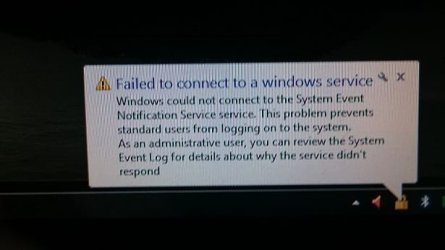
|I have a problem with small window which appear after every restart.
How do I get rid of this message?
P.S.
Sorry about my English.
 

Attachments

  • 1.jpg
    1.jpg
    36.7 KB · Views: 123

My Computer

OS
Windows 7 Ultimate x64
CPU
Intel(R) Core(TM)2 Quad Q6600
Motherboard
ASUS P5K Deluxe/WiFi-AP
Memory
4.00 GB
Graphics Card(s)
NVIDIA GEForce 8800 GTX
Sound Card
SoundMAX Intergrated Digital HD Audio
Monitor(s) Displays
LG Flatron Wide 22"
Hi

It didn't help.


Still I get the message..
 

My Computer

OS
Windows 7 Ultimate x64
CPU
Intel(R) Core(TM)2 Quad Q6600
Motherboard
ASUS P5K Deluxe/WiFi-AP
Memory
4.00 GB
Graphics Card(s)
NVIDIA GEForce 8800 GTX
Sound Card
SoundMAX Intergrated Digital HD Audio
Monitor(s) Displays
LG Flatron Wide 22"

My Computer

Computer type
PC/Desktop
Computer Manufacturer/Model Number
Skylake Special #666
OS
Windows 10 Pro x64
CPU
Intel Core i7 6700K
Motherboard
Asus Sabertooth Z170 Mark 1
Memory
GSkill TridentZ RGB 16GB 3600 16-16-16-36
Graphics Card(s)
EVGA GTX 980 Ti SC x2
Sound Card
Realtek High Definition
Monitor(s) Displays
AOC G2460PG
Screen Resolution
1920 x 1080 144Hz
Hard Drives
Samsung 860 Pro 256GB, Seagate Barracuda 4TB x2
PSU
EVGA 1000 P2, EVGA White Custom Braided Cables
Case
Corsair Vengeance C70 Gunmetal Black
Cooling
Corsair H100i v2, Corsair ML120 x2, Thermal Grizzly Kryonaut
Keyboard
Logitech G910 Orion Spectrum
Mouse
Logitech G700s
Internet Speed
Verizon Fios Quantum Gateway 75/75
Antivirus
Windows Defender, Malwarebytes Free 3.8.3
Browser
Chrome
Other Info
Corsair SP120 x4, LG Blu-ray Drive, Durabrand HT-395 100 Watt Dolby Digital Amp, Corsair H2100 Wireless 7.1 Headset
Nothing helped ! :(
 

My Computer

OS
Windows 7 Ultimate x64
CPU
Intel(R) Core(TM)2 Quad Q6600
Motherboard
ASUS P5K Deluxe/WiFi-AP
Memory
4.00 GB
Graphics Card(s)
NVIDIA GEForce 8800 GTX
Sound Card
SoundMAX Intergrated Digital HD Audio
Monitor(s) Displays
LG Flatron Wide 22"
Hi see what is running,
Use Clean boot,
http://www.sevenforums.com/tutorial...ation-conflicts-performing-clean-startup.html
Click Start and type in the search box,
msconfig
Click on the suggestion on top or hit the Enter key,
Go to the Startup section and take some screen shots for a complete list,
Go to the Services section and on the bottom left Check the box to Hide All Microsoft services,
Repeat the screen shots,
See the links above my signature on how to take and upload screen shots here,
Cheers.
 

My Computer

Computer type
PC/Desktop
Computer Manufacturer/Model Number
Custom assembled by me :}
OS
Win-7-Pro64bit 7-H-Prem-64bit
CPU
i7-5930K 2nd i9-9940x both water blocked VRM's too
Motherboard
ASUS SABERTOOTH X99 2nd ASUS x299 Apex
Memory
Trident-z 3200C14 2nd Trident-z 3600C16
Graphics Card(s)
EVGA 1080ti ftw3 2nd Titan Xp both water blocked
Sound Card
Built-in Realtek
Monitor(s) Displays
1-AOC G2460PG 24"G-Sync 144Hz/ 2nd 1-ASUS VG248QE 24" 144Hz
Screen Resolution
1920 x 1080 144Hz
Hard Drives
2-Samsung M.2 Evo & Evo Plus
2-Samsung 850 EVO 500GB SSD's/ 3-2.5 W.D. Black 1tb-&3-1tb/3-3.5 WD Black 1tb hdd's
PSU
EVGA SuperNOVA 1000-P2 2nd 1200-P2
Case
2-Corsair Obsidian Series 450D Black ATX Mid Tower
Cooling
Custom water loops
Keyboard
Logitech G710+/ 2nd Logitech G910
Mouse
2-RedDragon M901 Perdition 16400 dpi Gaming mouse = wired
Internet Speed
Comcast Ping 19ms 89.31mbps download speed 6.12mbps upload
Antivirus
Malwarebytes Pro/ Superantispyware Pro
Browser
FireFox & Pale moon
Other Info
2nd ASUS X299 Apex/Intel i9-9940x with Custom water loop/7H-Prem-x64/Corsair 450D case/Ram Trident-z 3600C16 4x8gb / Samsung970Evo plus 500gb SSD/Dual ssd EZ swap evo/PSU EVGA SuperNova 1200w-P2 80+Platinum/GPU Titan Xp /8-ML-140 on push-pull on 2-280GTX rads
Hi,

I tried to do what you told me but just in the beginning, when I tried In the General tab to select Selective Startup, and uncheck the Load Startup Items box when I press Apply button Load Startup Items box comeback checked.
I'm not able to uncheck Load Startup Items box. Is there any solution to solve this?
 

My Computer

OS
Windows 7 Ultimate x64
CPU
Intel(R) Core(TM)2 Quad Q6600
Motherboard
ASUS P5K Deluxe/WiFi-AP
Memory
4.00 GB
Graphics Card(s)
NVIDIA GEForce 8800 GTX
Sound Card
SoundMAX Intergrated Digital HD Audio
Monitor(s) Displays
LG Flatron Wide 22"
Hi,
Go to the next instructions to take the screen shots and post them here.
 

My Computer

Computer type
PC/Desktop
Computer Manufacturer/Model Number
Custom assembled by me :}
OS
Win-7-Pro64bit 7-H-Prem-64bit
CPU
i7-5930K 2nd i9-9940x both water blocked VRM's too
Motherboard
ASUS SABERTOOTH X99 2nd ASUS x299 Apex
Memory
Trident-z 3200C14 2nd Trident-z 3600C16
Graphics Card(s)
EVGA 1080ti ftw3 2nd Titan Xp both water blocked
Sound Card
Built-in Realtek
Monitor(s) Displays
1-AOC G2460PG 24"G-Sync 144Hz/ 2nd 1-ASUS VG248QE 24" 144Hz
Screen Resolution
1920 x 1080 144Hz
Hard Drives
2-Samsung M.2 Evo & Evo Plus
2-Samsung 850 EVO 500GB SSD's/ 3-2.5 W.D. Black 1tb-&3-1tb/3-3.5 WD Black 1tb hdd's
PSU
EVGA SuperNOVA 1000-P2 2nd 1200-P2
Case
2-Corsair Obsidian Series 450D Black ATX Mid Tower
Cooling
Custom water loops
Keyboard
Logitech G710+/ 2nd Logitech G910
Mouse
2-RedDragon M901 Perdition 16400 dpi Gaming mouse = wired
Internet Speed
Comcast Ping 19ms 89.31mbps download speed 6.12mbps upload
Antivirus
Malwarebytes Pro/ Superantispyware Pro
Browser
FireFox & Pale moon
Other Info
2nd ASUS X299 Apex/Intel i9-9940x with Custom water loop/7H-Prem-x64/Corsair 450D case/Ram Trident-z 3600C16 4x8gb / Samsung970Evo plus 500gb SSD/Dual ssd EZ swap evo/PSU EVGA SuperNova 1200w-P2 80+Platinum/GPU Titan Xp /8-ML-140 on push-pull on 2-280GTX rads
Event Viewer:

Log Name: Application
Source: Microsoft-Windows-Search
Date: 02/01/2016 10:42:23 AM
Event ID: 3036
Task Category: Gatherer
Level: Warning
Keywords: Classic
User: N/A
Computer: wKlJ
Description:
The content source <csc://{S-1-5-21-804083316-1099961911-2027366845-1001}/> cannot be accessed.

Context: Application, SystemIndex Catalog

Details:
The object was not found. (HRESULT : 0x80041201) (0x80041201)

Event Xml:
<Event xmlns="http://schemas.microsoft.com/win/2004/08/events/event">
<System>
<Provider Name="Microsoft-Windows-Search" Guid="{CA4E628D-8567-4896-AB6B-835B221F373F}" EventSourceName="Windows Search Service" />
<EventID Qualifiers="32768">3036</EventID>
<Version>0</Version>
<Level>3</Level>
<Task>3</Task>
<Opcode>0</Opcode>
<Keywords>0x80000000000000</Keywords>
<TimeCreated SystemTime="2016-01-02T15:42:23.000000000Z" />
<EventRecordID>162003</EventRecordID>
<Correlation />
<Execution ProcessID="0" ThreadID="0" />
<Channel>Application</Channel>
<Computer>wKlJ</Computer>
<Security />
</System>
<EventData>
<Data Name="ExtraInfo">

Context: Application, SystemIndex Catalog

Details:
The object was not found. (HRESULT : 0x80041201) (0x80041201)
</Data>
<Data Name="URL">csc://{S-1-5-21-804083316-1099961911-2027366845-1001}/</Data>
</EventData>
</Event>
 

My Computer

OS
Windows 7 Ultimate x64
CPU
Intel(R) Core(TM)2 Quad Q6600
Motherboard
ASUS P5K Deluxe/WiFi-AP
Memory
4.00 GB
Graphics Card(s)
NVIDIA GEForce 8800 GTX
Sound Card
SoundMAX Intergrated Digital HD Audio
Monitor(s) Displays
LG Flatron Wide 22"
Happy New Year zungul -

Looks like the Windows index is corrupt. Try deleting the index and rebuilding it:


  1. Start > Control Panel > All Control Panel Items
  2. Click on Indexing Options.
  3. Click the Advanced button.
  4. In the Index Settings tab click the Rebuild button then the dialog box OK button.

You return to the Indexing Options window and the index will start the rebuild process.

When it finished the text at the top of the window will say "X items indexed" and "Indexing complete".


  1. Click the Close button. You return to the Control Panel.
  2. Close the Control Panel.
  3. Close all other open applications.
  4. Reboot.

Let us know what happens upon reboot.

Regards,
GEWB
 

My Computer

Computer type
PC/Desktop
Computer Manufacturer/Model Number
(7 different computers booting up to 10 systems)
OS
Linux Mint / XP / Win7 Home, Pro, Ultimate / Win8.1 / Win10
Other Info
Four desktops, two laptops, one notebook and one tablet
Happy New Year GEWB and Everybody !!!

I did what you said ( it took really long time) but after reboot again I've got this message.
Nothing changed. :(
 

My Computer

OS
Windows 7 Ultimate x64
CPU
Intel(R) Core(TM)2 Quad Q6600
Motherboard
ASUS P5K Deluxe/WiFi-AP
Memory
4.00 GB
Graphics Card(s)
NVIDIA GEForce 8800 GTX
Sound Card
SoundMAX Intergrated Digital HD Audio
Monitor(s) Displays
LG Flatron Wide 22"
OK...so I followed the hyperlink listed in your log (Event xmlns="http://schemas.microsoft.com/win/2004/08/events/event") and this is what came up:
The resource you are looking for has been removed, had its name changed, or is temporarily unavailable.
This will be "interesting" to track down! I hope others will also take up the challenge.

Regards,
GEWB
 

My Computer

Computer type
PC/Desktop
Computer Manufacturer/Model Number
(7 different computers booting up to 10 systems)
OS
Linux Mint / XP / Win7 Home, Pro, Ultimate / Win8.1 / Win10
Other Info
Four desktops, two laptops, one notebook and one tablet
Any news?
 

My Computer

OS
Windows 7 Ultimate x64
CPU
Intel(R) Core(TM)2 Quad Q6600
Motherboard
ASUS P5K Deluxe/WiFi-AP
Memory
4.00 GB
Graphics Card(s)
NVIDIA GEForce 8800 GTX
Sound Card
SoundMAX Intergrated Digital HD Audio
Monitor(s) Displays
LG Flatron Wide 22"

My Computer

Computer type
PC/Desktop
Computer Manufacturer/Model Number
(7 different computers booting up to 10 systems)
OS
Linux Mint / XP / Win7 Home, Pro, Ultimate / Win8.1 / Win10
Other Info
Four desktops, two laptops, one notebook and one tablet
Back
Top