MarioBros
New member
- Local time
- 6:56 PM
- Messages
- 24
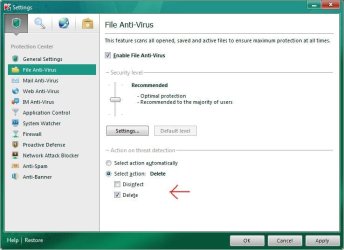
Interesting thanks. Where is the setting to make it delete malwares instead of disinfect and is it a good idea to change that?
If you are sure that the storage media you are about to connect to your pc isn't infected then Delete setting is good. If it is infected then Disinfect setting is more appropriate since you probably want to disinfect your infected valueable data and softwares instead of deleting them. But then again you can restore them anytime from deleted items menu, just make sure the permanent-delete-after-30-days setting is unchecked.
Attachments
My Computer
At a glance
Windows 7 Ultimate x64 7601 SP1i5 2500k @stockDDR3 Corsair 4GBx2 1333 7-7-7-20AMD Sapphire 7850 OC Edition
- Computer Manufacturer/Model Number
- built it myself out of the boxes
- OS
- Windows 7 Ultimate x64 7601 SP1
- CPU
- i5 2500k @stock
- Motherboard
- Asrock H61M-HVS
- Memory
- DDR3 Corsair 4GBx2 1333 7-7-7-20
- Graphics Card(s)
- AMD Sapphire 7850 OC Edition
- Sound Card
- Onboard VIA HD Audio
- Monitor(s) Displays
- LG E2250V
- Screen Resolution
- 1920x1080
- Hard Drives
- HDD Seagate 1TB 7200rpm ST31000524AS
- PSU
- FSP Supersonic 550 Watt
- Case
- Powerlogic Futura 220 ITX value
- Cooling
- stock cooling
- Keyboard
- Sami value PS/2 wired standard keyboard
- Mouse
- Genius value PS/2 wired standard optical mouse
- Internet Speed
- Excelcomindo wireless 512kbps
- Other Info
- Google Chrome, Kaspersky Internet Security 2012, CCC 12.4, Windows Firewall and Windows Defender in off state, Windows Search and Hibernation disabled, Windows Dreamscene enabled.