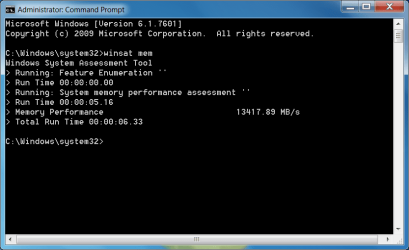
What's your memory assessment speed?

Status
Not open for further replies.
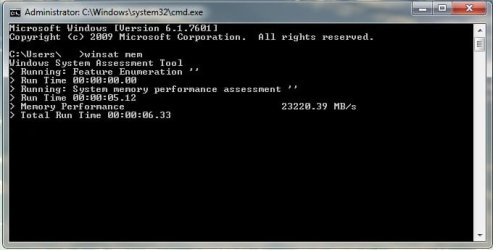
I'm greeny... or dummy in that mather. How can i improve this result?
 

Attachments

  • Winsat.gif
    Winsat.gif
    18.5 KB · Views: 13

My Computer My Computer

At a glance

windows 7 Pro x64Intel I5 34508 GB DDR3 dual chanelAsus Radeon 4870 Nevedi Gforce GTX 500Ti
Computer Manufacturer/Model Number
Home made
OS
windows 7 Pro x64
CPU
Intel I5 3450
Motherboard
Gefabye B75M-D3H
Memory
8 GB DDR3 dual chanel
Graphics Card(s)
Asus Radeon 4870 Nevedi Gforce GTX 500Ti
Sound Card
None
Monitor(s) Displays
4 L206W, Synckmaster, Acer X203W, X223W
Screen Resolution
1680 X 1050
Hard Drives
SSD 120G from Intel

640 GB
PSU
Cooler Master 600W
Case
Antec
Cooling
Regular fan
Keyboard
Microsoft Multimedia Bilingual
Mouse
Microsoft Optical 3000
12GB @ 1440 9-9-9-24 T2
it is 8-8-8-24 ram but i never changed it since it don't make that much of a difference in day to day use.
 

Attachments

  • Untitled.jpg
    Untitled.jpg
    37.7 KB · Views: 15

My Computer My Computer

At a glance

Windows 7 64bit Ultimate SP1, VMware Windows ...Intel Core i7 920 @ 3.8 or 4.2 when i need itCorsair XMS3 12GB DDR3 1600 1.5vMSI GeForce GTX 560Ti OC Twin FrozR II
Computer Manufacturer/Model Number
Goonie Build 8 2010
OS
Windows 7 64bit Ultimate SP1, VMware Windows 7 64bit Ultimate SP1
CPU
Intel Core i7 920 @ 3.8 or 4.2 when i need it
Motherboard
Gigabyte GA-X58-UD5
Memory
Corsair XMS3 12GB DDR3 1600 1.5v
Graphics Card(s)
MSI GeForce GTX 560Ti OC Twin FrozR II
Sound Card
7.1 HD
Monitor(s) Displays
2x BenQ 24 LED 1080p + LG 50PK590 1080p
Screen Resolution
3840 x 1080p
Hard Drives
Intel X25-M 80GB OS/
Intel X25-M 160GB
Data Robotics Drobo V2 8TB
PSU
Corsair AX 750W ATX Modular
Case
Antec Fusion Remote Max
Cooling
Noctua NH D14
Keyboard
Logitech
Mouse
Logitech
Internet Speed
15Mbs Down 1.3Mbs Up
Other Info
Hauppauge HD PVR/
Pioneer 1017-k - 7.1 THX/
Xbox 360 250 Slim
SkyHD/LG 50PK590 TV
I'm greeny... or dummy in that mather. How can i improve this result?
We'd need the exact full model number of you RAM and board. It may take new RAM.
 

My Computer My Computer

At a glance

Windows 7 Ultimate X64 SP1Intel i5-2550K, Differing ~4.4-4.8GHz No buil...16GB G.Skill Sniper 1866MHz @ 2133MHz 2x8GBASUS GTX650TIB-DC2OC-2GD5, (650TI Boost)
Computer type
PC/Desktop
Computer Manufacturer/Model Number
Home Built Desktop By DataTech
OS
Windows 7 Ultimate X64 SP1
CPU
Intel i5-2550K, Differing ~4.4-4.8GHz No built in GPU
Motherboard
ASUS P8Z68-V PRO/GEN3
Memory
16GB G.Skill Sniper 1866MHz @ 2133MHz 2x8GB
Graphics Card(s)
ASUS GTX650TIB-DC2OC-2GD5, (650TI Boost)
Sound Card
Onboard Realtek 5-1
Monitor(s) Displays
Samsung P2570HD
Screen Resolution
1920x1080
Hard Drives
Samsung 840 Pro 256GB SSD for OS, 500GB Seagate Constellation (Enterprise drive) for Data
PSU
Corsair HX650W
Case
Inwin Dragon Rider
Cooling
Hyper 212 EVO w/two Noctua fans, push-pull, @1300 RPM
Keyboard
E-Z Eyes, bright yellow keys with large characters
Mouse
steelseries SENSEI Laser Pro Gaming
Internet Speed
48-51Mbs Mbs down, 11 Mbs up Xfinity Cable
Antivirus
Norton Internet Security 2013
Browser
IE 10, Opera, Pale Moon if needed
Other Info
4 case fans, LG BluRay-RE, ASUS DVD-RW, Mr. Fusion power supply, 1.21 gigawatts.
I'm greeny... or dummy in that mather. How can i improve this result?
We'd need the exact full model number of you RAM and board. It may take new RAM.

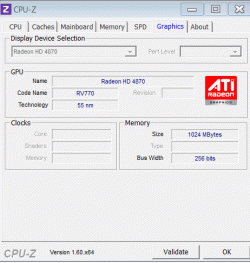
I know the board is Asus P5B

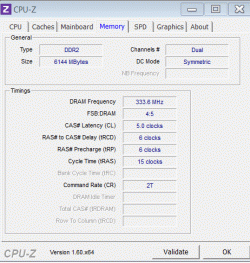
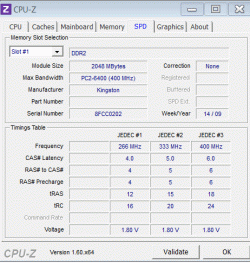
Ram: 6 G, but can't say more. How can I found the characteristic of them?

Martin
 

My Computer My Computer

At a glance

windows 7 Pro x64Intel I5 34508 GB DDR3 dual chanelAsus Radeon 4870 Nevedi Gforce GTX 500Ti
Computer Manufacturer/Model Number
Home made
OS
windows 7 Pro x64
CPU
Intel I5 3450
Motherboard
Gefabye B75M-D3H
Memory
8 GB DDR3 dual chanel
Graphics Card(s)
Asus Radeon 4870 Nevedi Gforce GTX 500Ti
Sound Card
None
Monitor(s) Displays
4 L206W, Synckmaster, Acer X203W, X223W
Screen Resolution
1680 X 1050
Hard Drives
SSD 120G from Intel

640 GB
PSU
Cooler Master 600W
Case
Antec
Cooling
Regular fan
Keyboard
Microsoft Multimedia Bilingual
Mouse
Microsoft Optical 3000

My Computer My Computer

At a glance

Windows 7 Ultimate X64 SP1Intel i5-2550K, Differing ~4.4-4.8GHz No buil...16GB G.Skill Sniper 1866MHz @ 2133MHz 2x8GBASUS GTX650TIB-DC2OC-2GD5, (650TI Boost)
Computer type
PC/Desktop
Computer Manufacturer/Model Number
Home Built Desktop By DataTech
OS
Windows 7 Ultimate X64 SP1
CPU
Intel i5-2550K, Differing ~4.4-4.8GHz No built in GPU
Motherboard
ASUS P8Z68-V PRO/GEN3
Memory
16GB G.Skill Sniper 1866MHz @ 2133MHz 2x8GB
Graphics Card(s)
ASUS GTX650TIB-DC2OC-2GD5, (650TI Boost)
Sound Card
Onboard Realtek 5-1
Monitor(s) Displays
Samsung P2570HD
Screen Resolution
1920x1080
Hard Drives
Samsung 840 Pro 256GB SSD for OS, 500GB Seagate Constellation (Enterprise drive) for Data
PSU
Corsair HX650W
Case
Inwin Dragon Rider
Cooling
Hyper 212 EVO w/two Noctua fans, push-pull, @1300 RPM
Keyboard
E-Z Eyes, bright yellow keys with large characters
Mouse
steelseries SENSEI Laser Pro Gaming
Internet Speed
48-51Mbs Mbs down, 11 Mbs up Xfinity Cable
Antivirus
Norton Internet Security 2013
Browser
IE 10, Opera, Pale Moon if needed
Other Info
4 case fans, LG BluRay-RE, ASUS DVD-RW, Mr. Fusion power supply, 1.21 gigawatts.
Beginning to pick up speed!

Give the timings listed in JEDEC#4 a try without a voltage bump. If it won't boot, try a +.01 or so. You can try 8-9-9-20 too.

Go to your BIOS and tell us what the DRAM and IMC (VTT CPU) voltage settings are.
Looks like your RAM is at 1066MHz, which is the default frequency.
Strange there is no XMP setting listed on the SPD tab, it may be AMD RAM, or just OCZ not playing right.
If it's running ok, then no problems.

You really don't need to adjust the voltages unless you are going to increase the RAM frequency, unless the RAM is unstable now.
If you increase the frequency above 800MHz (RAM frequency 1600MHz) then you will probably need more volts to sustain it.

In your motherboard manual under Extreme Tweaker menu there is a Memory Frequency setting, if you want to increase the RAM frequency.
Memory Frequency [Auto]
Forces a DDR3 frequency slower than the common tCK detected via SPD.
Configuration options: [Auto] [DDR3-800MHz] [DDR3-1066MHz] [DDR3_1333MHz] [DDR31600MHz]
[DDR3-1866MHz] [DDR3_2133MHz] [DDR3_2400MHz] [DDR3_2666MHz]
There is no 2000MHz setting, you might have to go with 1866MHz, unless you want to OC the CPU. Then it will all depend on the base clock setting.
Timings should be in the 10-10-10-30 (CAS-TRCD-TRP-TRAS), tRFC 88, Command rate 2T range, this may take some trial and error testing.
Since you should keep the DRAM and VTT CPU voltage settings within 0.50v and this would take DRAM at 1.65v and the VTT CPU at 1.15v minimum.
You are going to basically have to OC the RAM to get higher than 1066MHz, with all of the tweaking and testing that will be involved.

If they had a RAM XMP or even SPD setting at 2000MHz, it would be so much easier.

Thanks for the info. Britton and Dave. It got me started pretty well. I fooled around with the memory overclocks last night and was unsuccessful at getting it stable. That is surely just a lack of experience. I believe I understand the basics, though. My bios has a setting for me to overclock the CPU to 4.2 GHz (handling the appropriate other settings automatically), is stable there and relatively cool. When I OC the CPU, I get an automatic BCLK frequency adjustment to 140 MHz from 133 MHz. The result is that the memory frequency options change in that profile to include 1964 MHz (not sure of the math :confused:), just under what my memory was rated to perform (2000 MHz). What I would like to know is which timings would I need to change for that frequency and what would be your best guess for those timings at that frequency. I don't know if it matters, but I am running matched triple-channel memory. Also, when I set the frequency in the bios for the memory, it gives me the option to allow the board to automatically control voltage based on need, so I don't think I need to set that manually. Thanks.
 
Last edited:

My Computer My Computer

At a glance

Windows 7 Professional 64bitIntel Core i7-980x Extreme Ed. 3.33Ghz CPUOCZ Gold 2048MB PC16000 DDR3 2000MHz Triple C...EVGA GeForce GTX 580 Superclocked 1536MB GDDR...
Computer Manufacturer/Model Number
Custom
OS
Windows 7 Professional 64bit
CPU
Intel Core i7-980x Extreme Ed. 3.33Ghz CPU
Motherboard
ASUS Rampage III Extreme Intel X58 LGA1366 MoBo
Memory
OCZ Gold 2048MB PC16000 DDR3 2000MHz Triple Channel (X6)
Graphics Card(s)
EVGA GeForce GTX 580 Superclocked 1536MB GDDR5 Video Card
Sound Card
NVIDIA High Definition Audio
Monitor(s) Displays
1. Samsung SyncMaster P2570HD 2. Hanns-G HW173D
Screen Resolution
1. Samsung- 1920x1080 2. Hanns-G- 1440x900
Hard Drives
1 120GB OCZ Vertex 3 SSD (OS)

1 RAID-0 (Storage)
Including-1 WD 1TB 7200rpm Caviar Black HD X 1 WD 1TB 7200rpm Caviar Blue HD
PSU
ULTRA X4 1600w Modular Power Supply
Case
Cooler Master HAF X ATX Full Tower Black Case
Cooling
Corsair Hydro H50 CPU Liquid Cooler
Keyboard
Logitech MK700
Mouse
Logitech M705
Internet Speed
31.61 Mbps Download/ 2.51 Mbps Upload

Attachments

  • Cache.gif
    Cache.gif
    14.6 KB · Views: 2
  • CPU.gif
    CPU.gif
    24.8 KB · Views: 2
  • Graphic.gif
    Graphic.gif
    15.7 KB · Views: 2
  • Main Board.gif
    Main Board.gif
    16 KB · Views: 2
  • Memory.gif
    Memory.gif
    16.2 KB · Views: 3
  • SPD.gif
    SPD.gif
    18.5 KB · Views: 3

My Computer My Computer

At a glance

windows 7 Pro x64Intel I5 34508 GB DDR3 dual chanelAsus Radeon 4870 Nevedi Gforce GTX 500Ti
Computer Manufacturer/Model Number
Home made
OS
windows 7 Pro x64
CPU
Intel I5 3450
Motherboard
Gefabye B75M-D3H
Memory
8 GB DDR3 dual chanel
Graphics Card(s)
Asus Radeon 4870 Nevedi Gforce GTX 500Ti
Sound Card
None
Monitor(s) Displays
4 L206W, Synckmaster, Acer X203W, X223W
Screen Resolution
1680 X 1050
Hard Drives
SSD 120G from Intel

640 GB
PSU
Cooler Master 600W
Case
Antec
Cooling
Regular fan
Keyboard
Microsoft Multimedia Bilingual
Mouse
Microsoft Optical 3000
ASUS - Motherboards- ASUS P5B
There's your board spec page. It appears it will support up to DDR2800. You'd need to get some new RAM to boost your score, but it may not increase day-to-day performance.
The LGA775 socket is aged and you might consider upgrading to a new CPU and support.
 

My Computer My Computer

At a glance

Windows 7 Ultimate X64 SP1Intel i5-2550K, Differing ~4.4-4.8GHz No buil...16GB G.Skill Sniper 1866MHz @ 2133MHz 2x8GBASUS GTX650TIB-DC2OC-2GD5, (650TI Boost)
Computer type
PC/Desktop
Computer Manufacturer/Model Number
Home Built Desktop By DataTech
OS
Windows 7 Ultimate X64 SP1
CPU
Intel i5-2550K, Differing ~4.4-4.8GHz No built in GPU
Motherboard
ASUS P8Z68-V PRO/GEN3
Memory
16GB G.Skill Sniper 1866MHz @ 2133MHz 2x8GB
Graphics Card(s)
ASUS GTX650TIB-DC2OC-2GD5, (650TI Boost)
Sound Card
Onboard Realtek 5-1
Monitor(s) Displays
Samsung P2570HD
Screen Resolution
1920x1080
Hard Drives
Samsung 840 Pro 256GB SSD for OS, 500GB Seagate Constellation (Enterprise drive) for Data
PSU
Corsair HX650W
Case
Inwin Dragon Rider
Cooling
Hyper 212 EVO w/two Noctua fans, push-pull, @1300 RPM
Keyboard
E-Z Eyes, bright yellow keys with large characters
Mouse
steelseries SENSEI Laser Pro Gaming
Internet Speed
48-51Mbs Mbs down, 11 Mbs up Xfinity Cable
Antivirus
Norton Internet Security 2013
Browser
IE 10, Opera, Pale Moon if needed
Other Info
4 case fans, LG BluRay-RE, ASUS DVD-RW, Mr. Fusion power supply, 1.21 gigawatts.
ASUS - Motherboards- ASUS P5B
There's your board spec page. It appears it will support up to DDR2800. You'd need to get some new RAM to boost your score, but it may not increase day-to-day performance.
The LGA775 socket is aged and you might consider upgrading to a new CPU and support.

OK Thanks
 

My Computer My Computer

At a glance

windows 7 Pro x64Intel I5 34508 GB DDR3 dual chanelAsus Radeon 4870 Nevedi Gforce GTX 500Ti
Computer Manufacturer/Model Number
Home made
OS
windows 7 Pro x64
CPU
Intel I5 3450
Motherboard
Gefabye B75M-D3H
Memory
8 GB DDR3 dual chanel
Graphics Card(s)
Asus Radeon 4870 Nevedi Gforce GTX 500Ti
Sound Card
None
Monitor(s) Displays
4 L206W, Synckmaster, Acer X203W, X223W
Screen Resolution
1680 X 1050
Hard Drives
SSD 120G from Intel

640 GB
PSU
Cooler Master 600W
Case
Antec
Cooling
Regular fan
Keyboard
Microsoft Multimedia Bilingual
Mouse
Microsoft Optical 3000
12GB @ 1440 9-9-9-24 T2
it is 8-8-8-24 ram but i never changed it since it don't make that much of a difference in day to day use.

Good numbers :thumbsup:

A Guy
 

My Computer My Computer

At a glance

Windows 10 Home x64INTEL Core i5-750 Quad-Core 3.37GHzHyperX Fury Black Series 8GB (2 x 4GB) 1866MhzEVGA GeForce GTX 750 Superclocked 1GB 128-Bit...
Computer type
PC/Desktop
OS
Windows 10 Home x64
CPU
INTEL Core i5-750 Quad-Core 3.37GHz
Motherboard
ASUS P7P55D
Memory
HyperX Fury Black Series 8GB (2 x 4GB) 1866Mhz
Graphics Card(s)
EVGA GeForce GTX 750 Superclocked 1GB 128-Bit GDDR5
Monitor(s) Displays
LG 32MA68HY 32" IPS
Screen Resolution
1920 x 1080
Hard Drives
Samsung 840 Evo 120GB, SEAGATE 500GB Barracuda® 7200.12, SATA 3 Gb/s, 7200 RPM, 16MB cache
PSU
ANTEC TruePower New TP-550, 80 PLUS, 550W
Case
ANTEC Three Hundred Illusion
Cooling
COOLER MASTER Hyper 212 Plus, 4 x 120mm 1 x 140mm Noctua's
Internet Speed
85 + Mbps
Antivirus
Avast
Browser
Vivaldi
16GB DDR3 560MHz 8-8-8-21 Triple Channel
 

Attachments

  • mem stat.PNG
    mem stat.PNG
    16.8 KB · Views: 14

My Computer My Computer

At a glance

Windows 7 Ultimate x64 SP1i7 960 3.20Ghz16GB Crucial Ballistix DDR3 Triple ChannelNvidia GeForce GTX 670 ftw
Computer Manufacturer/Model Number
Custom build
OS
Windows 7 Ultimate x64 SP1
CPU
i7 960 3.20Ghz
Motherboard
Gigabyte X58A UD3R
Memory
16GB Crucial Ballistix DDR3 Triple Channel
Graphics Card(s)
Nvidia GeForce GTX 670 ftw
Sound Card
On-Broad
Monitor(s) Displays
27" Samsung HD
Screen Resolution
1920x1080
Hard Drives
Crucial m4 128GB SSD
WD 1TB Caviar Black HD
Seagate 2TB External drive
PSU
850W Thermaltake
Case
CoolerMaster HAF 932 Advanced
Cooling
Corsair H80,
Internet Speed
DSL
Go to your BIOS and tell us what the DRAM and IMC (VTT CPU) voltage settings are.
Looks like your RAM is at 1066MHz, which is the default frequency.
Strange there is no XMP setting listed on the SPD tab, it may be AMD RAM, or just OCZ not playing right.
If it's running ok, then no problems.

You really don't need to adjust the voltages unless you are going to increase the RAM frequency, unless the RAM is unstable now.
If you increase the frequency above 800MHz (RAM frequency 1600MHz) then you will probably need more volts to sustain it.

In your motherboard manual under Extreme Tweaker menu there is a Memory Frequency setting, if you want to increase the RAM frequency.
Memory Frequency [Auto]
Forces a DDR3 frequency slower than the common tCK detected via SPD.
Configuration options: [Auto] [DDR3-800MHz] [DDR3-1066MHz] [DDR3_1333MHz] [DDR31600MHz]
[DDR3-1866MHz] [DDR3_2133MHz] [DDR3_2400MHz] [DDR3_2666MHz]
There is no 2000MHz setting, you might have to go with 1866MHz, unless you want to OC the CPU. Then it will all depend on the base clock setting.
Timings should be in the 10-10-10-30 (CAS-TRCD-TRP-TRAS), tRFC 88, Command rate 2T range, this may take some trial and error testing.
Since you should keep the DRAM and VTT CPU voltage settings within 0.50v and this would take DRAM at 1.65v and the VTT CPU at 1.15v minimum.
You are going to basically have to OC the RAM to get higher than 1066MHz, with all of the tweaking and testing that will be involved.

If they had a RAM XMP or even SPD setting at 2000MHz, it would be so much easier.
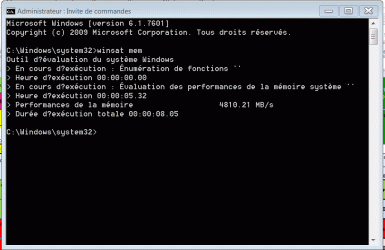
Thanks for the info. Britton and Dave. It got me started pretty well.
You're welcome.

I fooled around with the memory overclocks last night and was unsuccessful at getting it stable. That is surely just a lack of experience. I believe I understand the basics, though.
Can you explain what 'fooled around' means? Would help us give advice if we know what you have done.

My bios has a setting for me to overclock the CPU to 4.2 GHz (handling the appropriate other settings automatically), is stable there and relatively cool. When I OC the CPU, I get an automatic BCLK frequency adjustment to 140 MHz from 133 MHz. The result is that the memory frequency options change in that profile to include 1964 MHz (not sure of the math :confused:), just under what my memory was rated to perform (2000 MHz).
Automatic OC'ing from the motherboard BIOS will always set the voltages way too high, it's ok if your content with the extra heat, it is best to get a good OC'ing guide and jump in with both feet.
You will learn the OC'ing basics and get a cooler stable system.

Good info: 3 Step Guide To Overclock Your Core i3, i5, or i7 – Updated!

Guides
3 STEP OVERCLOCKING GUIDE – BLOOMFIELD AND GULFTOWN

This should be enough to get you started.
It will seem like a lot of reading, once you get the basics, it's not so difficult.

What I would like to know is which timings would I need to change for that frequency and what would be your best guess for those timings at that frequency. I don't know if it matters, but I am running matched triple-channel memory. Also, when I set the frequency in the bios for the memory, it gives me the option to allow the board to automatically control voltage based on need, so I don't think I need to set that manually. Thanks.
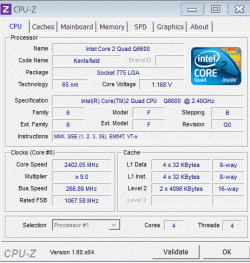
If you set the RAM frequency to 1964 MHz, you can use the timings I posted.
10-10-10-30 (CAS-TRCD-TRP-TRAS), tRFC 88, Command rate 2T, leave the rest on 'Auto'.
These have to be set manually in BIOS.
If it doesn't boot, loosen the timings to 11-11-11-33 and try again.
You should also set the DRAM voltage manually to the specified voltage for the RAM probably 1.65v for your RAM, also the VTT CPU at 1.15v.

It would have been better for your system to get RAM rated at 2000MHz at 1.5v.
 

My Computer My Computer

At a glance

Windows 7 Ult x64 - SP1/ Windows 8 Pro x64Intel Core i5-3570K 4.6GHz8GB (2X4GB) DDR3 1600 Corsair Vengeance CL8 1.5vSapphire HD 7770 Vapor-X OC 1GB DDR5
Computer type
PC/Desktop
Computer Manufacturer/Model Number
76~2.0
OS
Windows 7 Ult x64 - SP1/ Windows 8 Pro x64
CPU
Intel Core i5-3570K 4.6GHz
Motherboard
Gigabyte GA-Z77X UD3H, f18
Memory
8GB (2X4GB) DDR3 1600 Corsair Vengeance CL8 1.5v
Graphics Card(s)
Sapphire HD 7770 Vapor-X OC 1GB DDR5
Sound Card
Onboard VIA VT2021
Monitor(s) Displays
22" LCD Dell
Screen Resolution
1680x1050
Hard Drives
Samsung 840Pro 128GB SSD,
Seagate Barracuda 500GB SATA2 7200rpm 32MB cache, Seagate Barracuda 1TB SATA2 7200rpm 32MB cache,
PSU
Corsair HX650W
Case
Cooler Master Storm Scout
Cooling
Corsair H80 2x12cm Noctua NF P12 , 2x14cm case fans
Keyboard
Logitech Wave
Mouse
CM Sentinel
Internet Speed
Dismal
Antivirus
Avast
Browser
Opera Next
Other Info
Haswell laptop: HP Envy 17t-j, i7-4700MQ, GeForce 740M 2GB DDR3, 17.3" Full HD 1920x1080, 16GB RAM, Samsung 840 Pro 128GB, 1TB Hitachi 7200 HDD,
Desktop: eSATA ports,
External eSATA Seagate 500GB SATA2 7200rpm,
External WD USB 500GB
Thank you, I will do some reading.
 

My Computer My Computer

At a glance

Windows 7 Professional 64bitIntel Core i7-980x Extreme Ed. 3.33Ghz CPUOCZ Gold 2048MB PC16000 DDR3 2000MHz Triple C...EVGA GeForce GTX 580 Superclocked 1536MB GDDR...
Computer Manufacturer/Model Number
Custom
OS
Windows 7 Professional 64bit
CPU
Intel Core i7-980x Extreme Ed. 3.33Ghz CPU
Motherboard
ASUS Rampage III Extreme Intel X58 LGA1366 MoBo
Memory
OCZ Gold 2048MB PC16000 DDR3 2000MHz Triple Channel (X6)
Graphics Card(s)
EVGA GeForce GTX 580 Superclocked 1536MB GDDR5 Video Card
Sound Card
NVIDIA High Definition Audio
Monitor(s) Displays
1. Samsung SyncMaster P2570HD 2. Hanns-G HW173D
Screen Resolution
1. Samsung- 1920x1080 2. Hanns-G- 1440x900
Hard Drives
1 120GB OCZ Vertex 3 SSD (OS)

1 RAID-0 (Storage)
Including-1 WD 1TB 7200rpm Caviar Black HD X 1 WD 1TB 7200rpm Caviar Blue HD
PSU
ULTRA X4 1600w Modular Power Supply
Case
Cooler Master HAF X ATX Full Tower Black Case
Cooling
Corsair Hydro H50 CPU Liquid Cooler
Keyboard
Logitech MK700
Mouse
Logitech M705
Internet Speed
31.61 Mbps Download/ 2.51 Mbps Upload

My Computer My Computer

At a glance

Windows 7 Ultimate X64 SP1Intel i5-2550K, Differing ~4.4-4.8GHz No buil...16GB G.Skill Sniper 1866MHz @ 2133MHz 2x8GBASUS GTX650TIB-DC2OC-2GD5, (650TI Boost)
Computer type
PC/Desktop
Computer Manufacturer/Model Number
Home Built Desktop By DataTech
OS
Windows 7 Ultimate X64 SP1
CPU
Intel i5-2550K, Differing ~4.4-4.8GHz No built in GPU
Motherboard
ASUS P8Z68-V PRO/GEN3
Memory
16GB G.Skill Sniper 1866MHz @ 2133MHz 2x8GB
Graphics Card(s)
ASUS GTX650TIB-DC2OC-2GD5, (650TI Boost)
Sound Card
Onboard Realtek 5-1
Monitor(s) Displays
Samsung P2570HD
Screen Resolution
1920x1080
Hard Drives
Samsung 840 Pro 256GB SSD for OS, 500GB Seagate Constellation (Enterprise drive) for Data
PSU
Corsair HX650W
Case
Inwin Dragon Rider
Cooling
Hyper 212 EVO w/two Noctua fans, push-pull, @1300 RPM
Keyboard
E-Z Eyes, bright yellow keys with large characters
Mouse
steelseries SENSEI Laser Pro Gaming
Internet Speed
48-51Mbs Mbs down, 11 Mbs up Xfinity Cable
Antivirus
Norton Internet Security 2013
Browser
IE 10, Opera, Pale Moon if needed
Other Info
4 case fans, LG BluRay-RE, ASUS DVD-RW, Mr. Fusion power supply, 1.21 gigawatts.
ASUS - Motherboards- ASUS P5B
There's your board spec page. It appears it will support up to DDR2800. You'd need to get some new RAM to boost your score, but it may not increase day-to-day performance.
The LGA775 socket is aged and you might consider upgrading to a new CPU and support.

OK Thanks
What? What did I just say? I meant New CPU and Motherboard. :o

I had understood that...

How about overclocking my system. If I could increase a bit the performance of my system until I decide to spend some money on that. Naturally, I will have to modify the cooling fan

Martin
 

My Computer My Computer

At a glance

windows 7 Pro x64Intel I5 34508 GB DDR3 dual chanelAsus Radeon 4870 Nevedi Gforce GTX 500Ti
Computer Manufacturer/Model Number
Home made
OS
windows 7 Pro x64
CPU
Intel I5 3450
Motherboard
Gefabye B75M-D3H
Memory
8 GB DDR3 dual chanel
Graphics Card(s)
Asus Radeon 4870 Nevedi Gforce GTX 500Ti
Sound Card
None
Monitor(s) Displays
4 L206W, Synckmaster, Acer X203W, X223W
Screen Resolution
1680 X 1050
Hard Drives
SSD 120G from Intel

640 GB
PSU
Cooler Master 600W
Case
Antec
Cooling
Regular fan
Keyboard
Microsoft Multimedia Bilingual
Mouse
Microsoft Optical 3000
I had understood that...

How about overclocking my system. If I could increase a bit the performance of my system until I decide to spend some money on that. Naturally, I will have to modify the cooling fan

Martin
In your BIOS are there settings for clock frequency or BSCLK? There may be a CPU multiplier too, which would be easiest while bumping your CPU Vcore a little each time. As we have found though, an overclock won't generally get more performance othe than benchmarks.
 

My Computer My Computer

At a glance

Windows 7 Ultimate X64 SP1Intel i5-2550K, Differing ~4.4-4.8GHz No buil...16GB G.Skill Sniper 1866MHz @ 2133MHz 2x8GBASUS GTX650TIB-DC2OC-2GD5, (650TI Boost)
Computer type
PC/Desktop
Computer Manufacturer/Model Number
Home Built Desktop By DataTech
OS
Windows 7 Ultimate X64 SP1
CPU
Intel i5-2550K, Differing ~4.4-4.8GHz No built in GPU
Motherboard
ASUS P8Z68-V PRO/GEN3
Memory
16GB G.Skill Sniper 1866MHz @ 2133MHz 2x8GB
Graphics Card(s)
ASUS GTX650TIB-DC2OC-2GD5, (650TI Boost)
Sound Card
Onboard Realtek 5-1
Monitor(s) Displays
Samsung P2570HD
Screen Resolution
1920x1080
Hard Drives
Samsung 840 Pro 256GB SSD for OS, 500GB Seagate Constellation (Enterprise drive) for Data
PSU
Corsair HX650W
Case
Inwin Dragon Rider
Cooling
Hyper 212 EVO w/two Noctua fans, push-pull, @1300 RPM
Keyboard
E-Z Eyes, bright yellow keys with large characters
Mouse
steelseries SENSEI Laser Pro Gaming
Internet Speed
48-51Mbs Mbs down, 11 Mbs up Xfinity Cable
Antivirus
Norton Internet Security 2013
Browser
IE 10, Opera, Pale Moon if needed
Other Info
4 case fans, LG BluRay-RE, ASUS DVD-RW, Mr. Fusion power supply, 1.21 gigawatts.
I had understood that...

How about overclocking my system. If I could increase a bit the performance of my system until I decide to spend some money on that. Naturally, I will have to modify the cooling fan

Martin
In your BIOS are there settings for clock frequency or BSCLK? There may be a CPU multiplier too, which would be easiest while bumping your CPU Vcore a little each time. As we have found though, an overclock won't generally get more performance othe than benchmarks.

Hello

I did overclock from 266 to 320 this afternoon. I did not change anything else. I did not touched the voltage, leaving it to auto as mentioned in a video. Should I play with the voltage to?

My actual memory is rated to 400 mhz. I did saw a video this afternoon where the guy had install 1066 mhz memory stick.

My board is Asus P5B and CPU Q6600. Could I get more juice from it before getting a new motherboard, CPU and memory.

Martin
 

My Computer My Computer

At a glance

windows 7 Pro x64Intel I5 34508 GB DDR3 dual chanelAsus Radeon 4870 Nevedi Gforce GTX 500Ti
Computer Manufacturer/Model Number
Home made
OS
windows 7 Pro x64
CPU
Intel I5 3450
Motherboard
Gefabye B75M-D3H
Memory
8 GB DDR3 dual chanel
Graphics Card(s)
Asus Radeon 4870 Nevedi Gforce GTX 500Ti
Sound Card
None
Monitor(s) Displays
4 L206W, Synckmaster, Acer X203W, X223W
Screen Resolution
1680 X 1050
Hard Drives
SSD 120G from Intel

640 GB
PSU
Cooler Master 600W
Case
Antec
Cooling
Regular fan
Keyboard
Microsoft Multimedia Bilingual
Mouse
Microsoft Optical 3000
Hi Martin, going from 266 to 320 do you notice the machine runs faster, apps open quicker? I suspect your hardware is limiting what you can do with clocking.
 

My Computer My Computer

At a glance

Windows 7 Ultimate X64 SP1Intel i5-2550K, Differing ~4.4-4.8GHz No buil...16GB G.Skill Sniper 1866MHz @ 2133MHz 2x8GBASUS GTX650TIB-DC2OC-2GD5, (650TI Boost)
Computer type
PC/Desktop
Computer Manufacturer/Model Number
Home Built Desktop By DataTech
OS
Windows 7 Ultimate X64 SP1
CPU
Intel i5-2550K, Differing ~4.4-4.8GHz No built in GPU
Motherboard
ASUS P8Z68-V PRO/GEN3
Memory
16GB G.Skill Sniper 1866MHz @ 2133MHz 2x8GB
Graphics Card(s)
ASUS GTX650TIB-DC2OC-2GD5, (650TI Boost)
Sound Card
Onboard Realtek 5-1
Monitor(s) Displays
Samsung P2570HD
Screen Resolution
1920x1080
Hard Drives
Samsung 840 Pro 256GB SSD for OS, 500GB Seagate Constellation (Enterprise drive) for Data
PSU
Corsair HX650W
Case
Inwin Dragon Rider
Cooling
Hyper 212 EVO w/two Noctua fans, push-pull, @1300 RPM
Keyboard
E-Z Eyes, bright yellow keys with large characters
Mouse
steelseries SENSEI Laser Pro Gaming
Internet Speed
48-51Mbs Mbs down, 11 Mbs up Xfinity Cable
Antivirus
Norton Internet Security 2013
Browser
IE 10, Opera, Pale Moon if needed
Other Info
4 case fans, LG BluRay-RE, ASUS DVD-RW, Mr. Fusion power supply, 1.21 gigawatts.
Hi Martin, going from 266 to 320 do you notice the machine runs faster, apps open quicker? I suspect your hardware is limiting what you can do with clocking.

Hello Britton

Yes system is running a bit faster, I did no change in the bios other than increasing the clock to 320 MHz. All other parameter as been left to auto

Could I get another increase in performance if I install faster memory? That is my interrogation

Martin
 

My Computer My Computer

At a glance

windows 7 Pro x64Intel I5 34508 GB DDR3 dual chanelAsus Radeon 4870 Nevedi Gforce GTX 500Ti
Computer Manufacturer/Model Number
Home made
OS
windows 7 Pro x64
CPU
Intel I5 3450
Motherboard
Gefabye B75M-D3H
Memory
8 GB DDR3 dual chanel
Graphics Card(s)
Asus Radeon 4870 Nevedi Gforce GTX 500Ti
Sound Card
None
Monitor(s) Displays
4 L206W, Synckmaster, Acer X203W, X223W
Screen Resolution
1680 X 1050
Hard Drives
SSD 120G from Intel

640 GB
PSU
Cooler Master 600W
Case
Antec
Cooling
Regular fan
Keyboard
Microsoft Multimedia Bilingual
Mouse
Microsoft Optical 3000
Hi Martin, going from 266 to 320 do you notice the machine runs faster, apps open quicker? I suspect your hardware is limiting what you can do with clocking.

Hello Britton

Yes system is running a bit faster, I did no change in the bios other than increasing the clock to 320 MHz. All other parameter as been left to auto

Could I get another increase in performance if I install faster memory? That is my interrogation

Martin
It may help but its not a guarantee. I once went from 1333 to 1866 DDR3 DRAM and I saw only a slight improvement. One thing to look for with RAM is a lower CL or CAS number than what you have now. that is Column Access Strobe Latency and is an idicator ofr RAM performance as well as the frequency.
Good RAM is fairly cheap if you want to give it a try. The lower the CL is the higher the price usually.
 

My Computer My Computer

At a glance

Windows 7 Ultimate X64 SP1Intel i5-2550K, Differing ~4.4-4.8GHz No buil...16GB G.Skill Sniper 1866MHz @ 2133MHz 2x8GBASUS GTX650TIB-DC2OC-2GD5, (650TI Boost)
Computer type
PC/Desktop
Computer Manufacturer/Model Number
Home Built Desktop By DataTech
OS
Windows 7 Ultimate X64 SP1
CPU
Intel i5-2550K, Differing ~4.4-4.8GHz No built in GPU
Motherboard
ASUS P8Z68-V PRO/GEN3
Memory
16GB G.Skill Sniper 1866MHz @ 2133MHz 2x8GB
Graphics Card(s)
ASUS GTX650TIB-DC2OC-2GD5, (650TI Boost)
Sound Card
Onboard Realtek 5-1
Monitor(s) Displays
Samsung P2570HD
Screen Resolution
1920x1080
Hard Drives
Samsung 840 Pro 256GB SSD for OS, 500GB Seagate Constellation (Enterprise drive) for Data
PSU
Corsair HX650W
Case
Inwin Dragon Rider
Cooling
Hyper 212 EVO w/two Noctua fans, push-pull, @1300 RPM
Keyboard
E-Z Eyes, bright yellow keys with large characters
Mouse
steelseries SENSEI Laser Pro Gaming
Internet Speed
48-51Mbs Mbs down, 11 Mbs up Xfinity Cable
Antivirus
Norton Internet Security 2013
Browser
IE 10, Opera, Pale Moon if needed
Other Info
4 case fans, LG BluRay-RE, ASUS DVD-RW, Mr. Fusion power supply, 1.21 gigawatts.
Status
Not open for further replies.
Back
Top