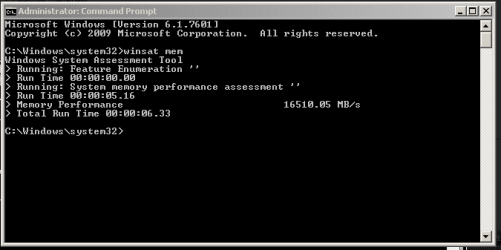
What's your memory assessment speed?

Status
Not open for further replies.
Depends on your system specs.

I think the last place gets new RAM and first place gets to donate it :shock:
 

My Computer My Computer

At a glance

Windows 7 Ult x64 - SP1/ Windows 8 Pro x64Intel Core i5-3570K 4.6GHz8GB (2X4GB) DDR3 1600 Corsair Vengeance CL8 1.5vSapphire HD 7770 Vapor-X OC 1GB DDR5
Computer type
PC/Desktop
Computer Manufacturer/Model Number
76~2.0
OS
Windows 7 Ult x64 - SP1/ Windows 8 Pro x64
CPU
Intel Core i5-3570K 4.6GHz
Motherboard
Gigabyte GA-Z77X UD3H, f18
Memory
8GB (2X4GB) DDR3 1600 Corsair Vengeance CL8 1.5v
Graphics Card(s)
Sapphire HD 7770 Vapor-X OC 1GB DDR5
Sound Card
Onboard VIA VT2021
Monitor(s) Displays
22" LCD Dell
Screen Resolution
1680x1050
Hard Drives
Samsung 840Pro 128GB SSD,
Seagate Barracuda 500GB SATA2 7200rpm 32MB cache, Seagate Barracuda 1TB SATA2 7200rpm 32MB cache,
PSU
Corsair HX650W
Case
Cooler Master Storm Scout
Cooling
Corsair H80 2x12cm Noctua NF P12 , 2x14cm case fans
Keyboard
Logitech Wave
Mouse
CM Sentinel
Internet Speed
Dismal
Antivirus
Avast
Browser
Opera Next
Other Info
Haswell laptop: HP Envy 17t-j, i7-4700MQ, GeForce 740M 2GB DDR3, 17.3" Full HD 1920x1080, 16GB RAM, Samsung 840 Pro 128GB, 1TB Hitachi 7200 HDD,
Desktop: eSATA ports,
External eSATA Seagate 500GB SATA2 7200rpm,
External WD USB 500GB
DDR3 4GB - Dual Channel Linear Mode, I don't know what speed its running :p

memory-performance.png
 

My Computer My Computer

At a glance

Windows 8.1 - 64 BitIntel Core i5-4670K (Haswell)8GB DDR3-RAM PC1600 CL9 ADATA XPG V1.0 blackGigabyte NVIDIA GTX 770 Graphics Card (2GB, D...
Computer type
PC/Desktop
Computer Manufacturer/Model Number
Self Built
OS
Windows 8.1 - 64 Bit
CPU
Intel Core i5-4670K (Haswell)
Motherboard
Gigabyte GA-Z87X-D3H
Memory
8GB DDR3-RAM PC1600 CL9 ADATA XPG V1.0 black
Graphics Card(s)
Gigabyte NVIDIA GTX 770 Graphics Card (2GB, DDR5, PCI-E)
Sound Card
ASUS Xonar DX 7.1 | Turtle Beach HPA 2
Monitor(s) Displays
Samsung SyncMaster P2270HD
Screen Resolution
1080p
Hard Drives
Samsung 840 Evo 250 GB (OS only)
Seagate Barracuda 1TB S-ATA
Seagate Barracuda 250GB S-ATA
Maxtor 250GB S-ATA (Backup only)
WD Elements 500Gb/Go
PSU
750 watts
Case
Zalman GS-1000 Special Edition
Cooling
Zalman CNPS10X Performa
Keyboard
Logitech K350
Mouse
Logitech M705 | Razer Vespula Mouse Pad
Internet Speed
Virgin Media - 60Mbps
Antivirus
Microsoft Security Essentials
Other Info
120mm fans x 4
(2 on top, 1 at rear, 1 at bottom)
@ Devilz

I am no expert , but I think the score seems very low for the memory you have stated.

My old setup had a Q8300 running 4gb DDR2 800mhz speed and it scored 6500.

You may want to check in your bios to see if the memory is set to the correct speed.

Cheers

Paul.
 

My Computer My Computer

At a glance

Windows 7 Professional 64 bit
OS
Windows 7 Professional 64 bit
:ditto:

Should be 4X that score.
Check all setting in BIOS and look at the CPUZ Memory and SPD tabs.
 

My Computer My Computer

At a glance

Windows 7 Ult x64 - SP1/ Windows 8 Pro x64Intel Core i5-3570K 4.6GHz8GB (2X4GB) DDR3 1600 Corsair Vengeance CL8 1.5vSapphire HD 7770 Vapor-X OC 1GB DDR5
Computer type
PC/Desktop
Computer Manufacturer/Model Number
76~2.0
OS
Windows 7 Ult x64 - SP1/ Windows 8 Pro x64
CPU
Intel Core i5-3570K 4.6GHz
Motherboard
Gigabyte GA-Z77X UD3H, f18
Memory
8GB (2X4GB) DDR3 1600 Corsair Vengeance CL8 1.5v
Graphics Card(s)
Sapphire HD 7770 Vapor-X OC 1GB DDR5
Sound Card
Onboard VIA VT2021
Monitor(s) Displays
22" LCD Dell
Screen Resolution
1680x1050
Hard Drives
Samsung 840Pro 128GB SSD,
Seagate Barracuda 500GB SATA2 7200rpm 32MB cache, Seagate Barracuda 1TB SATA2 7200rpm 32MB cache,
PSU
Corsair HX650W
Case
Cooler Master Storm Scout
Cooling
Corsair H80 2x12cm Noctua NF P12 , 2x14cm case fans
Keyboard
Logitech Wave
Mouse
CM Sentinel
Internet Speed
Dismal
Antivirus
Avast
Browser
Opera Next
Other Info
Haswell laptop: HP Envy 17t-j, i7-4700MQ, GeForce 740M 2GB DDR3, 17.3" Full HD 1920x1080, 16GB RAM, Samsung 840 Pro 128GB, 1TB Hitachi 7200 HDD,
Desktop: eSATA ports,
External eSATA Seagate 500GB SATA2 7200rpm,
External WD USB 500GB
:ditto:

Should be 4X that score.
Check all setting in BIOS and look at the CPUZ Memory and SPD tabs.

Well, as much as 3x that score anyway ;)

A Guy
 

My Computer My Computer

At a glance

Windows 10 Home x64INTEL Core i5-750 Quad-Core 3.37GHzHyperX Fury Black Series 8GB (2 x 4GB) 1866MhzEVGA GeForce GTX 750 Superclocked 1GB 128-Bit...
Computer type
PC/Desktop
OS
Windows 10 Home x64
CPU
INTEL Core i5-750 Quad-Core 3.37GHz
Motherboard
ASUS P7P55D
Memory
HyperX Fury Black Series 8GB (2 x 4GB) 1866Mhz
Graphics Card(s)
EVGA GeForce GTX 750 Superclocked 1GB 128-Bit GDDR5
Monitor(s) Displays
LG 32MA68HY 32" IPS
Screen Resolution
1920 x 1080
Hard Drives
Samsung 840 Evo 120GB, SEAGATE 500GB Barracuda® 7200.12, SATA 3 Gb/s, 7200 RPM, 16MB cache
PSU
ANTEC TruePower New TP-550, 80 PLUS, 550W
Case
ANTEC Three Hundred Illusion
Cooling
COOLER MASTER Hyper 212 Plus, 4 x 120mm 1 x 140mm Noctua's
Internet Speed
85 + Mbps
Antivirus
Avast
Browser
Vivaldi
I have never really understood how to read this test i am guessing lower is better? Anyways 12gigs Mushkin
 

Attachments

  • Capture13.PNG
    Capture13.PNG
    5.1 KB · Views: 26

My Computer My Computer

At a glance

WINDOWS 7 Ultimate x64 FullINTEL i7 930/INTEL i7 2630QM 2.9 GHz With Tur...MUSHKIN ENHANCED 12GB/8GB SAMSUNG DDR3 1333 MHzEVGA GTX570 S.C(SLI) FERMI /GTX560M 1.5GB of ...
Computer Manufacturer/Model Number
Self Built:kellymac35/TOSHIBA LAPTOP X775 3DV78
OS
WINDOWS 7 Ultimate x64 Full
CPU
INTEL i7 930/INTEL i7 2630QM 2.9 GHz With Turbo Boost
Motherboard
EVGA X58 3X SLI CLASSIFIED/TOSHIBA
Memory
MUSHKIN ENHANCED 12GB/8GB SAMSUNG DDR3 1333 MHz
Graphics Card(s)
EVGA GTX570 S.C(SLI) FERMI /GTX560M 1.5GB of GDDR 5 DISCRETE
Sound Card
REALTEK ON BOARD /BUILT IN HARMAN KARDON STEREO SPKS
Monitor(s) Displays
TOSHIBA 32'' /17.3" LCD 3D READY 120 Hz LED BACKLIT
Screen Resolution
1360x768/1920x1080
Hard Drives
MUSHKIN Enhanced Callisto Deluxe SSD X 2 240GB RAID 0/MUSHKIN Enhanced Callisto Deluxe 240 GB SSD 750 GB Serial ATA Hard Drive
PSU
CORSAIR Professional Series AX1200 1200W
Case
THERMALTAKE Xaser VI
Cooling
CORSAIR HYDRO SERIES H70
Keyboard
Logitech MX 3200/PREMIUM RAISED TILE LED BACKLIT
Mouse
Logitech
Internet Speed
DSL
Other Info
(SPDIF) To Kenwood VR-6070 Lucasfilm THX Select Surround EX
I have never really understood how to read this test i am guessing lower is better? Anyways 12gigs Mushkin

Higher is better, you have very good numbers :thumbsup:

A Guy
 

My Computer My Computer

At a glance

Windows 10 Home x64INTEL Core i5-750 Quad-Core 3.37GHzHyperX Fury Black Series 8GB (2 x 4GB) 1866MhzEVGA GeForce GTX 750 Superclocked 1GB 128-Bit...
Computer type
PC/Desktop
OS
Windows 10 Home x64
CPU
INTEL Core i5-750 Quad-Core 3.37GHz
Motherboard
ASUS P7P55D
Memory
HyperX Fury Black Series 8GB (2 x 4GB) 1866Mhz
Graphics Card(s)
EVGA GeForce GTX 750 Superclocked 1GB 128-Bit GDDR5
Monitor(s) Displays
LG 32MA68HY 32" IPS
Screen Resolution
1920 x 1080
Hard Drives
Samsung 840 Evo 120GB, SEAGATE 500GB Barracuda® 7200.12, SATA 3 Gb/s, 7200 RPM, 16MB cache
PSU
ANTEC TruePower New TP-550, 80 PLUS, 550W
Case
ANTEC Three Hundred Illusion
Cooling
COOLER MASTER Hyper 212 Plus, 4 x 120mm 1 x 140mm Noctua's
Internet Speed
85 + Mbps
Antivirus
Avast
Browser
Vivaldi
Thx Bill
 

My Computer My Computer

At a glance

WINDOWS 7 Ultimate x64 FullINTEL i7 930/INTEL i7 2630QM 2.9 GHz With Tur...MUSHKIN ENHANCED 12GB/8GB SAMSUNG DDR3 1333 MHzEVGA GTX570 S.C(SLI) FERMI /GTX560M 1.5GB of ...
Computer Manufacturer/Model Number
Self Built:kellymac35/TOSHIBA LAPTOP X775 3DV78
OS
WINDOWS 7 Ultimate x64 Full
CPU
INTEL i7 930/INTEL i7 2630QM 2.9 GHz With Turbo Boost
Motherboard
EVGA X58 3X SLI CLASSIFIED/TOSHIBA
Memory
MUSHKIN ENHANCED 12GB/8GB SAMSUNG DDR3 1333 MHz
Graphics Card(s)
EVGA GTX570 S.C(SLI) FERMI /GTX560M 1.5GB of GDDR 5 DISCRETE
Sound Card
REALTEK ON BOARD /BUILT IN HARMAN KARDON STEREO SPKS
Monitor(s) Displays
TOSHIBA 32'' /17.3" LCD 3D READY 120 Hz LED BACKLIT
Screen Resolution
1360x768/1920x1080
Hard Drives
MUSHKIN Enhanced Callisto Deluxe SSD X 2 240GB RAID 0/MUSHKIN Enhanced Callisto Deluxe 240 GB SSD 750 GB Serial ATA Hard Drive
PSU
CORSAIR Professional Series AX1200 1200W
Case
THERMALTAKE Xaser VI
Cooling
CORSAIR HYDRO SERIES H70
Keyboard
Logitech MX 3200/PREMIUM RAISED TILE LED BACKLIT
Mouse
Logitech
Internet Speed
DSL
Other Info
(SPDIF) To Kenwood VR-6070 Lucasfilm THX Select Surround EX
My 4 gigs of 1600MHz ram gets me this:

Mem.jpg

So you could probably do better, perhaps Dave or others will have some ideas.

A Guy
 

My Computer My Computer

At a glance

Windows 10 Home x64INTEL Core i5-750 Quad-Core 3.37GHzHyperX Fury Black Series 8GB (2 x 4GB) 1866MhzEVGA GeForce GTX 750 Superclocked 1GB 128-Bit...
Computer type
PC/Desktop
OS
Windows 10 Home x64
CPU
INTEL Core i5-750 Quad-Core 3.37GHz
Motherboard
ASUS P7P55D
Memory
HyperX Fury Black Series 8GB (2 x 4GB) 1866Mhz
Graphics Card(s)
EVGA GeForce GTX 750 Superclocked 1GB 128-Bit GDDR5
Monitor(s) Displays
LG 32MA68HY 32" IPS
Screen Resolution
1920 x 1080
Hard Drives
Samsung 840 Evo 120GB, SEAGATE 500GB Barracuda® 7200.12, SATA 3 Gb/s, 7200 RPM, 16MB cache
PSU
ANTEC TruePower New TP-550, 80 PLUS, 550W
Case
ANTEC Three Hundred Illusion
Cooling
COOLER MASTER Hyper 212 Plus, 4 x 120mm 1 x 140mm Noctua's
Internet Speed
85 + Mbps
Antivirus
Avast
Browser
Vivaldi
Mine is the same as yours A Guy, our systems are similar.

A i7 930 OC'ed with 12GB RAM, which is triple channel where ours is dual channel, should be higher, in the 20-25k range.
 

My Computer My Computer

At a glance

Windows 7 Ult x64 - SP1/ Windows 8 Pro x64Intel Core i5-3570K 4.6GHz8GB (2X4GB) DDR3 1600 Corsair Vengeance CL8 1.5vSapphire HD 7770 Vapor-X OC 1GB DDR5
Computer type
PC/Desktop
Computer Manufacturer/Model Number
76~2.0
OS
Windows 7 Ult x64 - SP1/ Windows 8 Pro x64
CPU
Intel Core i5-3570K 4.6GHz
Motherboard
Gigabyte GA-Z77X UD3H, f18
Memory
8GB (2X4GB) DDR3 1600 Corsair Vengeance CL8 1.5v
Graphics Card(s)
Sapphire HD 7770 Vapor-X OC 1GB DDR5
Sound Card
Onboard VIA VT2021
Monitor(s) Displays
22" LCD Dell
Screen Resolution
1680x1050
Hard Drives
Samsung 840Pro 128GB SSD,
Seagate Barracuda 500GB SATA2 7200rpm 32MB cache, Seagate Barracuda 1TB SATA2 7200rpm 32MB cache,
PSU
Corsair HX650W
Case
Cooler Master Storm Scout
Cooling
Corsair H80 2x12cm Noctua NF P12 , 2x14cm case fans
Keyboard
Logitech Wave
Mouse
CM Sentinel
Internet Speed
Dismal
Antivirus
Avast
Browser
Opera Next
Other Info
Haswell laptop: HP Envy 17t-j, i7-4700MQ, GeForce 740M 2GB DDR3, 17.3" Full HD 1920x1080, 16GB RAM, Samsung 840 Pro 128GB, 1TB Hitachi 7200 HDD,
Desktop: eSATA ports,
External eSATA Seagate 500GB SATA2 7200rpm,
External WD USB 500GB
Mine is the same as yours A Guy, our systems are similar.

A i7 930 OC'ed with 12GB RAM, which is triple channel where ours is dual channel, should be higher, in the 20-25k range.

When I saw he had 12 Gig, I realized my 1st answer wasn't that good :o

A Guy
 

My Computer My Computer

At a glance

Windows 10 Home x64INTEL Core i5-750 Quad-Core 3.37GHzHyperX Fury Black Series 8GB (2 x 4GB) 1866MhzEVGA GeForce GTX 750 Superclocked 1GB 128-Bit...
Computer type
PC/Desktop
OS
Windows 10 Home x64
CPU
INTEL Core i5-750 Quad-Core 3.37GHz
Motherboard
ASUS P7P55D
Memory
HyperX Fury Black Series 8GB (2 x 4GB) 1866Mhz
Graphics Card(s)
EVGA GeForce GTX 750 Superclocked 1GB 128-Bit GDDR5
Monitor(s) Displays
LG 32MA68HY 32" IPS
Screen Resolution
1920 x 1080
Hard Drives
Samsung 840 Evo 120GB, SEAGATE 500GB Barracuda® 7200.12, SATA 3 Gb/s, 7200 RPM, 16MB cache
PSU
ANTEC TruePower New TP-550, 80 PLUS, 550W
Case
ANTEC Three Hundred Illusion
Cooling
COOLER MASTER Hyper 212 Plus, 4 x 120mm 1 x 140mm Noctua's
Internet Speed
85 + Mbps
Antivirus
Avast
Browser
Vivaldi
The guy with 12gb ram does not state what speed ram it is though.

In my experience its the speed of the ram and not the amount that is the most important factor for high scores in winsat.
 

My Computer My Computer

At a glance

Windows 7 Professional 64 bit
OS
Windows 7 Professional 64 bit
@ Devilz

I am no expert , but I think the score seems very low for the memory you have stated.

My old setup had a Q8300 running 4gb DDR2 800mhz speed and it scored 6500.

You may want to check in your bios to see if the memory is set to the correct speed.

Cheers

Paul.

How to check and set correct speed :confused:
 

My Computer My Computer

At a glance

Windows 8.1 - 64 BitIntel Core i5-4670K (Haswell)8GB DDR3-RAM PC1600 CL9 ADATA XPG V1.0 blackGigabyte NVIDIA GTX 770 Graphics Card (2GB, D...
Computer type
PC/Desktop
Computer Manufacturer/Model Number
Self Built
OS
Windows 8.1 - 64 Bit
CPU
Intel Core i5-4670K (Haswell)
Motherboard
Gigabyte GA-Z87X-D3H
Memory
8GB DDR3-RAM PC1600 CL9 ADATA XPG V1.0 black
Graphics Card(s)
Gigabyte NVIDIA GTX 770 Graphics Card (2GB, DDR5, PCI-E)
Sound Card
ASUS Xonar DX 7.1 | Turtle Beach HPA 2
Monitor(s) Displays
Samsung SyncMaster P2270HD
Screen Resolution
1080p
Hard Drives
Samsung 840 Evo 250 GB (OS only)
Seagate Barracuda 1TB S-ATA
Seagate Barracuda 250GB S-ATA
Maxtor 250GB S-ATA (Backup only)
WD Elements 500Gb/Go
PSU
750 watts
Case
Zalman GS-1000 Special Edition
Cooling
Zalman CNPS10X Performa
Keyboard
Logitech K350
Mouse
Logitech M705 | Razer Vespula Mouse Pad
Internet Speed
Virgin Media - 60Mbps
Antivirus
Microsoft Security Essentials
Other Info
120mm fans x 4
(2 on top, 1 at rear, 1 at bottom)
You can check the settings in your BIOS or D/L CPUZ and check the Memory, and SPD tabs.

Changing the frequency can be done in the BIOS.


My Computer My Computer

At a glance

Windows 7 Ult x64 - SP1/ Windows 8 Pro x64Intel Core i5-3570K 4.6GHz8GB (2X4GB) DDR3 1600 Corsair Vengeance CL8 1.5vSapphire HD 7770 Vapor-X OC 1GB DDR5
Computer type
PC/Desktop
Computer Manufacturer/Model Number
76~2.0
OS
Windows 7 Ult x64 - SP1/ Windows 8 Pro x64
CPU
Intel Core i5-3570K 4.6GHz
Motherboard
Gigabyte GA-Z77X UD3H, f18
Memory
8GB (2X4GB) DDR3 1600 Corsair Vengeance CL8 1.5v
Graphics Card(s)
Sapphire HD 7770 Vapor-X OC 1GB DDR5
Sound Card
Onboard VIA VT2021
Monitor(s) Displays
22" LCD Dell
Screen Resolution
1680x1050
Hard Drives
Samsung 840Pro 128GB SSD,
Seagate Barracuda 500GB SATA2 7200rpm 32MB cache, Seagate Barracuda 1TB SATA2 7200rpm 32MB cache,
PSU
Corsair HX650W
Case
Cooler Master Storm Scout
Cooling
Corsair H80 2x12cm Noctua NF P12 , 2x14cm case fans
Keyboard
Logitech Wave
Mouse
CM Sentinel
Internet Speed
Dismal
Antivirus
Avast
Browser
Opera Next
Other Info
Haswell laptop: HP Envy 17t-j, i7-4700MQ, GeForce 740M 2GB DDR3, 17.3" Full HD 1920x1080, 16GB RAM, Samsung 840 Pro 128GB, 1TB Hitachi 7200 HDD,
Desktop: eSATA ports,
External eSATA Seagate 500GB SATA2 7200rpm,
External WD USB 500GB
Yeah as Dave says , restart your PC , keep pressing the delete key to get into the bios then have a look for the memory speed/frequency.

I would imagine yours being DDR3 should be 1333mhz or 1600mhz but it wouldn't surprise me if its set totally wrong in the bios.

Really you want to open the side of your case and have a look at the sticker on the side of one of your memory modules , this should tell you what speed the memory is supposed to run at , then go into the bios and alter it accordingly.


Paul.
 

My Computer My Computer

At a glance

Windows 7 Professional 64 bit
OS
Windows 7 Professional 64 bit
this is what I got

Corsair memory 4GB TwinX XMS3 10666 C9 DDR3 9-9-9-27 1333MHz Kit (4 x 1024MB) RAM

what settings should I select in BIOS?

I just did 3dmark and it shows RAM settings as below

Module 1

1024 MB Corsair 9 @ 667 MHz
Module 2

1024 MB Corsair 9 @ 533 MHz
Module 3

1024 MB Corsair 9 @ 667 MHz
Module 4

1024 MB Corsair 9 @ 533 MHz

why are they different?
 
Last edited:

My Computer My Computer

At a glance

Windows 8.1 - 64 BitIntel Core i5-4670K (Haswell)8GB DDR3-RAM PC1600 CL9 ADATA XPG V1.0 blackGigabyte NVIDIA GTX 770 Graphics Card (2GB, D...
Computer type
PC/Desktop
Computer Manufacturer/Model Number
Self Built
OS
Windows 8.1 - 64 Bit
CPU
Intel Core i5-4670K (Haswell)
Motherboard
Gigabyte GA-Z87X-D3H
Memory
8GB DDR3-RAM PC1600 CL9 ADATA XPG V1.0 black
Graphics Card(s)
Gigabyte NVIDIA GTX 770 Graphics Card (2GB, DDR5, PCI-E)
Sound Card
ASUS Xonar DX 7.1 | Turtle Beach HPA 2
Monitor(s) Displays
Samsung SyncMaster P2270HD
Screen Resolution
1080p
Hard Drives
Samsung 840 Evo 250 GB (OS only)
Seagate Barracuda 1TB S-ATA
Seagate Barracuda 250GB S-ATA
Maxtor 250GB S-ATA (Backup only)
WD Elements 500Gb/Go
PSU
750 watts
Case
Zalman GS-1000 Special Edition
Cooling
Zalman CNPS10X Performa
Keyboard
Logitech K350
Mouse
Logitech M705 | Razer Vespula Mouse Pad
Internet Speed
Virgin Media - 60Mbps
Antivirus
Microsoft Security Essentials
Other Info
120mm fans x 4
(2 on top, 1 at rear, 1 at bottom)
this is what I got

Corsair memory 4GB TwinX XMS3 10666 C9 DDR3 9-9-9-27 1333MHz Kit (4 x 1024MB) RAM

what settings should I select in BIOS?
Unless you're playing with overclocking your rig, you should be fine leaving the default settings... It'll be easier to check the speed your memory is running through Windows itself. My theory with any rig is to test it at default settings and then see where it can be improved from there.

Have a look at CPU-z, under the 'Menory' tab you'll see a field labelled "DRAM Frequency". What does that show you?

Keep in mind 800MHz memory will show 400MHz there, as 1066MHz will show 533MHz. This is because the DRAM Frequency is your core memory speed, similar to the core speed of your CPU before the multiplier.


I just did 3dmark and it shows RAM settings as below

Module 1

1024 MB Corsair 9 @ 667 MHz
Module 2

1024 MB Corsair 9 @ 533 MHz
Module 3

1024 MB Corsair 9 @ 667 MHz
Module 4

1024 MB Corsair 9 @ 533 MHz

why are they different?

I quoted your post before you edited it.... That helps clear up the problem a bit. Did you perhaps buy two 2GB RAM kits and put all 4 modules on your board? I don't remember seeing any straight 4x1GB RAM kits around...

Either way, those specs look like the memory modules' native (or max) speeds, but your motherboard will reduce the speed of the faster modules (667) to match the slowest modules (533). Also in CPU-z, next to the 'Memory' tab is a 'SPD' tab. On this you can see the specifications for each module individually. Check that and see what the differences are between the modules.
 

My Computer My Computer

At a glance

Win 10 x64 Pro x64 / Ubuntu 15.10 x64Intel i7-4960X4x8GB Corsair Dominator Platinum @2400MHz 10-...2x MSI GTX780Ti 3GB (SLI)
Computer type
PC/Desktop
OS
Win 10 x64 Pro x64 / Ubuntu 15.10 x64
CPU
Intel i7-4960X
Motherboard
Asus Rampage IV Black Edition
Memory
4x8GB Corsair Dominator Platinum @2400MHz 10-12-12-31
Graphics Card(s)
2x MSI GTX780Ti 3GB (SLI)
Sound Card
Onboard SupremeFX (Cirrus Logic CS4398)
Monitor(s) Displays
3x LG Cinema 27" IPS LED (27MP65)
Screen Resolution
[1920x1080]x3
Hard Drives
Crucial M500 120GB, Crucial M500 480GB, Toshiba DT01ACA200 2TB
PSU
CoolerMaster V1000
Case
Corsair Obsidian 750D
Cooling
ThermalTake Water 3.0 Extreme, 4xSP120, 3xAF120
Keyboard
Moshi Luna
Mouse
Logitech G700s / Roccat Tyon
Internet Speed
4Mb uncapped ADSL (Afrihost)
Antivirus
MS Security Essentials
Browser
Chrome... Duh. (:
4GB DDR2 855MHz

The basic idea of this thread is to show your score Paul , not just what memory you are running.

To do this , open up the command prompt as administrator and type winsat mem

This will assess your memory speed.

Edit , I see it says banned below his name , no need for this post then assuming he has been banned.
 
Last edited:

My Computer My Computer

At a glance

Windows 7 Professional 64 bit
OS
Windows 7 Professional 64 bit
4GB DDR2 855MHz

The basic idea of this thread is to show your score Paul , not just what memory you are running.

To do this , open up the command prompt as administrator and type winsat mem

This will assess your memory speed.

Edit , I see it says banned below his name , no need for this post then assuming he has been banned.

Yeah, they are strict when it comes to ram specs! :shock:

A Guy
 

My Computer My Computer

At a glance

Windows 10 Home x64INTEL Core i5-750 Quad-Core 3.37GHzHyperX Fury Black Series 8GB (2 x 4GB) 1866MhzEVGA GeForce GTX 750 Superclocked 1GB 128-Bit...
Computer type
PC/Desktop
OS
Windows 10 Home x64
CPU
INTEL Core i5-750 Quad-Core 3.37GHz
Motherboard
ASUS P7P55D
Memory
HyperX Fury Black Series 8GB (2 x 4GB) 1866Mhz
Graphics Card(s)
EVGA GeForce GTX 750 Superclocked 1GB 128-Bit GDDR5
Monitor(s) Displays
LG 32MA68HY 32" IPS
Screen Resolution
1920 x 1080
Hard Drives
Samsung 840 Evo 120GB, SEAGATE 500GB Barracuda® 7200.12, SATA 3 Gb/s, 7200 RPM, 16MB cache
PSU
ANTEC TruePower New TP-550, 80 PLUS, 550W
Case
ANTEC Three Hundred Illusion
Cooling
COOLER MASTER Hyper 212 Plus, 4 x 120mm 1 x 140mm Noctua's
Internet Speed
85 + Mbps
Antivirus
Avast
Browser
Vivaldi
Status
Not open for further replies.
Back
Top