I decided to open a thread to show what people are getting with there current memory settings, what improvements are shown with various timing tweaks, speed settings ect.
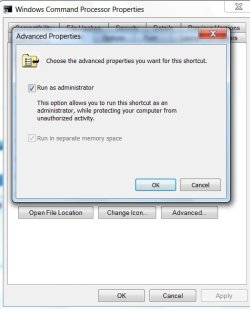
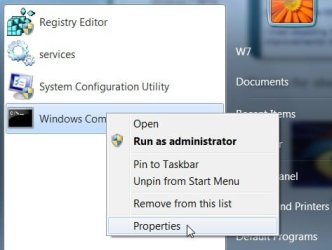
to access this you MUST have UAC turned off, OR choose 'Run as administrator'. open the command prompt window first, either by opening 'Run' from the start menu and typing 'cmd' --this will only work if UAC is deactivated--, or go to accessories in your start menu locate 'Command Prompt' right click, select 'Run as administrator'.
once opened simply type:
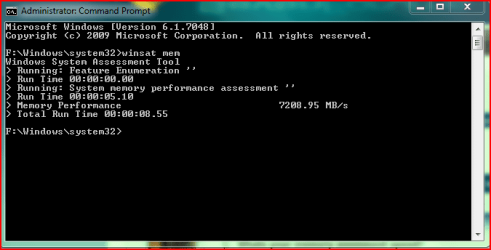
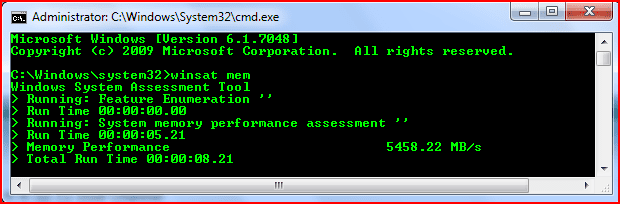
winsat mem
Note: it will not matter what the command path is set to.
i am currently facing issues with my DDR3 and being stuck at around 8500mb/s any suggestions why feel free. Dual channel and tri channel play a huge factor in this benchmark, so keep that in mind before comparing with others
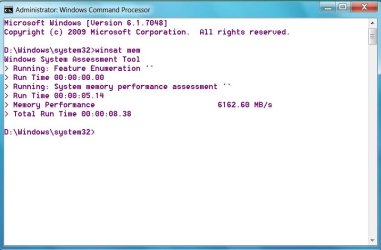
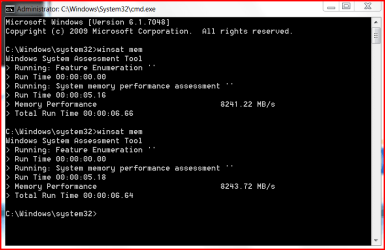
so here is my winsat score:

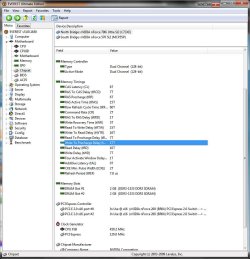
with the current timings:
post em up and let other people know what basic timings and MHz your set at (DDR2 950MHz 4/4/4/12 ect) and channel configuration (dual/tri channel) your using.
thanks to smarteyeball for pointing out the admin trick with cmd.exe!
Rick.
to access this you MUST have UAC turned off, OR choose 'Run as administrator'. open the command prompt window first, either by opening 'Run' from the start menu and typing 'cmd' --this will only work if UAC is deactivated--, or go to accessories in your start menu locate 'Command Prompt' right click, select 'Run as administrator'.
once opened simply type:
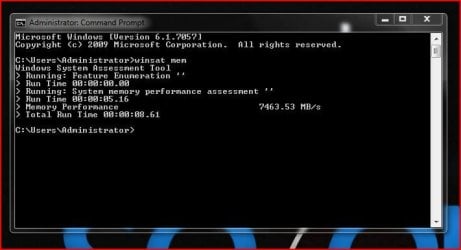
winsat mem
Note: it will not matter what the command path is set to.
i am currently facing issues with my DDR3 and being stuck at around 8500mb/s any suggestions why feel free. Dual channel and tri channel play a huge factor in this benchmark, so keep that in mind before comparing with others
so here is my winsat score:
with the current timings:
post em up and let other people know what basic timings and MHz your set at (DDR2 950MHz 4/4/4/12 ect) and channel configuration (dual/tri channel) your using.
thanks to smarteyeball for pointing out the admin trick with cmd.exe!
Rick.
Last edited:
My Computer
At a glance
Windows 7 7600 x64 (16385) Ultimate,Windows V...Intel Quad core Q9550 [email protected](AS5 lap...2gbx4 GSkill1600MHz9/9/9/24/2T-1.8v@1677MHz9/...x2 Leadtek 9800GX2 Quad SLI(re-pasted/no case...
- Computer Manufacturer/Model Number
- Mad Customs #4
- OS
- Windows 7 7600 x64 (16385) Ultimate,Windows Vista x64 Ultimate
- CPU
- Intel Quad core Q9550 [email protected](AS5 lapped)(1845FSB)
- Motherboard
- EVGA 790i FTW DIGITAL PWM (AS5 re-pasted)
- Memory
- 2gbx4 GSkill1600MHz9/9/9/24/2T-1.8v@1677MHz9/9/9/18/1T-1.8v
- Graphics Card(s)
- x2 Leadtek 9800GX2 Quad SLI(re-pasted/no cases)755/1120/1820
- Sound Card
- Crapative XF-i Plat
- Monitor(s) Displays
- Chimei22"ws(DVI)/LG32"LCD(HDMI)/Samsung 40"LCD(HDMI)
- Screen Resolution
- 1680x1050/1360x768/1920x1080 (1080P)
- Hard Drives
- Seagate 1TB "40NS" 32mb sata2, Hitachi 500gb 16mb sata2 (backup storage), Sandisk 16gb micro SD (mobile storage)
- PSU
- Zalman 850-HP 850watt x6 12v@18A
- Case
- Tiled floor (nice and cold-usually 18c idle)
- Cooling
- fan forced 120 Xtreme (lapped)with push/pull setup
- Keyboard
- Logitech Di Novo Edge
- Mouse
- MX 1100
- Internet Speed
- Bigpond 17mbit/s cable=Max witnessed 2.5Mbyte/s down 30kb up
- Other Info
- Enzotech SLF-1+Enzotech CNB-EVGAi chipset coolers/Sunbeamtech Rheobus Extreme 30 Watt x 6 channel fan controller/Zalman ZM-MFC2 fan controller-Watt meter/Logitech G25 Racing Wheel/Logitech cordless number pad/OCZ NIA//HTPC:7600 x64/[email protected]/2x2Gb ST Proj.X DDR3 1800 9-9-9-24/Nvidia 8400GS 512Mb/Asus HDAV1.3 Delux(changed OPAmps to OPA627)/250Gb 16Mb 7200/480W PSU/Custom made cardboard box!!