What's your memory assessment speed?

Status
Not open for further replies.
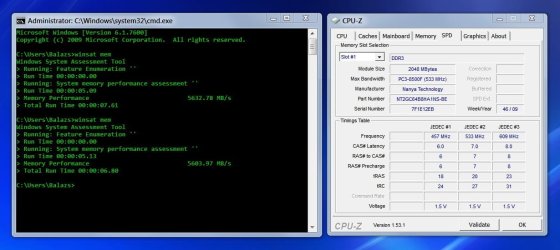
Guys, you shouldn't attach (ridiculously small) pictures in this thread really, there's only one value to answer this thread.

???

Perhaps try clicking the pics...
 

My Computer My Computer

Computer type
PC/Desktop
Computer Manufacturer/Model Number
Systems by SmartEyeball
OS
8 Pro x64
CPU
i7 3770K 4.6GHz
Motherboard
ASUS P8Z77 WS
Memory
16GB G.Skill Trident X 2666mhz
Graphics Card(s)
x2 EVGA 780 Ti Superclocked SLI
Sound Card
SB X-FI Surround 5.1 PRO USB / ATH-AD900 Headphones
Monitor(s) Displays
x3 Dell U2410 / 58" Samsung
Screen Resolution
5760*1200/ 1920*1200
Hard Drives
2x Intel 520 240GB (RAID 0) * 2x WD Caviar Blacks 2TB (RAID 0) * 2TB WD Caviar Black * Sony Optirac DVD
PSU
Silverstone Strider Evolution 1200W
Case
Thermaltake Level 10 GT Snow Edition
Cooling
Noctua NH-D14
Keyboard
Topre Realforce // Ducky Shine MX Black // Filco Ninja TKL
Mouse
Thermaltake Theron (Highly Recommended) + Razer Imperator
Antivirus
MSE
Browser
IE, FF, WaterFox
Other Info
GT Extreme V2 Sim Racing Cockpit + 40" LCD and K/B Mouse stand ▼
Fanatec CSR Elite Wheel + Clubsport V1 Pedals + CSR shifter/7G-H ▼Saitek X52 Pro ▼ TrackIR 5 Pro
Buttkicker v2 Seat Rumbler with Dedicated 5.1 and Sub Woofer attached to frame ▼
=
Bloody Big Grin
@ smarteyeball: Got a bit of a random question for you; I was looking at your winsat stats on the previous page (above my first post in this thread), and I can't help but wonder something... Which would you say contributes more to the access speed of your memory, the fact that it's DDR3 or that it's in triple channel?

The reason I'm asking is because I'm already starting to plan my next PC build, even though I'm not quite finished with my current machine, but I'm a big fan of AMD, so (Unless I'm mistaken and they do support it on AM3 for example) I'll lose out on the tri-channel setup...

Have you ever checked your RAM access speeds in dual-channel mode on your current setup?
 

My Computer My Computer

Computer type
PC/Desktop
OS
Win 10 x64 Pro x64 / Ubuntu 15.10 x64
CPU
Intel i7-4960X
Motherboard
Asus Rampage IV Black Edition
Memory
4x8GB Corsair Dominator Platinum @2400MHz 10-12-12-31
Graphics Card(s)
2x MSI GTX780Ti 3GB (SLI)
Sound Card
Onboard SupremeFX (Cirrus Logic CS4398)
Monitor(s) Displays
3x LG Cinema 27" IPS LED (27MP65)
Screen Resolution
[1920x1080]x3
Hard Drives
Crucial M500 120GB, Crucial M500 480GB, Toshiba DT01ACA200 2TB
PSU
CoolerMaster V1000
Case
Corsair Obsidian 750D
Cooling
ThermalTake Water 3.0 Extreme, 4xSP120, 3xAF120
Keyboard
Moshi Luna
Mouse
Logitech G700s / Roccat Tyon
Internet Speed
4Mb uncapped ADSL (Afrihost)
Antivirus
MS Security Essentials
Browser
Chrome... Duh. (:
@ smarteyeball: Got a bit of a random question for you; I was looking at your winsat stats on the previous page (above my first post in this thread), and I can't help but wonder something... Which would you say contributes more to the access speed of your memory, the fact that it's DDR3 or that it's in triple channel?

The reason I'm asking is because I'm already starting to plan my next PC build, even though I'm not quite finished with my current machine, but I'm a big fan of AMD, so (Unless I'm mistaken and they do support it on AM3 for example) I'll lose out on the tri-channel setup...

Have you ever checked your RAM access speeds in dual-channel mode on your current setup?

AM3 is dual channel and no, I haven't tested mine in dual channel.

Basicaly I would say DDR3 contributes more to the overall 'speed' simply because it is capable of achieving a higher clockspeed over DDR2. Cas Latencies also play a big part in it too.

There is still some debate to whether tri-channel actually offers any 'real world' performance advantage over dual-channel and the general consensus is that it doesn't.

So if it's access speed you are concerned with, basically go for the highest mhz you can afford with the lowest stock Cas Latencies. ie 1333mhz CL7 or 1600mhz CL7/8


If you plan to overclock, you will have more 'head room' with a higher rated mhz ie 1600mhz

Going Above 1600mhz, is really only for those aiming for very high OC's.

Outside of mega-overclocks, the only real advantage to buying a 2x2GB DDR3 2000mhz kit would be to run them at a lower speed with tighter timings.

I wouldn't be too concerned about dual vs tri channel.

The only 'real' difference so far, is in synthetic benchmarks.

Hope that helped :)
 

My Computer My Computer

Computer type
PC/Desktop
Computer Manufacturer/Model Number
Systems by SmartEyeball
OS
8 Pro x64
CPU
i7 3770K 4.6GHz
Motherboard
ASUS P8Z77 WS
Memory
16GB G.Skill Trident X 2666mhz
Graphics Card(s)
x2 EVGA 780 Ti Superclocked SLI
Sound Card
SB X-FI Surround 5.1 PRO USB / ATH-AD900 Headphones
Monitor(s) Displays
x3 Dell U2410 / 58" Samsung
Screen Resolution
5760*1200/ 1920*1200
Hard Drives
2x Intel 520 240GB (RAID 0) * 2x WD Caviar Blacks 2TB (RAID 0) * 2TB WD Caviar Black * Sony Optirac DVD
PSU
Silverstone Strider Evolution 1200W
Case
Thermaltake Level 10 GT Snow Edition
Cooling
Noctua NH-D14
Keyboard
Topre Realforce // Ducky Shine MX Black // Filco Ninja TKL
Mouse
Thermaltake Theron (Highly Recommended) + Razer Imperator
Antivirus
MSE
Browser
IE, FF, WaterFox
Other Info
GT Extreme V2 Sim Racing Cockpit + 40" LCD and K/B Mouse stand ▼
Fanatec CSR Elite Wheel + Clubsport V1 Pedals + CSR shifter/7G-H ▼Saitek X52 Pro ▼ TrackIR 5 Pro
Buttkicker v2 Seat Rumbler with Dedicated 5.1 and Sub Woofer attached to frame ▼
=
Bloody Big Grin
Hope that helped :)
That it did, thanks... Reading reviews is all good and well, but not all of them actually give people's personal opinions on matters, that's why I like to ask around.
 

My Computer My Computer

Computer type
PC/Desktop
OS
Win 10 x64 Pro x64 / Ubuntu 15.10 x64
CPU
Intel i7-4960X
Motherboard
Asus Rampage IV Black Edition
Memory
4x8GB Corsair Dominator Platinum @2400MHz 10-12-12-31
Graphics Card(s)
2x MSI GTX780Ti 3GB (SLI)
Sound Card
Onboard SupremeFX (Cirrus Logic CS4398)
Monitor(s) Displays
3x LG Cinema 27" IPS LED (27MP65)
Screen Resolution
[1920x1080]x3
Hard Drives
Crucial M500 120GB, Crucial M500 480GB, Toshiba DT01ACA200 2TB
PSU
CoolerMaster V1000
Case
Corsair Obsidian 750D
Cooling
ThermalTake Water 3.0 Extreme, 4xSP120, 3xAF120
Keyboard
Moshi Luna
Mouse
Logitech G700s / Roccat Tyon
Internet Speed
4Mb uncapped ADSL (Afrihost)
Antivirus
MS Security Essentials
Browser
Chrome... Duh. (:
No worries mate, happy to help :)
 

My Computer My Computer

Computer type
PC/Desktop
Computer Manufacturer/Model Number
Systems by SmartEyeball
OS
8 Pro x64
CPU
i7 3770K 4.6GHz
Motherboard
ASUS P8Z77 WS
Memory
16GB G.Skill Trident X 2666mhz
Graphics Card(s)
x2 EVGA 780 Ti Superclocked SLI
Sound Card
SB X-FI Surround 5.1 PRO USB / ATH-AD900 Headphones
Monitor(s) Displays
x3 Dell U2410 / 58" Samsung
Screen Resolution
5760*1200/ 1920*1200
Hard Drives
2x Intel 520 240GB (RAID 0) * 2x WD Caviar Blacks 2TB (RAID 0) * 2TB WD Caviar Black * Sony Optirac DVD
PSU
Silverstone Strider Evolution 1200W
Case
Thermaltake Level 10 GT Snow Edition
Cooling
Noctua NH-D14
Keyboard
Topre Realforce // Ducky Shine MX Black // Filco Ninja TKL
Mouse
Thermaltake Theron (Highly Recommended) + Razer Imperator
Antivirus
MSE
Browser
IE, FF, WaterFox
Other Info
GT Extreme V2 Sim Racing Cockpit + 40" LCD and K/B Mouse stand ▼
Fanatec CSR Elite Wheel + Clubsport V1 Pedals + CSR shifter/7G-H ▼Saitek X52 Pro ▼ TrackIR 5 Pro
Buttkicker v2 Seat Rumbler with Dedicated 5.1 and Sub Woofer attached to frame ▼
=
Bloody Big Grin
@ smarteyeball: I only meant that there is no need for a screenshot if the only information is a number, people can as well paste the score so it's directly readable in the post, rather than forcing readers to click on the picture of each post. I don't see anything of value in the screenshots other than the score, unless I am missing something? Not a big deal, though, that was just my 2 centavos.

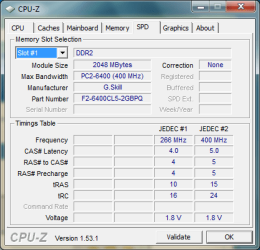
@ ZaLiTH: Thanks, I just checked CPU-Z. Seems to be a little buggy, though, it reports 4 modules installed in slots 1 to 4, when I definitely have only 2 x 2GB DDR2 modules (G-Skill PC2-6400 @ 400MHz).
I'll check my mobo manual to see if I can boost this memory score in winsat & WEI, 400MHz seems pretty slow, but then, it's a 3yo computer.
 

My Computer My Computer

Computer Manufacturer/Model Number
Home built
OS
Windows 7 x64 Ultimate English + language kits
CPU
Intel Core 2 6420 2.13GHz
Motherboard
Asus P5W DH Deluxe
Memory
4GB
Graphics Card(s)
NVIDIA GeForce 8800 GTX 768MB
Sound Card
Onboard audio
Monitor(s) Displays
Dell 1901FP
Hard Drives
Seagate Barracuda 1.5 and 0.5 TB
@ smarteyeball: I only meant that there is no need for a screenshot if the only information is a number, people can as well paste the score so it's directly readable in the post, rather than forcing readers to click on the picture of each post. I don't see anything of value in the screenshots other than the score, unless I am missing something? Not a big deal, though, that was just my 2 centavos.

No worries mate. I understand where you are coming from. You do have a point when it comes to winsat scores.

However when coupled with screenshots of other apps, it's sometimes it's easier and beneficial for others to 'see for themselves'. Plus it negates any 'fake scores' that the occasional person likes to post :rolleyes:

(P.S I find it's actually quicker to right click on the pic> and open in new tab)

I definitely have only 2 x 2GB DDR2 modules (G-Skill PC2-6400 @ 400MHz).
I'll check my mobo manual to see if I can boost this memory score in winsat & WEI, 400MHz seems pretty slow, but then, it's a 3yo computer.

Where is it being reported as 400mhz? Don't forget that DDR2 is Double Double Rate so therefore 400*2=800mhz actual.
 

My Computer My Computer

Computer type
PC/Desktop
Computer Manufacturer/Model Number
Systems by SmartEyeball
OS
8 Pro x64
CPU
i7 3770K 4.6GHz
Motherboard
ASUS P8Z77 WS
Memory
16GB G.Skill Trident X 2666mhz
Graphics Card(s)
x2 EVGA 780 Ti Superclocked SLI
Sound Card
SB X-FI Surround 5.1 PRO USB / ATH-AD900 Headphones
Monitor(s) Displays
x3 Dell U2410 / 58" Samsung
Screen Resolution
5760*1200/ 1920*1200
Hard Drives
2x Intel 520 240GB (RAID 0) * 2x WD Caviar Blacks 2TB (RAID 0) * 2TB WD Caviar Black * Sony Optirac DVD
PSU
Silverstone Strider Evolution 1200W
Case
Thermaltake Level 10 GT Snow Edition
Cooling
Noctua NH-D14
Keyboard
Topre Realforce // Ducky Shine MX Black // Filco Ninja TKL
Mouse
Thermaltake Theron (Highly Recommended) + Razer Imperator
Antivirus
MSE
Browser
IE, FF, WaterFox
Other Info
GT Extreme V2 Sim Racing Cockpit + 40" LCD and K/B Mouse stand ▼
Fanatec CSR Elite Wheel + Clubsport V1 Pedals + CSR shifter/7G-H ▼Saitek X52 Pro ▼ TrackIR 5 Pro
Buttkicker v2 Seat Rumbler with Dedicated 5.1 and Sub Woofer attached to frame ▼
=
Bloody Big Grin
I definitely have only 2 x 2GB DDR2 modules (G-Skill PC2-6400 @ 400MHz).
I'll check my mobo manual to see if I can boost this memory score in winsat & WEI, 400MHz seems pretty slow, but then, it's a 3yo computer.
Where is it being reported as 400mhz? Don't forget that DDR2 is Double Double Rate so therefore 400*2=800mhz actual.
Dang... You beat me to it. I had already opened up a quote in a new tab when I scrolled down and saw this... Lol.

By the way Chimel, just to set your mind at ease, CPU-z isn't actually that buggy... It shows mine as 440MHz for my RAM (DDR2-800 over clocked from 400MHz). But as smarteyeball said, being DDR the effective speed is twice that.
 

My Computer My Computer

Computer type
PC/Desktop
OS
Win 10 x64 Pro x64 / Ubuntu 15.10 x64
CPU
Intel i7-4960X
Motherboard
Asus Rampage IV Black Edition
Memory
4x8GB Corsair Dominator Platinum @2400MHz 10-12-12-31
Graphics Card(s)
2x MSI GTX780Ti 3GB (SLI)
Sound Card
Onboard SupremeFX (Cirrus Logic CS4398)
Monitor(s) Displays
3x LG Cinema 27" IPS LED (27MP65)
Screen Resolution
[1920x1080]x3
Hard Drives
Crucial M500 120GB, Crucial M500 480GB, Toshiba DT01ACA200 2TB
PSU
CoolerMaster V1000
Case
Corsair Obsidian 750D
Cooling
ThermalTake Water 3.0 Extreme, 4xSP120, 3xAF120
Keyboard
Moshi Luna
Mouse
Logitech G700s / Roccat Tyon
Internet Speed
4Mb uncapped ADSL (Afrihost)
Antivirus
MS Security Essentials
Browser
Chrome... Duh. (:
@ZaLiTH: I didn't mean buggy about the speed, just about the slots:
I have 2 modules in 2 slots, leaving 2 slots empty, but CPU-Z says all 4 slots are used.
When I select Slot #1 to #4 in the CPU-Z drop-down list (attached), it shows 2GB in each.

@smarteyeball, ZaLiTH: You're right about the DDR2 actual speed, but CPU-Z says only 400 MHz (in the "Max Bandwidth" field attached), I would expect such a system tool to do the computation for me. Now, let's see, 2 times 400, where's my calculator? ^-^
 

Attachments

  • cpu-z.png
    cpu-z.png
    13.9 KB · Views: 9

My Computer My Computer

Computer Manufacturer/Model Number
Home built
OS
Windows 7 x64 Ultimate English + language kits
CPU
Intel Core 2 6420 2.13GHz
Motherboard
Asus P5W DH Deluxe
Memory
4GB
Graphics Card(s)
NVIDIA GeForce 8800 GTX 768MB
Sound Card
Onboard audio
Monitor(s) Displays
Dell 1901FP
Hard Drives
Seagate Barracuda 1.5 and 0.5 TB
Last edited:

My Computer My Computer

Computer Manufacturer/Model Number
BGC (Bob's Garage Crew)
OS
win 7 X64 Ultimate SP1
CPU
I3770K
Motherboard
Asus P8Z77-V Deluxe
Memory
G Skill F3-14900CL9-4GBXL x 4
Graphics Card(s)
NVIDIA GeForce GTX670 + Intel 4000
Sound Card
Realtek HD 5.1 (MOB)
Monitor(s) Displays
Asus VW224T (1)
Screen Resolution
1920 x 1080
Hard Drives
SATA Corsair Force GT 2.5" 180GB (System) Sata 3
OCZ Vertex3 120GB
OCZ Vertex 2 120GB 2.5" SATA II
ST31000524AS 1000.2GB
WD15EARS (External)
PSU
CoolerMaster 1000 Watt
Case
CoolerMaster HAF X
Cooling
CPU -- CoolerMaster 520N
Keyboard
MS Wireless 3000 V2
Mouse
MS Wireless 3000 V2
Internet Speed
Cable
Antivirus
Norton Internet Security
Browser
IE9
Other Info
AMI Bios 1805
OC'd 3%
MEMTEST.jpg
 

My Computer My Computer

OS
Win 7
CPU
i7 920 @ 4000MHZ
Motherboard
GIGABYTE GA-EX58-UD5
Memory
CORSAIR XMS3 X 6GB
Graphics Card(s)
ATI RADEON HD5870 (1024MB)
Monitor(s) Displays
LG FLATRON W2252S 22INCH LCD
Screen Resolution
1680 X 1050
Hard Drives
SAMSUNG SPINPOINT 1TB 7200RPM SATA2
PSU
ANTEC CP-850 MODULAR
Case
ANTEC 1200
Cooling
SCYTHE MUGEN 2
Keyboard
LOGITECH LX710 EASYCALL
Mouse
LOGITECH LX715 LASER
Internet Speed
20MB
Memory Performance of a Dell Studio XPS 1640

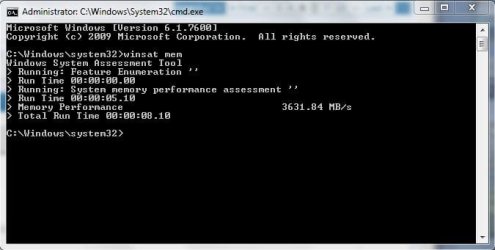
Here comes the (quite disappointing) memory speed of my Dell Studio XPS 1640 notebook. Is there anything I can do (besides buying new HW) to increase this score? :rolleyes:

A question: if my memory speed is so crappy, then why do I get a relatively high 6.1 for the memory subscore of WEI?

mas.jpg
 

My Computer My Computer

Computer Manufacturer/Model Number
Dell Studio XPS16
OS
Windows 7 Home Premium (64-bit)
CPU
Intel Core2Duo P8700 @ 2.53 GHz
Motherboard
Dell (XPS 1640)
Memory
4 GB DDR3 1066 MHz
Graphics Card(s)
ATI Mobility Radeon HD 4670 with 1 GB GDDR3 RAM
Sound Card
ATI HD Audio Device
Monitor(s) Displays
16" (Dell XPS16) & 22" (Dell P2210)
Screen Resolution
XPS16: 1920x1080 & P2210: 1680x1050
Hard Drives
500 GB 7200 RPM SATA
Here comes the (quite disappointing) memory speed of my Dell Studio XPS 1640 notebook. Is there anything I can do (besides buying new HW) to increase this score? :rolleyes:
You might want to check what speeds your motherboard chipset supports though; it may be restricted to 1066MHz (533MHz Double Density = 1066MHz). Looking at CPU-z though, your RAM supports 609MHz as well... If your chipset allows the higher speeds, you could up the frequency in your BIOS?
 

My Computer My Computer

Computer type
PC/Desktop
OS
Win 10 x64 Pro x64 / Ubuntu 15.10 x64
CPU
Intel i7-4960X
Motherboard
Asus Rampage IV Black Edition
Memory
4x8GB Corsair Dominator Platinum @2400MHz 10-12-12-31
Graphics Card(s)
2x MSI GTX780Ti 3GB (SLI)
Sound Card
Onboard SupremeFX (Cirrus Logic CS4398)
Monitor(s) Displays
3x LG Cinema 27" IPS LED (27MP65)
Screen Resolution
[1920x1080]x3
Hard Drives
Crucial M500 120GB, Crucial M500 480GB, Toshiba DT01ACA200 2TB
PSU
CoolerMaster V1000
Case
Corsair Obsidian 750D
Cooling
ThermalTake Water 3.0 Extreme, 4xSP120, 3xAF120
Keyboard
Moshi Luna
Mouse
Logitech G700s / Roccat Tyon
Internet Speed
4Mb uncapped ADSL (Afrihost)
Antivirus
MS Security Essentials
Browser
Chrome... Duh. (:
Here comes the (quite disappointing) memory speed of my Dell Studio XPS 1640 notebook. Is there anything I can do (besides buying new HW) to increase this score? :rolleyes:

A question: if my memory speed is so crappy, then why do I get a relatively high 6.1 for the memory subscore of WEI?

View attachment 52839

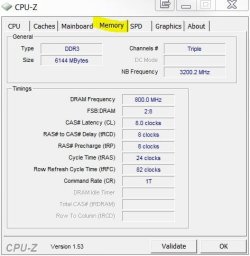
Can you post a screenshot of the Memory tab? It does look it's @ 1066 speeds.

mem tab.JPG
 

My Computer My Computer

Computer type
PC/Desktop
Computer Manufacturer/Model Number
Systems by SmartEyeball
OS
8 Pro x64
CPU
i7 3770K 4.6GHz
Motherboard
ASUS P8Z77 WS
Memory
16GB G.Skill Trident X 2666mhz
Graphics Card(s)
x2 EVGA 780 Ti Superclocked SLI
Sound Card
SB X-FI Surround 5.1 PRO USB / ATH-AD900 Headphones
Monitor(s) Displays
x3 Dell U2410 / 58" Samsung
Screen Resolution
5760*1200/ 1920*1200
Hard Drives
2x Intel 520 240GB (RAID 0) * 2x WD Caviar Blacks 2TB (RAID 0) * 2TB WD Caviar Black * Sony Optirac DVD
PSU
Silverstone Strider Evolution 1200W
Case
Thermaltake Level 10 GT Snow Edition
Cooling
Noctua NH-D14
Keyboard
Topre Realforce // Ducky Shine MX Black // Filco Ninja TKL
Mouse
Thermaltake Theron (Highly Recommended) + Razer Imperator
Antivirus
MSE
Browser
IE, FF, WaterFox
Other Info
GT Extreme V2 Sim Racing Cockpit + 40" LCD and K/B Mouse stand ▼
Fanatec CSR Elite Wheel + Clubsport V1 Pedals + CSR shifter/7G-H ▼Saitek X52 Pro ▼ TrackIR 5 Pro
Buttkicker v2 Seat Rumbler with Dedicated 5.1 and Sub Woofer attached to frame ▼
=
Bloody Big Grin
ZaLiTH: Unfortunately, my BIOS doesn't allow me to change the frequency. :( BTW: Its chipset is Intel PM45. Could it be that there was a (software) workaround to change the frequency?

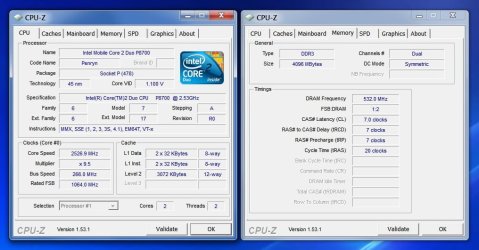
smarteyeball: Sure, here it is (together with my CPU tab).

cpuz.jpg

Is it @ 1066?
 

My Computer My Computer

Computer Manufacturer/Model Number
Dell Studio XPS16
OS
Windows 7 Home Premium (64-bit)
CPU
Intel Core2Duo P8700 @ 2.53 GHz
Motherboard
Dell (XPS 1640)
Memory
4 GB DDR3 1066 MHz
Graphics Card(s)
ATI Mobility Radeon HD 4670 with 1 GB GDDR3 RAM
Sound Card
ATI HD Audio Device
Monitor(s) Displays
16" (Dell XPS16) & 22" (Dell P2210)
Screen Resolution
XPS16: 1920x1080 & P2210: 1680x1050
Hard Drives
500 GB 7200 RPM SATA
With a Socket P (478), I doubt it'll go any higher... Here's a bit of info on Wiki about it: link. Sorry, but to me it looks like that's the fastest it will go. :huh:
 

My Computer My Computer

Computer type
PC/Desktop
OS
Win 10 x64 Pro x64 / Ubuntu 15.10 x64
CPU
Intel i7-4960X
Motherboard
Asus Rampage IV Black Edition
Memory
4x8GB Corsair Dominator Platinum @2400MHz 10-12-12-31
Graphics Card(s)
2x MSI GTX780Ti 3GB (SLI)
Sound Card
Onboard SupremeFX (Cirrus Logic CS4398)
Monitor(s) Displays
3x LG Cinema 27" IPS LED (27MP65)
Screen Resolution
[1920x1080]x3
Hard Drives
Crucial M500 120GB, Crucial M500 480GB, Toshiba DT01ACA200 2TB
PSU
CoolerMaster V1000
Case
Corsair Obsidian 750D
Cooling
ThermalTake Water 3.0 Extreme, 4xSP120, 3xAF120
Keyboard
Moshi Luna
Mouse
Logitech G700s / Roccat Tyon
Internet Speed
4Mb uncapped ADSL (Afrihost)
Antivirus
MS Security Essentials
Browser
Chrome... Duh. (:
With a Socket P (478), I doubt it'll go any higher... Here's a bit of info on Wiki about it: link. Sorry, but to me it looks like that's the fastest it will go. :huh:

Bad news, but thx anyway. Another question: is my FSB/DRAM ratio suitable? It is currently 1:2 and I am wondering whether it should be 1:1?
 

My Computer My Computer

Computer Manufacturer/Model Number
Dell Studio XPS16
OS
Windows 7 Home Premium (64-bit)
CPU
Intel Core2Duo P8700 @ 2.53 GHz
Motherboard
Dell (XPS 1640)
Memory
4 GB DDR3 1066 MHz
Graphics Card(s)
ATI Mobility Radeon HD 4670 with 1 GB GDDR3 RAM
Sound Card
ATI HD Audio Device
Monitor(s) Displays
16" (Dell XPS16) & 22" (Dell P2210)
Screen Resolution
XPS16: 1920x1080 & P2210: 1680x1050
Hard Drives
500 GB 7200 RPM SATA
heres my score, i do believe i have the dubious pleasure of having the lowest!
 

Attachments

  • Capture.JPG
    Capture.JPG
    30.1 KB · Views: 36

My Computer My Computer

Computer Manufacturer/Model Number
HP dv6519tx
OS
Windows 7 Ultimate x64
CPU
1.80 GHz Intel Core 2 Duo processor T7100
Memory
3 gig ddr2
Graphics Card(s)
NVIDIA GeForce 8400M GS
Sound Card
Realtek High Definition Audio
Monitor(s) Displays
15.4” WXGA High Definition BrightView Widescreen
Screen Resolution
1280 x 800
Hard Drives
Hitachi 320 GB (5400 rpm)
PSU
90 W AC Power Adapter
Cooling
Kitchen plate under the lappy
Keyboard
101 key compatible
Mouse
Touch Pad with On/Off button and dedicated vertical Scroll
Internet Speed
Three Wireless internet prepaid using E160G USB dongle
ZaLiTH: U

smarteyeball: Sure, here it is (together with my CPU tab).

View attachment 52863

Is it @ 1066?

Yep :(

Bad news, but thx anyway. Another question: is my FSB/DRAM ratio suitable? It is currently 1:2 and I am wondering whether it should be 1:1?

TBH, it doesn't make that much difference. It's a moot point anyway, since you can't adjust any options in the BIOS.

Outside of the BIOS, your only really alternative is software based adjusting:

MemSet 4.1
Tweakers.fr


*NB I know it works, but I haven't extensively used it.
 

My Computer My Computer

Computer type
PC/Desktop
Computer Manufacturer/Model Number
Systems by SmartEyeball
OS
8 Pro x64
CPU
i7 3770K 4.6GHz
Motherboard
ASUS P8Z77 WS
Memory
16GB G.Skill Trident X 2666mhz
Graphics Card(s)
x2 EVGA 780 Ti Superclocked SLI
Sound Card
SB X-FI Surround 5.1 PRO USB / ATH-AD900 Headphones
Monitor(s) Displays
x3 Dell U2410 / 58" Samsung
Screen Resolution
5760*1200/ 1920*1200
Hard Drives
2x Intel 520 240GB (RAID 0) * 2x WD Caviar Blacks 2TB (RAID 0) * 2TB WD Caviar Black * Sony Optirac DVD
PSU
Silverstone Strider Evolution 1200W
Case
Thermaltake Level 10 GT Snow Edition
Cooling
Noctua NH-D14
Keyboard
Topre Realforce // Ducky Shine MX Black // Filco Ninja TKL
Mouse
Thermaltake Theron (Highly Recommended) + Razer Imperator
Antivirus
MSE
Browser
IE, FF, WaterFox
Other Info
GT Extreme V2 Sim Racing Cockpit + 40" LCD and K/B Mouse stand ▼
Fanatec CSR Elite Wheel + Clubsport V1 Pedals + CSR shifter/7G-H ▼Saitek X52 Pro ▼ TrackIR 5 Pro
Buttkicker v2 Seat Rumbler with Dedicated 5.1 and Sub Woofer attached to frame ▼
=
Bloody Big Grin
Outside of the BIOS, your only really alternative is software based adjusting:

MemSet 4.1
Tweakers.fr

*NB I know it works, but I haven't extensively used it.

Thx, it's a nice program and it works on my system, but I did not notice significant improvements in benchmark scores, indeed.

BTW: A strange phenomenon: according to "winsat mem", I gain +300 MB/s when I run the assessment while WinAmp is playing music in the background. :confused: I have tried it several times, it is always the case. If it would be the other way around, then I was not surprised... Thus, it seems that "winsat mem" is not that consistent.
 

My Computer My Computer

Computer Manufacturer/Model Number
Dell Studio XPS16
OS
Windows 7 Home Premium (64-bit)
CPU
Intel Core2Duo P8700 @ 2.53 GHz
Motherboard
Dell (XPS 1640)
Memory
4 GB DDR3 1066 MHz
Graphics Card(s)
ATI Mobility Radeon HD 4670 with 1 GB GDDR3 RAM
Sound Card
ATI HD Audio Device
Monitor(s) Displays
16" (Dell XPS16) & 22" (Dell P2210)
Screen Resolution
XPS16: 1920x1080 & P2210: 1680x1050
Hard Drives
500 GB 7200 RPM SATA
Status
Not open for further replies.
Back
Top