What's your memory assessment speed?

Status
Not open for further replies.
attachment.php


attachment.php


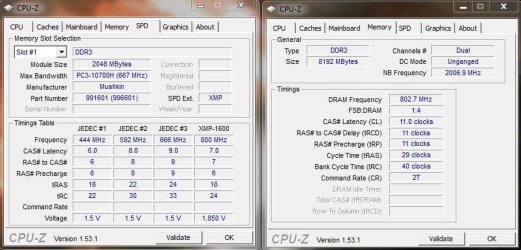
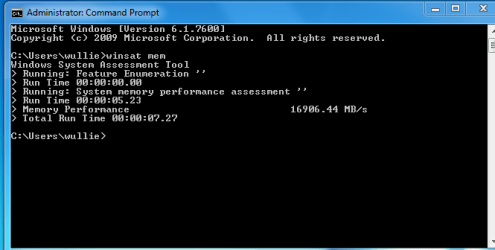
Ran the test 3 times to get an average - not much of a change.. and blazin fast! :-)
 

Attachments

  • MemorySpeed2.jpg
    MemorySpeed2.jpg
    60.5 KB · Views: 214
  • MemorySpeed.jpg
    MemorySpeed.jpg
    37.9 KB · Views: 214

My Computer My Computer

At a glance

Windows 7 Premium (OEM)AMD Phenom x4 955 BE @ 3.2GHz8gigs (4x2gb) Mushkin DDR3EVGA GeForce 260 GTX 216 core 896mb
OS
Windows 7 Premium (OEM)
CPU
AMD Phenom x4 955 BE @ 3.2GHz
Motherboard
ASUS Crosshair III
Memory
8gigs (4x2gb) Mushkin DDR3
Graphics Card(s)
EVGA GeForce 260 GTX 216 core 896mb
Sound Card
SoundBlaster X-Fi Fatal1ty Pro
Monitor(s) Displays
26.5" Samsung ToC, 22" Samsung 226BW
Screen Resolution
1920x1200 & 1680x1050
Hard Drives
2x WD Caviar Black AAKS 500gigs (RAID 0)
2x WD Caviar Black AAKS 1TB
PSU
Thermaltake ToughPower 750w
Case
CoolerMaster Scout CMStorm Black Edition
Cooling
2x140mm Intake/Exhaust, 1x120mm Exhaust, 2x120mm Side Intake
Keyboard
Razer Tarantula
Mouse
Razer Imperator w/ Razer Goliathus Precision Mat
Internet Speed
5mb DSL (768k Download, 83k Upload)
png.gif
here is mine hope I have done it right
 

Attachments

  • Capture12.PNG
    Capture12.PNG
    9.5 KB · Views: 24

My Computer My Computer

At a glance

windows 7 profi7 920 quad3gb triple memory 1333nvidia gts 250 1gb
Computer Manufacturer/Model Number
asus
OS
windows 7 prof
CPU
i7 920 quad
Motherboard
asus
Memory
3gb triple memory 1333
Graphics Card(s)
nvidia gts 250 1gb
Sound Card
on board
Monitor(s) Displays
22inch hannsg
Screen Resolution
1680 x1050
Hard Drives
1x1tb 1x 250gb 1x320 ext
PSU
650
Case
wizard
Cooling
3 fans
Keyboard
microsoft laser wireless
Mouse
microsoft laser wireless
Internet Speed
20mb
Other Info
wireless network n netgear 2000
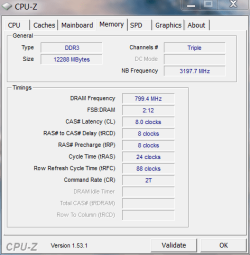
I did a little Bios tweaking to bring the memory speed up from the defaulted 1066 to the speed of 1600 as the corsair dominator DDR3 should be and the test came up to this.
 

Attachments

  • Capture.PNG
    Capture.PNG
    20.1 KB · Views: 45
  • Memory.PNG
    Memory.PNG
    13.4 KB · Views: 14

My Computer My Computer

At a glance

windows 7 home premium 64, and Windows 10 64 bitI7 94012 GB Dominator 3 channel 1600Radeon R9 Fury Nitro
Computer type
PC/Desktop
Computer Manufacturer/Model Number
Self made
OS
windows 7 home premium 64, and Windows 10 64 bit
CPU
I7 940
Motherboard
ASUS P6TX58D Premium- BIOS VERSION 1402
Memory
12 GB Dominator 3 channel 1600
Graphics Card(s)
Radeon R9 Fury Nitro
Sound Card
Z1
Monitor(s) Displays
50 Inch Panasonic TV
Screen Resolution
1920x1080
Hard Drives
Main drive OCZ Revodrive V2 and 8 TB multi drives
PSU
Coolermaster 1000
Case
CoolerMaster 932
Cooling
Coolermaster Dual fan
Keyboard
mx 5500 revolution
Mouse
mx 5500 revolution
Internet Speed
12 mb
Browser
Chrome
Other Info
set up for 3D Blue Ray applications with a surround room of 12 speaker Definitive Technology and multi amps, main is driven by yamaha M-65
Is something wrong with my computer? I'm using GS45 chipset, DDR3 laptop ram

I'm getting an average of 4700 MB/s only

cpuzram.png
 

My Computer My Computer

At a glance

Windows 7 UltimateIntel C2D SP94002GB DDR3Integrated =(
Computer Manufacturer/Model Number
Dell E4300
OS
Windows 7 Ultimate
CPU
Intel C2D SP9400
Motherboard
Intel GS45
Memory
2GB DDR3
Graphics Card(s)
Integrated =(
Sound Card
Integrated =(
Monitor(s) Displays
Matte LCD
Screen Resolution
1280x800
Hard Drives
Intel X25-M Gen 2 SSD
WD Caviar Black
Mouse
MX 518, V470 - Logitech
Do you guys think I could get more out of my RAM with higher frequencies but lower timings, or should I just be happy with the current state?

I'm running 8GB (4x2) Kingston HyperX GB PC2-8500U CL5-5-5-15 DDR2-1066 but only @400Mhz 1.82V because @533Mhz 2.3V I get errors in Memtest86+, even with very mild timings....maybe cause all 4 banks are loaded.
 

Attachments

  • Capture2.JPG
    Capture2.JPG
    36.1 KB · Views: 9
  • Capture3.JPG
    Capture3.JPG
    34.6 KB · Views: 3

My Computer My Computer

At a glance

Win7 Pro x64AMD Phenom II X4 940 BE @3.4Ghz (17x200Mhz)8GB (4x2GB) Kingston HyperX PC2-8500U @ DDR2-...Palit Radeon HD 4870 Sonic, 512MB GDDR5 @790M...
Computer Manufacturer/Model Number
Custom
OS
Win7 Pro x64
CPU
AMD Phenom II X4 940 BE @3.4Ghz (17x200Mhz)
Motherboard
Foxconn A7DA-S (NB @2200Mz; 1.36V)
Memory
8GB (4x2GB) Kingston HyperX PC2-8500U @ DDR2-800 CL4-4-4-12
Graphics Card(s)
Palit Radeon HD 4870 Sonic, 512MB GDDR5 @790Mhz/1040Mhz
Sound Card
Onboard HD Audio
Monitor(s) Displays
BenQ G2400WT 24'
Screen Resolution
1920x1200
Hard Drives
Hitachi Deskstar 7K1000.B 1000GB, SATA II (HDT721010SLA360)
PSU
Enermax PRO82+ 425W ATX 2.3 (EPR425AWT)
Case
CoolerMaster Elite 335 (RC-335)
Cooling
Scythe Kama Angle + 2x Enermax Twister Everest 120mm
I am guessing that most of us allow the default settings for the motherboard. This slows the system bus down to operate at the best settings and is fine. You really will not notice any changes between the bus speed when running your system. If you wish to tweak your system then do so but the default settings are for optimum use. This is why some prefer to overclock and tweak their PC for the best performance in every option. Stressing components for optimum use is fine but I do not feel there is an advantage as you will not see any value in it. This is why I do not overclock my system. Even though my system can run stable at 1600 my system defaults to 1066 and runs better at 1066. Yes I can force it to 1600 but what for? Higher voltage and frequency's will do little for user usage. You need to apply what applications you use your PC for and decide what is best for your own use. To run stable and at lower temps is what I am interested in.
 

My Computer My Computer

At a glance

windows 7 home premium 64, and Windows 10 64 bitI7 94012 GB Dominator 3 channel 1600Radeon R9 Fury Nitro
Computer type
PC/Desktop
Computer Manufacturer/Model Number
Self made
OS
windows 7 home premium 64, and Windows 10 64 bit
CPU
I7 940
Motherboard
ASUS P6TX58D Premium- BIOS VERSION 1402
Memory
12 GB Dominator 3 channel 1600
Graphics Card(s)
Radeon R9 Fury Nitro
Sound Card
Z1
Monitor(s) Displays
50 Inch Panasonic TV
Screen Resolution
1920x1080
Hard Drives
Main drive OCZ Revodrive V2 and 8 TB multi drives
PSU
Coolermaster 1000
Case
CoolerMaster 932
Cooling
Coolermaster Dual fan
Keyboard
mx 5500 revolution
Mouse
mx 5500 revolution
Internet Speed
12 mb
Browser
Chrome
Other Info
set up for 3D Blue Ray applications with a surround room of 12 speaker Definitive Technology and multi amps, main is driven by yamaha M-65
I'm running 8GB (4x2) Kingston HyperX GB PC2-8500U CL5-5-5-15 DDR2-1066 but only @400Mhz 1.82V
I don't know if you even referred to my post, but I'm actually UNDERclocking my RAM.

EDIT: btw, am I assuming correctly that unganged mode should perform better in my 4x2GB with QuadCore setup than unganged mode?
 
Last edited:

My Computer My Computer

At a glance

Win7 Pro x64AMD Phenom II X4 940 BE @3.4Ghz (17x200Mhz)8GB (4x2GB) Kingston HyperX PC2-8500U @ DDR2-...Palit Radeon HD 4870 Sonic, 512MB GDDR5 @790M...
Computer Manufacturer/Model Number
Custom
OS
Win7 Pro x64
CPU
AMD Phenom II X4 940 BE @3.4Ghz (17x200Mhz)
Motherboard
Foxconn A7DA-S (NB @2200Mz; 1.36V)
Memory
8GB (4x2GB) Kingston HyperX PC2-8500U @ DDR2-800 CL4-4-4-12
Graphics Card(s)
Palit Radeon HD 4870 Sonic, 512MB GDDR5 @790Mhz/1040Mhz
Sound Card
Onboard HD Audio
Monitor(s) Displays
BenQ G2400WT 24'
Screen Resolution
1920x1200
Hard Drives
Hitachi Deskstar 7K1000.B 1000GB, SATA II (HDT721010SLA360)
PSU
Enermax PRO82+ 425W ATX 2.3 (EPR425AWT)
Case
CoolerMaster Elite 335 (RC-335)
Cooling
Scythe Kama Angle + 2x Enermax Twister Everest 120mm
cabal06ba

cabal06ba

You should be happy with the settings you have. They are good results and as you said it is stable.
 

My Computer My Computer

At a glance

windows 7 home premium 64, and Windows 10 64 bitI7 94012 GB Dominator 3 channel 1600Radeon R9 Fury Nitro
Computer type
PC/Desktop
Computer Manufacturer/Model Number
Self made
OS
windows 7 home premium 64, and Windows 10 64 bit
CPU
I7 940
Motherboard
ASUS P6TX58D Premium- BIOS VERSION 1402
Memory
12 GB Dominator 3 channel 1600
Graphics Card(s)
Radeon R9 Fury Nitro
Sound Card
Z1
Monitor(s) Displays
50 Inch Panasonic TV
Screen Resolution
1920x1080
Hard Drives
Main drive OCZ Revodrive V2 and 8 TB multi drives
PSU
Coolermaster 1000
Case
CoolerMaster 932
Cooling
Coolermaster Dual fan
Keyboard
mx 5500 revolution
Mouse
mx 5500 revolution
Internet Speed
12 mb
Browser
Chrome
Other Info
set up for 3D Blue Ray applications with a surround room of 12 speaker Definitive Technology and multi amps, main is driven by yamaha M-65
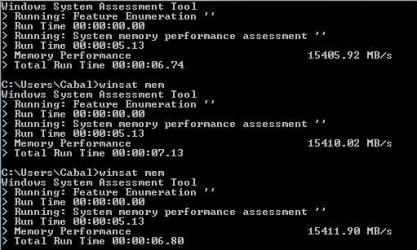
For what its worth...
 
Last edited:

My Computer My Computer

At a glance

Windows 7 ultimate X64Core i7 870 Lynnfield4GB Corsair XMS 3 1600MhzGeForce 8800 GTS (for the time being)
Computer Manufacturer/Model Number
Custom
OS
Windows 7 ultimate X64
CPU
Core i7 870 Lynnfield
Motherboard
MSI P55-GD55
Memory
4GB Corsair XMS 3 1600Mhz
Graphics Card(s)
GeForce 8800 GTS (for the time being)
Sound Card
Onboard 7.1 digital
Monitor(s) Displays
Dell 19"
Screen Resolution
1280x1024
Hard Drives
Barracuda 750Gb
PSU
Corsair TX 650w
Case
Thermaltake Armour Extreme Edition
Cooling
Corsair H50
Keyboard
Dell XPS slim
Mouse
Dell XPS mouse (only good product)
Internet Speed
100 Mbps +/-
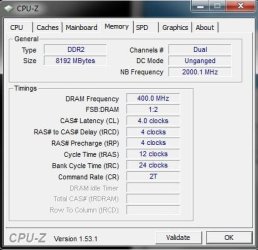
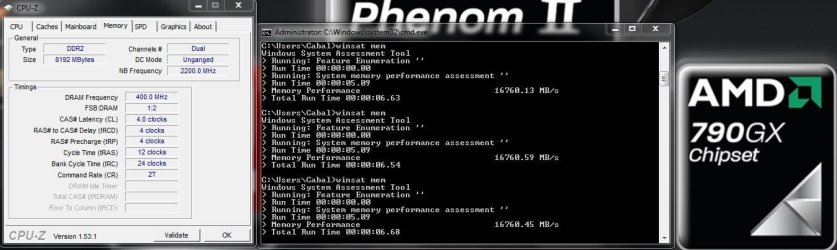
UPDATE for DDR2 RAM users: after some extensive testing I can definitely confirm that you shouldn't always go for high frequencies!

In my case, tuning the timings + NB Speed brought by far the best results combined with the advantages of low RAM voltages.

The optimal setup in my case:
8GB (4x2) Kingston HyperX GB PC2-8500U CL5-5-5-15 DDR2-1066
running @ DDR2-800 CL4-4-4-12; 1.84V
NB @ 2200Mhz (200Mhz x 11); 1.36V

Mainboard is Foxconn A7DA-S (AMD 790GX Chipset) + Phenom II X4 940 @3400Mhz
 

Attachments

  • Capture.JPG
    Capture.JPG
    87.7 KB · Views: 52

My Computer My Computer

At a glance

Win7 Pro x64AMD Phenom II X4 940 BE @3.4Ghz (17x200Mhz)8GB (4x2GB) Kingston HyperX PC2-8500U @ DDR2-...Palit Radeon HD 4870 Sonic, 512MB GDDR5 @790M...
Computer Manufacturer/Model Number
Custom
OS
Win7 Pro x64
CPU
AMD Phenom II X4 940 BE @3.4Ghz (17x200Mhz)
Motherboard
Foxconn A7DA-S (NB @2200Mz; 1.36V)
Memory
8GB (4x2GB) Kingston HyperX PC2-8500U @ DDR2-800 CL4-4-4-12
Graphics Card(s)
Palit Radeon HD 4870 Sonic, 512MB GDDR5 @790Mhz/1040Mhz
Sound Card
Onboard HD Audio
Monitor(s) Displays
BenQ G2400WT 24'
Screen Resolution
1920x1200
Hard Drives
Hitachi Deskstar 7K1000.B 1000GB, SATA II (HDT721010SLA360)
PSU
Enermax PRO82+ 425W ATX 2.3 (EPR425AWT)
Case
CoolerMaster Elite 335 (RC-335)
Cooling
Scythe Kama Angle + 2x Enermax Twister Everest 120mm
You say that we should change the timings of the RAM to get better performance?
Sorry but I am a novice with it. My 2Go DDR2 1066 (8500 corsair) has clocking like this: 5-5-5-18 2T O/C at 2.1V (initialy 1.8V), is that normal that I get only 4800Mb/s with the test or should I put the values as you did?
 

My Computer My Computer

At a glance

Windows 7 Ultimate x64Intel c2d E8400 O/C 3.0Ghz @ 3.6Ghz2x2Go DDR2-8500 Corsair XMS2-perf 1066 5-6-6-...Nvidia Geforce 8800GT 512mo
Computer Manufacturer/Model Number
Made by my own hands
OS
Windows 7 Ultimate x64
CPU
Intel c2d E8400 O/C 3.0Ghz @ 3.6Ghz
Motherboard
Asus P5QL Pro 'green'
Memory
2x2Go DDR2-8500 Corsair XMS2-perf 1066 5-6-6-16 2.1v
Graphics Card(s)
Nvidia Geforce 8800GT 512mo
Sound Card
Realtek HD
Monitor(s) Displays
Samsung Wide 19"
Screen Resolution
1440x900
Hard Drives
Samsung 750Go / WD 640Go
PSU
450W
Case
Advance
Cooling
many fans ^^
Internet Speed
10M
Other Info
Asus EeePc 1005HA O/C (WEI: 7.5)
Of course every system reacts differently to certain settings and a lot depends on chipset + processor (Intel vs. AMD), but you could just give it a try and compare the results, in my case it looked like this:
DDR2-1066 6-6-6-18-2T @ 2.2V (NB @ 2000Mhz): 12500 Mb/s
DDR2-800 4-4-4-12-2T @ 1.82V (NB @ 2200Mhz): 16500 Mb/s

Since you are running an Intel platform you don't really have to care about the Northbridge, just try with MemTest86+ if you can run DDR2-800 4-4-4-12-2T stable and then compare the winsat mem results. I would start with 1.9V and if that runs stable you can try reducing to the original 1.8V.
 

My Computer My Computer

At a glance

Win7 Pro x64AMD Phenom II X4 940 BE @3.4Ghz (17x200Mhz)8GB (4x2GB) Kingston HyperX PC2-8500U @ DDR2-...Palit Radeon HD 4870 Sonic, 512MB GDDR5 @790M...
Computer Manufacturer/Model Number
Custom
OS
Win7 Pro x64
CPU
AMD Phenom II X4 940 BE @3.4Ghz (17x200Mhz)
Motherboard
Foxconn A7DA-S (NB @2200Mz; 1.36V)
Memory
8GB (4x2GB) Kingston HyperX PC2-8500U @ DDR2-800 CL4-4-4-12
Graphics Card(s)
Palit Radeon HD 4870 Sonic, 512MB GDDR5 @790Mhz/1040Mhz
Sound Card
Onboard HD Audio
Monitor(s) Displays
BenQ G2400WT 24'
Screen Resolution
1920x1200
Hard Drives
Hitachi Deskstar 7K1000.B 1000GB, SATA II (HDT721010SLA360)
PSU
Enermax PRO82+ 425W ATX 2.3 (EPR425AWT)
Case
CoolerMaster Elite 335 (RC-335)
Cooling
Scythe Kama Angle + 2x Enermax Twister Everest 120mm
Ok, I will try to put the timing to 4-4-4-12 2T 800Mhz (my FSB is limited to 400 because of my MB : 1600 max for the CPU...) without touching the voltage (2.1V is the recommended O/C value). For now I am transfering some big files from one of my two HD to the other so I will post the results of the tests later (~1h).Thanks for the advice ;)

EDIT: I tried 5-5-5-18 and the system crashed before Windows could have been started. Now running with 6-6-6-15 and getting lower results (4750 instead of 4850)...
Is that linked with the fact that my FSB/DRAM ration is 1:1?
I have only one pin of 2Gb installed on my 2nd DDR2 slot (cause the first one is unusable, my Zalman CPU-fan is very big and hides it), could it explain the very bad performance I have compared with you?

Sorry for annoying you but I'd like to understand why I spent 50€ for that ****.
 
Last edited:

My Computer My Computer

At a glance

Windows 7 Ultimate x64Intel c2d E8400 O/C 3.0Ghz @ 3.6Ghz2x2Go DDR2-8500 Corsair XMS2-perf 1066 5-6-6-...Nvidia Geforce 8800GT 512mo
Computer Manufacturer/Model Number
Made by my own hands
OS
Windows 7 Ultimate x64
CPU
Intel c2d E8400 O/C 3.0Ghz @ 3.6Ghz
Motherboard
Asus P5QL Pro 'green'
Memory
2x2Go DDR2-8500 Corsair XMS2-perf 1066 5-6-6-16 2.1v
Graphics Card(s)
Nvidia Geforce 8800GT 512mo
Sound Card
Realtek HD
Monitor(s) Displays
Samsung Wide 19"
Screen Resolution
1440x900
Hard Drives
Samsung 750Go / WD 640Go
PSU
450W
Case
Advance
Cooling
many fans ^^
Internet Speed
10M
Other Info
Asus EeePc 1005HA O/C (WEI: 7.5)
My 2Go DDR2 1066 (8500 corsair) has clocking like this: 5-5-5-18 2T.
I tried 5-5-5-18 and the system crashed
So the official specifications are 5-5-5-18 @ DDR2-1066 (533Mhz) but those timings don't even run at DDR2-800 (400Mhz) speed, that's weird?

Is that linked with the fact that my FSB/DRAM ration is 1:1?
That's how it is supposed to be, if your FSB is 400Mhz then 1:1 simply means that your memory is running at DDR2-800 (=400Mhz x2 cause of DDR2) speed, as we wanted to try.

I have only one pin of 2Gb installed on my 2nd DDR2 slot, could it explain the very bad performance I have compared with you?
Honestly, I don't really know if the results of this test reflect only RAM speed or speed AND size (can someone answer that?), but I would assume that it is the second case since your 4800 x 4 = 19200MB/s could be a rough idea of what you might get with 4 x 2GB @ 1066.

In any case, if you can't get lower timings to run stable with reduced clock speeds, then of course you should stay with 533Mhz (DDR2-1066) to get the best performance!
 

My Computer My Computer

At a glance

Win7 Pro x64AMD Phenom II X4 940 BE @3.4Ghz (17x200Mhz)8GB (4x2GB) Kingston HyperX PC2-8500U @ DDR2-...Palit Radeon HD 4870 Sonic, 512MB GDDR5 @790M...
Computer Manufacturer/Model Number
Custom
OS
Win7 Pro x64
CPU
AMD Phenom II X4 940 BE @3.4Ghz (17x200Mhz)
Motherboard
Foxconn A7DA-S (NB @2200Mz; 1.36V)
Memory
8GB (4x2GB) Kingston HyperX PC2-8500U @ DDR2-800 CL4-4-4-12
Graphics Card(s)
Palit Radeon HD 4870 Sonic, 512MB GDDR5 @790Mhz/1040Mhz
Sound Card
Onboard HD Audio
Monitor(s) Displays
BenQ G2400WT 24'
Screen Resolution
1920x1200
Hard Drives
Hitachi Deskstar 7K1000.B 1000GB, SATA II (HDT721010SLA360)
PSU
Enermax PRO82+ 425W ATX 2.3 (EPR425AWT)
Case
CoolerMaster Elite 335 (RC-335)
Cooling
Scythe Kama Angle + 2x Enermax Twister Everest 120mm
My 2Go DDR2 1066 (8500 corsair) has clocking like this: 5-5-5-18 2T.
I tried 5-5-5-18 and the system crashed

I have made a mistake, I meant that I tried with 6-6-6-18 and that it crashed.
Also tested 4-4-4-12 and then got bad results with winsat.

Quick summary:

5-5-5-18 = normal timing for a 800Mhz clocking (2x400 like you said rightly), 1.8V recommended
4-4-4-12 = works bur lower performance than with the normal timing
6-6-6-18 = Does not work at all (crash as Windows starts)

Now I will try to force the frequency of the RAM to 533Mhz (for now it is set on Auto, so 400) and 2.1V which is the recommended tension at this level.

Honestly, I don't really know if the results of this test reflect only RAM speed or speed AND size (can someone answer that?), but I would assume that it is the second case since your 4800 x 4 = 19200MB/s could be a rough idea of what you might get with 4 x 2GB @ 1066.

Whether that is the solution I am the most happy man the day after tomorrow cause I will recuperate my 2nd pin of 2Gb, then I will make the same tests and tell you if it goes better! :)

EDIT: I reached 6400Mb/s by putting the RAM frequency to 1066 instead of 800 (Auto mode) so that means a +33% increase of the performance. Even if this is not 10000 or 15000 yet it becomes serious (at least more than the joke before).
 

My Computer My Computer

At a glance

Windows 7 Ultimate x64Intel c2d E8400 O/C 3.0Ghz @ 3.6Ghz2x2Go DDR2-8500 Corsair XMS2-perf 1066 5-6-6-...Nvidia Geforce 8800GT 512mo
Computer Manufacturer/Model Number
Made by my own hands
OS
Windows 7 Ultimate x64
CPU
Intel c2d E8400 O/C 3.0Ghz @ 3.6Ghz
Motherboard
Asus P5QL Pro 'green'
Memory
2x2Go DDR2-8500 Corsair XMS2-perf 1066 5-6-6-16 2.1v
Graphics Card(s)
Nvidia Geforce 8800GT 512mo
Sound Card
Realtek HD
Monitor(s) Displays
Samsung Wide 19"
Screen Resolution
1440x900
Hard Drives
Samsung 750Go / WD 640Go
PSU
450W
Case
Advance
Cooling
many fans ^^
Internet Speed
10M
Other Info
Asus EeePc 1005HA O/C (WEI: 7.5)
5-5-5-18 = normal timing for a 800Mhz clocking (2x400 like you said rightly), 1.8V recommended
4-4-4-12 = works bur lower performance than with the normal timing
6-6-6-18 = Does not work at all (crash as Windows starts)
That is very odd, because it's against everything I know about RAM!
- first of all try 5-5-5-15, as a rough rule of thumb the RAM usually works best when the last timing is the sum of timing 1+2+3
- at same speed lower timings should always bring better results, so your 4-4-4-12 result is surprising
- and the higher the timings the more stable the system usually runs, so your 6-6-6-18 crash is another mystery since your RAM should handle those timings without any problems

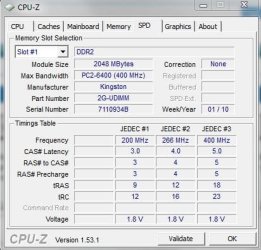
Can you post a screenshot of your SPD settings, such as this one below (you will have to select slot#2)?
 

Attachments

  • a.JPG
    a.JPG
    38.3 KB · Views: 4

My Computer My Computer

At a glance

Win7 Pro x64AMD Phenom II X4 940 BE @3.4Ghz (17x200Mhz)8GB (4x2GB) Kingston HyperX PC2-8500U @ DDR2-...Palit Radeon HD 4870 Sonic, 512MB GDDR5 @790M...
Computer Manufacturer/Model Number
Custom
OS
Win7 Pro x64
CPU
AMD Phenom II X4 940 BE @3.4Ghz (17x200Mhz)
Motherboard
Foxconn A7DA-S (NB @2200Mz; 1.36V)
Memory
8GB (4x2GB) Kingston HyperX PC2-8500U @ DDR2-800 CL4-4-4-12
Graphics Card(s)
Palit Radeon HD 4870 Sonic, 512MB GDDR5 @790Mhz/1040Mhz
Sound Card
Onboard HD Audio
Monitor(s) Displays
BenQ G2400WT 24'
Screen Resolution
1920x1200
Hard Drives
Hitachi Deskstar 7K1000.B 1000GB, SATA II (HDT721010SLA360)
PSU
Enermax PRO82+ 425W ATX 2.3 (EPR425AWT)
Case
CoolerMaster Elite 335 (RC-335)
Cooling
Scythe Kama Angle + 2x Enermax Twister Everest 120mm
Here is what CPU-Z shows:

326814CPU_Z_results.png


That is very odd, because it's against everything I know about RAM!
- first of all try 5-5-5-15, as a rough rule of thumb the RAM usually works best when the last timing is the sum of timing 1+2+3
- at same speed lower timings should always bring better results, so your 4-4-4-12 result is surprising
- and the higher the timings the more stable the system usually runs, so your 6-6-6-18 crash is another mystery since your RAM should handle those timings without any problems

I am about to test again with the RAM frequency locked on 1066 this time. We'll see whether the results are the same or if they change.

EDIT: Ok, in 1066 mode these are some configurations I tested and their results:

4-4-4-12 = Big crash, GPU-fan at 100%, no boot possible.
4-4-4-15 = "
4-5-5-15 = "
5-5-5-15 = OK but < normal timing
5-6-6-16 = Normal timing, best performance (6400Mb/s)
5-6-6-17 = OK but < normal timing
5-6-6-18 = OK = normal timing
6-6-6-18 = OK but < normal timing
6-6-6-21 = OK but < normal timing

Didn't try with a "7" or even "8" but looks like each time there is a "4" in the equation nothing works...
 
Last edited:

My Computer My Computer

At a glance

Windows 7 Ultimate x64Intel c2d E8400 O/C 3.0Ghz @ 3.6Ghz2x2Go DDR2-8500 Corsair XMS2-perf 1066 5-6-6-...Nvidia Geforce 8800GT 512mo
Computer Manufacturer/Model Number
Made by my own hands
OS
Windows 7 Ultimate x64
CPU
Intel c2d E8400 O/C 3.0Ghz @ 3.6Ghz
Motherboard
Asus P5QL Pro 'green'
Memory
2x2Go DDR2-8500 Corsair XMS2-perf 1066 5-6-6-16 2.1v
Graphics Card(s)
Nvidia Geforce 8800GT 512mo
Sound Card
Realtek HD
Monitor(s) Displays
Samsung Wide 19"
Screen Resolution
1440x900
Hard Drives
Samsung 750Go / WD 640Go
PSU
450W
Case
Advance
Cooling
many fans ^^
Internet Speed
10M
Other Info
Asus EeePc 1005HA O/C (WEI: 7.5)
Didn't try with a "7" or even "8" but looks like each time there is a "4" in the equation nothing works...
No need to go for '7' or '8', higher numbers = slower performance so if '4' is too much for your system, stick to '5' and/or '6'. Btw, you could never expect 4-4-4-12 to run at 533Mhz, those timings were only meant for 400Mhz speed and even then there is no guarantee since SPD recommendation for your RAM is "only" 5-5-5-18.

5-5-5-15 = OK but < normal timing
5-6-6-16 = Normal timing, best performance (6400Mb/s)
This is the only part about your system that I don't understand, usually 5-5-5-15 should be faster than 5-6-6-16.

But ok, as far as I can tell the EPP#1 settings (533Mhz-5-6-6-16) work best for you so no need to change anything about that. You can be happy with your results, since in my case 533Mhz was only stable with very bad timings (something like 8-6-6-20). So that is the only reason why I even tried the 4-4-4-12 timings @ 400Mhz - even though my SPD settings recommend "only" 5-5-5-18 for 400Mhz as well - and found out that I get the best results with those timings.

But every system is different, especially in our case it's hard to compare: Intel chipset, Dual-Core, 1 RAM Module vs. AMD chipset, Quad-Core, Northbridge & RAM Controller integrated into CPU (!), 4 RAM Modules.

Let's just wait and see what will happen to your speedtest results as soon as you installed more RAM.
 

My Computer My Computer

At a glance

Win7 Pro x64AMD Phenom II X4 940 BE @3.4Ghz (17x200Mhz)8GB (4x2GB) Kingston HyperX PC2-8500U @ DDR2-...Palit Radeon HD 4870 Sonic, 512MB GDDR5 @790M...
Computer Manufacturer/Model Number
Custom
OS
Win7 Pro x64
CPU
AMD Phenom II X4 940 BE @3.4Ghz (17x200Mhz)
Motherboard
Foxconn A7DA-S (NB @2200Mz; 1.36V)
Memory
8GB (4x2GB) Kingston HyperX PC2-8500U @ DDR2-800 CL4-4-4-12
Graphics Card(s)
Palit Radeon HD 4870 Sonic, 512MB GDDR5 @790Mhz/1040Mhz
Sound Card
Onboard HD Audio
Monitor(s) Displays
BenQ G2400WT 24'
Screen Resolution
1920x1200
Hard Drives
Hitachi Deskstar 7K1000.B 1000GB, SATA II (HDT721010SLA360)
PSU
Enermax PRO82+ 425W ATX 2.3 (EPR425AWT)
Case
CoolerMaster Elite 335 (RC-335)
Cooling
Scythe Kama Angle + 2x Enermax Twister Everest 120mm
I heard that a 1:1 FSB/DRAM ratio is better for the system than any other ones. Indeed, before went to bed yesterday I tried an ultimate OCCT test (only 30 min) with the best timing ever: 5-6-6-16/2.1V/533Mhz/Vnb Auto/Vsb Auto and got a wonderful crash so I did a "rage exit". :mad:
This morning I have decreased the RAM frequency back to 800Mhz in order to lock the ratio at 1:1 and then the system looks quite stable since about 30min.

Let's just wait and see what will happen to your speedtest results as soon as you installed more RAM.

I'll go and bring back my 2nd module at the station at 15 o'clock :p, this afternoon gonna be full of tests! ;)

Thanks again for your piece of advice and help which are always appreciated :thumbsup:
 

My Computer My Computer

At a glance

Windows 7 Ultimate x64Intel c2d E8400 O/C 3.0Ghz @ 3.6Ghz2x2Go DDR2-8500 Corsair XMS2-perf 1066 5-6-6-...Nvidia Geforce 8800GT 512mo
Computer Manufacturer/Model Number
Made by my own hands
OS
Windows 7 Ultimate x64
CPU
Intel c2d E8400 O/C 3.0Ghz @ 3.6Ghz
Motherboard
Asus P5QL Pro 'green'
Memory
2x2Go DDR2-8500 Corsair XMS2-perf 1066 5-6-6-16 2.1v
Graphics Card(s)
Nvidia Geforce 8800GT 512mo
Sound Card
Realtek HD
Monitor(s) Displays
Samsung Wide 19"
Screen Resolution
1440x900
Hard Drives
Samsung 750Go / WD 640Go
PSU
450W
Case
Advance
Cooling
many fans ^^
Internet Speed
10M
Other Info
Asus EeePc 1005HA O/C (WEI: 7.5)
For the record...
at 9-9-9=24
 
Last edited:

My Computer My Computer

At a glance

Windows 7 ultimate X64Core i7 870 Lynnfield4GB Corsair XMS 3 1600MhzGeForce 8800 GTS (for the time being)
Computer Manufacturer/Model Number
Custom
OS
Windows 7 ultimate X64
CPU
Core i7 870 Lynnfield
Motherboard
MSI P55-GD55
Memory
4GB Corsair XMS 3 1600Mhz
Graphics Card(s)
GeForce 8800 GTS (for the time being)
Sound Card
Onboard 7.1 digital
Monitor(s) Displays
Dell 19"
Screen Resolution
1280x1024
Hard Drives
Barracuda 750Gb
PSU
Corsair TX 650w
Case
Thermaltake Armour Extreme Edition
Cooling
Corsair H50
Keyboard
Dell XPS slim
Mouse
Dell XPS mouse (only good product)
Internet Speed
100 Mbps +/-
Status
Not open for further replies.
Back
Top