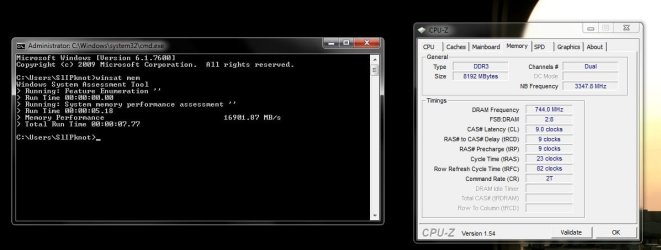
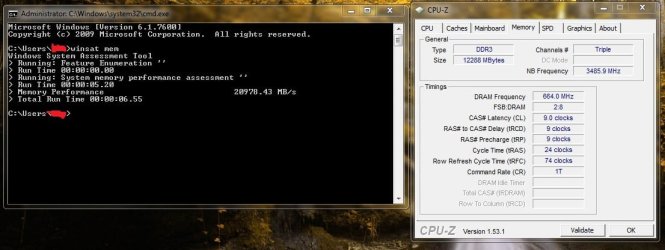
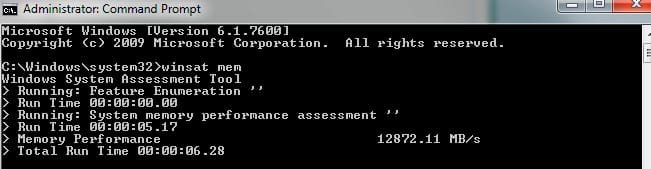
What's your memory assessment speed?

Status
Not open for further replies.
Dual memory sticks are linked memory banks that are accessed by one controller. This allows them higher bandwidth. Generally the greater bandwidth does not necessarily improve overall performance. On the other hand unganged memory allows both memories to directly link to separate controllers on the motherboard. Theoretically, unganged memory can have greater efficiency since each controller can access each memory group separately. Practically speaking, these differences are negligible.


Thank you for your discription about Linked and Unlinked memory.
 

My Computer My Computer

At a glance

Windows 10 ProIntel i5I'm old and lost a few chipsYup
Computer type
PC/Desktop
Computer Manufacturer/Model Number
Self Built
OS
Windows 10 Pro
CPU
Intel i5
Motherboard
I have a fatherboard
Memory
I'm old and lost a few chips
Graphics Card(s)
Yup
Sound Card
Yup
Monitor(s) Displays
Samsung 32" UHD
Screen Resolution
3840 x 2160
Hard Drives
Samsung 860 EVO drives
PSU
450 Watt and some fans that blow
Case
Small tower
Cooling
Yes I am cool. lol
Keyboard
Who needs a keyboard?
Mouse
Logitech Laser G7 wireless
Internet Speed
Zippy fast UP and DOWN
Antivirus
I got a shot
Browser
The new Improved EDGE 2020
how does this look?
 

Attachments

  • memtest.JPG
    memtest.JPG
    100.5 KB · Views: 52

My Computer My Computer

At a glance

windows 7 premium x64amd phenomII x6 1090 @ 4.018g ocz ocz platinum ddr3-2000 @2000xfx 5830
Computer Manufacturer/Model Number
me
OS
windows 7 premium x64
CPU
amd phenomII x6 1090 @ 4.01
Motherboard
asus m4a89gtd pro/usb3
Memory
8g ocz ocz platinum ddr3-2000 @2000
Graphics Card(s)
xfx 5830
Sound Card
onboard
Monitor(s) Displays
1 x acer al1706,1x viewsonic va902b, 1x dell e173fp
Screen Resolution
3840x1024
Hard Drives
1 sata 3.0g/s seagate 750gb
ocz vertex3 60 gb ssd x2 raid 1
PSU
750 corsair
Case
rosewill destroyer
Cooling
corsair h60
Internet Speed
50
8 Gig G.Skill memory DDR3 1600Mhz running at 1488mhz...
 

Attachments

  • mem.jpg
    mem.jpg
    55.1 KB · Views: 46

My Computer My Computer

At a glance

7
OS
7
12GB DDR3 @ 1333 1t - 1.5v
 

Attachments

  • Untitled.jpg
    Untitled.jpg
    63 KB · Views: 45

My Computer My Computer

At a glance

Windows 7 64bit Ultimate SP1, VMware Windows ...Intel Core i7 920 @ 3.8 or 4.2 when i need itCorsair XMS3 12GB DDR3 1600 1.5vMSI GeForce GTX 560Ti OC Twin FrozR II
Computer Manufacturer/Model Number
Goonie Build 8 2010
OS
Windows 7 64bit Ultimate SP1, VMware Windows 7 64bit Ultimate SP1
CPU
Intel Core i7 920 @ 3.8 or 4.2 when i need it
Motherboard
Gigabyte GA-X58-UD5
Memory
Corsair XMS3 12GB DDR3 1600 1.5v
Graphics Card(s)
MSI GeForce GTX 560Ti OC Twin FrozR II
Sound Card
7.1 HD
Monitor(s) Displays
2x BenQ 24 LED 1080p + LG 50PK590 1080p
Screen Resolution
3840 x 1080p
Hard Drives
Intel X25-M 80GB OS/
Intel X25-M 160GB
Data Robotics Drobo V2 8TB
PSU
Corsair AX 750W ATX Modular
Case
Antec Fusion Remote Max
Cooling
Noctua NH D14
Keyboard
Logitech
Mouse
Logitech
Internet Speed
15Mbs Down 1.3Mbs Up
Other Info
Hauppauge HD PVR/
Pioneer 1017-k - 7.1 THX/
Xbox 360 250 Slim
SkyHD/LG 50PK590 TV
Hi Guys , this is my 1st post on the forums so be gentle :D

I have 2 x 1 gig sticks of OCZ PC2-5300 677mhz memory in my pc.

It records speeds of around 5500 in both my Windows 7 64 bit pc and my Vista 32 bit pc.


After seeing this thread and testing mine out I decided to ask my father in law to test his out too seeing as he is well into his pc's.

He has very similar memory to mine , looks pretty much identical except his is a slightly better model being OCZ PC2-6400 800mhz , again 2 x 1 gig sticks.

He has done the test many times now and gets a score of around 4000 every time.

At 1st I thought perhaps there was something wrong with his pc or memory so tested his memory in one of my pc's and it came up with around 4000 as well.

So the question is , is 4000 about the right score for that memory and if it is then has anyone got any ideas why my slightly inferior memory is scoring 1500 more than his every time I test it?

Many thanks

Paul.
 

My Computer My Computer

At a glance

Windows 7 Professional 64 bit
OS
Windows 7 Professional 64 bit
Memory timings set in the Bios will change the performance of your memory and your results for the same stick.
 

My Computer My Computer

At a glance

Win 7 64 bit professionalCPU: 3930K @ 4.8 MHz Stable as a rockCORSAIR DOMINATOR GT 16GB (4 x 4GB) 240-Pin DDR3EVGA SuperClocked+ GeForce GTX 680
Computer Manufacturer/Model Number
Homemade
OS
Win 7 64 bit professional
CPU
CPU: 3930K @ 4.8 MHz Stable as a rock
Motherboard
ASUS Rampage IV Extreme LGA 2011
Memory
CORSAIR DOMINATOR GT 16GB (4 x 4GB) 240-Pin DDR3
Graphics Card(s)
EVGA SuperClocked+ GeForce GTX 680
Monitor(s) Displays
Dell 3007WFP
Screen Resolution
2560 x 1600
Hard Drives
Vector(256gb) x 2
RevoDrive 3 X2 space (240 GB)
Crucial C300 256 GB SSD
PSU
CORSAIR AX1200i 1200W Digital ATX12V v2.31 and EPS 2.92 SLI
Cooling
Water cooling EK Supremacy ELITE
Mouse
ratZ-7
Other Info
WEI-7.8
Hmm, I've just tried this on my DDR3 now. I have 1333MHz DDR3 RAM, and I only get around 6900MB/s in dual channel. I'm pretty sure I should be getting slightly higher than that :confused:
 

My Computer My Computer

At a glance

Windows 8.1 Pro x64Intel Core i7 4790k8GB Corsair Dominator 1600MHzMSI TwinFrozr GeForce GTX770
Computer type
PC/Desktop
Computer Manufacturer/Model Number
Custom Built
OS
Windows 8.1 Pro x64
CPU
Intel Core i7 4790k
Motherboard
MSI Z97S Krait Edition
Memory
8GB Corsair Dominator 1600MHz
Graphics Card(s)
MSI TwinFrozr GeForce GTX770
Sound Card
ASUS Xonar DX/XD 7.1
Monitor(s) Displays
Dell 24" S2409W + Dell 20" E207WFP
Screen Resolution
1920x1080 + 1680x1050
Hard Drives
1x 120GB OCZ Agility 3, 1x 750GB Western Digital Caviar Black, 1x 1TB Western Digital Caviar Blue
PSU
Corsair HX850 modular
Case
Fractal Design Define R4
Cooling
Corsair H60 w/ twin Corsair SP120 fans
Keyboard
Logitech G510S Keyboard
Mouse
Logitech G500S Laser Mouse
Internet Speed
40Mbps
Antivirus
Microsoft Security Essentials
Browser
Google Chrome
Other Info
LG Blu-Ray player
Hmm, I've just tried this on my DDR3 now. I have 1333MHz DDR3 RAM, and I only get around 6900MB/s in dual channel. I'm pretty sure I should be getting slightly higher than that :confused:

yep, you should be.

Any chance of some CPU-Z mem & SPD tab screenies to see what sort of timings/speed it's actually running at?
 

My Computer My Computer

At a glance

8 Pro x64i7 3770K 4.6GHz16GB G.Skill Trident X 2666mhzx2 EVGA 780 Ti Superclocked SLI
Computer type
PC/Desktop
Computer Manufacturer/Model Number
Systems by SmartEyeball
OS
8 Pro x64
CPU
i7 3770K 4.6GHz
Motherboard
ASUS P8Z77 WS
Memory
16GB G.Skill Trident X 2666mhz
Graphics Card(s)
x2 EVGA 780 Ti Superclocked SLI
Sound Card
SB X-FI Surround 5.1 PRO USB / ATH-AD900 Headphones
Monitor(s) Displays
x3 Dell U2410 / 58" Samsung
Screen Resolution
5760*1200/ 1920*1200
Hard Drives
2x Intel 520 240GB (RAID 0) * 2x WD Caviar Blacks 2TB (RAID 0) * 2TB WD Caviar Black * Sony Optirac DVD
PSU
Silverstone Strider Evolution 1200W
Case
Thermaltake Level 10 GT Snow Edition
Cooling
Noctua NH-D14
Keyboard
Topre Realforce // Ducky Shine MX Black // Filco Ninja TKL
Mouse
Thermaltake Theron (Highly Recommended) + Razer Imperator
Antivirus
MSE
Browser
IE, FF, WaterFox
Other Info
GT Extreme V2 Sim Racing Cockpit + 40" LCD and K/B Mouse stand ▼
Fanatec CSR Elite Wheel + Clubsport V1 Pedals + CSR shifter/7G-H ▼Saitek X52 Pro ▼ TrackIR 5 Pro
Buttkicker v2 Seat Rumbler with Dedicated 5.1 and Sub Woofer attached to frame ▼
=
Bloody Big Grin
Hi Guys , this is my 1st post on the forums so be gentle :D

I have 2 x 1 gig sticks of OCZ PC2-5300 677mhz memory in my pc.

It records speeds of around 5500 in both my Windows 7 64 bit pc and my Vista 32 bit pc.


After seeing this thread and testing mine out I decided to ask my father in law to test his out too seeing as he is well into his pc's.

He has very similar memory to mine , looks pretty much identical except his is a slightly better model being OCZ PC2-6400 800mhz , again 2 x 1 gig sticks.

He has done the test many times now and gets a score of around 4000 every time.

At 1st I thought perhaps there was something wrong with his pc or memory so tested his memory in one of my pc's and it came up with around 4000 as well.

So the question is , is 4000 about the right score for that memory and if it is then has anyone got any ideas why my slightly inferior memory is scoring 1500 more than his every time I test it?

Many thanks

Paul.

It depends on several factors.
OEM equipment or custom built, OEMs MOBOs are pre-set and can't be changed, custom MOBOs can be adjusted.

For OEM if you change the RAM you have to match the RAM to the pre-set settings. With a custom MOBO you can adjust them, they will have a low default setting to ensure whatever RAM you put in won't be overclocked too much and burn up, so you need to set the timings according to the RAMs recommended settings, or you can overclock them, but be careful if you aren't familiar with doing this.

The number of sticks installed and amount of GBs will affect the score, the more GBs the higher the score.

Hmm, I've just tried this on my DDR3 now. I have 1333MHz DDR3 RAM, and I only get around 6900MB/s in dual channel. I'm pretty sure I should be getting slightly higher than that :confused:

That sounds a little low for DDR3 dual channel.

Show us the CPU-Z memory tab for your RAM.
Check the settings against the RAMs recommended timings and voltages.

Mine is: 8Gb XMS3 @1600Mhz 8-8-8-24 DDR3 Dual Channel, at the RAMs stock recommended settings and is 19,422 MB/s.
I had to change the timings and voltages from the boards default settings.
 

My Computer My Computer

At a glance

Windows 7 Ult x64 - SP1/ Windows 8 Pro x64Intel Core i5-3570K 4.6GHz8GB (2X4GB) DDR3 1600 Corsair Vengeance CL8 1.5vSapphire HD 7770 Vapor-X OC 1GB DDR5
Computer type
PC/Desktop
Computer Manufacturer/Model Number
76~2.0
OS
Windows 7 Ult x64 - SP1/ Windows 8 Pro x64
CPU
Intel Core i5-3570K 4.6GHz
Motherboard
Gigabyte GA-Z77X UD3H, f18
Memory
8GB (2X4GB) DDR3 1600 Corsair Vengeance CL8 1.5v
Graphics Card(s)
Sapphire HD 7770 Vapor-X OC 1GB DDR5
Sound Card
Onboard VIA VT2021
Monitor(s) Displays
22" LCD Dell
Screen Resolution
1680x1050
Hard Drives
Samsung 840Pro 128GB SSD,
Seagate Barracuda 500GB SATA2 7200rpm 32MB cache, Seagate Barracuda 1TB SATA2 7200rpm 32MB cache,
PSU
Corsair HX650W
Case
Cooler Master Storm Scout
Cooling
Corsair H80 2x12cm Noctua NF P12 , 2x14cm case fans
Keyboard
Logitech Wave
Mouse
CM Sentinel
Internet Speed
Dismal
Antivirus
Avast
Browser
Opera Next
Other Info
Haswell laptop: HP Envy 17t-j, i7-4700MQ, GeForce 740M 2GB DDR3, 17.3" Full HD 1920x1080, 16GB RAM, Samsung 840 Pro 128GB, 1TB Hitachi 7200 HDD,
Desktop: eSATA ports,
External eSATA Seagate 500GB SATA2 7200rpm,
External WD USB 500GB
Cheers for your reply Dave,

It was a pc he bought ready built from a company called Mesh over here in the UK.

Its a few years old now but at the time it was an extremely high spec , cost like £1700 GBP

All the bits in it including the motherboard are very nice items ,sorry I don't have the model number to hand at the moment but its an Asus which has a section in the bios called extreme tweeker or overclocker. Something like that anyway.

I am going to have a look next time I am round his to see what the memory timings are at present and what they are supposed to be.

Oh and I should add , that when I tested his memory in my pc , I was testing it in my older pc , I am not sure whether or not the motherboard in that pc supports 800mhz ram so that could have caused a low reading in mine. It was showing 3500 score with just 1 stick in , and only 3900 with 2 sticks in.

Cheers

Paul.
 

My Computer My Computer

At a glance

Windows 7 Professional 64 bit
OS
Windows 7 Professional 64 bit
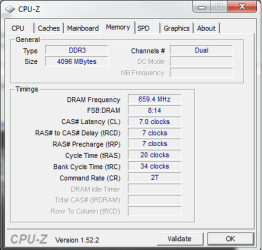
Here's CPU-Z.

memory.png

The original timings were 9-9-9-24, but they're capable of 7-7-7-20, which I put them to and that only increased it by 200MB/s. The RAM was originally a triple channel kit, but would that be a problem? I bought it off a friend who upgraded and had it in triple channel on his i7, but would that slow it down that much if it was running in dual channel?

Well even so now I think about it, even if it was in single channel, I should be getting up to 10,000MB/s.
 

My Computer My Computer

At a glance

Windows 8.1 Pro x64Intel Core i7 4790k8GB Corsair Dominator 1600MHzMSI TwinFrozr GeForce GTX770
Computer type
PC/Desktop
Computer Manufacturer/Model Number
Custom Built
OS
Windows 8.1 Pro x64
CPU
Intel Core i7 4790k
Motherboard
MSI Z97S Krait Edition
Memory
8GB Corsair Dominator 1600MHz
Graphics Card(s)
MSI TwinFrozr GeForce GTX770
Sound Card
ASUS Xonar DX/XD 7.1
Monitor(s) Displays
Dell 24" S2409W + Dell 20" E207WFP
Screen Resolution
1920x1080 + 1680x1050
Hard Drives
1x 120GB OCZ Agility 3, 1x 750GB Western Digital Caviar Black, 1x 1TB Western Digital Caviar Blue
PSU
Corsair HX850 modular
Case
Fractal Design Define R4
Cooling
Corsair H60 w/ twin Corsair SP120 fans
Keyboard
Logitech G510S Keyboard
Mouse
Logitech G500S Laser Mouse
Internet Speed
40Mbps
Antivirus
Microsoft Security Essentials
Browser
Google Chrome
Other Info
LG Blu-Ray player
Cheers for your reply Dave,

It was a pc he bought ready built from a company called Mesh over here in the UK.

Its a few years old now but at the time it was an extremely high spec , cost like £1700 GBP

All the bits in it including the motherboard are very nice items ,sorry I don't have the model number to hand at the moment but its an Asus which has a section in the bios called extreme tweeker or overclocker. Something like that anyway.

I am going to have a look next time I am round his to see what the memory timings are at present and what they are supposed to be.

Oh and I should add , that when I tested his memory in my pc , I was testing it in my older pc , I am not sure whether or not the motherboard in that pc supports 800mhz ram so that could have caused a low reading in mine. It was showing 3500 score with just 1 stick in , and only 3900 with 2 sticks in.

Cheers

Paul.

Welcome to Seven Forums.

When you check the RAM setting in BIOS you'll likely find the problem.
Same with your old PC and what scores does the RAM get in your new PC?
Can you adjust the settings in them?


Here's CPU-Z.

The original timings were 9-9-9-24, but they're capable of 7-7-7-20, which I put them to and that only increased it by 200MB/s. The RAM was originally a triple channel kit, but would that be a problem? I bought it off a friend who upgraded and had it in triple channel on his i7, but would that slow it down that much if it was running in dual channel?

Well even so now I think about it, even if it was in single channel, I should be getting up to 10,000MB/s.

Did you change any other settings besides the 7-7-7-20?

What is the RAM voltage set to?

I've read in other forums that the DDR3 RAM modules are the same for triple and dual channel.
It shouldn't matter that you put triple channel modules in your dual channel system.

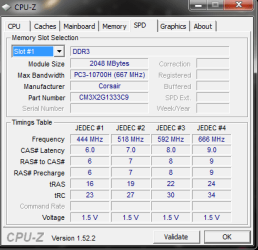
What's your SPD tab in CPU-Z?

Just for a quick test put your timings back to 9-9-9-24 and run the test for comparison.
 

My Computer My Computer

At a glance

Windows 7 Ult x64 - SP1/ Windows 8 Pro x64Intel Core i5-3570K 4.6GHz8GB (2X4GB) DDR3 1600 Corsair Vengeance CL8 1.5vSapphire HD 7770 Vapor-X OC 1GB DDR5
Computer type
PC/Desktop
Computer Manufacturer/Model Number
76~2.0
OS
Windows 7 Ult x64 - SP1/ Windows 8 Pro x64
CPU
Intel Core i5-3570K 4.6GHz
Motherboard
Gigabyte GA-Z77X UD3H, f18
Memory
8GB (2X4GB) DDR3 1600 Corsair Vengeance CL8 1.5v
Graphics Card(s)
Sapphire HD 7770 Vapor-X OC 1GB DDR5
Sound Card
Onboard VIA VT2021
Monitor(s) Displays
22" LCD Dell
Screen Resolution
1680x1050
Hard Drives
Samsung 840Pro 128GB SSD,
Seagate Barracuda 500GB SATA2 7200rpm 32MB cache, Seagate Barracuda 1TB SATA2 7200rpm 32MB cache,
PSU
Corsair HX650W
Case
Cooler Master Storm Scout
Cooling
Corsair H80 2x12cm Noctua NF P12 , 2x14cm case fans
Keyboard
Logitech Wave
Mouse
CM Sentinel
Internet Speed
Dismal
Antivirus
Avast
Browser
Opera Next
Other Info
Haswell laptop: HP Envy 17t-j, i7-4700MQ, GeForce 740M 2GB DDR3, 17.3" Full HD 1920x1080, 16GB RAM, Samsung 840 Pro 128GB, 1TB Hitachi 7200 HDD,
Desktop: eSATA ports,
External eSATA Seagate 500GB SATA2 7200rpm,
External WD USB 500GB
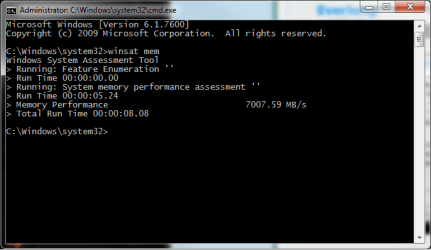
When it was at 9-9-9-24, that's when I got 6700MB/s. I set it to 7-7-7-20 and I got 6900MB/s. Went back in to BIOS and changed tRAS to 19, so 7-7-7-19, and tRC to 27, and I got 7007MB/s now. I have 2x2GB sticks and both are identical.

Voltage is at 1.6.

memory2.png
winsat.png
 

My Computer My Computer

At a glance

Windows 8.1 Pro x64Intel Core i7 4790k8GB Corsair Dominator 1600MHzMSI TwinFrozr GeForce GTX770
Computer type
PC/Desktop
Computer Manufacturer/Model Number
Custom Built
OS
Windows 8.1 Pro x64
CPU
Intel Core i7 4790k
Motherboard
MSI Z97S Krait Edition
Memory
8GB Corsair Dominator 1600MHz
Graphics Card(s)
MSI TwinFrozr GeForce GTX770
Sound Card
ASUS Xonar DX/XD 7.1
Monitor(s) Displays
Dell 24" S2409W + Dell 20" E207WFP
Screen Resolution
1920x1080 + 1680x1050
Hard Drives
1x 120GB OCZ Agility 3, 1x 750GB Western Digital Caviar Black, 1x 1TB Western Digital Caviar Blue
PSU
Corsair HX850 modular
Case
Fractal Design Define R4
Cooling
Corsair H60 w/ twin Corsair SP120 fans
Keyboard
Logitech G510S Keyboard
Mouse
Logitech G500S Laser Mouse
Internet Speed
40Mbps
Antivirus
Microsoft Security Essentials
Browser
Google Chrome
Other Info
LG Blu-Ray player
When it was at 9-9-9-24, that's when I got 6700MB/s. I set it to 7-7-7-20 and I got 6900MB/s. Went back in to BIOS and changed tRAS to 19, so 7-7-7-19, and tRC to 27, and I got 7007MB/s now. I have 2x2GB sticks and both are identical.

Voltage is at 1.6.

View attachment 69349
View attachment 69351
I must be honest, I'm not sure how much of a difference RAM timings really make, but I get a higher score than that with my Corsair XMS2 PC6400 memory... I'm running 2x 1GB XMS2-DHX-C5D modules at 880MHz (10% OC) at 5-5-5-15 (standard is 5-5-5-18), and I get around 8600MB/s. :sarc:
 

My Computer My Computer

At a glance

Win 10 x64 Pro x64 / Ubuntu 15.10 x64Intel i7-4960X4x8GB Corsair Dominator Platinum @2400MHz 10-...2x MSI GTX780Ti 3GB (SLI)
Computer type
PC/Desktop
OS
Win 10 x64 Pro x64 / Ubuntu 15.10 x64
CPU
Intel i7-4960X
Motherboard
Asus Rampage IV Black Edition
Memory
4x8GB Corsair Dominator Platinum @2400MHz 10-12-12-31
Graphics Card(s)
2x MSI GTX780Ti 3GB (SLI)
Sound Card
Onboard SupremeFX (Cirrus Logic CS4398)
Monitor(s) Displays
3x LG Cinema 27" IPS LED (27MP65)
Screen Resolution
[1920x1080]x3
Hard Drives
Crucial M500 120GB, Crucial M500 480GB, Toshiba DT01ACA200 2TB
PSU
CoolerMaster V1000
Case
Corsair Obsidian 750D
Cooling
ThermalTake Water 3.0 Extreme, 4xSP120, 3xAF120
Keyboard
Moshi Luna
Mouse
Logitech G700s / Roccat Tyon
Internet Speed
4Mb uncapped ADSL (Afrihost)
Antivirus
MS Security Essentials
Browser
Chrome... Duh. (:
Yea I put my old RAM's score earlier in this thread as well, which was 667MHz overclocked to 750MHz and that was scoring around 6,300MB/s.
 

My Computer My Computer

At a glance

Windows 8.1 Pro x64Intel Core i7 4790k8GB Corsair Dominator 1600MHzMSI TwinFrozr GeForce GTX770
Computer type
PC/Desktop
Computer Manufacturer/Model Number
Custom Built
OS
Windows 8.1 Pro x64
CPU
Intel Core i7 4790k
Motherboard
MSI Z97S Krait Edition
Memory
8GB Corsair Dominator 1600MHz
Graphics Card(s)
MSI TwinFrozr GeForce GTX770
Sound Card
ASUS Xonar DX/XD 7.1
Monitor(s) Displays
Dell 24" S2409W + Dell 20" E207WFP
Screen Resolution
1920x1080 + 1680x1050
Hard Drives
1x 120GB OCZ Agility 3, 1x 750GB Western Digital Caviar Black, 1x 1TB Western Digital Caviar Blue
PSU
Corsair HX850 modular
Case
Fractal Design Define R4
Cooling
Corsair H60 w/ twin Corsair SP120 fans
Keyboard
Logitech G510S Keyboard
Mouse
Logitech G500S Laser Mouse
Internet Speed
40Mbps
Antivirus
Microsoft Security Essentials
Browser
Google Chrome
Other Info
LG Blu-Ray player
Annoying the hell out of me now this. Tried everything I can think of and it's not budging it at all.
 

My Computer My Computer

At a glance

Windows 8.1 Pro x64Intel Core i7 4790k8GB Corsair Dominator 1600MHzMSI TwinFrozr GeForce GTX770
Computer type
PC/Desktop
Computer Manufacturer/Model Number
Custom Built
OS
Windows 8.1 Pro x64
CPU
Intel Core i7 4790k
Motherboard
MSI Z97S Krait Edition
Memory
8GB Corsair Dominator 1600MHz
Graphics Card(s)
MSI TwinFrozr GeForce GTX770
Sound Card
ASUS Xonar DX/XD 7.1
Monitor(s) Displays
Dell 24" S2409W + Dell 20" E207WFP
Screen Resolution
1920x1080 + 1680x1050
Hard Drives
1x 120GB OCZ Agility 3, 1x 750GB Western Digital Caviar Black, 1x 1TB Western Digital Caviar Blue
PSU
Corsair HX850 modular
Case
Fractal Design Define R4
Cooling
Corsair H60 w/ twin Corsair SP120 fans
Keyboard
Logitech G510S Keyboard
Mouse
Logitech G500S Laser Mouse
Internet Speed
40Mbps
Antivirus
Microsoft Security Essentials
Browser
Google Chrome
Other Info
LG Blu-Ray player
Annoying the hell out of me now this. Tried everything I can think of and it's not budging it at all.
Hmmm.... Many times component speed related issues on a computer are motherboard-specific. So here's an idea, I did this when I got my board and was looking for a bit of help (I have the nForce 750a (AMD) chipset, compared to your nForce 790i (Intel); why don't you see if the guys over at the NVidia forum can give you a few tips and suggestions? There's a section for nForce motherboard related queries over here.

By the way, that is a nice board you got there... ;) If the nForce 790 setup was available in an AMD variant, I would definitely go looking for one of those..
 

My Computer My Computer

At a glance

Win 10 x64 Pro x64 / Ubuntu 15.10 x64Intel i7-4960X4x8GB Corsair Dominator Platinum @2400MHz 10-...2x MSI GTX780Ti 3GB (SLI)
Computer type
PC/Desktop
OS
Win 10 x64 Pro x64 / Ubuntu 15.10 x64
CPU
Intel i7-4960X
Motherboard
Asus Rampage IV Black Edition
Memory
4x8GB Corsair Dominator Platinum @2400MHz 10-12-12-31
Graphics Card(s)
2x MSI GTX780Ti 3GB (SLI)
Sound Card
Onboard SupremeFX (Cirrus Logic CS4398)
Monitor(s) Displays
3x LG Cinema 27" IPS LED (27MP65)
Screen Resolution
[1920x1080]x3
Hard Drives
Crucial M500 120GB, Crucial M500 480GB, Toshiba DT01ACA200 2TB
PSU
CoolerMaster V1000
Case
Corsair Obsidian 750D
Cooling
ThermalTake Water 3.0 Extreme, 4xSP120, 3xAF120
Keyboard
Moshi Luna
Mouse
Logitech G700s / Roccat Tyon
Internet Speed
4Mb uncapped ADSL (Afrihost)
Antivirus
MS Security Essentials
Browser
Chrome... Duh. (:
I've posted over on the Corsair forums, I'll see if I get anywhere with them.

And yea it's a great board. I did have a 750i motherboard before this as well and never had any problems with either the 750 or 790 :)
 

My Computer My Computer

At a glance

Windows 8.1 Pro x64Intel Core i7 4790k8GB Corsair Dominator 1600MHzMSI TwinFrozr GeForce GTX770
Computer type
PC/Desktop
Computer Manufacturer/Model Number
Custom Built
OS
Windows 8.1 Pro x64
CPU
Intel Core i7 4790k
Motherboard
MSI Z97S Krait Edition
Memory
8GB Corsair Dominator 1600MHz
Graphics Card(s)
MSI TwinFrozr GeForce GTX770
Sound Card
ASUS Xonar DX/XD 7.1
Monitor(s) Displays
Dell 24" S2409W + Dell 20" E207WFP
Screen Resolution
1920x1080 + 1680x1050
Hard Drives
1x 120GB OCZ Agility 3, 1x 750GB Western Digital Caviar Black, 1x 1TB Western Digital Caviar Blue
PSU
Corsair HX850 modular
Case
Fractal Design Define R4
Cooling
Corsair H60 w/ twin Corsair SP120 fans
Keyboard
Logitech G510S Keyboard
Mouse
Logitech G500S Laser Mouse
Internet Speed
40Mbps
Antivirus
Microsoft Security Essentials
Browser
Google Chrome
Other Info
LG Blu-Ray player
I've been having the same issue. DDR3 1333 and can't get a thing over 6900MB/s. I have an OEM mobo though so not much I can do I guess. The only thing that bugs me though is that when I first put the ram in I got one test of 10000, but everything after that is around 6900.
 

My Computer My Computer

At a glance

Windows 7 Professional x64 6.1 Build 7600Intel Core 2 Quad Q9400 2.66Ghz8GB DDR3 PC3-10700H (1333Mhz)Visiontek ATI Radeon HD4850
Computer Manufacturer/Model Number
Dell XPS 430
OS
Windows 7 Professional x64 6.1 Build 7600
CPU
Intel Core 2 Quad Q9400 2.66Ghz
Motherboard
Dell Inc. 0G254H
Memory
8GB DDR3 PC3-10700H (1333Mhz)
Graphics Card(s)
Visiontek ATI Radeon HD4850
Sound Card
Intel® 7.1 channel High Definition Audio
Monitor(s) Displays
Asus VH222H 22"
Screen Resolution
1920x1080
Hard Drives
OS: Kingston SSDNow V Series SNV425-S2BD/64GB

Data: Western Digital Caviar Blue 320GB, 7200 RPM
PSU
Dell 425watt PSU
Case
Dell XPS 430
Cooling
Stock
Keyboard
Microsoft Wireless Keyboard 1000
Mouse
Microsoft Wireless Optical Mouse 2000
Internet Speed
20Mb/s Down 5Mb/s Up
Other Info
Logitech X-540 5.1 Channel Surround Sound System
Mine: Kingston DDR3-1333 x 4 (Total 8GB) This should dispell those myths about running a memory chip in the 4th slot. Oh yeah and it pays to use only Genuine Intel Boards.
 

Attachments

  • memassess.jpg
    memassess.jpg
    17.6 KB · Views: 25

My Computer My Computer

At a glance

Win 7 x64Intel Core i7 965XEKingston DDR3-1333 (8GB)Nvidia 9800GT
Computer Manufacturer/Model Number
Intel
OS
Win 7 x64
CPU
Intel Core i7 965XE
Motherboard
Intel DX58SO
Memory
Kingston DDR3-1333 (8GB)
Graphics Card(s)
Nvidia 9800GT
Sound Card
Intel Onboard
Monitor(s) Displays
NEC 3090WQXi
Hard Drives
1 x Intel 160GB SSD (OS)
4 x 1TB Seagate SATA2
1 x Seagate Savvio 10k.3 running on Adaptec 2450
PSU
Neolink 1200w dual power system
Case
Antec P190
Cooling
Default Coolers with CPU and Case (More than ample)
Status
Not open for further replies.
Back
Top