When computer starts wifi starts automatically?

fett400

New member
Hello

I bougth new Notebook Acer 5741G which has Windows 7 X64.
When I start computer it always starts up automatically WiFi adaptor.

Do you think is it possible to disable that function?
I have tried to do that in many ways but I cant.

Thank you in advance
 

My Computer

Computer Manufacturer/Model Number
ACER
OS
Windows Ultimate 7 64bit
CPU
Intel Core i3 2.13GHZ
Memory
4GB
Graphics Card(s)
N Vidia GEFORCE G105M CUDA 1Gb up to 2.7Gb
Monitor(s) Displays
15.6
Screen Resolution
1366x768
Hard Drives
500GB
Internet Speed
100Mb D. 50Mb U. /S
Hello

I bougth new Notebook Acer 5741G which has Windows 7 X64.
When I start computer it always starts up automatically WiFi adaptor.

Do you think is it possible to disable that function?
I have tried to do that in many ways but I cant.

Thank you in advance
don't you have a WiFi button on your laptop to disable WiFi?
 
Last edited:

My Computer

Computer Manufacturer/Model Number
Acer Aspire 8735g
OS
Windows 7 Home Premium 64-bit
CPU
Intel Core 2 Duo T6600 @2.2 GHz
Motherboard
/
Memory
4GB RAM DDR3 so-DIMM
Graphics Card(s)
NVIDIA GeForce GT 240m 1GB
Sound Card
Realtek High Definition Audio
Monitor(s) Displays
18,4 HD+ LCD
Hard Drives
2 x 500 GB @5400 RPM
PSU
/
Case
Acer Aspire 8735g (laptop)
Cooling
/
Keyboard
Logitech Media Keyboard 600
Mouse
Logitech G3
same here with my gateway nv7923u.

we have to use the touchpoint on the top of keyboard to turn off.
I have the wifi adapter disabled on my win7 machine but my vista rig m-6881 there is a swtch on the side.
 

My Computer

Computer Manufacturer/Model Number
Gateway/NV7923u & NV79C52u Laptops
OS
windows 7 professional & ultimate 64bit laptops
CPU
2.27 boost to 2.53 & 2.53 boost to 2.80
Motherboard
Mobile Intel® HM55 Express Chipset ???
Memory
4GB
Graphics Card(s)
Intel® Graphics Media Accelerator HD
Sound Card
realtek High-definition audio support
Monitor(s) Displays
17.3 " HD 1600 x 900
Hard Drives
hatachi Travelstar 5400 500GB & west digital 500GB
Internet Speed
35MB fios
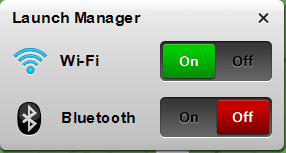
No. In this notebook there isnt WiFi button, it starts when you press Fn+F3, actually the menu comes and then you turn on or off by use of command. So if there isnt a button it is not possible to disable?
 

Attachments

  • Capture.PNG
    Capture.PNG
    13.3 KB · Views: 1,792

My Computer

Computer Manufacturer/Model Number
ACER
OS
Windows Ultimate 7 64bit
CPU
Intel Core i3 2.13GHZ
Memory
4GB
Graphics Card(s)
N Vidia GEFORCE G105M CUDA 1Gb up to 2.7Gb
Monitor(s) Displays
15.6
Screen Resolution
1366x768
Hard Drives
500GB
Internet Speed
100Mb D. 50Mb U. /S
Go into the network and sharing centre then change adaptor settings right click the wireless adaptor and choose disable. this should stiop it - just remember you did it if you ever need to use it ;)
 

My Computers

System One System Two

  • Computer type
    PC/Desktop
    Computer Manufacturer/Model Number
    ChillBlast - Custom to my design
    OS
    Windows 11 Pro x64 [Latest Release and Release Preview]
    CPU
    Ryzen 9 5950X, 3.8 - 5.2 MHz
    Motherboard
    Asus Prime X570-Pro
    Memory
    64GB [2 x 32GB] DDR4 3200MHz
    Graphics Card(s)
    4GB NVIDIA GEFORCE GTX 1650 Ti
    Sound Card
    On-board SPDIF to 5.1 System + HDMI [5.1 system]
    Monitor(s) Displays
    32" UHD 32 Bit HDR Monitor + 43" UHD 4K 32Bit HDR TV
    Screen Resolution
    2 x 3840 x 2160 @60Hz
    Hard Drives
    1TB M2 SSD OS, 500GB Fast Access SSD, 2 x 8TB Data + Various Externals from 1TB to 4TB, 10TB NAS
    PSU
    NZXT C750 80 PLUS Gold 750W Modular PSU
    Case
    Workstation Case [Matt Black]
    Cooling
    NZXT Kraken X63 280mm CPU Cooler +2x Quiet Case fans
    Keyboard
    Logitech Wireless MX Keys & K400 + others
    Mouse
    Logitech Wireless MX Master 3S
    Internet Speed
    920 MB Down 50 MB Up
    Antivirus
    BitDefender Total Security Pro
    Browser
    Chrome (always run latest Non-Beta)
    Other Info
    Also run ...
    Laptop - Quad 8GB - Windows 10 Pro x64
    Nexus 7 Android tablet x2
    Samsung 10.2" tablet
    Blackview TAB 8 4G Android Tablet c/w Keyboard
    Wacom Intuos Pro Medium Pen Pad
    Wacom Intuos Pro Small Pen Pad
    Wacom Expresskeys Remote
    Loopdeck+ Graphics Controller
    Shuttle Pro v2 Control
  • Computer type
    Laptop
    System Manufacturer/Model Number
    Dell XPS 17 10750H
    OS
    Windows 11 Pro x64 Latest RP
    CPU
    Intel I7 10750H 5.0GHz
    Motherboard
    Dell XPS
    Memory
    32GB [2x16GB] DDR4 2933 MHz
    Graphics Card(s)
    nVidia GTX1650Ti 4 GB GDDR6
    Sound Card
    Stock [Realtek] 4 Speaker
    Monitor(s) Displays
    17" IPS UHD+ Infinity Edge Touchscreen
    Screen Resolution
    3840 x 2400
    Hard Drives
    2TB M2 NVMe, 4TB External + various 500GB & 1TB External NVMe (also have access to spinner HDD from
    PSU
    Stock
    Case
    Stock XPS Aluminium & Carbon Fibre
    Cooling
    Stock - Active Fan Control
    Keyboard
    Backlit + Various Logitech
    Mouse
    Stock Track Pad + Logitech MX Trackball
    Internet Speed
    72 MB Down 18MB Up
    Browser
    Chrome
    Other Info
    Also run ...
    Laptop - Quad 8GB - Windows 10 Pro x64
    Nexus 7 Android tablet x2
    10.2" tablet
    Sony Z3 Android Smartphone
    Wacom Intuos Pro Medium Pen Pad
    Wacom Intuos Pro Small Pen Pad
    Wacom Expresskeys Remote
    Loopdeck+ Graphics Controller
    Shuttle Pro v2 Control Pad
    10TB NAS
Hello

I bougth new Notebook Acer 5741G which has Windows 7 X64.
When I start computer it always starts up automatically WiFi adaptor.

Do you think is it possible to disable that function?
I have tried to do that in many ways but I cant.

Thank you in advance

Hello fett,
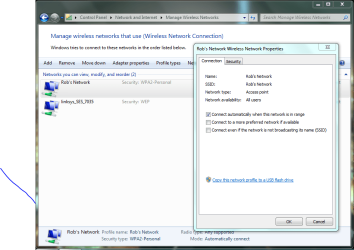
The best way to do this is to go to the Network and Sharing center, look upper left and click on "Manage Wireless Networks" click on the wireless network connection you want to keep from connecting automatically and uncheck the box to connect automatically like the picture below shows. Hope this helps. :)
 

Attachments

  • Manage wireless networks.PNG
    Manage wireless networks.PNG
    191.9 KB · Views: 198

My Computer

Computer type
PC/Desktop
Computer Manufacturer/Model Number
Home built
OS
Windows 7 Ult, Windows 8.1 Pro,
CPU
Q9650-4.275GHz, E8600 4.5GHz, E6750-3.8GHz
Motherboard
Evga 780i FTW
Memory
G.Skill PC2 9600 1200Mhz 5 5 5 15 2T
Graphics Card(s)
GTX480
Sound Card
Asus Xonar D2
Monitor(s) Displays
HannsG
Screen Resolution
1680X1050
Hard Drives
GSkill Phoenix Pro 120GB SSD
PSU
ThermalTake Toughpower 1000Watt modular
Case
ThermalTake XaserV
Cooling
Xigmatek S1283
Keyboard
Logitech G15
Mouse
Logitech G9
Internet Speed
T1
Hello

I bougth new Notebook Acer 5741G which has Windows 7 X64.
When I start computer it always starts up automatically WiFi adaptor.

Do you think is it possible to disable that function?
I have tried to do that in many ways but I cant.

Thank you in advance

Hello fett,
The best way to do this is to go to the Network and Sharing center, look upper left and click on "Manage Wireless Networks" click on the wireless network connection you want to keep from connecting automatically and uncheck the box to connect automatically like the picture below shows. Hope this helps. :)
That will only keep it from connecting to a hotspot automatically. If I understand the OP correctly, he doesn't want the wifi adapter to activate at all unless he wants it activated.

When you use the FN+F3 combo to bring up the control and turn off the wifi adapter, are you saying that it is automatically turned back on when rebooted?

Have you checked in the BIOS to see if there is an option there to turn off the wifi by default?

Although it isn't the most desirable way to do it, you may have to go with the suggestions to disable the wifi adapter in the Network and Sharing center.
 

My Computer

Computer type
PC/Desktop
Computer Manufacturer/Model Number
Home Built desktop, Dell G15 5511 Gaming laptop,MS Surface Pro 7 tablet
OS
W10 Pro desktop, W11 laptop, W11 Pro tablet (all 64-bit)
CPU
3.7Ghz 8700K i7, i7-11800H, i7-1065G7
Motherboard
ASUS TUF Z370-Pro Gaming in desktop
Memory
16G desktop, 16G laptop, 4G tablet
Graphics Card(s)
AMD Radeon RX580, RTX 3060, Intel Iris Plus
Sound Card
High Definition Audio (Built-in to mobo)
Monitor(s) Displays
Samsung U32J59 32" (2x), 15.6", 12"
Screen Resolution
3840x2160, 3840x2160, 1920x1080, 2160x1440
Hard Drives
500G SSD for OS; 2T, 10T & 15T HDDs for Data on Desktop, 1TB SSD laptop, 128G SSD tablet.
PSU
Corsair CX 750M
Case
Antec 100
Cooling
CM 212+
Keyboard
IBM Model M - used continuously since 1986
Mouse
Microsoft Pro IntelliMouse
Internet Speed
400M down 8M up
Antivirus
Windows Defender
Browser
FireFox
Other Info
Built my first computer (8Mhz 8088cpu, 640K RAM, 20MB HDD, 2 360K floppy drives) in 1985 and have been building them for myself, relatives and friends ever since.
Yes, I meant that I will prevent to start up it automatically when I restart computer. Anyway it seems that it is impossible or something like that, because I use wifi and I dont need to dissable and enable every time.
 

My Computer

Computer Manufacturer/Model Number
ACER
OS
Windows Ultimate 7 64bit
CPU
Intel Core i3 2.13GHZ
Memory
4GB
Graphics Card(s)
N Vidia GEFORCE G105M CUDA 1Gb up to 2.7Gb
Monitor(s) Displays
15.6
Screen Resolution
1366x768
Hard Drives
500GB
Internet Speed
100Mb D. 50Mb U. /S
Back
Top