
You are using an out of date browser. It may not display this or other websites correctly.
You should upgrade or use an alternative browser.
You should upgrade or use an alternative browser.
When Gaming Suddenly Error Appear DIEmWin: Windows
- Thread starter sle3pingz
- Start date

The DIEmWin is it DIEmWin.exe??? or just an error message DIEmWin. Also what is the windows blablabla would be nice too know what they are saying, What type of Windows are you on XP,7,Vista or 8???
My Computer
- Computer type
- PC/Desktop
- Computer Manufacturer/Model Number
- Cyber Power
- OS
- Windows 8.1 PRO
- CPU
- AMD FX-4100 3.60 GHz Quad-Core AM3+ CPU 4MB
- Motherboard
- ASUS M5A78L-M/USB3 AMD 760G (780L)
- Memory
- 8GB (2x4GB) Kingston
- Graphics Card(s)
- XfX HD R7850 AMD 2GB
- Monitor(s) Displays
- LG gaming flatron monitor
- Screen Resolution
- 1920×1080
- Hard Drives
- 1TB hitachi 7200RPM 64mb cache
1TB Western digital 7200RPM 64mb cache
- PSU
- 500watt coolermaster gaming power supply
- Case
- Coolermaster elite gaming case 430
- Cooling
- CoolerMaster Hyper TX3 Evo + 5 case fans and GPU fan
- Keyboard
- Razor blackwidow ultimate
- Mouse
- Razor death adder 3500dpi
- Internet Speed
- slow :(
- Antivirus
- F-secure premium
- Browser
- Google chrome
- Local time
- 8:32 AM
- Messages
- 394
I had this problem a while back.
The only fixes I've ever seen for this is to use a difficult to get rid of and not free program called PC Cleaner and another program called reimage, or to just roll back using Windows System Restore.
I suggest the latter as it seems to be the most reliable fix. Just use System Restore.
Using system restore to a point before the issue came up fixed the problem for me. I only lost about a half day, annoying, but it worked.
The only fixes I've ever seen for this is to use a difficult to get rid of and not free program called PC Cleaner and another program called reimage, or to just roll back using Windows System Restore.
I suggest the latter as it seems to be the most reliable fix. Just use System Restore.
Using system restore to a point before the issue came up fixed the problem for me. I only lost about a half day, annoying, but it worked.
My Computer
- Computer type
- PC/Desktop
- Computer Manufacturer/Model Number
- Home built
- OS
- Windows 7 Home premium
- CPU
- I7 3770 3.4
- Motherboard
- Republic of Gamers Maximus V
- Memory
- Corsair Vengance ddr3 8gb x2 1600 [@ 2400]
- Graphics Card(s)
- AMD 7970 6GB x3 [currently x2 until x3 is actually useful]
- Sound Card
- N/A
- Monitor(s) Displays
- Visio 47" 3D/Acer 27" 3D
- Screen Resolution
- 1920x1080 120mhz Passive 3D
- Hard Drives
- Samsung 830 series SSD 512gb x2
Seagate 2tb x2
Segate 750 Gb
- PSU
- 1500w
- Case
- Coolermaster
- Cooling
- Noctua D14
- Keyboard
- Logitech g10
- Mouse
- Naga Razer
- Internet Speed
- 30mb Cable
- Antivirus
- Like I'd tell.
- Browser
- Waterfox mostly.
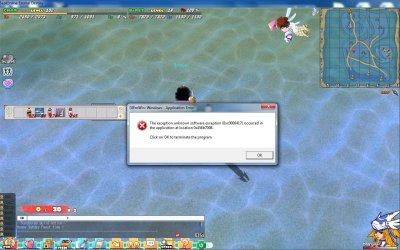
seriously? idk this happened at other game or not, the game i play it's Seal Online , this happened after the seal release the new patch , and the problem occured, i try to copy my old seal file and repatch , but still not help, it's seriously our system problem ? Thanks 
My Computer
- OS
- Windows 7 Home Premium 64bit
- Local time
- 8:32 AM
- Messages
- 394
Always include the full error message when trying to get help. Write out the whole thing and post it, or an image like the one you provided that includes the whole thing. The Hex error code (0xc0000417) and Hex location code 0x458b7098 are important information for anyone who is going to try and help you troubleshoot. These numbers identify what and where the problem actually is. This problem is a little different than the one I thought you had initially.
I'm pretty sure that's a USB driver/port error. Unplug any gamepads, thumbdrives, headphones, or anything else that has a USB input and then try running the game. It should clear up and you can then plug them back in again. Most likely it's caused by a gamepad you've got plugged in.
If that doesn't work, and I think it should, try uninstalling the game, and running CCleaner to clean out your registry and reinstall the game again. [It's a free program just Google it or something, you don't need the Pro version, the free one works fine.]
You may have to do a roll back with Windows System Restore if neither of those two fixes works.
I'm pretty sure that's a USB driver/port error. Unplug any gamepads, thumbdrives, headphones, or anything else that has a USB input and then try running the game. It should clear up and you can then plug them back in again. Most likely it's caused by a gamepad you've got plugged in.
If that doesn't work, and I think it should, try uninstalling the game, and running CCleaner to clean out your registry and reinstall the game again. [It's a free program just Google it or something, you don't need the Pro version, the free one works fine.]
You may have to do a roll back with Windows System Restore if neither of those two fixes works.
My Computer
- Computer type
- PC/Desktop
- Computer Manufacturer/Model Number
- Home built
- OS
- Windows 7 Home premium
- CPU
- I7 3770 3.4
- Motherboard
- Republic of Gamers Maximus V
- Memory
- Corsair Vengance ddr3 8gb x2 1600 [@ 2400]
- Graphics Card(s)
- AMD 7970 6GB x3 [currently x2 until x3 is actually useful]
- Sound Card
- N/A
- Monitor(s) Displays
- Visio 47" 3D/Acer 27" 3D
- Screen Resolution
- 1920x1080 120mhz Passive 3D
- Hard Drives
- Samsung 830 series SSD 512gb x2
Seagate 2tb x2
Segate 750 Gb
- PSU
- 1500w
- Case
- Coolermaster
- Cooling
- Noctua D14
- Keyboard
- Logitech g10
- Mouse
- Naga Razer
- Internet Speed
- 30mb Cable
- Antivirus
- Like I'd tell.
- Browser
- Waterfox mostly.
is that the solution ? unplug keyboard & mouse too :sarc: ? like i already try to delete that game with error and replace it with the new one , still not work ... usb drive i use only Mouse, Keyboard and USB Modem ...
My Computer
- OS
- Windows 7 Home Premium 64bit
- Local time
- 8:32 AM
- Messages
- 394
is that the solution ? unplug keyboard & mouse too :sarc: ? like i already try to delete that game with error and replace it with the new one , still not work ... usb drive i use only Mouse, Keyboard and USB Modem ...
Well, you won't be able to launch the game or do anything else without the Mouse and Keyboard. Everything else you've got plugged in through a USB port go ahead and unplug.
If you've got a different keyboard and mouse or have a KB and mouse that don't use USB I'd hook those up and try to run the game using them, but if you've got no other option you're going to have to use at least one of them. If you don't need to use the keyboard to launch the game I'd go ahead and remove that as well if it's still popping up with both plugged in.
If that still doesn't work, try running chkdsk. Go to computer, right click C: drive and go down to properties. In the properties window, go to tools and select Error-checking 'Check now'. Make sure Automatically fix file system errors is checked and click start. If it asks you to check for hard disk errors the next time you start your computer, select Schedule disk check. Restart and let it run, it will probably take a little while.
Once finished check and see if the issue has cleared up or not.
If that still doesn't work then I suggest making sure your KB and mouse drivers are up to date as well. Especially if they are the only things plugged in. You should be able to download the drivers from whatever company made them.
My Computer
- Computer type
- PC/Desktop
- Computer Manufacturer/Model Number
- Home built
- OS
- Windows 7 Home premium
- CPU
- I7 3770 3.4
- Motherboard
- Republic of Gamers Maximus V
- Memory
- Corsair Vengance ddr3 8gb x2 1600 [@ 2400]
- Graphics Card(s)
- AMD 7970 6GB x3 [currently x2 until x3 is actually useful]
- Sound Card
- N/A
- Monitor(s) Displays
- Visio 47" 3D/Acer 27" 3D
- Screen Resolution
- 1920x1080 120mhz Passive 3D
- Hard Drives
- Samsung 830 series SSD 512gb x2
Seagate 2tb x2
Segate 750 Gb
- PSU
- 1500w
- Case
- Coolermaster
- Cooling
- Noctua D14
- Keyboard
- Logitech g10
- Mouse
- Naga Razer
- Internet Speed
- 30mb Cable
- Antivirus
- Like I'd tell.
- Browser
- Waterfox mostly.
pizzafreeza
New member
- Local time
- 7:32 AM
- Messages
- 8
actually that is an error caused by the game on all win 7 64-bit users. There's no help to that problem unless they release a patch that fixes the problem.
My Computer
- Computer type
- PC/Desktop
- OS
- WA
Similar threads

- Replies
- 7
- Views
- 5K


- Replies
- 2
- Views
- 837