where is the cache file

grc225

New member
Local time
3:59 PM
Messages
4
I am using 7 ultimate 64bit
Everything is fine other than I can not find my temp Internet files.
the reason I want them is when I watch a flash movie from adobe if the cache was written in XP.... when I watched the same tutorial the second time, the movie would be very smooth.
But I can watch the same tutorial a half dozen times with my installation of 7 and its as jerky the 6th time as it was the first time.
If I could find the files I suppose I could save them as I did in XP.....but as long as it worked to make the viewing better, that would be fine.
Thanks
Gene
 

My Computer

Computer Manufacturer/Model Number
Asus
OS
windows 7 64 bit
CPU
i7
Motherboard
asus
Memory
6
Graphics Card(s)
4850
Sound Card
none
Monitor(s) Displays
24inch
Try the following path... Start, Run or Paste into Windows Explorer address bar.
Code:
%LocalAppData%\Microsoft\Windows\Temporary Internet Files
 

My Computer

Computer Manufacturer/Model Number
Dell Dimension E520
OS
Windows 7 Ultimate (x86)
CPU
Intel 2.20 Dual Core
Memory
4 GB
Graphics Card(s)
nVidia 9400 GT (512 MB)
Sound Card
Sigmatel C Major HD
Monitor(s) Displays
22" Samsung 2232 bw
Screen Resolution
1680x1050
Mouse
Microsoft Arc
Other Info
Wacom Graphire 4 (6x8) Tablet
Close but no cigar.......there is one swf file there but way too small, and no fla files.

But thanks anyway
 

My Computer

Computer Manufacturer/Model Number
Asus
OS
windows 7 64 bit
CPU
i7
Motherboard
asus
Memory
6
Graphics Card(s)
4850
Sound Card
none
Monitor(s) Displays
24inch
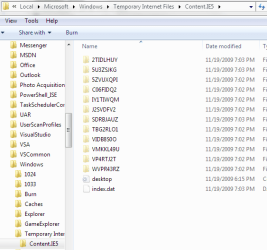
You have to 'view protected OS files' and naviagte to content.ie5
There you will have several subfolders.
 

Attachments

  • ContentIE5.PNG
    ContentIE5.PNG
    65.3 KB · Views: 240

My Computer

Computer Manufacturer/Model Number
Dell Dimension E520
OS
Windows 7 Ultimate (x86)
CPU
Intel 2.20 Dual Core
Memory
4 GB
Graphics Card(s)
nVidia 9400 GT (512 MB)
Sound Card
Sigmatel C Major HD
Monitor(s) Displays
22" Samsung 2232 bw
Screen Resolution
1680x1050
Mouse
Microsoft Arc
Other Info
Wacom Graphire 4 (6x8) Tablet
if I use your address I open a folder with 100's of files mostly cookies and Icons but no swf or fla files and if I add IE5 I get an empty folder.......Its like I have a setting set to not cache files over a certain size.
The largest file in the temp folder is .99mb and it is a program I downloaded yesterday to find flash files
 

My Computer

Computer Manufacturer/Model Number
Asus
OS
windows 7 64 bit
CPU
i7
Motherboard
asus
Memory
6
Graphics Card(s)
4850
Sound Card
none
Monitor(s) Displays
24inch
So \content.ie5 is empty? And you unchecked 'Hide protected operating system files' under folder options? I have my IE cache set to 250 MB's. Otherwise nothign else comes to mind.
 

My Computer

Computer Manufacturer/Model Number
Dell Dimension E520
OS
Windows 7 Ultimate (x86)
CPU
Intel 2.20 Dual Core
Memory
4 GB
Graphics Card(s)
nVidia 9400 GT (512 MB)
Sound Card
Sigmatel C Major HD
Monitor(s) Displays
22" Samsung 2232 bw
Screen Resolution
1680x1050
Mouse
Microsoft Arc
Other Info
Wacom Graphire 4 (6x8) Tablet
Check that IE8 isn't configured to delete cookies and other data on browser shutdown.
 

My Computer

Computer Manufacturer/Model Number
Sony Vaio Z46GDU
OS
Windows 7 Ultimate x86-64
CPU
[email protected] 1066MHz FSB
Motherboard
Sony branded
Memory
6GB DDR3 1066MHz
Graphics Card(s)
9300M GS 256MB Dedicated (Speed) + Intel4500MHD (Stamina)
Sound Card
Realtek HD Audio
Monitor(s) Displays
13.1' WXGA
Screen Resolution
1600x900
Hard Drives
320GB 7200RPM w/ 16MB cache
Internet Speed
1MB/s
The correct path to Temporary Internet Files on Windows 7 is:

C:\Users\YOURUSERNAME\AppData\Local\Microsoft\Windows\Temporary Internet Files

There is no content.ie5 folder
 

My Computer

Computer Manufacturer/Model Number
Custom
OS
Windows 7 Ultimate RTM (Technet)
CPU
3.00 gigahertz Intel Core2 Duo E8400
Motherboard
ASUSTeK Computer INC. P5K/EPU Rev 1.xx
Memory
4GB
Graphics Card(s)
ATI Radeon X1950 Pro
Sound Card
Built in HD Audio
Monitor(s) Displays
22" Gateway LCD
Screen Resolution
1920 x 1200
Hard Drives
ST3160023A [Hard drive] (160.04 GB) -- drive 0, rev 8.01, ST3500630AS [Hard drive] (500.11 GB) -- drive 2, rev 3.AAK
ST3500630AS [Hard drive] (500.11 GB) -- drive 1, rev 3.AAK
Keyboard
Logitech G11
Mouse
Microsoft Wireless Laser Mouse 5000
Internet Speed
13.44 Mbps
Well that path had one swf file.......
I thank everyone.... but it seems its much easier to use GOOGLE Chrome when I want to watch tutorials......as I can save them to any location I wish.
These OS seems to take one step forward in some aspects and 2 steps back in others.
Now if I could just find a good Email client..... and no thanks, Window Live Mail
is not it.

The correct path to Temporary Internet Files on Windows 7 is:

C:\Users\YOURUSERNAME\AppData\Local\Microsoft\Windows\Temporary Internet Files

There is no content.ie5 folder
 
Last edited:

My Computer

Computer Manufacturer/Model Number
Asus
OS
windows 7 64 bit
CPU
i7
Motherboard
asus
Memory
6
Graphics Card(s)
4850
Sound Card
none
Monitor(s) Displays
24inch
Back
Top