Whether To Use Windows and/or Software Makers Drivers

gary palmer

New member
Member
Local time
5:24 PM
Messages
58
Am aware when new hardware device is connected to PC; windows will search for & automatically install 'supposedly appropriate drivers'. After this the software maker drivers can be installed.

Recently I installed a new graphic card and upon start of PC windows started installing drivers which also included a graphic driver. However the graphic driver is not the most suited for a game I play called DCS World. I stopped the install of Windows choice of drivers halfway and then installed a specific Nvidia graphic driver of my choice.

Problems after this as I had a corrupted install of Nvidia driver. Fix was to run a program call DDU (Display Driver Uninstaller) to clean out any graphic driver software remnants/leftovers. Then do a clean fresh install of graphic driver of my choice.

Question. Does one always need to let Windows automatically install drivers for hardware; then as further step then install the hardware manufacturers software for the device on top. In other words is it standard for 'two lots of software' to be installed in general. One by Windows and one by maker of new installed hardware? How does one know whether to install both or just one? Confusing!

Am aware that I can go to Advanced System Settings>System Properties>Device Installation Settings ... and choose yes/no for 'Windows to Automatically download and install software'. In hindsight with graphic card I should have selected No before installing graphics card then after boot up of PC installed my choice of Nvidia driver...then after all done sets windows choice to yes for auto install of software if that is desired...in most case Windows downloading software automatically is trouble free.

Thx...Gary
 

My Computer My Computer

Computer type
PC/Desktop
OS
Microsoft Windows 7 Professional 64-bit 7601 Multiprocessor Free Service Pack 1
CPU
Intel(R) Core(TM) i7-4770 CPU @ 3.40GHz
Motherboard
ASUSTeK COMPUTER INC. Z87-C
Memory
16.00 GB
Graphics Card(s)
NVIDIA GeForce GTX 1060
Sound Card
Asus Xonar Essence STX
Monitor(s) Displays
2X Dell U2713H
Screen Resolution
2560 x 1440 x 32 bits (4294967296 colors) @ 59 Hz
Hard Drives
(1) INTEL SSDSC2CW120A3 ATA Device (2) WDC WD1001FALS-00J7B0 ATA Device (3) WDC WD10EARS-00MVWB0 ATA Device (4) Generic- SD/MMC/MS/MSPRO USB Device (5) HP Photosmart C6180 USB Device (6) SanDisk Cruzer Switch USB Device (7) ST2000DM 001-1
Antivirus
Avast Pro Antivirus
The primary difference between what Windows will find and install and the drivers direct from the vendor is the driver available from the vendor may be a later driver. Microsoft has a driver validation process that can take months and thus the latest driver from Microsoft may not be the latest and greatest from the hardware vendor. This is not always the case as some hardware vendors drivers may be years old (and not need updating), thus installing a hardware vendors driver over top of a Microsoft installed version may result in the same driver. Finally some vendor drivers are only available as "plug and play" thus no driver is available direct from the vendor. Roland did this for their drivers in Windows 10, none are available on their site, just the plug and play drivers from Microsoft.
 

My Computer My Computer

Computer type
PC/Desktop
Computer Manufacturer/Model Number
My Own Build
OS
Windows 10 64 bit
CPU
Intel i7 6700K
Motherboard
ASUS ROG Maximus VIII Hero
Memory
16GB Corsair Dominator
Graphics Card(s)
Intel CPU Graphics
Sound Card
RealTek
Monitor(s) Displays
27" Dell S2719dgf
Screen Resolution
2560X1440
Hard Drives
1 TB Samsung 850 EVO SSD for Win 10 Pro
500GB Samsung 850 EVO SSD for Win 10 Insider
2 TB drive for backup
PSU
EVGA Supernova 750G2
Case
BeQuiet Silent Base 600
Cooling
Deepcool Captain 120EX
Keyboard
Microsoft Wireless 2000
Mouse
Microsoft wireless
Internet Speed
100 MB/sec (Cable)
Antivirus
Microsoft Defender and Malwarebytes
Browser
Edge/Firefox
Other Info
Cakewalk (Sonar) by BandLab and Studio One 4.1 Pro recording studio software. MOTU 896Mk3 Hybrid recording interface, Frontier Tranzport wireless control unit, Behringer X-Touch Control Surface.
Five USB connected optical drives for CD Audio production using Nero BurningROM
Thanks Fireberd and I found your reply useful....Can you shed any light on my question as per:

Question. Does one always need to let Windows automatically install drivers for hardware; then as further step then install the hardware manufacturers software for the device on top. In other words is it standard for 'two lots of software' to be installed in general. One by Windows and one by maker of new installed hardware? How does one know whether to install both or just one? Confusing!

My guess is that they may be some situations where some Windows software may be needed as well as the vendors software...an example I can think of straight away are Microsoft Visual C+ redistributables or Direct X...where in the case of my PC are essential for certain games to run and also Avast Antivirus. Am aware though often the vendor provides such software as an integrated part of vendor software.

Sounds like I am answering my own question here but any insight from another is welcome.

Thankyou...GAry
 

My Computer My Computer

Computer type
PC/Desktop
OS
Microsoft Windows 7 Professional 64-bit 7601 Multiprocessor Free Service Pack 1
CPU
Intel(R) Core(TM) i7-4770 CPU @ 3.40GHz
Motherboard
ASUSTeK COMPUTER INC. Z87-C
Memory
16.00 GB
Graphics Card(s)
NVIDIA GeForce GTX 1060
Sound Card
Asus Xonar Essence STX
Monitor(s) Displays
2X Dell U2713H
Screen Resolution
2560 x 1440 x 32 bits (4294967296 colors) @ 59 Hz
Hard Drives
(1) INTEL SSDSC2CW120A3 ATA Device (2) WDC WD1001FALS-00J7B0 ATA Device (3) WDC WD10EARS-00MVWB0 ATA Device (4) Generic- SD/MMC/MS/MSPRO USB Device (5) HP Photosmart C6180 USB Device (6) SanDisk Cruzer Switch USB Device (7) ST2000DM 001-1
Antivirus
Avast Pro Antivirus
Microsoft does not write drivers for any hardware other than their own, as has been stated, the age and functionality may differ dependent on the will of the hardware manufacturer, some will supply Microsoft with a reduced function set than it offers itself - Probably this is to reduce issues with getting MS approval but it does happen

As for the download issue ...
Enable or Disable Driver Updates in Windows Update in Windows 10 Windows 10 Windows Update Activation Tutorials

Device Installation Settings - Windows 7 Help Forums
 
Last edited:

My Computers My Computers

System One System Two

  • Computer type
    PC/Desktop
    Computer Manufacturer/Model Number
    ChillBlast - Custom to my design
    OS
    Windows 11 Pro x64 [Latest Release and Release Preview]
    CPU
    Ryzen 9 5950X, 3.8 - 5.2 MHz
    Motherboard
    Asus Prime X570-Pro
    Memory
    64GB [2 x 32GB] DDR4 3200MHz
    Graphics Card(s)
    4GB NVIDIA GEFORCE GTX 1650 Ti
    Sound Card
    On-board SPDIF to 5.1 System + HDMI [5.1 system]
    Monitor(s) Displays
    32" UHD 32 Bit HDR Monitor + 43" UHD 4K 32Bit HDR TV
    Screen Resolution
    2 x 3840 x 2160 @60Hz
    Hard Drives
    1TB M2 SSD OS, 500GB Fast Access SSD, 2 x 8TB Data + Various Externals from 1TB to 4TB, 10TB NAS
    PSU
    NZXT C750 80 PLUS Gold 750W Modular PSU
    Case
    Workstation Case [Matt Black]
    Cooling
    NZXT Kraken X63 280mm CPU Cooler +2x Quiet Case fans
    Keyboard
    Logitech Wireless MX Keys & K400 + others
    Mouse
    Logitech Wireless MX Master 3S
    Internet Speed
    920 MB Down 50 MB Up
    Antivirus
    BitDefender Total Security Pro
    Browser
    Chrome (always run latest Non-Beta)
    Other Info
    Also run ...
    Laptop - Quad 8GB - Windows 10 Pro x64
    Nexus 7 Android tablet x2
    Samsung 10.2" tablet
    Blackview TAB 8 4G Android Tablet c/w Keyboard
    Wacom Intuos Pro Medium Pen Pad
    Wacom Intuos Pro Small Pen Pad
    Wacom Expresskeys Remote
    Loopdeck+ Graphics Controller
    Shuttle Pro v2 Control
  • Computer type
    Laptop
    System Manufacturer/Model Number
    Dell XPS 17 10750H
    OS
    Windows 11 Pro x64 Latest RP
    CPU
    Intel I7 10750H 5.0GHz
    Motherboard
    Dell XPS
    Memory
    32GB [2x16GB] DDR4 2933 MHz
    Graphics Card(s)
    nVidia GTX1650Ti 4 GB GDDR6
    Sound Card
    Stock [Realtek] 4 Speaker
    Monitor(s) Displays
    17" IPS UHD+ Infinity Edge Touchscreen
    Screen Resolution
    3840 x 2400
    Hard Drives
    2TB M2 NVMe, 4TB External + various 500GB & 1TB External NVMe (also have access to spinner HDD from
    PSU
    Stock
    Case
    Stock XPS Aluminium & Carbon Fibre
    Cooling
    Stock - Active Fan Control
    Keyboard
    Backlit + Various Logitech
    Mouse
    Stock Track Pad + Logitech MX Trackball
    Internet Speed
    72 MB Down 18MB Up
    Browser
    Chrome
    Other Info
    Also run ...
    Laptop - Quad 8GB - Windows 10 Pro x64
    Nexus 7 Android tablet x2
    10.2" tablet
    Sony Z3 Android Smartphone
    Wacom Intuos Pro Medium Pen Pad
    Wacom Intuos Pro Small Pen Pad
    Wacom Expresskeys Remote
    Loopdeck+ Graphics Controller
    Shuttle Pro v2 Control Pad
    10TB NAS
If something such as C++ is needed, that will be included with the driver or the driver will download the needed compiler. Its nothing to really be concerned about.

Best option is to let Windows do whatever it does and if something doesn't work as you want then check the hardware vendor for an updated (or full feature) driver.

Games can pose many issues that are actually deficiencies in the game software and not a Windows or driver issue. I see many times people blame Windows for a problem when in fact its not a Windows "problem" but a problem within a program or vendor driver.
 

My Computer My Computer

Computer type
PC/Desktop
Computer Manufacturer/Model Number
My Own Build
OS
Windows 10 64 bit
CPU
Intel i7 6700K
Motherboard
ASUS ROG Maximus VIII Hero
Memory
16GB Corsair Dominator
Graphics Card(s)
Intel CPU Graphics
Sound Card
RealTek
Monitor(s) Displays
27" Dell S2719dgf
Screen Resolution
2560X1440
Hard Drives
1 TB Samsung 850 EVO SSD for Win 10 Pro
500GB Samsung 850 EVO SSD for Win 10 Insider
2 TB drive for backup
PSU
EVGA Supernova 750G2
Case
BeQuiet Silent Base 600
Cooling
Deepcool Captain 120EX
Keyboard
Microsoft Wireless 2000
Mouse
Microsoft wireless
Internet Speed
100 MB/sec (Cable)
Antivirus
Microsoft Defender and Malwarebytes
Browser
Edge/Firefox
Other Info
Cakewalk (Sonar) by BandLab and Studio One 4.1 Pro recording studio software. MOTU 896Mk3 Hybrid recording interface, Frontier Tranzport wireless control unit, Behringer X-Touch Control Surface.
Five USB connected optical drives for CD Audio production using Nero BurningROM
which radar buttons under 'No' do I select

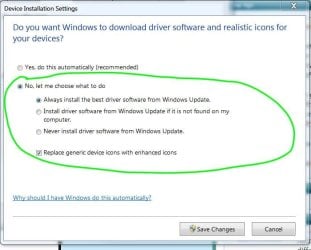
Look at attached pic and can someone please tell me which radar buttons under 'No' do I select so rather than windows just automatically downloading/installing drivers I am prompted by Windows to say Yes/No and therefore manually I make the decision.

Is it a case that by selecting 'No' combined with any sub-menu radar button for 'No' will have this happen? Or is it a case of selecting 'No' and the sub-menu radar button with words: 'Never install driver software from Windows Update' needs to be selected too.

I just want a situation where I can manually choose Yes/No whether to have Windows search/download/install drivers. They are times I want Windows to do nothing as I want to install vendors software

Thanks all for your help...GAry
 

Attachments

  • which radar buttons under No do I select .JPG
    which radar buttons under No do I select .JPG
    51.8 KB · Views: 19

My Computer My Computer

Computer type
PC/Desktop
OS
Microsoft Windows 7 Professional 64-bit 7601 Multiprocessor Free Service Pack 1
CPU
Intel(R) Core(TM) i7-4770 CPU @ 3.40GHz
Motherboard
ASUSTeK COMPUTER INC. Z87-C
Memory
16.00 GB
Graphics Card(s)
NVIDIA GeForce GTX 1060
Sound Card
Asus Xonar Essence STX
Monitor(s) Displays
2X Dell U2713H
Screen Resolution
2560 x 1440 x 32 bits (4294967296 colors) @ 59 Hz
Hard Drives
(1) INTEL SSDSC2CW120A3 ATA Device (2) WDC WD1001FALS-00J7B0 ATA Device (3) WDC WD10EARS-00MVWB0 ATA Device (4) Generic- SD/MMC/MS/MSPRO USB Device (5) HP Photosmart C6180 USB Device (6) SanDisk Cruzer Switch USB Device (7) ST2000DM 001-1
Antivirus
Avast Pro Antivirus
Probably the No 2 is closest to what you want, but I would be more likely to choose No3 and do everything Manually - Most drivers do not change that often, most changes are are for issues that only some users experience. The old saying If it ain't broke ... is still a good one.

Also a bit of regular surfing will normally be enough to keep you informed on the major drivers status so you can investigate and then decide
 

My Computers My Computers

System One System Two

  • Computer type
    PC/Desktop
    Computer Manufacturer/Model Number
    ChillBlast - Custom to my design
    OS
    Windows 11 Pro x64 [Latest Release and Release Preview]
    CPU
    Ryzen 9 5950X, 3.8 - 5.2 MHz
    Motherboard
    Asus Prime X570-Pro
    Memory
    64GB [2 x 32GB] DDR4 3200MHz
    Graphics Card(s)
    4GB NVIDIA GEFORCE GTX 1650 Ti
    Sound Card
    On-board SPDIF to 5.1 System + HDMI [5.1 system]
    Monitor(s) Displays
    32" UHD 32 Bit HDR Monitor + 43" UHD 4K 32Bit HDR TV
    Screen Resolution
    2 x 3840 x 2160 @60Hz
    Hard Drives
    1TB M2 SSD OS, 500GB Fast Access SSD, 2 x 8TB Data + Various Externals from 1TB to 4TB, 10TB NAS
    PSU
    NZXT C750 80 PLUS Gold 750W Modular PSU
    Case
    Workstation Case [Matt Black]
    Cooling
    NZXT Kraken X63 280mm CPU Cooler +2x Quiet Case fans
    Keyboard
    Logitech Wireless MX Keys & K400 + others
    Mouse
    Logitech Wireless MX Master 3S
    Internet Speed
    920 MB Down 50 MB Up
    Antivirus
    BitDefender Total Security Pro
    Browser
    Chrome (always run latest Non-Beta)
    Other Info
    Also run ...
    Laptop - Quad 8GB - Windows 10 Pro x64
    Nexus 7 Android tablet x2
    Samsung 10.2" tablet
    Blackview TAB 8 4G Android Tablet c/w Keyboard
    Wacom Intuos Pro Medium Pen Pad
    Wacom Intuos Pro Small Pen Pad
    Wacom Expresskeys Remote
    Loopdeck+ Graphics Controller
    Shuttle Pro v2 Control
  • Computer type
    Laptop
    System Manufacturer/Model Number
    Dell XPS 17 10750H
    OS
    Windows 11 Pro x64 Latest RP
    CPU
    Intel I7 10750H 5.0GHz
    Motherboard
    Dell XPS
    Memory
    32GB [2x16GB] DDR4 2933 MHz
    Graphics Card(s)
    nVidia GTX1650Ti 4 GB GDDR6
    Sound Card
    Stock [Realtek] 4 Speaker
    Monitor(s) Displays
    17" IPS UHD+ Infinity Edge Touchscreen
    Screen Resolution
    3840 x 2400
    Hard Drives
    2TB M2 NVMe, 4TB External + various 500GB & 1TB External NVMe (also have access to spinner HDD from
    PSU
    Stock
    Case
    Stock XPS Aluminium & Carbon Fibre
    Cooling
    Stock - Active Fan Control
    Keyboard
    Backlit + Various Logitech
    Mouse
    Stock Track Pad + Logitech MX Trackball
    Internet Speed
    72 MB Down 18MB Up
    Browser
    Chrome
    Other Info
    Also run ...
    Laptop - Quad 8GB - Windows 10 Pro x64
    Nexus 7 Android tablet x2
    10.2" tablet
    Sony Z3 Android Smartphone
    Wacom Intuos Pro Medium Pen Pad
    Wacom Intuos Pro Small Pen Pad
    Wacom Expresskeys Remote
    Loopdeck+ Graphics Controller
    Shuttle Pro v2 Control Pad
    10TB NAS
Thanks Barman58. 95% of the time I would just let Windows look for drivers automatically. Am asking these questions for the odd occasion where I want to prevent windows from doing its auto thing and I make the choice. For example the latest video card driver for my Nvidia GTX1060 is not best for game I play called DCS World. Windows cannot work this stuff out so I have to; and a manual choice is important to achieve that correct choice. I think it is best to minimize the uninstalling/reinstalling process in general as garbage always seems to get left behind and occasionally this causes tricky problems...that expression: 'if it ain't broke leave it alone' is so true.

When I next need the manual choice I will select radar button 3 (never install driver software from Windows Update) as you suggested. And install my choice via Device Manager entry for hardware. After all done then go back and set to Auto.

I must say the way Windows words things is far from intuitive hence my thread here. Thankyou for taking the time to reply to my thread...Gary
 

My Computer My Computer

Computer type
PC/Desktop
OS
Microsoft Windows 7 Professional 64-bit 7601 Multiprocessor Free Service Pack 1
CPU
Intel(R) Core(TM) i7-4770 CPU @ 3.40GHz
Motherboard
ASUSTeK COMPUTER INC. Z87-C
Memory
16.00 GB
Graphics Card(s)
NVIDIA GeForce GTX 1060
Sound Card
Asus Xonar Essence STX
Monitor(s) Displays
2X Dell U2713H
Screen Resolution
2560 x 1440 x 32 bits (4294967296 colors) @ 59 Hz
Hard Drives
(1) INTEL SSDSC2CW120A3 ATA Device (2) WDC WD1001FALS-00J7B0 ATA Device (3) WDC WD10EARS-00MVWB0 ATA Device (4) Generic- SD/MMC/MS/MSPRO USB Device (5) HP Photosmart C6180 USB Device (6) SanDisk Cruzer Switch USB Device (7) ST2000DM 001-1
Antivirus
Avast Pro Antivirus
Just to add my two pennyworth - your system should create a system restore point automatically before installing an update but have you considered making regular system backups using Macrium Reflect (Free)?
 

My Computer My Computer

Computer type
PC/Desktop
OS
Microsoft Windows 7 Home Premium 64-bit 7601 Multiprocessor Free Service Pack 1
CPU
Intel(R) Core(TM) i7-3770 CPU @ 3.40GHz
Motherboard
ASUSTeK COMPUTER INC. P8H77-M
Memory
8.00 GB
Graphics Card(s)
Intel(R) HD Graphics 4000
Sound Card
On Board
Monitor(s) Displays
Dell 24"
Screen Resolution
1920 x 1080
Hard Drives
(1) INTEL SSDSC2CT180A3 ATA Device (2) ST500DM002-1BD142 ATA Device (3) WDC WD3200AAKS-75L9A0 ATA Device (4) Generic- Compact Flash USB Device (5) Generic- MS/MS-Pro USB Device (6) Generic- SD/MMC USB Device (7) Generic- SM/xD-Picture USB
PSU
500w Corsair
Case
Cooler Master
Cooling
3 Fans
Keyboard
Logitech MK300
Mouse
Logitech WOM
Internet Speed
75Mb
Antivirus
Norton 360
Browser
Firefox, Opera, IE
Back
Top