which is better for gaming 32 bit or 64 bit

Ashin5

Banned
Local time
6:38 PM
Messages
44
Hi, I have 4 gb DDR2 RAM(800Mhz),Intel Core 2 duo 2.66Ghz,2.67 Ghz CPU(X86),1 gb Nvidia Geforce 210 GPU,previously i was using windows 7(32 bit) when i used to have 2gb ram, but when i increased my ram to 4gb it did not detect it.It only read 2.75 gb.so i switched back to windows xp professional(32 bit).but the result is the same.i want my ram not to be wasted... I want to access full 4gb of it and want to have best and smooth gaming performance out of my present pc configuration that i mentioned... So should i install Windows 7 (64 bit)?? will it work on my X86 cpu and serve my purpose??if not then what is the alternative solution? I'm confused.. Plz give me proper advice.....
,regards..........
 

My Computer My Computer

At a glance

Windows 7 Ultimate 64 bitIntel Core 2 Duo E7300 @ 2.66GHz,Wolfdale 45n...4.00 GB Dual-Channel DDR2 @ 400MHz700B (1024x768@85Hz) 1024MB Nvidia GeForce 210
Computer Manufacturer/Model Number
Gigabyte Technology Co., Ltd./ G31M-S2L
OS
Windows 7 Ultimate 64 bit
CPU
Intel Core 2 Duo E7300 @ 2.66GHz,Wolfdale 45nm Technology
Motherboard
Gigabyte Technology Co., Ltd. G31M-S2L
Memory
4.00 GB Dual-Channel DDR2 @ 400MHz
Graphics Card(s)
700B (1024x768@85Hz) 1024MB Nvidia GeForce 210
Monitor(s) Displays
LG 17" display monitor
Screen Resolution
1024 x 768
Hard Drives
250GB Seagate ST250DM000-1BD141 ATA Device (SATA)
Cooling
1 cpu fan
Keyboard
PS/2 compatible Keyboard
Mouse
PS/2 compatible Mouse
Your cpu is 64bit compatible and will benefit with 4GB or more memory. Some older games don't utilize the 64bit cpu, Most modern ones do.

If you fill in your system specs we can help you why your memory is not showing all 4GBs

Thanks
 

My Computer My Computer

At a glance

MS Windows 7 Professional 64-bit SP1AMD FX(tm)-6100 Six-Core Processor Socket AM3...8.00 GB Dual-Channel DDR3 @ 802MHz (11-11-11-...NVIDIA GeForce GTX 560 Ti
Computer type
PC/Desktop
Computer Manufacturer/Model Number
Self Build
OS
MS Windows 7 Professional 64-bit SP1
CPU
AMD FX(tm)-6100 Six-Core Processor Socket AM3+ (942)
Motherboard
ASUSTeK COMPUTER INC. SABERTOOTH 990FX (AM3r2)
Memory
8.00 GB Dual-Channel DDR3 @ 802MHz (11-11-11-36) 1.5Volts
Graphics Card(s)
NVIDIA GeForce GTX 560 Ti
Sound Card
Onboard Realtek HD
Monitor(s) Displays
shimian (1920x1080@60Hz)
Screen Resolution
1920*1080
Hard Drives
OCZ-AGIL ITY3 SATA Disk Device 120GB
PSU
Corsair TX 750
Case
Corsair
Cooling
WaterCooled
Keyboard
Microsoft Wired
Mouse
Logitech USB Optical TiltWheel Mouse
Internet Speed
Realtek PCIe GBE Family Controller 20MB*1MB
Antivirus
Avast
Browser
Firefox
Other Info
150GB Internal Hard Drive for Backing Up Important Files -
Hauppauge Nova-DT Dual DVB-T Tuner Device (+IR) -
USB PC Camera with Mic (SN9C105)
My system specs are

OS Name Microsoft Windows XP Professional
Version 5.1.2600 Service Pack 3 Build 2600
OS Manufacturer Microsoft Corporation

System Manufacturer Gigabyte Technology Co., Ltd.
System Model G31M-S2L
System Type X86-based PC
Processor x86 Family 6 Model 23 Stepping 6 GenuineIntel ~2666 Mhz
BIOS Version/Date Award Software International, Inc. F7C, 7/30/2008
SMBIOS Version 2.4

Total Physical Memory 4,096.00 MB
Available Physical Memory 2.40 GB
Total Virtual Memory 2.00 GB
Available Virtual Memory 1.96 GB
Page File Space 4.59 GB

CPU: Intel(R) Core(TM) 2 duo E7300 @ 2.66GHz,2.67Ghz
GPU: 1GB Nvidia Geforce 210
RAM: 2 X 2GB DDR2(800 PC),Dual channel Interleaved
HArd Disk: 250 Gb SAT install Windows 7 (64 bit)

Can I install Windows 7(64 bit)? will my cpu perform smoothly or may i have some problems?can i get best gaming performance out of my present pc configuration by installing windows 7(64 bit)?
 

My Computer My Computer

At a glance

Windows 7 Ultimate 64 bitIntel Core 2 Duo E7300 @ 2.66GHz,Wolfdale 45n...4.00 GB Dual-Channel DDR2 @ 400MHz700B (1024x768@85Hz) 1024MB Nvidia GeForce 210
Computer Manufacturer/Model Number
Gigabyte Technology Co., Ltd./ G31M-S2L
OS
Windows 7 Ultimate 64 bit
CPU
Intel Core 2 Duo E7300 @ 2.66GHz,Wolfdale 45nm Technology
Motherboard
Gigabyte Technology Co., Ltd. G31M-S2L
Memory
4.00 GB Dual-Channel DDR2 @ 400MHz
Graphics Card(s)
700B (1024x768@85Hz) 1024MB Nvidia GeForce 210
Monitor(s) Displays
LG 17" display monitor
Screen Resolution
1024 x 768
Hard Drives
250GB Seagate ST250DM000-1BD141 ATA Device (SATA)
Cooling
1 cpu fan
Keyboard
PS/2 compatible Keyboard
Mouse
PS/2 compatible Mouse
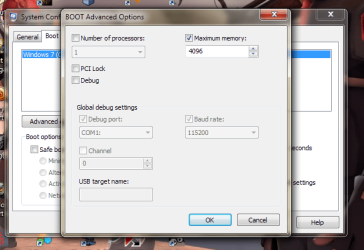
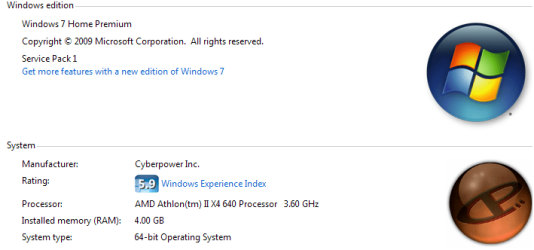
64bit because you have 4gbs of ram and will be able to use more mem.Also go to the start bar and type msconfig and press enter. When in msconfig click on the tab called boot then advanced options below. Then tick the box called maximum memory and it should read all of it then save it and reboot. For four gbs of ram it should say 4096 after you tick the box maximum memory or type in the number into that area and when done click apply. Also check in the bios to make sure your motherboard is reading all the memory and make sure your mobo supports more then 2gbs of ram.When you right click my computer then go to properties it should say 4.00gb of ram installed.
 

Attachments

  • example.png
    example.png
    37.8 KB · Views: 219
  • 2ndex.png
    2ndex.png
    20.1 KB · Views: 60

My Computer My Computer

At a glance

Windows 10 64bitAMD Phenom II X4 925 (Deneb)(2.8GHz) OC 3.4GHzCorsair Vengeance DDR3 4GBX2 (8192MB)XFX HD 6870 1GB (OC)- 940MHz core, mem 1150MHz
Computer type
PC/Desktop
Computer Manufacturer/Model Number
custom build
OS
Windows 10 64bit
CPU
AMD Phenom II X4 925 (Deneb)(2.8GHz) OC 3.4GHz
Motherboard
M5A78L-MLX Plus
Memory
Corsair Vengeance DDR3 4GBX2 (8192MB)
Graphics Card(s)
XFX HD 6870 1GB (OC)- 940MHz core, mem 1150MHz
Monitor(s) Displays
Vizio 26' 1920x1080 / Acer 1336x768
Screen Resolution
1920x1080 60Hz /1336x768
Hard Drives
Kingston Digital 60GB SSDNow V300/500gb HDD Western Digital 7200rpm (/WD 160GB HDD 7200rpm
PSU
CORSAIR CX600 600w
Case
AZZA Orion 202 EVO
Cooling
cooler master hyper TX3 cpu cooler
Keyboard
Razer DeathStalker
Mouse
Logitech Optical Gaming Mouse G400
Antivirus
Defualt on win 10
Browser
Firefox
Other Info
cpu is overclocked in bios
Actually Win7 32Bit is 3.75GB usable if you are down to 2.60GB usable then either your graphics needed some or it is allocated and saved because you don't need that much to run what you do

Win7 64 bit will truly let you use all your ram unless you don't have a dedicated GPU which the ram will be used more to make up for the lack of power that a deducated gpu would bring

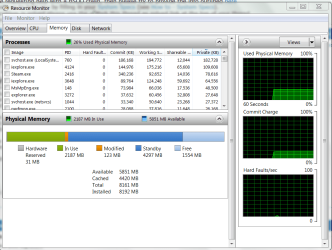
The best way to first find out what is going on with your ram is to bring up Process from, Task manager click performance then resource monitor

it should look like this

Basicly showing where your ram is going and why it is behaving that way
doing above advice does work in some cases but ..............most of us have it unchecked to utalize more ram

I would say do this first and see how your ram is being used then from there you can proceed to what you feel is right
 

Attachments

  • system.PNG
    system.PNG
    44.1 KB · Views: 49

My Computer My Computer

At a glance

Windows 10 Home Premium 64bit sp1Intel I7-6700K @ 4.6 Ghz 1.344 volts everyday OC32GB G-Skill TridentZ 3200mhz 16-18-18-38 DDR4Sli Gigabyte Windforce GTX 980 G1
Computer type
PC/Desktop
Computer Manufacturer/Model Number
CoreI7-6700K MrFingerIII Special Builds
OS
Windows 10 Home Premium 64bit sp1
CPU
Intel I7-6700K @ 4.6 Ghz 1.344 volts everyday OC
Motherboard
Asrock Fatality K6 Z170 Socket 1151
Memory
32GB G-Skill TridentZ 3200mhz 16-18-18-38 DDR4
Graphics Card(s)
Sli Gigabyte Windforce GTX 980 G1
Sound Card
AC97 Creative Rage Tactic 3D Headphones Bluetooth
Monitor(s) Displays
27" Asus ROG Swift PG278Q G-Sync 48" Vizio Smart HD TV
Screen Resolution
2560x1440p 27"- 48" Currently Gaming at 2560x1440p Res 2K
Hard Drives
250GB Samsung Evo840SSD Seagate baracuda 500 GB WD Mybook 500Gb 1TB Seagate Barracuda
PSU
HX1050w Corsair Silver 80plus certified crosfire/sli
Case
Enthod Pro Full Tower
Cooling
Corsair H110i GT 280 mm High Performance WaterBlock
Keyboard
Logitech wireless keyboard
Mouse
Logitech wireless mouse
Internet Speed
Cox Cable 100+ mb
Antivirus
WebRoot Spysweeper with Antivirus
Browser
IE-10, Chrome, Opera
Other Info
My Other Rig is a AMD FX8320E @4.6Ghz 16GB Ballistic Sport Ram
Mobo Asrock Fatality 990FX 120GB OCZ SSD 1TB Seagate Barracuda Corsair H75 Cooling PSU Corsair CX750
GPU GTX Gigabyte 970G1
I agree with Solarstarshines.

Besides I’ve always disagreed with this tip


because it’s mainly for testing purposes and Windows does a pretty good job of managing the memory on its own without that box checked.

And a 64-bit OS will see all the RAM you have installed anyway, a 32-bit OS is basically 3.5gig or less memory limited (if you count the video card(s)) so checking the box there won't magically give you "more" RAM.

So unless you want to "limit" the amount of RAM used by the system, mainly the 64-bit OS, there’s no need in checking that box.

http://www.sevenforums.com/performance-maintenance/147214-boot-advanced-options.html#post1262195
http://www.sevenforums.com/tutorials/66482-memory-set-maximum-amount-used-windows-7-a.html
http://www.sevenforums.com/tutorial...um-amount-used-windows-7-a-3.html#post1976821
http://www.sevenforums.com/performa...only-2-93gb-usable-my-4gb-ram.html#post886444

My two cents.
 

My Computer My Computer

At a glance

Windows 10 ProIntel Core i7-4770K (3.5Ghz)32 gig Corsair Dominator Platinum (4x8Gig)Sapphire Tri-X R9 Fury
Computer type
PC/Desktop
Computer Manufacturer/Model Number
Custom built by me.
OS
Windows 10 Pro
CPU
Intel Core i7-4770K (3.5Ghz)
Motherboard
Gigabyte G1 Sniper 5 (F10 Bios)
Memory
32 gig Corsair Dominator Platinum (4x8Gig)
Graphics Card(s)
Sapphire Tri-X R9 Fury
Sound Card
Soundblaster ZXR
Monitor(s) Displays
NEC PA242W 24" LCD Monitor
Screen Resolution
1920 x 1200
Hard Drives
Primary - Samsung 850 Pro (512gig), Samsung 840 Pro (256gig), 2TB WD Caviar Black.
PSU
EVGA Supernova 1000 G2
Case
Cooler Master HAF X
Cooling
Corsair H100i with Corsair Air Series SP120 Quiet Fans
Keyboard
Logitech Wireless Wave
Mouse
Logitech Performance MX
Internet Speed
High Speed Cable
Antivirus
Norton Security
Browser
IE11
Other Info
Memory Timings - 1866MHz @ 9-9-9-27-1T @ 1.5 volts
It IS possible to make 32 bits OSs to recognize up to 64GB RAM, but it's not easy at all, and Windows 7 has this option blocked by default. After Googling a lot, I once managed to make that work once, a few years back. Look for something to enable PAE mode in 32 bits system and that does the trick.

All games I know are x86 and will not profit anything from being on a x64 Windows. You may see a performance improvement if you use specifically made x64 programs. So, if the computer will serve only and exclusively for gaming purposes, I would stick to 32 bits OS, else go for 64 bits.
 

My Computer My Computer

At a glance

Windows 7 Ultimate x64Intel Core i7-740QM8 GB DDR3NVIDIA GeForce 330GT
Computer type
Laptop
Computer Manufacturer/Model Number
Toshiba Sattelite A665-S6092
OS
Windows 7 Ultimate x64
CPU
Intel Core i7-740QM
Memory
8 GB DDR3
Graphics Card(s)
NVIDIA GeForce 330GT
Screen Resolution
1366x768
Hard Drives
Samsung 840 SSD 500GB
1TB USB3 external HD
Cooling
Coolermaster Notepal U3 notebook cooling pad
Internet Speed
3mbps ASDL
Antivirus
ClamWin 0.98.7
Browser
Opera 12.17 x86 (main), Firefox 38 (sec), IE11 (last resort)
It IS possible to make 32 bits OSs to recognize up to 64GB RAM, but it's not easy at all, and Windows 7 has this option blocked by default. After Googling a lot, I once managed to make that work once, a few years back. Look for something to enable PAE mode in 32 bits system and that does the trick.

While it is theoretically possibly to do, it’s not necessarily worth the headache of trying to accomplish it for such a small gain. Point being if it was easy, and worth it, everyone would be doing it, and not going with a 64-bit OS.

At any rate that can be debated for another thread as it’s not applicable here.

All games I know are x86 and will not profit anything from being on a x64 Windows. You may see a performance improvement if you use specifically made x64 programs. So, if the computer will serve only and exclusively for gaming purposes, I would stick to 32 bits OS, else go for 64 bits.

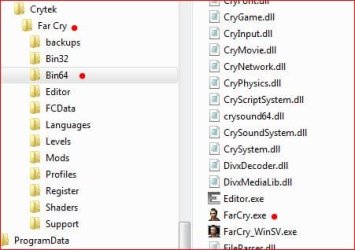
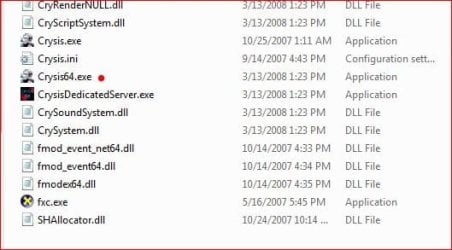
Most games today are optimized to run on a 64-bit OS and some games, even older ones like Far Cry (the first one) will have a dedicated 64-bit exe file for running the game on a 64-bit OS. Crysis (the first one) and Crysis Warhead also have 64-bit exe files.

Far Cry 64.JPGCrysis Warhead 64.JPG

Crysis 64.JPG


The other reason to run games on a 64-bit OS is of course the the RAM, the more, the better. As stated 32-bit OS is basically limited to 3.5gig. ANd more and more games are requiring at least 4 gig of RAM to run in fully optimized with all the bells and whistles.

Skyrim and Dragon Age 2 for example state 4gig of RAM to run the enhanched graphics package that you can download.

Bottom line: A lot of games will be made to run on a 64-bit OS because it's the dominant OS out, plus the fact that it can run more RAM.
 
Last edited:

My Computer My Computer

At a glance

Windows 10 ProIntel Core i7-4770K (3.5Ghz)32 gig Corsair Dominator Platinum (4x8Gig)Sapphire Tri-X R9 Fury
Computer type
PC/Desktop
Computer Manufacturer/Model Number
Custom built by me.
OS
Windows 10 Pro
CPU
Intel Core i7-4770K (3.5Ghz)
Motherboard
Gigabyte G1 Sniper 5 (F10 Bios)
Memory
32 gig Corsair Dominator Platinum (4x8Gig)
Graphics Card(s)
Sapphire Tri-X R9 Fury
Sound Card
Soundblaster ZXR
Monitor(s) Displays
NEC PA242W 24" LCD Monitor
Screen Resolution
1920 x 1200
Hard Drives
Primary - Samsung 850 Pro (512gig), Samsung 840 Pro (256gig), 2TB WD Caviar Black.
PSU
EVGA Supernova 1000 G2
Case
Cooler Master HAF X
Cooling
Corsair H100i with Corsair Air Series SP120 Quiet Fans
Keyboard
Logitech Wireless Wave
Mouse
Logitech Performance MX
Internet Speed
High Speed Cable
Antivirus
Norton Security
Browser
IE11
Other Info
Memory Timings - 1866MHz @ 9-9-9-27-1T @ 1.5 volts
I had a similar problem with Half-Life HD and Skyrim, on 32bit with 3gb ram when playing those games with the HD packs would always crash, built a 64bit (new system) with 8gb ram, now problems now.
 

My Computer My Computer

At a glance

Windows 8.1 Proi5 3550 Ivy Bridge8gb 1600 GSkill 9-9-9-24 xmpGigabyte GTX 760 OC
Computer type
PC/Desktop
Computer Manufacturer/Model Number
Home Build
OS
Windows 8.1 Pro
CPU
i5 3550 Ivy Bridge
Motherboard
Gigabyte Z77MX-D3H
Memory
8gb 1600 GSkill 9-9-9-24 xmp
Graphics Card(s)
Gigabyte GTX 760 OC
Sound Card
VIA VT2021 onboard
Monitor(s) Displays
BenQ GL2760H 27inch hdmi; LG Flatron E2351 23inch dvi
Screen Resolution
1920x1080
Hard Drives
1x Samsung 850 Evo 120GB
1x 4TB WD Green HDD
1x 3TB WD Green HDD
2x 2TB Seagate HDD
1x 1TB Seagate External HDD
PSU
Cooler Master V750
Case
Coolermaster HAF 912 Advanced
Cooling
Standard
Keyboard
Logitech K120 USB
Mouse
Razor Abyssus USB
Internet Speed
Broadband
Antivirus
MSE + Malwarebytes
Browser
Palemoon
Other Info
It's been the worst day since yesterday (thanks Flogging Molly) so apt!
I agree with Solarstarshines.

Besides I’ve always disagreed with this tip


because it’s mainly for testing purposes and Windows does a pretty good job of managing the memory on its own without that box checked.

And a 64-bit OS will see all the RAM you have installed anyway, a 32-bit OS is basically 3.5gig or less memory limited (if you count the video card(s)) so checking the box there won't magically give you "more" RAM.

So unless you want to "limit" the amount of RAM used by the system, mainly the 64-bit OS, there’s no need in checking that box.

http://www.sevenforums.com/performance-maintenance/147214-boot-advanced-options.html#post1262195
http://www.sevenforums.com/tutorials/66482-memory-set-maximum-amount-used-windows-7-a.html
http://www.sevenforums.com/tutorial...um-amount-used-windows-7-a-3.html#post1976821
http://www.sevenforums.com/performa...only-2-93gb-usable-my-4gb-ram.html#post886444

My two cents.
Yes but it could be that it has marked for 2gbs when indeed he has 4gbs of ram. So that is a easy way to get windows to see all the ram if windows by default doesn't see it. I have mine unchecked and it sees all my 4gbs of ram but I have seen folks computers were it was set to say 1 or 2gb of ram but they had 4 or more and manually setting it or un-ticking the box would show all their available memory after a reboot.Also the tip was for when he installed the win 7 64bit OS which he said was not seeing all his memory so he reverted back to win xp 32bit if you read the ops post.
 

My Computer My Computer

At a glance

Windows 10 64bitAMD Phenom II X4 925 (Deneb)(2.8GHz) OC 3.4GHzCorsair Vengeance DDR3 4GBX2 (8192MB)XFX HD 6870 1GB (OC)- 940MHz core, mem 1150MHz
Computer type
PC/Desktop
Computer Manufacturer/Model Number
custom build
OS
Windows 10 64bit
CPU
AMD Phenom II X4 925 (Deneb)(2.8GHz) OC 3.4GHz
Motherboard
M5A78L-MLX Plus
Memory
Corsair Vengeance DDR3 4GBX2 (8192MB)
Graphics Card(s)
XFX HD 6870 1GB (OC)- 940MHz core, mem 1150MHz
Monitor(s) Displays
Vizio 26' 1920x1080 / Acer 1336x768
Screen Resolution
1920x1080 60Hz /1336x768
Hard Drives
Kingston Digital 60GB SSDNow V300/500gb HDD Western Digital 7200rpm (/WD 160GB HDD 7200rpm
PSU
CORSAIR CX600 600w
Case
AZZA Orion 202 EVO
Cooling
cooler master hyper TX3 cpu cooler
Keyboard
Razer DeathStalker
Mouse
Logitech Optical Gaming Mouse G400
Antivirus
Defualt on win 10
Browser
Firefox
Other Info
cpu is overclocked in bios
There are plenty of posts here where people have had memery issues or where Windows wasn't able see all the RAM installed because that box was checked.

At any rate the box is for testing purposes and really doen't need to be checked, especially on a 64-bit OS, unless you want to limit the RAM, or do some testing to see if all the RAM is being used. It could also cause memory issues, especially if you have an intergrated video card. Again, I refer to Binks tutorial I linked to earlier.

Anyway my suggestion is to not check that box but to each his own, and if you feel it works for you well...

Peace :cool:
 

My Computer My Computer

At a glance

Windows 10 ProIntel Core i7-4770K (3.5Ghz)32 gig Corsair Dominator Platinum (4x8Gig)Sapphire Tri-X R9 Fury
Computer type
PC/Desktop
Computer Manufacturer/Model Number
Custom built by me.
OS
Windows 10 Pro
CPU
Intel Core i7-4770K (3.5Ghz)
Motherboard
Gigabyte G1 Sniper 5 (F10 Bios)
Memory
32 gig Corsair Dominator Platinum (4x8Gig)
Graphics Card(s)
Sapphire Tri-X R9 Fury
Sound Card
Soundblaster ZXR
Monitor(s) Displays
NEC PA242W 24" LCD Monitor
Screen Resolution
1920 x 1200
Hard Drives
Primary - Samsung 850 Pro (512gig), Samsung 840 Pro (256gig), 2TB WD Caviar Black.
PSU
EVGA Supernova 1000 G2
Case
Cooler Master HAF X
Cooling
Corsair H100i with Corsair Air Series SP120 Quiet Fans
Keyboard
Logitech Wireless Wave
Mouse
Logitech Performance MX
Internet Speed
High Speed Cable
Antivirus
Norton Security
Browser
IE11
Other Info
Memory Timings - 1866MHz @ 9-9-9-27-1T @ 1.5 volts
64-bit operating system will allow you install and use more RAM, however, make sure your motherboard is able to support the type of memory you are installing, as well as, the amount being installed.
 

My Computer My Computer

Computer type
Laptop
gradually decaying of ram

i have win 7 64 bit os .....i hv 4gb ram ,bt just after booting initially i saw from system information that my total physical memory is 4 gb,installed memory is also 4gb & available memory reads 3.21 gb or so... but if i start to do anything & after having finished that task & closing that particular application (browser,games etc) completely whn i recheked it i found my total & installed physical memory read the same as previous but the available physical memory comes down to 2.73gb or something like that..

i can't guess wht's wrong ..plz suggest me solution for stopping this..

thanks in advance
 

My Computer My Computer

At a glance

Windows 7 Ultimate 64 bitIntel Core 2 Duo E7300 @ 2.66GHz,Wolfdale 45n...4.00 GB Dual-Channel DDR2 @ 400MHz700B (1024x768@85Hz) 1024MB Nvidia GeForce 210
Computer Manufacturer/Model Number
Gigabyte Technology Co., Ltd./ G31M-S2L
OS
Windows 7 Ultimate 64 bit
CPU
Intel Core 2 Duo E7300 @ 2.66GHz,Wolfdale 45nm Technology
Motherboard
Gigabyte Technology Co., Ltd. G31M-S2L
Memory
4.00 GB Dual-Channel DDR2 @ 400MHz
Graphics Card(s)
700B (1024x768@85Hz) 1024MB Nvidia GeForce 210
Monitor(s) Displays
LG 17" display monitor
Screen Resolution
1024 x 768
Hard Drives
250GB Seagate ST250DM000-1BD141 ATA Device (SATA)
Cooling
1 cpu fan
Keyboard
PS/2 compatible Keyboard
Mouse
PS/2 compatible Mouse
i have win 7 64 bit os .....i hv 4gb ram ,bt just after booting initially i saw from system information that my total physical memory is 4 gb,installed memory is also 4gb & available memory reads 3.21 gb or so... but if i start to do anything & after having finished that task & closing that particular application (browser,games etc) completely whn i recheked it i found my total & installed physical memory read the same as previous but the available physical memory comes down to 2.73gb or something like that..

i can't guess wht's wrong ..plz suggest me solution for stopping this..

thanks in advance

Please don't take this the wrong way but....

1 - Speaking in sms (text message terms) can only lead to miscommunication and misunderstandings, and doesn't clearly get accross your issue. Not everyone understands hv, whn, wht's and plz. This is a technical forum, not a social networking site.

2 - Fill in your systems specs. Not doing so can only lead to guess work and frustration on both sides. And in this case, we really do need them for your issue.

That said we need system specs and a clear explaination of what going on with your system - minus the sms talk.

Thanks.
 

My Computer My Computer

At a glance

Windows 10 ProIntel Core i7-4770K (3.5Ghz)32 gig Corsair Dominator Platinum (4x8Gig)Sapphire Tri-X R9 Fury
Computer type
PC/Desktop
Computer Manufacturer/Model Number
Custom built by me.
OS
Windows 10 Pro
CPU
Intel Core i7-4770K (3.5Ghz)
Motherboard
Gigabyte G1 Sniper 5 (F10 Bios)
Memory
32 gig Corsair Dominator Platinum (4x8Gig)
Graphics Card(s)
Sapphire Tri-X R9 Fury
Sound Card
Soundblaster ZXR
Monitor(s) Displays
NEC PA242W 24" LCD Monitor
Screen Resolution
1920 x 1200
Hard Drives
Primary - Samsung 850 Pro (512gig), Samsung 840 Pro (256gig), 2TB WD Caviar Black.
PSU
EVGA Supernova 1000 G2
Case
Cooler Master HAF X
Cooling
Corsair H100i with Corsair Air Series SP120 Quiet Fans
Keyboard
Logitech Wireless Wave
Mouse
Logitech Performance MX
Internet Speed
High Speed Cable
Antivirus
Norton Security
Browser
IE11
Other Info
Memory Timings - 1866MHz @ 9-9-9-27-1T @ 1.5 volts
I have updated my system specifications...

i have win 7 64 bit os .....i have 4gb ram ,bt just after booting initially i saw from system information that my total physical memory is 4 gb,installed memory is also 4gb & available memory reads 3.21 gb or so... but if i start to do anything (launching any applications, e.g. - browsers,games etc) & after having finished that task & closing that particular application completely when i recheck it i get my total & installed physical memory amount same as previous but the available physical memory comes down close to 2.6,2.7gb or something like that..

i can't guess what is wrong ..please suggest me solution for stopping this..

Hope i have clearly specified my problems this time....

thanks in advance
 

My Computer My Computer

At a glance

Windows 7 Ultimate 64 bitIntel Core 2 Duo E7300 @ 2.66GHz,Wolfdale 45n...4.00 GB Dual-Channel DDR2 @ 400MHz700B (1024x768@85Hz) 1024MB Nvidia GeForce 210
Computer Manufacturer/Model Number
Gigabyte Technology Co., Ltd./ G31M-S2L
OS
Windows 7 Ultimate 64 bit
CPU
Intel Core 2 Duo E7300 @ 2.66GHz,Wolfdale 45nm Technology
Motherboard
Gigabyte Technology Co., Ltd. G31M-S2L
Memory
4.00 GB Dual-Channel DDR2 @ 400MHz
Graphics Card(s)
700B (1024x768@85Hz) 1024MB Nvidia GeForce 210
Monitor(s) Displays
LG 17" display monitor
Screen Resolution
1024 x 768
Hard Drives
250GB Seagate ST250DM000-1BD141 ATA Device (SATA)
Cooling
1 cpu fan
Keyboard
PS/2 compatible Keyboard
Mouse
PS/2 compatible Mouse

My Computer My Computer

At a glance

Windows 10 ProIntel Core i7-4770K (3.5Ghz)32 gig Corsair Dominator Platinum (4x8Gig)Sapphire Tri-X R9 Fury
Computer type
PC/Desktop
Computer Manufacturer/Model Number
Custom built by me.
OS
Windows 10 Pro
CPU
Intel Core i7-4770K (3.5Ghz)
Motherboard
Gigabyte G1 Sniper 5 (F10 Bios)
Memory
32 gig Corsair Dominator Platinum (4x8Gig)
Graphics Card(s)
Sapphire Tri-X R9 Fury
Sound Card
Soundblaster ZXR
Monitor(s) Displays
NEC PA242W 24" LCD Monitor
Screen Resolution
1920 x 1200
Hard Drives
Primary - Samsung 850 Pro (512gig), Samsung 840 Pro (256gig), 2TB WD Caviar Black.
PSU
EVGA Supernova 1000 G2
Case
Cooler Master HAF X
Cooling
Corsair H100i with Corsair Air Series SP120 Quiet Fans
Keyboard
Logitech Wireless Wave
Mouse
Logitech Performance MX
Internet Speed
High Speed Cable
Antivirus
Norton Security
Browser
IE11
Other Info
Memory Timings - 1866MHz @ 9-9-9-27-1T @ 1.5 volts
I have updated my system specifications...

i have win 7 64 bit os .....i have 4gb ram ,bt just after booting initially i saw from system information that my total physical memory is 4 gb,installed memory is also 4gb & available memory reads 3.21 gb or so... but if i start to do anything (launching any applications, e.g. - browsers,games etc) & after having finished that task & closing that particular application completely when i recheck it i get my total & installed physical memory amount same as previous but the available physical memory comes down close to 2.6,2.7gb or something like that..

i can't guess what is wrong ..please suggest me solution for stopping this..

Hope i have clearly specified my problems this time....

thanks in advance

Depending on what game(s) you're going to play, more available RAM is a good idea. A game such as Civilization 4 (with a mod called "Rise of Mankind: A New Dawn) adds so much stuff to the game that 4 gigs of RAM is pretty much minimum required to play for a long length of time. There's not a whole lot of games out there that use huge amounts of RAM. If you want to use the 64-Bit system, I suggest getting 6 or even 8 gigs of RAM. 64-Bit systems with only 4 gigs is pretty pointless.
 

My Computer My Computer

At a glance

Windows 7 Ultimate 32-BitIntel(R) Core(TM) i7 CPU 920 @ 2.67GHzCorsair DDR3 4GbNvidia Ge-Force GTS250
Computer Manufacturer/Model Number
Custom
OS
Windows 7 Ultimate 32-Bit
CPU
Intel(R) Core(TM) i7 CPU 920 @ 2.67GHz
Motherboard
Gigabyte Technology Co., Ltd. EX58-UD3R
Memory
Corsair DDR3 4Gb
Graphics Card(s)
Nvidia Ge-Force GTS250
Sound Card
High Definition Audio Device
Monitor(s) Displays
Envision 19 inch
Screen Resolution
1280x1024
Hard Drives
2 physical hard drives (4 letter drives) that equal up to 626.3 gigs of space all together. I think both are Maxtors, but primary is a SATA drive, secondary is a SATA, too.
Case
"Elite" style case
Cooling
"Cooler Master"
Mouse
Microsoft Optical USB Mouse.
Internet Speed
Verizon DSL Internet
Simple Answer:

Gaming is better on 64bit.. and why? Well with 32bit OS you are limited to use less than 4GB of RAM where on 64bit you can have as much RAM as you want.

+ you can run all your 32bit applications as well. Just like everyday computing ;)
 

My Computer My Computer

At a glance

Windows 10 ProCore i5 9600KCorsair Vengeance Pro 2x 8GB (16GB) 3200MHz DDR4MSI GTX 1070 Gaming X 8GB
Computer type
PC/Desktop
Computer Manufacturer/Model Number
Self Built
OS
Windows 10 Pro
CPU
Core i5 9600K
Motherboard
ASUS ROG Strix Z390-F Gaming
Memory
Corsair Vengeance Pro 2x 8GB (16GB) 3200MHz DDR4
Graphics Card(s)
MSI GTX 1070 Gaming X 8GB
Sound Card
ASRock A-Style Purity Sound
Monitor(s) Displays
ASUS VX239H IPS
Screen Resolution
1920x1080
Hard Drives
XPG SPECTRIX S40G 2566GB M.2 NVMe | Patriot P210 512GB SSD | Seagate BarraCuda 4TB 5400RPM
PSU
Thermaltake Smart 600w RGB 80Plus
Case
NZXT H500 with 3x Corsair HD120 RGB w/Node Pro
Cooling
Cryorig H7
Keyboard
Corsair K70 RapidFire RGB (Cherry MX Speed)
Mouse
Logitech G402 Hyperion Fury
Internet Speed
20MB Cable Broadband
Browser
Chrome
Other Info
Corsair MM300 Extended Anti-Fray Mouse Pad | Edifier C2 2.1ch Sound System | XBOX One S Controller | XBOX 360 Wireless Controller for Windows | APC SUA1000i Smart-UPS | PS4 Slim 500GB [Region 1 - USA]
Well .... I have checked from resource monitor that my installed memory -> 4096 mb,Total memory -> 4094 mb,
hardware reserved->2 mb,modified memory ->20 to 22 mb(it fluctuates),but the available memory(standby + free) is initially say 3.3 or 3.4 gb just after booting but after launching any applications (that I mentioned before) it is coming down to 2.57 gb or 2.7 gb or something like that.... & memory in use is showing 1498 mb(+- 5 mb).. i want to know is it normal to have available memory nearly 2.5 gb while i have 4gb of installed memory??
 

My Computer My Computer

At a glance

Windows 7 Ultimate 64 bitIntel Core 2 Duo E7300 @ 2.66GHz,Wolfdale 45n...4.00 GB Dual-Channel DDR2 @ 400MHz700B (1024x768@85Hz) 1024MB Nvidia GeForce 210
Computer Manufacturer/Model Number
Gigabyte Technology Co., Ltd./ G31M-S2L
OS
Windows 7 Ultimate 64 bit
CPU
Intel Core 2 Duo E7300 @ 2.66GHz,Wolfdale 45nm Technology
Motherboard
Gigabyte Technology Co., Ltd. G31M-S2L
Memory
4.00 GB Dual-Channel DDR2 @ 400MHz
Graphics Card(s)
700B (1024x768@85Hz) 1024MB Nvidia GeForce 210
Monitor(s) Displays
LG 17" display monitor
Screen Resolution
1024 x 768
Hard Drives
250GB Seagate ST250DM000-1BD141 ATA Device (SATA)
Cooling
1 cpu fan
Keyboard
PS/2 compatible Keyboard
Mouse
PS/2 compatible Mouse
Well .... I have checked from resource monitor that my installed memory -> 4096 mb,Total memory -> 4094 mb,
hardware reserved->2 mb,modified memory ->20 to 22 mb(it fluctuates),but the available memory(standby + free) is initially say 3.3 or 3.4 gb just after booting but after launching any applications (that I mentioned before) it is coming down to 2.57 gb or 2.7 gb or something like that.... & memory in use is showing 1498 mb(+- 5 mb).. i want to know is it normal to have available memory nearly 2.5 gb while i have 4gb of installed memory??

hmmm that does'nt sound normal to me but it does'nt mean the memory went bad or something. This is definetely a software related issue not hardware.

Download CPU-Z from the link below and run it then post screen shots of Memory Tab:
CPUID - System & hardware benchmark, monitoring, reporting
 

My Computer My Computer

At a glance

Windows 10 ProCore i5 9600KCorsair Vengeance Pro 2x 8GB (16GB) 3200MHz DDR4MSI GTX 1070 Gaming X 8GB
Computer type
PC/Desktop
Computer Manufacturer/Model Number
Self Built
OS
Windows 10 Pro
CPU
Core i5 9600K
Motherboard
ASUS ROG Strix Z390-F Gaming
Memory
Corsair Vengeance Pro 2x 8GB (16GB) 3200MHz DDR4
Graphics Card(s)
MSI GTX 1070 Gaming X 8GB
Sound Card
ASRock A-Style Purity Sound
Monitor(s) Displays
ASUS VX239H IPS
Screen Resolution
1920x1080
Hard Drives
XPG SPECTRIX S40G 2566GB M.2 NVMe | Patriot P210 512GB SSD | Seagate BarraCuda 4TB 5400RPM
PSU
Thermaltake Smart 600w RGB 80Plus
Case
NZXT H500 with 3x Corsair HD120 RGB w/Node Pro
Cooling
Cryorig H7
Keyboard
Corsair K70 RapidFire RGB (Cherry MX Speed)
Mouse
Logitech G402 Hyperion Fury
Internet Speed
20MB Cable Broadband
Browser
Chrome
Other Info
Corsair MM300 Extended Anti-Fray Mouse Pad | Edifier C2 2.1ch Sound System | XBOX One S Controller | XBOX 360 Wireless Controller for Windows | APC SUA1000i Smart-UPS | PS4 Slim 500GB [Region 1 - USA]
Back
Top