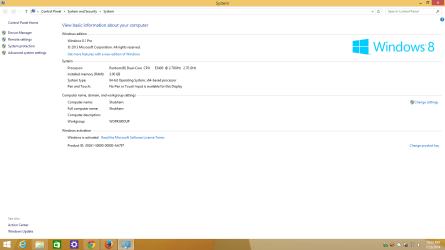
which is better for gaming 32 bit or 64 bit

I think the best thing to do is post a screen shot of your Resource Monitor.
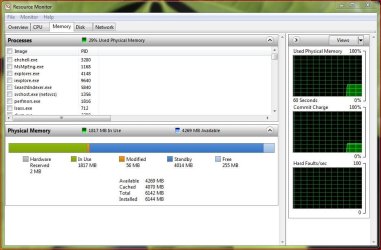
Resource Monitor.JPG

This'll give us a better look into what's going on. Also be aware that you want very little "Free" memory as that says the system isn't utilizing all the available memory.

This article also explains how to read/measure your memory usage: Windows 7 memory usage: What's the best way to measure? | ZDNet

Thanks.
 

My Computer My Computer

At a glance

Windows 10 ProIntel Core i7-4770K (3.5Ghz)32 gig Corsair Dominator Platinum (4x8Gig)Sapphire Tri-X R9 Fury
Computer type
PC/Desktop
Computer Manufacturer/Model Number
Custom built by me.
OS
Windows 10 Pro
CPU
Intel Core i7-4770K (3.5Ghz)
Motherboard
Gigabyte G1 Sniper 5 (F10 Bios)
Memory
32 gig Corsair Dominator Platinum (4x8Gig)
Graphics Card(s)
Sapphire Tri-X R9 Fury
Sound Card
Soundblaster ZXR
Monitor(s) Displays
NEC PA242W 24" LCD Monitor
Screen Resolution
1920 x 1200
Hard Drives
Primary - Samsung 850 Pro (512gig), Samsung 840 Pro (256gig), 2TB WD Caviar Black.
PSU
EVGA Supernova 1000 G2
Case
Cooler Master HAF X
Cooling
Corsair H100i with Corsair Air Series SP120 Quiet Fans
Keyboard
Logitech Wireless Wave
Mouse
Logitech Performance MX
Internet Speed
High Speed Cable
Antivirus
Norton Security
Browser
IE11
Other Info
Memory Timings - 1866MHz @ 9-9-9-27-1T @ 1.5 volts
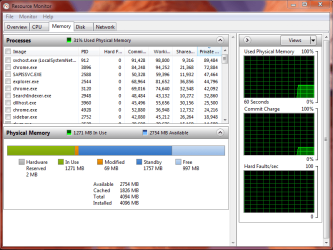
Well .... I have checked from resource monitor that my installed memory -> 4096 mb,Total memory -> 4094 mb,
hardware reserved->2 mb,modified memory ->20 to 22 mb(it fluctuates),but the available memory(standby + free) is initially say 3.3 or 3.4 gb just after booting but after launching any applications (that I mentioned before) it is coming down to 2.57 gb or 2.7 gb or something like that.... & memory in use is showing 1498 mb(+- 5 mb).. i want to know is it normal to have available memory nearly 2.5 gb while i have 4gb of installed memory??

I know, that hardware addressing reduces some the usable RAM found with the System Properties, but 2.5GB very low for 4GB installed, however, 64-bit applications do require more RAM than 32-bit applications if I am correct?
 

My Computer My Computer

Computer type
Laptop
As i don't have cameras so i'm unable to post screen shots but i'm posting the statistics shown under the memory tab after the test was performed with CPU-Z below.....

Type -> DDR2 Channels # -> Dual
Size -> 4096 MBytes DC Mode -> Symmetric

Timings
---------

DRAM Frequency -> 399.5/400 MHz(fluctuating)

FSB:DRAM -> 2:3

CAS# Latency (CL) -> 6.0 clocks

RAS# to CAS# Delay (tRCD) -> 6 clocks

RAS# Precharge(tRP) -> 6 clocks

Cycle Time (tRAS) -> 18 clocks

ROW Refresh Cycle Time(tRFC) -> 52 clocks

Command Rate -> 2T

there were other fields also but as they appeared blank so i didn't include them in this post.

one thing i want to tell you that i've two 2gb ram,one of stronsium & the other one is of Zion..... in different slots...& both of them are 800PC..... but i really don't know why CPU Z reads my memory frequency 400 Mhz.... while i checked it from BIOS as 800MHz....

i don't know what is the reason of this difference.....

please give me proper suggestions.....

thanks...
 

My Computer My Computer

At a glance

Windows 7 Ultimate 64 bitIntel Core 2 Duo E7300 @ 2.66GHz,Wolfdale 45n...4.00 GB Dual-Channel DDR2 @ 400MHz700B (1024x768@85Hz) 1024MB Nvidia GeForce 210
Computer Manufacturer/Model Number
Gigabyte Technology Co., Ltd./ G31M-S2L
OS
Windows 7 Ultimate 64 bit
CPU
Intel Core 2 Duo E7300 @ 2.66GHz,Wolfdale 45nm Technology
Motherboard
Gigabyte Technology Co., Ltd. G31M-S2L
Memory
4.00 GB Dual-Channel DDR2 @ 400MHz
Graphics Card(s)
700B (1024x768@85Hz) 1024MB Nvidia GeForce 210
Monitor(s) Displays
LG 17" display monitor
Screen Resolution
1024 x 768
Hard Drives
250GB Seagate ST250DM000-1BD141 ATA Device (SATA)
Cooling
1 cpu fan
Keyboard
PS/2 compatible Keyboard
Mouse
PS/2 compatible Mouse
As i don't have cameras so i'm unable to post screen shots


one thing i want to tell you that i've two 2gb ram,one of stronsium & the other one is of Zion..... in different slots...& both of them are 800PC..... but i really don't know why CPU Z reads my memory frequency 400 Mhz.... while i checked it from BIOS as 800MHz....

i don't know what is the reason of this difference.....

You don't need a camera to post screen shots.

All you need is the snipping tool in Windows.

The 400/800 thing is normal. You have DDR 2 RAM (double data rate), so you multiply the 400 by 2 to get the 800.
 

My Computer My Computer

At a glance

Windows 7 Home Premium SP1, 64-bitIntel Skylake i5-6600K, not overclocked8 GB HyperX DDR4-2666 (2 x 4 GB)none; graphics are integrated on CPU
Computer type
PC/Desktop
Computer Manufacturer/Model Number
Ignatz Special; 4 speed manual gearbox; factory air conditioning; one of one
OS
Windows 7 Home Premium SP1, 64-bit
CPU
Intel Skylake i5-6600K, not overclocked
Motherboard
AsRock Z170M Extreme 4, micro ATX
Memory
8 GB HyperX DDR4-2666 (2 x 4 GB)
Graphics Card(s)
none; graphics are integrated on CPU
Sound Card
onboard: Realtek ALC1150; external: USB Behringer UF0-202
Monitor(s) Displays
Dell S2340M 23 inch IPS
Screen Resolution
1600 x 900
Hard Drives
System: Crucial MX100 series SSD, 128 GB;
Data: Samsung Spinpoint 103SJ, 1 TB;
Backup: WD Caviar Green WD30EZRX-00D8PB0, 3 TB
PSU
Rosewill SilentNight 500 watt fanless, semi-modular
Case
Antec Solo II
Cooling
Noctua NH-U12S; Noctua F12 intake, Noctua S12A exhaust
Keyboard
Microsoft 200 6JH-00001 USB
Mouse
Dell or Microsoft optical wired; USB
Antivirus
Microsoft Security Essentials and Malwarebytes Premium
Browser
Pale Moon
Other Info
All fans PWM; speeds at idle: CPU circa 500 rpm; intake circa 600 rpm; exhaust circa 600 rpm; CPU temps 27 idle and 47 C load in a warm room (27 C/81 F) when running Intel Extreme Tuning Utility stress test.
I've attached the memory tab after running cpu z with the help of sniping tool....

i'm a student... & i don't know all the features that windows has got....

thanks for the sniping tool.....
 

Attachments

  • Memory Tab.PNG
    Memory Tab.PNG
    20.1 KB · Views: 15

My Computer My Computer

At a glance

Windows 7 Ultimate 64 bitIntel Core 2 Duo E7300 @ 2.66GHz,Wolfdale 45n...4.00 GB Dual-Channel DDR2 @ 400MHz700B (1024x768@85Hz) 1024MB Nvidia GeForce 210
Computer Manufacturer/Model Number
Gigabyte Technology Co., Ltd./ G31M-S2L
OS
Windows 7 Ultimate 64 bit
CPU
Intel Core 2 Duo E7300 @ 2.66GHz,Wolfdale 45nm Technology
Motherboard
Gigabyte Technology Co., Ltd. G31M-S2L
Memory
4.00 GB Dual-Channel DDR2 @ 400MHz
Graphics Card(s)
700B (1024x768@85Hz) 1024MB Nvidia GeForce 210
Monitor(s) Displays
LG 17" display monitor
Screen Resolution
1024 x 768
Hard Drives
250GB Seagate ST250DM000-1BD141 ATA Device (SATA)
Cooling
1 cpu fan
Keyboard
PS/2 compatible Keyboard
Mouse
PS/2 compatible Mouse
and i'm also attaching the descriptions which i found from the Resource Monitor as below
 

Attachments

  • resource monitor memory.PNG
    resource monitor memory.PNG
    32.1 KB · Views: 13

My Computer My Computer

At a glance

Windows 7 Ultimate 64 bitIntel Core 2 Duo E7300 @ 2.66GHz,Wolfdale 45n...4.00 GB Dual-Channel DDR2 @ 400MHz700B (1024x768@85Hz) 1024MB Nvidia GeForce 210
Computer Manufacturer/Model Number
Gigabyte Technology Co., Ltd./ G31M-S2L
OS
Windows 7 Ultimate 64 bit
CPU
Intel Core 2 Duo E7300 @ 2.66GHz,Wolfdale 45nm Technology
Motherboard
Gigabyte Technology Co., Ltd. G31M-S2L
Memory
4.00 GB Dual-Channel DDR2 @ 400MHz
Graphics Card(s)
700B (1024x768@85Hz) 1024MB Nvidia GeForce 210
Monitor(s) Displays
LG 17" display monitor
Screen Resolution
1024 x 768
Hard Drives
250GB Seagate ST250DM000-1BD141 ATA Device (SATA)
Cooling
1 cpu fan
Keyboard
PS/2 compatible Keyboard
Mouse
PS/2 compatible Mouse
I don't see much wrong with either picture.

Here is my Resource Monitor for comparison. I have 4 GB of RAM and am using 1403 MB of that.

On a fresh boot, I have around 800 MB used, if I recall correctly--and around 45 to 50 processes shown in Task Manager.
 

Attachments

  • Untitled-1.jpg
    Untitled-1.jpg
    98.6 KB · Views: 10

My Computer My Computer

At a glance

Windows 7 Home Premium SP1, 64-bitIntel Skylake i5-6600K, not overclocked8 GB HyperX DDR4-2666 (2 x 4 GB)none; graphics are integrated on CPU
Computer type
PC/Desktop
Computer Manufacturer/Model Number
Ignatz Special; 4 speed manual gearbox; factory air conditioning; one of one
OS
Windows 7 Home Premium SP1, 64-bit
CPU
Intel Skylake i5-6600K, not overclocked
Motherboard
AsRock Z170M Extreme 4, micro ATX
Memory
8 GB HyperX DDR4-2666 (2 x 4 GB)
Graphics Card(s)
none; graphics are integrated on CPU
Sound Card
onboard: Realtek ALC1150; external: USB Behringer UF0-202
Monitor(s) Displays
Dell S2340M 23 inch IPS
Screen Resolution
1600 x 900
Hard Drives
System: Crucial MX100 series SSD, 128 GB;
Data: Samsung Spinpoint 103SJ, 1 TB;
Backup: WD Caviar Green WD30EZRX-00D8PB0, 3 TB
PSU
Rosewill SilentNight 500 watt fanless, semi-modular
Case
Antec Solo II
Cooling
Noctua NH-U12S; Noctua F12 intake, Noctua S12A exhaust
Keyboard
Microsoft 200 6JH-00001 USB
Mouse
Dell or Microsoft optical wired; USB
Antivirus
Microsoft Security Essentials and Malwarebytes Premium
Browser
Pale Moon
Other Info
All fans PWM; speeds at idle: CPU circa 500 rpm; intake circa 600 rpm; exhaust circa 600 rpm; CPU temps 27 idle and 47 C load in a warm room (27 C/81 F) when running Intel Extreme Tuning Utility stress test.
There is nothing wrong in both those images. All your memory is there and being used as it should. If anything you may want the system to use a little more RAM since you nearly have 1 gig of "Free" RAM doing nothing. How to make that happen, i'm not sure.

Anyway here's mine, and I have 6gig of RAM installed.....

My Resource Monitor.JPG

Bottom line is there's nothing wrong. The system is using the memory as it sees fit. Again, see this article: http://www.zdnet.com/blog/bott/windows-7-memory-usage-whats-the-best-way-to-measure/1786. It does a pretty good job of explaining how the memory is used.

Good luck.
 

My Computer My Computer

At a glance

Windows 10 ProIntel Core i7-4770K (3.5Ghz)32 gig Corsair Dominator Platinum (4x8Gig)Sapphire Tri-X R9 Fury
Computer type
PC/Desktop
Computer Manufacturer/Model Number
Custom built by me.
OS
Windows 10 Pro
CPU
Intel Core i7-4770K (3.5Ghz)
Motherboard
Gigabyte G1 Sniper 5 (F10 Bios)
Memory
32 gig Corsair Dominator Platinum (4x8Gig)
Graphics Card(s)
Sapphire Tri-X R9 Fury
Sound Card
Soundblaster ZXR
Monitor(s) Displays
NEC PA242W 24" LCD Monitor
Screen Resolution
1920 x 1200
Hard Drives
Primary - Samsung 850 Pro (512gig), Samsung 840 Pro (256gig), 2TB WD Caviar Black.
PSU
EVGA Supernova 1000 G2
Case
Cooler Master HAF X
Cooling
Corsair H100i with Corsair Air Series SP120 Quiet Fans
Keyboard
Logitech Wireless Wave
Mouse
Logitech Performance MX
Internet Speed
High Speed Cable
Antivirus
Norton Security
Browser
IE11
Other Info
Memory Timings - 1866MHz @ 9-9-9-27-1T @ 1.5 volts
I HAD THE SAME PROBLEM I HAVE A 4GB DDR3 MEMORY AND YET MY LAPTOP SHOWS "2.99 GB usable" HOW DO I FIX THIS? I HAVE WINDOWS 7 32 bit.
 

My Computer My Computer

At a glance

Windows 7 Ultimate x324 GB DDR3AMD Radeon HD 6370
Computer type
Laptop
Computer Manufacturer/Model Number
acer
OS
Windows 7 Ultimate x32
Memory
4 GB DDR3
Graphics Card(s)
AMD Radeon HD 6370
Hard Drives
500 GB HDD
Antivirus
Bitfender
I HAD THE SAME PROBLEM I HAVE A 4GB DDR3 MEMORY AND YET MY LAPTOP SHOWS "2.99 GB usable" HOW DO I FIX THIS? I HAVE WINDOWS 7 32 bit.

It would be best if you make a new thread since this is a old thread. Also it will get more people to look at your problem and be able to better solve it since it will be specifically about your issue with your pc.
 

My Computer My Computer

At a glance

Windows 10 64bitAMD Phenom II X4 925 (Deneb)(2.8GHz) OC 3.4GHzCorsair Vengeance DDR3 4GBX2 (8192MB)XFX HD 6870 1GB (OC)- 940MHz core, mem 1150MHz
Computer type
PC/Desktop
Computer Manufacturer/Model Number
custom build
OS
Windows 10 64bit
CPU
AMD Phenom II X4 925 (Deneb)(2.8GHz) OC 3.4GHz
Motherboard
M5A78L-MLX Plus
Memory
Corsair Vengeance DDR3 4GBX2 (8192MB)
Graphics Card(s)
XFX HD 6870 1GB (OC)- 940MHz core, mem 1150MHz
Monitor(s) Displays
Vizio 26' 1920x1080 / Acer 1336x768
Screen Resolution
1920x1080 60Hz /1336x768
Hard Drives
Kingston Digital 60GB SSDNow V300/500gb HDD Western Digital 7200rpm (/WD 160GB HDD 7200rpm
PSU
CORSAIR CX600 600w
Case
AZZA Orion 202 EVO
Cooling
cooler master hyper TX3 cpu cooler
Keyboard
Razer DeathStalker
Mouse
Logitech Optical Gaming Mouse G400
Antivirus
Defualt on win 10
Browser
Firefox
Other Info
cpu is overclocked in bios
I HAD THE SAME PROBLEM I HAVE A 4GB DDR3 MEMORY AND YET MY LAPTOP SHOWS "2.99 GB usable" HOW DO I FIX THIS? I HAVE WINDOWS 7 32 bit.

It would be best if you make a new thread since this is a old thread. Also it will get more people to look at your problem and be able to better solve it since it will be specifically about your issue with your pc.

:ditto:

Please start a new thread, this thread is almost a year old.
 

My Computer My Computer

Computer type
Laptop
what should i use, 32 bit or 64 bit acc. to my specs.
i dont have any graphic cards installed on my system
all i want my pc is for common uses like browsing,office and light gaming :)
 

Attachments

  • Untitled.png
    Untitled.png
    38.1 KB · Views: 5

My Computer My Computer

At a glance

Win 8.1 pro x64 bit3 gb ddr2
Computer type
PC/Desktop
Computer Manufacturer/Model Number
custom build
OS
Win 8.1 pro x64 bit
Memory
3 gb ddr2
Screen Resolution
1600x900
Internet Speed
600 kbits/sec
Browser
google chrome, firefox
As mentioned above, create a new thread for your question. New threads get more attention than old ones.
 

My Computer My Computer

At a glance

Windows 7 Pro 64 bitXeon W35208 GBNvidia Geforce 210
Computer type
PC/Desktop
Computer Manufacturer/Model Number
HP
OS
Windows 7 Pro 64 bit
CPU
Xeon W3520
Memory
8 GB
Graphics Card(s)
Nvidia Geforce 210
Back
Top