Which MBR fix is correct?

markg2

New member
Member
VIP
Local time
7:21 AM
Messages
477
My wife's computer periodically issues 'bootmgr is missing' on boot. I use an Acronis boot disk in those instances to successfully load Windows. Norton comes up clean and so does Malwarbytes. I ran the Norton Eraser in the event there was a rootkit problem and it too came up clean.

Therefore I'm assuming there's something messed up with the MBR.

I've researched repairing the boot loader and found 2 similar but different command prompt commands and wish to get a clarification here before I proceed.

Method 1: Select command prompt from the system recovery options on the OS disk. Type 'bootrec /fixmbr' to restore the master boot record.

Method 2: At the command prompt, successively type each of the following commands followed by a CR:
bootrec /FixMbr
bootrec /FixBoot
bootrec /RebuildBcd

?

Mark
 

My Computer

Computer type
PC/Desktop
OS
Windows 7 & Windows 10

My Computer

Computer type
PC/Desktop
Computer Manufacturer/Model Number
Custom Built
OS
Windows 10 Pro
CPU
AMD Ryzen 5 2400G Processor with Radeon RX Vega 11 Graphics
Motherboard
ASRock X470 Master SLI/AC AM4 AMD Promontory X470 SATA 6Gb/s
Memory
G.SKILL Ripjaws V Series 16GB (2 x 8GB) 288-Pin DDR4 SDRAM D
Graphics Card(s)
2047MB NVIDIA GeForce GTX 1060 6GB (EVGA)
Sound Card
Motherboard Built in
Monitor(s) Displays
Acer R240HY bidx 23.8-Inch IPS HDMI DVI VGA (1920 x 1080) Wi
Screen Resolution
1920 x 1080
Hard Drives
1TB Sandisk SSD PLUS (Main drive)
500 GB Seagate 7200 RPM (Games)
500 GB Western Digital 7200 RPM (Virtual Machines)
PSU
CORSAIR TX Series TX650M 650W 80+ Gold Modular Power Supply
Case
CORSAIR CARBIDE SPEC-02 Mid-Tower Gaming Case, Red LED Fan
Cooling
220mm, two 120mm, and four 60mm fans
Keyboard
Wired Dell keyboard
Mouse
Wireless Logitech mouse
Internet Speed
250mb down, 30mb up
Antivirus
Panda Cloud Antivirus
Browser
Chrome-ish x64
Other Info
Your awesome for reading this.

My Computer

Computer type
PC/Desktop
Computer Manufacturer/Model Number
Own build
OS
Windows 7x64 Home Premium SP1
CPU
Intel i7 2600k
Motherboard
ASUS P8Z68 Deluxe
Memory
G.Skill Ripjaws (DDR3-1600) 2x4GB
Graphics Card(s)
Nvidia GeForce GTS 450; Intel HD Graphics 3000(GT2+)
Monitor(s) Displays
Dell Ultrasharp IPS panel U2311H, Samsung SyncMaster P2350
Screen Resolution
1920x1080
Hard Drives
Samsung 850 Pro SSD 256GB, Samsung SSD 840 120GB, Seagates 1TB Barracuda ST31000528AS x2
PSU
Seasonic M12II 520W
Case
Lian Li Lancool PC-K60
Cooling
Case: 1x120mm, 3x140mm CPU: Hyper 212+
Keyboard
Logitech MK520 (wireless)
Mouse
Logitech MK520
Internet Speed
6-7 Mbps
Antivirus
Norton Security Premium, Malwarebytes on 2 (MSE on 3rd PC)
Browser
FireFox
Other Info
Audio: Logitech Z523 2.1
+ another for Option 2
 

My Computer

Computer type
PC/Desktop
Computer Manufacturer/Model Number
Systems by SmartEyeball
OS
8 Pro x64
CPU
i7 3770K 4.6GHz
Motherboard
ASUS P8Z77 WS
Memory
16GB G.Skill Trident X 2666mhz
Graphics Card(s)
x2 EVGA 780 Ti Superclocked SLI
Sound Card
SB X-FI Surround 5.1 PRO USB / ATH-AD900 Headphones
Monitor(s) Displays
x3 Dell U2410 / 58" Samsung
Screen Resolution
5760*1200/ 1920*1200
Hard Drives
2x Intel 520 240GB (RAID 0) * 2x WD Caviar Blacks 2TB (RAID 0) * 2TB WD Caviar Black * Sony Optirac DVD
PSU
Silverstone Strider Evolution 1200W
Case
Thermaltake Level 10 GT Snow Edition
Cooling
Noctua NH-D14
Keyboard
Topre Realforce // Ducky Shine MX Black // Filco Ninja TKL
Mouse
Thermaltake Theron (Highly Recommended) + Razer Imperator
Antivirus
MSE
Browser
IE, FF, WaterFox
Other Info
GT Extreme V2 Sim Racing Cockpit + 40" LCD and K/B Mouse stand ▼
Fanatec CSR Elite Wheel + Clubsport V1 Pedals + CSR shifter/7G-H ▼Saitek X52 Pro ▼ TrackIR 5 Pro
Buttkicker v2 Seat Rumbler with Dedicated 5.1 and Sub Woofer attached to frame ▼
=
Bloody Big Grin
I followed through Andrew's link and sort of come back to a tangent of my initial question.

Although, practically it may not be, browsing through the screens step by step the procedure conveys a sense of having a ton of steps and a procedure that could (when doing for the first time) could lead to failure by way of user input error.

At the very end of Andrew's link, a screenshot says: "NOTE: If this method fails to restore the MBR, you can try the bootrec command as it is also a tool for repairing the MBR.", which to me, begs a variant of my initial question: WHY go through all of Andrew's steps if all I have to do is simply type:

Method 1: Select command prompt from the system recovery options on the OS disk. Type 'bootrec /fixmbr' to restore the master boot record.

and if that doesn't do the trick... reboot off the DVD and execute ALL 3 of the steps listed below?

Method 2: At the command prompt, successively type each of the following commands followed by a CR:
bootrec /FixMbr
bootrec /FixBoot
bootrec /RebuildBcd

Makes any sense?

Mark
 

My Computer

Computer type
PC/Desktop
OS
Windows 7 & Windows 10
WHY go through all of Andrew's steps if all I have to do is simply type:......
You were given alternate opinions (and links) which you chose to ignore.
 

My Computer

Computer type
PC/Desktop
Computer Manufacturer/Model Number
Own build
OS
Windows 7x64 Home Premium SP1
CPU
Intel i7 2600k
Motherboard
ASUS P8Z68 Deluxe
Memory
G.Skill Ripjaws (DDR3-1600) 2x4GB
Graphics Card(s)
Nvidia GeForce GTS 450; Intel HD Graphics 3000(GT2+)
Monitor(s) Displays
Dell Ultrasharp IPS panel U2311H, Samsung SyncMaster P2350
Screen Resolution
1920x1080
Hard Drives
Samsung 850 Pro SSD 256GB, Samsung SSD 840 120GB, Seagates 1TB Barracuda ST31000528AS x2
PSU
Seasonic M12II 520W
Case
Lian Li Lancool PC-K60
Cooling
Case: 1x120mm, 3x140mm CPU: Hyper 212+
Keyboard
Logitech MK520 (wireless)
Mouse
Logitech MK520
Internet Speed
6-7 Mbps
Antivirus
Norton Security Premium, Malwarebytes on 2 (MSE on 3rd PC)
Browser
FireFox
Other Info
Audio: Logitech Z523 2.1

My Computer

Computer Manufacturer/Model Number
HP, Dell, Gateway, Toshiba - 4 laptops and 2 desktops
OS
Vista, Windows7, Mint Mate, Zorin, Windows 8
CPU
from 1.6GHz Duo to i7
Monitor(s) Displays
2x HP w2207
Hard Drives
5x HDD, 7x SSD, 12x Externals
Keyboard
with trackball - no mices
Mouse
Trackball mice
Internet Speed
DSL 6000
Startup repair is another option but takes longer and isn't solely focused on fixing the boot chain - Bootrec is. I haven't had a problem with Bootrec but wouldn't reject startup repair. I have had startup repair hang on me.
Now you have another option.
 

My Computer

Computer type
PC/Desktop
Computer Manufacturer/Model Number
Own build
OS
Windows 7x64 Home Premium SP1
CPU
Intel i7 2600k
Motherboard
ASUS P8Z68 Deluxe
Memory
G.Skill Ripjaws (DDR3-1600) 2x4GB
Graphics Card(s)
Nvidia GeForce GTS 450; Intel HD Graphics 3000(GT2+)
Monitor(s) Displays
Dell Ultrasharp IPS panel U2311H, Samsung SyncMaster P2350
Screen Resolution
1920x1080
Hard Drives
Samsung 850 Pro SSD 256GB, Samsung SSD 840 120GB, Seagates 1TB Barracuda ST31000528AS x2
PSU
Seasonic M12II 520W
Case
Lian Li Lancool PC-K60
Cooling
Case: 1x120mm, 3x140mm CPU: Hyper 212+
Keyboard
Logitech MK520 (wireless)
Mouse
Logitech MK520
Internet Speed
6-7 Mbps
Antivirus
Norton Security Premium, Malwarebytes on 2 (MSE on 3rd PC)
Browser
FireFox
Other Info
Audio: Logitech Z523 2.1
Results:

bootrec /FixMbr-->Operation completed successfully
bootrec /FixBoot-->Operation completed successfully

bootrec /RebuildBcd-->Total identified Windows installation=0, Operation completed successfully

How can the operation be successful if there was no Windows installation found????
 

My Computer

Computer type
PC/Desktop
OS
Windows 7 & Windows 10
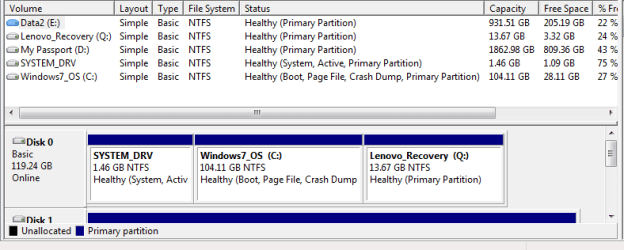
Post a disk management screenshot.
(You need an active partition)

I also refer you to
http://support.microsoft.com/kb/927392
in particular

"If rebuilding the BCD store doesn't resolve the startup issue, you can export and delete the BCD store and then run this option again. By doing this, you make sure that the BCD store is completely rebuilt.

To do this, type the following commands at the Windows RE command prompt:
  • bcdedit /export C:\BCD_Backup
  • c:
  • cd boot
  • attrib bcd -s -h -r
  • ren c:\boot\bcd bcd.old
  • bootrec /RebuildBcd
"
 
Last edited:

My Computer

Computer type
PC/Desktop
Computer Manufacturer/Model Number
Own build
OS
Windows 7x64 Home Premium SP1
CPU
Intel i7 2600k
Motherboard
ASUS P8Z68 Deluxe
Memory
G.Skill Ripjaws (DDR3-1600) 2x4GB
Graphics Card(s)
Nvidia GeForce GTS 450; Intel HD Graphics 3000(GT2+)
Monitor(s) Displays
Dell Ultrasharp IPS panel U2311H, Samsung SyncMaster P2350
Screen Resolution
1920x1080
Hard Drives
Samsung 850 Pro SSD 256GB, Samsung SSD 840 120GB, Seagates 1TB Barracuda ST31000528AS x2
PSU
Seasonic M12II 520W
Case
Lian Li Lancool PC-K60
Cooling
Case: 1x120mm, 3x140mm CPU: Hyper 212+
Keyboard
Logitech MK520 (wireless)
Mouse
Logitech MK520
Internet Speed
6-7 Mbps
Antivirus
Norton Security Premium, Malwarebytes on 2 (MSE on 3rd PC)
Browser
FireFox
Other Info
Audio: Logitech Z523 2.1
To clarify--

I'm inclined to believe that I fixed whatever problem lurked within the MBR. The problem that she was experiencing was a 'random' boot load failure. The boot stop seemed to be associated with a more 'energetic' boot typically after a raft of updates. I've now updated her machine 3 times post my MBR attempted fix and all with required boots and all attempts have booted just fine to this point. That is not to infer the problem is no more. The only sure fire way of confirming that is more time and more boots.

Yesterday, at the time of repairing her MBR, since I did not run the switch /scanos and she clearly has an active (C) partition (attachment), I remained confused why the switch /RebuildBcd unsolicitously returned (in addition to a successful result) "Total identified Windows installation=0"
 

Attachments

  • Connie_Disk.PNG
    Connie_Disk.PNG
    11.6 KB · Views: 2

My Computer

Computer type
PC/Desktop
OS
Windows 7 & Windows 10
T I remained confused why the switch /RebuildBcd unsolicitously returned (in addition to a successful result) "Total identified Windows installation=0"
This is reported by others and I admit it is a confusing message. My guess was that the BCD had an entry for a Windows "Winload.exe" but that this was wrong and you had to delete the BCD before rebuilding. This is described at the end of the MS guidance I referred you to. However, the PC is booting so I am also a little confused would hope
bootrec /scanos
would identify an OS.

Aside:
I don't know specifically about Lenova but the SYSTEM_DRV looks a little odd to me in that it has a lot of free space.
 

My Computer

Computer type
PC/Desktop
Computer Manufacturer/Model Number
Own build
OS
Windows 7x64 Home Premium SP1
CPU
Intel i7 2600k
Motherboard
ASUS P8Z68 Deluxe
Memory
G.Skill Ripjaws (DDR3-1600) 2x4GB
Graphics Card(s)
Nvidia GeForce GTS 450; Intel HD Graphics 3000(GT2+)
Monitor(s) Displays
Dell Ultrasharp IPS panel U2311H, Samsung SyncMaster P2350
Screen Resolution
1920x1080
Hard Drives
Samsung 850 Pro SSD 256GB, Samsung SSD 840 120GB, Seagates 1TB Barracuda ST31000528AS x2
PSU
Seasonic M12II 520W
Case
Lian Li Lancool PC-K60
Cooling
Case: 1x120mm, 3x140mm CPU: Hyper 212+
Keyboard
Logitech MK520 (wireless)
Mouse
Logitech MK520
Internet Speed
6-7 Mbps
Antivirus
Norton Security Premium, Malwarebytes on 2 (MSE on 3rd PC)
Browser
FireFox
Other Info
Audio: Logitech Z523 2.1
The Bootrec /scanos reports essentially the same information as did bootrec /RebuildBcd: Total identified Windows installation=0, Operation completed successfully.

It's possible that the clue to this mess is the automatic scan screen that occurs just before the repair screen listing one's action options.

The result was of that automatic scan:

Operating system Partition size Location
Windows 106603 E<----patently wrong

Somehow the diagnostic is seeing the active partition as E whereas it's clearly C (re: my disk management post earlier in the thread).

The E drive is my wife's 2 of 2 physical data only drive (a third data only, D, is attached externally using USB)

I have no clue as to how the repair disk finds the active disk to be on one drive and the loaded OS vis a vie disk management finds the active disk to be totally different.

FWIW, the active drive C is an SSD.

Mark
 

My Computer

Computer type
PC/Desktop
OS
Windows 7 & Windows 10
Back
Top