Which windows uses the most RAM?

Raymond

New member
Local time
6:47 AM
Messages
45
Location
Venus
The title says it all.

Which windows uses the most RAM and CPU?

Windows XP or Windows 7? Which one of those uses more RAM?

Discuss.
 

My Computer

Computer Manufacturer/Model Number
ML3108b
OS
Windows 7
CPU
AMD Sempron 1.8 Ghz
Motherboard
AMD
Memory
1GB
Graphics Card(s)
Nvidea Geforce go 6100
Sound Card
Realtek
Monitor(s) Displays
Nvidea GeForce go 6100
Hard Drives
40GB
vista uses the most.

win 7 uses more because of superfetch, so all unused ram it utilized to speed up the system whereever it can. But dont worry, when you need the ram, it will free some up for you

unused ram = pointless. So win 7 takes advantage of it
 

My Computer

OS
Windows 6 Professional 64bit
Basically Windows 7 uses more RAM?

I checked out the usuage and its pretty high. Maybe Windows XP is good in RAM after all?
 

My Computer

Computer Manufacturer/Model Number
ML3108b
OS
Windows 7
CPU
AMD Sempron 1.8 Ghz
Motherboard
AMD
Memory
1GB
Graphics Card(s)
Nvidea Geforce go 6100
Sound Card
Realtek
Monitor(s) Displays
Nvidea GeForce go 6100
Hard Drives
40GB
Basically Windows 7 uses more RAM?

I checked out the usuage and its pretty high. Maybe Windows XP is good in RAM after all?

Yes, the Win7 kernel uses more RAM by default than all other Windows OSes.
Windows XP is probably the best performing operating system.
 

My Computer

Computer type
PC/Desktop
OS
Windows 8 Pro x64
CPU
i7 3820 @ 4.68GHz
Motherboard
ASUS Rampage IV Extreme RoG BF3
Memory
F3-12800CL9D-8GBXL (32GB)
Graphics Card(s)
GTX 480 SLI
Sound Card
Auzentech X-Fi HomeTheater HD
Monitor(s) Displays
Sony 32V5500
Screen Resolution
1920 x 1080
Hard Drives
LSI MR9260-4i (RAID10):
Toshiba DT01ACA300 x 4
iaStorA:
OCZ Vertex Enterprise 120GB
ST3500320AS 500GB
Intel 520 Series 120GB
PSU
OCZ ZX 1250W
Case
HAF X
Cooling
H80
Keyboard
Cyborg V.7
Mouse
Razer Lachesis 3.5G 5600dpi
Internet Speed
23296kbps ds / 812kbps us ADSL2+
Browser
Mozilla/5.0 (Windows NT 6.3; Win64; x64; rv:32.0) Gecko/2010
Other Info
AverMedia C127 Game Broadcaster HD
Question should be "Which Windows makes the most use of RAM?".
 

My Computer

OS
Windows 7 64
CPU
AMD Phenom II X4 Black Edition 940
Motherboard
Gigabyte GA-MA790X-UD3P
Memory
8 GB
Graphics Card(s)
Nvidia 8800GTS
Monitor(s) Displays
Benq G2420HDBL
Screen Resolution
1920x1080
Case
Lian-Li
Internet Speed
10/10 mb/s
The thing is Windows XP can be customized like Windows 7 and uses lesser RAM. ;)
 

My Computer

Computer Manufacturer/Model Number
ML3108b
OS
Windows 7
CPU
AMD Sempron 1.8 Ghz
Motherboard
AMD
Memory
1GB
Graphics Card(s)
Nvidea Geforce go 6100
Sound Card
Realtek
Monitor(s) Displays
Nvidea GeForce go 6100
Hard Drives
40GB
win7 decides for you

winxp lets you decide
 

My Computer

Computer type
PC/Desktop
Computer Manufacturer/Model Number
diy
OS
Win7 pro x64
CPU
stock i7 7700k
Motherboard
Gigabyte Z270N-WIFI mini-ITX
Memory
Corsair Vengeance LPX 16GB (2x8GB) DDR4 @ 3200MHz
Graphics Card(s)
integrated Intel HD 630
Sound Card
onboard Realtek ALC1220
Monitor(s) Displays
two vertically mounted samsung 55" 4k un55mu8000
Screen Resolution
1920x1280
Hard Drives
256GB Samsung EVO 960 M.2 pci-e NVMe SSD
PSU
SilverStone Nightjar ST45NF 450Watt Fanless
Case
No case. Motherboard is mounted directly onto power supply
Cooling
Evercool low profile 815EP with Panaflow 12L fan at 7v
Keyboard
Ortek MCK-86 mini
Mouse
Belkin 5-button USB
Internet Speed
spectrum 400mbps
Basically Windows 7 uses more RAM?

I checked out the usuage and its pretty high. Maybe Windows XP is good in RAM after all?

Windows 7 more efficiently makes use of RAM...that's an accurate way of stating it.

With Windows XP, the machine didn't cache things into RAM, it just left it wide open and it showed as free. And people were aware of how much free RAM they had and made efforts to try to maximize the amount of free RAM to ensure that apps ran the best they could and had the ram when they needed it.

Modern operating systems like Linux and Windows Vista/7 don't just leave RAM lying around unused. Instead, they keep as much in RAM as possible since RAM is the fastest way to get data. It's always faster to pull from RAM then your hard drive....even if you have an SSD drive.

Why have 8GB of RAM and ensure that 6GB of RAM is free? That doesn't make any sense. If you have 8GB, why not use 8GB.

And when an application needs to have RAM to run properly, Windows just writes over anything that was cached in RAM.....this isn't a performance hit to your user experience.

The thing is Windows XP can be customized like Windows 7 and uses lesser RAM. ;)
And Windows XP is now 8 years old, has fewer features, has less eye candy options, etc. I mean, Windows 3.1 took even less RAM then Windows XP....but people aren't still using it.

At the end of the day, RAM is plentiful and cheap. It's one thing that people generally tend to simply overbuy simply for the sake of having extra because it is cheap.
 

My Computer

Computer Manufacturer/Model Number
Self-Built in July 2009
OS
Windows 7 Ultimate x64
CPU
Intel Q9550 2.83Ghz OC'd to 3.40Ghz
Motherboard
Gigabyte GA-EP45-UD3R rev. 1.1, F12 BIOS
Memory
8GB G.Skill PI DDR2-800, 4-4-4-12 timings
Graphics Card(s)
EVGA 1280MB Nvidia GeForce GTX570
Sound Card
Realtek ALC899A 8 channel onboard audio
Monitor(s) Displays
23" Acer x233H
Screen Resolution
1920x1080
Hard Drives
Intel X25-M 80GB Gen 2 SSD
Western Digital 1TB Caviar Black, 32MB cache. WD1001FALS
PSU
Corsair 620HX modular
Case
Antec P182
Cooling
stock
Keyboard
ABS M1 Mechanical
Mouse
Logitech G9 Laser Mouse
Internet Speed
15/2 cable modem
Other Info
Windows and Linux enthusiast. Logitech G35 Headset.
Windows XP isnt really old. Many companies and etc still use it. Even vista ;)

Everything what gets released windows XP is supported.
 

My Computer

Computer Manufacturer/Model Number
ML3108b
OS
Windows 7
CPU
AMD Sempron 1.8 Ghz
Motherboard
AMD
Memory
1GB
Graphics Card(s)
Nvidea Geforce go 6100
Sound Card
Realtek
Monitor(s) Displays
Nvidea GeForce go 6100
Hard Drives
40GB
The title says it all.

Which windows uses the most RAM and CPU?

Windows XP or Windows 7? Which one of those uses more RAM?

Discuss.


The OP did not ask about Vista so no idea why you said that.

XP wastes Memory, it sits and does nothing.

Vista and Win 7 cache unused Memory (not the same as the Actual Memory usage you will see in a Gadget Meter or Task Manager), this preloads your most used Programs/Apps so they open faster.

If you start up a Game/App that need Memory they both let go of it immediately to run that Game/App.

Windows XP uses less Memory is stupid, it is a waste of time sitting there doing nothing when it can be used.

Also something above about XP and support, hate to tell you but as from April 2009 XP is no longer supported by MS its basically dead and will only get Critical Updates.
 
Last edited:

My Computer

OS
Vista (Hate Win 7)
If computers are roads, MS keeps helping itself to not only more space, but an increasing percentage of available space. Some call that progress, others do not. MS has many reasons why it is better that they use that space and give you the user a decreasing role in managing that space, or even having the ability to manage it. In this way MS looks at the world as a group of people who will never get very good at managing their computer, and as people who never learned to drive (85% of people never defrag a hard drive), just need the MS bus to come and pick them up and take them where they are going. It will only be a short wait, nothing you should complain about.

But if you like to drive, you may have cynicism about MS' tendency to take away your pedals and levers.

The primary point of car responsiveness is the engine responding to the gas pedal. MS puts so much in the trunk of each new version that despite the engine being faster, the car seems just a little sluggish, which irritates drivers but does not matter to people on a bus. Many argue as to the value of those things in the trunk, but the fact that we cannot remove them is absurd, though blackviper helps us try. But try as we might the basic tasks like explorer, network browsing, file searching, mail, whatever, have a tendency to slow down.

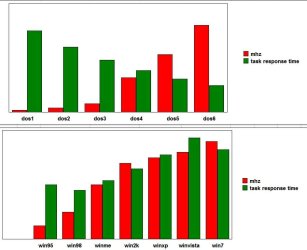
The arbitrary chart below shows how as we moved through DOS versions, DOS took a DECREASING amount of resource from the system (through relocating some of itself above 640k), and imposed a relatively unchanging overhead to the hardware, which meant that it got FASTER to us the users. But windows has done the opposite, and each new version has points of sluggishness when compared to the previous version, even on faster hardware. DOS users kept getting happier with each version, but MS is increasingly taking away our ferrari by loading down the trunk with stuff we cannot remove.

 

Attachments

  • 000017.jpg
    000017.jpg
    45.1 KB · Views: 51

My Computer

Computer type
PC/Desktop
Computer Manufacturer/Model Number
diy
OS
Win7 pro x64
CPU
stock i7 7700k
Motherboard
Gigabyte Z270N-WIFI mini-ITX
Memory
Corsair Vengeance LPX 16GB (2x8GB) DDR4 @ 3200MHz
Graphics Card(s)
integrated Intel HD 630
Sound Card
onboard Realtek ALC1220
Monitor(s) Displays
two vertically mounted samsung 55" 4k un55mu8000
Screen Resolution
1920x1280
Hard Drives
256GB Samsung EVO 960 M.2 pci-e NVMe SSD
PSU
SilverStone Nightjar ST45NF 450Watt Fanless
Case
No case. Motherboard is mounted directly onto power supply
Cooling
Evercool low profile 815EP with Panaflow 12L fan at 7v
Keyboard
Ortek MCK-86 mini
Mouse
Belkin 5-button USB
Internet Speed
spectrum 400mbps
Windows XP isnt really old. Many companies and etc still use it. Even vista ;)
XP was released on August 24, 2001. That makes it over 8 years old. In the computer world....that is really darn old. I'm not using any of the software that I had 8 years ago, I'm not using the same computer that I used from 8 years ago. I'm not using the same monitor, mouse or keyboard that I used 8 years ago.

Just because businesses and people are still using it, doesn't mean that it isn't old. I'm pretty sure that anybody at MS would have liked to have seen every single desktop go to Vista and then every single desktop go to Windows 7.
 

My Computer

Computer Manufacturer/Model Number
Self-Built in July 2009
OS
Windows 7 Ultimate x64
CPU
Intel Q9550 2.83Ghz OC'd to 3.40Ghz
Motherboard
Gigabyte GA-EP45-UD3R rev. 1.1, F12 BIOS
Memory
8GB G.Skill PI DDR2-800, 4-4-4-12 timings
Graphics Card(s)
EVGA 1280MB Nvidia GeForce GTX570
Sound Card
Realtek ALC899A 8 channel onboard audio
Monitor(s) Displays
23" Acer x233H
Screen Resolution
1920x1080
Hard Drives
Intel X25-M 80GB Gen 2 SSD
Western Digital 1TB Caviar Black, 32MB cache. WD1001FALS
PSU
Corsair 620HX modular
Case
Antec P182
Cooling
stock
Keyboard
ABS M1 Mechanical
Mouse
Logitech G9 Laser Mouse
Internet Speed
15/2 cable modem
Other Info
Windows and Linux enthusiast. Logitech G35 Headset.
Back when Windows XP first came out, the average computer probably had 512 MB of RAM.

When Windows 7 came out, the average PC has 2-4 GB of RAM.

Any smart OS developer would take advantage of the extra resources. Not utilizing it would be silly.
 

My Computer

Computer Manufacturer/Model Number
Custom
OS
Windows 7 Home Premium 64
CPU
Core i7 870 2.93 GHz
Motherboard
Gigabyte P55A-UD3
Memory
16 GB G-Skills DDR3 1333
Graphics Card(s)
ASUS GTX 680 DirectCu-II Top
Sound Card
Realtek 5.1 audio
Monitor(s) Displays
Samsung 23" widescreen
Screen Resolution
2048x1152
Hard Drives
OCZ Vertex III 128 GB (primary)
OCZ Vertex II 128 GB (data)
PSU
Corsair 650W
Case
CoolerMaster HAF 920
Cooling
Arctic Cooling Freezer 7 Pro
Keyboard
DAS Model S Ultimate keyboard
Mouse
Logitech G5 gaming mouse
Internet Speed
Cable
Browser
Chrome
Other Info
Built in December 2010
I rather go with Windows XP now. You can get brilliant themes and gadets on there aswell.
 

My Computer

Computer Manufacturer/Model Number
ML3108b
OS
Windows 7
CPU
AMD Sempron 1.8 Ghz
Motherboard
AMD
Memory
1GB
Graphics Card(s)
Nvidea Geforce go 6100
Sound Card
Realtek
Monitor(s) Displays
Nvidea GeForce go 6100
Hard Drives
40GB
And it will run like the crap the more bloat you add to it as it cannot mange Memory as Vista and Win 7 do.

XP was good in its day but its like a kids Fisherprice look now and a dinosaur.

Any good modern hardware should be on Vista or Win 7 64bit OS to get the most out of it.
 

My Computer

OS
Vista (Hate Win 7)
I rather go with Windows XP now. You can get brilliant themes and gadets on there aswell.
Nothing wrong with that. It is your choice.
 

My Computer

Computer Manufacturer/Model Number
Self-Built in July 2009
OS
Windows 7 Ultimate x64
CPU
Intel Q9550 2.83Ghz OC'd to 3.40Ghz
Motherboard
Gigabyte GA-EP45-UD3R rev. 1.1, F12 BIOS
Memory
8GB G.Skill PI DDR2-800, 4-4-4-12 timings
Graphics Card(s)
EVGA 1280MB Nvidia GeForce GTX570
Sound Card
Realtek ALC899A 8 channel onboard audio
Monitor(s) Displays
23" Acer x233H
Screen Resolution
1920x1080
Hard Drives
Intel X25-M 80GB Gen 2 SSD
Western Digital 1TB Caviar Black, 32MB cache. WD1001FALS
PSU
Corsair 620HX modular
Case
Antec P182
Cooling
stock
Keyboard
ABS M1 Mechanical
Mouse
Logitech G9 Laser Mouse
Internet Speed
15/2 cable modem
Other Info
Windows and Linux enthusiast. Logitech G35 Headset.
I agree XP is better for the lower end systems that won't be pumping power to 2 or more gigs of RAM. If Windows 7 uses more than half a gig on just standard services then you won't be able to use supportable older systems that tend to peak out at 1G of RAM capacity. My company is looking into upgrading to 7 but we still have MoBo's in the I800 series that are still using 400MHz RAM. That which are lucky if we can hunt down a full gig for them to have. I understand that "hey it will utilize it better for me and manage my overhead" but whats it matter if the standard OS services swallow all of it up before any applications are running.

I like the idea of Windows7 in a nice new beef box, but to me it's another way of forcing small companies to spend money on all new systems and operating systems, not to mention applications that are compatible. And by the way throw all your old software to the poor because it's only able to be fully utilized by the stoneage Xp users. :)
 

My Computer

OS
All of them
...but whats it matter if the standard OS services swallow all of it up before any applications are running....

Those standard OS services give up any resource they have INSTANTLY without question to any application that requires it. Third-party stuff....now that is what you must watch out for.
 

My Computer

Computer type
PC/Desktop
Computer Manufacturer/Model Number
Alienware Aurora ALX R4
OS
Windows 10 Pro (x64)
CPU
Intel Core i7-3930K (3.2GHz - 4.5GHz)
Motherboard
Alienware Aurora-R4 x79
Memory
4x Samsung 4GB PC3-12800 DDR3 (16GB 1600MHz)
Graphics Card(s)
Nvidia Geforce GTX 690
Sound Card
SteelSeries Siberia Elite
Monitor(s) Displays
Dell UltraSharp U3011
Screen Resolution
2560x1600
Hard Drives
Samsung 850 Pro 256 GB, Seagate 1TB Desktop Hybrid HDD, 2x Western Digital 4TB Green HDD
PSU
875W Some Dell PSU <.<
Case
Alienware Aurora ALX
Cooling
Custom Liquid Cooling (EK CPU & GPU blocks) dual EK 480RAD
Keyboard
Logitech G710+ Mechanical
Mouse
Logitech G700s
Internet Speed
Verizon Fios (50 mbps average)
Other Info
Server: Intel NUC D54250WYK: i5-4250U, 16GB, 256 GB mSATA, Windows Server 2012 R2
Back home I have an old machine: 1GB RAM, 1.7 GHz Celeron CPU and x1500 series ATI Radeon 256MB video. It's on XP now. Should I consider upgrading it to Windows 7? It's mainly used (not by me) for browsing and games, or at least the once that can run on it.
 

My Computer

Computer Manufacturer/Model Number
Dell Vostro 1700
OS
Windows 7 Ultimate x64
CPU
Intel Core2Duo T9300 @2.5 GHz, 6 MB L2 cache
Motherboard
Dell
Memory
2x2048 DDR2 800 MHz
Graphics Card(s)
nVidia GeForce 8600M GT 256 MB DDR2
Screen Resolution
1440x900
Hard Drives
Samsung 470 Series 128GB SSD;
Western Digital Scorpio 250GB SATA 5400RPM 8 MB Cache
Back
Top