
Why can't I format this partition???

t4akawolf

Banned
Local time
2:17 PM
Messages
72
Location
Visakhapatnam, India
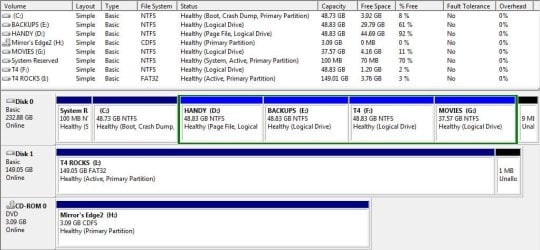
OK, I recently emptied my D:Drive but noticed that there is still used space of 4GB on that drive. So I tried to format it but got an error saying 'This drive is in use. Another program or process is using this drive. Do you want to format it anyway?'

I clicked Yes and then I got error saying 'Windows cannot format this drive. Quit any disk utilities or other programs that are using this drive, and make sure that no window is displaying the contents of the drive. Then try formatting again.'

I clicked OK, followed the instructions, tried formatting again and got the same error again. I've tried restarting my PC and also disconnecting/reconnecting my HDD. I also don't have a boot disc (or anything similar) so I can't format from BIOS (or whatever)

Btw, I have Win7x64 installed on C:Drive and have 4 partitions left (D:, E:, F:, G:).

So my questions are:-

1. What exactly is using up 4GB of my hard disk space?

2. Is the missing 4GB the reason I can't format that partition?

3. Why is my pinky finger longer than my thumb?


P.S.: I've attached a Snip of my Disk Manager.
 

Attachments
  • Capture.JPG
    Capture.JPG
    85.1 KB · Views: 386

My Computer My Computer

Computer Manufacturer/Model Number
Intel DG31PR
OS
Windows 7 Ultimate x32 (UPDATE: Now x64!)
CPU
Intel(R) Core(TM)2 Duo CPU - E4600 @ 2.40GHz (2CPUs)
Motherboard
Intel DG31PR
Memory
4096 RAM
Graphics Card(s)
ATI Radeon HD 4350 1GB DDR2
Sound Card
In-built
Monitor(s) Displays
Generic Pnp Monitor 1024x768 (32 bit) (85Hz)
Screen Resolution
1024x768
Hard Drives
[s]250GB HDD[/s] 1TB HDD + 150GB Ext + 4GB PD
PSU
450W
Case
Uhm, a normal one I guess
Cooling
No cooling thingamabobs installed
Keyboard
MS Standard PS/2 Keyboard
Mouse
MS HID Compliant Mouse
Internet Speed
256Kbps-768Kbps
Other Info
Creative 2.1 Speakers
OK, I recently emptied my D:Drive but noticed that there is still used space of 4GB on that drive. So I tried to format it but got an error saying 'This drive is in use. Another program or process is using this drive. Do you want to format it anyway?'

I clicked Yes and then I got error saying 'Windows cannot format this drive. Quit any disk utilities or other programs that are using this drive, and make sure that no window is displaying the contents of the drive. Then try formatting again.'

I clicked OK, followed the instructions, tried formatting again and got the same error again. I've tried restarting my PC and also disconnecting/reconnecting my HDD. I also don't have a boot disc (or anything similar) so I can't format from BIOS (or whatever)

Btw, I have Win7x64 installed on C:Drive and have 4 partitions left (D:, E:, F:, G:).

So my questions are:-

1. What exactly is using up 4GB of my hard disk space?

2. Is the missing 4GB the reason I can't format that partition?

3. Why is my pinky finger longer than my thumb?


P.S.: I've attached a Snip of my Disk Manager.


One your page file is there and in use.

two if you safe boot (F8) you will be able to
 

My Computer My Computer

Computer Manufacturer/Model Number
HP Pavillion dv-7 1005 Tx
OS
Win 8 Release candidate 8400
CPU
[email protected]
Memory
4 gigs
Graphics Card(s)
Nvidia 9600M
Sound Card
HD built-in
Monitor(s) Displays
17" Wxga
Screen Resolution
1440x900
Cooling
none
Internet Speed
45Mb down 5Mb up
If you really succeed to format it in safe mode, make sure you create a new page file - or move your page file to C before you start.
 

My Computer My Computer

Computer Manufacturer/Model Number
HP, Dell, Gateway, Toshiba - 4 laptops and 2 desktops
OS
Vista, Windows7, Mint Mate, Zorin, Windows 8
CPU
from 1.6GHz Duo to i7
Monitor(s) Displays
2x HP w2207
Hard Drives
5x HDD, 7x SSD, 12x Externals
Keyboard
with trackball - no mices
Mouse
Trackball mice
Internet Speed
DSL 6000
1. Hmm, why can't I see this 'Page File'? What's it for?
2. How do I move it if I can't see it (tried the 'Show Hidden Files' thing) ?
3. How do I create one?
4. Why is my pinky finger longer than my thumb??????
 

My Computer My Computer

Computer Manufacturer/Model Number
Intel DG31PR
OS
Windows 7 Ultimate x32 (UPDATE: Now x64!)
CPU
Intel(R) Core(TM)2 Duo CPU - E4600 @ 2.40GHz (2CPUs)
Motherboard
Intel DG31PR
Memory
4096 RAM
Graphics Card(s)
ATI Radeon HD 4350 1GB DDR2
Sound Card
In-built
Monitor(s) Displays
Generic Pnp Monitor 1024x768 (32 bit) (85Hz)
Screen Resolution
1024x768
Hard Drives
[s]250GB HDD[/s] 1TB HDD + 150GB Ext + 4GB PD
PSU
450W
Case
Uhm, a normal one I guess
Cooling
No cooling thingamabobs installed
Keyboard
MS Standard PS/2 Keyboard
Mouse
MS HID Compliant Mouse
Internet Speed
256Kbps-768Kbps
Other Info
Creative 2.1 Speakers
Go to Start > Help and Support and paste this into the search field:

Change the size of virtual memory

That will explain all your questions.
 

My Computer My Computer

Computer Manufacturer/Model Number
HP, Dell, Gateway, Toshiba - 4 laptops and 2 desktops
OS
Vista, Windows7, Mint Mate, Zorin, Windows 8
CPU
from 1.6GHz Duo to i7
Monitor(s) Displays
2x HP w2207
Hard Drives
5x HDD, 7x SSD, 12x Externals
Keyboard
with trackball - no mices
Mouse
Trackball mice
Internet Speed
DSL 6000
Go to Start > Help and Support and paste this into the search field:

Change the size of virtual memory

That will explain all your questions.

Thanks a lot!!! That DID explain everything!!!

It says 4092 MB is allotted for Virtual Memory on that drive but it also says 6138 is recommended...should I allot that much space for VM?

And how do I ... nvm, figured it out.

Anyhow, I'm gonna set another drive as the host for virtual memory and then format this one.

Thanks a lot for your help! I wish I could rep you twice lol :D
 

My Computer My Computer

Computer Manufacturer/Model Number
Intel DG31PR
OS
Windows 7 Ultimate x32 (UPDATE: Now x64!)
CPU
Intel(R) Core(TM)2 Duo CPU - E4600 @ 2.40GHz (2CPUs)
Motherboard
Intel DG31PR
Memory
4096 RAM
Graphics Card(s)
ATI Radeon HD 4350 1GB DDR2
Sound Card
In-built
Monitor(s) Displays
Generic Pnp Monitor 1024x768 (32 bit) (85Hz)
Screen Resolution
1024x768
Hard Drives
[s]250GB HDD[/s] 1TB HDD + 150GB Ext + 4GB PD
PSU
450W
Case
Uhm, a normal one I guess
Cooling
No cooling thingamabobs installed
Keyboard
MS Standard PS/2 Keyboard
Mouse
MS HID Compliant Mouse
Internet Speed
256Kbps-768Kbps
Other Info
Creative 2.1 Speakers
Did you suck you thumb as a child? If you did it probably stunted its growth. You now have ALL the answers.

Jim :geek:
 

My Computer My Computer

Computer type
PC/Desktop
Computer Manufacturer/Model Number
Home Built
OS
Windows 8.1 Pro w/Media Center 64bit, Windows 7 HP 64bit
CPU
Phenom II X6 1100T
Motherboard
ASUS M5A99X EVO
Memory
Crucial Balistic 8gb DDR3-1866 CL9
Graphics Card(s)
MSI R6850 Cyclone IGD5 PE
Sound Card
On Board
Monitor(s) Displays
ASUS VE258Q 25" LED with DVI-HDMI-DisplayPort
Screen Resolution
1920 x 1080
Hard Drives
Two WD Cavier Black 2TB Sata III, WD My Book Essential 2TB USB 3.0
PSU
Seasonic X650 80 Plus GOLD Modular
Case
Corsair 400R
Cooling
Antec Kuhler H2O 620, Two 120mm and four 140mm
Keyboard
Logitech K120
Mouse
Logitech Marble Mouse USB, Logitech Precision Game Pad
Internet Speed
15MB
Antivirus
Norton IS 2013, Malwarebytes Pro Beta 2
Browser
IE-11, FF-27
Other Info
APC UPS ES 750, Netgear WNR3500L Gigabit & Wireless N Router with SamKnows Test Program, Motorola SB6120 Gigabit Cable Modem. Brother HL-2170W Laser Printer, Epson V300 Scanner
Did you suck you thumb as a child? If you did it probably stunted its growth. You now have ALL the answers.

Jim :geek:

Haha, that's most probably true XD. Thanks for answering...:D
 

My Computer My Computer

Computer Manufacturer/Model Number
Intel DG31PR
OS
Windows 7 Ultimate x32 (UPDATE: Now x64!)
CPU
Intel(R) Core(TM)2 Duo CPU - E4600 @ 2.40GHz (2CPUs)
Motherboard
Intel DG31PR
Memory
4096 RAM
Graphics Card(s)
ATI Radeon HD 4350 1GB DDR2
Sound Card
In-built
Monitor(s) Displays
Generic Pnp Monitor 1024x768 (32 bit) (85Hz)
Screen Resolution
1024x768
Hard Drives
[s]250GB HDD[/s] 1TB HDD + 150GB Ext + 4GB PD
PSU
450W
Case
Uhm, a normal one I guess
Cooling
No cooling thingamabobs installed
Keyboard
MS Standard PS/2 Keyboard
Mouse
MS HID Compliant Mouse
Internet Speed
256Kbps-768Kbps
Other Info
Creative 2.1 Speakers
Go to Start > Help and Support and paste this into the search field:

Change the size of virtual memory

That will explain all your questions.

Thanks a lot!!! That DID explain everything!!!

It says 4092 MB is allotted for Virtual Memory on that drive but it also says 6138 is recommended...should I allot that much space for VM?

And how do I ... nvm, figured it out.

Anyhow, I'm gonna set another drive as the host for virtual memory and then format this one.

Thanks a lot for your help! I wish I could rep you twice lol :D
There is really no need to increase the virtual storage, 4GBs is enough.
 

My Computer My Computer

Computer Manufacturer/Model Number
HP, Dell, Gateway, Toshiba - 4 laptops and 2 desktops
OS
Vista, Windows7, Mint Mate, Zorin, Windows 8
CPU
from 1.6GHz Duo to i7
Monitor(s) Displays
2x HP w2207
Hard Drives
5x HDD, 7x SSD, 12x Externals
Keyboard
with trackball - no mices
Mouse
Trackball mice
Internet Speed
DSL 6000

My Computer My Computer

Computer Manufacturer/Model Number
Intel DG31PR
OS
Windows 7 Ultimate x32 (UPDATE: Now x64!)
CPU
Intel(R) Core(TM)2 Duo CPU - E4600 @ 2.40GHz (2CPUs)
Motherboard
Intel DG31PR
Memory
4096 RAM
Graphics Card(s)
ATI Radeon HD 4350 1GB DDR2
Sound Card
In-built
Monitor(s) Displays
Generic Pnp Monitor 1024x768 (32 bit) (85Hz)
Screen Resolution
1024x768
Hard Drives
[s]250GB HDD[/s] 1TB HDD + 150GB Ext + 4GB PD
PSU
450W
Case
Uhm, a normal one I guess
Cooling
No cooling thingamabobs installed
Keyboard
MS Standard PS/2 Keyboard
Mouse
MS HID Compliant Mouse
Internet Speed
256Kbps-768Kbps
Other Info
Creative 2.1 Speakers
my pinky is longer than my thumb too, so i am guessing its normal!
 

My Computer My Computer

Computer Manufacturer/Model Number
HP dv6519tx
OS
Windows 7 Ultimate x64
CPU
1.80 GHz Intel Core 2 Duo processor T7100
Memory
3 gig ddr2
Graphics Card(s)
NVIDIA GeForce 8400M GS
Sound Card
Realtek High Definition Audio
Monitor(s) Displays
15.4” WXGA High Definition BrightView Widescreen
Screen Resolution
1280 x 800
Hard Drives
Hitachi 320 GB (5400 rpm)
PSU
90 W AC Power Adapter
Cooling
Kitchen plate under the lappy
Keyboard
101 key compatible
Mouse
Touch Pad with On/Off button and dedicated vertical Scroll
Internet Speed
Three Wireless internet prepaid using E160G USB dongle

My Computer My Computer

Computer type
PC/Desktop
Computer Manufacturer/Model Number
Home Built
OS
Windows 8.1 Pro w/Media Center 64bit, Windows 7 HP 64bit
CPU
Phenom II X6 1100T
Motherboard
ASUS M5A99X EVO
Memory
Crucial Balistic 8gb DDR3-1866 CL9
Graphics Card(s)
MSI R6850 Cyclone IGD5 PE
Sound Card
On Board
Monitor(s) Displays
ASUS VE258Q 25" LED with DVI-HDMI-DisplayPort
Screen Resolution
1920 x 1080
Hard Drives
Two WD Cavier Black 2TB Sata III, WD My Book Essential 2TB USB 3.0
PSU
Seasonic X650 80 Plus GOLD Modular
Case
Corsair 400R
Cooling
Antec Kuhler H2O 620, Two 120mm and four 140mm
Keyboard
Logitech K120
Mouse
Logitech Marble Mouse USB, Logitech Precision Game Pad
Internet Speed
15MB
Antivirus
Norton IS 2013, Malwarebytes Pro Beta 2
Browser
IE-11, FF-27
Other Info
APC UPS ES 750, Netgear WNR3500L Gigabit & Wireless N Router with SamKnows Test Program, Motorola SB6120 Gigabit Cable Modem. Brother HL-2170W Laser Printer, Epson V300 Scanner
my pinky is longer than my thumb too, so i am guessing its normal!

Around 5-10% of the people all over the world have pinky fingers longer than their thumb...the rest are abnormal ;)
 

My Computer My Computer

Computer Manufacturer/Model Number
Intel DG31PR
OS
Windows 7 Ultimate x32 (UPDATE: Now x64!)
CPU
Intel(R) Core(TM)2 Duo CPU - E4600 @ 2.40GHz (2CPUs)
Motherboard
Intel DG31PR
Memory
4096 RAM
Graphics Card(s)
ATI Radeon HD 4350 1GB DDR2
Sound Card
In-built
Monitor(s) Displays
Generic Pnp Monitor 1024x768 (32 bit) (85Hz)
Screen Resolution
1024x768
Hard Drives
[s]250GB HDD[/s] 1TB HDD + 150GB Ext + 4GB PD
PSU
450W
Case
Uhm, a normal one I guess
Cooling
No cooling thingamabobs installed
Keyboard
MS Standard PS/2 Keyboard
Mouse
MS HID Compliant Mouse
Internet Speed
256Kbps-768Kbps
Other Info
Creative 2.1 Speakers
Back
Top