1) Start your computer and log on as an administrator.
2) Click the Start button then select All Programs, Accessories, System Tools, and then click System Restore.
3) In the new window, select "Restore my computer to an earlier time" option and then click Next.
4) Select the most recent system restore point from the "On this list, click a restore point" list, and then click Next.
5) Click Next on the confirmation window.
6) Restarts the computer when the restoration is finished.
My Computer
Computer type
PC/Desktop
Computer Manufacturer/Model Number
Custom Bulid/Self made
OS
Windows 11 x64
CPU
i5 2500K @ 3.3 GHz
Motherboard
ASUS P8 Z77 V pro
Memory
16 GB DDR 3 @ 1600Mhz
Graphics Card(s)
MSI 1050TI 4GB OC version
Sound Card
On Board (Realtek HD audio)
Monitor(s) Displays
Samsung 22" LCD
Screen Resolution
1920*1080
Hard Drives
Seagate 1 TB, WD 1TB, Seagate 2 TB ( I use a lot of space)
Who is your Service provider? What are your Mail servers?
I tried to find Lighthouse-tech.com (a sports event site), but found a few that might fit the bill (LHtek, Dice).
UsernameIssues is right - port 110 / SSL could be the issue
eMail is just the same as addressing a letter - you have to provide the correct information for the letter to be delivered. In this case you're not even getting to the Post Office.
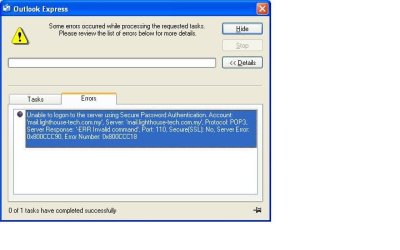
According to the screenshot...
...the service provider is lighthouse-tech.com.my
...the mail server is mail.lighthouse-tech.com.my
It does seem odd that an ISP would not have a home page setup. But they do have a Facebook page and it has several adverts for employment positions. Maybe they are just getting started. Those same openings are sprinkled across various job websites.
I hunted for an ISP help webpage for e-mail configuration before I posted what I did about the ports. I found nothing :-(
There are other setting that must be enabled on the host provider for other features. If I knew the provider, not the address of the end user page, I might be able to advise with more detail.
But... to get back to your original assesment -> the server port = 110
Jason: try these settings: Server settings: Text authentication My server requires authentication and confirm the [settings] button = use same settings as incoming server
Advanced seetings: Outgoing (SMTP) port 465 with SSL (or port 587 with TLS) Incoming (POP3) port 995 with SSL