Why does my C drive fluctuate with storage?

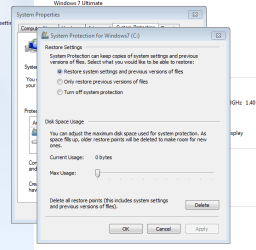
OK so I took a screenshot of the current usage of C Drives - do you think I should turn off the system protection - will that free up the C Drive?

Also, i think I ought to delete restore points? That ought to have the same effect?

Thanks!
 

Attachments

  • SnapShot2.png
    SnapShot2.png
    14.7 KB · Views: 3

My Computer My Computer

At a glance

Windows 7 Panasonic CF F9 (used to have CF F8)

Computer Manufacturer/Model Number
Panasonic Toughbook CF F9
OS
Windows 7 Panasonic CF F9 (used to have CF F8)
It looks to me that this is already a 160gb HD in a laptop, correct ?
with 4 partitions & the 100mb reserve partition for boot backup.
 

My Computer My Computer

At a glance

Win7 Enterprise, Win7 x86 (Ult 7600), Win7 x6...AMD fx8350 4ghz, AMD-32 2400mhz, AMD-64 3200m...2gb, 4gb on the Ult 7600, 4gb on Technet RTM,...Draw my own Graphics, several nVidia cards
Computer type
PC/Desktop
Computer Manufacturer/Model Number
Built them myself, Science Experiments !
OS
Win7 Enterprise, Win7 x86 (Ult 7600), Win7 x64 Ult 7600, TechNet RTM on AMD x64 (2.8Ghz)
CPU
AMD fx8350 4ghz, AMD-32 2400mhz, AMD-64 3200mhz, AMDx64 2.8G
Motherboard
SIS 755, ECS-K8M890M-M (Ult 7600), GigaByte & others
Memory
2gb, 4gb on the Ult 7600, 4gb on Technet RTM, 32gb on FX8350
Graphics Card(s)
Draw my own Graphics, several nVidia cards
Sound Card
on motherboard
Monitor(s) Displays
19" flat scr, 28" I-Inc widescr,22" Emprex Widescr, 23" Acer
Screen Resolution
1280 x 1024, 1440 x 900, 1920 x 1080
Hard Drives
6 pata Ide HD's & 2 Sata HD's
added 80gb external on Ult 7600 computer,
numerous extra 1tb, 2TB, 3Tb SATA HD's
A collection of ext HD Docks w/ HDs
PSU
430w, 550w, 600w, 700, 800, etc
Case
All Generic Full Towers
Cooling
Open Air & a few fans, some w/ colored LEDs
Keyboard
Compaq & Dell recycled from GoodWill
Mouse
Made in China Optical Wired Mouse
Internet Speed
Fast Cable InterNet
Antivirus
AVG Free on 24 different Desktops, NO Problems!
Browser
IE 8 is preferred, but use FireFox sometimes
Other Info
Linksys Routers, switches, & Hubs
Too Many USB Flash Drives to count, Biggest is 64GB !
Eight computers in my home network.
Sixteen computers at my business network.
Linked via TeamViewer !
Lots of old used spare computer parts everywhere!
Y0u could do that. But that means that literally thousands of potential problems that can be easily fixed with system restore will be made unfixable, or will need to be fixed with a much more difficult method.
 

My Computer My Computer

At a glance

Windows 7 Professional SP1 64-bitIntel Core i5-2450M @2.5 GHz6 GB DDR3 1333MHzIntel HD 3000
Computer type
Laptop
Computer Manufacturer/Model Number
Toshiba P775-S7100
OS
Windows 7 Professional SP1 64-bit
CPU
Intel Core i5-2450M @2.5 GHz
Memory
6 GB DDR3 1333MHz
Graphics Card(s)
Intel HD 3000
Monitor(s) Displays
Built-in 17.3" LED; 22" Insignia NS-L22Q-10A
Screen Resolution
1600x900; 1360x768
Hard Drives
750 GB Hitachi
1TB Seagate FreeAgent External
Internet Speed
Verizon DSL Speed(Down/Up): 3360 Kbps / 800 Kbps
Antivirus
MSE and MBAM Pro
Browser
IE10
OK so I took a screenshot of the current usage of C Drives - do you think I should turn off the system protection - will that free up the C Drive?

Also, i think I ought to delete restore points? That ought to have the same effect?

Thanks!
It looks like it is turned off because there are zero bytes used. With the current size of your C, I would not turn it on (although I would generally favor turning it on). You just do not have enough space on C. I suggest you do imaging to an external disk instead: http://www.sevenforums.com/tutorials/73828-imaging-free-macrium.html?ltr=I
 

My Computer My Computer

At a glance

Vista, Windows7, Mint Mate, Zorin, Windows 8from 1.6GHz Duo to i7
Computer Manufacturer/Model Number
HP, Dell, Gateway, Toshiba - 4 laptops and 2 desktops
OS
Vista, Windows7, Mint Mate, Zorin, Windows 8
CPU
from 1.6GHz Duo to i7
Monitor(s) Displays
2x HP w2207
Hard Drives
5x HDD, 7x SSD, 12x Externals
Keyboard
with trackball - no mices
Mouse
Trackball mice
Internet Speed
DSL 6000
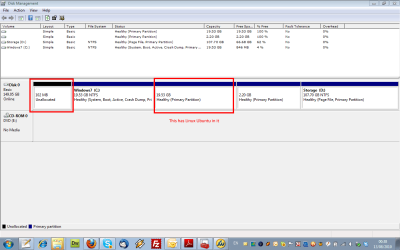
If it was me, I'd get PartedMagic, and delete those middle two partitions that don't have letters assigned to them. Then, I'd expand the C partition out to use that free unallocated space. The would nearly double your total C drive space. As I suspected near the beginning of this thread, the drive partitioning is done incorrectly.
 

My Computer My Computer

At a glance

Windows 7 Ultimate x64 SP1Intel Core i7-260012 GB Patriot Extreme DDR3-1333Nvidia GTX 470
OS
Windows 7 Ultimate x64 SP1
CPU
Intel Core i7-2600
Motherboard
Gigabyte GA-P67A-UD3P-B3
Memory
12 GB Patriot Extreme DDR3-1333
Graphics Card(s)
Nvidia GTX 470
Monitor(s) Displays
Dell UltraSharp 2209WA
Hard Drives
OCZ Agility3 240 GB, WD5001AALS, WD7501AALS
PSU
OCZ ModStream 700W
Case
CoolerMaster HAF 912 Advanced
Cooling
CoolerMaster Hyper 212 Plus
The drive without a letter assigned houses linux ubuntu whilst the 2.20 gig I am not sure what this is....

I have uploaded the new screenshot to explain
 

Attachments

  • SnapShot.png
    SnapShot.png
    28.6 KB · Views: 14

My Computer My Computer

At a glance

Windows 7 Panasonic CF F9 (used to have CF F8)
Computer Manufacturer/Model Number
Panasonic Toughbook CF F9
OS
Windows 7 Panasonic CF F9 (used to have CF F8)
I would still advise a bigger hard drive. They are not that expensive right now. an 80G IDE HDD would cost about 25-30 bucks.

I am not sure what your system is compatible with though.


Big time agree.
 

My Computer My Computer

At a glance

Win 7 Home Premium x64Athlon 64 X2 4200Corsair 2GB PC3500 at 400MHz 2-3-2-5-1TGeForce 8800GTS 640MB
Computer Manufacturer/Model Number
Home built
OS
Win 7 Home Premium x64
CPU
Athlon 64 X2 4200
Motherboard
Asus A8N-SLI Deluxe
Memory
Corsair 2GB PC3500 at 400MHz 2-3-2-5-1T
Graphics Card(s)
GeForce 8800GTS 640MB
Sound Card
TerraTec Universe 7.1
Monitor(s) Displays
Proview 19in CRT and Samsung 17in TFT
Screen Resolution
1280x1024
Hard Drives
Seagate 320Gb SATA 300 - Windows and Programes
Western Digital 750GB SATA 300 - Data/Files only
Hitachi 500GB SATA300 - Backups
PSU
Enermax 650w
Case
Lian Li
Cooling
Forced air
I would still advise a bigger hard drive. They are not that expensive right now. an 80G IDE HDD would cost about 25-30 bucks.

I am not sure what your system is compatible with though.


Big time agree.

Actually, this is a Panasonic Toughbook laptop - good luck finding a larger 2.5" HDD for less than $200.
 

My Computer My Computer

At a glance

Windows 10 Pro x64Intel Core i7 4790K @ 4.5GHz32GB DDR3Nvidia GeForce GTX970
Computer type
PC/Desktop
Computer Manufacturer/Model Number
Custom
OS
Windows 10 Pro x64
CPU
Intel Core i7 4790K @ 4.5GHz
Motherboard
Asus Maximus Hero VII
Memory
32GB DDR3
Graphics Card(s)
Nvidia GeForce GTX970
Sound Card
Realtek HD Audio
Screen Resolution
1920x1200
Hard Drives
1x Samsung 250GB SSD
4x WD RE 2TB (RAIDZ)
PSU
Corsair AX760i
Case
Fractal Design Define R4
Cooling
Noctua NH-D15
He has a 160GB HDD if you read the 22nd post in thread. I read his initial post and thought the drive was 20GB total
 

My Computer My Computer

At a glance

Win7 Home Premium 64xIntel Core 2 Duo P7450 / 2.13 GHz (2.29 with ...4 GB PC-6400 Hyundai (2X2) at 800MhzNVIDIA GeForce GTX 260M 1GB DDR3 VRAM
Computer type
Laptop
Computer Manufacturer/Model Number
ASUS G60-RBBX05
OS
Win7 Home Premium 64x
CPU
Intel Core 2 Duo P7450 / 2.13 GHz (2.29 with Extreme Turbo)
Memory
4 GB PC-6400 Hyundai (2X2) at 800Mhz
Graphics Card(s)
NVIDIA GeForce GTX 260M 1GB DDR3 VRAM
Monitor(s) Displays
16" LED Backlit
Screen Resolution
1366 x 768 on laptop 1600x1050 max res on 22" external mon
Hard Drives
OCZ Agility 3 60GB SSD / 320 GB - Serial ATA-150 - 7200 rpm
PSU
6-cell Lithium ion { lasts 1.5 hours }
Case
ASUS G60 Laptop
Keyboard
Chicklet type back-lit (white light) keyboard
Mouse
Logitech G9 Laser Mouse 3200dpi and 1000 reports per minute
Internet Speed
Comcast 8.60mb/s up - 3.11mb/s down
Antivirus
MSE
Browser
Firefox
Other Info
General mid-budget gaming Comp. Low batterylife - High FrameRates - currently overheating problems :(

2nd Rig: Case: Rosewill BLACKHAWK Gaming ATX Mid Tower Computer Case

Mobo: GIGABYTE GA-990FXA-UD3
CPU: AMD FX-6200 Zambezi 3.8GHz (4.1GHz Turbo)
Heatsink: COOLER MASTER V8 CPU Cooler
RAM: Patriot Viper 3 8GB (2 x 4GB) 240-Pin DDR3 SDRAM 1866 (PC3 15000)
GPU: SAPPHIRE Radeon HD 6850 1GB 2
OK thanks so much everyone for the really helpful replies.

Here is my plan - can u guys confirm if this is possible and do-able with ease?

So I take an image of the C and D Drives - reformat the entire machine, re-make the partitions and then reinstall the images of C and D?

That sound ok and do-able with minor headaches?

Surely replacing the hard-drive would have the same above effect no?

Thanks very much !
 

My Computer My Computer

At a glance

Windows 7 Panasonic CF F9 (used to have CF F8)
Computer Manufacturer/Model Number
Panasonic Toughbook CF F9
OS
Windows 7 Panasonic CF F9 (used to have CF F8)
Provided that the target partitions are of equal or greater size relative to the originating partitions. You cannot image a 100GB partition (with e.g. 20GB of data) and then try to restore it into a 50GB partition. The data would fit but you get problems with the rest of the partition files - e.g. the MFT. For such an operation you have to use cloning that can restore to a smaller partition.
 

My Computer My Computer

At a glance

Vista, Windows7, Mint Mate, Zorin, Windows 8from 1.6GHz Duo to i7
Computer Manufacturer/Model Number
HP, Dell, Gateway, Toshiba - 4 laptops and 2 desktops
OS
Vista, Windows7, Mint Mate, Zorin, Windows 8
CPU
from 1.6GHz Duo to i7
Monitor(s) Displays
2x HP w2207
Hard Drives
5x HDD, 7x SSD, 12x Externals
Keyboard
with trackball - no mices
Mouse
Trackball mice
Internet Speed
DSL 6000
...is freed by upto 2 gig and then suddenly the storage space left becomes very small like 500mb..

After reading all the replies, then re-reading the original post, I think what you are seeing is the space used for the page (swap) file. The default setting is to allow Windows to resize as it wants based on your memory size.

The default values on my 3GB installation are to automatically allocate (which is dynamic and does change), 16MB min allowed, 4218MB recommended and the system at this moment has 2812MB allocated

Try setting a static page file of an appropriate size. This example is for about 1GB:

Start > Control Panel > All Control Panel Items > System

Advanced system settings > (Advanced tab) click Performace SETTINGS... button

Click the ADVANCED tab

Click the CHANGE... button under Virtual Memory

Deselect (uncheck) AUTOMATICALLY MANAGE...

Click CUSTOM SIZE radio button

Enter an INITIAL SIZE (MB) value such as 1024 (about 1GB page file)

Enter a MAXIMUM SIZE (MB) value the same as initial value of 1024

Click the SET button

Click the OK button

System requires a reboot to take effect.

If you get error/warning messages about page file, increase the size settings.

Regards, GEWB
 

My Computer My Computer

At a glance

Linux Mint / XP / Win7 Home, Pro, Ultimate / ...
Computer type
PC/Desktop
Computer Manufacturer/Model Number
(7 different computers booting up to 10 systems)
OS
Linux Mint / XP / Win7 Home, Pro, Ultimate / Win8.1 / Win10
Other Info
Four desktops, two laptops, one notebook and one tablet
Hey thanks for that I think that you might have nailed it.

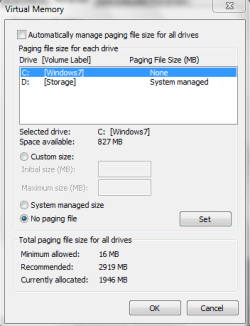
Just one issue, as you can see from the screenshot I only have 872 MB memory left in the C Drive (which is having this issue) - say if I made the minimum and maximum to 500 MB would that be enough for the page file?

Thanks!
 

Attachments

  • VirtualMemory.png
    VirtualMemory.png
    10.7 KB · Views: 1

My Computer My Computer

At a glance

Windows 7 Panasonic CF F9 (used to have CF F8)
Computer Manufacturer/Model Number
Panasonic Toughbook CF F9
OS
Windows 7 Panasonic CF F9 (used to have CF F8)
Back
Top