
Solved How can I move C: drive where it belongs?

gold eagle

New member
Local time
7:59 PM
Messages
13
Location
Oregon
Hello every one, this is my problem, my letter C: is in system restore it shows this when I go with disk to repair disk, when I load drives it does not take me to system 32 any more it looks like my computer, first drive is F: I think, somehow, when I did dispart I diskscramble them, because I was trying to fix a bootmissing error I got......I activated more than 1.......... got this last error because I was trying to bring f11 factory settings to my second OS, which my husband had suggested we just use as storage, this was years ago I thought I could do it, but somehow even though I changed boot in bios apparently did not take, and went straight to C: so... thinking I still had a second OS, I tried bootrec/fixboot and I found my self with element not found, so I have to bother you and ask if any of you think there is any hope for this nice omelette I have made out of my drives. or if it is good for parts now. (lol parts are not even good now.....)

So what do you think?

Sorry I forgot both C: and G: are same OS windows 7 64 bit Home Edition restoring to factory settings on f11 I got the message error 0xe0ef0003 ............................after it had taken C: away -.- seemed like it was working fine......after error when I booted again that is when I had bootmgr missing error.

Thanks.
 
Last edited:

My Computer My Computer

At a glance

Windows 7 Home Premium 64 bit
Computer type
PC/Desktop
Computer Manufacturer/Model Number
HP
OS
Windows 7 Home Premium 64 bit

My Computer My Computer

At a glance

Win-7-Pro64bit 7-H-Prem-64biti7-5930K 2nd i9-9940x both water blocked VRM'...Trident-z 3200C14 2nd Trident-z 3600C16EVGA 1080ti ftw3 2nd Titan Xp both water blocked
Computer type
PC/Desktop
Computer Manufacturer/Model Number
Custom assembled by me :}
OS
Win-7-Pro64bit 7-H-Prem-64bit
CPU
i7-5930K 2nd i9-9940x both water blocked VRM's too
Motherboard
ASUS SABERTOOTH X99 2nd ASUS x299 Apex
Memory
Trident-z 3200C14 2nd Trident-z 3600C16
Graphics Card(s)
EVGA 1080ti ftw3 2nd Titan Xp both water blocked
Sound Card
Built-in Realtek
Monitor(s) Displays
1-AOC G2460PG 24"G-Sync 144Hz/ 2nd 1-ASUS VG248QE 24" 144Hz
Screen Resolution
1920 x 1080 144Hz
Hard Drives
2-Samsung M.2 Evo & Evo Plus
2-Samsung 850 EVO 500GB SSD's/ 3-2.5 W.D. Black 1tb-&3-1tb/3-3.5 WD Black 1tb hdd's
PSU
EVGA SuperNOVA 1000-P2 2nd 1200-P2
Case
2-Corsair Obsidian Series 450D Black ATX Mid Tower
Cooling
Custom water loops
Keyboard
Logitech G710+/ 2nd Logitech G910
Mouse
2-RedDragon M901 Perdition 16400 dpi Gaming mouse = wired
Internet Speed
Comcast Ping 19ms 89.31mbps download speed 6.12mbps upload
Antivirus
Malwarebytes Pro/ Superantispyware Pro
Browser
FireFox & Pale moon
Other Info
2nd ASUS X299 Apex/Intel i9-9940x with Custom water loop/7H-Prem-x64/Corsair 450D case/Ram Trident-z 3600C16 4x8gb / Samsung970Evo plus 500gb SSD/Dual ssd EZ swap evo/PSU EVGA SuperNova 1200w-P2 80+Platinum/GPU Titan Xp /8-ML-140 on push-pull on 2-280GTX rads
Thank you ThrashZone for your reply.

I personally like easy but I know nothing about computers, I don't know what a sata is and I would love to give you pictures I can only do that by camera at this point I cannot go to start comp will not boot into windows is a desktop and I am actually in a laptop now. I will look in to the sata and maybe that is the answer thank you for suggestion I will look into it and will let you know if that fixed the problems ok?
 

My Computer My Computer

At a glance

Windows 7 Home Premium 64 bit
Computer type
PC/Desktop
Computer Manufacturer/Model Number
HP
OS
Windows 7 Home Premium 64 bit
As you rightfully said, you seem to have no clue about computers and should really not mess with them. But if you post a picture of your disk management, we will try to get you over this problem.
 

My Computer My Computer

At a glance

Vista, Windows7, Mint Mate, Zorin, Windows 8from 1.6GHz Duo to i7
Computer Manufacturer/Model Number
HP, Dell, Gateway, Toshiba - 4 laptops and 2 desktops
OS
Vista, Windows7, Mint Mate, Zorin, Windows 8
CPU
from 1.6GHz Duo to i7
Monitor(s) Displays
2x HP w2207
Hard Drives
5x HDD, 7x SSD, 12x Externals
Keyboard
with trackball - no mices
Mouse
Trackball mice
Internet Speed
DSL 6000
whs!! nice to meet you!

I have seen you all over the forums a lot of you helping people out :), and yes thank you for reply but how do I get to disk management? I know I can use disk repair where do I go from there?? is that load drives?
 

My Computer My Computer

At a glance

Windows 7 Home Premium 64 bit
Computer type
PC/Desktop
Computer Manufacturer/Model Number
HP
OS
Windows 7 Home Premium 64 bit
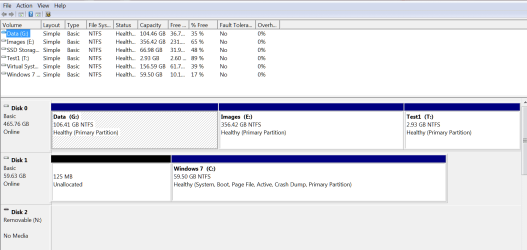
Press Start and type disk management. Then bring that up, make a snip of it and post it here.
 

My Computer My Computer

At a glance

Vista, Windows7, Mint Mate, Zorin, Windows 8from 1.6GHz Duo to i7
Computer Manufacturer/Model Number
HP, Dell, Gateway, Toshiba - 4 laptops and 2 desktops
OS
Vista, Windows7, Mint Mate, Zorin, Windows 8
CPU
from 1.6GHz Duo to i7
Monitor(s) Displays
2x HP w2207
Hard Drives
5x HDD, 7x SSD, 12x Externals
Keyboard
with trackball - no mices
Mouse
Trackball mice
Internet Speed
DSL 6000
:(

I am so sorry maybe I am not understanding where start? where type??? my comp won't boot when I boot I get BOOTMGR is missing, when I do disk repair and load drives C: is not the right place C: seems to be as system restore seems like F: should be C: to me.
 

My Computer My Computer

At a glance

Windows 7 Home Premium 64 bit
Computer type
PC/Desktop
Computer Manufacturer/Model Number
HP
OS
Windows 7 Home Premium 64 bit
Maybe this will help some:

Diskpart says on list Volume...

Volume 0 ..... I ..... GRMCPXFRER ..... VDF ........ DVD-ROM.......3075 MB.... Healthy
Volume 1 ..... E ..... NTFS .......PARTITION.......100 MB ....Healthy
Volume 2 ..... C...... RAW ........PARTITION........ 0 B ... ..Healthy
Volume 3 ..... F ..... FACTORY_IMA..... NTFS .......PARTITION.......10 G ......Healthy
Volume 4 ..... D ..... SYSTEM............. NTFS........PARTITION......100 MB......Healthy
Volume 5 ..... G ..... OS .....................NTFS.......PARTITION.......584 BM......Healthy
Volume 6 ..... H ..... HP_RECOVERY ....NTFS.......PARTITION........11 GB.......Healthy
 

My Computer My Computer

At a glance

Windows 7 Home Premium 64 bit
Computer type
PC/Desktop
Computer Manufacturer/Model Number
HP
OS
Windows 7 Home Premium 64 bit
I will try tomorrow to get the picture of how my drives are seen in load drives with disk repair. thanks for your help.
 

My Computer My Computer

At a glance

Windows 7 Home Premium 64 bit
Computer type
PC/Desktop
Computer Manufacturer/Model Number
HP
OS
Windows 7 Home Premium 64 bit
This is the kind of picture we are looking for:
 

Attachments

  • 2016-04-21_0009.png
    2016-04-21_0009.png
    27.9 KB · Views: 2

My Computer My Computer

At a glance

Vista, Windows7, Mint Mate, Zorin, Windows 8from 1.6GHz Duo to i7
Computer Manufacturer/Model Number
HP, Dell, Gateway, Toshiba - 4 laptops and 2 desktops
OS
Vista, Windows7, Mint Mate, Zorin, Windows 8
CPU
from 1.6GHz Duo to i7
Monitor(s) Displays
2x HP w2207
Hard Drives
5x HDD, 7x SSD, 12x Externals
Keyboard
with trackball - no mices
Mouse
Trackball mice
Internet Speed
DSL 6000
Got it but....

Is not that inside windows system? where I cannot get tooo?? can you get to it through bios sys repair? over passing umm missing bootmanager?
 

My Computer My Computer

At a glance

Windows 7 Home Premium 64 bit
Computer type
PC/Desktop
Computer Manufacturer/Model Number
HP
OS
Windows 7 Home Premium 64 bit
Diskpart in post 8 in this thread shows your C partition as "RAW".

Not good.

As long as C is "RAW", I don't think you are going to boot Windows or be able to use Disk Management.

I assume this is an HP computer with one hard drive containing multiple partitions?
 

My Computer My Computer

At a glance

Windows 7 Home Premium SP1, 64-bitIntel Skylake i5-6600K, not overclocked8 GB HyperX DDR4-2666 (2 x 4 GB)none; graphics are integrated on CPU
Computer type
PC/Desktop
Computer Manufacturer/Model Number
Ignatz Special; 4 speed manual gearbox; factory air conditioning; one of one
OS
Windows 7 Home Premium SP1, 64-bit
CPU
Intel Skylake i5-6600K, not overclocked
Motherboard
AsRock Z170M Extreme 4, micro ATX
Memory
8 GB HyperX DDR4-2666 (2 x 4 GB)
Graphics Card(s)
none; graphics are integrated on CPU
Sound Card
onboard: Realtek ALC1150; external: USB Behringer UF0-202
Monitor(s) Displays
Dell S2340M 23 inch IPS
Screen Resolution
1600 x 900
Hard Drives
System: Crucial MX100 series SSD, 128 GB;
Data: Samsung Spinpoint 103SJ, 1 TB;
Backup: WD Caviar Green WD30EZRX-00D8PB0, 3 TB
PSU
Rosewill SilentNight 500 watt fanless, semi-modular
Case
Antec Solo II
Cooling
Noctua NH-U12S; Noctua F12 intake, Noctua S12A exhaust
Keyboard
Microsoft 200 6JH-00001 USB
Mouse
Dell or Microsoft optical wired; USB
Antivirus
Microsoft Security Essentials and Malwarebytes Premium
Browser
Pale Moon
Other Info
All fans PWM; speeds at idle: CPU circa 500 rpm; intake circa 600 rpm; exhaust circa 600 rpm; CPU temps 27 idle and 47 C load in a warm room (27 C/81 F) when running Intel Extreme Tuning Utility stress test.
Not sure

Thanks you for your reply, as you can see I don't understand much about computers is a hard drive an OS? If it is one hard drive and there is no hope is ok I was just wondering if any thing could be done for it, you see I saw 2 local disks is that it? see I cannot tell, I know I made this happened by messing with diskpart forget about bootmanager missing...what I was looking for is how to put C: back to it's original place I will give you the picture I talk about tomorrow, but I know I moved them by going to diskpart and activating what I should not, felt like God or something activating stuff lol I don't know, my reasoning is if I try to do any thing to it like fixing boot from scratch it will not do it in right drive......is hard to explain C: in winRE when I load drives says in place of another letter you see it in System Restore not local disk......

Thank you so much for your reply I know is confusing but I will try to post picture tomorrow :).
 
Last edited:

My Computer My Computer

At a glance

Windows 7 Home Premium 64 bit
Computer type
PC/Desktop
Computer Manufacturer/Model Number
HP
OS
Windows 7 Home Premium 64 bit

My Computer My Computer

At a glance

Windows 7 Home Premium 32-Bit - Build 7600 SP1Intel Core i3-2120 3.30GhzKingston 4 GB DDR3 1333 mhzAMD Radeon HD6670
Computer type
PC/Desktop
Computer Manufacturer/Model Number
Custom Build
OS
Windows 7 Home Premium 32-Bit - Build 7600 SP1
CPU
Intel Core i3-2120 3.30Ghz
Motherboard
Asus P8Z68-V LX Intel Z68 Socket H2 ATX
Memory
Kingston 4 GB DDR3 1333 mhz
Graphics Card(s)
AMD Radeon HD6670
Sound Card
Sound Blaster Audigy SE 24-Bit
Monitor(s) Displays
Asus VE228
Screen Resolution
1440 X 900
Hard Drives
OCZ Vertex 3 120 GB Sata 3 SSD ==
Kingston SH103/S3 120 G Hyper X 120 GB SSD ==
Western Digital 500 GB Caviar Green 7200 RPM ==
PSU
Corsair CX600M == 600 Watt
Case
NZXT Apollo - Silver with Clear Side Panel
Cooling
Three 120 mm Fans
Keyboard
Microsoft Natural 4000
Mouse
Microsoft Custom Optical 3000
Internet Speed
AT&T Fiber Optic Wireless Network
Antivirus
Microsoft Security Essentials
Browser
Chrome
Other Info
120 mm Blue LED Fan -- Three Blue LED Lazer Light Sticks
Problem solved :)

Thank you all for your time and care Solution:

Take disk out
Unplug your computer for about 1 hour.

This is what happened .............My husband's comp froze and gave it to me he had a usb overload thing... he kicked his front usb port my accident and 2 pins were touching each other................fixed.............I needed the disk according to me and the power cord........ today I was going to send that pict I was talking about, when I got to it was back in place so I don't know......

That may work for others hopefully....

Thank you to all again and whs.....I will try no to touch computers again, after I fix my raw C: lol :).

Have a great day! and thanks seven forums.
 

My Computer My Computer

At a glance

Windows 7 Home Premium 64 bit
Computer type
PC/Desktop
Computer Manufacturer/Model Number
HP
OS
Windows 7 Home Premium 64 bit
Thank you all for your time and care Solution:

Take disk out
Unplug your computer for about 1 hour.

This is what happened .............My husband's comp froze and gave it to me he had a usb overload thing... he kicked his front usb port my accident and 2 pins were touching each other................fixed.............I needed the disk according to me and the power cord........ today I was going to send that pict I was talking about, when I got to it was back in place so I don't know......

That may work for others hopefully....

Thank you to all again and whs.....I will try no to touch computers again, after I fix my raw C: lol :).

Have a great day! and thanks seven forums.


OK, who wants to write a Tutorial on kicking the computer. :)
 

My Computer My Computer

At a glance

Windows 7 Home Premium 32-Bit - Build 7600 SP1Intel Core i3-2120 3.30GhzKingston 4 GB DDR3 1333 mhzAMD Radeon HD6670
Computer type
PC/Desktop
Computer Manufacturer/Model Number
Custom Build
OS
Windows 7 Home Premium 32-Bit - Build 7600 SP1
CPU
Intel Core i3-2120 3.30Ghz
Motherboard
Asus P8Z68-V LX Intel Z68 Socket H2 ATX
Memory
Kingston 4 GB DDR3 1333 mhz
Graphics Card(s)
AMD Radeon HD6670
Sound Card
Sound Blaster Audigy SE 24-Bit
Monitor(s) Displays
Asus VE228
Screen Resolution
1440 X 900
Hard Drives
OCZ Vertex 3 120 GB Sata 3 SSD ==
Kingston SH103/S3 120 G Hyper X 120 GB SSD ==
Western Digital 500 GB Caviar Green 7200 RPM ==
PSU
Corsair CX600M == 600 Watt
Case
NZXT Apollo - Silver with Clear Side Panel
Cooling
Three 120 mm Fans
Keyboard
Microsoft Natural 4000
Mouse
Microsoft Custom Optical 3000
Internet Speed
AT&T Fiber Optic Wireless Network
Antivirus
Microsoft Security Essentials
Browser
Chrome
Other Info
120 mm Blue LED Fan -- Three Blue LED Lazer Light Sticks
:geek: That is hilarious and I meant *by accident* you guys are really cool Thanks again!
 

My Computer My Computer

At a glance

Windows 7 Home Premium 64 bit
Computer type
PC/Desktop
Computer Manufacturer/Model Number
HP
OS
Windows 7 Home Premium 64 bit
My computer is back now!

The whole mess started because I got an 0xe0ef0003 error could not reset factory restore or settings or that.......I am kinda * thank full * for it. It does warn you to disconnect every thing out of your computer and leave only keyboard and mouse...... I have 2 OS same Home Premium (windows 7)...........


I unplugged the second drive and took mem card....not card... stick out of it did not restore to factory settings, I may try tomorrow LOL... but when I did it found Home Premium but the location was unknown all this with repair disc of course in repair comp, I click on repair startup and there it was whole system back nothing lost, I plugged back the second one put mem card? no is not a card is a stick sorry. And every thing was just like I had it before. Seven Forums helped a lot to get here so one moooore time. Much thanks and keep up the good work.

Now I can send you the pict you wanted!!!!!! ;)


Note: Did not *restore* my computer I only got it like it was before I tried to restore to factory settings.
 
Last edited:

My Computer My Computer

At a glance

Windows 7 Home Premium 64 bit
Computer type
PC/Desktop
Computer Manufacturer/Model Number
HP
OS
Windows 7 Home Premium 64 bit
Back
Top