Why does my pc turn itself on?

StormtrooprDave

New member
Local time
8:22 AM
Messages
7
Every so often I get up in the morning to find the pc that I had put to sleep has woken up. There doesn't seem to be any extra processes running. Wake on lan is turned off. I recently started using Windows Media Centre but I don't have anything set to record or update. What could it be?
 

My Computer

OS
Windows 7 Home Premium 64 bit
Is automatic Updates switched on?
 

My Computer

Computer type
PC/Desktop
Computer Manufacturer/Model Number
Self Built Custom Computer.
OS
Windows 10 Pro x64
CPU
i7-4770K
Motherboard
Asus Z87 Sabertooth
Memory
16Gig DDR3-2400
Graphics Card(s)
Gigabyte GT740
Sound Card
Onboard
Monitor(s) Displays
Benq 27" - Dell 23' - Benq 22"
Screen Resolution
1680x1050
Hard Drives
Samsung 840 Pro 128g SSD
1xWestern Digital Caviar Green 1tb
2xWestern Digital Caviar Green 2 tb
PSU
Seasonic 760 watt Platinum
Case
Coolermaster Haf - X
Cooling
Noctua NH-C12P CPU Cooler
Keyboard
Logitech illuminated keyboard
Mouse
Logitech Perfomance MX
Internet Speed
Cable = speeds to 20Mbps downsteam and 512kbps upsteam
Antivirus
Avast Internet Security
Browser
Firefox
Is automatic Updates switched on?

It is but this is only a recent phenomenon. And it was always my understanding that if the pc wasn't on at the specified update time it would just check for updates on next start up?
 

My Computer

OS
Windows 7 Home Premium 64 bit
Turn it off temporarily and see if it fixes the problem
 

My Computer

Computer type
PC/Desktop
Computer Manufacturer/Model Number
Self Built Custom Computer.
OS
Windows 10 Pro x64
CPU
i7-4770K
Motherboard
Asus Z87 Sabertooth
Memory
16Gig DDR3-2400
Graphics Card(s)
Gigabyte GT740
Sound Card
Onboard
Monitor(s) Displays
Benq 27" - Dell 23' - Benq 22"
Screen Resolution
1680x1050
Hard Drives
Samsung 840 Pro 128g SSD
1xWestern Digital Caviar Green 1tb
2xWestern Digital Caviar Green 2 tb
PSU
Seasonic 760 watt Platinum
Case
Coolermaster Haf - X
Cooling
Noctua NH-C12P CPU Cooler
Keyboard
Logitech illuminated keyboard
Mouse
Logitech Perfomance MX
Internet Speed
Cable = speeds to 20Mbps downsteam and 512kbps upsteam
Antivirus
Avast Internet Security
Browser
Firefox
I don't think that is the problem as I've always had automatic updates switched on and this has only started happening recently and its only once every so often.

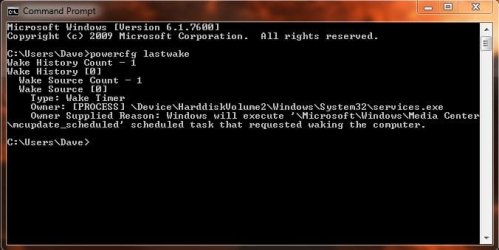
I found another thread here that shows I can use the powercfg lastwake command to find out what it was next time it happens.
 

My Computer

OS
Windows 7 Home Premium 64 bit
Check the Start-up setting in the Bios.
 

My Computer

Computer Manufacturer/Model Number
Homemade
OS
Win 7 64 bit professional
CPU
CPU: 3930K @ 4.8 MHz Stable as a rock
Motherboard
ASUS Rampage IV Extreme LGA 2011
Memory
CORSAIR DOMINATOR GT 16GB (4 x 4GB) 240-Pin DDR3
Graphics Card(s)
EVGA SuperClocked+ GeForce GTX 680
Monitor(s) Displays
Dell 3007WFP
Screen Resolution
2560 x 1600
Hard Drives
Vector(256gb) x 2
RevoDrive 3 X2 space (240 GB)
Crucial C300 256 GB SSD
PSU
CORSAIR AX1200i 1200W Digital ATX12V v2.31 and EPS 2.92 SLI
Cooling
Water cooling EK Supremacy ELITE
Mouse
ratZ-7
Other Info
WEI-7.8
Have any animals in the house? They could be walking over the keyboard or bumping the mouse.
Or maybe it is a mouse?

Just a thought.

Might want to check other installed software,, something you installed recently maybe?
Run a malware/virus scan with Malwarebytes and some other scan?

Could be BIOS settings. Did you update your BIOS lately?

Possible power fluctuations? Maybe, just guessing. Do you have your system on a Battery Backup?

IF not using a Battery Backup, it could be the surge protector, or it is possible that it might be the power supply itself. These may not be the problem, but they are plausible.
 
Last edited:

My Computer

Computer Manufacturer/Model Number
Self Built
OS
Win 7 Ultimate 32bit
CPU
C2D E6600 2.4Ghz
Motherboard
Intel D965WH
Memory
4G Kingston KHX5400D2
Graphics Card(s)
EVGA GTX 570 HD SC (012-P3-1573-KR)
Sound Card
On-Board
Monitor(s) Displays
Samsung 226BW
Screen Resolution
1680 x 1050
Hard Drives
2 x 250 Seagate Barracuda
2 x 500 Seagate Barracuda (Raid1)
PSU
Corsair TX750W
Case
In-Win C589
Cooling
Stock Intel Cooling
There are 3 ways I can think of a PC turning on

1. You physically press the power button on your casing which is connected to the power switch on your motherboard.

2. The switch on some motherboards can be activated but just touching it with conductor or by a surge of current.

3. You have set the BIOS to turn on your computer at a specific time. Considering your computer wakes up at a specific time (in the morning), this is probably the cause.
[FONT=Arial ! important][/FONT]​
 

My Computer

Computer Manufacturer/Model Number
Dell E4300
OS
Windows 7 Ultimate
CPU
Intel C2D SP9400
Motherboard
Intel GS45
Memory
2GB DDR3
Graphics Card(s)
Integrated =(
Sound Card
Integrated =(
Monitor(s) Displays
Matte LCD
Screen Resolution
1280x800
Hard Drives
Intel X25-M Gen 2 SSD
WD Caviar Black
Mouse
MX 518, V470 - Logitech
I used the powercfg lastwake command and found it was a Windows Media Centre updater. Capture.JPG

In the Task Scheduler it was ticked to wake copmuter to perform this task. Hopefully this should be problem solved/
 

My Computer

OS
Windows 7 Home Premium 64 bit
I am personally having a similar problem. I have had Windows 7 installed for several months now, although this problem first appeared about a month ago. Now it occurs every night without fail around at about, say, 3 o'clock-ish AM. Even when I SHUT DOWN (or HIBERNATE, for that matter) my computer it will turn itself ON (unless I unplug the power and take the battery out, of course).

I ran through some of the steps in this thread and I unchecked the "wake the computer to perform this task" under WMC in Task Scheduler. Also, I'm pretty sure I've always had Windows Update set to automatically check for, download and install updates as they are available - but will this turn my laptop on to do this? I was unable to obtain more information when running the command "powercfg -lastwake" - but there is a history of "1" wake count, it reports. But again, will this not only apply to computers that have been put to SLEEP and not shut down???

I have been researching this issue of mine for several weeks now, have had a Dell tech come out and replace my motherboard along with memory cards, etc. but the problem still persists. The last thing they recommended is performing a clean install of 7 but I have not completed that as the installation sits at 64% for over an hour on the "installing windows files" step or whatever. I'm going to try turning off automatic updates for the first time ever and see what that does - this problem is really annoying and I seem to almost be at my wit's end. Sorry if my explanation seems scattered or nondescript. Could anyone provide any assistance?!? Thanks in advance!!

 
Last edited:

My Computer

Computer Manufacturer/Model Number
Dell Studio 1735
OS
Windows 7
CPU
Intel Core 2 Duo
Memory
2.1 GHz
Graphics Card(s)
ATI Radeon T8100
Sounds like Windows Update is turning your machine on to get the updates. The default time for Windows Updates is 3am.
 

My Computer

Computer type
PC/Desktop
Computer Manufacturer/Model Number
Dell OP7010
OS
Windows 7 Enterprise (x64); Windows Server 2008 R2 (x64)
Memory
16GB
Monitor(s) Displays
4 Dell 24" LCD
Screen Resolution
1280x1024
Keyboard
Dell
Mouse
Dell Optical
Internet Speed
40meg
Sounds like Windows Update is turning your machine on to get the updates. The default time for Windows Updates is 3am.

Yeah, after altering the time to get automatic updates... no more computer turning itself on!! Finally! I was about ready to pull my hair out! I changed the time to 5 pm. I didn't alter anything else... but my computer didn't turn itself on at the time designated (weird; I'm not sure what exactly is going on here). Thanks, WindowStar for helping to confirm my suspicions. I really appreciate the reply :). Does anyone know definitively exactly what is going on here with Windows Update? Will my PC always turn itself on at the time designated - just like I altered the program to do? or will it only do it only if there's a wireless network signal at that exact time and not re-attempt to check for updates when it, say, re-acquires a signal?? Help and Support seems to not really address these working definitions..
 

My Computer

Computer Manufacturer/Model Number
Dell Studio 1735
OS
Windows 7
CPU
Intel Core 2 Duo
Memory
2.1 GHz
Graphics Card(s)
ATI Radeon T8100
HP 8540w turns on by itself

I've been having the exact same issuefor 3 months now with both of my HP 8540w laptops (purchased April/2010) running Windows 7 Ultimate. HP shipped these with Windows XP Pro and I reformatted them with genuine versions of Windows 7 Ultimate purchased directly from Microsoft. I've been thru the BIOS and every setting for the Network Adapters and disabled any 'wake' feature I could find. Since mine are booting up from being completely powered off I'm not sure that chasing a 'wake' issue to be the right path to take however I have to look at all possibilities. From turning on inside the computer case one of these fried the DC/DC board. While at HP for service they even replaced the main board thinking this to be the problem as well as updating the BIOS. It still turns itself on. HP even sent me a beta test version BIOS to try and I'm still having the same issue. Finally they sent me a replacement for one of the units. I swapped hard drives (this one came with Windows XP Pro as well) and am having the same issues with the new unit. Mine aren't coming on every night and are quite sporadic. One once turned on 10 - 15 minutes after being shut down. I even tried shutting off my wireless router to no avail. What I can't understand is if this is a Windows 7 Ultimate problem how can this laptop turn on without the OS even being loaded? I really like these machines and need them for my business and hate to send them back when this issue shouldn't be that hard for their Tech Support to solve. Presently I'm waiting for a return call from HP Level 4 Tech Support. Any thoughts from anyone would be greatly welcomed as jumping off my roof isn't a viable alternative.

With kind regards,
Robbie.
 

My Computer

Computer Manufacturer/Model Number
HP 8540w EliteBook
OS
Windows 7 Ultimate
CPU
i7 DuoCore
Memory
4 GIG
Graphics Card(s)
NVIDIA
Hello. Did you try all of the troubleshooting steps discussed in this thread? I'm not stupid or technologically illiterate but when I finally adjusted when Windows Update checks for updates it seemed to magically fix all of my woes. I had been having this problem for a little over a month and spoke with Dell a number of times about the issue. I hope that you find out how to fix it as well.
 

My Computer

Computer Manufacturer/Model Number
Dell Studio 1735
OS
Windows 7
CPU
Intel Core 2 Duo
Memory
2.1 GHz
Graphics Card(s)
ATI Radeon T8100
Thanks so much for the reply. The option for selecting time of day in Windows Update Settings (at least in Windows 7 Ultimate) is only when it will 'install' the downloaded updates. There is no option to select when it will 'check' for updates and I have mine set to only notify me of available updates. This way I determine which ones get installed and when they get installed. I suppose it's possible that Windows Update could randomly check for updates and that might be when these are turning on. I just have a hard time believing that the OS [when not running] can dictate thru the BIOS to boot up. The other bizzare thing is that this has happened twice at midnight on a Saturday and also at 12:24 AM on a Saturday. Being up watching SNL I heard the logon tones and came down to investigate. Once I came down to my kitchen at 9 AM Sunday morning and both machines had booted up and were running. They were networked together via a crossover cable and my wireless router was off so I can ensure they received no network signals. I still say, "Computers; it's not technology, it's witchcraft!"

Thanks again and please forward any additional thoughts.

Regards,
Robbie
 

My Computer

Computer Manufacturer/Model Number
HP 8540w EliteBook
OS
Windows 7 Ultimate
CPU
i7 DuoCore
Memory
4 GIG
Graphics Card(s)
NVIDIA
Thanks so much for the reply. The option for selecting time of day in Windows Update Settings (at least in Windows 7 Ultimate) is only when it will 'install' the downloaded updates. There is no option to select when it will 'check' for updates and I have mine set to only notify me of available updates. This way I determine which ones get installed and when they get installed. I suppose it's possible that Windows Update could randomly check for updates and that might be when these are turning on. I just have a hard time believing that the OS [when not running] can dictate thru the BIOS to boot up. The other bizzare thing is that this has happened twice at midnight on a Saturday and also at 12:24 AM on a Saturday. Being up watching SNL I heard the logon tones and came down to investigate. Once I came down to my kitchen at 9 AM Sunday morning and both machines had booted up and were running. They were networked together via a crossover cable and my wireless router was off so I can ensure they received no network signals. I still say, "Computers; it's not technology, it's witchcraft!"

Thanks again and please forward any additional thoughts.

Regards,
Robbie

I have had the same issues with my machines waking up (Yes more than one). I have no clue how they do it, but your Saturday SNL boot up is the same as mine, sitting in the living room watching SNL computer off and it booted up freaked me out the first time it did it. Dell replaced everything on this computer except for the case. Still does it. I have to unplug it to keep it off at night. If anyone finds a clue as to why, please post it here! -WS
 

My Computer

Computer type
PC/Desktop
Computer Manufacturer/Model Number
Dell OP7010
OS
Windows 7 Enterprise (x64); Windows Server 2008 R2 (x64)
Memory
16GB
Monitor(s) Displays
4 Dell 24" LCD
Screen Resolution
1280x1024
Keyboard
Dell
Mouse
Dell Optical
Internet Speed
40meg
Is it just 'waking up' or is it performing a complete boot up? Mine are doing a full boot up from being completely powered down. I presently have three 8540w's here; one is awaiting a replacement. (Actually I have four however the fourth one was dropped quite hard by either HP or FedEx and rendered useless. Let HP/FedEx fight it out). I have 2machines with updated/matched BIOS and a beta test version from HP on the other. Two of the machines are running Windows 7 Ultimate and the third Windows XP Pro as that's how HP ships these particular units. Two are set with Windows Update completely off and the third to allow Windows Update to check for updates and automatically install them at 9 AM tomorrow morning. I want to see if the update forces the unit to boot and if the other 2 units (with updates turned off) are forced as well. I got nowhere with cmd.exe powercfg-last wake. It seems that Windows 7 Ultimate didn't recognize that command. I looked into the 30-day history in Task Scheduler but didn't recognize what a lot of the process were. As mentioned these machines are great, real work horses and I hate to send them back however removing the batteries and pulling the AC cord each time you're finished using them isn't very convenient either. Kinda' like finally buying that rare Ferrari Dino 308 GT4 and then having to crawl deeply into the engine compartment each night and remove the positive cable from the battery so it doesn't go dead over night.

Cheers,
Robbie.
 

My Computer

Computer Manufacturer/Model Number
HP 8540w EliteBook
OS
Windows 7 Ultimate
CPU
i7 DuoCore
Memory
4 GIG
Graphics Card(s)
NVIDIA
Yes my machines turn on from a completely off state. I have windows updates OFF.

Short list of testing:

Windows Updates Off
No network cable (to confirm no NIC wakeup packets)
BIOS settings for WAKE UP complete disabled

Windows 7 Ultimate machines all wake I have 3 of them, 1 Dell 755 and 2 Dell 760’s.

Next same machines with Windows XP Professional on them stay off. I have 2 hard drives for each machine 1 drive loaded Windows 7 Ultimate and 1 drive loaded Windows XP Professional. I physically swap the drives; I don't leave the other drive in the system keeping the machines as close to alike as possible. All hard drives are Western Digital 160gig drives same model number.

-WS
 

My Computer

Computer type
PC/Desktop
Computer Manufacturer/Model Number
Dell OP7010
OS
Windows 7 Enterprise (x64); Windows Server 2008 R2 (x64)
Memory
16GB
Monitor(s) Displays
4 Dell 24" LCD
Screen Resolution
1280x1024
Keyboard
Dell
Mouse
Dell Optical
Internet Speed
40meg
Here’s what I learned today from the HP Level 4 technician who I’ve been working closely with for a couple weeks now. BTW he has been extremely knowledgeable and pleasant to work with. He pretty much assured me that since the OS is not running no matter what the settings/preferences are in Windows 7 the machine can’t receive instructions from the OS and boot up when turned off, shut down, powered off, etc;. “OFF” is also the key to this as many folks in the forums talk about their machines ‘waking’ from sleep, hibernate or suspend modes. That’s another whole issue that that doesn’t affect my situation. Since this is happening to your Dells at the same times as my HPs it might suggest the two companies share the same BIOS chipset manufacturer. I presented this to the HP technician but he told me they manufacture their own chipsets. (I wonder who Dell buys their chipsets from). Hmmm. I’ve also had mine turn on a couple times when I close the lid after being powered off for just a short time as well as sitting overnight. Today as I was packing up the three machines (which had been sitting opened since 2 am yesterday) as I closed the lid on one of the units it turned on. (Yes I checked to ensure nothing was up against the power button as the lid closed). What's interesting is that this machine had a drive formatted with XP Pro so as far as I’m concerned it’s not a Windows 7 issue but rather a BIOS issue. HP asked me for the imprinted data on the drives, so as I was swapping them I photographed both drives (one is a Seagate and the other a Western Digital). HP thought that possibly the firmware on the drives could be the culprit. HP also claims that mine are the only units reporting this type of behavior and this hasn’t been reported anywhere else. I guess I should feel special!
 

My Computer

Computer Manufacturer/Model Number
HP 8540w EliteBook
OS
Windows 7 Ultimate
CPU
i7 DuoCore
Memory
4 GIG
Graphics Card(s)
NVIDIA
One other note; don’t bother entering DOS mode and checking powercfg –lastwake. Our computers are not waking; they’re booting up and powercfg will indicate ‘Wake History Count – 0.’
 

My Computer

Computer Manufacturer/Model Number
HP 8540w EliteBook
OS
Windows 7 Ultimate
CPU
i7 DuoCore
Memory
4 GIG
Graphics Card(s)
NVIDIA
Back
Top