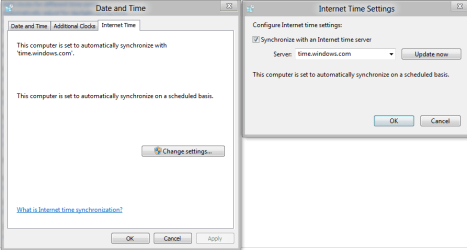
why does the time on my computer clock keep changing on its own

jturk

New member
Member
Local time
7:08 PM
Messages
64
to the wrong time? the clock in the bottom right corner keeps resetting on its own. i have the battery in. do you know what might be causing this?

i have a relatively new hp pavillion dv5 laptop & the clock in the bottom right corner keeps resetting on its own. i have the battery in. do you know what might be causing this?
 
Last edited by a moderator:

My Computer

OS
windows 7
Check in your regional settings make sure everything is correct for your area in there - http://www.sevenforums.com/tutorials/149362-region-language-change.html
Have a look at these posts regarding time - http://www.sevenforums.com/tutorials/944-time-zone-change.html
http://www.sevenforums.com/tutorials/943-date-time-change.html

A system file scan wouldn't hurt either - http://www.sevenforums.com/tutorials/1538-sfc-scannow-command-system-file-checker.html

Have you altered any services or changed the internet time sync configuration?

Capture.PNG

Danny
 
Last edited by a moderator:

My Computer

Computer Manufacturer/Model Number
acer aspire 5935g
OS
Windows 7 Home Premium x64 SP1
CPU
intel(R)core(TM)2 duo CPU T6600 @ 2.20GHz
Motherboard
intel gm45/gm47 revision 07
Memory
3 gb ddr3
Graphics Card(s)
ati radeon hd4570/512mb
Monitor(s) Displays
lop156wh2-tle1 15.3 flat
Screen Resolution
1366x768
Hard Drives
OCZ-Agility3 60gig ssd
320gig external hdd
500gig external hdd
Mouse
Optical
Internet Speed
30Mbps Down/30Mbps Up
i have the battery in.
But is it any good? How old is it? When you reboot and look at BIOS screen, is the time there the same (off) as Windows?
 

My Computer

Computer type
Laptop
Computer Manufacturer/Model Number
Dell Latitude E6540 Laptop
OS
Windows 7 Professional 64bit
CPU
Intel Core i7 4600M @ 2.90GHz
Motherboard
Dell Inc. 0CYT5F (SOCKET 0)
Memory
16.0GB Dual-Channel DDR3 @ 797MHz (11-11-11-28)
Graphics Card(s)
Intel HD Graphics 4600 (Dell) 2048MB ATI AMD Radeon HD 8790M
Sound Card
Realtek High Definition Audio
Monitor(s) Displays
HP ZR30w (2560x1600@60Hz)
Hard Drives
256GB LITEONIT LMT-256M6M-41 mm SATA (SSD)
1TB Samsung SSD 860 EVO mSATA SATA (SSD)
2TB USB 3.0 USB Device
115GB SanDisk Ultra Fit USB
Other Info
Multiple Dell E-Port Plus II Port Replicator/Docking Stations 0Y72NH USB 3.0 + 130W AC Adapters
Timeserver... just turn it off and use the internal clock in the BIOS.
 

Attachments

  • time.windows.wrong.jpg
    time.windows.wrong.jpg
    28.6 KB · Views: 185

My Computer

Computer Manufacturer/Model Number
Self Built
OS
Windows 7 Pro 64 Bit
CPU
I7 920
Motherboard
EVGA Classfied 760
Memory
12GB DDR3
Graphics Card(s)
2X GTX 295
Sound Card
Onboard Realtek
Monitor(s) Displays
3X 20.1 Inch 1X 24 inch
Hard Drives
3X 1TB WD RE3 RAID 0 + 2X 2TB Green Drive 2X 1TB USB 2.0 external
PSU
Antec 1000 Watt
Case
Cooler Master Haf-X
Cooling
Zalman 9900 Max
Does this happen if you leave the computer off (Start -> Shutdown) for a period of time?
(Doesn't matter if it is plugged in or the battery is in or both)
 

My Computer

Computer Manufacturer/Model Number
XFX NForce 780i SLI
OS
Win7 64-bit Ultimate
CPU
Intel Core2 Extrme X9650 3.0Ghz @ 3.33Ghz
Motherboard
XFX Intel 780i
Memory
8GB DDR-2 1333Mhz
Graphics Card(s)
2x SLI NVIDIA 780GTX
Sound Card
PCI Express X-Fi Titanium Fatal1ty Champion PCI-X
Monitor(s) Displays
2x Samsung LCD
Screen Resolution
1280x1024
Hard Drives
4x Seagate Barracuda 500GB something.10
PSU
PC Power & Cooling 1000W
Case
Thermaltake
Cooling
Water - 2x Koolance EXOS 2.5
Keyboard
Logitech DiNovo
Mouse
Logitech MX1000
Internet Speed
25 Down/5 Up
Cmos battery that is weak will cause this problem. A little round battery about the size of a nickle on the motherboard. They are cheep and easy to replace.
 

My Computer

Computer type
PC/Desktop
Computer Manufacturer/Model Number
Home made Desktop
OS
Windows 10 Pro. 64/ version 1709 Windows 7 Pro/64
CPU
Intel i7-6800K @ 4.3
Motherboard
ASUS X-99 Deluxe II
Memory
Corsair Platinum 16 gig @2400
Graphics Card(s)
EVGA GTX 1070 OC
Monitor(s) Displays
Asus 27" LED LCD/VE278Q
Screen Resolution
1920-1080 or 1280-720 HDMI
Hard Drives
INTEL SSD 730-240 Gb Sata 3.0/
PSU
EVGA Platium 1200W
Case
Phanteks Luxe Tempered Glass 8 fans/ one radiator
Cooling
XSPC/ Water Cooled CPU
Keyboard
Das 4 Professional
Mouse
Logitech M705/MX Anywhere 2-S
Internet Speed
100 mbits
Antivirus
Microsoft Security Essentials/ Malwarebytes Premium 3.0/ SAS
Browser
I.E. 11 default/Firefox/ ISP Time Warner Cable/Spectrum
Other Info
LG BluRay Burner/
Sound system-KLipsch-THX/
Icy Dock ssd Hot Swap bays.
Layback bear is saying same thing I was going to troubleshoot first.
If it does like I said, CMOS battery is dead or dying/weak.
 

My Computer

Computer Manufacturer/Model Number
XFX NForce 780i SLI
OS
Win7 64-bit Ultimate
CPU
Intel Core2 Extrme X9650 3.0Ghz @ 3.33Ghz
Motherboard
XFX Intel 780i
Memory
8GB DDR-2 1333Mhz
Graphics Card(s)
2x SLI NVIDIA 780GTX
Sound Card
PCI Express X-Fi Titanium Fatal1ty Champion PCI-X
Monitor(s) Displays
2x Samsung LCD
Screen Resolution
1280x1024
Hard Drives
4x Seagate Barracuda 500GB something.10
PSU
PC Power & Cooling 1000W
Case
Thermaltake
Cooling
Water - 2x Koolance EXOS 2.5
Keyboard
Logitech DiNovo
Mouse
Logitech MX1000
Internet Speed
25 Down/5 Up
is the system BIOS clock set correctly as well? battery may be fine but bios is not correct
 

My Computer

Computer Manufacturer/Model Number
Toshiba Z830-S8301
OS
Windows 7 Ultimate SP1 x64
CPU
Intel Core i5 2557M
Motherboard
Intel QM67
Memory
6 Gb PC3-10600 DDR3
Graphics Card(s)
Intel 3000 HD
Monitor(s) Displays
13.3" Matt LCD Panel
Screen Resolution
1366 x 768
Hard Drives
128Gb Toshiba mSATA SSD
Cooling
Toshiba Airflow Technology
Keyboard
Chiclet
Mouse
Synaptics Touchpad
Other Info
1.08 Kg (2.38lb)
Any time the battery is replaced the time should be reset in the Bios. Let us know what you find.
 

My Computer

Computer type
PC/Desktop
Computer Manufacturer/Model Number
Home made Desktop
OS
Windows 10 Pro. 64/ version 1709 Windows 7 Pro/64
CPU
Intel i7-6800K @ 4.3
Motherboard
ASUS X-99 Deluxe II
Memory
Corsair Platinum 16 gig @2400
Graphics Card(s)
EVGA GTX 1070 OC
Monitor(s) Displays
Asus 27" LED LCD/VE278Q
Screen Resolution
1920-1080 or 1280-720 HDMI
Hard Drives
INTEL SSD 730-240 Gb Sata 3.0/
PSU
EVGA Platium 1200W
Case
Phanteks Luxe Tempered Glass 8 fans/ one radiator
Cooling
XSPC/ Water Cooled CPU
Keyboard
Das 4 Professional
Mouse
Logitech M705/MX Anywhere 2-S
Internet Speed
100 mbits
Antivirus
Microsoft Security Essentials/ Malwarebytes Premium 3.0/ SAS
Browser
I.E. 11 default/Firefox/ ISP Time Warner Cable/Spectrum
Other Info
LG BluRay Burner/
Sound system-KLipsch-THX/
Icy Dock ssd Hot Swap bays.
why does my clock keep changing on its own

it wont stay whatever time i set it at.

and i did what the first guy said, except i didnt do a file system scan.

i want to turn if off & use the internal clock in the BIOS as one of the answers suggested. how do i do this?
 
Last edited by a moderator:

My Computer

OS
windows 7
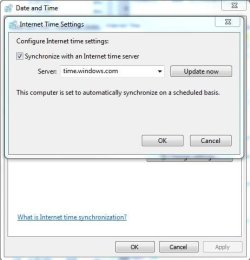
Why don't you just replace the battery :) You can disable timeserver updates by going to Control Panel -> Date and Time, then to the third tab in the window (Internet time)...but frankly, there's no good reason to do so. It won't solve your specific issue, of that I'm 99% sure...
 

My Computer

Computer type
PC/Desktop
Computer Manufacturer/Model Number
Custom-built
OS
Windows 7 Professional SP1 32-bit
CPU
Intel Core 2 Duo E6600 2.4GHz
Motherboard
Asus PL5D2
Memory
4GB DDR2-667 (4x1GB in dual-channel config)
Graphics Card(s)
nVidia GeForce 9800 GT
Sound Card
Creative X-Fi XtremeMusic
Monitor(s) Displays
Acer P236H
Screen Resolution
1920x1200 (DVI)
Hard Drives
OCZ SSD Vertex Plus 60GB SATA (Firmware 3.55), 64MB cache
Hitachi HD321KJ SATA, 320GB, 7200rpm, 16MB cache
PSU
Antec TruePower 2.0
Case
Cooler Master Centurion
Cooling
Too many fans
Keyboard
Standard
Mouse
Microsoft wireless optical mouse
Internet Speed
AT&T U-verse (18mbit/sec)
Antivirus
Microsoft Security Essentials
Browser
Firefox
Other Info
Other devices:
Compaq CQ-60 laptop
Google Nexus 7 (2012) tablet
Nvidia SHIELD tablet (US/LTE)
Hardkernel ODROID-XU single-board computer (Samsung Exynos 5420)
Try changing internet time servers. My problem was solved after I switched fm Windows to a .gov time server.
 

My Computer

OS
Win 7 x64
Glad you got things fixed. All my computers use Windows time. If I ever have that problem I will remember that.
 

My Computer

Computer type
PC/Desktop
Computer Manufacturer/Model Number
Home made Desktop
OS
Windows 10 Pro. 64/ version 1709 Windows 7 Pro/64
CPU
Intel i7-6800K @ 4.3
Motherboard
ASUS X-99 Deluxe II
Memory
Corsair Platinum 16 gig @2400
Graphics Card(s)
EVGA GTX 1070 OC
Monitor(s) Displays
Asus 27" LED LCD/VE278Q
Screen Resolution
1920-1080 or 1280-720 HDMI
Hard Drives
INTEL SSD 730-240 Gb Sata 3.0/
PSU
EVGA Platium 1200W
Case
Phanteks Luxe Tempered Glass 8 fans/ one radiator
Cooling
XSPC/ Water Cooled CPU
Keyboard
Das 4 Professional
Mouse
Logitech M705/MX Anywhere 2-S
Internet Speed
100 mbits
Antivirus
Microsoft Security Essentials/ Malwarebytes Premium 3.0/ SAS
Browser
I.E. 11 default/Firefox/ ISP Time Warner Cable/Spectrum
Other Info
LG BluRay Burner/
Sound system-KLipsch-THX/
Icy Dock ssd Hot Swap bays.
Was having a similar problem with my samsung laptop and tried many of the solutions put forward here and on other forums.
The solution, for me was pretty simple.
I shutdown the computer, pulled the power cord out and also pulled the battery out and rebooted, fixed the time issue and it hasn't reoccurred again.
 

My Computer

Computer type
Laptop
Computer Manufacturer/Model Number
Samsung
OS
Windows 7 Home Premium 64bit
Cmos battery that is weak will cause this problem. A little round battery about the size of a nickle on the motherboard. They are cheep and easy to replace.

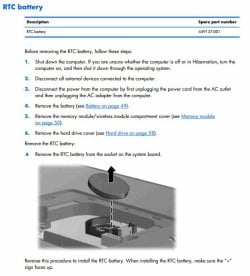
Not easy on a laptop though which is what this is.

Edit: Just found the manual and this one is not too bad:

RTC BAttery PavDV5.jpg
 

My Computer

Computer type
PC/Desktop
Computer Manufacturer/Model Number
Lenovo IdeaCenter 450
OS
Windows 10 Pro X64
CPU
Intel Quad Core i7-4770 @ 3.4Ghz
Memory
16.0GB PC3-12800 DDR3 SDRAM 1600 MHz
Graphics Card(s)
Intel Integrated HD Graphics
Sound Card
Realtek HD Audio
Monitor(s) Displays
HP 22" LCD
Screen Resolution
1680 x 1050
Hard Drives
250GB Samsung EVO SATA-3 SSD
2TB Seagate ST2000DM001 SATA-2
1.5TB Seagate ST3150041AS SATA
Keyboard
Dell USB
Mouse
Lenovo USB
Internet Speed
Cable via Road Runner 3MB Upload, 30MB Download
Antivirus
Windows Defender, MBAM Pro, MBAE
Browser
Seamonkey
Other Info
UEFI/GPT
PLDS DVD-RW DH16AERSH
Well, scratch that, spoke too soon.
The laptop has started to lose time again.
I will have to maybe look at replacing the cmos battery.
 

My Computer

Computer type
Laptop
Computer Manufacturer/Model Number
Samsung
OS
Windows 7 Home Premium 64bit
Back
Top