
Why is EFS running

RC5000

New member
Local time
10:24 AM
Messages
39
My machine is a Windows 7 Home Premium machine from Dell.

My machine is experiencing a lot of problems. Here's a thread where I talk about it:

http://www.sevenforums.com/general-discussion/390333-windows-sort-stops-working-time-time-2.html


An IT Technician I know examined my machine yesterday (in Safe Mode, no networking) and believes it is severely compromised. He said many logs are deleted; there might be something which has compromsed the MBR.

Yesterday I ran Taskmgr (which I do a lot) and saw EFS running. Now I have never gotten credentials for this and have never seen it run before. I have never run cipher.exe, for example.

Why would EFS be running?

The technician's recommendation is to toss the computer and get a new one.

I run Kaspersky anti-Virus. They seem to feel they may be the cause (they did not say so directly, but they've asked me to uninstall the current version and install a new one, which I did; it did not help).

I've run MalwareBytes and also Combofix.

The starting and stopping does not seem to happen when in Safe Mode with Networking.

BUT since yesterday the problem has not reoccurred, as far as I know.

The EFS running bothers me.

RON
 

My Computer My Computer

Computer type
PC/Desktop
Computer Manufacturer/Model Number
Dell
OS
Microsoft Windows 7 Home Premium 64-bit 7601 Multiproc; build: 7601 Multiprocessor Free
CPU
Intel(R) Core(TM) i3-2100 CPU @ 3.10GHz
Motherboard
Dell Inc. 0GDG8Y
Memory
4.00 GB
Graphics Card(s)
Intel(R) HD Graphics Family
Sound Card
(1) Conexant HD Audio (2) Intel(R) Display Audio
Monitor(s) Displays
Nothing appears in systeminfo for Monitor.
Screen Resolution
1920 x 1080 x 32 bits (4294967296 colors) @ 60 Hz
Hard Drives
WDC WD10EALX-759BA1 ATA Device, 3 partitions, size: 931.51 GB; Generic- Multi-Card USB Device: 0 GB, 0 Partitions; Seagate Expansion Desk USB Device, 1 partition, External hard disk media, 1.82TB
Antivirus
Kaspersky
Browser
Chrome; IE, Mozilla
Other Info
SystemInfo took < 1 sec to download but then 5 min to come up (due to the problem)
My machine is a Windows 7 Home Premium machine from Dell...

The EFS running bothers me.
Your thread caught my eye and I looked at my own relatively-new-pristine Dell and the EFS service is Automatic and Started (running), though I can find no executable in Task Manager specific to EFS. You are talking about the Service being Started then?

This computer has a Smart Card capability, which I see is also Running, and I use neither the Smart Card nor Encryption or Bitlocker or any such stuff on this W7Pro x64 machine (at least not that I know of)!

I have no problems at all, so while I find that EFS can be disabled, I'm inclined to just leave it alone. Anyway FWIW and in-my-not-very-educated-about-EFS-opinion, the fact that your service is running should not necessarily be of concern to you (by itself).
 

My Computer My Computer

Computer type
Laptop
Computer Manufacturer/Model Number
Dell Latitude E6540 Laptop
OS
Windows 7 Professional 64bit
CPU
Intel Core i7 4600M @ 2.90GHz
Motherboard
Dell Inc. 0CYT5F (SOCKET 0)
Memory
16.0GB Dual-Channel DDR3 @ 797MHz (11-11-11-28)
Graphics Card(s)
Intel HD Graphics 4600 (Dell) 2048MB ATI AMD Radeon HD 8790M
Sound Card
Realtek High Definition Audio
Monitor(s) Displays
HP ZR30w (2560x1600@60Hz)
Hard Drives
256GB LITEONIT LMT-256M6M-41 mm SATA (SSD)
1TB Samsung SSD 860 EVO mSATA SATA (SSD)
2TB USB 3.0 USB Device
115GB SanDisk Ultra Fit USB
Other Info
Multiple Dell E-Port Plus II Port Replicator/Docking Stations 0Y72NH USB 3.0 + 130W AC Adapters
That is good to know. It was just I've never seen it before. This computer has smart-card capability but I have no way to use it (no device) and of course no Bitlocker or encryption either. So I'll leave it alone. With all the other weird stuff going on on my machine it was just one more thing.

THANKS!!!
 

My Computer My Computer

Computer type
PC/Desktop
Computer Manufacturer/Model Number
Dell
OS
Microsoft Windows 7 Home Premium 64-bit 7601 Multiproc; build: 7601 Multiprocessor Free
CPU
Intel(R) Core(TM) i3-2100 CPU @ 3.10GHz
Motherboard
Dell Inc. 0GDG8Y
Memory
4.00 GB
Graphics Card(s)
Intel(R) HD Graphics Family
Sound Card
(1) Conexant HD Audio (2) Intel(R) Display Audio
Monitor(s) Displays
Nothing appears in systeminfo for Monitor.
Screen Resolution
1920 x 1080 x 32 bits (4294967296 colors) @ 60 Hz
Hard Drives
WDC WD10EALX-759BA1 ATA Device, 3 partitions, size: 931.51 GB; Generic- Multi-Card USB Device: 0 GB, 0 Partitions; Seagate Expansion Desk USB Device, 1 partition, External hard disk media, 1.82TB
Antivirus
Kaspersky
Browser
Chrome; IE, Mozilla
Other Info
SystemInfo took < 1 sec to download but then 5 min to come up (due to the problem)
An IT technician examined my machine. He believes there is an SMM virus and a clean reinstall, factory reset will not make a difference. I cannot evaluate his abilities (I'm a .net developer with some but limited understand of machinery, networks, systems etc.) He said it seems the log files were purged and there were other issues (which I forgot now). He was quite concerned. He has no financial stake in anything. He suggested I get a new computer.
 

My Computer My Computer

Computer type
PC/Desktop
Computer Manufacturer/Model Number
Dell
OS
Microsoft Windows 7 Home Premium 64-bit 7601 Multiproc; build: 7601 Multiprocessor Free
CPU
Intel(R) Core(TM) i3-2100 CPU @ 3.10GHz
Motherboard
Dell Inc. 0GDG8Y
Memory
4.00 GB
Graphics Card(s)
Intel(R) HD Graphics Family
Sound Card
(1) Conexant HD Audio (2) Intel(R) Display Audio
Monitor(s) Displays
Nothing appears in systeminfo for Monitor.
Screen Resolution
1920 x 1080 x 32 bits (4294967296 colors) @ 60 Hz
Hard Drives
WDC WD10EALX-759BA1 ATA Device, 3 partitions, size: 931.51 GB; Generic- Multi-Card USB Device: 0 GB, 0 Partitions; Seagate Expansion Desk USB Device, 1 partition, External hard disk media, 1.82TB
Antivirus
Kaspersky
Browser
Chrome; IE, Mozilla
Other Info
SystemInfo took < 1 sec to download but then 5 min to come up (due to the problem)
An IT technician examined my machine. He believes there is an SMM virus and a clean reinstall, factory reset will not make a difference. I cannot evaluate his abilities (I'm a .net developer with some but limited understand of machinery, networks, systems etc.) He said it seems the log files were purged and there were other issues (which I forgot now). He was quite concerned. He has no financial stake in anything. He suggested I get a new computer.
I had to look-up the SMM virus so will be no help to you about this. I can only say that when someone says "get a new computer" then akin to a doctor diagnosis ("you have x months to live") well I would certainly get a second opinion!

:geek:
 

My Computer My Computer

Computer type
Laptop
Computer Manufacturer/Model Number
Dell Latitude E6540 Laptop
OS
Windows 7 Professional 64bit
CPU
Intel Core i7 4600M @ 2.90GHz
Motherboard
Dell Inc. 0CYT5F (SOCKET 0)
Memory
16.0GB Dual-Channel DDR3 @ 797MHz (11-11-11-28)
Graphics Card(s)
Intel HD Graphics 4600 (Dell) 2048MB ATI AMD Radeon HD 8790M
Sound Card
Realtek High Definition Audio
Monitor(s) Displays
HP ZR30w (2560x1600@60Hz)
Hard Drives
256GB LITEONIT LMT-256M6M-41 mm SATA (SSD)
1TB Samsung SSD 860 EVO mSATA SATA (SSD)
2TB USB 3.0 USB Device
115GB SanDisk Ultra Fit USB
Other Info
Multiple Dell E-Port Plus II Port Replicator/Docking Stations 0Y72NH USB 3.0 + 130W AC Adapters
I know. He's a friend of mine; he does not profit from it. He examined it for hours yesterday in Safe Mode. I cannot validate the findings. I am at least totally backed up. All my data and installation programs are safe in many copies, so if I do get a new machine it won't be the worst pain in the world.
 

My Computer My Computer

Computer type
PC/Desktop
Computer Manufacturer/Model Number
Dell
OS
Microsoft Windows 7 Home Premium 64-bit 7601 Multiproc; build: 7601 Multiprocessor Free
CPU
Intel(R) Core(TM) i3-2100 CPU @ 3.10GHz
Motherboard
Dell Inc. 0GDG8Y
Memory
4.00 GB
Graphics Card(s)
Intel(R) HD Graphics Family
Sound Card
(1) Conexant HD Audio (2) Intel(R) Display Audio
Monitor(s) Displays
Nothing appears in systeminfo for Monitor.
Screen Resolution
1920 x 1080 x 32 bits (4294967296 colors) @ 60 Hz
Hard Drives
WDC WD10EALX-759BA1 ATA Device, 3 partitions, size: 931.51 GB; Generic- Multi-Card USB Device: 0 GB, 0 Partitions; Seagate Expansion Desk USB Device, 1 partition, External hard disk media, 1.82TB
Antivirus
Kaspersky
Browser
Chrome; IE, Mozilla
Other Info
SystemInfo took < 1 sec to download but then 5 min to come up (due to the problem)
My Windows 7 Home Premium system has EFS set to Automatic and is running. I have not changed service configuration. It is hosted by the lsass.exe process. This is a relatively new installation with no known problems.

My guess why it is running is that it does something else in addition to managing the encrypting file system. It is not unusual for services to do more than the documentation states.

I doubt this has anything to do with your problems.
 

My Computer My Computer

Computer type
PC/Desktop
Computer Manufacturer/Model Number
HP
OS
Windows 7 Pro 64 bit
CPU
Xeon W3520
Memory
8 GB
Graphics Card(s)
Nvidia Geforce 210
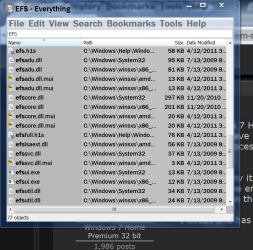
My systems have a bunch of EFS without any problem. I really don't know what they all are. What little research of have done on my system, they all seem to be related with programs I have installed.

If one of my computers had all the problems yours has I would do a Clean Install of everything.


EFS.PNG
 

My Computer My Computer

Computer type
PC/Desktop
Computer Manufacturer/Model Number
Home made Desktop
OS
Windows 10 Pro. 64/ version 1709 Windows 7 Pro/64
CPU
Intel i7-6800K @ 4.3
Motherboard
ASUS X-99 Deluxe II
Memory
Corsair Platinum 16 gig @2400
Graphics Card(s)
EVGA GTX 1070 OC
Monitor(s) Displays
Asus 27" LED LCD/VE278Q
Screen Resolution
1920-1080 or 1280-720 HDMI
Hard Drives
INTEL SSD 730-240 Gb Sata 3.0/
PSU
EVGA Platium 1200W
Case
Phanteks Luxe Tempered Glass 8 fans/ one radiator
Cooling
XSPC/ Water Cooled CPU
Keyboard
Das 4 Professional
Mouse
Logitech M705/MX Anywhere 2-S
Internet Speed
100 mbits
Antivirus
Microsoft Security Essentials/ Malwarebytes Premium 3.0/ SAS
Browser
I.E. 11 default/Firefox/ ISP Time Warner Cable/Spectrum
Other Info
LG BluRay Burner/
Sound system-KLipsch-THX/
Icy Dock ssd Hot Swap bays.
Back
Top