Why Registered Window has Single partition ?

mmnouman

New member
Member
Local time
7:26 AM
Messages
60
Why Registered Window has Single partition .When we buy pc with registered window it always has single partition ...........what is logic behind this ??
 

My Computer

Computer Manufacturer/Model Number
DELL Inspiron N5110
OS
Windows 7 x64
CPU
DELL
Memory
80GB
Graphics Card(s)
Nvidia GT525m
Hard Drives
500GB
What are you asking? I don't quite understand your problem or concern.

If you are asking why systems are sold with a single usable partition is because it's easier to manage for users. A big portion of the population that uses windows only know how to do their word/excel documents. They don't mess with default save location or anything like that. Go out an explain partitions to someone who 1) doesn't really care 2) is not very computer literate 3) will forget. They are comfortable with a single partition to save and access their documents.
 

My Computer

Computer type
PC/Desktop
Computer Manufacturer/Model Number
Gateway / Slight Modifications
OS
Windows 8 64 bit PRO
CPU
AMD Phenom X4 9100e
Motherboard
Gateway RS780
Memory
2GB X2 DDR2
Graphics Card(s)
Sapphire HD 6850
Sound Card
Integrated
Monitor(s) Displays
Gateway 19" + Dell 19"
Screen Resolution
1440X900 sometimes 2880 by 900
Hard Drives
WD 80GB
WD 640GB
WD 1,000GB
PSU
Antec BP 550watts
Case
Antec 300
Cooling
Stock Cooling
Keyboard
Saitek Eclipse II
Mouse
Gigabyte GM-M6800
Internet Speed
D: 30Mbps U:4Mbps
Antivirus
Avast version 8
Browser
Internet Explorer ver 10 64 bit
Other Info
This is my work computer.
I have another laptop running Windows 7 64 bit.
Another PC running Windows 8 64 bit pro.
Total of 3
I inquired because I found that single disk partition slows down the performance.
 

My Computer

Computer Manufacturer/Model Number
DELL Inspiron N5110
OS
Windows 7 x64
CPU
DELL
Memory
80GB
Graphics Card(s)
Nvidia GT525m
Hard Drives
500GB
Not all computers come with a single partition my Laptop came with two partitions also has hidden partition
 

My Computer

Computer Manufacturer/Model Number
W530-3630QM1
OS
windows 7 home 64bit
CPU
INTEL-CORE I7
Memory
16GB
Hard Drives
750GB
Browser
Chrome
Hidden is only recovery drive
 

My Computer

Computer Manufacturer/Model Number
DELL Inspiron N5110
OS
Windows 7 x64
CPU
DELL
Memory
80GB
Graphics Card(s)
Nvidia GT525m
Hard Drives
500GB
Well the majority of PC users don't bother maintaining their systems and either a) download 3rd party software which sometimes works sometimes it complicates b) take it to a shop c) know someone who can fix it.

I don't think having a second partition would help them very much. The performance gain vs complexity is just not worth it. Just imagine the number of increase calls for a PC manufacturer, there would be an increase number and that's just more money they need to spend. They spend more money = more expenses = they pass the cost down to the consumer = more expensive computers for the consumer.

The performance gain is not significant
 

My Computer

Computer type
PC/Desktop
Computer Manufacturer/Model Number
Gateway / Slight Modifications
OS
Windows 8 64 bit PRO
CPU
AMD Phenom X4 9100e
Motherboard
Gateway RS780
Memory
2GB X2 DDR2
Graphics Card(s)
Sapphire HD 6850
Sound Card
Integrated
Monitor(s) Displays
Gateway 19" + Dell 19"
Screen Resolution
1440X900 sometimes 2880 by 900
Hard Drives
WD 80GB
WD 640GB
WD 1,000GB
PSU
Antec BP 550watts
Case
Antec 300
Cooling
Stock Cooling
Keyboard
Saitek Eclipse II
Mouse
Gigabyte GM-M6800
Internet Speed
D: 30Mbps U:4Mbps
Antivirus
Avast version 8
Browser
Internet Explorer ver 10 64 bit
Other Info
This is my work computer.
I have another laptop running Windows 7 64 bit.
Another PC running Windows 8 64 bit pro.
Total of 3
I inquired because I found that single disk partition slows down the performance.

Could you explain how a single partition slows down a computer?
 

My Computer

Computer type
PC/Desktop
Computer Manufacturer/Model Number
Home made Desktop
OS
Windows 10 Pro. 64/ version 1709 Windows 7 Pro/64
CPU
Intel i7-6800K @ 4.3
Motherboard
ASUS X-99 Deluxe II
Memory
Corsair Platinum 16 gig @2400
Graphics Card(s)
EVGA GTX 1070 OC
Monitor(s) Displays
Asus 27" LED LCD/VE278Q
Screen Resolution
1920-1080 or 1280-720 HDMI
Hard Drives
INTEL SSD 730-240 Gb Sata 3.0/
PSU
EVGA Platium 1200W
Case
Phanteks Luxe Tempered Glass 8 fans/ one radiator
Cooling
XSPC/ Water Cooled CPU
Keyboard
Das 4 Professional
Mouse
Logitech M705/MX Anywhere 2-S
Internet Speed
100 mbits
Antivirus
Microsoft Security Essentials/ Malwarebytes Premium 3.0/ SAS
Browser
I.E. 11 default/Firefox/ ISP Time Warner Cable/Spectrum
Other Info
LG BluRay Burner/
Sound system-KLipsch-THX/
Icy Dock ssd Hot Swap bays.
because all programs runs on C and also it contains all the data, so I think it slows the system on startup.
 

My Computer

Computer Manufacturer/Model Number
DELL Inspiron N5110
OS
Windows 7 x64
CPU
DELL
Memory
80GB
Graphics Card(s)
Nvidia GT525m
Hard Drives
500GB
Short Stroke

You can "short stroke" the OS partition.

I read an article where the author compared a small WD Black (250GB) HDD to a large WD Green HDD (1 TB).
His tests showed, the WD Green was almost as fast as the WD Black, if he created a small partition for the OS (and left the rest as a large data partition).
The large WD Green was also cheaper than the small WD Black.

I don't have the equipment (or inclination) to confirm his findings.

You also seem to get more fragmentation if everything is on the same drive.
All the various Windows (and program) log files and updates get scattered everywhere.
 

My Computer

Computer type
PC/Desktop
Computer Manufacturer/Model Number
n/a
OS
W7 Ultimate SP1, LM19.2 MATE, W10 Home 1703, W10 Pro 1703 VM, #All 64 bit
CPU
AMD Phenom II x6 1100T, 3.3 GHz
Motherboard
ASUS M4A88T-M/USB3 (AM3)
Memory
12GB DDR3 1333 G-Skill (4GB x 2), G-Skill (2GB x 2)
Graphics Card(s)
NVIDIA GeForce GTX 660
Sound Card
Realtek?
Monitor(s) Displays
Samsung S23B350
Screen Resolution
1920x1080
Hard Drives
WD Green 2TB (SATA), WD Green 3TB (SATA), WD Blue 4TB (SATA), WD Blue 6TB (SATA)
PSU
Cooler Master
Case
Antec GX300 Tower
Cooling
3x Antec TRICOOL 120mm Fans
Mouse
Wired Optical
Internet Speed
DSL
Antivirus
Avast
Browser
Pale Moon (64 bit)
Other Info
2018-12-27 Upgraded HDDs
2015-12-10 Upgraded case, graphics card, storage
2015-08-15 Upgraded motherboard & RAM
2015-07-15 Upgraded LM17.1 to LM17.2
I wonder when SSDs will become commonplace in appliance PCs. Random access really changes the picture.
 

My Computer

Computer Manufacturer/Model Number
homegrown
OS
Windows 7 Pro X64 SP1
CPU
Intel Core I7-3930k
Motherboard
Asus P9X79 Pro
Memory
16 GB Gskill DDR3-2133
Graphics Card(s)
eVGA GTX680
Sound Card
Creative X-Fi Titanium
Monitor(s) Displays
As PA246Q
Screen Resolution
1920 X 1200
Hard Drives
Corsair Force GT, 120 GB
WDC 1.5TB Caviar Black
PSU
PCP&C Silencer 750 Crossfire
Case
Silverstone FT02
Cooling
Noctua NH-D14
Keyboard
cheap Logitech USB
Mouse
Microsoft Intellimouse Explorer (old optical) USB
Internet Speed
6Mb cable
Other Info
Pioneer BDR-205
Samsung SH-203B
Monsoon 5.1 speakers
Any drive or partition that is fragmented will be slower no mater what size it is.
 

My Computer

Computer type
PC/Desktop
Computer Manufacturer/Model Number
Home made Desktop
OS
Windows 10 Pro. 64/ version 1709 Windows 7 Pro/64
CPU
Intel i7-6800K @ 4.3
Motherboard
ASUS X-99 Deluxe II
Memory
Corsair Platinum 16 gig @2400
Graphics Card(s)
EVGA GTX 1070 OC
Monitor(s) Displays
Asus 27" LED LCD/VE278Q
Screen Resolution
1920-1080 or 1280-720 HDMI
Hard Drives
INTEL SSD 730-240 Gb Sata 3.0/
PSU
EVGA Platium 1200W
Case
Phanteks Luxe Tempered Glass 8 fans/ one radiator
Cooling
XSPC/ Water Cooled CPU
Keyboard
Das 4 Professional
Mouse
Logitech M705/MX Anywhere 2-S
Internet Speed
100 mbits
Antivirus
Microsoft Security Essentials/ Malwarebytes Premium 3.0/ SAS
Browser
I.E. 11 default/Firefox/ ISP Time Warner Cable/Spectrum
Other Info
LG BluRay Burner/
Sound system-KLipsch-THX/
Icy Dock ssd Hot Swap bays.
Where do you found that more partitions are faster? That's not accurate, because even if data is on different partition, and supposing you're accessing them all at the same time, the system will have to "compete" for IO on each partition, since it can't be served together.

A different situation is when you have 2 physical disk, not partitions of the same disk. There can be a noticeable boost if the data is properly arranged.
 

My Computer

Computer type
Laptop
Computer Manufacturer/Model Number
Toshiba Sattelite A665-S6092
OS
Windows 7 Ultimate x64
CPU
Intel Core i7-740QM
Memory
8 GB DDR3
Graphics Card(s)
NVIDIA GeForce 330GT
Screen Resolution
1366x768
Hard Drives
Samsung 840 SSD 500GB
1TB USB3 external HD
Cooling
Coolermaster Notepal U3 notebook cooling pad
Internet Speed
3mbps ASDL
Antivirus
ClamWin 0.98.7
Browser
Opera 12.17 x86 (main), Firefox 38 (sec), IE11 (last resort)
Where do you found that more partitions are faster? That's not accurate, because even if data is on different partition, and supposing you're accessing them all at the same time, the system will have to "compete" for IO on each partition, since it can't be served together.

A different situation is when you have 2 physical disk, not partitions of the same disk. There can be a noticeable boost if the data is properly arranged.

Multiple HDDs should always be better/faster.

The author's point was, why spend a lot of money on a small high-speed HDD (250GB) when you can gain most of the speed benefits from a cheaper larger HDD (1TB)?

He suggested putting infrequently accessed data on the large partition.
You can probably put small files (<10MB) on the large partition.

Any files that you access regularly, should be on the small partition.

You have to consciously set up your system to make the most of any possible gains.
 

My Computer

Computer type
PC/Desktop
Computer Manufacturer/Model Number
n/a
OS
W7 Ultimate SP1, LM19.2 MATE, W10 Home 1703, W10 Pro 1703 VM, #All 64 bit
CPU
AMD Phenom II x6 1100T, 3.3 GHz
Motherboard
ASUS M4A88T-M/USB3 (AM3)
Memory
12GB DDR3 1333 G-Skill (4GB x 2), G-Skill (2GB x 2)
Graphics Card(s)
NVIDIA GeForce GTX 660
Sound Card
Realtek?
Monitor(s) Displays
Samsung S23B350
Screen Resolution
1920x1080
Hard Drives
WD Green 2TB (SATA), WD Green 3TB (SATA), WD Blue 4TB (SATA), WD Blue 6TB (SATA)
PSU
Cooler Master
Case
Antec GX300 Tower
Cooling
3x Antec TRICOOL 120mm Fans
Mouse
Wired Optical
Internet Speed
DSL
Antivirus
Avast
Browser
Pale Moon (64 bit)
Other Info
2018-12-27 Upgraded HDDs
2015-12-10 Upgraded case, graphics card, storage
2015-08-15 Upgraded motherboard & RAM
2015-07-15 Upgraded LM17.1 to LM17.2

My Computers

System One System Two

  • Computer type
    PC/Desktop
    Computer Manufacturer/Model Number
    ALWAYS UNDER CONSTRUCTION
    OS
    Windows 11 Pro
    CPU
    Ryzen 9 5900X
    Motherboard
    Asus X570 Crosshair Viii Hero
    Memory
    32GB G Skill DDR4-3600
    Graphics Card(s)
    EVGA RTX 3080 FTW 3 Ultra
    Sound Card
    On Board/Sennheiser PC37X Headset
    Monitor(s) Displays
    3 X Asus 27"
    Screen Resolution
    2560x1440
    Hard Drives
    2 X 1 TB NVME drives
    PSU
    EVGA 850
    Case
    Phanteks Eclipse P400A
    Cooling
    EVGA 280 AIO
    Keyboard
    Logitech G510s/ Logitech G13
    Mouse
    Logitech G502
    Internet Speed
    24/1
    Antivirus
    ESET/MBAM Pro/SAS Pro
    Browser
    Chrome/ Firefox/ Edge
  • Computer type
    Laptop
    System Manufacturer/Model Number
    Dell 16 Plus
    OS
    Windows 11 Pro
    CPU
    Intel Ultra 9 288V
    Memory
    32 GB LPDDR5X 8533
    Monitor(s) Displays
    16" Mini-LED HDR600 Touch 90 Hz
    Screen Resolution
    2560X1600
    Hard Drives
    1 TB NVME
Has it slowed down recently or do you think it has always been slow?

I can't figure why a system with a Partition for the OS will work faster that a small single partition drive. The read/write heads have to travel the same physical platters for data.
 

My Computer

Computer type
PC/Desktop
Computer Manufacturer/Model Number
Home Built Desktop By DataTech
OS
Windows 7 Ultimate X64 SP1
CPU
Intel i5-2550K, Differing ~4.4-4.8GHz No built in GPU
Motherboard
ASUS P8Z68-V PRO/GEN3
Memory
16GB G.Skill Sniper 1866MHz @ 2133MHz 2x8GB
Graphics Card(s)
ASUS GTX650TIB-DC2OC-2GD5, (650TI Boost)
Sound Card
Onboard Realtek 5-1
Monitor(s) Displays
Samsung P2570HD
Screen Resolution
1920x1080
Hard Drives
Samsung 840 Pro 256GB SSD for OS, 500GB Seagate Constellation (Enterprise drive) for Data
PSU
Corsair HX650W
Case
Inwin Dragon Rider
Cooling
Hyper 212 EVO w/two Noctua fans, push-pull, @1300 RPM
Keyboard
E-Z Eyes, bright yellow keys with large characters
Mouse
steelseries SENSEI Laser Pro Gaming
Internet Speed
48-51Mbs Mbs down, 11 Mbs up Xfinity Cable
Antivirus
Norton Internet Security 2013
Browser
IE 10, Opera, Pale Moon if needed
Other Info
4 case fans, LG BluRay-RE, ASUS DVD-RW, Mr. Fusion power supply, 1.21 gigawatts.
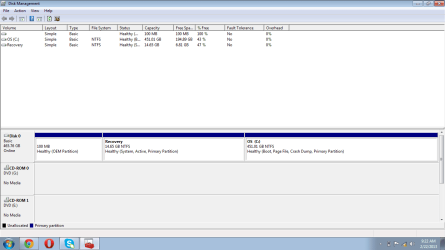
Please see the disk management.

My specs are,
Dell n5110 Core i7 ,4GB Ram, 500GB Hard drive, 1 Gb Nvidia Graphic card, Windows 7 Home Premium 64-bit (registered) ,also I have Mcafee Antvirus which is heavy as well.
It takes about 250 seconds to start and at start it is slow but gradually performance increases but remains unsatisfactory.
 

Attachments

  • disk.png
    disk.png
    21.1 KB · Views: 14

My Computer

Computer Manufacturer/Model Number
DELL Inspiron N5110
OS
Windows 7 x64
CPU
DELL
Memory
80GB
Graphics Card(s)
Nvidia GT525m
Hard Drives
500GB
You have 3 partitions in your hard drive . A 100mb system reserved partition , a 14.6 Gb recovery partition and your Windows partition . You might want to look at the start up tab inside system configuration windows . I'd personally have the recovery partition hidden or format it altogether . But first I'd create a recovery discs .

Click on :orb: type msconfig in the Search programs and files box click on yes if the uac window comes up . Uncheck the programs you don't need running when your PC starts up ie adobe reader , google stuff . show us a scrnprnt of the startup tab and we could help you on disabling programs from starting when your PC boots .
 

My Computer

Computer Manufacturer/Model Number
Custom Built
OS
Windows 7 Ultimate 32-Bit & Windows 7 Ultimate 64-Bit
CPU
Intel Core i7 CPU 950 @ 3.07GHz
Motherboard
ASUS P6T DELUXE V2
Memory
OCZ 6GB (3 x 2GB) 240-Pin DDR3 SDRAM DDR3 1600 OCZ3X1600R2
Graphics Card(s)
ATI Radeon HD 5700 Series
Sound Card
OnBoard
Hard Drives
WD6400AACS-00M3B0 (640GB SATA )
PSU
CORSAIR 850w
Case
NZXT LEXA
Cooling
Intel Stock Heatsink Fan
Keyboard
Microsoft Wireless Laser Keyboard 7000
Mouse
Microsoft Wireless Laser Mouse 7000
I already have stopped many of them.
 

My Computer

Computer Manufacturer/Model Number
DELL Inspiron N5110
OS
Windows 7 x64
CPU
DELL
Memory
80GB
Graphics Card(s)
Nvidia GT525m
Hard Drives
500GB
Remove Mcafee and get something much better .
 

My Computer

Computer Manufacturer/Model Number
Custom Built
OS
Windows 7 Ultimate 32-Bit & Windows 7 Ultimate 64-Bit
CPU
Intel Core i7 CPU 950 @ 3.07GHz
Motherboard
ASUS P6T DELUXE V2
Memory
OCZ 6GB (3 x 2GB) 240-Pin DDR3 SDRAM DDR3 1600 OCZ3X1600R2
Graphics Card(s)
ATI Radeon HD 5700 Series
Sound Card
OnBoard
Hard Drives
WD6400AACS-00M3B0 (640GB SATA )
PSU
CORSAIR 850w
Case
NZXT LEXA
Cooling
Intel Stock Heatsink Fan
Keyboard
Microsoft Wireless Laser Keyboard 7000
Mouse
Microsoft Wireless Laser Mouse 7000
which one is better instead of Mcafee ?
 

My Computer

Computer Manufacturer/Model Number
DELL Inspiron N5110
OS
Windows 7 x64
CPU
DELL
Memory
80GB
Graphics Card(s)
Nvidia GT525m
Hard Drives
500GB
Back
Top