Solved why windows seven takes higher memory.?

IamLEGEND

New member
Member
VIP
Local time
4:06 PM
Messages
138
Hi to all,
this is my first post to this forum. since I started to using windows seven 32bits. I noticed that windows seven takes higher RAM even I didn't launch any application, I had 1gb of ddr2 ram. and the win seven takes at least 40 to 50% of memory without any software is running.
I double the ram but this issue is still constant that the win seven takes 45% of memory,
why is that. ?
my other question is, when I launching many browser tab and some applications, the memory usage reaches to 80 to 90%, but some time, when I closed the all applications, the memory is still stay at the 80 or 90% usage.. then where are the memory is being used..?
 

My Computer

Computer type
PC/Desktop
Computer Manufacturer/Model Number
Acer Veriton S670/G M670/G
OS
Windows 7 SP1 Ultimate x64
CPU
Intel(R) Core(TM) 2 Due cpu E8400 @ 3.0ghz
Motherboard
Acer EQ45M
Memory
3x2gb DDR3 PC3-10600
Graphics Card(s)
NVIDIA GeForce 9800 GT
Sound Card
Digital Audio (S/PDIF) (High Definition Audio Device)
Monitor(s) Displays
Asus VK222H 22" lcd HDMI wide.
Screen Resolution
1680x1050 @ 60 Hz
Hard Drives
2x1TB WD 10EAR
Internet Speed
4mbps
Browser
FireFox v27.01
Normal idle win 7 mem usage without add-ons is around 1 gig.

Sorry to put it to you this way, but 2 gigs or even 4 (I myself have 4) are just no longer really considered a decent amount of ram. This is why 1 gig is considered the absolute minimum for installing win 7. You also have the ultimate edition which is using more than say, home would
Commonly used apps will stay in ram until another app pushes them out. This is for faster launching. Win 7 is made to actually USE the ram provided.
I'm guessing you upgraded from xp, because vista wasn't much different.

You can also launch the resource monitor to get a better ideal of exactly where things are going and what is being used by what service/application.
I hate to say this but it honestly sounds to me like you are one of those people that just won't be happy with windows 7. I personally don't understand why people bother adding ram then get upset when it's actually in use.
I'm blabbering now though. That's basically the long and the short of it at any rate.
 

My Computer

Computer Manufacturer/Model Number
Insane hobo technologies. ;-)
OS
Windows 7 x64
CPU
Intel i7 2600k
Motherboard
Asrock z68 extreme 4 gen 3
Memory
G.skill Ripjaw 16gigs @ 1866
Graphics Card(s)
Nvidia gtx580 (evga)
Sound Card
Integrated HD audio + hdmi
Monitor(s) Displays
24" ASUS widescreen + 42" insignia
Screen Resolution
1080p (1920x1080)
Hard Drives
128 Samsung 830
256 Samsung 840
3 x 1tb storage drive (various)
1 western digital 1tb (eSATA)
1 Seagate 1tb (eSATA)
PSU
1 kilowatt SLI/Crossfire rated Silverstone modular
Case
NZXT Phantom + additional 220 fan
Cooling
Zalmann
Keyboard
Microsoft wireless 3000 (v2)
Mouse
MS - wireless 5000 (bluetrack)
Internet Speed
depends on if you ask me or my provider.
Other Info
The above information is provided as is, and the author assumes no responsibility for issues it may cause with your sanity or fanboyism.
Just for comparison sake , I have 8gb of dd3 ram and with all my apps running on tickover my ram sits a 18% usage.

Seem to see lots of people with 8gb now , but I am also seeing loads of people building new rigs with 16gb which is certainly future proofing lol.
 

My Computer

OS
Windows 7 Professional 64 bit
I've got 14gb in my system right now and with a few things running (XChat, firefox 4, winamp, notepad and a couple MSN messenger windows) I'm at 2.5gb used RAM, or 17%. Windows 7 NEEDS the RAM. Even sitting at an empty desktop I'll be using 1.8gb.
 

My Computer

OS
7x64 SP1
CPU
Intel 2600K
Motherboard
Intel DZ77GA-70K
Memory
8GB Samsung
Graphics Card(s)
MSI 670
Sound Card
HT Omega Striker 7.1
Monitor(s) Displays
Dell U2412M
Screen Resolution
1920x1200
Hard Drives
2x 3TB WD Green
1x 4TB Hitachi
1x Intel 330 Series 180GB SSD
PSU
Corsair HX850
Hi to all,
this is my first post to this forum. since I started to using windows seven 32bits. I noticed that windows seven takes higher RAM even I didn't launch any application, I had 1gb of ddr2 ram. and the win seven takes at least 40 to 50% of memory without any software is running.
I double the ram but this issue is still constant that the win seven takes 45% of memory,
why is that. ?
my other question is, when I launching many browser tab and some applications, the memory usage reaches to 80 to 90%, but some time, when I closed the all applications, the memory is still stay at the 80 or 90% usage.. then where are the memory is being used..?
Note that Windows 7 needs at least 1GB for the system itself. This is perfectly normal since 1GB is the bare minimum requirement for Win7. Add more RAM for better performance
No need to worry about that Win7 automatically allocates the required memory when required ;)
The 32-bit version of Windows 7 uses about 800MB-1.6GB when idle
 

My Computer

Computer type
PC/Desktop
Computer Manufacturer/Model Number
Custom Build
OS
Windows 10 Pro x64, Arch Linux
CPU
Intel Core 2 Quad Q8200 OC'd 3.08GHz
Motherboard
Asus Rampage formula LGA775
Memory
8GB DDR2 900Mhz
Graphics Card(s)
MSI GT730 2GB GDDR5 (Kepler)
Sound Card
Supreme FX2
Monitor(s) Displays
Samsung LS22F350 LED
Screen Resolution
1080P
Hard Drives
Kingston SSDNow UV400 120GB, 500GB Hitachi, 2TB Samsung, 500GB Seagate FreeAgent, 640GB Samsung, 160GB Toshiba (Arch)
PSU
AeroCool 500W Bronze
Cooling
Cooler Master V6 + 3X fans
Keyboard
Prolink keyboard
Mouse
Logitech M705
Internet Speed
1MiB/s
Browser
Chrome Beta
2GB of RAM suits me perfectly, and I run some pretty demanding tasks too. Windows has practically never been slow or laggy with 2GB of RAM in my experience.
 

My Computer

Computer Manufacturer/Model Number
Spitfire X (Custom Rig)
OS
Windows 7 Ultimate x64 Service Pack 1
CPU
Intel Pentium E5500 Dual Core 2.8GHz OC'd @3.2GHz
Motherboard
AsRock G31M-S R2.0
Memory
4GB Corsair DDR2 800MHz (2x2GB)
Graphics Card(s)
Inno 3D Geforce GT 440 1GB
Sound Card
Realtek ALC662 Audio w/ Logitech Z506 5.1 Surround Speakers
Monitor(s) Displays
BenQ G2220HDA 21.5" Monitor
Screen Resolution
1920 x 1080 (1080p)
Hard Drives
OS: Seagate Barracuda 7200.12 250GB
Data and Programs: Seagate Barracuda 7200.12 500GB
PSU
Antec High Current Gamer HCG-520w
Case
Antec One Hundred
Cooling
140 mm Roof Fan, 120mm Rear Fan, 120mm Frontal Fan
Keyboard
Logitech Ultra Flat Keyboard PN 967653-0100
Mouse
Trust GXT 14S Gaming Mouse
Other Info
2x10cm Blue LED strips inside case
Fact is that Windows 7 need more and more RAM memory. I have 2GB and with FF(4tabs),Skype,MSN,AIMP2,and some programs for security windows is using 49% of ram memory.

You can use vlite to tweak Win 7 installation.
vLite is a tool for customizing the Windows Vista installation before actually installing it.

Main features are:
  • hotfix, language pack and driver integration
  • component removal
  • unattended setup
  • tweaks
  • split/merge Vista installation CDs
  • create ISO and burn bootable CD/DVD
 

My Computer

Computer type
PC/Desktop
Computer Manufacturer/Model Number
Custom Build
OS
Windows 10 Pro x64
CPU
Intel Core i5 4440 @Stock
Motherboard
Gigabyte Z97 D3H
Memory
4 x 4GB HyperX Fury DDR3
Graphics Card(s)
Gigabyte GTX 1050Ti O4G
Sound Card
Integrated
Monitor(s) Displays
Dell P2417H
Screen Resolution
1920 x 1080
Hard Drives
Samsung EVO 850 120GB / Toshiba DT01ACA050 1TB 7200prm 32MB
PSU
Riotoro Onyx 750W
Case
NZXT H500 Black-Red
Cooling
Stock CPU + NZXT 120mm + 2x120mm red fans
Keyboard
Modecom Volcano Lanparty
Mouse
Asus ROG Gladius / DeepCool E-Pad Plus
Internet Speed
DOCSIS 50/3 Mbit
Browser
Google Chrome
Other Info
Asus K55VJ(i5 3210M, GT635M / 2GB, 8GB DDR3, 500GB HDD)
Fact is that Windows 7 need more and more RAM memory. I have 2GB and with FF(4tabs),Skype,MSN,AIMP2,and some programs for security windows is using 49% of ram memory.

You can use vlite to tweak Win 7 installation.
vLite is a tool for customizing the Windows Vista installation before actually installing it.

Main features are:
  • hotfix, language pack and driver integration
  • component removal
  • unattended setup
  • tweaks
  • split/merge Vista installation CDs
  • create ISO and burn bootable CD/DVD
vlite is for Vista and has not been updated for windows 7
RT Se7en Lite is the one for Windows 7, however modifying windows can create problems later.
 

My Computer

Computer type
PC/Desktop
Computer Manufacturer/Model Number
Custom Build
OS
Windows 10 Pro x64, Arch Linux
CPU
Intel Core 2 Quad Q8200 OC'd 3.08GHz
Motherboard
Asus Rampage formula LGA775
Memory
8GB DDR2 900Mhz
Graphics Card(s)
MSI GT730 2GB GDDR5 (Kepler)
Sound Card
Supreme FX2
Monitor(s) Displays
Samsung LS22F350 LED
Screen Resolution
1080P
Hard Drives
Kingston SSDNow UV400 120GB, 500GB Hitachi, 2TB Samsung, 500GB Seagate FreeAgent, 640GB Samsung, 160GB Toshiba (Arch)
PSU
AeroCool 500W Bronze
Cooling
Cooler Master V6 + 3X fans
Keyboard
Prolink keyboard
Mouse
Logitech M705
Internet Speed
1MiB/s
Browser
Chrome Beta
Windows itself wouldn't cause this, so minimizing Windows isn't a good way to troubleshoot, either. You're addressing the wrong area - Windows 7 is going to try and use as much RAM as needed for superfetch cache, kernel cache, etc. We still haven't seen the resmon tab so we don't know if it's the cache or something else using RAM at this point.
 

My Computer

Computer type
PC/Desktop
Computer Manufacturer/Model Number
Custom
OS
Windows 10 Pro x64
CPU
Intel Core i7 4790K @ 4.5GHz
Motherboard
Asus Maximus Hero VII
Memory
32GB DDR3
Graphics Card(s)
Nvidia GeForce GTX970
Sound Card
Realtek HD Audio
Screen Resolution
1920x1200
Hard Drives
1x Samsung 250GB SSD
4x WD RE 2TB (RAIDZ)
PSU
Corsair AX760i
Case
Fractal Design Define R4
Cooling
Noctua NH-D15
Normal idle win 7 mem usage without add-ons is around 1 gig.

Sorry to put it to you this way, but 2 gigs or even 4 (I myself have 4) are just no longer really considered a decent amount of ram. This is why 1 gig is considered the absolute minimum for installing win 7. You also have the ultimate edition which is using more than say, home would
Commonly used apps will stay in ram until another app pushes them out. This is for faster launching. Win 7 is made to actually USE the ram provided.
I'm guessing you upgraded from xp, because vista wasn't much different.

You can also launch the resource monitor to get a better ideal of exactly where things are going and what is being used by what service/application.
I hate to say this but it honestly sounds to me like you are one of those people that just won't be happy with windows 7. I personally don't understand why people bother adding ram then get upset when it's actually in use.
I'm blabbering now though. That's basically the long and the short of it at any rate.

thank u very much Mr, Maguscreed, for your full of info reply. yeah u r right I m upgrading from xp, but I don't bother with seven, seven is very fantastic OS, its increase my internet speed and its virus security is very better then xp, specially when I install MS security essential. also seven had a wast rang of drivers. and now, I'll upgrades the mem as you said,
as for you concern the resource monitor, its not very different with task manager, when without running any app and mem reaches to 80 to 90%, as task manager didn't show where the mem is using, the resource monitor is same thing shown as task manger, means resource monitor not shown the other (hidden) apps running which is takes the mem,
anyway, thanks again,

Fact is that Windows 7 need more and more RAM memory. I have 2GB and with FF(4tabs),Skype,MSN,AIMP2,and some programs for security windows is using 49% of ram memory.

You can use vlite to tweak Win 7 installation.
vLite is a tool for customizing the Windows Vista installation before actually installing it.

Main features are:
  • hotfix, language pack and driver integration
  • component removal
  • unattended setup
  • tweaks
  • split/merge Vista installation CDs
  • create ISO and burn bootable CD/DVD
vlite is for Vista and has not been updated for windows 7
RT Se7en Lite is the one for Windows 7, however modifying windows can create problems later.

thanks Mr, Stalker, I'll try, RT se7ev LIte.
 

My Computer

Computer type
PC/Desktop
Computer Manufacturer/Model Number
Acer Veriton S670/G M670/G
OS
Windows 7 SP1 Ultimate x64
CPU
Intel(R) Core(TM) 2 Due cpu E8400 @ 3.0ghz
Motherboard
Acer EQ45M
Memory
3x2gb DDR3 PC3-10600
Graphics Card(s)
NVIDIA GeForce 9800 GT
Sound Card
Digital Audio (S/PDIF) (High Definition Audio Device)
Monitor(s) Displays
Asus VK222H 22" lcd HDMI wide.
Screen Resolution
1680x1050 @ 60 Hz
Hard Drives
2x1TB WD 10EAR
Internet Speed
4mbps
Browser
FireFox v27.01
heay dear friends come back to my thread,, actually this was I talking about. when I say,
"my other question is, when I launching many browser tab and some applications, the memory usage reaches to 80 to 90%, but some time, when I closed the all applications, the memory is still stay at the 80 or 90% usage.. then where are the memory is being used..?"
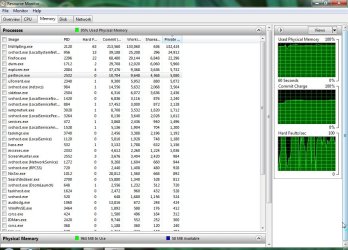
this is happening now when I searching some thing in C: drive with windows search option. I abort searching when its near the end of green bar, but when I return to desktop, my pc is getting heavy and the mem usage is 95%, although I didn't open many thing, only fire fox with tabs. I opened the Resource Monitor, this is its snap, plz tell me where did the mem is being used,, because after this kind of activity or mem usage, the only solution to minimize the mem usage is Restart the Computer,

1.jpg
 

My Computer

Computer type
PC/Desktop
Computer Manufacturer/Model Number
Acer Veriton S670/G M670/G
OS
Windows 7 SP1 Ultimate x64
CPU
Intel(R) Core(TM) 2 Due cpu E8400 @ 3.0ghz
Motherboard
Acer EQ45M
Memory
3x2gb DDR3 PC3-10600
Graphics Card(s)
NVIDIA GeForce 9800 GT
Sound Card
Digital Audio (S/PDIF) (High Definition Audio Device)
Monitor(s) Displays
Asus VK222H 22" lcd HDMI wide.
Screen Resolution
1680x1050 @ 60 Hz
Hard Drives
2x1TB WD 10EAR
Internet Speed
4mbps
Browser
FireFox v27.01
Something is going on with microsoft security essentials.
I have never seen it eating that much power on my own system.

I would guess it is eating the cpu time as well.
You may want to look into its settings and see that it's not running scans when you are trying to use the system for other things.
 

My Computer

Computer Manufacturer/Model Number
Insane hobo technologies. ;-)
OS
Windows 7 x64
CPU
Intel i7 2600k
Motherboard
Asrock z68 extreme 4 gen 3
Memory
G.skill Ripjaw 16gigs @ 1866
Graphics Card(s)
Nvidia gtx580 (evga)
Sound Card
Integrated HD audio + hdmi
Monitor(s) Displays
24" ASUS widescreen + 42" insignia
Screen Resolution
1080p (1920x1080)
Hard Drives
128 Samsung 830
256 Samsung 840
3 x 1tb storage drive (various)
1 western digital 1tb (eSATA)
1 Seagate 1tb (eSATA)
PSU
1 kilowatt SLI/Crossfire rated Silverstone modular
Case
NZXT Phantom + additional 220 fan
Cooling
Zalmann
Keyboard
Microsoft wireless 3000 (v2)
Mouse
MS - wireless 5000 (bluetrack)
Internet Speed
depends on if you ask me or my provider.
Other Info
The above information is provided as is, and the author assumes no responsibility for issues it may cause with your sanity or fanboyism.
One thing to remember. You won't be able to utilize anything more than about 3.5 GB using a 32 bit OS version. To use the 8 and 16 talked about above you need the 64 bit version.
 

My Computer

Computer type
Laptop
Computer Manufacturer/Model Number
Hewlett-Packard/G62-107SA Notebook
OS
Microsoft Windows 7 Home Premium 64-bit Service Pack 1
CPU
Intel(R) Core(TM) i3 CPU M 330 @ 2.13GHz
Motherboard
Hewlett-Packard 1425
Memory
8 GB DDR3
Graphics Card(s)
Intel(R) HD Graphics
Sound Card
Realtek High Definition Audio
Monitor(s) Displays
Builtin
Screen Resolution
1366 x 768 x 32 bits (4294967296 colors) @ 60 Hz
Hard Drives
250 GB SATA Hard Disk Drive 7200 rpm
2TB Seagate GoFlex USB 2 Drive
1TB Iomega Prestige USB 2 Drive
1.5TB Iomega Prestige USB 2 Drive (Samsung)
2TB WD MyBook Live NAS.
Mouse
Logitech Anywhere MX
Internet Speed
152 Mbs download 10 Mbs upload
Antivirus
Norton 360
Browser
Chrome
1. I have seen MSE using that much RAM. MSE is a resource hog in terms of RAM.
2. You get a lot of hard page faults. That is a sign that you do not have enough RAM. If you can, add 1GB - even 2GB although your 32bit system will not be able to use it all.
3. Unfortunately you did not show the color bar of Resource Monitor. That would have been more telling.
4. Restarting the PC is not a good idea. You loose the cache, so makes the system run slower at first.
 
Last edited:

My Computer

Computer Manufacturer/Model Number
HP, Dell, Gateway, Toshiba - 4 laptops and 2 desktops
OS
Vista, Windows7, Mint Mate, Zorin, Windows 8
CPU
from 1.6GHz Duo to i7
Monitor(s) Displays
2x HP w2207
Hard Drives
5x HDD, 7x SSD, 12x Externals
Keyboard
with trackball - no mices
Mouse
Trackball mice
Internet Speed
DSL 6000
One stupid opinion,try to uninstall the MSE with Revo Uninstaller,and install it again.
 

My Computer

Computer type
PC/Desktop
Computer Manufacturer/Model Number
Custom Build
OS
Windows 10 Pro x64
CPU
Intel Core i5 4440 @Stock
Motherboard
Gigabyte Z97 D3H
Memory
4 x 4GB HyperX Fury DDR3
Graphics Card(s)
Gigabyte GTX 1050Ti O4G
Sound Card
Integrated
Monitor(s) Displays
Dell P2417H
Screen Resolution
1920 x 1080
Hard Drives
Samsung EVO 850 120GB / Toshiba DT01ACA050 1TB 7200prm 32MB
PSU
Riotoro Onyx 750W
Case
NZXT H500 Black-Red
Cooling
Stock CPU + NZXT 120mm + 2x120mm red fans
Keyboard
Modecom Volcano Lanparty
Mouse
Asus ROG Gladius / DeepCool E-Pad Plus
Internet Speed
DOCSIS 50/3 Mbit
Browser
Google Chrome
Other Info
Asus K55VJ(i5 3210M, GT635M / 2GB, 8GB DDR3, 500GB HDD)
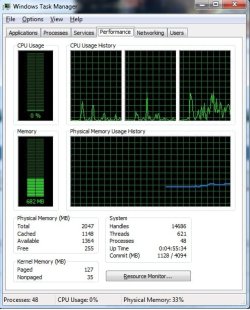
I am on a system with 2GB of ram and it is using about 28% of the ram,
 

Attachments

  • tm.jpg
    tm.jpg
    59.8 KB · Views: 7

My Computer

Computer Manufacturer/Model Number
HAL-9000
OS
Windows 7 Ultimate 64bit
CPU
Intel i7 3770K
Motherboard
Asus Sabertooth Z77
Memory
16GB DDR3 1333 Corsair XMS3
Graphics Card(s)
XFX HD6950 2GB EyeFinity
Sound Card
Logitech G35 & Sennheiser PC135 & VIA HD
Monitor(s) Displays
23" HP 2310e, 23" Samsung B2230, 21.5" Viewsonic
Screen Resolution
5760x1080
Hard Drives
16TB of Storage
128GB & 256GB Crucial M4 SSD's, 2X 1TB WD Black, 3x 2TB WD, 3x 2TB Samsung F4, 1.5TB Seagate, WD 500GB,
PSU
Antec True Power New 650watt
Case
Cooler Master HAF-932
Cooling
Corsair H60 Hydro Cooler, 3x 230mm Fans, 2x120mm Fan
Keyboard
Logitech G15 and G13
Mouse
Logitech G700 Gaming Mouse
Internet Speed
50/10 Mbit
Other Info
Speakers : Alesis M1 Active Mk2 Studio Monitors , APC RS 1200 UPS, HP 4500DN Color Laser, HP P1006 mono Laser, Kodak 8500 Dye-Sub, Epson 1280 inkjet, Epson Worforce 610 MFC
Hi
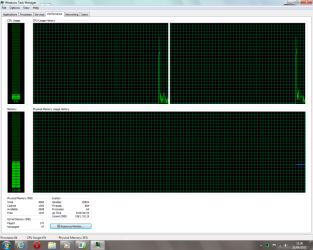
I have 4GB ram in my system and with things running like IE WMP it use around 35%
 

Attachments

  • Untitlede3.png
    Untitlede3.png
    35.7 KB · Views: 8

My Computer

Computer type
PC/Desktop
Computer Manufacturer/Model Number
iMac 21.5 Late 2013
OS
OS X 10.10 Yosemite & Windows 7 Ultimate 64Bit
CPU
Intel Core i5 4570R
Motherboard
Apple
Memory
8.00GB
Graphics Card(s)
Intel Iris Pro 5200
Monitor(s) Displays
iMac 21.5 Inch
Screen Resolution
1920 * 1080
Hard Drives
1TB Apple HDD
Keyboard
Apple Wireless Keyboard
Mouse
Apple Magic Trackpad
Yeah - I'm guessing something on that box has triggered MSE for some reason. Best to remove, make sure you're working properly after removal of MSE (disconnect from the internet or your home network after uninstalling, to be safe, if you're paranoid), and then reinstall to see if the problem returns.
 

My Computer

Computer type
PC/Desktop
Computer Manufacturer/Model Number
Custom
OS
Windows 10 Pro x64
CPU
Intel Core i7 4790K @ 4.5GHz
Motherboard
Asus Maximus Hero VII
Memory
32GB DDR3
Graphics Card(s)
Nvidia GeForce GTX970
Sound Card
Realtek HD Audio
Screen Resolution
1920x1200
Hard Drives
1x Samsung 250GB SSD
4x WD RE 2TB (RAIDZ)
PSU
Corsair AX760i
Case
Fractal Design Define R4
Cooling
Noctua NH-D15
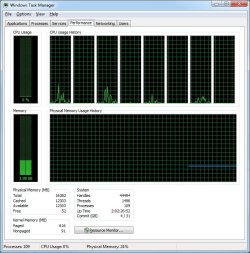
my main rig uses 24% after 2 days of running, Firefox with 10 tabs, Outlook 2010, Steam, and a bunch of other little apps and gadgets running.
 

Attachments

  • tm.jpg
    tm.jpg
    94 KB · Views: 15

My Computer

Computer Manufacturer/Model Number
HAL-9000
OS
Windows 7 Ultimate 64bit
CPU
Intel i7 3770K
Motherboard
Asus Sabertooth Z77
Memory
16GB DDR3 1333 Corsair XMS3
Graphics Card(s)
XFX HD6950 2GB EyeFinity
Sound Card
Logitech G35 & Sennheiser PC135 & VIA HD
Monitor(s) Displays
23" HP 2310e, 23" Samsung B2230, 21.5" Viewsonic
Screen Resolution
5760x1080
Hard Drives
16TB of Storage
128GB & 256GB Crucial M4 SSD's, 2X 1TB WD Black, 3x 2TB WD, 3x 2TB Samsung F4, 1.5TB Seagate, WD 500GB,
PSU
Antec True Power New 650watt
Case
Cooler Master HAF-932
Cooling
Corsair H60 Hydro Cooler, 3x 230mm Fans, 2x120mm Fan
Keyboard
Logitech G15 and G13
Mouse
Logitech G700 Gaming Mouse
Internet Speed
50/10 Mbit
Other Info
Speakers : Alesis M1 Active Mk2 Studio Monitors , APC RS 1200 UPS, HP 4500DN Color Laser, HP P1006 mono Laser, Kodak 8500 Dye-Sub, Epson 1280 inkjet, Epson Worforce 610 MFC
my main rig uses 24% after 2 days of running, Firefox with 10 tabs, Outlook 2010, Steam, and a bunch of other little apps and gadgets running.


from your printscreen, that's quite a high kernel paged memory isn't it? 600mb
 

My Computer

OS
Windows 7 Ultimate x64
CPU
Intel i7 2600K
Motherboard
Asus P8P67 WS Revolution B3
Memory
Gskill Ripjaws X 8gb 2133Mhz
Graphics Card(s)
EVGA GTX 580 Black Ops
Sound Card
Creative SB Titanium HD
Monitor(s) Displays
ACER HN274H
Hard Drives
WD Caviar Black
OCZ Vertex 3 240GB
PSU
Antec HCP 1200W
Case
Corsair Obsidian 800D
Cooling
Coolit Vantage
Back
Top