Wierd memtest screen & Game crashes (Far Cry3 & Borderlands 2)

rcwombat

New member
Local time
3:49 PM
Messages
7
Location
Adelaide
Hi all,

I have been experiencing severe problems with Far Cry 3 (Happens very frequently) and very minor problems with Borderlands 2 (Rarely happens). No other games have these issues (BF3 etc), so it could possibly be game specific, but am trying to make sure that is the case...

At random times the game will either crash to desktop, or BSOD. The latest 3 BSOD have given me the following errors...
PAGE_FAULT_IN_NONPAGED_AREA 0x50
SYSTEM_SERVICE_EXCEPTION 0x3b
BAD_POOL_HEADER 0x19

I ran memtest on Windows, with no errors (Only a short time)

I then ran from the boot disk version 4.0a overnight (at least 8 hours) upon getting up in the morning, I was faced with the following screen:
small.jpg


It looks like something is corrupt, but the screen says, in amongst the garble, pass complete, no errors.... and there doesn't appear to be any red within the garble..
Could that still indicate memory errors?

Computer specs:

Asus P8Z680V Pro
Corsair Dominator 2 x pairs of 4GB CMZ8GX3M2A1600C9 @ 1333mhz

This RAM and amount is in the QVL:
CORSAIR CMZ8GX3M2A1600C9(XMP) 8GB ( 2x 4GB ) DS - - 9-9-9-24 1.5 ● ● ● (third dot indicates 4DIMM)

Any reason why the garbled memtest screen?

Oh, and yes, ALL drivers up to date, tried Beta driver as well for Graphics Card, all mobo drivers and BIOS up to date....

Thanks :)
 
Last edited:

My Computer My Computer

At a glance

Windows 7 Ultimate x64Core i7 2600K4 x 4GB Corsair Dominator CMZ8GX3M2A1600C9 @ ...GTX580 1.5GB VRAM
Computer Manufacturer/Model Number
Self
OS
Windows 7 Ultimate x64
CPU
Core i7 2600K
Motherboard
Asus P8Z68-V Pro
Memory
4 x 4GB Corsair Dominator CMZ8GX3M2A1600C9 @ 1333
Graphics Card(s)
GTX580 1.5GB VRAM
Sound Card
onboard
Monitor(s) Displays
27" Asus
Hard Drives
2 x 120GB OCZ Vertex 3 in Raid 0
1 x 2TB Seagate
PSU
Corsair 850
Case
Corsair 600T Graphite White
Cooling
Corsair H80 Water Cooling
Keyboard
Logitech G15
Mouse
Logitech G700
Internet Speed
14k down 1k up

My Computer My Computer

At a glance

Microsoft Windows 10 Pro Insider Preview 64-bitIntel(R) Core(TM) i3-4130 CPU @ 3.40GHzCorsair Vengence 4GB x2 (8.00GB Dual-Channel ...2047MB GeForce GTS 450 (ZOTAC International)
Computer type
PC/Desktop
Computer Manufacturer/Model Number
Self Assembled
OS
Microsoft Windows 10 Pro Insider Preview 64-bit
CPU
Intel(R) Core(TM) i3-4130 CPU @ 3.40GHz
Motherboard
Gigabyte Technology Co., Ltd. B85M-D3H
Memory
Corsair Vengence 4GB x2 (8.00GB Dual-Channel DDR3 @ 798MHz)
Graphics Card(s)
2047MB GeForce GTS 450 (ZOTAC International)
Sound Card
Onboard (Realtek High Definition Audio)
Monitor(s) Displays
LG Flatron E2040T
Screen Resolution
1600x900
Hard Drives
Western Digital 1 TB
Seagate 500 GB
PSU
Corsair VS550
Case
Cooler Master K380
Cooling
Cooler Master Seidon 120V Plus
Keyboard
Logitech MK260r
Mouse
Logitech MK260r
Internet Speed
PMPL Broadband
Antivirus
Windows Defender + MBAM
Browser
Firefox
Other Info
Dell Studio 15" Laptop
Thanks for the reply :)

Interesting, i ran the tool, and it created its own folder in D: drive user$user$/desktop to store the folder in... (I have changed my default docs&setts to D:drive, but it created a new one...)

Anyway, very thorough program i had a look myself and has very good thorough readings so might be able to find something in there.. hopefully..

here it is... EDIT - CONTAINS PERSONAL EMAIL AND OTHER DATA, NOT WILLING TO POST ON A PUBLIC FORUM
 

My Computer My Computer

At a glance

Windows 7 Ultimate x64Core i7 2600K4 x 4GB Corsair Dominator CMZ8GX3M2A1600C9 @ ...GTX580 1.5GB VRAM
Computer Manufacturer/Model Number
Self
OS
Windows 7 Ultimate x64
CPU
Core i7 2600K
Motherboard
Asus P8Z68-V Pro
Memory
4 x 4GB Corsair Dominator CMZ8GX3M2A1600C9 @ 1333
Graphics Card(s)
GTX580 1.5GB VRAM
Sound Card
onboard
Monitor(s) Displays
27" Asus
Hard Drives
2 x 120GB OCZ Vertex 3 in Raid 0
1 x 2TB Seagate
PSU
Corsair 850
Case
Corsair 600T Graphite White
Cooling
Corsair H80 Water Cooling
Keyboard
Logitech G15
Mouse
Logitech G700
Internet Speed
14k down 1k up
The last crash was graphics related. Let us start with rolling back to a known stable graphics driver.

How is the situation after that?
 

My Computer My Computer

At a glance

Microsoft Windows 10 Pro Insider Preview 64-bitIntel(R) Core(TM) i3-4130 CPU @ 3.40GHzCorsair Vengence 4GB x2 (8.00GB Dual-Channel ...2047MB GeForce GTS 450 (ZOTAC International)
Computer type
PC/Desktop
Computer Manufacturer/Model Number
Self Assembled
OS
Microsoft Windows 10 Pro Insider Preview 64-bit
CPU
Intel(R) Core(TM) i3-4130 CPU @ 3.40GHz
Motherboard
Gigabyte Technology Co., Ltd. B85M-D3H
Memory
Corsair Vengence 4GB x2 (8.00GB Dual-Channel DDR3 @ 798MHz)
Graphics Card(s)
2047MB GeForce GTS 450 (ZOTAC International)
Sound Card
Onboard (Realtek High Definition Audio)
Monitor(s) Displays
LG Flatron E2040T
Screen Resolution
1600x900
Hard Drives
Western Digital 1 TB
Seagate 500 GB
PSU
Corsair VS550
Case
Cooler Master K380
Cooling
Cooler Master Seidon 120V Plus
Keyboard
Logitech MK260r
Mouse
Logitech MK260r
Internet Speed
PMPL Broadband
Antivirus
Windows Defender + MBAM
Browser
Firefox
Other Info
Dell Studio 15" Laptop
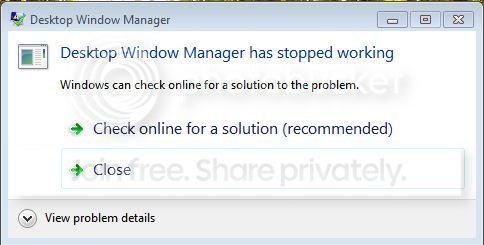
Hi, just finished testing after following your method.

No change, still random crash, it seems to always have something to do with the DWM:

DWMerror.jpg
 

My Computer My Computer

At a glance

Windows 7 Ultimate x64Core i7 2600K4 x 4GB Corsair Dominator CMZ8GX3M2A1600C9 @ ...GTX580 1.5GB VRAM
Computer Manufacturer/Model Number
Self
OS
Windows 7 Ultimate x64
CPU
Core i7 2600K
Motherboard
Asus P8Z68-V Pro
Memory
4 x 4GB Corsair Dominator CMZ8GX3M2A1600C9 @ 1333
Graphics Card(s)
GTX580 1.5GB VRAM
Sound Card
onboard
Monitor(s) Displays
27" Asus
Hard Drives
2 x 120GB OCZ Vertex 3 in Raid 0
1 x 2TB Seagate
PSU
Corsair 850
Case
Corsair 600T Graphite White
Cooling
Corsair H80 Water Cooling
Keyboard
Logitech G15
Mouse
Logitech G700
Internet Speed
14k down 1k up

My Computer My Computer

At a glance

Microsoft Windows 10 Pro Insider Preview 64-bitIntel(R) Core(TM) i3-4130 CPU @ 3.40GHzCorsair Vengence 4GB x2 (8.00GB Dual-Channel ...2047MB GeForce GTS 450 (ZOTAC International)
Computer type
PC/Desktop
Computer Manufacturer/Model Number
Self Assembled
OS
Microsoft Windows 10 Pro Insider Preview 64-bit
CPU
Intel(R) Core(TM) i3-4130 CPU @ 3.40GHz
Motherboard
Gigabyte Technology Co., Ltd. B85M-D3H
Memory
Corsair Vengence 4GB x2 (8.00GB Dual-Channel DDR3 @ 798MHz)
Graphics Card(s)
2047MB GeForce GTS 450 (ZOTAC International)
Sound Card
Onboard (Realtek High Definition Audio)
Monitor(s) Displays
LG Flatron E2040T
Screen Resolution
1600x900
Hard Drives
Western Digital 1 TB
Seagate 500 GB
PSU
Corsair VS550
Case
Cooler Master K380
Cooling
Cooler Master Seidon 120V Plus
Keyboard
Logitech MK260r
Mouse
Logitech MK260r
Internet Speed
PMPL Broadband
Antivirus
Windows Defender + MBAM
Browser
Firefox
Other Info
Dell Studio 15" Laptop
hmm, thanks, I think i will do clean re-install rather than the update, the potential for the upgrade to mess up settings etc, is worth the extra effort to backup and re-install everything, plus I know its all fresh with no problems to start with. Will hopefully get it all backedup and maybe format tonight...

If it continues after the format, i'm gunna take a punt and replace the graphics card... it seems the only thing left that could be causing it.. other than maybe the PSU, but its a near new (8months old) 850w Corsair, so it seems unlikely...
 

My Computer My Computer

At a glance

Windows 7 Ultimate x64Core i7 2600K4 x 4GB Corsair Dominator CMZ8GX3M2A1600C9 @ ...GTX580 1.5GB VRAM
Computer Manufacturer/Model Number
Self
OS
Windows 7 Ultimate x64
CPU
Core i7 2600K
Motherboard
Asus P8Z68-V Pro
Memory
4 x 4GB Corsair Dominator CMZ8GX3M2A1600C9 @ 1333
Graphics Card(s)
GTX580 1.5GB VRAM
Sound Card
onboard
Monitor(s) Displays
27" Asus
Hard Drives
2 x 120GB OCZ Vertex 3 in Raid 0
1 x 2TB Seagate
PSU
Corsair 850
Case
Corsair 600T Graphite White
Cooling
Corsair H80 Water Cooling
Keyboard
Logitech G15
Mouse
Logitech G700
Internet Speed
14k down 1k up
I'd say, you planned it perfectly ! That's the best process of elimination.

Best of luck.
 

My Computer My Computer

At a glance

Microsoft Windows 10 Pro Insider Preview 64-bitIntel(R) Core(TM) i3-4130 CPU @ 3.40GHzCorsair Vengence 4GB x2 (8.00GB Dual-Channel ...2047MB GeForce GTS 450 (ZOTAC International)
Computer type
PC/Desktop
Computer Manufacturer/Model Number
Self Assembled
OS
Microsoft Windows 10 Pro Insider Preview 64-bit
CPU
Intel(R) Core(TM) i3-4130 CPU @ 3.40GHz
Motherboard
Gigabyte Technology Co., Ltd. B85M-D3H
Memory
Corsair Vengence 4GB x2 (8.00GB Dual-Channel DDR3 @ 798MHz)
Graphics Card(s)
2047MB GeForce GTS 450 (ZOTAC International)
Sound Card
Onboard (Realtek High Definition Audio)
Monitor(s) Displays
LG Flatron E2040T
Screen Resolution
1600x900
Hard Drives
Western Digital 1 TB
Seagate 500 GB
PSU
Corsair VS550
Case
Cooler Master K380
Cooling
Cooler Master Seidon 120V Plus
Keyboard
Logitech MK260r
Mouse
Logitech MK260r
Internet Speed
PMPL Broadband
Antivirus
Windows Defender + MBAM
Browser
Firefox
Other Info
Dell Studio 15" Laptop
ok, clean format, everything fresh and up to date....

crashed after 10 minutes, BSOD:

NTFS_FILE_SYSTEM
0x00000024

such completely different BSOD messages every time... confuses the crap out of me... still thinking graphics card, but that message seems totally unrelated to graphics card. (File system, was ntfs.sys driver that apparently caused it that time...)
 

My Computer My Computer

At a glance

Windows 7 Ultimate x64Core i7 2600K4 x 4GB Corsair Dominator CMZ8GX3M2A1600C9 @ ...GTX580 1.5GB VRAM
Computer Manufacturer/Model Number
Self
OS
Windows 7 Ultimate x64
CPU
Core i7 2600K
Motherboard
Asus P8Z68-V Pro
Memory
4 x 4GB Corsair Dominator CMZ8GX3M2A1600C9 @ 1333
Graphics Card(s)
GTX580 1.5GB VRAM
Sound Card
onboard
Monitor(s) Displays
27" Asus
Hard Drives
2 x 120GB OCZ Vertex 3 in Raid 0
1 x 2TB Seagate
PSU
Corsair 850
Case
Corsair 600T Graphite White
Cooling
Corsair H80 Water Cooling
Keyboard
Logitech G15
Mouse
Logitech G700
Internet Speed
14k down 1k up
This may be caused either by the storage device itself, or by any program impacting on the storage device. So first check that the storage device is doing ok ....

  1. Update your SSD's Firmware (Skip it, if it is not a SSD)
  2. Re-seat the sata and power.
  3. Run chkdsk /f/r, following the option two of the tutorial Disk Check
  4. Seatool for dos: SeaTools | Seagate download
    Burn it in a blank cd. boot from the CD, click on "Accept", wait for it to finish detecting the drives, then in the upper left corner select "Basic Tests", then select "Long Test" and let it run.
And, as we need to see if there is any program messing around, post it following the Blue Screen of Death (BSOD) Posting Instructions.
 

My Computer My Computer

At a glance

Microsoft Windows 10 Pro Insider Preview 64-bitIntel(R) Core(TM) i3-4130 CPU @ 3.40GHzCorsair Vengence 4GB x2 (8.00GB Dual-Channel ...2047MB GeForce GTS 450 (ZOTAC International)
Computer type
PC/Desktop
Computer Manufacturer/Model Number
Self Assembled
OS
Microsoft Windows 10 Pro Insider Preview 64-bit
CPU
Intel(R) Core(TM) i3-4130 CPU @ 3.40GHz
Motherboard
Gigabyte Technology Co., Ltd. B85M-D3H
Memory
Corsair Vengence 4GB x2 (8.00GB Dual-Channel DDR3 @ 798MHz)
Graphics Card(s)
2047MB GeForce GTS 450 (ZOTAC International)
Sound Card
Onboard (Realtek High Definition Audio)
Monitor(s) Displays
LG Flatron E2040T
Screen Resolution
1600x900
Hard Drives
Western Digital 1 TB
Seagate 500 GB
PSU
Corsair VS550
Case
Cooler Master K380
Cooling
Cooler Master Seidon 120V Plus
Keyboard
Logitech MK260r
Mouse
Logitech MK260r
Internet Speed
PMPL Broadband
Antivirus
Windows Defender + MBAM
Browser
Firefox
Other Info
Dell Studio 15" Laptop
It was a combination of RAM and a bad coop map that always crashed from what I can work out now.. The SSD's are fine, its a RAID 0 on 2 Vertex 3's which I updated their firmware only a few months back, the drives have never skipped a beat since then, and I am very confident that the game was playing a part as well....
I bought some 1333 Kingston VR 2x4GB sticks this morning to double check that the RAM wasn't at fault before spending $500 on a graphics card... Since the RAM has been in I have not had a crash in single player, and only once crashed, with an "Application Hang" indicated as the source in event viewer (rather than the other crazy ones I had been getting), on a COOP map I tried out with a friend, after 3 hours of playing single player. Changed COOP maps and another 3 hours of playing went by without problems...
So the conclusion...

RAM

(Both kits were tested separately, both exhibiting the same results (No memtest errors at all and game still crashing), so I concluded as I had had them for more than 6 months working together that it wasn't the RAM and must have been something else.. I was wrong, and even though the memtest screen said it had no errors, the garbled display must have come from RAM and not the Graphics Card which I had suspected)

Thanks for helping me work through the problem Arc
 

My Computer My Computer

At a glance

Windows 7 Ultimate x64Core i7 2600K4 x 4GB Corsair Dominator CMZ8GX3M2A1600C9 @ ...GTX580 1.5GB VRAM
Computer Manufacturer/Model Number
Self
OS
Windows 7 Ultimate x64
CPU
Core i7 2600K
Motherboard
Asus P8Z68-V Pro
Memory
4 x 4GB Corsair Dominator CMZ8GX3M2A1600C9 @ 1333
Graphics Card(s)
GTX580 1.5GB VRAM
Sound Card
onboard
Monitor(s) Displays
27" Asus
Hard Drives
2 x 120GB OCZ Vertex 3 in Raid 0
1 x 2TB Seagate
PSU
Corsair 850
Case
Corsair 600T Graphite White
Cooling
Corsair H80 Water Cooling
Keyboard
Logitech G15
Mouse
Logitech G700
Internet Speed
14k down 1k up
sigh,

nope, wasn't the problem... just had a good day yesterday it seems... today crashed as per normal

i will continue to work out the problem and post back when i find the answer...
 

My Computer My Computer

At a glance

Windows 7 Ultimate x64Core i7 2600K4 x 4GB Corsair Dominator CMZ8GX3M2A1600C9 @ ...GTX580 1.5GB VRAM
Computer Manufacturer/Model Number
Self
OS
Windows 7 Ultimate x64
CPU
Core i7 2600K
Motherboard
Asus P8Z68-V Pro
Memory
4 x 4GB Corsair Dominator CMZ8GX3M2A1600C9 @ 1333
Graphics Card(s)
GTX580 1.5GB VRAM
Sound Card
onboard
Monitor(s) Displays
27" Asus
Hard Drives
2 x 120GB OCZ Vertex 3 in Raid 0
1 x 2TB Seagate
PSU
Corsair 850
Case
Corsair 600T Graphite White
Cooling
Corsair H80 Water Cooling
Keyboard
Logitech G15
Mouse
Logitech G700
Internet Speed
14k down 1k up
Back
Top