Solved Wife cannot access weebly.com

bobland

Not a Power User
Power User
Local time
2:21 AM
Messages
247
Location
Boise
She has a custom site there and has maintained it for the past 6 months. Suddenly, it takes over 60 seconds just to get into the site. Once there, she cannot upload content. On my computer, I can access the site within 1 second. Her computer is newer and faster than mine.

We thought it might be a cable problem so we swapped out cables. Other sites ran noticeable faster but not weebly. We tried Firefox, Google and IE. Same problem with all.

Any suggestions or tips would be greatly appreciated.
 

My Computer

Computer type
PC/Desktop
Computer Manufacturer/Model Number
Crafted by Hand
OS
Windows 7 Professional SP1 64 bit Retail
CPU
Intel i7-4790K
Motherboard
ASRock Z97 Extreme6
Memory
2 x 4GB G.Skill RipJaws 13800
Graphics Card(s)
MSI GTX 970 Gaming
Sound Card
Focusrite Scarlett 2i2
Monitor(s) Displays
BenQ 3200
Screen Resolution
1440p
Hard Drives
Corsair 250GB SSD
WD RED 2 TB SATA
WD 500GB Green SATA
WD 1TB Black SATA x2
PSU
Corsair CMPSU 750TX
Case
Cooler Master 932 HAF
Cooling
Noctua NH-D14
Keyboard
Roccat Ryos MK
Mouse
Roccat Kone XTD
Internet Speed
20 Mb - CenturyLink
Antivirus
Security Essentials
Browser
FireFox Latest
Other Info
Moving to Windows 10
Possible reason

She has a custom site there and has maintained it for the past 6 months. Suddenly, it takes over 60 seconds just to get into the site. Once there, she cannot upload content. On my computer, I can access the site within 1 second. Her computer is newer and faster than mine.

We thought it might be a cable problem so we swapped out cables. Other sites ran noticeable faster but not weebly. We tried Firefox, Google and IE. Same problem with all.

Any suggestions or tips would be greatly appreciated.

I had the same problem and the reason that I couldn't upload files or use the site editor was down to a blocked domain in my hosts file. A problem with the hosts file would affect all installed browsers. I'm not saying that it's definitely the problem but if you are using a modified hosts file try backing it up and using the default hosts file instead.

If you're not using a modified hosts file it seems that Flash Player could be the culprit as you need three different versions for the browsers that you've got installed.

Just as a quick test try launching Chrome and disabling it's Flash Plugin as per the instuctions here:

https://support.google.com/chrome/answer/108086?hl=en

Exit Chrome and try FF or IE. If there's no improvement it might be worth going through the correct procedure to remove flash player completely then reinstall it.
 
Last edited:

My Computer

Computer type
Laptop
Computer Manufacturer/Model Number
ASUS
OS
Microsoft Windows 7 Home Premium 64-bit 7601 Multiprocessor Free Service Pack 1
CPU
AMD C-60 APU with Radeon(tm) HD Graphics
Motherboard
ASUSTeK COMPUTER INC. X501U
Memory
4.00 GB
Graphics Card(s)
AMD Radeon HD 6290 Graphics
Sound Card
(1) AMD High Definition Audio Device (2) Realtek High Defi
Screen Resolution
1366 x 768 x 32 bits (4294967296 colors) @ 60 Hz
Hard Drives
Hitachi HTS545050A7E380 SATA Disk Device
Antivirus
Comodo CIS & FW, SecureAplus App Whitelisting, Threatfire
Browser
Cyberfox 64bit, Opera 64bit, Airfox
Other Info
Spy-The-Spy, HitmanPro.Alert, Norton Connect Safe, MJRegWatcher, BitDefender TrafficLight, Voodoo Shield, Zemana AntiMalware
Since I know nothing about the hosts file, I removed Flash and reinstalled it. I was asked to install Flash Runtime which I also did. It made the load faster but still could not do anything on the site. Can you advise me on the hosts file?

Thanks,
Burt
 

My Computer

Computer type
PC/Desktop
Computer Manufacturer/Model Number
Crafted by Hand
OS
Windows 7 Professional SP1 64 bit Retail
CPU
Intel i7-4790K
Motherboard
ASRock Z97 Extreme6
Memory
2 x 4GB G.Skill RipJaws 13800
Graphics Card(s)
MSI GTX 970 Gaming
Sound Card
Focusrite Scarlett 2i2
Monitor(s) Displays
BenQ 3200
Screen Resolution
1440p
Hard Drives
Corsair 250GB SSD
WD RED 2 TB SATA
WD 500GB Green SATA
WD 1TB Black SATA x2
PSU
Corsair CMPSU 750TX
Case
Cooler Master 932 HAF
Cooling
Noctua NH-D14
Keyboard
Roccat Ryos MK
Mouse
Roccat Kone XTD
Internet Speed
20 Mb - CenturyLink
Antivirus
Security Essentials
Browser
FireFox Latest
Other Info
Moving to Windows 10
Hosts File

Unless you have personally modified the hosts file or installed software that will modify it - it's unlikely to be the problem. However you can check it like this:

Open an Explorer window and copy and paste the following into the address bar:

%systemroot% \system32\drivers\etc

Then press Enter. In the folder that opens you should see a file named HOSTS. Right click the file and choose "Edit" and inspect the contents. It should look like this:

Code:
# Copyright (c) 1993-2009 Microsoft Corp.
 #
 # This is a sample HOSTS file used by Microsoft TCP/IP for Windows.
 #
 # This file contains the mappings of IP addresses to host names. Each
 # entry should be kept on an individual line. The IP address should
 # be placed in the first column followed by the corresponding host name.
 # The IP address and the host name should be separated by at least one
 # space.
 #
 # Additionally, comments (such as these) may be inserted on individual
 # lines or following the machine name denoted by a '#' symbol.
 #
 # For example:
 #
 #      102.54.94.97     rhino.acme.com          # source server
 #       38.25.63.10     x.acme.com              # x client host
 # localhost name resolution is handle within DNS itself.
 #       127.0.0.1       localhost
 #       ::1             localhost

If that's the case just close the file without saving it. If you see any additional lines beginning with 127.0.0.1 and that contain the text cdn2.editmysite.com or editmysite.com or anything else relating to Weebly then it could be a problem.
 

My Computer

Computer type
Laptop
Computer Manufacturer/Model Number
ASUS
OS
Microsoft Windows 7 Home Premium 64-bit 7601 Multiprocessor Free Service Pack 1
CPU
AMD C-60 APU with Radeon(tm) HD Graphics
Motherboard
ASUSTeK COMPUTER INC. X501U
Memory
4.00 GB
Graphics Card(s)
AMD Radeon HD 6290 Graphics
Sound Card
(1) AMD High Definition Audio Device (2) Realtek High Defi
Screen Resolution
1366 x 768 x 32 bits (4294967296 colors) @ 60 Hz
Hard Drives
Hitachi HTS545050A7E380 SATA Disk Device
Antivirus
Comodo CIS & FW, SecureAplus App Whitelisting, Threatfire
Browser
Cyberfox 64bit, Opera 64bit, Airfox
Other Info
Spy-The-Spy, HitmanPro.Alert, Norton Connect Safe, MJRegWatcher, BitDefender TrafficLight, Voodoo Shield, Zemana AntiMalware
Flash Player

Did you use Adobe's removal tool to uninstall flash player? If you used Control Panel to uninstall - it doesn't actually fully remove it or all remnants of old versions that could be buggy.

Here's a link to the removal tool: Uninstall Flash Player | Windows

Following all of the steps listed 1-4 (don't skip anything in step 3 and make sure that you reboot) should allow you to clean install flash player and thus rule it out as a possible cause.
 

My Computer

Computer type
Laptop
Computer Manufacturer/Model Number
ASUS
OS
Microsoft Windows 7 Home Premium 64-bit 7601 Multiprocessor Free Service Pack 1
CPU
AMD C-60 APU with Radeon(tm) HD Graphics
Motherboard
ASUSTeK COMPUTER INC. X501U
Memory
4.00 GB
Graphics Card(s)
AMD Radeon HD 6290 Graphics
Sound Card
(1) AMD High Definition Audio Device (2) Realtek High Defi
Screen Resolution
1366 x 768 x 32 bits (4294967296 colors) @ 60 Hz
Hard Drives
Hitachi HTS545050A7E380 SATA Disk Device
Antivirus
Comodo CIS & FW, SecureAplus App Whitelisting, Threatfire
Browser
Cyberfox 64bit, Opera 64bit, Airfox
Other Info
Spy-The-Spy, HitmanPro.Alert, Norton Connect Safe, MJRegWatcher, BitDefender TrafficLight, Voodoo Shield, Zemana AntiMalware
Followed the instructions for both uninstalling and hosts file. On top of that we discovered a kink in one of the cables and replaced it. In the end, the new cable gave a faster overall response but no change for weebly at all. This is maddening because it all works fine on my computer, the one closest the modem.
 

My Computer

Computer type
PC/Desktop
Computer Manufacturer/Model Number
Crafted by Hand
OS
Windows 7 Professional SP1 64 bit Retail
CPU
Intel i7-4790K
Motherboard
ASRock Z97 Extreme6
Memory
2 x 4GB G.Skill RipJaws 13800
Graphics Card(s)
MSI GTX 970 Gaming
Sound Card
Focusrite Scarlett 2i2
Monitor(s) Displays
BenQ 3200
Screen Resolution
1440p
Hard Drives
Corsair 250GB SSD
WD RED 2 TB SATA
WD 500GB Green SATA
WD 1TB Black SATA x2
PSU
Corsair CMPSU 750TX
Case
Cooler Master 932 HAF
Cooling
Noctua NH-D14
Keyboard
Roccat Ryos MK
Mouse
Roccat Kone XTD
Internet Speed
20 Mb - CenturyLink
Antivirus
Security Essentials
Browser
FireFox Latest
Other Info
Moving to Windows 10
Weebly site editor/ file upload

Okay so that rules out problems that I know about and have experienced myself in the past. Is it correct to say that the problem occurs only on Weebly? For example is it possible to upload/ attach files to Seven Forums using your wife's machine?

After you removed flash player and rebooted - did you clean install flash player for both browsers (other than Chrome which has it's own version built in?)

Suggest visiting this page using Firefox just to check that plugins are up to date.:

https://www.mozilla.org/en-US/plugincheck/

Also have a check here:

https://www.macromedia.com/support/documentation/en/flashplayer/help/settings_manager07.html

and here:

https://www.macromedia.com/support/documentation/en/flashplayer/help/settings_manager03.html

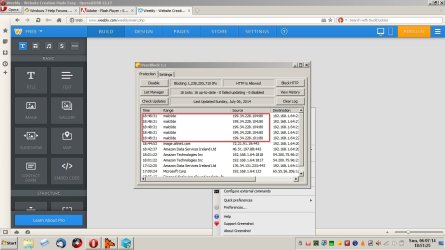
I just logged into Weebly using Opera12 browser and it's very slow to the point of being unusable. Also the site editor's ip address in on the Malcode database and is blocked by Peerblock (software that's installed on my machine) so the next question is does your wife's machine have a different setup in terms of security software?

Weebly 1.jpg

Weebly 2.jpg


In the meantime I'll retest Weebly using IE 11 and post again if it works okay.
 
Last edited:

My Computer

Computer type
Laptop
Computer Manufacturer/Model Number
ASUS
OS
Microsoft Windows 7 Home Premium 64-bit 7601 Multiprocessor Free Service Pack 1
CPU
AMD C-60 APU with Radeon(tm) HD Graphics
Motherboard
ASUSTeK COMPUTER INC. X501U
Memory
4.00 GB
Graphics Card(s)
AMD Radeon HD 6290 Graphics
Sound Card
(1) AMD High Definition Audio Device (2) Realtek High Defi
Screen Resolution
1366 x 768 x 32 bits (4294967296 colors) @ 60 Hz
Hard Drives
Hitachi HTS545050A7E380 SATA Disk Device
Antivirus
Comodo CIS & FW, SecureAplus App Whitelisting, Threatfire
Browser
Cyberfox 64bit, Opera 64bit, Airfox
Other Info
Spy-The-Spy, HitmanPro.Alert, Norton Connect Safe, MJRegWatcher, BitDefender TrafficLight, Voodoo Shield, Zemana AntiMalware
Weebly tested using IE (sort of)

Hi again,

Using IE Weebly website loaded fast and login was smooth. However file uploading will not work unless Flash Player for IE is installed:

Weebly - Internet Explorer.jpg

As I rarely use IE11 I don't particularly wish to install the missing plugin but I believe it would work if installed!

You have a problem with IE, Firefox and Chrome so it doesn't appear to be a browser specific issue.

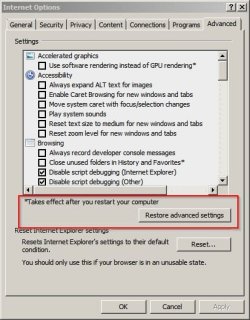
You could try this anyway:

Start> Control Panel> Internet Options> Advanced.

Then "Restore Advanced Settings" - click OK and reboot.

Internet Options.jpg

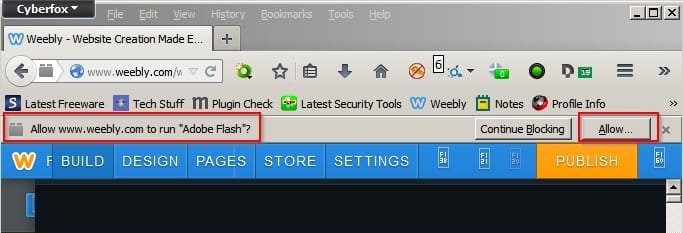
For testing purposes I tried using the Weebly site editor via Cyberfox (That's another version of Firefox) and see the following:

Weebly - Cyberfox.jpg

In other words if you've got any kind of flash blocker installed it will prevent the file uploader from working.

Are IE, Firefox and Chrome are all patched and up to date?
 

My Computer

Computer type
Laptop
Computer Manufacturer/Model Number
ASUS
OS
Microsoft Windows 7 Home Premium 64-bit 7601 Multiprocessor Free Service Pack 1
CPU
AMD C-60 APU with Radeon(tm) HD Graphics
Motherboard
ASUSTeK COMPUTER INC. X501U
Memory
4.00 GB
Graphics Card(s)
AMD Radeon HD 6290 Graphics
Sound Card
(1) AMD High Definition Audio Device (2) Realtek High Defi
Screen Resolution
1366 x 768 x 32 bits (4294967296 colors) @ 60 Hz
Hard Drives
Hitachi HTS545050A7E380 SATA Disk Device
Antivirus
Comodo CIS & FW, SecureAplus App Whitelisting, Threatfire
Browser
Cyberfox 64bit, Opera 64bit, Airfox
Other Info
Spy-The-Spy, HitmanPro.Alert, Norton Connect Safe, MJRegWatcher, BitDefender TrafficLight, Voodoo Shield, Zemana AntiMalware
I tried your new recommendations. They got to weebly a little faster but all goes to hell when we try to add content. Watching progress via Networx, the update rarely gets about 350 bytes, not kbytes, but bytes. Or, in other words, nothing happens until we get a timeout. For the immediate future, my wife will update her site on my computer.

Weebly offers a chat session. We will try that.

With great appreciation for all your efforts we applaud you and thank you.
 

My Computer

Computer type
PC/Desktop
Computer Manufacturer/Model Number
Crafted by Hand
OS
Windows 7 Professional SP1 64 bit Retail
CPU
Intel i7-4790K
Motherboard
ASRock Z97 Extreme6
Memory
2 x 4GB G.Skill RipJaws 13800
Graphics Card(s)
MSI GTX 970 Gaming
Sound Card
Focusrite Scarlett 2i2
Monitor(s) Displays
BenQ 3200
Screen Resolution
1440p
Hard Drives
Corsair 250GB SSD
WD RED 2 TB SATA
WD 500GB Green SATA
WD 1TB Black SATA x2
PSU
Corsair CMPSU 750TX
Case
Cooler Master 932 HAF
Cooling
Noctua NH-D14
Keyboard
Roccat Ryos MK
Mouse
Roccat Kone XTD
Internet Speed
20 Mb - CenturyLink
Antivirus
Security Essentials
Browser
FireFox Latest
Other Info
Moving to Windows 10
Solved!
The solution could not have been more simple. In the hosts file there were 2 lines with addresses, both commented out:
#127.0.0.1 localhost
#::1 localhost

I never saw anything that resembled "::1" so I left that comment in tact but removed the comment before 127.0.0.1.

I fooled around with Weebly and found I was able to upload pictures normally. That is, normally for Weebly which has a very bizarre usage interface.

After a while, my wife came in and checked the sites she was having problems with and they all worked as expected. Needless to say, she was very happy.

I never had this problem with my computer which as Windows 7 Pro installed. Hers was Home Premium. Don't know why Microsoft shipped them out that way.
 

My Computer

Computer type
PC/Desktop
Computer Manufacturer/Model Number
Crafted by Hand
OS
Windows 7 Professional SP1 64 bit Retail
CPU
Intel i7-4790K
Motherboard
ASRock Z97 Extreme6
Memory
2 x 4GB G.Skill RipJaws 13800
Graphics Card(s)
MSI GTX 970 Gaming
Sound Card
Focusrite Scarlett 2i2
Monitor(s) Displays
BenQ 3200
Screen Resolution
1440p
Hard Drives
Corsair 250GB SSD
WD RED 2 TB SATA
WD 500GB Green SATA
WD 1TB Black SATA x2
PSU
Corsair CMPSU 750TX
Case
Cooler Master 932 HAF
Cooling
Noctua NH-D14
Keyboard
Roccat Ryos MK
Mouse
Roccat Kone XTD
Internet Speed
20 Mb - CenturyLink
Antivirus
Security Essentials
Browser
FireFox Latest
Other Info
Moving to Windows 10
Brilliant

I never thought about suggesting that you reset your Hosts file to default. Sorry about that as it would have sorted the problem!

All the best!
 

My Computer

Computer type
Laptop
Computer Manufacturer/Model Number
ASUS
OS
Microsoft Windows 7 Home Premium 64-bit 7601 Multiprocessor Free Service Pack 1
CPU
AMD C-60 APU with Radeon(tm) HD Graphics
Motherboard
ASUSTeK COMPUTER INC. X501U
Memory
4.00 GB
Graphics Card(s)
AMD Radeon HD 6290 Graphics
Sound Card
(1) AMD High Definition Audio Device (2) Realtek High Defi
Screen Resolution
1366 x 768 x 32 bits (4294967296 colors) @ 60 Hz
Hard Drives
Hitachi HTS545050A7E380 SATA Disk Device
Antivirus
Comodo CIS & FW, SecureAplus App Whitelisting, Threatfire
Browser
Cyberfox 64bit, Opera 64bit, Airfox
Other Info
Spy-The-Spy, HitmanPro.Alert, Norton Connect Safe, MJRegWatcher, BitDefender TrafficLight, Voodoo Shield, Zemana AntiMalware
Bob did you ever figure out how 127.0.0.1 got there in the first place.
 

My Computer

Computer type
PC/Desktop
Computer Manufacturer/Model Number
Home made Desktop
OS
Windows 10 Pro. 64/ version 1709 Windows 7 Pro/64
CPU
Intel i7-6800K @ 4.3
Motherboard
ASUS X-99 Deluxe II
Memory
Corsair Platinum 16 gig @2400
Graphics Card(s)
EVGA GTX 1070 OC
Monitor(s) Displays
Asus 27" LED LCD/VE278Q
Screen Resolution
1920-1080 or 1280-720 HDMI
Hard Drives
INTEL SSD 730-240 Gb Sata 3.0/
PSU
EVGA Platium 1200W
Case
Phanteks Luxe Tempered Glass 8 fans/ one radiator
Cooling
XSPC/ Water Cooled CPU
Keyboard
Das 4 Professional
Mouse
Logitech M705/MX Anywhere 2-S
Internet Speed
100 mbits
Antivirus
Microsoft Security Essentials/ Malwarebytes Premium 3.0/ SAS
Browser
I.E. 11 default/Firefox/ ISP Time Warner Cable/Spectrum
Other Info
LG BluRay Burner/
Sound system-KLipsch-THX/
Icy Dock ssd Hot Swap bays.
Bob did you ever figure out how 127.0.0.1 got there in the first place.

I believe this is the default config for all Windows versions. I did not have to do this for my Professional version but apparently, the default version for Home is set with a comment. Why? I don't know. Especially since it caused enough grief that we were ready to go out and buy a new pre-built computer.

My wife works at home and travels. She was unable to book flights on many major airline websites, could not update her website, could not update many social media sites, leading to a level of frustration bordering on red-line.

In the future, I will stay away from the "Home" versions of Windows. I built both computers. Hers is the only one with problems -- all software related.
 

My Computer

Computer type
PC/Desktop
Computer Manufacturer/Model Number
Crafted by Hand
OS
Windows 7 Professional SP1 64 bit Retail
CPU
Intel i7-4790K
Motherboard
ASRock Z97 Extreme6
Memory
2 x 4GB G.Skill RipJaws 13800
Graphics Card(s)
MSI GTX 970 Gaming
Sound Card
Focusrite Scarlett 2i2
Monitor(s) Displays
BenQ 3200
Screen Resolution
1440p
Hard Drives
Corsair 250GB SSD
WD RED 2 TB SATA
WD 500GB Green SATA
WD 1TB Black SATA x2
PSU
Corsair CMPSU 750TX
Case
Cooler Master 932 HAF
Cooling
Noctua NH-D14
Keyboard
Roccat Ryos MK
Mouse
Roccat Kone XTD
Internet Speed
20 Mb - CenturyLink
Antivirus
Security Essentials
Browser
FireFox Latest
Other Info
Moving to Windows 10
Thank you for your answer.
Happy computing.
 

My Computer

Computer type
PC/Desktop
Computer Manufacturer/Model Number
Home made Desktop
OS
Windows 10 Pro. 64/ version 1709 Windows 7 Pro/64
CPU
Intel i7-6800K @ 4.3
Motherboard
ASUS X-99 Deluxe II
Memory
Corsair Platinum 16 gig @2400
Graphics Card(s)
EVGA GTX 1070 OC
Monitor(s) Displays
Asus 27" LED LCD/VE278Q
Screen Resolution
1920-1080 or 1280-720 HDMI
Hard Drives
INTEL SSD 730-240 Gb Sata 3.0/
PSU
EVGA Platium 1200W
Case
Phanteks Luxe Tempered Glass 8 fans/ one radiator
Cooling
XSPC/ Water Cooled CPU
Keyboard
Das 4 Professional
Mouse
Logitech M705/MX Anywhere 2-S
Internet Speed
100 mbits
Antivirus
Microsoft Security Essentials/ Malwarebytes Premium 3.0/ SAS
Browser
I.E. 11 default/Firefox/ ISP Time Warner Cable/Spectrum
Other Info
LG BluRay Burner/
Sound system-KLipsch-THX/
Icy Dock ssd Hot Swap bays.
Back
Top