
WiFi interference. Solution?

ToxicXGL

New member
OK so there's a problem with the WiFi in the house basically it runs fine until a certain point in the house it basically drops 1-2 bars immediately after moving beyond 2 rooms. So I assume there's a lot of interference in that area. So I thought getting power line would solve the issue just run it through the wiring and direct connect to whatever PC needs it beyond that point. Turns out that same place where the WiFi drops also doesn't allow the power line connection to continue. I assume the power stops there because it has to pass by this room in order to get to the pc and that room that it has to pass by has no working outlets so I guess there's no power there so power line can't work. So now looking into buying a dual band router to hopefully solve this problem but I'm not 100% sure. Is buying a better router a better idea? Mind my horrible diagram (if it even uploaded)
 

My Computer

Computer type
PC/Desktop
Computer Manufacturer/Model Number
Custom Build
OS
Microsoft Windows 7 Ultimate 64-bit 7601 Multiprocessor Free Service Pack 1
CPU
Intel(R) Core(TM) i5-2400 CPU @ 3.10GHz
Motherboard
ASUSTeK COMPUTER INC. P8H61-M LE/CSM
Memory
16.00 GB
Graphics Card(s)
NVIDIA GeForce GTX 660 Ti SC 3GB
Sound Card
(1) NVIDIA High Definition Audio (2) Realtek High Definiti
Monitor(s) Displays
21.5" HP
Screen Resolution
1600 x 900 x 32 bits (4294967296 colors) @ 60 Hz
Hard Drives
ST31000524AS ATA Device 7200
PSU
OCZ 650W Bronze Plus
Case
Zalman Z9 Plus
Mouse
Razer naga molten edition
Antivirus
Microsoft Security Essentials along with Malwarbytes
Browser
Chrome
Other Info
Love computers but wanting to learn more about troubleshooting and wanting to contribute to this community!
Try changing the location of the router even if it's just a few feet. There's a number of things that can interfere with the signal. A near by PC, a UPS, wiring in the walls, heat/AC ducts, pipes, furniture TVs and brick walls can all block or disperse a signal. Since you don't specify what router you have now, it's hard to say if a "better router" will make much difference. Better than what?

If you have a room without working plugs, there's a problem somewhere. Perhaps a fuse/breaker is tripped. Are you remodeling your house or something? An entire room without power wouldn't in itself cause interference but there may be more than one room on the same circuit back to the main electrical panel. This would cause you to loose power from a room and any circuits beyond or in front of it. The power line routers need electric to work.
 

My Computer

Computer type
PC/Desktop
Computer Manufacturer/Model Number
Built 2/11/2011
OS
Windows 7 Pro-x64
CPU
i7-2600 3.4GHz - 3.8GHz Turbo
Motherboard
Intel DH67BL-B3
Memory
8Gb - 2x4GB, Muskin 991770 PC3-1333
Graphics Card(s)
Integrated Intel HD 2000
Sound Card
Integrated Intel 10.1 HD, RealTek ALC892
Monitor(s) Displays
Asus LCD VH222H, Haier HL24XSL2a
Screen Resolution
1920x1080, 1920x1080
Hard Drives
Crucial SSD C300-128Gb,
Western Digital WD5002AALX - 500Gb,
Western Digital WD7501AALS - 750Gb
PSU
Seasonic 650W 80+ Gold Modular
Case
Rosewill Defender
Cooling
Stock CPU, Four 120mm case fans, PCH fan added
Keyboard
Logitech EX100 Y-RBH94 Wireless
Mouse
Logitech EX100 M-RCE95 Wireless
Internet Speed
3.0/1.5 Mbs
Antivirus
Microsoft Security Essentials
Browser
Microsoft Internet Explorer 11
Other Info
Antec Veris Premier-Multimedia IR Station,
Cyber Accoustics-3602 Speakers,
AFT XM-5U Card Reader,
Hauppauge TV-HVR-2250,
Sony LX300 USB Turntable
  • Like
Reactions: 2xg
The current router is an action tech v1000h and moving the modem is impossible the way the telus set it up
 

My Computer

Computer type
PC/Desktop
Computer Manufacturer/Model Number
Custom Build
OS
Microsoft Windows 7 Ultimate 64-bit 7601 Multiprocessor Free Service Pack 1
CPU
Intel(R) Core(TM) i5-2400 CPU @ 3.10GHz
Motherboard
ASUSTeK COMPUTER INC. P8H61-M LE/CSM
Memory
16.00 GB
Graphics Card(s)
NVIDIA GeForce GTX 660 Ti SC 3GB
Sound Card
(1) NVIDIA High Definition Audio (2) Realtek High Definiti
Monitor(s) Displays
21.5" HP
Screen Resolution
1600 x 900 x 32 bits (4294967296 colors) @ 60 Hz
Hard Drives
ST31000524AS ATA Device 7200
PSU
OCZ 650W Bronze Plus
Case
Zalman Z9 Plus
Mouse
Razer naga molten edition
Antivirus
Microsoft Security Essentials along with Malwarbytes
Browser
Chrome
Other Info
Love computers but wanting to learn more about troubleshooting and wanting to contribute to this community!

My Computer

Computer type
PC/Desktop
Computer Manufacturer/Model Number
Compac
OS
Microsoft Windows 7 Ultimate 32-bit 7601
CPU
Intel(R) Pentium(R) Dual CPU E2160 @ 1.80GHz
Motherboard
MSI Boston
Memory
4.00 GB
Graphics Card(s)
(1) VNC Mirror Driver (2) Intel(R) G33/G31 Express Chipset
Sound Card
Disabled
Monitor(s) Displays
Headless
Screen Resolution
1280 x 960 x 32 bits (4294967296 colors) @ 60 Hz
Hard Drives
ST3320820AS ATA Device
Keyboard
Headless
Mouse
Headless
Antivirus
Malwarebytes pro
Other Info
Also
Windows 8.1 Laptop and Desktop both Acer
Wireless power level is already at 100%
 

My Computer

Computer type
PC/Desktop
Computer Manufacturer/Model Number
Custom Build
OS
Microsoft Windows 7 Ultimate 64-bit 7601 Multiprocessor Free Service Pack 1
CPU
Intel(R) Core(TM) i5-2400 CPU @ 3.10GHz
Motherboard
ASUSTeK COMPUTER INC. P8H61-M LE/CSM
Memory
16.00 GB
Graphics Card(s)
NVIDIA GeForce GTX 660 Ti SC 3GB
Sound Card
(1) NVIDIA High Definition Audio (2) Realtek High Definiti
Monitor(s) Displays
21.5" HP
Screen Resolution
1600 x 900 x 32 bits (4294967296 colors) @ 60 Hz
Hard Drives
ST31000524AS ATA Device 7200
PSU
OCZ 650W Bronze Plus
Case
Zalman Z9 Plus
Mouse
Razer naga molten edition
Antivirus
Microsoft Security Essentials along with Malwarbytes
Browser
Chrome
Other Info
Love computers but wanting to learn more about troubleshooting and wanting to contribute to this community!
The current router is an action tech v1000h and moving the modem is impossible the way the telus set it up
Can you be more specific?

I can't see how or where it's set up. What about the items detailed in the previous post?
 

My Computer

Computer type
PC/Desktop
Computer Manufacturer/Model Number
Built 2/11/2011
OS
Windows 7 Pro-x64
CPU
i7-2600 3.4GHz - 3.8GHz Turbo
Motherboard
Intel DH67BL-B3
Memory
8Gb - 2x4GB, Muskin 991770 PC3-1333
Graphics Card(s)
Integrated Intel HD 2000
Sound Card
Integrated Intel 10.1 HD, RealTek ALC892
Monitor(s) Displays
Asus LCD VH222H, Haier HL24XSL2a
Screen Resolution
1920x1080, 1920x1080
Hard Drives
Crucial SSD C300-128Gb,
Western Digital WD5002AALX - 500Gb,
Western Digital WD7501AALS - 750Gb
PSU
Seasonic 650W 80+ Gold Modular
Case
Rosewill Defender
Cooling
Stock CPU, Four 120mm case fans, PCH fan added
Keyboard
Logitech EX100 Y-RBH94 Wireless
Mouse
Logitech EX100 M-RCE95 Wireless
Internet Speed
3.0/1.5 Mbs
Antivirus
Microsoft Security Essentials
Browser
Microsoft Internet Explorer 11
Other Info
Antec Veris Premier-Multimedia IR Station,
Cyber Accoustics-3602 Speakers,
AFT XM-5U Card Reader,
Hauppauge TV-HVR-2250,
Sony LX300 USB Turntable
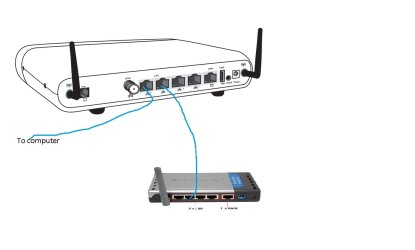
I would get another wireless router and hook it up to the v1000h with cat 5 cable and set that as an access point and move that one around your house
 

Attachments

  • v1000h.jpg
    v1000h.jpg
    84.1 KB · Views: 1
Last edited:

My Computer

Computer type
PC/Desktop
Computer Manufacturer/Model Number
Compac
OS
Microsoft Windows 7 Ultimate 32-bit 7601
CPU
Intel(R) Pentium(R) Dual CPU E2160 @ 1.80GHz
Motherboard
MSI Boston
Memory
4.00 GB
Graphics Card(s)
(1) VNC Mirror Driver (2) Intel(R) G33/G31 Express Chipset
Sound Card
Disabled
Monitor(s) Displays
Headless
Screen Resolution
1280 x 960 x 32 bits (4294967296 colors) @ 60 Hz
Hard Drives
ST3320820AS ATA Device
Keyboard
Headless
Mouse
Headless
Antivirus
Malwarebytes pro
Other Info
Also
Windows 8.1 Laptop and Desktop both Acer
Ok so this a really simplified diagram there are walls in the way and whatnot but basically there is only 1 telephone port that provides internet access on this floor. that telephone cable and the router are basically side by side and i doubt telus would be willing to give us another one for free. and even if we were able to move the router my main PC dosent support wireless so there would be a problem running ethernet to it

Image codes: IMG 20140403 104846[1]
Image codes: IMG 20140403 104856[1]
Image codes: IMG 20140403 105252[1]

Sorry didnt have time to downscale the files
 

My Computer

Computer type
PC/Desktop
Computer Manufacturer/Model Number
Custom Build
OS
Microsoft Windows 7 Ultimate 64-bit 7601 Multiprocessor Free Service Pack 1
CPU
Intel(R) Core(TM) i5-2400 CPU @ 3.10GHz
Motherboard
ASUSTeK COMPUTER INC. P8H61-M LE/CSM
Memory
16.00 GB
Graphics Card(s)
NVIDIA GeForce GTX 660 Ti SC 3GB
Sound Card
(1) NVIDIA High Definition Audio (2) Realtek High Definiti
Monitor(s) Displays
21.5" HP
Screen Resolution
1600 x 900 x 32 bits (4294967296 colors) @ 60 Hz
Hard Drives
ST31000524AS ATA Device 7200
PSU
OCZ 650W Bronze Plus
Case
Zalman Z9 Plus
Mouse
Razer naga molten edition
Antivirus
Microsoft Security Essentials along with Malwarbytes
Browser
Chrome
Other Info
Love computers but wanting to learn more about troubleshooting and wanting to contribute to this community!
I would get another wireless router and hook it up to the v1000h with cat 5 cable and set that as an access point and move that one around your house

Not to sure if we can get that much cat 5, and running it through the walls is probably not going to happen just because of the cost my dad isnt to happy with that kind of stuff.
 

My Computer

Computer type
PC/Desktop
Computer Manufacturer/Model Number
Custom Build
OS
Microsoft Windows 7 Ultimate 64-bit 7601 Multiprocessor Free Service Pack 1
CPU
Intel(R) Core(TM) i5-2400 CPU @ 3.10GHz
Motherboard
ASUSTeK COMPUTER INC. P8H61-M LE/CSM
Memory
16.00 GB
Graphics Card(s)
NVIDIA GeForce GTX 660 Ti SC 3GB
Sound Card
(1) NVIDIA High Definition Audio (2) Realtek High Definiti
Monitor(s) Displays
21.5" HP
Screen Resolution
1600 x 900 x 32 bits (4294967296 colors) @ 60 Hz
Hard Drives
ST31000524AS ATA Device 7200
PSU
OCZ 650W Bronze Plus
Case
Zalman Z9 Plus
Mouse
Razer naga molten edition
Antivirus
Microsoft Security Essentials along with Malwarbytes
Browser
Chrome
Other Info
Love computers but wanting to learn more about troubleshooting and wanting to contribute to this community!
Be sure the router is not sitting on any metal surface such as a file cabinet or metal desk and that there is no metal within a 2-3 of feet of the router. When I said try moving the router, a couple of feet one way or another can make a difference. Even moving the router higher a foot or two can help. I can't imagine any Telco installing a 12" cable or what ever it is. Is the Telco terminus a wall socket or just a wire through an outside wall?

I don't see any pictures so I'm done here.
 

My Computer

Computer type
PC/Desktop
Computer Manufacturer/Model Number
Built 2/11/2011
OS
Windows 7 Pro-x64
CPU
i7-2600 3.4GHz - 3.8GHz Turbo
Motherboard
Intel DH67BL-B3
Memory
8Gb - 2x4GB, Muskin 991770 PC3-1333
Graphics Card(s)
Integrated Intel HD 2000
Sound Card
Integrated Intel 10.1 HD, RealTek ALC892
Monitor(s) Displays
Asus LCD VH222H, Haier HL24XSL2a
Screen Resolution
1920x1080, 1920x1080
Hard Drives
Crucial SSD C300-128Gb,
Western Digital WD5002AALX - 500Gb,
Western Digital WD7501AALS - 750Gb
PSU
Seasonic 650W 80+ Gold Modular
Case
Rosewill Defender
Cooling
Stock CPU, Four 120mm case fans, PCH fan added
Keyboard
Logitech EX100 Y-RBH94 Wireless
Mouse
Logitech EX100 M-RCE95 Wireless
Internet Speed
3.0/1.5 Mbs
Antivirus
Microsoft Security Essentials
Browser
Microsoft Internet Explorer 11
Other Info
Antec Veris Premier-Multimedia IR Station,
Cyber Accoustics-3602 Speakers,
AFT XM-5U Card Reader,
Hauppauge TV-HVR-2250,
Sony LX300 USB Turntable
We might be able to figure this out I just have a few questions

So I thought getting power line would solve the issue just run it through the wiring and direct connect to whatever PC needs it beyond that point

What is the name of this device and do you have any other routers or would you be able to buy another wireless router. What I am thinking is you might be able to use the powerline router ( If that's what it is im not sure ) to get closer to the PC and hook the wireless router to that then connect your PC to the wireless router
 

My Computer

Computer type
PC/Desktop
Computer Manufacturer/Model Number
Compac
OS
Microsoft Windows 7 Ultimate 32-bit 7601
CPU
Intel(R) Pentium(R) Dual CPU E2160 @ 1.80GHz
Motherboard
MSI Boston
Memory
4.00 GB
Graphics Card(s)
(1) VNC Mirror Driver (2) Intel(R) G33/G31 Express Chipset
Sound Card
Disabled
Monitor(s) Displays
Headless
Screen Resolution
1280 x 960 x 32 bits (4294967296 colors) @ 60 Hz
Hard Drives
ST3320820AS ATA Device
Keyboard
Headless
Mouse
Headless
Antivirus
Malwarebytes pro
Other Info
Also
Windows 8.1 Laptop and Desktop both Acer
Be sure the router is not sitting on any metal surface such as a file cabinet or metal desk and that there is no metal within a 2-3 of feet of the router. When I said try moving the router, a couple of feet one way or another can make a difference. Even moving the router higher a foot or two can help. I can't imagine any Telco installing a 12" cable or what ever it is. Is the Telco terminus a wall socket or just a wire through an outside wall?

I don't see any pictures so I'm done here.

I'll try moving it a bit. And I'm sure that its a wall socket I think the connect is set up in the basement and routes to that socket
 

My Computer

Computer type
PC/Desktop
Computer Manufacturer/Model Number
Custom Build
OS
Microsoft Windows 7 Ultimate 64-bit 7601 Multiprocessor Free Service Pack 1
CPU
Intel(R) Core(TM) i5-2400 CPU @ 3.10GHz
Motherboard
ASUSTeK COMPUTER INC. P8H61-M LE/CSM
Memory
16.00 GB
Graphics Card(s)
NVIDIA GeForce GTX 660 Ti SC 3GB
Sound Card
(1) NVIDIA High Definition Audio (2) Realtek High Definiti
Monitor(s) Displays
21.5" HP
Screen Resolution
1600 x 900 x 32 bits (4294967296 colors) @ 60 Hz
Hard Drives
ST31000524AS ATA Device 7200
PSU
OCZ 650W Bronze Plus
Case
Zalman Z9 Plus
Mouse
Razer naga molten edition
Antivirus
Microsoft Security Essentials along with Malwarbytes
Browser
Chrome
Other Info
Love computers but wanting to learn more about troubleshooting and wanting to contribute to this community!
We might be able to figure this out I just have a few questions

So I thought getting power line would solve the issue just run it through the wiring and direct connect to whatever PC needs it beyond that point

What is the name of this device and do you have any other routers or would you be able to buy another wireless router. What I am thinking is you might be able to use the powerline router ( If that's what it is im not sure ) to get closer to the PC and hook the wireless router to that then connect your PC to the wireless router

What i meant by power line was this D-Link PowerLine AV500 Mini Adapter Starter Kit (DHP-309AV) : Range Extenders & Powerline - Future Shop

And yes getting a new router is the idea but only if it will ensure that it reaches rooms that i want it to. The main problem is my current router just drops a bar or 2 at a certain point in the house and i want there to be a strong signal throughout
 

My Computer

Computer type
PC/Desktop
Computer Manufacturer/Model Number
Custom Build
OS
Microsoft Windows 7 Ultimate 64-bit 7601 Multiprocessor Free Service Pack 1
CPU
Intel(R) Core(TM) i5-2400 CPU @ 3.10GHz
Motherboard
ASUSTeK COMPUTER INC. P8H61-M LE/CSM
Memory
16.00 GB
Graphics Card(s)
NVIDIA GeForce GTX 660 Ti SC 3GB
Sound Card
(1) NVIDIA High Definition Audio (2) Realtek High Definiti
Monitor(s) Displays
21.5" HP
Screen Resolution
1600 x 900 x 32 bits (4294967296 colors) @ 60 Hz
Hard Drives
ST31000524AS ATA Device 7200
PSU
OCZ 650W Bronze Plus
Case
Zalman Z9 Plus
Mouse
Razer naga molten edition
Antivirus
Microsoft Security Essentials along with Malwarbytes
Browser
Chrome
Other Info
Love computers but wanting to learn more about troubleshooting and wanting to contribute to this community!
Sorry if I'm making this hard to understand
 

My Computer

Computer type
PC/Desktop
Computer Manufacturer/Model Number
Custom Build
OS
Microsoft Windows 7 Ultimate 64-bit 7601 Multiprocessor Free Service Pack 1
CPU
Intel(R) Core(TM) i5-2400 CPU @ 3.10GHz
Motherboard
ASUSTeK COMPUTER INC. P8H61-M LE/CSM
Memory
16.00 GB
Graphics Card(s)
NVIDIA GeForce GTX 660 Ti SC 3GB
Sound Card
(1) NVIDIA High Definition Audio (2) Realtek High Definiti
Monitor(s) Displays
21.5" HP
Screen Resolution
1600 x 900 x 32 bits (4294967296 colors) @ 60 Hz
Hard Drives
ST31000524AS ATA Device 7200
PSU
OCZ 650W Bronze Plus
Case
Zalman Z9 Plus
Mouse
Razer naga molten edition
Antivirus
Microsoft Security Essentials along with Malwarbytes
Browser
Chrome
Other Info
Love computers but wanting to learn more about troubleshooting and wanting to contribute to this community!
WiFi range issues are commonly solved by adding additional "wireless access points (WAP)" at remote locations. Something like a Netgear WN604 (10/100 wired, 802.11a/b/g/n wireless-150) or Netgear WN802 (gigabit wired, wireless-300) are such devices, depending on your wired/wireless requirements at the remote locations.

You plug the WAP into some wired ethernet jack (provided either through an ethernet cable directly to the primary router, or maybe via a nearby PowerLine adapter if you don't have ethernet cable to the remote location). Then the WAP provides a second WiFi network on its own, along with providing additional wired ethernet jacks. It's like a second wired/wireless router but it is not actually a router. It's more like an "invisible extension" of the primary router, with all IP address handling and other network management for devices connected to the WAP (either wired or wireless) being done by the primary router. If you look at "attached devices" in the primary router, you'll see all devices gaining access through the WAP, just as if they'd been connected directly wired/wireless to the primary router.

The range of the WAP is very good, so even if there's no AC wall adapter in a room and no ethernet cable nearby, you can still use a PowerLine adapter in an adjacent room and place a WN604 or WN802 there in that other room, and you'll absolutely still get WiFi reception via the WAP where you want it. it's not quite as strong as the usual primary wireless routers, but it's still very very strong.

Should solve your problem. Note that the wired/wireless speed capability out of the WAP is 100% a function of the wired speed feeding the WAP. If you had the WAP connected via CAT5e or CAT6 cable to a gigabit router, you'd provide maximum wired/wireless speed from the WAP. But if you have CAT5 connection to the router, or you use a PowerLine adapter with low-speed capability, then clearly the WAP will also be similarly restricted on overall speed provided simultaneously to its wired/wireless clients. This is just common sense.
 

My Computer

Computer type
PC/Desktop
Computer Manufacturer/Model Number
Home-built, two systems (1) and (2)
OS
Windows 7 Pro x64 (1), Win7 Pro X64 (2)
CPU
i5-3350p 3.1Ghz/6MB-cache (1); E8400 3.0Ghz/6MB-cache (2)
Motherboard
ASUS P8Z77-V Pro (1); ASUS P5Q3 (2)
Memory
8GB PC3-12800 DDR3 (1); 4GB PC3-10600 DDR3 (2)
Graphics Card(s)
ATI HD7750 (1), (see TV cards); ATI R7 250 (2)
Sound Card
Realtek ALC892 HD Audio (1); Realtek ALC1200 HD Audio (2)
Monitor(s) Displays
Eizo HD2441W LCD, Eizo S2433W (1); Eizo 24" S2433W (2)
Screen Resolution
1920x1200, 1920x1200 (1); 1920x1200 (2)
Hard Drives
(1) 1TB SATA-II (7200RPM), 2x2TB SATA-III (7200RPM), 250GB SATA-III (10000RPM) for OS; 2x2TB external USB 3.0

(2) 320GB SATA-II (7200RPM), 750GB SATA-II (7200RPM), 150GB SATA-II (10000RPM) for OS; 2TB external USB 3.0
PSU
Nesteq ECS-6001 600W (1); Nesteq ECS-5001 500W (2)
Case
Acousti-Case 360 (1) and (2)
Cooling
Noctua NH-U12P SE2 for CPU, 2x120mm case fans (1) and (2)
Keyboard
IBM PS/2 (1) and (2)
Mouse
Logitech MX Revolution wireless (1); Microsoft wired (2)
Internet Speed
100mbps down / 10mbps up
Antivirus
Microsoft Security Essentials; Malwarebyte Anti-Malware Pro
Browser
Firefox
Other Info
Ceton InfiniTV 4-tuner cablecard-enabled TV card as well as Hauppauge HVR-2250 OTA/ATSC 2-tuner TV card in (1), running under Win7 WMC
WiFi range issues are commonly solved by adding additional "wireless access points (WAP)" at remote locations. Something like a Netgear WN604 (10/100 wired, 802.11a/b/g/n wireless-150) or Netgear WN802 (gigabit wired, wireless-300) are such devices, depending on your wired/wireless requirements at the remote locations.

You plug the WAP into some wired ethernet jack (provided either through an ethernet cable directly to the primary router, or maybe via a nearby PowerLine adapter if you don't have ethernet cable to the remote location). Then the WAP provides a second WiFi network on its own, along with providing additional wired ethernet jacks. It's like a second wired/wireless router but it is not actually a router. It's more like an "invisible extension" of the primary router, with all IP address handling and other network management for devices connected to the WAP (either wired or wireless) being done by the primary router. If you look at "attached devices" in the primary router, you'll see all devices gaining access through the WAP, just as if they'd been connected directly wired/wireless to the primary router.

The range of the WAP is very good, so even if there's no AC wall adapter in a room and no ethernet cable nearby, you can still use a PowerLine adapter in an adjacent room and place a WN604 or WN802 there in that other room, and you'll absolutely still get WiFi reception via the WAP where you want it. it's not quite as strong as the usual primary wireless routers, but it's still very very strong.

Should solve your problem. Note that the wired/wireless speed capability out of the WAP is 100% a function of the wired speed feeding the WAP. If you had the WAP connected via CAT5e or CAT6 cable to a gigabit router, you'd provide maximum wired/wireless speed from the WAP. But if you have CAT5 connection to the router, or you use a PowerLine adapter with low-speed capability, then clearly the WAP will also be similarly restricted on overall speed provided simultaneously to its wired/wireless clients. This is just common sense.

dsperber explained it better than I did, you said you had a basement maybee you could hook up the powerline router in the basement and then connect a wireless router to that and with some cat6 get the wireless router right underneith the PC you want to connect to
 

My Computer

Computer type
PC/Desktop
Computer Manufacturer/Model Number
Compac
OS
Microsoft Windows 7 Ultimate 32-bit 7601
CPU
Intel(R) Pentium(R) Dual CPU E2160 @ 1.80GHz
Motherboard
MSI Boston
Memory
4.00 GB
Graphics Card(s)
(1) VNC Mirror Driver (2) Intel(R) G33/G31 Express Chipset
Sound Card
Disabled
Monitor(s) Displays
Headless
Screen Resolution
1280 x 960 x 32 bits (4294967296 colors) @ 60 Hz
Hard Drives
ST3320820AS ATA Device
Keyboard
Headless
Mouse
Headless
Antivirus
Malwarebytes pro
Other Info
Also
Windows 8.1 Laptop and Desktop both Acer
Thanks guys, well I guess I'm looking at a new router or a WAP which one would be the better buy?
 

My Computer

Computer type
PC/Desktop
Computer Manufacturer/Model Number
Custom Build
OS
Microsoft Windows 7 Ultimate 64-bit 7601 Multiprocessor Free Service Pack 1
CPU
Intel(R) Core(TM) i5-2400 CPU @ 3.10GHz
Motherboard
ASUSTeK COMPUTER INC. P8H61-M LE/CSM
Memory
16.00 GB
Graphics Card(s)
NVIDIA GeForce GTX 660 Ti SC 3GB
Sound Card
(1) NVIDIA High Definition Audio (2) Realtek High Definiti
Monitor(s) Displays
21.5" HP
Screen Resolution
1600 x 900 x 32 bits (4294967296 colors) @ 60 Hz
Hard Drives
ST31000524AS ATA Device 7200
PSU
OCZ 650W Bronze Plus
Case
Zalman Z9 Plus
Mouse
Razer naga molten edition
Antivirus
Microsoft Security Essentials along with Malwarbytes
Browser
Chrome
Other Info
Love computers but wanting to learn more about troubleshooting and wanting to contribute to this community!
I would lean towards ASUS RT N66U since it's considered the best N router by many people. For large house, a multi-AP setup is my take (a la office environment). For example, 3 Ubiquiti UniFi AP Long Range (or Pro version for 5 GHz capability) should cover the house with 5 bars everywhere. I like the UniFis for their "smoke alarm and low profile" look which you can mount on the ceiling or on the wall.
 

My Computer

Computer type
Laptop
Computer Manufacturer/Model Number
Dell Optiplex SX270, Lenovo Z470
OS
Windows 7 Professional x64 SP1
CPU
Intel® Pentium® 4 @ 2.26 GHz, Intel Core i7-2670QM @ 2.20 GH
Motherboard
Dell, Lenovo
Memory
512MB Dual channel DDR SDRAM @ 400MHz 2.5-3-3-7, 8 GB DDR3
Graphics Card(s)
Intel 82865G, Nvidia GeForce 520M Graphics
Sound Card
SoundMax Integrated Audio, Integrated HD Audio
Monitor(s) Displays
LG W1952
Screen Resolution
1440x900, 1366 x 768
Hard Drives
40 GB 2.5" IDE 4200 RPM HDD, 500 GB 5400 RPM Sata 1.5 + 32 GB SSD
PSU
Dell 145 Watt, Lenovo 120 Watt Power Adapter
Case
Optiplex SX270 Small Form Factor, Laptop
Cooling
Dell Proprietary Air Cooling, Stock laptop cooling
Keyboard
Dell SK-8125 USB Keyboard
Mouse
Dell PS/2 2 button ball mouse with wheel scroll
Internet Speed
300 Mbit down / 20 Mbps up Time Warner Cable
Antivirus
MSE, Malwarebytes Scanner
Browser
Internet (Aizawa) Explorer 11
Other Info
Running Windows Server 2012 Datacenter on a virtual machine to run Metro Apps.
Thanks guys, well I guess I'm looking at a new router or a WAP which one would be the better buy?
You don't want or need an actual second router, although it can be used as a second wireless capability at a distance away from the primary router. You don't want all of the firewall, security, and configuration issues that a true router comes along with.

All you want is a WAP, which conceptually is like a "switch" in that it is connected wired to your primary router, and then provides additional ethernet jacks. Like an ethernet "power strip", but with no firewall overhead or other issue. It simply is kind of an ethernet "port multiplier", in that you have one wired ethernet connection to the primary router and in turn you now have three or four more wired ethernet ports available at the switch.

Furthermore, the WAP provides additional wireless capability to any number of wireless devices in the vicinity. So it's really a "wired/wireless switch" in contrast to an ordinary "unmanaged switch" (like the Netgear GS105) which is wired-only in its port multiplier function. Again, a switch is like a router in that it provides multiple wired ethernet ports (like any electrical power strip does for power). And a WAP goes beyond that, also provides wireless capability as well. But there is no other router-provided security and firewall and port-forwarding etc.. It's just a wired/wireless switch.

So... the WAP is typically less expensive than a router. And easier to configure, and essentially invisible and transparent, simply forwarding on all traffic to the primary router through the ethernet wired connection from WAP to router. Wired/wireless devices connecting through the WAP to the primary router appear to be connected directly to the primary router. The WAP is effectively invisible, serving just as a wired/wireless switch.
 

My Computer

Computer type
PC/Desktop
Computer Manufacturer/Model Number
Home-built, two systems (1) and (2)
OS
Windows 7 Pro x64 (1), Win7 Pro X64 (2)
CPU
i5-3350p 3.1Ghz/6MB-cache (1); E8400 3.0Ghz/6MB-cache (2)
Motherboard
ASUS P8Z77-V Pro (1); ASUS P5Q3 (2)
Memory
8GB PC3-12800 DDR3 (1); 4GB PC3-10600 DDR3 (2)
Graphics Card(s)
ATI HD7750 (1), (see TV cards); ATI R7 250 (2)
Sound Card
Realtek ALC892 HD Audio (1); Realtek ALC1200 HD Audio (2)
Monitor(s) Displays
Eizo HD2441W LCD, Eizo S2433W (1); Eizo 24" S2433W (2)
Screen Resolution
1920x1200, 1920x1200 (1); 1920x1200 (2)
Hard Drives
(1) 1TB SATA-II (7200RPM), 2x2TB SATA-III (7200RPM), 250GB SATA-III (10000RPM) for OS; 2x2TB external USB 3.0

(2) 320GB SATA-II (7200RPM), 750GB SATA-II (7200RPM), 150GB SATA-II (10000RPM) for OS; 2TB external USB 3.0
PSU
Nesteq ECS-6001 600W (1); Nesteq ECS-5001 500W (2)
Case
Acousti-Case 360 (1) and (2)
Cooling
Noctua NH-U12P SE2 for CPU, 2x120mm case fans (1) and (2)
Keyboard
IBM PS/2 (1) and (2)
Mouse
Logitech MX Revolution wireless (1); Microsoft wired (2)
Internet Speed
100mbps down / 10mbps up
Antivirus
Microsoft Security Essentials; Malwarebyte Anti-Malware Pro
Browser
Firefox
Other Info
Ceton InfiniTV 4-tuner cablecard-enabled TV card as well as Hauppauge HVR-2250 OTA/ATSC 2-tuner TV card in (1), running under Win7 WMC
Thanks guys, well I guess I'm looking at a new router or a WAP which one would be the better buy?
You don't want or need an actual second router, although it can be used as a second wireless capability at a distance away from the primary router. You don't want all of the firewall, security, and configuration issues that a true router comes along with.

All you want is a WAP, which conceptually is like a "switch" in that it is connected wired to your primary router, and then provides additional ethernet jacks. Like an ethernet "power strip", but with no firewall overhead or other issue. It simply is kind of an ethernet "port multiplier", in that you have one wired ethernet connection to the primary router and in turn you now have three or four more wired ethernet ports available at the switch.

Furthermore, the WAP provides additional wireless capability to any number of wireless devices in the vicinity. So it's really a "wired/wireless switch" in contrast to an ordinary "unmanaged switch" (like the Netgear GS105) which is wired-only in its port multiplier function. Again, a switch is like a router in that it provides multiple wired ethernet ports (like any electrical power strip does for power). And a WAP goes beyond that, also provides wireless capability as well. But there is no other router-provided security and firewall and port-forwarding etc.. It's just a wired/wireless switch.

So... the WAP is typically less expensive than a router. And easier to configure, and essentially invisible and transparent, simply forwarding on all traffic to the primary router through the ethernet wired connection from WAP to router. Wired/wireless devices connecting through the WAP to the primary router appear to be connected directly to the primary router. The WAP is effectively invisible, serving just as a wired/wireless switch.

Yes either I can get the WAP or a new router entirely but what would be better
 

My Computer

Computer type
PC/Desktop
Computer Manufacturer/Model Number
Custom Build
OS
Microsoft Windows 7 Ultimate 64-bit 7601 Multiprocessor Free Service Pack 1
CPU
Intel(R) Core(TM) i5-2400 CPU @ 3.10GHz
Motherboard
ASUSTeK COMPUTER INC. P8H61-M LE/CSM
Memory
16.00 GB
Graphics Card(s)
NVIDIA GeForce GTX 660 Ti SC 3GB
Sound Card
(1) NVIDIA High Definition Audio (2) Realtek High Definiti
Monitor(s) Displays
21.5" HP
Screen Resolution
1600 x 900 x 32 bits (4294967296 colors) @ 60 Hz
Hard Drives
ST31000524AS ATA Device 7200
PSU
OCZ 650W Bronze Plus
Case
Zalman Z9 Plus
Mouse
Razer naga molten edition
Antivirus
Microsoft Security Essentials along with Malwarbytes
Browser
Chrome
Other Info
Love computers but wanting to learn more about troubleshooting and wanting to contribute to this community!
Back
Top