Solved WiFi Internet blocking

slugger7

New member
Local time
12:43 AM
Messages
33
I've recently found that my android phone can create a WiFi hotspot to share the internet and started streaming media over my new network I've created. But one of the applications needs my firewalls to be turned off to be able to view the files. I'm not too comfortable with my computer unprotected while on my phones internet.
If I use the connectify app to create the WiFi hotspot without any internet it also works but then my phone cant receive emails and so on.

Will there be a way to connect to my phones WiFi hotspot with the internet still on on my phone but block internet access on the computer. And then when i want to go onto the internet just swich it back on.
Its realy quite a big hassle to switch between networks and so forth.
Any help will be appreciated.
 

My Computer

OS
Windows 7 Ultimate 32 bit
CPU
Pentium(R) Dual-Core CPU E5400 @ 2.70 GHz
Memory
2gb ddr2
Graphics Card(s)
ATI Radeon HD5700 series
Hi slugger7,

Are you aware that Hot spot or tethering is an optional feature on most of the big Providers such as AT&T, T-Mobile and Verizon if not please find out from them if not you'll see the extra charge from your bill? :D
 

My Computer

Computer Manufacturer/Model Number
Lenovo Desktop/Samsung Laptop
OS
Win7 & Win8 64bit
CPU
Intel i5
Internet Speed
Charter-20 Mbps
Antivirus
Avast
Browser
FF, IE9 and Chrome
I am aware that the inter net over the wi fi network costs money. But thats not thw problem.
I dont want my computer to be on the internet with my firewall disabled. But i still want my phone to have internet on so i can receive my emails... But we dont own adsl the only internet access i have is my phone because im still only a teenager.
This is why i want the wi fi network but the coputer shouldnt have internet access as i only use my wi fi for media streaming.
 

My Computer

OS
Windows 7 Ultimate 32 bit
CPU
Pentium(R) Dual-Core CPU E5400 @ 2.70 GHz
Memory
2gb ddr2
Graphics Card(s)
ATI Radeon HD5700 series
Thanks for the clarification, appreciated it.

Yes, there's a way to do this. You may create 2 Network Profiles by using Netsetman from your computer. You should also be aware that if you leave the tethering enabled from your phone it will drain your battery quickly.
After Netsetman is installed, on the first Profile, create a Static IP only leaving the TCP/IP and Subnet Mask only, on the second Profile, leave on DHCP. Enable the second Profile if you want to be connected to your phone, disable the first Profile if you don't want any internet access. It takes a second to Enable/Disable the profile that you have created.

Here's a Tutorial on how to create a Static IP.

If you need to be connected to another Wi-Fi Hotspot other than your phone, you may create another Profile using Netsetman.
Will there be a way to connect to my phones WiFi hotspot with the internet still on on my phone but block internet access on the computer. And then when i want to go onto the internet just swich it back on.
Its realy quite a big hassle to switch between networks and so forth.
I hope that I didn't confuse you. Feel free to raise your hand to verify this process. :D
 

My Computer

Computer Manufacturer/Model Number
Lenovo Desktop/Samsung Laptop
OS
Win7 & Win8 64bit
CPU
Intel i5
Internet Speed
Charter-20 Mbps
Antivirus
Avast
Browser
FF, IE9 and Chrome
I havent had time to try this i will most probably give you a result on this.
Thanx sofar anyway
 

My Computer

OS
Windows 7 Ultimate 32 bit
CPU
Pentium(R) Dual-Core CPU E5400 @ 2.70 GHz
Memory
2gb ddr2
Graphics Card(s)
ATI Radeon HD5700 series
Thanks for the clarification, appreciated it.

Yes, there's a way to do this. You may create 2 Network Profiles by using Netsetman from your computer. You should also be aware that if you leave the tethering enabled from your phone it will drain your battery quickly.
After Netsetman is installed, on the first Profile, create a Static IP only leaving the TCP/IP and Subnet Mask only, on the second Profile, leave on DHCP. Enable the second Profile if you want to be connected to your phone, disable the first Profile if you don't want any internet access. It takes a second to Enable/Disable the profile that you have created.

Here's a Tutorial on how to create a Static IP.

If you need to be connected to another Wi-Fi Hotspot other than your phone, you may create another Profile using Netsetman.
Will there be a way to connect to my phones WiFi hotspot with the internet still on on my phone but block internet access on the computer. And then when i want to go onto the internet just swich it back on.
Its realy quite a big hassle to switch between networks and so forth.
I hope that I didn't confuse you. Feel free to raise your hand to verify this process. :D
I'm Realy sorry for saying this but I'm gonna need some steps the static ip i can understand but. i dont connect to a router at all seeing as we dont have adsl at all the only internet i can access is from my phone and i do that over wifi.
I've got NetSetMan installed on my computer. so that is a step. We still play lan games so i know how to change the ip adress from the standard windows.
 

My Computer

OS
Windows 7 Ultimate 32 bit
CPU
Pentium(R) Dual-Core CPU E5400 @ 2.70 GHz
Memory
2gb ddr2
Graphics Card(s)
ATI Radeon HD5700 series
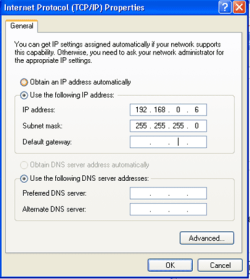
Connect your computer to your phone (using its Hotspot), then run the ipconfig /all. Follow the steps from this tutorial and save the .txt file on your computer. You will need the ipconfig /all output to assign the Static IP on your computer's WLAN settings and create different profiles (Home, School, Static IP, Auto IP, No Internet, etc...) for different types of connections that you wish to do.

You won't have to touch the LAN configurations (for your Games) only WLAN.

Remember that if you don't want any internet connection, you will create a Static profile for this connection, call it 'No Internet' if you want and only assign the IP Address and Subnet Mask, no Gateway and DNS will be entered. See attached as an example.
Note: This process will only be applied on your computer and not to your phone.
 

Attachments

  • LAN.png
    LAN.png
    94.5 KB · Views: 6

My Computer

Computer Manufacturer/Model Number
Lenovo Desktop/Samsung Laptop
OS
Win7 & Win8 64bit
CPU
Intel i5
Internet Speed
Charter-20 Mbps
Antivirus
Avast
Browser
FF, IE9 and Chrome
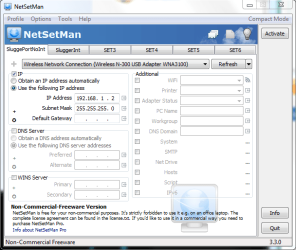
Ok Ive got it working but still very new to this whole networking thing should start studying all this next year hopefully.
But this is what ive done is this what you meant i should do?
 

Attachments

  • 1.PNG
    1.PNG
    78.6 KB · Views: 18
  • 2.PNG
    2.PNG
    81.6 KB · Views: 9
Last edited:

My Computer

OS
Windows 7 Ultimate 32 bit
CPU
Pentium(R) Dual-Core CPU E5400 @ 2.70 GHz
Memory
2gb ddr2
Graphics Card(s)
ATI Radeon HD5700 series
Very good Slugger, you did it! Now, if you want to use a profile, all you need to do is press Activate. You may switch to a different profile and it only takes a second to do it. :)
 

My Computer

Computer Manufacturer/Model Number
Lenovo Desktop/Samsung Laptop
OS
Win7 & Win8 64bit
CPU
Intel i5
Internet Speed
Charter-20 Mbps
Antivirus
Avast
Browser
FF, IE9 and Chrome
Dude. Thank you so much. It's actually simpler than i thought.
 

My Computer

OS
Windows 7 Ultimate 32 bit
CPU
Pentium(R) Dual-Core CPU E5400 @ 2.70 GHz
Memory
2gb ddr2
Graphics Card(s)
ATI Radeon HD5700 series

My Computer

Computer Manufacturer/Model Number
Lenovo Desktop/Samsung Laptop
OS
Win7 & Win8 64bit
CPU
Intel i5
Internet Speed
Charter-20 Mbps
Antivirus
Avast
Browser
FF, IE9 and Chrome
Hehe sorry. Common misconception hehe. Thanx anyway. Realy apreciate it.
 

My Computer

OS
Windows 7 Ultimate 32 bit
CPU
Pentium(R) Dual-Core CPU E5400 @ 2.70 GHz
Memory
2gb ddr2
Graphics Card(s)
ATI Radeon HD5700 series
Back
Top