WiFi problem

DavidMKD

New member
Member
VIP
Local time
10:02 AM
Messages
120
Location
Macedonia
hey guys. I have a problem here. I bought a TPLINK Tl-WR340G Woreless router. And I also have D-Link ADSL2+ Modem. How can I connect it. I dont have wireless card or something in my PC. :cry:
I saw somewhere that I need to copy my MAC adress but where?
 

My Computer

Computer Manufacturer/Model Number
David's Imperator
OS
Windows 7 Ultimate x64
CPU
Intel Core i5-2500 3.3 GHz
Motherboard
Foxconn P67A-S
Memory
6 GB DDR3 RAM Silicon Power
Graphics Card(s)
Nvidia GeForce GTS 450 2GB DDR3
Sound Card
Realtek HD Audio
Monitor(s) Displays
Philips 226VLA
Screen Resolution
1920x1080
Hard Drives
WD Green 1TB (1000GB)
PSU
250W
You will need the Security Key for your router (If needed),

Once you have done this move as close as you can to the Router and then follow the Steps in the Attached File

After that choose your network and enter the Key then Surf the Internet ;)
 

Attachments

My Computer

Computer type
PC/Desktop
Computer Manufacturer/Model Number
Custom Built
OS
Windows 7 Professional x64 SP1 ; Windows Server 2012 R2 Standard
CPU
Intel Core i5 2400 @ 3.10GHz
Motherboard
Foxconn H67MP-S/-V/H67MP
Memory
8.0GB DDR3 @ 665MHz (2GBx4)
Graphics Card(s)
AMD Radeon HD 6870
Sound Card
Realtek High Definition Audio
Monitor(s) Displays
AOC 2243W & SMB1930NW
Screen Resolution
1440x900 & 1920x1080
Hard Drives
977GB Seagate ST31000524AS ATA Drive (SATA)
250GB WD iSCSI attached Drive
PSU
750W Gaming PSU
Case
Novatech Night
Cooling
Fan
Keyboard
Dell Standard PS/2 Keyboard
Mouse
R.A.T 07 Gaming Mouse
Internet Speed
Download: 10 Mbps Ping: 30ms Upload: 0.81 Mbps
Browser
Google Chrome
Other Info
Optiarc DVD RW AD-5260S ATA Device
hey thanks for that but my problem is this. I cant connect it with my PC. I mean I have D-Link modem and I have ISDn Splitter. and with that I connect Dlink modem with internet. I plug in that cable in ADSL port and the cable for PC in the internet port. Now I bought TPlink (as above model) and I dont know what to do what to connect.
 

My Computer

Computer Manufacturer/Model Number
David's Imperator
OS
Windows 7 Ultimate x64
CPU
Intel Core i5-2500 3.3 GHz
Motherboard
Foxconn P67A-S
Memory
6 GB DDR3 RAM Silicon Power
Graphics Card(s)
Nvidia GeForce GTS 450 2GB DDR3
Sound Card
Realtek HD Audio
Monitor(s) Displays
Philips 226VLA
Screen Resolution
1920x1080
Hard Drives
WD Green 1TB (1000GB)
PSU
250W
On the Back of that router there should be a Port for the ADSL to connect and then 4 other Ports - To connect your computer (Wired) you will need an ehternet Cable

(wireless) You will need a wifi Card , laptops have them built in but Desktop PC's won't - You also might not need to use the modem but follow the Proceedure I have given so far ;)

Hope This Helps,
Josh
 

My Computer

Computer type
PC/Desktop
Computer Manufacturer/Model Number
Custom Built
OS
Windows 7 Professional x64 SP1 ; Windows Server 2012 R2 Standard
CPU
Intel Core i5 2400 @ 3.10GHz
Motherboard
Foxconn H67MP-S/-V/H67MP
Memory
8.0GB DDR3 @ 665MHz (2GBx4)
Graphics Card(s)
AMD Radeon HD 6870
Sound Card
Realtek High Definition Audio
Monitor(s) Displays
AOC 2243W & SMB1930NW
Screen Resolution
1440x900 & 1920x1080
Hard Drives
977GB Seagate ST31000524AS ATA Drive (SATA)
250GB WD iSCSI attached Drive
PSU
750W Gaming PSU
Case
Novatech Night
Cooling
Fan
Keyboard
Dell Standard PS/2 Keyboard
Mouse
R.A.T 07 Gaming Mouse
Internet Speed
Download: 10 Mbps Ping: 30ms Upload: 0.81 Mbps
Browser
Google Chrome
Other Info
Optiarc DVD RW AD-5260S ATA Device
I have WAN port i think its same as ADSL?
Now I unplug the cable from the modem which connects modem and PC and plug it into some of the 4 ports. Than what to do? Which cable goest into WAn port? Do I need to buy same cable to connect the router with modem via the same port (modem-PC)?

Sorry for the noob questions I am using Wireless for first time
 

My Computer

Computer Manufacturer/Model Number
David's Imperator
OS
Windows 7 Ultimate x64
CPU
Intel Core i5-2500 3.3 GHz
Motherboard
Foxconn P67A-S
Memory
6 GB DDR3 RAM Silicon Power
Graphics Card(s)
Nvidia GeForce GTS 450 2GB DDR3
Sound Card
Realtek HD Audio
Monitor(s) Displays
Philips 226VLA
Screen Resolution
1920x1080
Hard Drives
WD Green 1TB (1000GB)
PSU
250W
Riiight?
 

My Computer

Computer Manufacturer/Model Number
David's Imperator
OS
Windows 7 Ultimate x64
CPU
Intel Core i5-2500 3.3 GHz
Motherboard
Foxconn P67A-S
Memory
6 GB DDR3 RAM Silicon Power
Graphics Card(s)
Nvidia GeForce GTS 450 2GB DDR3
Sound Card
Realtek HD Audio
Monitor(s) Displays
Philips 226VLA
Screen Resolution
1920x1080
Hard Drives
WD Green 1TB (1000GB)
PSU
250W
Sorry for the Late Reply...

Connect your ADSLWire into your Modem then connect your Modem to the Router after that connect your PC or laptop to the Router (Wired) or to do this wirelessly Connect to your router as shown in the Attached file above


Edit: If you have Broadband then you will not need a Modem - Most Routers and Laptops have them built in


Hope This Helps,
Josh
 

My Computer

Computer type
PC/Desktop
Computer Manufacturer/Model Number
Custom Built
OS
Windows 7 Professional x64 SP1 ; Windows Server 2012 R2 Standard
CPU
Intel Core i5 2400 @ 3.10GHz
Motherboard
Foxconn H67MP-S/-V/H67MP
Memory
8.0GB DDR3 @ 665MHz (2GBx4)
Graphics Card(s)
AMD Radeon HD 6870
Sound Card
Realtek High Definition Audio
Monitor(s) Displays
AOC 2243W & SMB1930NW
Screen Resolution
1440x900 & 1920x1080
Hard Drives
977GB Seagate ST31000524AS ATA Drive (SATA)
250GB WD iSCSI attached Drive
PSU
750W Gaming PSU
Case
Novatech Night
Cooling
Fan
Keyboard
Dell Standard PS/2 Keyboard
Mouse
R.A.T 07 Gaming Mouse
Internet Speed
Download: 10 Mbps Ping: 30ms Upload: 0.81 Mbps
Browser
Google Chrome
Other Info
Optiarc DVD RW AD-5260S ATA Device
Also can I ask do you have Broadband or use Dialup?
 

My Computer

Computer type
PC/Desktop
Computer Manufacturer/Model Number
Custom Built
OS
Windows 7 Professional x64 SP1 ; Windows Server 2012 R2 Standard
CPU
Intel Core i5 2400 @ 3.10GHz
Motherboard
Foxconn H67MP-S/-V/H67MP
Memory
8.0GB DDR3 @ 665MHz (2GBx4)
Graphics Card(s)
AMD Radeon HD 6870
Sound Card
Realtek High Definition Audio
Monitor(s) Displays
AOC 2243W & SMB1930NW
Screen Resolution
1440x900 & 1920x1080
Hard Drives
977GB Seagate ST31000524AS ATA Drive (SATA)
250GB WD iSCSI attached Drive
PSU
750W Gaming PSU
Case
Novatech Night
Cooling
Fan
Keyboard
Dell Standard PS/2 Keyboard
Mouse
R.A.T 07 Gaming Mouse
Internet Speed
Download: 10 Mbps Ping: 30ms Upload: 0.81 Mbps
Browser
Google Chrome
Other Info
Optiarc DVD RW AD-5260S ATA Device

My Computer

Computer type
PC/Desktop
Computer Manufacturer/Model Number
Custom Built
OS
Windows 7 Professional x64 SP1 ; Windows Server 2012 R2 Standard
CPU
Intel Core i5 2400 @ 3.10GHz
Motherboard
Foxconn H67MP-S/-V/H67MP
Memory
8.0GB DDR3 @ 665MHz (2GBx4)
Graphics Card(s)
AMD Radeon HD 6870
Sound Card
Realtek High Definition Audio
Monitor(s) Displays
AOC 2243W & SMB1930NW
Screen Resolution
1440x900 & 1920x1080
Hard Drives
977GB Seagate ST31000524AS ATA Drive (SATA)
250GB WD iSCSI attached Drive
PSU
750W Gaming PSU
Case
Novatech Night
Cooling
Fan
Keyboard
Dell Standard PS/2 Keyboard
Mouse
R.A.T 07 Gaming Mouse
Internet Speed
Download: 10 Mbps Ping: 30ms Upload: 0.81 Mbps
Browser
Google Chrome
Other Info
Optiarc DVD RW AD-5260S ATA Device
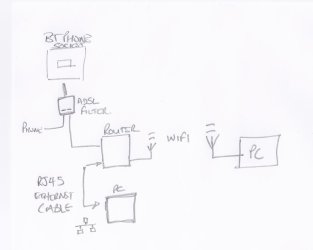
I have drawn a Network Map that may help you...

Scan0001.jpg
 

My Computer

Computer type
PC/Desktop
Computer Manufacturer/Model Number
Custom Built
OS
Windows 7 Professional x64 SP1 ; Windows Server 2012 R2 Standard
CPU
Intel Core i5 2400 @ 3.10GHz
Motherboard
Foxconn H67MP-S/-V/H67MP
Memory
8.0GB DDR3 @ 665MHz (2GBx4)
Graphics Card(s)
AMD Radeon HD 6870
Sound Card
Realtek High Definition Audio
Monitor(s) Displays
AOC 2243W & SMB1930NW
Screen Resolution
1440x900 & 1920x1080
Hard Drives
977GB Seagate ST31000524AS ATA Drive (SATA)
250GB WD iSCSI attached Drive
PSU
750W Gaming PSU
Case
Novatech Night
Cooling
Fan
Keyboard
Dell Standard PS/2 Keyboard
Mouse
R.A.T 07 Gaming Mouse
Internet Speed
Download: 10 Mbps Ping: 30ms Upload: 0.81 Mbps
Browser
Google Chrome
Other Info
Optiarc DVD RW AD-5260S ATA Device
If you have Broadband then you will not need a Modem

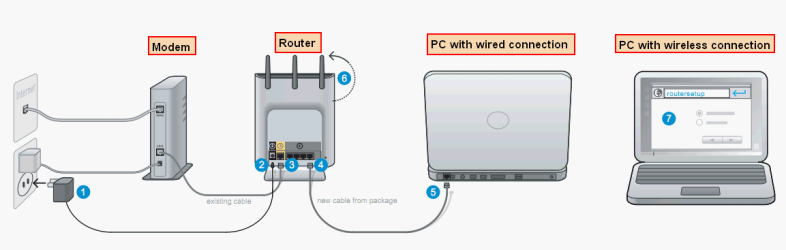
That is simply not true. You always need a modem in broadband connection. Some routers have a built-in modem, but not all routers have modem. For instance this is how I need to connect my modem, router and computer:

Belkin_Setup.png
(Click to enlarge.)

Here are simple steps you need to do. Be sure you have your ISP credentials (broadband username and password from your service provider) near by before starting:
  • Disconnect the cable that you used to have between modem and your computer from computer, connect it to router's WAN port
  • Connect router to computer using a LAN cable. You can use any of the four LAN ports
  • Reset the modem back to factory settings (please notice you temporarily lose your broadband connection when doing this)
  • Set up the broadband connection in router using either the CD/DVD provided by your ISP, or manually by logging in to router using a browser as told in this manual of your new router (chapter 3)
  • If you want to connect wireless you need to connect a wireless adapter to your computer

Kari
 
Last edited:

My Computer

Computer type
Laptop
Computer Manufacturer/Model Number
HP ENVY 17-1150eg
OS
Windows 10 Pro x64 EN-GB
CPU
1.6 GHz Intel Core i7-720QM Processor
Memory
6 GB
Graphics Card(s)
ATI Mobility Radeon HD 5850 Graphics
Sound Card
Beats sound system with integrated subwoofer
Monitor(s) Displays
17" laptop display, 22" LED and 32" Full HD TV through HDMI
Screen Resolution
1600*900 (1), 1920*1080 (2&3)
Hard Drives
Internal: 2 x 500 GB SATA Hard Disk Drive 7200 rpm
External: 2TB for backups, 3TB USB3 network drive for media
Cooling
As Envy runs a bit warm, I have it on a Cooler Master pad
Keyboard
Logitech diNovo Media Desktop Laser (bluetooth)
Mouse
Logitech Performance Mouse MX
Internet Speed
50/10 Mbps VDSL
Antivirus
Windows Defender 4.3.9431.0
Browser
Maxthon 3.5.2., IE11

My Computer

Computer Manufacturer/Model Number
David's Imperator
OS
Windows 7 Ultimate x64
CPU
Intel Core i5-2500 3.3 GHz
Motherboard
Foxconn P67A-S
Memory
6 GB DDR3 RAM Silicon Power
Graphics Card(s)
Nvidia GeForce GTS 450 2GB DDR3
Sound Card
Realtek HD Audio
Monitor(s) Displays
Philips 226VLA
Screen Resolution
1920x1080
Hard Drives
WD Green 1TB (1000GB)
PSU
250W
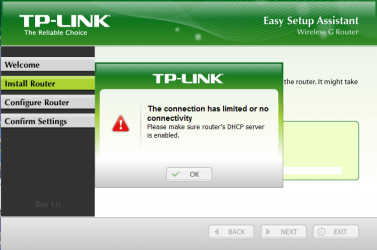
Hey guys now I have another problem. Capture.PNG
 

My Computer

Computer Manufacturer/Model Number
David's Imperator
OS
Windows 7 Ultimate x64
CPU
Intel Core i5-2500 3.3 GHz
Motherboard
Foxconn P67A-S
Memory
6 GB DDR3 RAM Silicon Power
Graphics Card(s)
Nvidia GeForce GTS 450 2GB DDR3
Sound Card
Realtek HD Audio
Monitor(s) Displays
Philips 226VLA
Screen Resolution
1920x1080
Hard Drives
WD Green 1TB (1000GB)
PSU
250W
pls guys reply faster :cry:
 

My Computer

Computer Manufacturer/Model Number
David's Imperator
OS
Windows 7 Ultimate x64
CPU
Intel Core i5-2500 3.3 GHz
Motherboard
Foxconn P67A-S
Memory
6 GB DDR3 RAM Silicon Power
Graphics Card(s)
Nvidia GeForce GTS 450 2GB DDR3
Sound Card
Realtek HD Audio
Monitor(s) Displays
Philips 226VLA
Screen Resolution
1920x1080
Hard Drives
WD Green 1TB (1000GB)
PSU
250W
pls guys reply faster :cry:
Maybe I'm just having a bad day, I don't know, but this pisses me off!

Your previous post, posted 29 minutes before this, made me to start searching if I could find something that could help you. I came back to post what I had found, and saw this.

We have over 100,000 members here on the Seven Forums, and a few hundred active members trying to answer as many posts as possible, as fast as possible. You had waited 29 minutes after your last post, before posting "Faster, geeks, faster!".

I unsubscribe this thread now. I'm not willing to try to help you anymore.

Kari
 

My Computer

Computer type
Laptop
Computer Manufacturer/Model Number
HP ENVY 17-1150eg
OS
Windows 10 Pro x64 EN-GB
CPU
1.6 GHz Intel Core i7-720QM Processor
Memory
6 GB
Graphics Card(s)
ATI Mobility Radeon HD 5850 Graphics
Sound Card
Beats sound system with integrated subwoofer
Monitor(s) Displays
17" laptop display, 22" LED and 32" Full HD TV through HDMI
Screen Resolution
1600*900 (1), 1920*1080 (2&3)
Hard Drives
Internal: 2 x 500 GB SATA Hard Disk Drive 7200 rpm
External: 2TB for backups, 3TB USB3 network drive for media
Cooling
As Envy runs a bit warm, I have it on a Cooler Master pad
Keyboard
Logitech diNovo Media Desktop Laser (bluetooth)
Mouse
Logitech Performance Mouse MX
Internet Speed
50/10 Mbps VDSL
Antivirus
Windows Defender 4.3.9431.0
Browser
Maxthon 3.5.2., IE11
I am with Kari on this one - There are other People who need help,

Within this 30Min Period I have been doing some research for your Problem,

You need to Have a look at your Manual for your router and Enter the Settings after you done that Enable the DHCP Server

This is going to be different on every Router sorry I couldn't be any other help

Many Thanks,
Josh
 

My Computer

Computer type
PC/Desktop
Computer Manufacturer/Model Number
Custom Built
OS
Windows 7 Professional x64 SP1 ; Windows Server 2012 R2 Standard
CPU
Intel Core i5 2400 @ 3.10GHz
Motherboard
Foxconn H67MP-S/-V/H67MP
Memory
8.0GB DDR3 @ 665MHz (2GBx4)
Graphics Card(s)
AMD Radeon HD 6870
Sound Card
Realtek High Definition Audio
Monitor(s) Displays
AOC 2243W & SMB1930NW
Screen Resolution
1440x900 & 1920x1080
Hard Drives
977GB Seagate ST31000524AS ATA Drive (SATA)
250GB WD iSCSI attached Drive
PSU
750W Gaming PSU
Case
Novatech Night
Cooling
Fan
Keyboard
Dell Standard PS/2 Keyboard
Mouse
R.A.T 07 Gaming Mouse
Internet Speed
Download: 10 Mbps Ping: 30ms Upload: 0.81 Mbps
Browser
Google Chrome
Other Info
Optiarc DVD RW AD-5260S ATA Device
Back
Top