Will a Recovery disc from another laptop work on mine ?

SaibotXI

New member
Local time
10:27 AM
Messages
19
Hi guys,

I have an HP Pavilion dv6 - 6c01se (AMD Processor)
I recently updated my laptop to Windows 8, but after not liking it much I reverted back to the original and activated Windows 7 Home Premium x64 with the key that came with the laptop. However, since then the laptop has been acting weird and sometimes does not respond at all, it worked beautifully before on Windows 7.

One of my friends has the same laptop though I'm not sure if he has the Intel one or the AMD, but I was thinking if I could use his laptop to create recovery discs and use the to restore my laptop to factory conditions because I screwed up my recovery partition also after the Windows 8 install.

Can I use the recovery discs created from his laptop and use them to restore my laptop and then activate it using my Window's key ?

Thanks ! :D
 
Last edited:

My Computer My Computer

At a glance

Windows 7 Home Premium x64AMD A6-3430MX APU with Radeon(tm) HD Graphic6 GBAMD Radeon 6600M and 6700M Series
Computer type
Laptop
Computer Manufacturer/Model Number
HP
OS
Windows 7 Home Premium x64
CPU
AMD A6-3430MX APU with Radeon(tm) HD Graphic
Memory
6 GB
Graphics Card(s)
AMD Radeon 6600M and 6700M Series
Sound Card
AMD High Definition Audio Device
Screen Resolution
1366 x 768
Hard Drives
Hitachi HTS547575A9E384 SATA Disk Device - 750 GB
Antivirus
Norton
Browser
Google Chrome
The factory install on HP is the worst possible install of Win7 one can have, with the worst load of bloatware in the industry smothering the best OS ever so that you'll never even know what its native performance is like.

What I would do is follow these steps to do a perfect http://www.sevenforums.com/tutorials/219487-clean-reinstall-factory-oem-windows-7-a.html#post1839164 which is a vastly better install than the factory bloatware install and has been used by a million consumers without a single complaint.

Be sure to read the Special Note for HP Owners at the end. If you can still boot Factory Recovery via F11 then there may be a Minimal Recovery choice which is nearly as good as a Clean Reinstall. If not then I'd delete all partitions during the booted install.
 
I have already tried that, and that's what basically screwed my laptop :( My HP CoolSense isn't working anymore and the laptop heats up very fast even when it's actually idle. I've tried many different solutions from many places but it didn't work.

SO i was just wondering if getting a recovery from another laptop of the same model would work on mine.
 

My Computer My Computer

At a glance

Windows 7 Home Premium x64AMD A6-3430MX APU with Radeon(tm) HD Graphic6 GBAMD Radeon 6600M and 6700M Series
Computer type
Laptop
Computer Manufacturer/Model Number
HP
OS
Windows 7 Home Premium x64
CPU
AMD A6-3430MX APU with Radeon(tm) HD Graphic
Memory
6 GB
Graphics Card(s)
AMD Radeon 6600M and 6700M Series
Sound Card
AMD High Definition Audio Device
Screen Resolution
1366 x 768
Hard Drives
Hitachi HTS547575A9E384 SATA Disk Device - 750 GB
Antivirus
Norton
Browser
Google Chrome
You already tried what? I gave you several suggestions. If you tried the http://www.sevenforums.com/tutorials/219487-clean-reinstall-factory-oem-windows-7-a.html#post1839164 then did you install the HP CoolSense software from the HP Support Downloads webpage for your PC model?

Or did you try the F11 Performing an HP System Recovery (Windows 7) | HP® Support choosing Minimal Recovery option?

If you're going to finally seek our help then you'll need to be specific and complete in your answers.

Only if your friend has the exact same laptop model would Recov disks work for your PC. It would also not have the Minimal Recovery option so you'd have all the bloatware. But you can Clean Up Factory Bloatware
 
You already tried what? I gave you several suggestions. If you tried the http://www.sevenforums.com/tutorials/219487-clean-reinstall-factory-oem-windows-7-a.html#post1839164 then did you install the HP CoolSense software from the HP Support Downloads webpage for your PC model?

Or did you try the F11 Performing an HP System Recovery (Windows 7) | HP® Support choosing Minimal Recovery option?

If you're going to finally seek our help then you'll need to be specific and complete in your answers.

Only if your friend has the exact same laptop model would Recov disks work for your PC. It would also not have the Minimal Recovery option so you'd have all the bloatware. But you can Clean Up Factory Bloatware

I've tried re-installing Windows 7 using that post, but it didn't make any difference. I've also used the HP CoolSense package from my laptop Driver page. I've tried other versions too. all work similar. It gets installed but when I try to set the HP CoolSense Mode, it just doesnt seem to open to let me change the modes. And also i dont really feel like its actually running, its just there.

While installing Windows 8 on my laptop my recovery drive ran into some problems, and I remember it giving me the harddisk.dll error something. and i tried alot but could never get a solution. So, Once i reinstalled the new Windows 7 again, i formatted the recovery drive and used that partition to make my own system image for later restores.

Yes he has the same exact model, only that im not sure if he has the AMD based motherboard or the Intel based. would that really make a difference ? cant i not later install the AMD drivers ?
 

My Computer My Computer

At a glance

Windows 7 Home Premium x64AMD A6-3430MX APU with Radeon(tm) HD Graphic6 GBAMD Radeon 6600M and 6700M Series
Computer type
Laptop
Computer Manufacturer/Model Number
HP
OS
Windows 7 Home Premium x64
CPU
AMD A6-3430MX APU with Radeon(tm) HD Graphic
Memory
6 GB
Graphics Card(s)
AMD Radeon 6600M and 6700M Series
Sound Card
AMD High Definition Audio Device
Screen Resolution
1366 x 768
Hard Drives
Hitachi HTS547575A9E384 SATA Disk Device - 750 GB
Antivirus
Norton
Browser
Google Chrome
Actually the only problem I'm having is with HP Coolsense and because of that my laptop heats up like an oven even when Idle. :(

I re-installed windows again using the new media (.iso) released by Microsoft last month, and now my laptop is lagging also.
 

My Computer My Computer

At a glance

Windows 7 Home Premium x64AMD A6-3430MX APU with Radeon(tm) HD Graphic6 GBAMD Radeon 6600M and 6700M Series
Computer type
Laptop
Computer Manufacturer/Model Number
HP
OS
Windows 7 Home Premium x64
CPU
AMD A6-3430MX APU with Radeon(tm) HD Graphic
Memory
6 GB
Graphics Card(s)
AMD Radeon 6600M and 6700M Series
Sound Card
AMD High Definition Audio Device
Screen Resolution
1366 x 768
Hard Drives
Hitachi HTS547575A9E384 SATA Disk Device - 750 GB
Antivirus
Norton
Browser
Google Chrome
This is why I asked you if you'd followed the steps in http://www.sevenforums.com/tutorials/219487-clean-reinstall-factory-oem-windows-7-a.html#post1839164, particularly as they pertain to drivers which are handled differently than in XP since Win7 is a driver-complete OS which provides the drivers it wants. Only import the drivers missing in Device Manager after all Windows Updates are done.

Then reimport only the HP software you know for sure you need. To decide this I would wait and test the install to see what that you need is missing. Then import the additional software from the HP Downloads page for your model. We can help you do this. Have you found the CoolSense software?
 
Yes I agree with the last post you should visit HP web site and look for the cool sense/ fan driver and download it maybe the model that your friend had didn't include the necessary driver when the backup disk was created. There are partitions on your hard drive so maybe you still can restore its to its factory state if not remove your hard drive and then use it in the computer of your friends then switch back to your that worked for missing hp drivers for me in the past
 

My Computer My Computer

At a glance

win 7,8,10
Computer type
Laptop
Computer Manufacturer/Model Number
HP,dell,toshiba
OS
win 7,8,10
This is why I asked you if you'd followed the steps in http://www.sevenforums.com/tutorials/219487-clean-reinstall-factory-oem-windows-7-a.html#post1839164, particularly as they pertain to drivers which are handled differently than in XP since Win7 is a driver-complete OS which provides the drivers it wants. Only import the drivers missing in Device Manager after all Windows Updates are done.

Then reimport only the HP software you know for sure you need. To decide this I would wait and test the install to see what that you need is missing. Then import the additional software from the HP Downloads page for your model. We can help you do this. Have you found the CoolSense software?

So If I'm to completely re-install windows 7 for the 4th time that is :p I want to delete all partitions and setup my laptop as completely new. Any help on this ? There is a HP_Tools Partition also in my HDD, Is it okay to delete that now since my recovery is no longer there ?
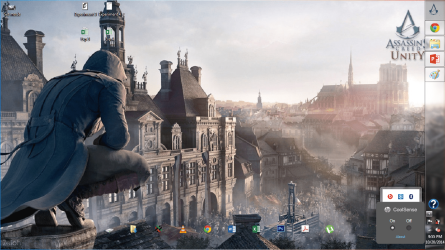
Yes I downloaded the HP CoolSense software package from my laptop downloads page. I installed it, and i can also see it; however, when I click on it to set my HP CoolSense mode it doesn't do anything rather it shows me the ON/Off. (Screenshots Attached)
 

Attachments

  • Set mode.png
    Set mode.png
    544.1 KB · Views: 0
  • no use.png
    no use.png
    544.7 KB · Views: 0

My Computer My Computer

At a glance

Windows 7 Home Premium x64AMD A6-3430MX APU with Radeon(tm) HD Graphic6 GBAMD Radeon 6600M and 6700M Series
Computer type
Laptop
Computer Manufacturer/Model Number
HP
OS
Windows 7 Home Premium x64
CPU
AMD A6-3430MX APU with Radeon(tm) HD Graphic
Memory
6 GB
Graphics Card(s)
AMD Radeon 6600M and 6700M Series
Sound Card
AMD High Definition Audio Device
Screen Resolution
1366 x 768
Hard Drives
Hitachi HTS547575A9E384 SATA Disk Device - 750 GB
Antivirus
Norton
Browser
Google Chrome
Yes I agree with the last post you should visit HP web site and look for the cool sense/ fan driver and download it maybe the model that your friend had didn't include the necessary driver when the backup disk was created. There are partitions on your hard drive so maybe you still can restore its to its factory state if not remove your hard drive and then use it in the computer of your friends then switch back to your that worked for missing hp drivers for me in the past

i didn't yet use his recovery discs or anything. I wanted to know if they will work before trying it to be on the safe side.
I dont have the recovery partition since i deleted it after it got corrupted after my Windows 8 install. Also, I dont wanna remove my hard disk or anything. I just want a software solution because this is a software issue.
 

My Computer My Computer

At a glance

Windows 7 Home Premium x64AMD A6-3430MX APU with Radeon(tm) HD Graphic6 GBAMD Radeon 6600M and 6700M Series
Computer type
Laptop
Computer Manufacturer/Model Number
HP
OS
Windows 7 Home Premium x64
CPU
AMD A6-3430MX APU with Radeon(tm) HD Graphic
Memory
6 GB
Graphics Card(s)
AMD Radeon 6600M and 6700M Series
Sound Card
AMD High Definition Audio Device
Screen Resolution
1366 x 768
Hard Drives
Hitachi HTS547575A9E384 SATA Disk Device - 750 GB
Antivirus
Norton
Browser
Google Chrome
If you read the Special Note to HP Owners at the end of http://www.sevenforums.com/tutorials/219487-clean-reinstall-factory-oem-windows-7-a.html#post1839164 it explains how to test if the HP Tools partition's Bootable Diagnostics and Recovery partition still run.

If Performing an HP system recovery (Windows 7) | HP® Support will still run then I'd try it to see if there is a Minimal Recovery option given when you run it, as this is nearly the same as Clean Reinstall but includes factory drivers and essential system software. If not you can delete Recovery.

If Diagnostics still runs and gives a good report then I would save the HP Tools Partition but delete all other partitions, create a new one in their place during reinstall using the Drive Options pictured in Steps 7 and 8 of http://www.sevenforums.com/tutorials/1649-clean-install-windows-7-a.html
 
Yes, I have tried that method and it does not work, and should not work since I formatted my recovery (Yes, I know I was stupid) but well mistakes happen. So, currently the F11 method does not work. I tried again just now to re-confirm it.

Also, I followed ur method to re-install my Windows 7 about 3 weeks ago, and i slip-streamed the updates; however, it still showed the updated after windows installation and it downloaded and updated which took hours.

One another thing is the UEFI installation of Windows 7. I dont really know what UEFI does and how useful it is, but I've heard that it's better to have. My laptop did initially have the UEFI, but now I dont know. It does't show anything in the disk management though.
 

My Computer My Computer

At a glance

Windows 7 Home Premium x64AMD A6-3430MX APU with Radeon(tm) HD Graphic6 GBAMD Radeon 6600M and 6700M Series
Computer type
Laptop
Computer Manufacturer/Model Number
HP
OS
Windows 7 Home Premium x64
CPU
AMD A6-3430MX APU with Radeon(tm) HD Graphic
Memory
6 GB
Graphics Card(s)
AMD Radeon 6600M and 6700M Series
Sound Card
AMD High Definition Audio Device
Screen Resolution
1366 x 768
Hard Drives
Hitachi HTS547575A9E384 SATA Disk Device - 750 GB
Antivirus
Norton
Browser
Google Chrome
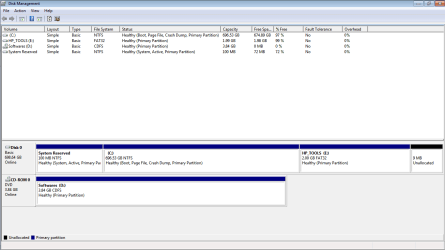
Please note that the recovery partition isnt the original HP one because i formatted it, and created a system backup/image on that.
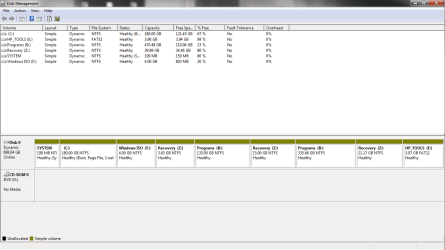
And one more thing, why am I seeing two different partitions for each drive ?
 

Attachments

  • Dsk Mngmt.png
    Dsk Mngmt.png
    23 KB · Views: 5

My Computer My Computer

At a glance

Windows 7 Home Premium x64AMD A6-3430MX APU with Radeon(tm) HD Graphic6 GBAMD Radeon 6600M and 6700M Series
Computer type
Laptop
Computer Manufacturer/Model Number
HP
OS
Windows 7 Home Premium x64
CPU
AMD A6-3430MX APU with Radeon(tm) HD Graphic
Memory
6 GB
Graphics Card(s)
AMD Radeon 6600M and 6700M Series
Sound Card
AMD High Definition Audio Device
Screen Resolution
1366 x 768
Hard Drives
Hitachi HTS547575A9E384 SATA Disk Device - 750 GB
Antivirus
Norton
Browser
Google Chrome
The problem is that you converted your HD to Dynamic which is only meant to be used to span a partition across multiple HD's. Apparently you didn't see the warning message. You can have only four primary partitions, or 3 Primary and unlimited Logical partitions.

The solution to solve this non-destructively is to boot free Partition Wizard CD version 4.2 from Option One of Convert a Dynamic Disk to a Basic Disk

Download the ISO, rightclick to burn it to CD using Windows Image Burner, or use ImgBurn.

Boot CD. You will need to delete the extra partition(s) you created which tipped it to convert to Dynamic before it will convert back to Basic, so back up any files first from within Win7 if it will boot, or Copy & Paste - in Windows Recovery Console to external USB. I would delete all partitions between C and HP Tools which you should keep for bootable hardware diagnostics on F12 key menu.

Then follow these video steps: How to convert dynamic disk to basic disk with Partition Wizard?

If Win7 will not start and you confirm it's been converted successfully, then confirm that the 100mb System Reserved partition (preferred if you have it) or C is Set Active partition - Partition Wizard Video Help, then run Startup Repair - Run up to 3 Separate Times.

After conversion if you want help adding a partition post back a screenshot of your maximized Disk Mgmt drive map with listings, using the Snipping Tool in Start Menu, attached using paper clip in Reply Box.

I would create a fourth Logical partition after C for all storage, or add as many adjacent Logical partitions as you wish. Create Logical Partition. There is no good reason to have a bunch of partitions as opposed to one Storage partition, though.
 
Sorry for the long months of delay, I've been really busy with my University.

Please see the screenshot i attached, and I completely formatted my HDD. Then, I installed Windows 7 using the method here: http://www.sevenforums.com/tutorial...e-firmware-interface-install-windows-7-a.html

I'm not getting the MSR partition as mentioned in that post. Also, from my laptop's driver page i installed the UEFI Environment driver which created the HP_Tools partition again itself. I want a new partition named "Program" like i had before, but i'm afraid it might convert the disk to dynamic again; is it safe to do so ?

Thanks.
 

Attachments

  • Capture.PNG
    Capture.PNG
    17.9 KB · Views: 2

My Computer My Computer

At a glance

Windows 7 Home Premium x64AMD A6-3430MX APU with Radeon(tm) HD Graphic6 GBAMD Radeon 6600M and 6700M Series
Computer type
Laptop
Computer Manufacturer/Model Number
HP
OS
Windows 7 Home Premium x64
CPU
AMD A6-3430MX APU with Radeon(tm) HD Graphic
Memory
6 GB
Graphics Card(s)
AMD Radeon 6600M and 6700M Series
Sound Card
AMD High Definition Audio Device
Screen Resolution
1366 x 768
Hard Drives
Hitachi HTS547575A9E384 SATA Disk Device - 750 GB
Antivirus
Norton
Browser
Google Chrome
The HP Tools partition would not have recreated itself during a Clean Reinstall, only Factory Recovery or manually could have restored it. Do the HP Diagnostics work from the ESC key at boot? If not then you can delete it because it serves no purpose. This is explained further in the Special Note for HP Owners at the end of Clean Reinstall Windows 7 which helps determine what partitions to keep during a Clean Reinstall. Is it possible you didn't delete it during the install?

MSR partition is hidden.

You can shrink C to create as many Logical data partitions as you want: Partition Wizard Resize Partition - Video Help.
Partition Wizard Create Partition - Video Help
 
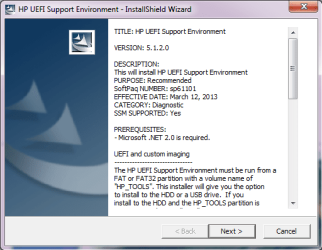
I completely formatted my HDD using the clean command from CMD at boot. After I installed Windows, I was installing the drivers, and there was a driver for UEFI Environment of which I'm attaching the screenshot. Once, I installed that driver it asked me if I want to create a partition for HP_Tools. I clicked yes and it made the partition, and yes i tried it after boot up by pressing F2 and it works just fine.

Also, what's the difference between a logical partition and a normal primary partition ? which one would be better ? and I can I just shrink Volume C using disk mgmt because I'm already familiar with that.
 

Attachments

  • Capture.PNG
    Capture.PNG
    24.5 KB · Views: 22

My Computer My Computer

At a glance

Windows 7 Home Premium x64AMD A6-3430MX APU with Radeon(tm) HD Graphic6 GBAMD Radeon 6600M and 6700M Series
Computer type
Laptop
Computer Manufacturer/Model Number
HP
OS
Windows 7 Home Premium x64
CPU
AMD A6-3430MX APU with Radeon(tm) HD Graphic
Memory
6 GB
Graphics Card(s)
AMD Radeon 6600M and 6700M Series
Sound Card
AMD High Definition Audio Device
Screen Resolution
1366 x 768
Hard Drives
Hitachi HTS547575A9E384 SATA Disk Device - 750 GB
Antivirus
Norton
Browser
Google Chrome
I asked if there were diagnostics on the ESC menu, and whether they would boot and fully run or not. Is F2 the specific key for Diagnostics and you are saying they boot and run fully?

How much other bloatware did you reimport from the HP website, defeating the purpose of a Clean Reinstall? This is discussed in Clean Reinstall Windows 7 so you understand how to judge. I've never heard of UEFI environment but if it allows replacing a functioning bootable diagnostics then that is worth it.

You can have four total Primary partitions OR 3 Primary and unlimited Logical partitions. A partition must be Primary to boot an OS, Logical are therefore only for data. HP Tools needs to remain Primary to be bootable, as does System Reserved. I would shrink C to make as many other partitions as you want and create them Logical.
 
Yes, F2's the button for Diagnostics and it runs completely fine at boot, I tried it.

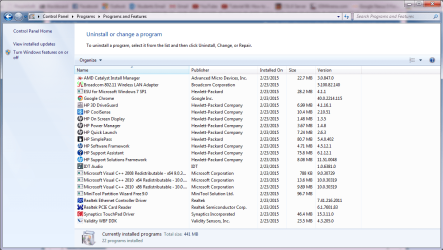
I'm attaching the screenshot of the drivers i downloaded from HP because im not sure which ones are really bloatware and which are actual drivers for the hardware. Is it fine if I remove the IDT Audio driver ? will it affect sound quality ? And HP OSD, HP PM, and HP QL are the three top most unneeded bloatwares, but I guess i like bloatwares :P
Anyways, let me know about your suggestions.

Okay Thanks. I'll create a logical partition for Programs now. I also, want to create a logical partition and put the system image there, just in case of later restore purposes. Is that fine too ?
 

Attachments

  • Capture.PNG
    Capture.PNG
    63 KB · Views: 1

My Computer My Computer

At a glance

Windows 7 Home Premium x64AMD A6-3430MX APU with Radeon(tm) HD Graphic6 GBAMD Radeon 6600M and 6700M Series
Computer type
Laptop
Computer Manufacturer/Model Number
HP
OS
Windows 7 Home Premium x64
CPU
AMD A6-3430MX APU with Radeon(tm) HD Graphic
Memory
6 GB
Graphics Card(s)
AMD Radeon 6600M and 6700M Series
Sound Card
AMD High Definition Audio Device
Screen Resolution
1366 x 768
Hard Drives
Hitachi HTS547575A9E384 SATA Disk Device - 750 GB
Antivirus
Norton
Browser
Google Chrome
Back
Top