Win "10" and "11"

billmcct

New member
Guru
Local time
6:54 AM
Messages
405
Location
Atlanta Georgia USA
I'm sorry guys , but I have to ask: What is an Operating System? I always thought an "OPERATING SYSTEM" was to run the hardware on the computer. I'm sorry but I really don't like anything released after Win 7 because they seem to think the "OS" is a catchall to install "M$" crap software (and other crap s**t that's "UNWANTED" basically referring to "METRO" crap). Win 7 had a lot of s**t that needed to be deleted (like "AERO"), that, being as I am "OLD and almost blind" just looked F***ed up to me) but hey even Win 8 had even 10 times more "S**T". I have used Win 8.1 and 10 and 11 in VMs and all I can see is that they're actually, (a piece of S**T). "WAY TOO MUCH ADDED CRAP". I really don't think an "OS" should be a catchall for "EVERYTHING" (when is M$ going to add the kitchen sink?). I am all for "SUPPORTING EVERYTHING". Hey, I'm 81 YO and since maybe (if I'm lucky) I can get another 3 years of updates for Win 7 (yet to be seen) maybe I wont "DIE" before that's over. I don't know Guys and Gals, but I really need to know that there is at least one person out there that feels that an "OPERATING SYSTEM" should "NOT" be a catchall for every piece of crap software they can include with it. Sorry but I always thought software was developed to "ENHANCE" an operating system and not to be included in it. Sorry folks, I know this is nothing but a "RANT" but, hey I will be more than happy to see any replies to this.
 

My Computer

Computer type
Laptop
Computer Manufacturer/Model Number
Dell Precision 15 7550 Workstation
OS
Windows 10 22H2 Pro
CPU
Intel(R) Xeon W-10885M
Motherboard
Dell
Memory
2x 32 GB DDR4 ECC memory (128 GB max)
Graphics Card(s)
Intel onboard GPU 1080p - Quadro RTX 5000 Max-Q GPU 4K
Hard Drives
500 GB Corsair T500 main M2 SSD
1 TB Intel storage M2 SSD (6 TB max)
Mouse
Logitech MX-25 Bluetooth
Internet Speed
slow
Antivirus
MS
Browser
Pale Moon 33.3.x x64 AVX2 build
We get it. :-)
 

My Computers

System One System Two

  • Computer type
    PC/Desktop
    OS
    7 X64
    CPU
    i5 8400
    Motherboard
    gigabyte b365m ds3h
    Memory
    2x8gb 3200mhz
    Hard Drives
    various
    PSU
    pure power 11 400w cm
    Case
    Coolermaster
    Cooling
    cryorig m9i
  • Computer type
    PC/Desktop
    OS
    7x64
    CPU
    g5400
    Motherboard
    ga b365m ds3h
    Memory
    8gb ddr4 2400
    PSU
    xfx pro 450w
I'm sorry guys , but I have to ask: What is an Operating System?

A corporate ecosystem where the user is the cash cow. Mooooo...

There's always Gentoo.
 

My Computer

Computer type
PC/Desktop
OS
Windows 7 Ultimate x64
billmcct:

I've been a Windows 7 user since its beginning, and I consider it to be the best Windows operating system that's been released.
When Windows 10 was released more than 7 years ago, I was shocked at how many useless apps it came with.
With the exception of a few that I need and use, I uninstall the other 30+ apps.

Feel free to rant all you want.
This 77-year old is ranting with you.
 

My Computer

Computer type
PC/Desktop
Computer Manufacturer/Model Number
Dell OptiPlex 9020
OS
Windows 7 Professional SP1 64-bit
CPU
Intel Core i7-4790 3.60 GHz
Memory
32 GB DDR3-1600 MHz
Graphics Card(s)
Integrated Intel HD Graphics 4600
Monitor(s) Displays
Viewsonic 32" LCD
Hard Drives
Kingston SATA 3 240 GB SSD
Internet Speed
Spectrum Internet 1000 Mbps
I smell what you're steppin' in Bro. I wish MS would support W-7 for "enthusiasts". I know, I'm hardly in that category but I can come here and bum advice from you guys! Anyway, wish you many more years of Windows 7!
 

My Computer

Computer type
PC/Desktop
Computer Manufacturer/Model Number
Leo625`s Amazing Time Killers
OS
Win 7 Ultimate X64
CPU
AMD RYZEN 5 2600
Motherboard
GIGABYTE X470 AORUS Gaming 7 WIFI
Memory
MEM 2Gx8|G.SKILL AEGIS
Graphics Card(s)
NVIDIA 750 Ti
Sound Card
MB
Monitor(s) Displays
LG
Screen Resolution
1920 X 1080
Hard Drives
WD 1TB Black
PSU
Corsair 750
Case
Old and Sturdy
Cooling
3 - 120MM Fans and CoolerMaster Hyper 612 on CPU
Keyboard
Logitech wired and lighted
Mouse
Logitech wireless
Browser
Firefox
I can understand the need to want to stay with Windows 7, I for one do, that's why I'm still on this forum. But at the end of the day you're forced to eventually move on to a newer and supported OS (Operating System) because the evolution of all things tech evolves. But with my use of the word "evolves" I'm not saying Windows 10 is an evolutionary step ahead for OSs. IMO it's not, it's an OS created and offered for free because YOU are the product. Android is like that in many ways and I feel like Microsoft wanted to follow suit in the phone market ecosphere of technology as it pertains to an OS. Especially given the fact there's a boat ton of telemetry pouring out of the latest incarnations of Windows just like Android.

I wouldn't say we need a Microsoft OS for "enthusiasts" but for PC/Gamers and another for the smart devices of things like tablets. This makes massive sense from a marketing perspective if you ask me. But! I can see how maintaining two different OSs can be a real pain monetarily and all that rot. I can understand the name of the game is all about profit, but I know several decades ago just in the 1970s alone that it seems like a lot of companies cared for their customer and the products they made. Especially in the realm of customer service. In this day and age customer service and a fine polished product seem to be out the window. We can also see this in the arts like movies, TV shows and music. What ever the production company is comfortable with backing and ensuring a guaranteed profit without risk is king and thus so much for a quality product. To make an analogy, the era of Windows XP and Window 7 was like the movies Dances With Wolves and Saving Private Ryan. Or the musical quality and full wealth of instruments in a lot of the music prior to the 2000s.

So how do we move forward and try and stay up to date in this ever evolving technology landscape without being connected to a digital teat sucker since you are the "cash cow?" Look toward alternatives of course. If you're doing nothing but office orientated Apping, then Linux would be well suited for you. By office orientated Apping, I mean your 80% use of the PC everyday is browsing the Internet, using Libre Office or Microsoft Office and printing. If 80%+ of what you do matches those criteria then dual boot Linux. Preferably on two separate hard drives. Don't ever depend on partitions. For SSDs and platters I use a 5.25" hard drive selector drive bay with six hard drive switches made by the company Kingwin. If you use NVMe, you have to interject on boot up and select the HDD to boot from with the right key press. I have to do this all the time since I make use of SSDs, platters and a NVMe drive. Real pain sometimes though. Many people say Zorin OS is a good Windows alternative. I'd personally stay away from Ubuntu since it seems Microsoft got their mitts all in that OS. For the server I hear AlmaLinux was pretty good. There's also this guy's project where he stripped the hell out of Windows 10 and calls it Tiny10. So check that out. Yes, you'll still need to provide a product key for Tiny10.

Speaking of Microsoft getting their mitts in Ubuntu. They own Github, they want you to use the Microsoft Store like Google Play et al, and did I mention Windows 10/11 comes with a boat ton of telemetry making you the cash cow? I imagine one day Microsoft will make it so ONLY the Microsoft Store will allow you to install what programs you want to install. Linux already has something like this, but you can still install what ever you want and the alternative in Windows is called Chocolatey which is a Windows package manager much like the Linux version.

In the end, if I ran a company it would NEVER be Microsoft as my computing solution, EVER! LOL My IT staff would thank me for having everyone use Linux, the servers running Linux, Libre software and the major threat mitigation because of it... If the software I needed was Windows only I'd have an alternative custom coded for Linux or make use of a virtual machine and/or Docker containers... I realize that there is some needed software that is Windows only, but I'm very, very good at finding alternatives or at least hiring a Dev. Which of course means money... But hey! I have a fined polished product by which to use from. No more of this "the system's down/software is borked" crap. Especially with a forced BS update that all too often needs an update. Does that make any sense? An update needing an update? Really?! QC is straight out the window and I know because one of the most popular search engine hits on my website is, "Why is Windows 10 a piece of shit?"

- - - Updated - - -

Related. 4 Awful Secrets No One Is Telling You About Windows 10 | Cracked.com
 

My Computer

Computer type
PC/Desktop
OS
Windows 7 Ultimate x64
Yes, "resistance is futile". Personally, I am dipping a toe into a VM on W-10 to see if there is any life left for W-7 there. I have read of others here who VM W-7 so it can't be all bad. I have retail versions of W-10 and 11 and all the negatives about telemetry etc. still seem to affect them. The one good thing about getting old is if my hardware outlasts me I can have Windows 7 as long as I like. The world turns and there may come a day when a newer generation can make Windows 7 "backward" compatible more easily and I can use it even longer on newer hardware!
 

My Computer

Computer type
PC/Desktop
Computer Manufacturer/Model Number
Leo625`s Amazing Time Killers
OS
Win 7 Ultimate X64
CPU
AMD RYZEN 5 2600
Motherboard
GIGABYTE X470 AORUS Gaming 7 WIFI
Memory
MEM 2Gx8|G.SKILL AEGIS
Graphics Card(s)
NVIDIA 750 Ti
Sound Card
MB
Monitor(s) Displays
LG
Screen Resolution
1920 X 1080
Hard Drives
WD 1TB Black
PSU
Corsair 750
Case
Old and Sturdy
Cooling
3 - 120MM Fans and CoolerMaster Hyper 612 on CPU
Keyboard
Logitech wired and lighted
Mouse
Logitech wireless
Browser
Firefox
Yes, "resistance is futile". Personally, I am dipping a toe into a VM on W-10 to see if there is any life left for W-7 there. I have read of others here who VM W-7 so it can't be all bad. I have retail versions of W-10 and 11 and all the negatives about telemetry etc. still seem to affect them. The one good thing about getting old is if my hardware outlasts me I can have Windows 7 as long as I like. The world turns and there may come a day when a newer generation can make Windows 7 "backward" compatible more easily and I can use it even longer on newer hardware!

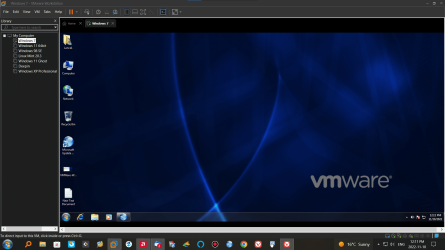
I'm running Win 7 in my VMWare along with a number of other OS's and on my old Toshiba Satellite A210. You could live and work out of a VM and never work out of your bare metal host system again. Love VM's
 

Attachments

  • VMWare-Win7.png
    VMWare-Win7.png
    929 KB · Views: 5

My Computer

Computer type
PC/Desktop
Computer Manufacturer/Model Number
Custom Built By Me.
OS
Windows 10 Pro 64 bit
CPU
AMD FX 9590 8 Core Black Edition
Motherboard
MSI 990FXA GAMING (MS-7893)
Memory
Corsair Vengeance 16GB DDR3
Graphics Card(s)
AMD Radeon (TM) R9 380 Gaming Series
Sound Card
AMD High Definition
Monitor(s) Displays
Samsung 32" 60Hz 4ms Curved PLS LED
Screen Resolution
1920 X 1080
Hard Drives
C: 223 GB SSD = E: 465 GB HDD = F: 931 GB HDD = G: 149 GB HDD = H: 931 GB HDD
PSU
EVGA Supernova NEX750B 750W ATX EPS12V 80PLUS Bronze
Case
Cool Master
Cooling
Noctua NH-D15 Premium Cooler with 2x NF-A15 PWM 140mm Fan
Internet Speed
Fiber Optic: Download 332.7 Mbps / Upload 331.5 Mbps
Antivirus
Windows Defender
Browser
Slimjet (64bit)
You might be interested to learn there is work on a so-called "Extended Kernel" for Windows 7 to allow you to run modern applications that no longer officially support Windows 7 such as the latest iTunes, supposedly works quite well
 

My Computers

System One System Two

  • OS
    Windows 7 Starter SP1
  • Computer type
    PC/Desktop
I'm no Windows guru, so, I come here looking for help instead of being able to give intelligent answers. In the past, Windows updates tried to sneak in an update from Windows 7 to Windows 10. Many took steps to block that from happening because they didn't want to switch. If someone were to do that update, is everything backward compatible enough that all of the programs already on the computer would run as they were designed to run? I'm assuming, from the tone of the answers here, that it isn't an easy thing to make Windows 10 or 11 more like Windows 7 by deleting the unwanted "stuff"? For those of us using Chrome, is it better to carry on without future updates or will it become a necessity to dump Chrome for something else? I also have to admit I haven't used 10 or 11, so, I have no knowledge of how extensive the differences are. Thanks.
 

My Computer

Computer type
PC/Desktop
Computer Manufacturer/Model Number
Dell
OS
Windows 7 64 bit
CPU
Intel(R) Celeron(R) CPU G465 @ 1.90GHz
Motherboard
Dell Inc. 0478VN
Memory
8 gig
Graphics Card(s)
Intel(R) HD Graphics
Sound Card
(1) Intel(R) Display Audio (2) Realtek High Definition Aud
Monitor(s) Displays
Dell 19"
Hard Drives
(1) ST500DM002-1BD142 (2) Generic- Multi-Card USB Device
Mouse
Logitech marble mouse
Internet Speed
100
Antivirus
Spybot Search and Destroy, Malwarebytes,Security Essentials
Browser
Chrome with Duck Duck Go
"I also have to admit I haven't used 10 or 11, so, I have no knowledge of how extensive the differences are. Thanks."

It's sort of like a homely woman with a very fancy dress on.
In the case of 10 or 11, the difference is mostly in the GUI. (graphical user interface).

I've installed both enough times to know where the old leaves off and the new begins.

I thought that Win-11 would really be a #%$&, but once I burrowed down below the GUI, it's just another Windows.
Now I have it all tweaked and tuned, so that to the passer by, it looks just like Win-7. I even use the same sounds and Themes. In fact, I use little bits and pieces that date back to Windows XP.
Yes, there are a few things that MS has added to Windows over the past decade or two, that I don't want to use, so I just fire up the "Revo uninstaller", and Out They GO!!! Then I run "WinUtilities" to clean up any leftovers in the registry.

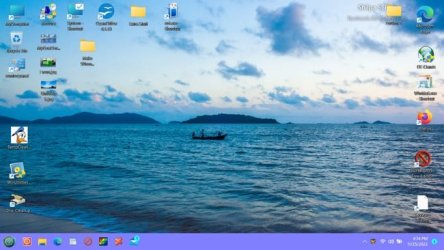
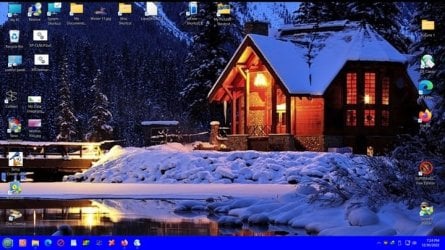
How about this, for a friendly looking OS?

Winter 11.jpg WIN 11 Desktop.jpg The first one is my desktop theme, without desktop icons, and the second one, is WITH icons. I've set up every OS since '98 the same way. (with shortcut icons around the perimeter of the desktop)

Granted, what I do to make a new OS user friendly isn't for beginners. It does take time and effort, and lots of experience. I've been at this stuff for ~42 years, and it's no longer my vocation....but my Hobby.

Happy Holidays, mates,
TM :cool:
 

My Computer

Computer type
PC/Desktop
Computer Manufacturer/Model Number
Various
OS
Win 7 Pro, SP1, x86, Win-11/Pro/64
CPU
AMD
Motherboard
Various
Memory
8GB Crucial
Graphics Card(s)
Various
Sound Card
OnBoard
Monitor(s) Displays
Acer 21.5"
Hard Drives
Crucial SSD, 500 GB
PSU
OEM
Case
SFF Slim Line Case
Cooling
OEM
Keyboard
eMachines
Mouse
Logitech Wireless
Internet Speed
varies
Antivirus
Windows Defender/Super Anti-Spyware
Browser
Firefox
That’s quite an answer. For those of us who are not gurus, after you download the 11 download, do all of the programs used on the 7 system have to be reloaded with the hopes that they will work with the new system? If we’ve kept 7 as long as we have, it’s not just getting used to a different operating system that would constitute a learning curve, having to reload as much as what was on there before switching sounds daunting. One might be better off just buying a whole new computer and starting over again.
Sorry for being clueless, but the vast majority of those still running 7 are in the same boat. If we’re in a spot where even Chrome wants you to switch, it would be nice to have a how - to to help us get there.
 

My Computer

Computer type
PC/Desktop
Computer Manufacturer/Model Number
Dell
OS
Windows 7 64 bit
CPU
Intel(R) Celeron(R) CPU G465 @ 1.90GHz
Motherboard
Dell Inc. 0478VN
Memory
8 gig
Graphics Card(s)
Intel(R) HD Graphics
Sound Card
(1) Intel(R) Display Audio (2) Realtek High Definition Aud
Monitor(s) Displays
Dell 19"
Hard Drives
(1) ST500DM002-1BD142 (2) Generic- Multi-Card USB Device
Mouse
Logitech marble mouse
Internet Speed
100
Antivirus
Spybot Search and Destroy, Malwarebytes,Security Essentials
Browser
Chrome with Duck Duck Go
I would like to thank you folks for making a man in his 60's for feeling so young. Man, I'm just a noob compared to you gurus, but I've done Windows 95 to the present and Windows 7 is still my favorite of all time. In fact, I'm currently typing this on Windows 7 as a result of my 8.1 cratering on me (yet again) and although I managed to rescue my 8.1 (yet again) the sweet allure of Windows 7 held me in her loving affection all the while so here I am in spite of a functional Win 8.1 running on the flip side of this rig. Different people prefer different operating systems for different reasons. I daresay there isn't a single O/S ever made by Microsoft since Win 95 that was not plagued by bloatware. The beauty of it all is that there are ways of removing what you don't need. The sad part of it is when the new Windoze upgrade ditches a Windows ap you really enjoyed using and refuses to bring it back. This is one reason why I like to keep my options open. For example, online purchases can be made on the latest "secure" version and content creation can be made on the OS that makes the most sense. I'm happy to see so many Windows 7 die hards posting here and even a few Linux users as well. Yup. I got Linux too. :p
 

My Computers

System One System Two

  • Computer type
    PC/Desktop
    Computer Manufacturer/Model Number
    ASUS CUSTOM BUILD IN THERMALTAKE LEVEL 10 GT CASE
    OS
    Windows 7 Ultimate, Windows 8.1 Pro, Linux Mint/Cinnimon (Triple Boot)
    CPU
    INTEL 6900K
    Motherboard
    X99-E WS USB 3.1
    Memory
    CORSAIR DOMINATOR PLATINUM 128GB
    Graphics Card(s)
    EVGA GTX 1070 FTW
    Sound Card
    Onboard Crystal Sound - very nice ;)
    Monitor(s) Displays
    SAMSUNG 4K 28"
    Screen Resolution
    3140 x 2160 - A little extreme. Need to change it.
    Hard Drives
    1) LSI LOGICAL VOLUME RAID 10 (250 GBX4) SSD ARRAY
    2) INTEL RAID 0 KINGSTON (2) SSD ARRAY
    3) INTEL RAID 1 SEAGATE (2) 1TB ARRAY (secured backup)
    4) INTEL RAID 1 SEAGATE HYBRID (2) (secure secured backup)
    5) AHCI SEAGATE 3TB (1) BACKUP & STORAGE (back
    PSU
    CORSAIR HX 1000i
    Case
    THERMAL TAKE LEVEL 10 GT
    Cooling
    NOCTUA TOWER COOLING - PUSH/PULL
    Keyboard
    LOGITECH PRODIGY (One day I'll get a real keyboard.)
    Mouse
    LOGITECH (One day I'll get a real mouse.)
    Internet Speed
    300 Gb down 12 up Intel(R) I210 Gigabit Network Connection
    Antivirus
    several - Network implementing vs from other PCs - ask me
    Browser
    Mostly FireFox these days
    Other Info
    NOT ENOUGH ROOM TO LIST ALL HARD DRIVES HERE. Cuts me off at 5. Did you know that if you run a network you can scan your PC for viruses via other PCs using several different virus scanners? No virus scanner gets it all. This is narrows down the window for contracting a virus. By using multiple operating systems you can use different virus scanners with no risk of conflict.
  • Antivirus
    KASPERSKY
My first PC was back in 87 so I worked with almost all M$ OS, from pure DOS to Win 11.
Seen good changes:
- From pure DOS to Win 3.1
- From Win 3.1 to Win 95 / Win 98SE
- From Win 95 / Win 98SE to Win XP (great OS)
- From Win XP to Vista (weak) / Win 7 (best)
- From Win 7 to Win 10 and Win 11 (big changes on the kernel but with cosmetic changes on the GUI)

Most "new" M$ versions do almost the same but with a new look, a new GUI. All your knowledge on how to use goes to the bin.
I still miss the Office 2003 GUI that was basically the same since the early office suites. Office 2007 and up worked the same but had a completely new GUI. I still loose a lot of time looking for commands on those new menus.
From Win 7 to Win 10 it changed the way to set the computer. On Win 7 you had only Control Panel. On Win 10 you have Control Panel and Settings. Again, your knowledge on how to use goes to the bin.
But the worst in Win 10 and Win 11 is the Start Menu. The same since Win 95, Win 8 came with something unusable. You have to add Classic Shell on Win 10 and Classic Shell + ExplorerPatcher on Win 11.
Most improvements on Win 10 are on the kernel and on background tools that most users don't know how to use like DISM, MBR2GPT and many others.
I do have a dedicated small SSD (256G) for Win 10 for learning (tried Win 11 and hated). Win 7 is till my main OS.
M$ would make a lot of money if they release a Win 7 SE with a Win 7 GUI and a Win 10 kernel and tools.
 
Last edited:

My Computers

System One System Two

  • Computer type
    PC/Desktop
    Computer Manufacturer/Model Number
    custom build
    OS
    Windows 7 HP 64
    CPU
    i5 6600K - 800MHz to 4200MHz
    Motherboard
    GA-Z170-HD3P
    Memory
    4+4G GSkill DDR4 3000
    Graphics Card(s)
    IG - Intel 530
    Monitor(s) Displays
    Samsung 226BW
    Screen Resolution
    1680x1050
    Hard Drives
    (1) -1 SM951 – 128GB M.2 AHCI PCIe SSD drive for Windows 7 and Lubuntu
    (2) -1 WD SATA 3 - 1T for Data
    (3) -1 WD SATA 3 - 1T for backup
    PSU
    Thermaltake 450W TR2 gold
    Keyboard
    Old and good Chicony mechanical keyboard
    Mouse
    Logitech mX performance - 9 buttons (had to disable some)
    Internet Speed
    500Mb/s
    Browser
    Firefox 64
    Other Info
    TinyWall firewall
  • Computer type
    Laptop
    System Manufacturer/Model Number
    Asus Q550LF
    OS
    Windows 7 Pro
    CPU
    i7-4500U 800MHz to 3.0GHz
    Motherboard
    Asus Q550LF
    Memory
    (4+4)G DDR3 1600
    Graphics Card(s)
    IG intel 4400 + NVIDIA GeForce GT 745M
    Sound Card
    Realtek
    Monitor(s) Displays
    LG Display LP156WF4-SPH1
    Screen Resolution
    1920 x 1080
    Hard Drives
    BX500 120G SSD for Windows and programs +
    1T HDD for data
    Internet Speed
    500 Mb/s
    Browser
    Firefox
    Other Info
    TinyWall firewall
I still miss the Office 2003 GUI that was basically the same since the early office suites. Office 2007 and up worked the same but had a completely new GUI. I still loose a lot of time looking for commands on those new menus.
I have owned a home computer since 1979. I didn't get my first PC until January 1995. It came with WFWG 3.11 and DOS 6.22. I hated it so much that I replaced them with the Windows 95 Beta and DOS 7.0 when Microsoft offered it for test in March 1995.

If you prefer the menu interface for Office you might want to try LibreOffice or FreeOffice. They are both free. They both have the option to switch between the new tabbed interface and the classic menu interface.
 

My Computers

System One System Two

  • Computer type
    PC/Desktop
    Computer Manufacturer/Model Number
    Custom build
    OS
    Windows 7 Home Premium 64-bits
    CPU
    AMD FX-8350
    Motherboard
    Gigabyte GA-990FXA-UD3 (AM3+)
    Memory
    GSKILL Ripjaw-X PC3 12800 8GB (2x4GB)
    Graphics Card(s)
    ASUS ROG STRIX GTX 1060 6GB
    Sound Card
    Integrated
    Monitor(s) Displays
    Asus VE228H (21.5-in)
    Screen Resolution
    1920x1080 60Hz
    Hard Drives
    SAMSUNG 870 EVO 2.5 Inch SATA SSD (1TB)
    SAMSUNG 870 EVO 2.5 Inch SATA SSD (1TB)
    SAMSUNG 870 EVO 2.5 Inch SATA SSD (1TB)
    PSU
    Corsair RM750x (750 watts)
    Case
    Corsair Carbide Series 200R
    Cooling
    Corsair Hydro Series H60 (CWCH60)
    Keyboard
    Logitech Elite
    Mouse
    Logitech M510 Wireless Mouse
    Internet Speed
    Comcast Gigabit Extra (1200Mbps down / 35Mbps up)
    Antivirus
    Malwarebytes
    Browser
    Firefox, Edge, Chrome
    Other Info
    ASUS DRW-24B1ST DVD-RW (24X) optical drive
    Seagate Expansion Desk (5TB) external SATA/USB HDD
    Comcast XB8 Internet Gateway
  • Computer type
    PC/Desktop
    System Manufacturer/Model Number
    Custom
    OS
    Windows 7 Pro (64-bit)
    CPU
    AMD Phenom II 960T X4
    Motherboard
    ASUS M4N82 Deluxe
    Memory
    Corsair XMS2 DDR2-800 8GB (4x2GB)
    Graphics Card(s)
    ASUS ENGTX560 DCII OC/2DI/1GD5 1GB
    Monitor(s) Displays
    Samsung 930B 19-inch LCD
    Screen Resolution
    1280x1024
    Hard Drives
    Samsung SSD 870 EVO 1000 GB (Windows 10)
    Seagate ST1000DM003 1000 GB (Windows 7)
    PSU
    Antec TruePower (new) TP-650
    Case
    Antec Three Hundred
    Cooling
    AMD stock cooler from FX8350
    Mouse
    Logitech M100
    Internet Speed
    Xfinity Gigabit Extra 1200/35 Mbps
I have owned a home computer since 1979. I didn't get my first PC until January 1995. It came with WFWG 3.11 and DOS 6.22. I hated it so much that I replaced them with the Windows 95 Beta and DOS 7.0 when Microsoft offered it for test in March 1995.

If you prefer the menu interface for Office you might want to try LibreOffice or FreeOffice. They are both free. They both have the option to switch between the new tabbed interface and the classic menu interface.

I have LibreOffice on my Linux.
The main problem is that I imported the Outlook Express files to Outlook in 2011 and now I'm dependent on Outlook as I have tons of old emails I want to keep. Thanks anyway
 

My Computers

System One System Two

  • Computer type
    PC/Desktop
    Computer Manufacturer/Model Number
    custom build
    OS
    Windows 7 HP 64
    CPU
    i5 6600K - 800MHz to 4200MHz
    Motherboard
    GA-Z170-HD3P
    Memory
    4+4G GSkill DDR4 3000
    Graphics Card(s)
    IG - Intel 530
    Monitor(s) Displays
    Samsung 226BW
    Screen Resolution
    1680x1050
    Hard Drives
    (1) -1 SM951 – 128GB M.2 AHCI PCIe SSD drive for Windows 7 and Lubuntu
    (2) -1 WD SATA 3 - 1T for Data
    (3) -1 WD SATA 3 - 1T for backup
    PSU
    Thermaltake 450W TR2 gold
    Keyboard
    Old and good Chicony mechanical keyboard
    Mouse
    Logitech mX performance - 9 buttons (had to disable some)
    Internet Speed
    500Mb/s
    Browser
    Firefox 64
    Other Info
    TinyWall firewall
  • Computer type
    Laptop
    System Manufacturer/Model Number
    Asus Q550LF
    OS
    Windows 7 Pro
    CPU
    i7-4500U 800MHz to 3.0GHz
    Motherboard
    Asus Q550LF
    Memory
    (4+4)G DDR3 1600
    Graphics Card(s)
    IG intel 4400 + NVIDIA GeForce GT 745M
    Sound Card
    Realtek
    Monitor(s) Displays
    LG Display LP156WF4-SPH1
    Screen Resolution
    1920 x 1080
    Hard Drives
    BX500 120G SSD for Windows and programs +
    1T HDD for data
    Internet Speed
    500 Mb/s
    Browser
    Firefox
    Other Info
    TinyWall firewall
Split the difference

That’s quite an answer. For those of us who are not gurus, after you download the 11 download, do all of the programs used on the 7 system have to be reloaded with the hopes that they will work with the new system? If we’ve kept 7 as long as we have, it’s not just getting used to a different operating system that would constitute a learning curve, having to reload as much as what was on there before switching sounds daunting. One might be better off just buying a whole new computer and starting over again.
Sorry for being clueless, but the vast majority of those still running 7 are in the same boat. If we’re in a spot where even Chrome wants you to switch, it would be nice to have a how - to to help us get there.

I'm hardly a guru compared to some of the giants in this forum but I suggest keeping your options open as I alluded to on an earlier post on this thread. Man, I so miss Windows Live Movie Maker :( *ahhremm* I mean, there are so many instructional videos on YouTube and other social media these days for you to do just about anything, including refurbishing your old PC, that the learning curve you mentioned is for all intents and purposes child's play. Sure, you could just go buy a new PC and up the anti on the learning curve OR, you could learn how to upgrade your current PC and do the environment a big favor. OR, you could do both. OR, you could build your own PC which in fact is child's play as well as there are many videos of children under the age of 12 building them. OR, you could just set up a dual boot if your hardware can handle it. (Most hardware can.) The options are limitless and one need not be an IT or a computer scientist to take advantage of them. Myself, I don't mean to sound like a hipster but I got away from GOOGLE CHROME aeons ago. Those boys at GOOGLE really know how to sink in their hooks for a company that once upon a time had the motto, "Do no evil". Just my opinion and preference here: I like FireFox and Start Page. The wife still uses Chrome and I have to fix things for her from time to time because GOOGLE got too pushy.
The one good thing about installing the OS directly from Microsoft is you bypass all that proprietary bloatware. That isn't to say that Windows no longer comes with its own bloatware but that's another subject and there are many good videos out on how to correct that. I hope this helps. :)
 

My Computers

System One System Two

  • Computer type
    PC/Desktop
    Computer Manufacturer/Model Number
    ASUS CUSTOM BUILD IN THERMALTAKE LEVEL 10 GT CASE
    OS
    Windows 7 Ultimate, Windows 8.1 Pro, Linux Mint/Cinnimon (Triple Boot)
    CPU
    INTEL 6900K
    Motherboard
    X99-E WS USB 3.1
    Memory
    CORSAIR DOMINATOR PLATINUM 128GB
    Graphics Card(s)
    EVGA GTX 1070 FTW
    Sound Card
    Onboard Crystal Sound - very nice ;)
    Monitor(s) Displays
    SAMSUNG 4K 28"
    Screen Resolution
    3140 x 2160 - A little extreme. Need to change it.
    Hard Drives
    1) LSI LOGICAL VOLUME RAID 10 (250 GBX4) SSD ARRAY
    2) INTEL RAID 0 KINGSTON (2) SSD ARRAY
    3) INTEL RAID 1 SEAGATE (2) 1TB ARRAY (secured backup)
    4) INTEL RAID 1 SEAGATE HYBRID (2) (secure secured backup)
    5) AHCI SEAGATE 3TB (1) BACKUP & STORAGE (back
    PSU
    CORSAIR HX 1000i
    Case
    THERMAL TAKE LEVEL 10 GT
    Cooling
    NOCTUA TOWER COOLING - PUSH/PULL
    Keyboard
    LOGITECH PRODIGY (One day I'll get a real keyboard.)
    Mouse
    LOGITECH (One day I'll get a real mouse.)
    Internet Speed
    300 Gb down 12 up Intel(R) I210 Gigabit Network Connection
    Antivirus
    several - Network implementing vs from other PCs - ask me
    Browser
    Mostly FireFox these days
    Other Info
    NOT ENOUGH ROOM TO LIST ALL HARD DRIVES HERE. Cuts me off at 5. Did you know that if you run a network you can scan your PC for viruses via other PCs using several different virus scanners? No virus scanner gets it all. This is narrows down the window for contracting a virus. By using multiple operating systems you can use different virus scanners with no risk of conflict.
  • Antivirus
    KASPERSKY
I have 7 computers
2 Desktops about 20 years old - best with Windows XP
2 Desktops about 10 years old - best with Windows 7 (also dual boot with Windows 10)
1 Desktop and laptop about 5 years old - best with Windows 10
1 laptop about 2 months about - best with Windows 11

I found if you build or buy computers suitable for the operating system that was current then they will will always remain so. For example,
A 20 year old computer while technically able to run Windows 7 will simply run better with Windows XP.
A 10 year old computer while technically able to run Windows 10 will simply run better with Windows 7.
A 5 year old computer while technically able to run Windows 11 will simply run better with Windows 10.

The same goes when trying to downgrade a computer operating system.
A 20 year old computer while technically able to run Windows 98 will simply run better with Windows XP.
A 10 year old computer while technically able to run Windows XP will simply run better with Windows 7.
A 5 year old computer while technically able to run Windows 7 will simply run better with Windows 10.
A 2 month old computer while technically able to run Windows 10 will simply run better with Windows 11.

All this shows that a computer that runs the operating system current at the time they were built or bought will simply work better because they are best supported that way. Also, note that each successive operating system is more demanding of what hardware is needed. That means if you upgrade to a newer operating system then the computer may run slower than with the previous operating system.

- - - Updated - - -

I'm no Windows guru, so, I come here looking for help instead of being able to give intelligent answers. In the past, Windows updates tried to sneak in an update from Windows 7 to Windows 10. Many took steps to block that from happening because they didn't want to switch. If someone were to do that update, is everything backward compatible enough that all of the programs already on the computer would run as they were designed to run? I'm assuming, from the tone of the answers here, that it isn't an easy thing to make Windows 10 or 11 more like Windows 7 by deleting the unwanted "stuff"? For those of us using Chrome, is it better to carry on without future updates or will it become a necessity to dump Chrome for something else? I also have to admit I haven't used 10 or 11, so, I have no knowledge of how extensive the differences are. Thanks.
There is simply no way to know for sure considering all the applications out there. I lost a lot of programs and games when I updated from Windows XP to Windows 7. I also lost programs and games when I updated from Windows 7 to Windows 10. On the other hand I have a few programs and games that I first got with Window XP or Windows 7 that still work in Windows 11. Also, some games that wouldn't work in Windows 10 later received updates and modifications to change that. Some people have suggested just run programs in compatibility mode. That has worked for a few programs but fails for most.

It's a mixed bag with the answer unique to each persons list of programs and games. Your best bet is to back up your Windows 7 computer and try the free upgrade to Windows 10. Make sure Windows 10 receives a digital license.

Now you can start testing programs that you can't live without to see if they work in Windows 10. Once done you have to decide if the upgrade was worth it. If not you can use the backup to restore your computer back to Windows 7.

Optionally, you can do a clean install of Windows 10 and then reinstall your programs and games. Your computer should be more stable in the long run. If the computer previously had a Windows 10 digital license it should reactivate automatically. If not then you can use your Windows 7 product key for activating Windows 10.

BTW, I upgraded a couple computers from Windows 7 to Windows 10. I had a few unused Windows 7 licenses so I created dual-boots on these computers. Now they both have Windows 7 and Windows 10. I mainly use Windows 10 on them and only use Windows 7 for playing around with old programs.
 

My Computers

System One System Two

  • Computer type
    PC/Desktop
    Computer Manufacturer/Model Number
    Custom build
    OS
    Windows 7 Home Premium 64-bits
    CPU
    AMD FX-8350
    Motherboard
    Gigabyte GA-990FXA-UD3 (AM3+)
    Memory
    GSKILL Ripjaw-X PC3 12800 8GB (2x4GB)
    Graphics Card(s)
    ASUS ROG STRIX GTX 1060 6GB
    Sound Card
    Integrated
    Monitor(s) Displays
    Asus VE228H (21.5-in)
    Screen Resolution
    1920x1080 60Hz
    Hard Drives
    SAMSUNG 870 EVO 2.5 Inch SATA SSD (1TB)
    SAMSUNG 870 EVO 2.5 Inch SATA SSD (1TB)
    SAMSUNG 870 EVO 2.5 Inch SATA SSD (1TB)
    PSU
    Corsair RM750x (750 watts)
    Case
    Corsair Carbide Series 200R
    Cooling
    Corsair Hydro Series H60 (CWCH60)
    Keyboard
    Logitech Elite
    Mouse
    Logitech M510 Wireless Mouse
    Internet Speed
    Comcast Gigabit Extra (1200Mbps down / 35Mbps up)
    Antivirus
    Malwarebytes
    Browser
    Firefox, Edge, Chrome
    Other Info
    ASUS DRW-24B1ST DVD-RW (24X) optical drive
    Seagate Expansion Desk (5TB) external SATA/USB HDD
    Comcast XB8 Internet Gateway
  • Computer type
    PC/Desktop
    System Manufacturer/Model Number
    Custom
    OS
    Windows 7 Pro (64-bit)
    CPU
    AMD Phenom II 960T X4
    Motherboard
    ASUS M4N82 Deluxe
    Memory
    Corsair XMS2 DDR2-800 8GB (4x2GB)
    Graphics Card(s)
    ASUS ENGTX560 DCII OC/2DI/1GD5 1GB
    Monitor(s) Displays
    Samsung 930B 19-inch LCD
    Screen Resolution
    1280x1024
    Hard Drives
    Samsung SSD 870 EVO 1000 GB (Windows 10)
    Seagate ST1000DM003 1000 GB (Windows 7)
    PSU
    Antec TruePower (new) TP-650
    Case
    Antec Three Hundred
    Cooling
    AMD stock cooler from FX8350
    Mouse
    Logitech M100
    Internet Speed
    Xfinity Gigabit Extra 1200/35 Mbps
I have 7 computers
2 Desktops about 20 years old - best with Windows XP
2 Desktops about 10 years old - best with Windows 7 (also dual boot with Windows 10)
1 Desktop and laptop about 5 years old - best with Windows 10
1 laptop about 2 months about - best with Windows 11

I found if you build or buy computers suitable for the operating system that was current then they will will always remain so. For example,
A 20 year old computer while technically able to run Windows 7 will simply run better with Windows XP.
A 10 year old computer while technically able to run Windows 10 will simply run better with Windows 7.
A 5 year old computer while technically able to run Windows 11 will simply run better with Windows 10.

The same goes when trying to downgrade a computer operating system.
A 20 year old computer while technically able to run Windows 98 will simply run better with Windows XP.
A 10 year old computer while technically able to run Windows XP will simply run better with Windows 7.
A 5 year old computer while technically able to run Windows 7 will simply run better with Windows 10.
A 2 month old computer while technically able to run Windows 10 will simply run better with Windows 11.

All this shows that a computer that runs the operating system current at the time they were built or bought will simply work better because they are best supported that way. Also, note that each successive operating system is more demanding of what hardware is needed. That means if you upgrade to a newer operating system then the computer may run slower than with the previous operating system.

- - - Updated - - -


There is simply no way to know for sure considering all the applications out there. I lost a lot of programs and games when I updated from Windows XP to Windows 7. I also lost programs and games when I updated from Windows 7 to Windows 10. On the other hand I have a few programs and games that I first got with Window XP or Windows 7 that still work in Windows 11. Also, some games that wouldn't work in Windows 10 later received updates and modifications to change that. Some people have suggested just run programs in compatibility mode. That has worked for a few programs but fails for most.

It's a mixed bag with the answer unique to each persons list of programs and games. Your best bet is to back up your Windows 7 computer and try the free upgrade to Windows 10. Make sure Windows 10 receives a digital license.

Now you can start testing programs that you can't live without to see if they work in Windows 10. Once done you have to decide if the upgrade was worth it. If not you can use the backup to restore your computer back to Windows 7.

Optionally, you can do a clean install of Windows 10 and then reinstall your programs and games. Your computer should be more stable in the long run. If the computer previously had a Windows 10 digital license it should reactivate automatically. If not then you can use your Windows 7 product key for activating Windows 10.

BTW, I upgraded a couple computers from Windows 7 to Windows 10. I had a few unused Windows 7 licenses so I created dual-boots on these computers. Now they both have Windows 7 and Windows 10. I mainly use Windows 10 on them and only use Windows 7 for playing around with old programs.

MisterED this makes perfect sense to me. As an owner of approximately two dozen PCs (including lap tops) I have found this to generally be the case. I do have an old DELL Inspiron desk top (but I think the system board is from a DELL Vostro) that runs Windows 10 like it was made for it however. Now this seems odd because it uses DDR2 RAM and is so very simple in design compared to other PCs. Originally it ran Windows Vista and I can honestly say that it never ran well with that OS. It ran better with Windows 7 and even better with Windows 10. Alas, Windows 8 was horrible on this PC. You are a man after mine own heart. I love my options and nearly all my PCs sport dual boots. Some have triple boots and others even have quad boots. Thank you for sharing this.
 

My Computers

System One System Two

  • Computer type
    PC/Desktop
    Computer Manufacturer/Model Number
    ASUS CUSTOM BUILD IN THERMALTAKE LEVEL 10 GT CASE
    OS
    Windows 7 Ultimate, Windows 8.1 Pro, Linux Mint/Cinnimon (Triple Boot)
    CPU
    INTEL 6900K
    Motherboard
    X99-E WS USB 3.1
    Memory
    CORSAIR DOMINATOR PLATINUM 128GB
    Graphics Card(s)
    EVGA GTX 1070 FTW
    Sound Card
    Onboard Crystal Sound - very nice ;)
    Monitor(s) Displays
    SAMSUNG 4K 28"
    Screen Resolution
    3140 x 2160 - A little extreme. Need to change it.
    Hard Drives
    1) LSI LOGICAL VOLUME RAID 10 (250 GBX4) SSD ARRAY
    2) INTEL RAID 0 KINGSTON (2) SSD ARRAY
    3) INTEL RAID 1 SEAGATE (2) 1TB ARRAY (secured backup)
    4) INTEL RAID 1 SEAGATE HYBRID (2) (secure secured backup)
    5) AHCI SEAGATE 3TB (1) BACKUP & STORAGE (back
    PSU
    CORSAIR HX 1000i
    Case
    THERMAL TAKE LEVEL 10 GT
    Cooling
    NOCTUA TOWER COOLING - PUSH/PULL
    Keyboard
    LOGITECH PRODIGY (One day I'll get a real keyboard.)
    Mouse
    LOGITECH (One day I'll get a real mouse.)
    Internet Speed
    300 Gb down 12 up Intel(R) I210 Gigabit Network Connection
    Antivirus
    several - Network implementing vs from other PCs - ask me
    Browser
    Mostly FireFox these days
    Other Info
    NOT ENOUGH ROOM TO LIST ALL HARD DRIVES HERE. Cuts me off at 5. Did you know that if you run a network you can scan your PC for viruses via other PCs using several different virus scanners? No virus scanner gets it all. This is narrows down the window for contracting a virus. By using multiple operating systems you can use different virus scanners with no risk of conflict.
  • Antivirus
    KASPERSKY
Bill, are you asking about the Hardware Operating System, or the Software Operating system. Apples and oranges!

DOS, disk operation system, did indeed operate all the drives and hardware, but it did a lot to run the old Software too.
So it's really pretty hard to do, to completely separate the hardware from the software.

Now, as far as, lets say, Windows 11. Microsoft has indeed padded it with Software to do many things which a lot of people like me have no use for. It will never be available in a 32 bit version, because MS believes it will run best with 4GB+ of ram memory.

I personally downloaded a non-MS version of 11, which was 99% un-messed around with. But it did come with things I don't want or need, so, since installing it, I've been tweaking and tuning it and peeling it like an onion, to get down to just the OS that I want. I'm on Win-11 right now, and I have it running every bit as fast on this old Acer SFF Desktop PC, as it did while running Win-7, or Win-8.1. Actually, when I acquired this little PC, some years ago now, it had run Win-7 till it just could not run any more. I got it as "Broken" and "Unrepairable", or so one computer shop said.

But fixing things is 'What I do!' So I went to work refurbishing this little beastie. The first OS it ran was Win-7, but finding all the drivers was a bit of a chore. So I then installed Windows 8.1/pro/64 which it ran pretty well, as fast as I needed.

Then something happened in Win-8.1, to make me look for relief. I had this version of Win-11 on a flash drive, and I had installed it on other PC's with total success. So I thought "why not give it a try on my little "Refurb" "?
After two weeks or so of just removing the stuff I don't want, and tweaking the rest, I've got one heck of a nice little PC.
When it boots up, it plays my old XP startup sound, and then presents me with a desktop screen that could easily be XP, 7 or even 8.1.
Win 11 won't run my 'Windows mail' program, but it runs O.E. Classic Pro just fine.

I applaud those who can still run Windows 7, without problems. I had said many times that I would run Win-7 till I die, but it just didn't work out that way. So now Win-11 is my new Win-7.

Win 11 Desktop.jpg Doesn't look much like Win-11, do it?

Happy New Year, Mates,
:cool:
 

My Computer

Computer type
PC/Desktop
Computer Manufacturer/Model Number
Various
OS
Win 7 Pro, SP1, x86, Win-11/Pro/64
CPU
AMD
Motherboard
Various
Memory
8GB Crucial
Graphics Card(s)
Various
Sound Card
OnBoard
Monitor(s) Displays
Acer 21.5"
Hard Drives
Crucial SSD, 500 GB
PSU
OEM
Case
SFF Slim Line Case
Cooling
OEM
Keyboard
eMachines
Mouse
Logitech Wireless
Internet Speed
varies
Antivirus
Windows Defender/Super Anti-Spyware
Browser
Firefox
Back
Top