Win 7 64 bit : Windows keeps prioritizing wireless over wired connecti

Question2

New member
Member
VIP
Local time
1:47 PM
Messages
123
I already have the ethernet adapter set to a higher priority than the wireless connection, but windows will always connect and use the wireless connection instead.

E.G. When i restart the notebook, windows will boot up connected to the wireless connection instead of the wired one.

How do i fix this?
 

My Computer My Computer

Computer type
Laptop
Computer Manufacturer/Model Number
Lenovo ideapad y460p
OS
win 7 64 bit
CPU
i7-2720QM
Motherboard
unknown
Memory
4gb
Graphics Card(s)
HD 5600 series
Sound Card
onboard sound
Screen Resolution
1366x768
Hard Drives
Western digital
Internet Speed
10 mbps down/0.8 up
Antivirus
Microsoft security essentials
Browser
Firefox/IE
If you have it wired then they should both be working.

Disable the wireless or just turn it off.

Or set it to connect manually. ( uncheck connect automatically )
 

My Computer My Computer

Computer type
PC/Desktop
Computer Manufacturer/Model Number
Skylake Special #666
OS
Windows 10 Pro x64
CPU
Intel Core i7 6700K
Motherboard
Asus Sabertooth Z170 Mark 1
Memory
GSkill TridentZ RGB 16GB 3600 16-16-16-36
Graphics Card(s)
EVGA GTX 980 Ti SC x2
Sound Card
Realtek High Definition
Monitor(s) Displays
AOC G2460PG
Screen Resolution
1920 x 1080 144Hz
Hard Drives
Samsung 860 Pro 256GB, Seagate Barracuda 4TB x2
PSU
EVGA 1000 P2, EVGA White Custom Braided Cables
Case
Corsair Vengeance C70 Gunmetal Black
Cooling
Corsair H100i v2, Corsair ML120 x2, Thermal Grizzly Kryonaut
Keyboard
Logitech G910 Orion Spectrum
Mouse
Logitech G700s
Internet Speed
Verizon Fios Quantum Gateway 75/75
Antivirus
Windows Defender, Malwarebytes Free 3.8.3
Browser
Chrome
Other Info
Corsair SP120 x4, LG Blu-ray Drive, Durabrand HT-395 100 Watt Dolby Digital Amp, Corsair H2100 Wireless 7.1 Headset
You can go into BIOS setup and change boot order to boot to wired connection first, if this is what you need.
 

My Computer My Computer

Computer type
Laptop
Computer Manufacturer/Model Number
Dell Vostro 3750
OS
Windows 7 Professional
CPU
Core I5
Memory
8GB
Hard Drives
Seagate 600 240GB SSD
Antivirus
MSE
Browser
Chrome, IE, Firfox
Im trying not to disable wireless entirely.

Also my BIOS has no options for wireless connections.
 

My Computer My Computer

Computer type
Laptop
Computer Manufacturer/Model Number
Lenovo ideapad y460p
OS
win 7 64 bit
CPU
i7-2720QM
Motherboard
unknown
Memory
4gb
Graphics Card(s)
HD 5600 series
Sound Card
onboard sound
Screen Resolution
1366x768
Hard Drives
Western digital
Internet Speed
10 mbps down/0.8 up
Antivirus
Microsoft security essentials
Browser
Firefox/IE
Just turn off the wireless when wired. It's not complicated.:D
 

My Computer My Computer

Computer type
Laptop
Computer Manufacturer/Model Number
Dell Vostro 3750
OS
Windows 7 Professional
CPU
Core I5
Memory
8GB
Hard Drives
Seagate 600 240GB SSD
Antivirus
MSE
Browser
Chrome, IE, Firfox
Im looking for a solution that doesnt involve turning off wireless. Isnt windows supposed to have an option to prioritize wired over wireless?
 

My Computer My Computer

Computer type
Laptop
Computer Manufacturer/Model Number
Lenovo ideapad y460p
OS
win 7 64 bit
CPU
i7-2720QM
Motherboard
unknown
Memory
4gb
Graphics Card(s)
HD 5600 series
Sound Card
onboard sound
Screen Resolution
1366x768
Hard Drives
Western digital
Internet Speed
10 mbps down/0.8 up
Antivirus
Microsoft security essentials
Browser
Firefox/IE
idk how to change the priority, but right clicking your connection>open network and sharing center>change adapter settings, somewhere in there would probably be you're best bet, and u should just be able to click whether you want to use the wireless or wired by double clicking the device
 

My Computer My Computer

Computer type
PC/Desktop
OS
.
Greg, i'm connected to the router via a ethernet cable. Why would i get a faster speed via wireless compared to ethernet?
 

My Computer My Computer

Computer type
Laptop
Computer Manufacturer/Model Number
Lenovo ideapad y460p
OS
win 7 64 bit
CPU
i7-2720QM
Motherboard
unknown
Memory
4gb
Graphics Card(s)
HD 5600 series
Sound Card
onboard sound
Screen Resolution
1366x768
Hard Drives
Western digital
Internet Speed
10 mbps down/0.8 up
Antivirus
Microsoft security essentials
Browser
Firefox/IE
My 2 questions ?

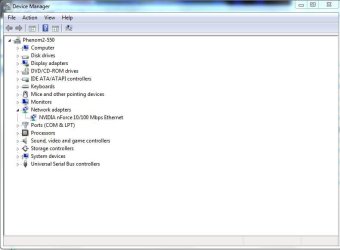
What is the make & model of the wired network adapter in your computer ?

What is its speed 10, 100, or 1000 ?
 

Attachments

  • Device_Manager_Network_Adapter.JPG
    Device_Manager_Network_Adapter.JPG
    39.9 KB · Views: 3

My Computer My Computer

Computer type
PC/Desktop
Computer Manufacturer/Model Number
Built them myself, Science Experiments !
OS
Win7 Enterprise, Win7 x86 (Ult 7600), Win7 x64 Ult 7600, TechNet RTM on AMD x64 (2.8Ghz)
CPU
AMD fx8350 4ghz, AMD-32 2400mhz, AMD-64 3200mhz, AMDx64 2.8G
Motherboard
SIS 755, ECS-K8M890M-M (Ult 7600), GigaByte & others
Memory
2gb, 4gb on the Ult 7600, 4gb on Technet RTM, 32gb on FX8350
Graphics Card(s)
Draw my own Graphics, several nVidia cards
Sound Card
on motherboard
Monitor(s) Displays
19" flat scr, 28" I-Inc widescr,22" Emprex Widescr, 23" Acer
Screen Resolution
1280 x 1024, 1440 x 900, 1920 x 1080
Hard Drives
6 pata Ide HD's & 2 Sata HD's
added 80gb external on Ult 7600 computer,
numerous extra 1tb, 2TB, 3Tb SATA HD's
A collection of ext HD Docks w/ HDs
PSU
430w, 550w, 600w, 700, 800, etc
Case
All Generic Full Towers
Cooling
Open Air & a few fans, some w/ colored LEDs
Keyboard
Compaq & Dell recycled from GoodWill
Mouse
Made in China Optical Wired Mouse
Internet Speed
Fast Cable InterNet
Antivirus
AVG Free on 24 different Desktops, NO Problems!
Browser
IE 8 is preferred, but use FireFox sometimes
Other Info
Linksys Routers, switches, & Hubs
Too Many USB Flash Drives to count, Biggest is 64GB !
Eight computers in my home network.
Sixteen computers at my business network.
Linked via TeamViewer !
Lots of old used spare computer parts everywhere!
Broadcom netlink gigabit ethernet. Not sure what speed its capable of handling, but this isnt a particularly fast connection anyway, tops out at 10 mbps down usually.
 

My Computer My Computer

Computer type
Laptop
Computer Manufacturer/Model Number
Lenovo ideapad y460p
OS
win 7 64 bit
CPU
i7-2720QM
Motherboard
unknown
Memory
4gb
Graphics Card(s)
HD 5600 series
Sound Card
onboard sound
Screen Resolution
1366x768
Hard Drives
Western digital
Internet Speed
10 mbps down/0.8 up
Antivirus
Microsoft security essentials
Browser
Firefox/IE
Greg, i'm connected to the router via a ethernet cable. Why would i get a faster speed via wireless compared to ethernet?

My point isn't to debate with you which should be faster, only how the connection manager assigns each connection priority.

If you want a certain connection to take first priority then follow the steps provided to assign it a lower metric value in the Connection Properties.
 
Back
Top