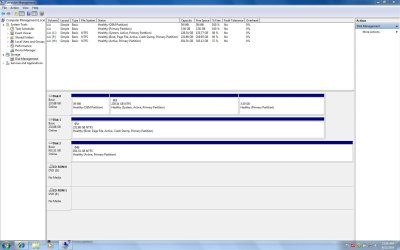
Hi--I am not a computer newbie, but I am new to win 7. I searched the forums and tutorials first, I may have missed a simple answer to this question, and if you have answered this before please just point me to the answer.
I have xp installed on my C drive, and recently installed win 7 ultimate 32 bit on a clean F drive. Both systems work flawlessly.
I use a 1 tb (drive letter H) drive for my backups.
Today I tried the win 7 backup utility, selected H as my backup location, with disk image etc included. Backup ran for about 10-15 minutes and, being curious, I clicked on the "view details" (i think that is what it is called) and saw that the backup was backing up my C drive. I stopped the backup, and deleted the files win 7 had created on my H drive.
I just assumed that win 7 would backup itself, and that that is why there is no "source" choice option, only a "destination" option. Of course, if win 7 is ACTUALLY backing up itself from the F drive, but defaults to calling itself C, then that would still work. Don't know.
Thinking about letting the backup complete and then going into it on H to see what is there, xp from C or win 7 from F, but hope to hear from someone who already has the answer.
So glad I found this forum, I am sure to learn a lot here. Thanks in advance.
I have xp installed on my C drive, and recently installed win 7 ultimate 32 bit on a clean F drive. Both systems work flawlessly.
I use a 1 tb (drive letter H) drive for my backups.
Today I tried the win 7 backup utility, selected H as my backup location, with disk image etc included. Backup ran for about 10-15 minutes and, being curious, I clicked on the "view details" (i think that is what it is called) and saw that the backup was backing up my C drive. I stopped the backup, and deleted the files win 7 had created on my H drive.
I just assumed that win 7 would backup itself, and that that is why there is no "source" choice option, only a "destination" option. Of course, if win 7 is ACTUALLY backing up itself from the F drive, but defaults to calling itself C, then that would still work. Don't know.
Thinking about letting the backup complete and then going into it on H to see what is there, xp from C or win 7 from F, but hope to hear from someone who already has the answer.
So glad I found this forum, I am sure to learn a lot here. Thanks in advance.
My Computer
- Computer Manufacturer/Model Number
- dell xps gen 3
- OS
- windows 7 ultimate 32 bit
- CPU
- 3.4ghs pent 4 ht
- Memory
- 4 gb
- Graphics Card(s)
- ati radeon 4830
- Sound Card
- sb audigy
- Monitor(s) Displays
- lg 23" flatron
- Screen Resolution
- 1034 x 768
- Hard Drives
- c=250 gb seagate with xp
f=250 gb seagate with win 7 ultimate 32 bit
h=1 tb seagate for storage


 I had named each partition "xp_25gb" & "Win7_45gb" . I saw it use both names while doing the image to the 1tb ext HD. I then restored it to a new 250gb HD in the laptop. It restored both the XP & Win7 partitions. So the laptop can still dual boot on the new HD