Hey guys!
First time post here.
This a crosspost of my question from a few other support forums. Sorry, I couldn't find a "spoiler" bb tag so the post is uncut. Please point me to a correct one for future posts.
Generally I try to resolve my computer issues on my with my trusty friend Google, however after a few days of multiple hour web searches I think I’ve finally reached my limit and decided to actually ask for help.
Please bear with me as here are the problem variables:
I have an old Core 2 Duo rig with four hard drives and one SSD on which a Windows 7 installation resides. The other disks are for storage. A few days ago I decided(a decision that was made because I was having these ridiculous dpc latency issues with Win 7, but that’s another story for another day) to take Windows 8 for a spin so I took an old 120 gig hard drive of mine and installed the system onto the said drive. Before doing so, however, I’ve disconnected my SSD(Win 7) and two of my storage hard drives so as not to screw up any files on them or erase them completely during the installation which has been known to happen to me during the XP days where the drive names were long and convoluted during the installation screen and it was difficult to tell them apart. So, basically, I have two storage drives that are connected to the computer and two that are offline. During the first startup Windows 8 tells me that it “Optimizes some things” to improve some other things etc. etc…
So in a few hours I finish playing with Win 8 and decide to boot Win 7. I completely disconnect the hard drive with Win 8, connect my Win 7 SSD and power up. After the POST Windows 7 does not boot-black screen and the hard drives are being accessed like mad-the LEDs on the front are blinking.
Basically, Windows 7 boots perfectly on my GF’s computer, it boots on my computer without all of my storage hard drives connected and it boots with the two storages hard drives that were disconnected during the short Windows 8 installation and operation session. When I boot with either of the hard drives that were connected while Win 8 was heading the show I get a black boot screen. In the latter configuration I’ve tried booting normally, running the startup repair(which is kinda redundant since everything boots perfectly, just without those two rogue hard drives), booting in safe mode and booting in 640x480 mode-all with the same result or, should I say, a lack thereof.
So my two questions to you, gentlemen, are: what has Windows 8 done to the two of my storage hard drives that stands in the way of Windows 7 booting and how do I revert what has been done?
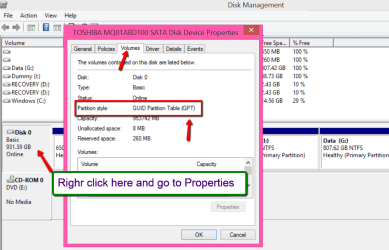
I am not very well versed in the modern operating systems since I am a pathological clinger-oner and have been using an XP installation forever until last summer when it completely crashed and died on me. Some of my acquaintances suggest that Win 8 changes the computer’s connected HD types from MBR to GPT and that THAT might be an issue here (although why would it since I’ve read that Win 7 is perfectly capable of working with GPT hard drives?), but since technologically I am firmly stuck in the late nineties-early 2k years I wouldn’t know about such things.
Thank you in advance and I appreciate your help very much!
Max
First time post here.
This a crosspost of my question from a few other support forums. Sorry, I couldn't find a "spoiler" bb tag so the post is uncut. Please point me to a correct one for future posts.
Generally I try to resolve my computer issues on my with my trusty friend Google, however after a few days of multiple hour web searches I think I’ve finally reached my limit and decided to actually ask for help.
Please bear with me as here are the problem variables:
I have an old Core 2 Duo rig with four hard drives and one SSD on which a Windows 7 installation resides. The other disks are for storage. A few days ago I decided(a decision that was made because I was having these ridiculous dpc latency issues with Win 7, but that’s another story for another day) to take Windows 8 for a spin so I took an old 120 gig hard drive of mine and installed the system onto the said drive. Before doing so, however, I’ve disconnected my SSD(Win 7) and two of my storage hard drives so as not to screw up any files on them or erase them completely during the installation which has been known to happen to me during the XP days where the drive names were long and convoluted during the installation screen and it was difficult to tell them apart. So, basically, I have two storage drives that are connected to the computer and two that are offline. During the first startup Windows 8 tells me that it “Optimizes some things” to improve some other things etc. etc…
So in a few hours I finish playing with Win 8 and decide to boot Win 7. I completely disconnect the hard drive with Win 8, connect my Win 7 SSD and power up. After the POST Windows 7 does not boot-black screen and the hard drives are being accessed like mad-the LEDs on the front are blinking.
Basically, Windows 7 boots perfectly on my GF’s computer, it boots on my computer without all of my storage hard drives connected and it boots with the two storages hard drives that were disconnected during the short Windows 8 installation and operation session. When I boot with either of the hard drives that were connected while Win 8 was heading the show I get a black boot screen. In the latter configuration I’ve tried booting normally, running the startup repair(which is kinda redundant since everything boots perfectly, just without those two rogue hard drives), booting in safe mode and booting in 640x480 mode-all with the same result or, should I say, a lack thereof.
So my two questions to you, gentlemen, are: what has Windows 8 done to the two of my storage hard drives that stands in the way of Windows 7 booting and how do I revert what has been done?
I am not very well versed in the modern operating systems since I am a pathological clinger-oner and have been using an XP installation forever until last summer when it completely crashed and died on me. Some of my acquaintances suggest that Win 8 changes the computer’s connected HD types from MBR to GPT and that THAT might be an issue here (although why would it since I’ve read that Win 7 is perfectly capable of working with GPT hard drives?), but since technologically I am firmly stuck in the late nineties-early 2k years I wouldn’t know about such things.
Thank you in advance and I appreciate your help very much!
Max
My Computer
- Computer type
- PC/Desktop
- Computer Manufacturer/Model Number
- Custom Build
- OS
- Windows 7 Ultimate x64
- CPU
- Intel e6400 2.13 GHz clocked @ 2.68 Ghz
- Motherboard
- Asus p5p43td/usb3
- Memory
- 8Gbs DDR3
- Graphics Card(s)
- Nvidia 660 Ti